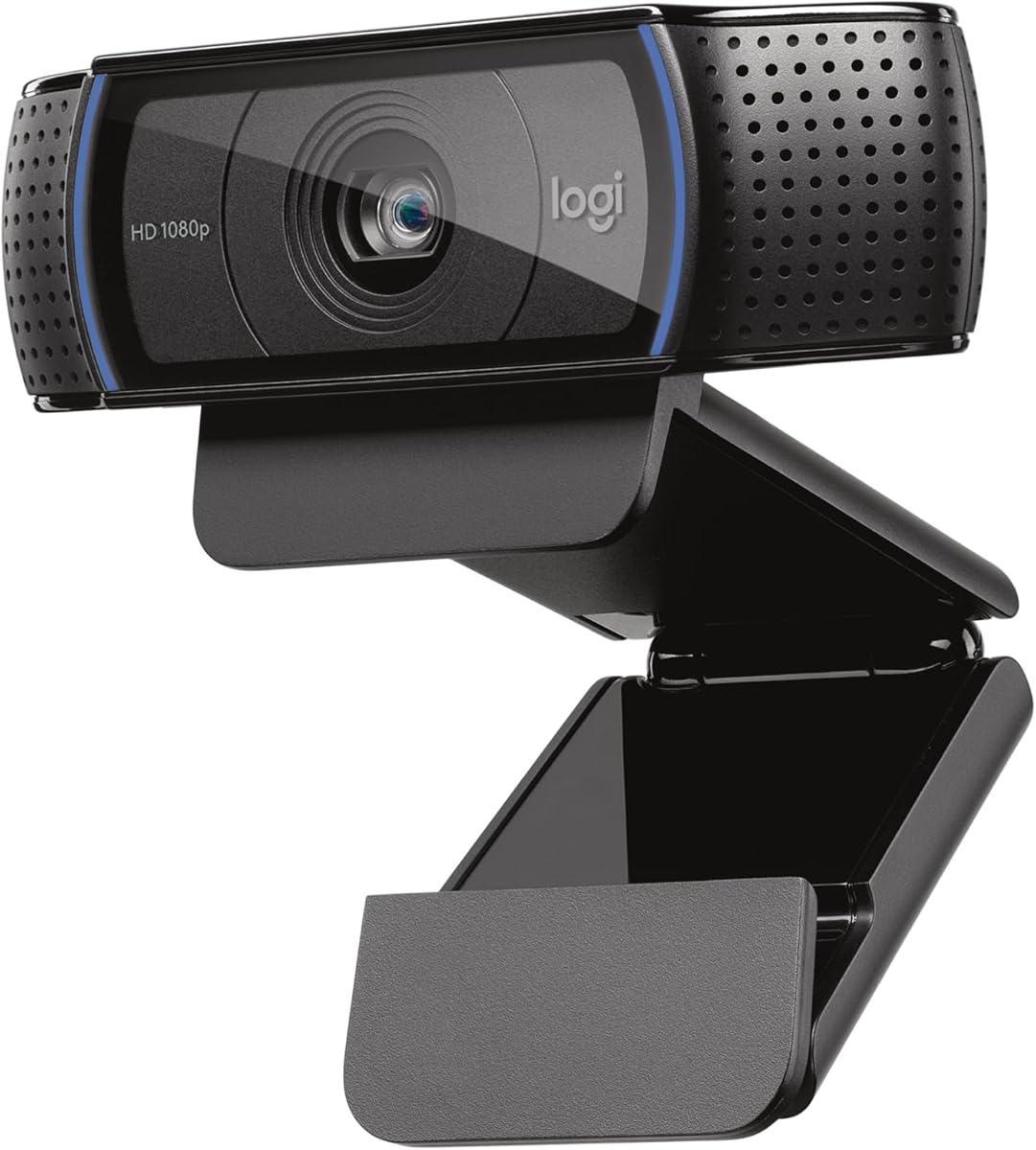
Logitech C920x HD Pro PC Webcam
4.6Editor score
HD Autofocus
Stereo Dual Mics
XSplit VCam License
Compare the top 1080p webcams for work and streaming. See detailed specs, real ratings, and expert insights to choose the right camera today.
Choosing the right webcam is essential for modern digital communication whether you are attending business meetings streaming content or simply staying in touch with friends and family. A quality camera captures you more in your video ensures professional quality and helps you stand out in any digital environment.
In this guide we have evaluated the most popular 1080p webcams on the market analyzing their image quality audio capabilities ease of use and special features like privacy shutters and auto light balancing. Each model offers a unique combination of strengths tailored to different needs and budgets.
Every recommendation below includes detailed specifications verified ratings and honest insights into what makes each camera excel or fall short in real world usage. You can browse through our picks to find the perfect match for your setup and always check the current details before purchasing to get the best deal available.
4.6Editor score

4.4Editor score
4.4Editor score
Below you will find a quick overview of all ten cameras we have selected in this comprehensive guide helping you weigh key specifications at a glance to make an informed decision.





The Logitech Brio 101 stands out as the Editor's Choice in our roundup of 1080p webcams due to its impressive combination of quality, ease of use, and user-friendly features like a privacy slide. It offers full HD video at 30 frames per second ensuring you look sharp and presentable during business calls, streaming sessions, or casual chats with friends and family who value reliable performance.
We may earn a commission when you buy through this link, at no additional cost to you.
One of the strongest aspects of this camera is its Auto-Light Balance feature which significantly boosts brightness by up to fifty percent compared to older models reducing shadows and helping you maintain a professional appearance even in less than ideal lighting environments. The integrated privacy cover adds a layer of security and peace of mind allowing you to quickly block the lens when you step away from your desk or finish a meeting without closing the app.
Despite its strengths there are some trade-offs such as the lack of a software suite for advanced color adjustments or digital zooms which means you rely on your video conferencing platform for those tools and the focus is fixed rather than autofocus limiting flexibility for moving around during calls. However for most users looking for a dependable high-quality camera that works right out of the box without needing technical knowledge this model strikes the perfect balance of value and utility.
If you are looking for a high-performance camera that delivers clear 1080p resolution and practical privacy features the Logitech Brio 101 is a top recommendation for professionals and home users alike. It is a reliable choice for anyone seeking a webcam that integrates seamlessly into their workspace providing a professional look while respecting your privacy and offering a plug-and-play experience that saves time and setup effort.
The full HD 1080p resolution ensures crisp details in every frame making you appear sharp on screen for any professional or casual video communication.
The integrated privacy slide allows you to physically cover the lens providing immediate security without relying on software switches or app settings.
We may earn a commission when you buy through this link, at no additional cost to you.
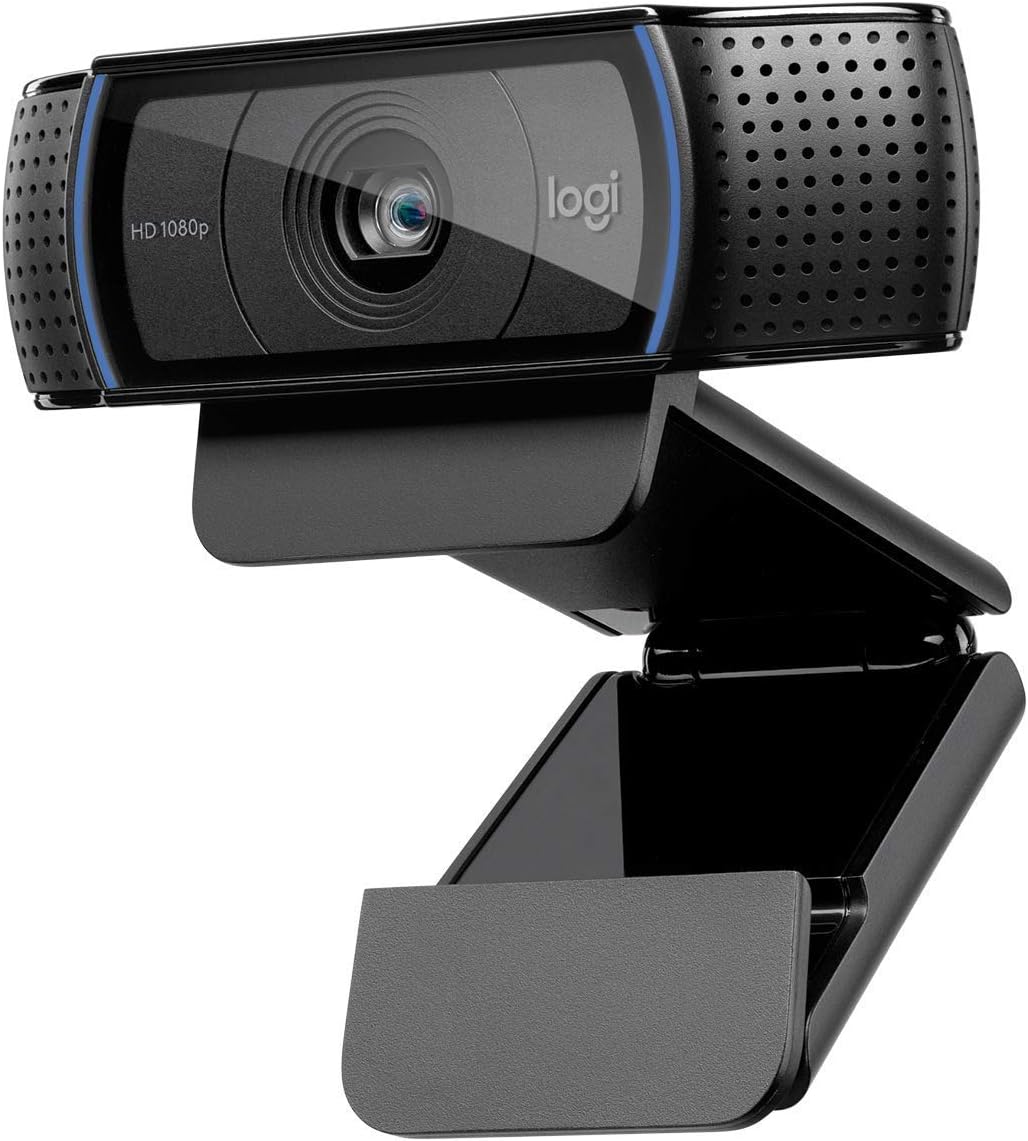
The Logitech C920x is a powerhouse in the 1080p webcam market offering excellent autofocus and lighting adjustments that automatically fine-tune the image to ensure bright and razor-sharp pictures even when your room lighting is suboptimal. Its robust build quality and classic design make it a favorite among streamers and business users who need consistent performance across various applications without needing to fiddle with complex settings.
We may earn a commission when you buy through this link, at no additional cost to you.
Audio is handled by dual built-in microphones that deliver natural sounding stereo quality allowing for clearer communication during calls and recorded videos without requiring an external microphone unless you are a professional broadcaster. The package also includes a three month XSplit VCam license which is a significant value add enabling you to replace or blur backgrounds digitally without a green screen enhancing the professional look of your video feed significantly.
On the downside the camera does not come with a privacy shutter which some users might find necessary for security and you will need to rely on software solutions or external covers if you prioritize physical lens blocking. While the performance is outstanding the fixed length USB cable may be a limitation for setups where your camera needs to be positioned further away from your computer than the cable can reach comfortably.
Overall the C920x is a premium choice for those who demand high quality 1080p video and reliable autofocus performance for both streaming and professional meetings. Its combination of clear audio strong image processing and included software tools makes it one of the best options available for users who want a camera that looks and sounds excellent in virtually any environment.
Advanced autofocus ensures you remain sharp and clear whether you move around during a presentation or sit still for a long conversation.
The included XSplit VCam license offers powerful virtual background features making it easy to present a clean professional backdrop without extra gear.
We may earn a commission when you buy through this link, at no additional cost to you.
The Logitech C920S is a refined version of the iconic C920 webcam adding a crucial privacy shutter that puts you in control of when your camera is active and protecting the lens from dust and scratches when not in use. It maintains the high-quality 1080p video performance that the series is known for using a glass lens and full HD optics to ensure your recorded videos and calls look crisp vibrantly colored and professional.
We may earn a commission when you buy through this link, at no additional cost to you.
Its autofocus system combined with HD light correction ensures that you look good in any environment whether you are in a bright office or a dimly lit home room allowing you to focus on the conversation rather than adjusting settings constantly. The stereo audio captured by dual microphones is another highlight providing natural sounding voice clarity which is essential for conference calls and recorded content alike.
The main trade-off compared to the C920x is the absence of the included XSplit VCam background replacement software meaning you might need third-party tools if you want to blur your background digitally. Additionally the privacy shutter while a security plus is manual and requires you to physically flip the cover open or close which some users may find slower than software switches but others prefer for security peace of mind.
If you are looking for a tried and trusted webcam that offers excellent video quality and a physical privacy shutter the C920S is a solid investment for professionals and streamers. Its durability glass lens quality and reliable audio performance make it a go-to choice for anyone who wants a camera that performs well day in and day out while keeping your privacy secure.
The snugly fitting cover protects the lens and ensures privacy giving you complete control over your visual presence in video chats.
A quality glass lens helps achieve vibrant colors and sharp details ensuring you look your best on every call and recording session.
We may earn a commission when you buy through this link, at no additional cost to you.
The Logitech C920e is designed with professional business environments in mind offering certifications for Zoom and Microsoft Teams that ensure seamless integration and compatibility with popular workplace video calling applications. Its fixed 78-degree field of view provides a well-balanced frame for individual users while still allowing enough room to visually share projects or documents on your screen with colleagues effectively.
We may earn a commission when you buy through this link, at no additional cost to you.
Audio is handled by two integrated omnidirectional microphones that capture your voice clearly from up to one meter away ensuring your voice always sounds natural and clear during conferences. The webcam features an attachable privacy screen that flips up and down to cover or expose the lens providing a simple glance to confirm if the lens is active which helps maintain security in busy office settings.
While the C920e is excellent for office setups it lacks the autofocus speed of some consumer models and requires you to use the attachable screen for privacy instead of having it built into the main unit. The sturdy adjustable clip and tripod threads offer mounting versatility but the fixed field of view means you cannot zoom or pan the frame dynamically without moving the physical camera which may not suit large meetings.
For corporate teams and enterprise users who prioritize certified compatibility and reliable performance in office settings the C920e is a highly practical choice. It delivers clear video and audio quality while offering tools to enhance privacy and secure communication making it an ideal webcam for businesses that need dependable hardware that integrates smoothly with their existing workflows.
Certification for platforms like Microsoft Teams ensures a smooth experience without compatibility issues in professional office environments.
The attachable privacy screen gives you quick visual confirmation of camera status helping secure sensitive conversations at a glance.
We may earn a commission when you buy through this link, at no additional cost to you.
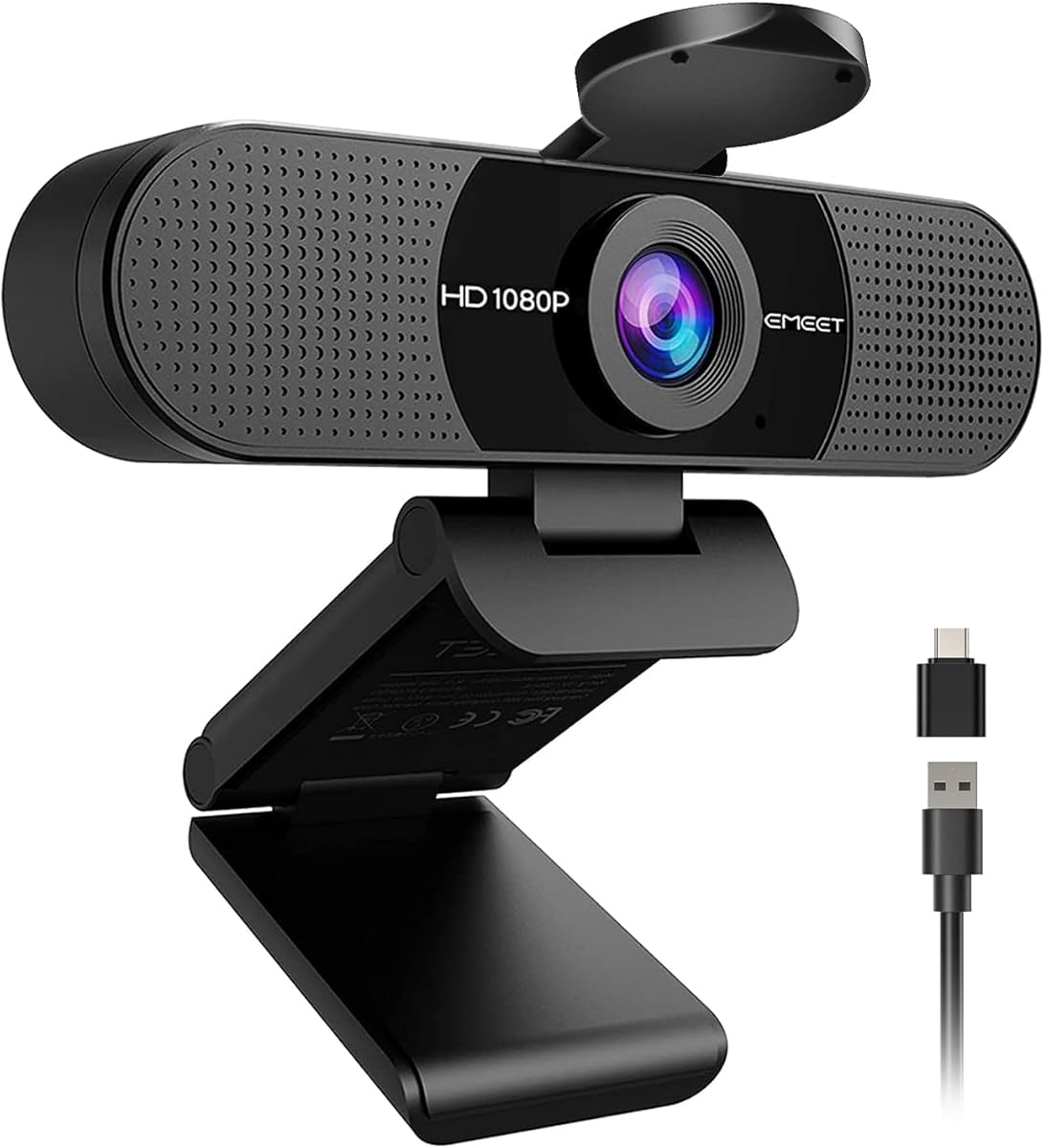
The EMEET C960 earns the Best Budget badge by delivering solid 1080p video quality and essential features like a privacy cover and dual omnidirectional microphones at a highly affordable price point. It is an excellent choice for students or casual users who need a reliable webcam for daily calls without breaking the bank while still getting good image quality in well-lit environments.
We may earn a commission when you buy through this link, at no additional cost to you.
Its automatic light adjustment and fixed focus are designed to deliver stable image performance without requiring manual tweaks ensuring the streaming webcam looks clear even when lighting changes slightly during the day. The privacy cover on the camera can be removed automatically when needed meeting your privacy needs easily and the 90-degree wide-angle lens captures more participants without frequent adjustments.
One notable limitation is the lack of advanced autofocus or software control which means you have limited options for fine-tuning the image if your setup requires specific exposure tweaks. However given the price point these compromises are acceptable and the included USB-C adapter and wide platform compatibility ensure it works well with most modern computers and laptops regardless of their USB port type.
If you want a straightforward affordable webcam that looks great and includes a privacy cover the EMEET C960 is an outstanding option for everyday video communication. It offers excellent value for money combining key features like dual mics and automatic light optimization in a compact design that fits seamlessly into any home or student setup.
High definition video at 1080p ensures clear streaming without the high cost of premium branded alternatives making it ideal for students.
Support for both USB-A and USB-C connections ensures it works with modern laptops without requiring extra dongles or adapters.
We may earn a commission when you buy through this link, at no additional cost to you.
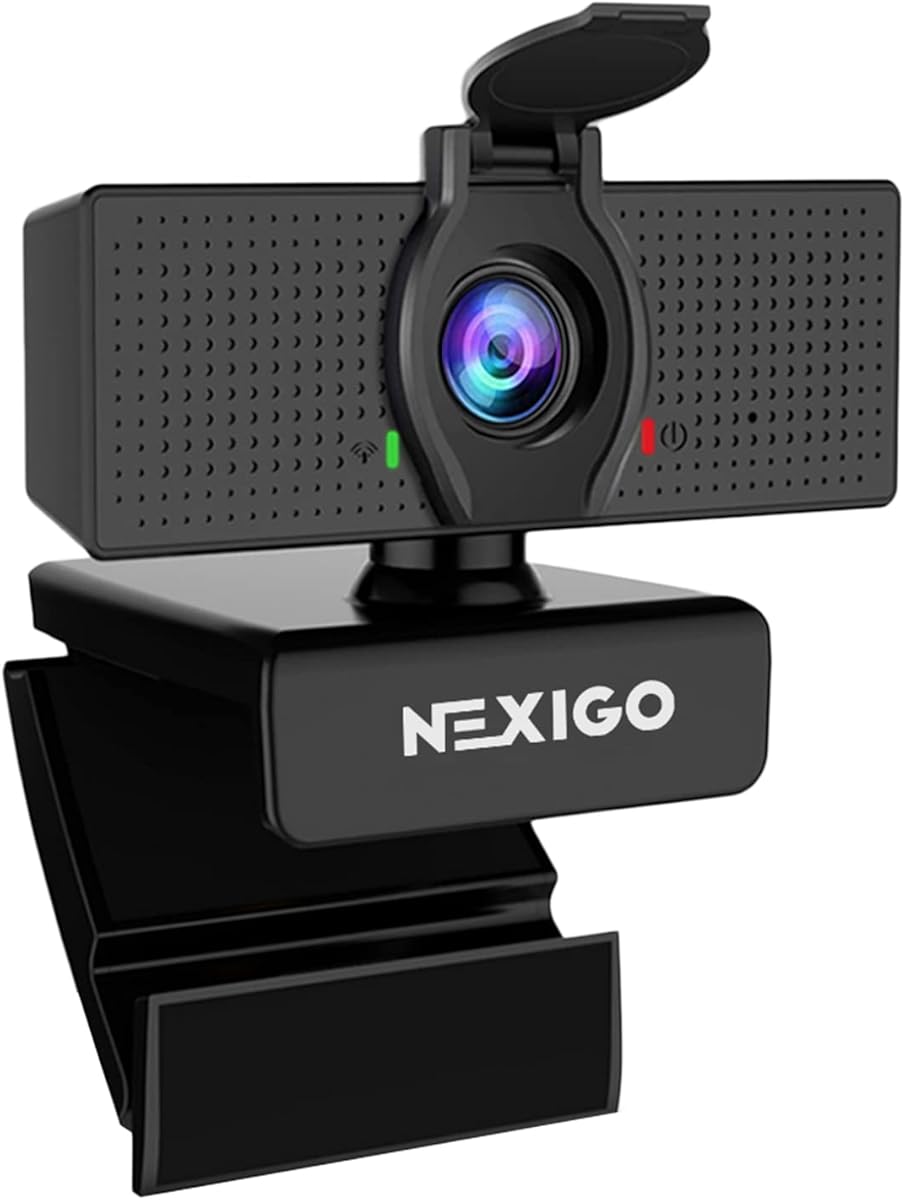
The NexiGo N60 provides a compelling mix of performance and value for those who want a dedicated webcam with software control and a privacy cover. It uses a 1080p CMOS sensor to deliver sharp videos at 30fps and includes a glass lens that optimizes clarity for distances typical in home office setups making it ideal for almost any indoor use you can imagine.
We may earn a commission when you buy through this link, at no additional cost to you.
A built-in noise-canceling microphone is integrated into the design to reduce ambient noise and enhance the sound quality of your video calls ensuring your voice is heard clearly even in noisy environments. The privacy cover blocks the lens effectively when the camera is not in use helping provide security and peace of mind to anyone from individuals to large companies wanting to protect their workspace privacy.
While the software control allows for customization of certain parameters the fixed focus and average low-light performance compared to premium models mean you may need to manage your lighting carefully for the best results. Additionally the audio delay noted by some users might require a firmware update via support though most find the audio performance perfectly adequate for standard video conferencing and streaming.
The NexiGo N60 is an excellent choice for users seeking a functional and customizable webcam that works across many operating systems and includes essential privacy features. With its combination of software control noise reduction and wide compatibility it serves well for students professionals and streamers who need a reliable tool for online communication.
Access to software controls allows you to fine-tune settings like brightness and color to suit your specific room lighting needs.
The noise-canceling microphone ensures your voice remains the focus of the call even in busy or noisy home environments.
We may earn a commission when you buy through this link, at no additional cost to you.
The EMEET S600 stands out for its high-quality Sony sensor that delivers unmatched streaming quality and advanced PDAF autofocus technology that offers faster speed and more precision than common autofocus systems. Whether you need 4K at 30fps or smooth 1080p at 60fps this camera provides stunning resolution options that exceed typical webcam quality making it ideal for aspiring streamers and content creators demanding top-tier performance.
We may earn a commission when you buy through this link, at no additional cost to you.
Its auto light adjustment capability balances shadows and highlights even in low-light environments keeping every detail sharp and clear on screen which is a significant advantage for those working with variable home lighting. The proprietary audio algorithm filters out background noise and captures your voice with exceptional clarity ensuring your stream or call remains professional and focused on the content.
On the downside the higher price point may not be necessary for basic users and the need for sufficient power supply via USB can be a constraint for older computers with limited ports. The adjustable field of view is a great feature for framing yourself perfectly but at higher resolutions like 4K it is fixed which means you must physically move the camera to change framing.
If you are serious about streaming or content creation and need a camera with superior sensor quality and autofocus the EMEET S600 is a top recommendation. It offers a powerful mix of advanced optics customizable framing and strong audio performance that helps your content stand out while ensuring you look and sound your best on screen.
The high-definition Sony sensor delivers crisp images that exceed typical webcam standards helping you look sharp and professional.
Phase Detection Autofocus ensures quick and precise focusing so you stay sharp even when moving around during your stream.
We may earn a commission when you buy through this link, at no additional cost to you.
The original Logitech C920 remains a legendary standard in the webcam industry offering reliable full HD 1080p video quality that continues to satisfy users who want a proven performer without the newest marketing features. Its widescreen format ensures a better view for video calling and recording making it a favorite for desktop setups where a cinematic aspect ratio enhances the visual experience.
We may earn a commission when you buy through this link, at no additional cost to you.
Its autofocus technology ensures you stay sharp and the dual built-in microphones provide clear natural audio that eliminates the need for external mics in most casual situations. This model has been a staple for years and its broad software support means it works seamlessly with virtually every video conferencing platform or streaming software available today giving you flexibility and stability.
The main trade-off with this older model is the lack of a modern privacy shutter which some users now expect as a standard feature and it relies on software updates for improvements rather than hardware changes. However for those who prioritize proven reliability and high-quality optics over new gimmicks this camera delivers consistent performance that is hard to beat at its price point.
For anyone looking for a trusted and reliable webcam that has stood the test of time the Logitech C920 is an excellent choice. It offers professional-quality video and audio that is suitable for both work and entertainment providing a seamless experience that integrates easily into any modern digital setup.
Years of user trust and broad compatibility make this camera a safe bet for anyone seeking reliable video performance.
Dual microphones capture clear voice audio reducing the need for external microphones during standard calls and meetings.
We may earn a commission when you buy through this link, at no additional cost to you.
The Logitech Brio 105 offers great value for businesses needing a dependable webcam with essential privacy features. It produces clear 1080p video that makes meetings feel natural and employees feel confident. Certified for Google Meet and compatible with major systems including Chromebooks it works seamlessly in corporate environments supported by Logitech Sync for remote deployment.
We may earn a commission when you buy through this link, at no additional cost to you.
RightLight 2 auto light balancing technology automatically improves image quality in suboptimal conditions ensuring you look your best even in dim rooms. The integrated privacy shutter gives employees extra confidence that their privacy is protected which is especially important when working from home. Just plug it into a USB-A port and start a call with the built-in mic for a hassle free experience.
The trade-offs include a basic microphone that may not suit high-end recording needs and a lack of advanced software features compared to higher tier models. However the focus on core business needs makes it a practical choice. It provides essential video quality and privacy tools without unnecessary complexity.
If you need a reliable and affordable webcam that fits into a professional business workflow the Brio 105 is a strong candidate. It balances quality with ease of use making it an excellent choice for enterprises wanting a secure and effective video collaboration tool.
Certification for major business platforms ensures smooth integration and compatibility for office workflows and remote teams.
RightLight technology helps you look professional in various lighting conditions which boosts confidence in important video calls.
We may earn a commission when you buy through this link, at no additional cost to you.
The Logitech Brio 100 Renewed offers high definition video quality at an affordable price point making it a great entry-level choice for those who want reliable 1080p performance without paying full retail price. With up to Full HD 1080p resolution at 30 fps it provides clear and smooth video streaming and recording that is sufficient for daily meetings and casual chats.
We may earn a commission when you buy through this link, at no additional cost to you.
Its plug and play compatibility ensures easy USB connection that works seamlessly with popular video conferencing applications without requiring drivers. The built-in microphone provides convenient audio capture eliminating the need for extra equipment while the 58-degree field of view captures enough of your surroundings for personal calls though it may be narrower than some prefer.
While the renewed condition is inspected for performance the cosmetic appearance may vary and the fixed field of view means you cannot adjust the framing digitally. However for those comfortable with refurbished tech it is a solid option. It delivers consistent video and audio without complications for standard video conferencing tasks.
If you are looking for a cost effective reliable webcam that performs well for basic video calls the Logitech Brio 100 Renewed is a sensible option. It provides the core HD experience needed for remote work and communication without the premium price tag of newer models.
Get reliable 1080p video at a budget friendly price making high quality video calls accessible for everyone.
Just plug into USB and start your call. It works with all major video apps without any extra software or steps.
We may earn a commission when you buy through this link, at no additional cost to you.
Choosing the right webcam involves balancing video quality audio performance privacy needs and ease of setup to find a model that fits your specific environment and usage habits.
Video resolution is one of the most critical factors when selecting a webcam as it determines the clarity and sharpness of the image you transmit to others. Most modern 1080p webcams offer full HD resolution at 30 frames per second which provides smooth and detailed visuals for standard calls and meetings. However some models support higher frame rates like 60fps for smoother motion or offer 4K upscaling for exceptional detail on high resolution displays. If you often move during calls or stream content look for a camera with higher frame rates to avoid choppy visuals or pixelation that can distract viewers.
Autofocus is a valuable feature that allows the webcam to automatically adjust its focus to keep you sharp even if you move closer to or further away from the lens. Cameras with fixed focus require you to sit at a specific distance to look clear which can be restrictive if you like to move around or share items with your camera. High-quality autofocus systems like phase detection autofocus offer faster and more precise adjustments ensuring you remain the focal point of your video without manual intervention making it a priority if you want flexibility and professional consistency.
Privacy has become a top concern for remote workers and home users alike leading many to prefer webcams that include a physical shutter or cover. A privacy cover allows you to physically block the lens when the camera is not in use ensuring that no one can activate it without your knowledge. Software solutions can sometimes be overridden or exploited but a physical barrier provides absolute peace of mind. When selecting a webcam check if it has a built-in slide or flip cover or consider adding a universal shutter to ensure your visual data remains secure.
The built-in microphone is often sufficient for casual meetings but high-quality stereo microphones are essential for professional presentations or streaming where audio clarity matters. Look for webcams with noise-canceling technology that reduces background sounds like typing or traffic to ensure your voice is the focus of the call. Dual mics can capture sound in stereo which sounds more natural than mono audio. If you are in a noisy environment consider a model with strong audio processing or an external microphone for the best results.
Field of View (FOV) determines how much of your surroundings the camera can capture which is important depending on your usage. A wider FOV around 90 degrees allows you to capture more participants or objects in your workspace without turning the camera which is great for group calls. Narrower views like 58 degrees are better for one-on-one meetings as they reduce distortion and focus on your face. Choose a wider angle if you often show your room or use the camera for presentations and a tighter view for personal professional calls.
Ensure the webcam you choose is compatible with your operating system and video conferencing platforms such as Zoom Microsoft Teams or Google Meet. Many webcams offer plug-and-play functionality but having dedicated software can allow for advanced adjustments like exposure and color. Check if the webcam supports Windows Mac or Linux and if it is certified for specific platforms to avoid driver issues. Additional software features like background replacement or virtual lighting can enhance your presence without requiring external tools.
A sturdy clip and tripod mount options allow you to position the camera securely on your monitor or desktop for the best viewing angle. Look for models with adjustable clips that fit different monitor thicknesses or include threaded holes for standard tripod mounts to elevate the camera to eye level. Good ergonomics improve your posture and the viewing angle of the camera ensuring you look at the lens rather than down at the screen. A durable design ensures the camera stays in place even if you move around during calls.
Start by placing your webcam at eye level or slightly above to ensure a flattering angle and clear view of your face. Use a stable surface or the included clip to secure the camera on your monitor or desk to avoid shaking during use.
Clean the lens gently with a microfiber cloth before each call to prevent smudges from affecting image quality. Avoid using harsh chemicals or paper towels that could scratch the glass lens over time.
Update your drivers regularly through the manufacturer's software to ensure optimal performance and access new features. If you notice any issues with focus or audio restart your computer and reconnect the USB cable to reset the connection.
A 1080p webcam provides Full HD video which is standard for most meetings and streaming. A 4K webcam offers higher resolution detail but requires more computing power and better lighting to perform well. For most business and casual needs 1080p is sufficient and more affordable than 4K options.
Most modern webcams are plug-and-play and work immediately with Windows or Mac without drivers. However installing dedicated software can unlock features like virtual backgrounds or advanced lighting adjustments. Check your product manual to see if specific software is recommended for full functionality.
Lighting is the most critical factor so position a light source in front of you to avoid backlighting. Use a clean lens and ensure your camera is stable and positioned at eye level for the best angle. Closing unnecessary apps can also improve performance by freeing up system resources.
Most standard PC webcams are not directly compatible with consoles like PS5 or Xbox. They require a computer to run software that processes the video stream. Some specific models support Nintendo Switch or specialized capture cards but standard usage is limited to PC or Mac environments.
A privacy shutter is a physical cover that slides or flips over the camera lens to block your vision when the camera is not in use. It provides security against potential hacking or unauthorized access giving you peace of mind without relying on software toggles that might fail.
Most webcams use standard sensors that need adequate light to produce sharp images. In low light the camera may struggle to focus or increase exposure resulting in grainy images. Using a ring light or positioning your desk near a natural light source can significantly improve clarity.
Selecting the right 1080p webcam depends on whether you prioritize privacy features audio quality or advanced autofocus capabilities. The Logitech Brio 101 leads our list for its balanced features while the EMEET C960 offers excellent value for budget-conscious buyers.
Consider your specific needs such as the need for a physical privacy shutter or business certifications when narrowing down your options. Investing in a camera with robust features like autofocus and good audio ensures professional quality for both work and personal use.
Always verify the current availability and check for any recent reviews or updates before finalizing your purchase to ensure you get the latest version of your chosen model. With the right webcam you can enjoy clear professional and secure video communication from anywhere.