
Novation Launchkey Mini 25 MK4
4.6Editor score
FSR drum pads with aftertouch
Seamless DAW integration
Scale and chord modes
Compare the top 10 25 key MIDI controllers. Expert reviews, real ratings, and detailed specs to help you choose the perfect controller for your music production workflow.
Finding the right 25 key MIDI controller can transform your music production workflow. These compact devices offer portability without sacrificing essential controls, making them ideal for producers on the go or those with limited desk space.
We evaluated ten top models based on key feel, integration capabilities, software bundles, and build quality. Each controller was assessed for compatibility with major DAWs and its ability to handle diverse creative tasks from beat making to live performance.
Every pick highlights unique strengths and potential trade-offs to guide your decision. Remember that pricing and availability fluctuate frequently, so check current listings before purchasing to ensure you get the best value for your specific needs.
4.6Editor score

4.6Editor score

4.7Editor score
This side-by-side comparison highlights the core specifications of every model featured in this guide. Use this table to quickly identify which controller matches your specific workflow requirements and budget constraints.



The Akai Professional MPK Mini MK3 stands out as the top choice for most producers seeking a balance of performance and portability. With an impressive 4.6 star rating from thousands of users, it delivers responsive velocity-sensitive keys and a robust feature set that rivals much larger controllers.
We may earn a commission when you buy through this link, at no additional cost to you.
Its defining strength lies in the combination of an innovative 4-way thumbstick for pitch and modulation alongside 8 backlit MPC-style pads. This configuration allows for dynamic beat making and expressive playing without needing a separate drum controller. The NKS integration further enhances compatibility with Native Instruments software, making workflow setup seamless.
While the mini keys are highly responsive, some users find them slightly tight compared to full-sized keyboards. Additionally, the unit relies entirely on USB power, limiting untethered use. These trade-offs are generally acceptable given the controller's compact design and professional feature set at this price point.
Ultimately, this controller is best suited for music producers who need a reliable all-in-one tool for home studios and mobile setups. Its blend of hardware controls and software support makes it a versatile choice for both beginners and experienced composers looking to streamline their creative process.
The eight velocity-sensitive pads provide precise control over drums and samples, enabling complex programming without mouse reliance.
Native Kontrol Standard integration ensures smooth interaction with a vast library of plugins and sounds from Native Instruments.
We may earn a commission when you buy through this link, at no additional cost to you.
The Novation Launchkey Mini 25 MK4 earns the Best Premium badge for its exceptional build quality and advanced musical features. It distinguishes itself with a superior keybed and polyphonic aftertouch on its pads, offering expressive control that most competitors at this size cannot match.
We may earn a commission when you buy through this link, at no additional cost to you.
Key strengths include seamless integration with major DAWs like Ableton Live and Logic Pro, allowing users to launch clips and control synths intuitively. The inclusion of Scale Mode helps musicians play complex chords without extensive music theory knowledge, fostering creativity for users of all skill levels.
Despite its premium features, the higher cost may be a consideration for budget-conscious buyers. The unit is also slightly heavier than some ultra-compact alternatives, though this contributes to its sturdy feel. For serious producers, these factors are minor compared to the production value offered.
This controller is ideal for artists who demand high-fidelity control and advanced musical tools. It is particularly well-suited for live performance scenarios where reliability and expressive depth are critical for delivering engaging shows and intricate compositions.
Polyphonic aftertouch on the sixteen pads allows for nuanced modulation of individual notes within a chord or drum pattern.
Ableton Live Lite and various plugin bundles provide a complete production environment straight out of the box.
We may earn a commission when you buy through this link, at no additional cost to you.
The Akai Professional LPK25 offers the best value for money in the 25 key category, boasting a high 4.7 star rating. Its minimalist design focuses on core functionality, providing responsive keys and essential tools without unnecessary complexity or high costs.
We may earn a commission when you buy through this link, at no additional cost to you.
Its primary advantage is ease of use and portability. With dedicated octave buttons and a built-in arpeggiator, users can create melodies quickly using just one USB cable. The eight programmable preset slots allow for quick switching between different software configurations during a session.
The main limitation is the lack of drum pads or extensive assignable knobs, which might restrict complex production tasks. However, for simple melody input or beat making focused on external hardware, these trade-offs are minimal. It remains an excellent companion for laptop producers.
This controller is perfect for beginners, songwriters, or anyone needing a reliable backup keyboard for travel. It delivers professional functionality at an accessible price point, ensuring that cost is never a barrier to starting your music production journey.
Its featherweight design allows it to fit easily into any bag, making it ideal for capturing ideas anywhere.
Programmable slots let you save specific control mappings for different virtual instruments or software environments.
We may earn a commission when you buy through this link, at no additional cost to you.
The Arturia MiniLab 3 combines elegant aesthetics with robust functionality, earning a strong 4.7 star rating from users. Its clean white design and intuitive layout make it a favorite for producers who value both form and function in their studio setup.
We may earn a commission when you buy through this link, at no additional cost to you.
Key strengths include its four dedicated faders and eight responsive pads, allowing for precise mixing and drum programming. The high-quality velocity-sensitive keys ensure expressive performance, while the included software suite provides a comprehensive starting point for music creation.
While the price is higher than budget options, the build quality and feature set justify the investment for many professionals. The faders, while useful, slightly increase the footprint, making it less ideal for extremely tight spaces compared to the LPK25.
This controller is well-suited for producers who want a versatile tool that integrates seamlessly with various software environments. Its universal workflow design ensures it adapts well to different styles of music production, from beat making to full studio arrangements.
Four dedicated faders offer direct control over volume and mix parameters without needing to mouse around.
Comes with curated Arturia software and third-party plugins to jumpstart your production capabilities immediately.
We may earn a commission when you buy through this link, at no additional cost to you.
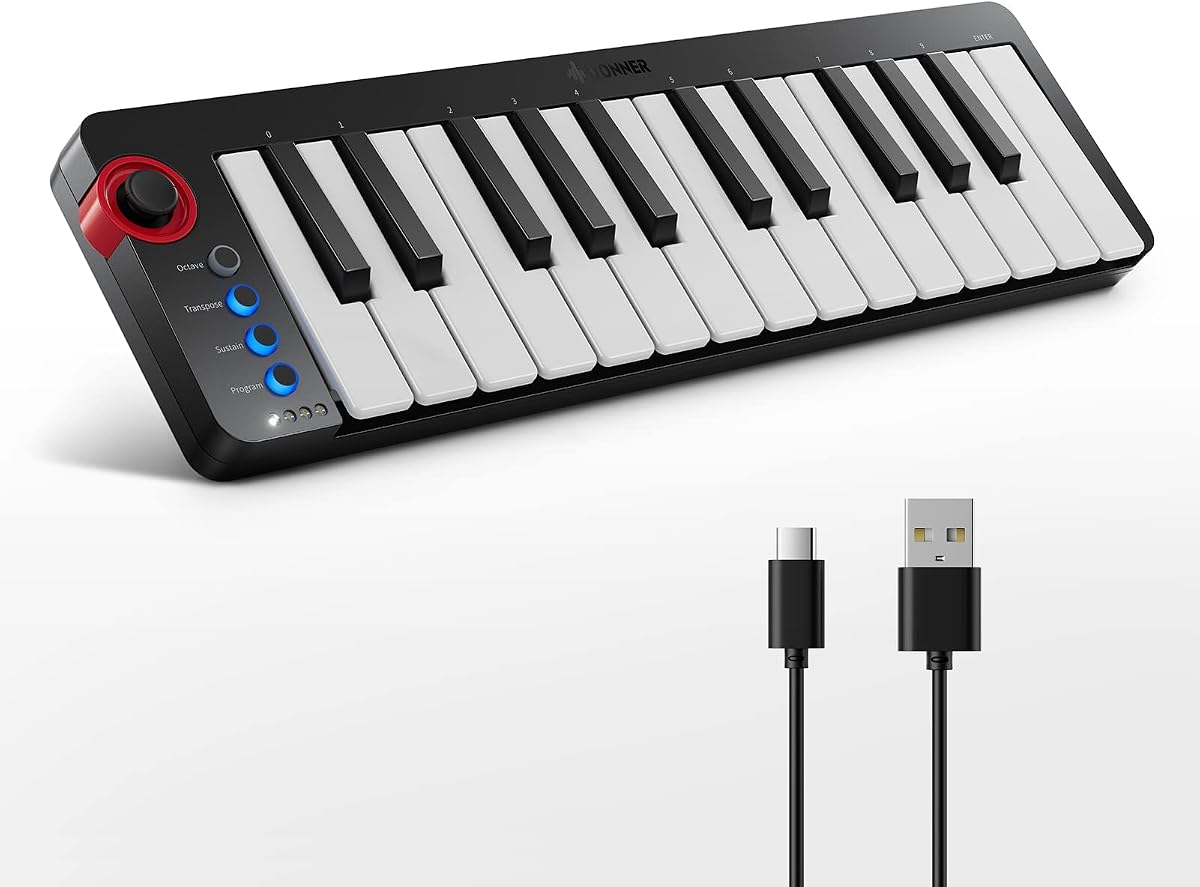
The Donner Mini MIDI Keyboard N-25 is uniquely positioned as an educational tool with a 4.1 star rating. Its standout feature is the inclusion of 40 teaching courses designed to guide beginners through music arrangement and production concepts.
We may earn a commission when you buy through this link, at no additional cost to you.
Key strengths focus on accessibility, with light-up buttons providing visual feedback during play and compatibility with mobile apps. This makes it an excellent gateway device for younger learners or adults taking their first steps into music creation without needing a computer immediately.
Build quality is basic compared to premium models, and features like the arpeggiator are simplified. However, for educational purposes, these limitations are acceptable given the integrated learning content. It serves as a fun entry point rather than a professional studio tool.
This controller is best for students or hobbyists looking to learn music basics alongside production. The educational component distinguishes it from competitors, offering value beyond mere hardware functionality by providing structured learning paths.
The included courses offer step-by-step guidance to help users understand arrangement essentials and basic production techniques.
Seamless connection to smartphones and tablets allows for learning on the go without needing a full computer setup.
We may earn a commission when you buy through this link, at no additional cost to you.
The Rhymo 25 Key USB MIDI controller offers a unique blend of modern connectivity and compact design with a 4.1 star rating. Its support for both USB-C and Bluetooth MIDI makes it highly versatile for connecting to tablets and computers without dongles.
We may earn a commission when you buy through this link, at no additional cost to you.
Key strengths include the X-Y joystick for dynamic control and an integrated loop function, which are rare at this price point. These features allow for creative performance manipulation and ease of use when working with modern DAWs on mobile devices.
While the build materials are basic and the brand is less established, the functionality offered is impressive for the cost. The reliance on Bluetooth may introduce latency for some users, but the USB connection ensures stability when needed for recording sessions.
This controller is ideal for mobile producers who prioritize connectivity options. It suits users looking for a budget-friendly device that can interface with both traditional desktop setups and modern mobile production environments.
Dual connectivity via USB-C and Bluetooth allows for flexible setup options across different devices and platforms.
Built-in loop functions enable real-time recording and layering of ideas directly on the controller.
We may earn a commission when you buy through this link, at no additional cost to you.
The M-VAVE 25 Key USB MIDI controller stands out for its wireless capabilities, holding a 4.5 star rating from users. Its ability to operate via Bluetooth for up to 16 hours makes it exceptionally convenient for composing away from a power outlet.
We may earn a commission when you buy through this link, at no additional cost to you.
Key strengths include the semi-weighted keybed and 8 backlit pads, providing a more substantial feel than typical mini controllers. The inclusion of production software adds value, ensuring users have tools ready to create music immediately after unboxing.
The battery charging cycle adds a maintenance step compared to USB-only units, and build consistency can vary slightly with budget brands. However, for untethered performance and portability, the trade-offs are minimal given the extended battery life.
This controller is perfect for musicians who need to move freely around a room or venue. It balances traditional controls with modern wireless features, making it a strong option for live performers or casual creators.
A built-in battery supports hours of continuous use, allowing for portable music creation without cables.
Bluetooth support eliminates cable clutter, keeping your workspace clean and mobile.
We may earn a commission when you buy through this link, at no additional cost to you.
The Akai Professional MPK Mini Play MK3 offers unique standalone functionality with a 4.5 star rating. Its built-in speaker and internal sound engine allow users to create music without connecting to a computer, setting it apart from standard controllers.
We may earn a commission when you buy through this link, at no additional cost to you.
Key strengths include the OLED display for navigating sounds and the same professional control layout as the standard MPK Mini. This makes it a versatile hybrid device suitable for both laptop-based production and standalone jamming sessions.
The additional electronics make it slightly heavier and more expensive than the standard Mini. While the internal sounds are limited compared to full DAW instruments, they provide a convenient backup for sketching ideas quickly on the go.
This controller is ideal for travelers or bedroom producers who want flexibility. It bridges the gap between a keyboard and a production tool, ensuring creativity can happen anywhere without relying on external hardware.
The built-in speaker and battery option allow you to play and record without needing a computer connected.
An OLED display provides clear visual feedback for selecting and managing internal sounds and presets.
We may earn a commission when you buy through this link, at no additional cost to you.
The Akai Professional MPK Mini MK3 Black offers the same professional performance as its counterpart with a 4.6 star rating. It retains the robust feature set that makes the MPK series a staple in many studios, focusing purely on MIDI control rather than standalone audio.
We may earn a commission when you buy through this link, at no additional cost to you.
Key strengths include the 4-way thumbstick and eight MPC-style pads, providing intuitive control over pitch, modulation, and beats. The NKS integration ensures seamless compatibility with a wide range of software, making it a reliable choice for serious producers.
As a standard model, it lacks the standalone capabilities of the Play version, which may limit use without a computer. However, for desktop studio setups, this limitation is negligible, and the classic design fits well in professional environments.
This controller is perfect for users who prefer a traditional black aesthetic without sacrificing functionality. It remains a top contender for anyone needing a dependable primary controller for DAW production and sound design.
The sleek black design blends seamlessly into professional studio setups, maintaining a clean and focused workspace.
Classic layout ensures familiarity for users upgrading from previous models, reducing the learning curve.
We may earn a commission when you buy through this link, at no additional cost to you.
The Akai Professional APC Key 25 MK2 is uniquely tailored for Ableton Live users with a 4.4 star rating. Its defining feature is the 5×8 RGB pad matrix, offering significantly more launch pads than most competitors for managing clips and scenes.
We may earn a commission when you buy through this link, at no additional cost to you.
Key strengths include the dedicated arrow buttons for scrolling and the seamless pre-mapping for Ableton Live. This design enables complex arrangement and performance tasks directly from the controller without needing to touch a mouse or keyboard.
The larger footprint and specific focus on Ableton make it less versatile for general-purpose production compared to the MPK Mini. However, for live performers and electronic artists using Ableton, these constraints are minor given the specialized workflow it enables.
This controller is best suited for producers deeply invested in the Ableton ecosystem. It provides a dedicated tool for triggering and arranging that transforms the laptop into a comprehensive performance station.
Forty RGB pads provide extensive access to audio and MIDI clips without needing to navigate menus.
Designed specifically for live sets, allowing instant control over scenes and effects during performance.
We may earn a commission when you buy through this link, at no additional cost to you.
Choosing the right controller involves evaluating your specific workflow needs, software environment, and portability requirements.
The type of keys significantly impacts playability. Velocity-sensitive keys are essential for dynamic expression, while key weight can vary from lightweight plastic to heavier semi-weighted models. Consider how much you play melodies versus chords to decide on the best key feel for your hand comfort.
Prioritize velocity sensitivity and comfortable travel distance to ensure expressive performance without fatigue.
Different controllers offer varying levels of integration with Digital Audio Workstations. Look for models that support specific DAWs like Ableton Live or Logic Pro to gain direct control over transport, clips, and virtual instruments. This reduces the need to manually map knobs and faders.
Check for pre-mapped support for your preferred software to streamline your creative workflow.
Beyond keys, assess the presence of pads, knobs, and faders. Drum pads are critical for beat makers, while faders help with mixing and automation. Knobs allow real-time manipulation of synth parameters, making them valuable for sound design.
Ensure the physical controls match your production style, whether you focus on performance or sound sculpting.
Portability is a major reason to choose a 25 key controller. Lightweight units fit easily in bags, making them ideal for travel. Check power requirements: USB-only models need a computer connection, while battery-powered options allow for standalone use.
Select a model that fits your mobility needs without compromising essential features.
Many controllers come with DAWs and virtual instruments included. These software bundles can save significant money and provide a complete production environment out of the box. Evaluate the quality and usability of the included software against your existing setup.
Consider software value as part of the overall package price to maximize your initial investment.
A durable controller withstands frequent transport and regular use. Look for sturdy materials and reliable switches to avoid malfunctions. While budget options offer affordability, investing in a well-built unit can prevent costly repairs or replacements down the line.
Balance cost with build quality to ensure long-term reliability.
Modern connectivity like USB-C and Bluetooth MIDI offers flexibility. USB-C ensures faster data transfer, while Bluetooth eliminates cable clutter. Ensure the controller supports the ports available on your devices to avoid needing extra adapters.
Choose connectivity options that align with your current tech setup.
Price often correlates with features and build quality. Set a realistic budget that covers the essential features you need. Remember that the cheapest option might lack durability, while premium models offer advanced tools that may justify the higher cost.
Determine the feature set you need most and prioritize that in your final decision.
To start using your controller, connect it to your computer via USB and ensure it is recognized by your DAW. Download and install any proprietary drivers or editor software to customize control mappings for specific instruments. Always configure MIDI preferences in your software to route inputs correctly.
For portable use, ensure your laptop is charged if relying on USB power. For battery-powered units, recharge the device fully before heading out. Adjust the sensitivity settings on your DAW to match your playing style for accurate velocity response.
Proper maintenance involves keeping the unit dry and dust-free. Use a soft, dry cloth to wipe down keys and pads regularly. Avoid storing the controller in extreme temperatures. If possible, transport it in a padded case to prevent physical damage during travel.
The main advantage is portability. It provides enough range to play melodies and chords without occupying the desk space of a full-sized keyboard. This makes it ideal for producers with limited space or those who travel frequently to capture ideas on the go.
Most controllers require a computer or tablet with DAW software to function. However, some models include internal sound engines and speakers that allow standalone operation without a computer. Check the specific product features to determine if it supports standalone use.
Yes, the vast majority of modern controllers are class-compliant and work with both Mac and PC via USB. Some models also offer iOS and Android support via OTG adapters or Bluetooth, making them versatile across different operating systems.
Velocity measures how hard you press a key when it is struck, controlling volume and timbre. Aftertouch measures pressure applied after the key is down, allowing for modulation of effects like vibrato or filter cutoff. Aftertouch adds a layer of expressive depth beyond velocity.
Yes, many of these models are designed with live performance in mind. Features like clip launching, chord triggers, and dedicated transport controls make them suitable for stage use. Look for controllers with robust build quality and clear visual feedback.
Thumbsticks are often preferred for compact controllers because they take up less space than traditional pitch bend wheels. They allow for simultaneous pitch and modulation control with a single hand, which can be more ergonomic for smaller setups.
The top picks including the Akai MPK Mini MK3, Novation Launchkey Mini, and Akai LPK25 offer a balanced mix of performance and value. Each model excels in specific areas, ensuring there is a suitable option for any budget or skill level.
Prioritize features that align with your primary use case, such as drum pads for beat makers or faders for mixing. Investing in a controller with strong software support can significantly enhance your production workflow.
Remember to check current availability and specific bundle offers before purchasing. Prices and included software can change, so verifying the latest details ensures you get the best value for your specific production setup.