
Creality Filament Dryer Box 4 Spools
4.6Editor score
Dual independent 200W heating chambers
Stores up to 4 standard spools
85°C max temperature for advanced filaments
Compare the top 10 3D Printer Filament Dryer Boxes of 2026. Expert reviews, ratings, and detailed specs to help you choose the best filament storage and drying solution.
Moisture absorption is one of the most common issues affecting 3D printing quality. A reliable 3D Printer Filament Dryer Box ensures your materials stay dry, preventing stringing, clogging, and weak layer adhesion during prints.
We evaluated ten leading models based on heating efficiency, capacity, sealing quality, and ease of use. Our comparison includes data from verified user ratings and technical specifications to help you find the right fit for your workflow.
Each pick below highlights key features, pros, and cons to guide your decision. Note that prices and availability can change frequently, so checking the current listing is recommended before purchase.
4.6Editor score

4.7Editor score

4.7Editor score
The following table provides a side-by-side comparison of all ten selected models. Review the core specifications to identify which box aligns with your filament types, capacity needs, and budget constraints.


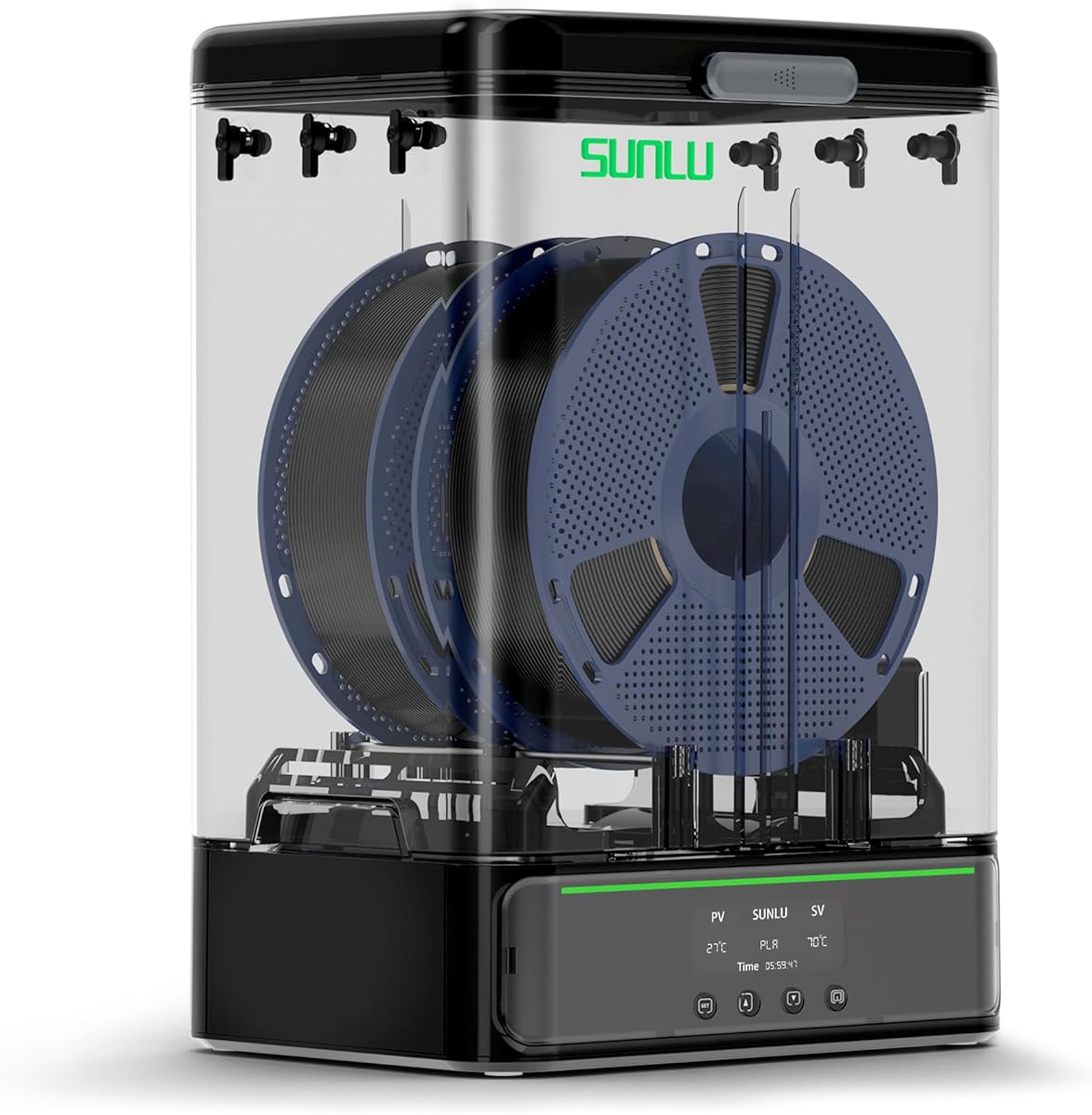

The SUNLU S4 stands out as a top-tier option for users who need high capacity. It holds four 1kg spools simultaneously, making it perfect for multi-color or multi-machine setups. With a 4.7 rating from users, it delivers reliability and performance.
We may earn a commission when you buy through this link, at no additional cost to you.
Its standout feature is the 350W PTC heater combined with three built-in fans. This setup heats up quickly and maintains a temperature balance within ±3°C, ensuring uniform drying across all spools. The auto humidity control mode further reduces manual intervention.
While the S4 is robust, it comes at a higher cost and requires significant desk space. The large footprint might not suit smaller studios. However, for serious users needing efficiency, these trade-offs are acceptable given the output quality.
Buy this if you print frequently with multiple filaments or need to store several types at once. It is an investment in workflow continuity that minimizes downtime caused by wet filament issues.
Supports four 1kg spools for complex jobs requiring frequent color changes without interruption.
Smart auto mode detects humidity levels and starts or stops drying to prevent excessive moisture or drying.
We may earn a commission when you buy through this link, at no additional cost to you.
The Creality Space Pi X4 offers premium features for high-volume users. It accommodates four 1kg spools or two 2kg spools. With a 4.6 rating, it shows strong user satisfaction regarding drying speed and moisture elimination.
We may earn a commission when you buy through this link, at no additional cost to you.
Dual independent 200W heating chambers allow for faster drying—30% faster than single-chamber dryers. The ability to reach 85°C makes it suitable for advanced filaments like ABS and PC that require higher temperatures to release moisture effectively.
The price reflects its advanced capabilities, which may be overkill for casual users. Additionally, the touch UI has a learning curve. Despite this, the efficiency and high-temperature support justify the cost for professionals.
Choose this if you work with high-performance materials or print large batches. The dual chambers and sealed design ensure consistent results across various filament types and environmental conditions.
Two independent heating zones work together to reduce drying time significantly compared to single-zone units.
Up to 85°C capability handles difficult materials like Polycarbonate and ABS without damage or loss of properties.
We may earn a commission when you buy through this link, at no additional cost to you.
For those on a tight budget, the SUNLU S1 Plus offers excellent value. It maintains a 4.7 rating by delivering reliable drying performance for common materials. It solves stringing and clogging issues effectively without breaking the bank.
We may earn a commission when you buy through this link, at no additional cost to you.
Its ultra-quiet design keeps noise under 10dB, making it suitable for home offices or shared spaces. The adjustable temperature and time settings allow customization for various filament needs within its range.
While it lacks the high heat and capacity of premium models, it handles standard PLA, PETG, and TPU well. The limited temperature range might not suit all engineering materials, but for general use, it is sufficient.
Opt for this if you are new to 3D printing or want a simple, low-cost solution. It provides the essential features needed to improve print quality without unnecessary complexity.
Minimal noise levels ensure the drying process does not disturb daily activities or sleep cycles.
Accommodates spools from 1.75mm up to 3mm, covering most standard options found on the market.
We may earn a commission when you buy through this link, at no additional cost to you.
The Comgrow dryer box is designed to keep filaments dry during printing. It holds two 1kg spools and features a clear LCD for monitoring. With a 4.4 rating, users appreciate its consistent performance and sealing capabilities.
We may earn a commission when you buy through this link, at no additional cost to you.
Its outlet structure includes a silicone cable sheath and Teflon tube for smooth feeding. The snap button cover ensures good sealing performance to prevent moisture ingress when not actively drying. This makes it a solid choice for storage.
Note that the unit auto-shuts down if not set properly within three minutes, which requires attention during setup. The manual settings are straightforward but lack presets found in newer models.
This model is ideal for users needing a balance between storage and active drying. It ensures consistent feeds and protects consumables effectively within a reasonable size.
Snap button cover and silicone seals prevent moisture from entering the storage area between printing sessions.
Teflon tubes and cable sheaths reduce friction for a smoother path from the box to the printer.
We may earn a commission when you buy through this link, at no additional cost to you.
The Creality Space Pi SE offers upgraded PTC efficiency with a built-in fan for 360° circulation. It heats quickly to 65°C, making it suitable for most common filaments. With a 4.4 rating, it provides reliable performance for its price range.
We may earn a commission when you buy through this link, at no additional cost to you.
Thermal insulation cotton on inner walls keeps heat in and protects against heat. The knob interface allows easy operation without needing complex menus. This simplicity is appreciated by users who value straightforward controls.
While it lacks advanced humidity monitoring, it is effective at reducing moisture issues like stringing. The limited max temperature may not suit high-temperature materials like Polycarbonate which need more heat.
Choose this if you want quick, efficient drying without high complexity. It balances cost and performance well for general-purpose 3D printing needs.
Heats the chamber to 65°C in just 15 minutes, getting filament ready for printing faster.
Simple knob design allows quick adjustments to time and temperature without confusing digital menus.
We may earn a commission when you buy through this link, at no additional cost to you.
The Creality Space PI stands out with a 3.7-inch touch screen and presets for 12 filament types. With a 4.4 rating, users find it versatile for various materials including high-performance composites. It simplifies the drying process significantly.
We may earn a commission when you buy through this link, at no additional cost to you.
A power-off memory function saves settings after outages, which is a unique practical feature. The timer can go up to 48 hours, allowing thorough drying for moisture-sensitive filaments. Temperature switching between Celsius and Fahrenheit adds flexibility.
The 110W heater is durable but may be slower than higher-wattage models for thick filaments. Overall, it remains a strong choice for its usability and long-duration drying capabilities.
Select this if you need a user-friendly interface and long drying times. It balances technology with practical features for consistent results.
Includes pre-set settings for 12 types, including composite filaments for ease of use.
Remembers settings even after a power loss, reducing the need to reset every time.
We may earn a commission when you buy through this link, at no additional cost to you.
The black version of the SUNLU S1 Plus features a fan design to speed up moisture discharge. It displays temperature, time, and humidity on a 2-inch screen. With a 4.3 rating, it shows solid performance for reducing wet weather impacts.
We may earn a commission when you buy through this link, at no additional cost to you.
The fan design helps push excess water out faster than passive dryers. Adjustable settings allow fine-tuning based on ambient conditions. This adaptability ensures better print quality across different environments.
While the plastic build is standard, it does the job well. The fan adds slight noise but keeps drying times short. For most users, this balance works effectively.
Consider this if you live in humid areas where fast moisture removal is essential. It offers reliable drying with minimal setup.
Upgraded fan design helps push out excess moisture from filaments quickly.
Adjust temperature and time based on your local humidity and filament needs.
We may earn a commission when you buy through this link, at no additional cost to you.
The Polymaker Polydryer focuses on storage and humidity control. It combines an airtight seal with desiccant support to lock out moisture. With a 4.4 rating, it is praised for consistency in maintaining filament quality.
We may earn a commission when you buy through this link, at no additional cost to you.
A built-in hygrometer provides visible humidity readings for precise monitoring. You can feed filament while the spool remains stored inside, breaking the seal only when needed. This preserves dryness for longer periods.
It lacks active heating, so it relies on ambient conditions and desiccants. This makes it less ideal for already wet filaments but excellent for maintenance. It serves better as a protector than a quick dryer.
Choose this for long-term storage rather than urgent drying. It keeps spools dry between prints with minimal intervention.
Hygrometer lets you track humidity levels easily to ensure the environment stays dry.
Design allows printing without breaking the seal, protecting filament from air exposure.
We may earn a commission when you buy through this link, at no additional cost to you.
The SUNLU SP2 handles larger loads with ease, supporting 3kg spools. It uses a 250W PTC heater to reach 70°C within 15 minutes. With a 4.4 rating, it offers efficient drying and reliable sealing for various materials.
We may earn a commission when you buy through this link, at no additional cost to you.
A detachable storage box allows you to lift the dryer apart and use the base for storage. This versatility means you can store spools separately once dry. The included desiccant containers help track internal humidity.
It is a solid option for larger projects needing more filament per spool. The size and weight may be considerations for smaller workspaces.
Select this if you use 3kg spools or need extended drying. It supports high-volume workflows effectively.
Rollers and bar supports fit spools from 250g up to 3kg.
Detachable design allows separate storage and drying modes for added flexibility.
We may earn a commission when you buy through this link, at no additional cost to you.
The Sovol SH02 offers fast 150W PTC heating to 70°C in 25 minutes. It features one-key presets for nine filament types including PC and PA. With a 4.3 rating, it provides a good balance of speed and usability.
We may earn a commission when you buy through this link, at no additional cost to you.
Safety features include auto power-off if the PTC exceeds 130°C and alarms if the fan stops. The improved sealing design protects from dirt even when unpowered. These add peace of mind during operation.
It is compact but supports dual spools which increases utility. The basic interface is easy to learn but lacks advanced options found in premium models.
Choose this for reliable, fast drying at a reasonable price. It is safe and effective for general printing needs.
Thermal cut-off and fan alarms protect against overheating and component failure.
One key sets default time and temperature for common materials.
We may earn a commission when you buy through this link, at no additional cost to you.
Choosing the right dryer box involves considering capacity, heating power, and safety features. Use these factors to match the device to your specific printing habits.
Consider how many spools you need to dry at once. Some boxes hold two 1kg spools while others can accommodate four or even larger 3kg spools. This affects your workflow efficiency and workspace usage.
Select a capacity that matches your typical batch size.
Higher wattage leads to faster heating. Ensure the max temperature meets your material needs; PLA needs lower heat while ABS requires higher temperatures. Check the temperature range before purchasing.
Choose a unit with enough power to heat your materials efficiently.
A good seal prevents moisture from re-entering the box. Look for silicone seals and snap button covers. This feature is crucial for storage between printing sessions.
Prioritize models with verified tight seals.
Built-in fans help circulate hot air uniformly. This ensures all filaments dry evenly without cold spots. Dual fans or 360° heating designs are preferred for consistency.
Look for systems that promote uniform air movement.
Touch screens and presets make operation easier. Models with one-key settings reduce manual input errors. Ensure the interface is intuitive for your experience level.
Choose a control method that fits your workflow.
Safety mechanisms like thermal cut-offs and fan alarms protect your equipment. These prevent overheating or module damage. Check for certifications and safety specs.
Ensure the unit includes essential safety protections.
Consider the physical footprint. Larger units may take significant desk space. If space is tight, look for compact options or detachable storage designs.
Pick a size that fits your available workspace.
Prices vary from budget to premium. Determine which features you need and avoid overpaying for unused capabilities. Balance cost against long-term print quality improvements.
Opt for value by matching features to your needs.
Place your spool inside the box ensuring the filament is fed through the outlet hole correctly. Close the lid securely to engage the seal. If the model has rollers ensure the spool sits properly for smooth feeding.
Set the temperature based on your filament type. Start with 45°C for PLA and increase up to 70°C for ABS if needed. Set the duration from 4 to 12 hours depending on moisture levels. Wait for the unit to cycle and confirm the drying complete indicator.
Clean the interior periodically to remove any dust or filament dust. Check the filter if your model has one and replace desiccants when needed. Ensure the seal remains intact by wiping the rubber gaskets occasionally for consistent moisture protection.
Look for popping sounds during extrusion or bubbles in printed parts. Stringing and poor layer adhesion often indicate moisture. If you notice these issues your filament likely absorbed humidity and needs drying.
PLA typically dries well at 45°C to 55°C. Temperatures above this can deform the spool or damage the material. Always stay within the manufacturer's recommended limits to avoid warping.
Most models are designed to feed filament directly while running. Check the feed tube connections and ensure the box is stable. This setup maintains dry filament throughout the print without pauses.
Most dryers need 4 to 12 hours to fully dry spools. Time depends on initial moisture and material type. ABS or Nylon may need longer cycles for complete moisture removal.
Many models include seals and desiccant supports for storage. If designed for it the box can store spools for weeks. Check the seal quality before assuming long-term protection.
Most units support 1.75mm and 2.85mm diameters. The outlet holes are adjustable or sized for both. Confirm the compatibility in the specs before buying.
Built-in fans create airflow but can generate hum. Higher wattage units may be louder. Check for obstructions or loose parts that add vibration noise.
Power issues or safety alarms may cause stops. Check the power supply and reset settings if needed. Verify safety features like overheat protection haven't triggered unexpectedly.
We highlighted ten models that balance capacity power and usability. The SUNLU S4 stands out for large needs while the SUNLU S1 Plus offers budget-friendly value for beginners.
Prioritize features like fan circulation sealing and preset options to match your printing habits. A good dryer box prevents moisture issues and extends your filament life significantly.
Prices and availability can change so check current listings before purchasing. Invest in quality to ensure consistent high-quality prints and better printer longevity.