
FLASHFORGE Adventurer 5M
3.9Editor score
One-Click Automatic Printing
600mm/s High Speed
3S Detachable Nozzle
Compare the top 10 3D printers for beginners in 2026. Real ratings, expert analysis, and detailed reviews to help you choose the right machine.
Entering the world of 3D printing can feel overwhelming with so many options available today. Choosing the right machine depends on your specific needs, budget, and technical comfort level. This guide simplifies the process by highlighting models that balance ease of use with powerful features for newcomers.
We have carefully evaluated ten distinct 3D printers based on their performance, reliability, and user feedback. Our analysis focuses on critical aspects like print speed, calibration ease, and build volume. Each product listed here offers a unique value proposition tailored to different types of beginners.
Every review in this guide provides deep insights into what makes each printer stand out or fall short. You will find detailed breakdowns of features, pros, cons, and real-world usage scenarios. Please note that pricing and availability can change frequently, so always check current offers before purchasing.
3.9Editor score

4.7Editor score

4.2Editor score
This side-by-side comparison highlights the key specifications and unique selling points of all ten selected 3D printers. It helps you quickly identify which model aligns best with your project requirements and skill level without reading every full review.




The Bambu Lab A1 stands out as the premier choice for beginners seeking a balance of speed and ease of use. With a high rating of 4.7, it offers fully automatic calibration that removes the guesswork from bed leveling and Z-offset adjustments. This makes it incredibly accessible for those new to 3D printing.
We may earn a commission when you buy through this link, at no additional cost to you.
Its standout feature is the high-speed precision enabled by an acceleration of 10,000 mm/s². This allows for rapid printing while maintaining exceptional detail in your models. The active flow rate compensation ensures smooth prints by adjusting flow based on real-time readings, preventing common issues like blobs or under-extrusion.
While the A1 is powerful, it lacks an enclosure by default, which limits its use with advanced filaments like ABS or ASA without an upgrade. Additionally, multi-color printing requires the separate purchase of the AMS lite system. These trade-offs are acceptable given its core focus on beginner-friendly operation and performance.
If you want a printer that works flawlessly out of the box and grows with your skills, the A1 is the top recommendation. It combines high-speed printing with a quiet, user-friendly interface that keeps the focus on creativity rather than troubleshooting technical issues.
Automatic calibration saves hours of manual tuning and ensures the first layer is perfect every time, reducing failed prints significantly for beginners.
Despite its high speeds, the A1 maintains precision through active flow compensation, proving that fast printing does not mean low quality.
We may earn a commission when you buy through this link, at no additional cost to you.
The Flashforge Adventurer 5M offers impressive speed and features at a competitive entry point. With a 3.9 rating, it appeals to users prioritizing rapid prototyping. Its CoreXY all-metal structure provides stability, while the 600mm/s travel speed drastically reduces print times compared to standard printers.
We may earn a commission when you buy through this link, at no additional cost to you.
Key strengths include the one-click automatic printing feature and 3-second nozzle changes. The dual-sided PEI platform ensures easy model removal, and remote monitoring via the Flash Studio app adds convenience. These features make it a strong contender for efficiency-focused beginners.
However, the lower rating suggests some users may experience inconsistency or quality variations. It is primarily optimized for standard filaments like PLA and PETG, which may limit advanced experimentation. These limitations are balanced by its high speed and ease of use.
This printer is ideal for beginners who want fast results and don't mind occasional tuning. The combination of auto leveling, high speed, and app monitoring makes it a practical choice for everyday creative projects.
The all-metal CoreXY design reduces vibration and improves print quality, ensuring reliable performance even at high speeds.
Real-time mobile monitoring allows you to track progress and adjust settings remotely, adding flexibility to your workflow.
We may earn a commission when you buy through this link, at no additional cost to you.
The Bambu Lab P1S Combo delivers premium performance with its enclosed design and multi-color capabilities. Rated 4.2, it is perfect for users ready to experiment beyond standard PLA. The included AMS system enables up to 16 colors, transforming single-color prints into vibrant masterpieces.
We may earn a commission when you buy through this link, at no additional cost to you.
Its enclosed body improves performance for advanced filaments like ABS and ASA, which require stable temperatures. The 500mm/s print speed and automatic bed leveling ensure fast, high-quality results. This model is ideal for hobbyists wanting professional-grade features without complex assembly.
The main trade-off is the higher cost compared to entry-level printers. Additionally, setting up the AMS requires extra attention. However, the ability to switch materials and colors seamlessly justifies the investment for serious creators.
Choose this if you want future-proof capabilities and high-quality output. It bridges the gap between beginner-friendly operation and advanced industrial performance, making it a top premium pick.
With AMS support, you can combine different materials or colors in one print, expanding creative possibilities significantly.
The enclosed design maintains consistent heat, reducing warping and enabling use of engineering filaments like ABS.
We may earn a commission when you buy through this link, at no additional cost to you.
This mini 3D printer kit is designed specifically for young beginners and those wanting a simple start. Rated 4.4, it comes fully assembled with necessary accessories. The auto leveling and easy loading features remove barriers to entry, making it a great educational tool.
We may earn a commission when you buy through this link, at no additional cost to you.
Key strengths include its high precision of 0.01mm and the inclusion of a filament roll and SD card. The PEI heated bed simplifies model removal. The warranty offers peace of mind with 30-day returns and lifetime support, which is valuable for families.
The small build size restricts larger projects, and features are simplified compared to full-sized machines. However, its focus on usability and safety makes it ideal for introductory use. It teaches fundamentals without overwhelming complexity.
Pick this for kids or quick home projects. It provides a complete, safe, and fun experience that encourages creativity without the frustration of complex setup or maintenance tasks.
Everything needed is included, from filament to SD card, ensuring immediate printing after unboxing without extra purchases.
Despite its size, it achieves 0.01mm precision, allowing for detailed and high-quality miniatures and small toys.
We may earn a commission when you buy through this link, at no additional cost to you.
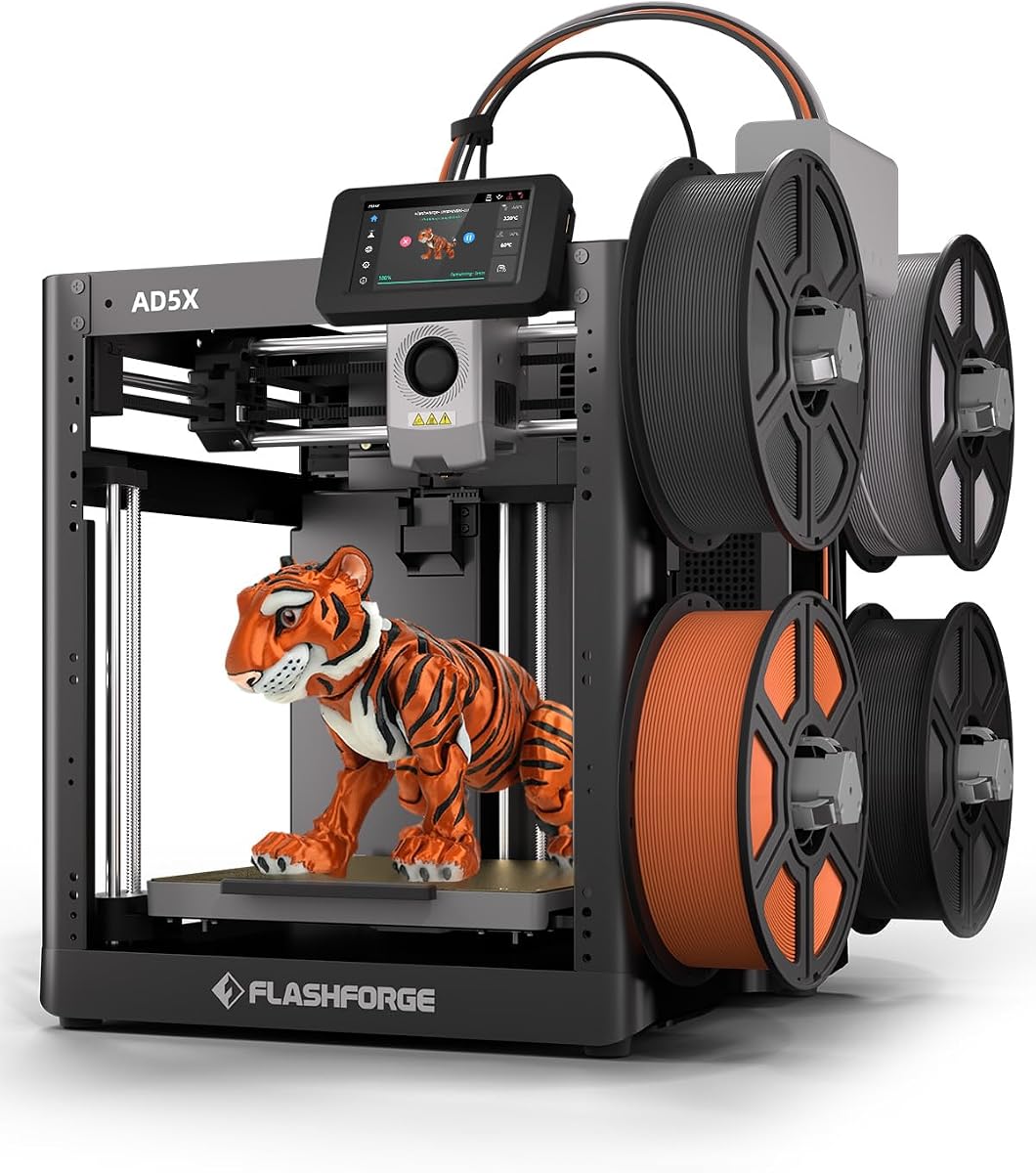
The Flashforge AD5X brings multi-color printing to a budget-friendly price point. With a 3.9 rating, it targets users wanting vibrant prints without high costs. Its CoreXY structure and 600mm/s speed ensure efficient production, while the 300C extruder handles diverse materials.
We may earn a commission when you buy through this link, at no additional cost to you.
Key strengths include 1-click auto leveling and flexible nozzle options for varying detail levels. The resume function protects prints during outages. Remote monitoring via the Flash Maker app adds convenience for busy users managing multiple jobs.
The lower rating indicates possible inconsistencies in build quality or software stability. Additionally, true multi-color requires manual intervention or external accessories. These drawbacks are offset by its high speed and feature-rich design.
Ideal for creators wanting multi-color capability without breaking the bank. It balances performance and affordability, making it a solid choice for those willing to manage occasional tuning.
Supporting four colors simultaneously allows for creative designs without needing complex multi-extruder systems.
Resume printing saves failed jobs during outages, ensuring you don't lose hours of work unexpectedly.
We may earn a commission when you buy through this link, at no additional cost to you.
The AOSEED AI 3D Printer transforms creativity with AI-driven design tools. Rated 4.5, it targets kids and beginners wanting simple, safe fun. Features like AI Doodle and MiniMe allow model creation from prompts, removing the need for 3D design skills.
We may earn a commission when you buy through this link, at no additional cost to you.
Key strengths include its enclosed, pinch-resistant safety design and real-time monitoring via a built-in camera. The starter kit includes multiple filament rolls and tools, ensuring immediate use. The vast library of 8,000+ models provides endless project ideas.
It is limited to single-color PLA printing, which restricts material options. However, its focus on accessibility and safety makes it ideal for families. The AI features encourage imaginative play rather than technical challenges.
Choose this for educational and creative home use. It simplifies the design process, making 3D printing an engaging and safe activity for children of all ages.
AI tools let you create custom 3D models using voice or text prompts, bypassing complex design software entirely.
The enclosed, pinch-resistant build ensures safe operation around children, preventing accidents during printing.
We may earn a commission when you buy through this link, at no additional cost to you.
The A1 mini offers a compact, beginner-friendly experience with a unique LED Lamp Kit included. Rated 4.4, it suits small spaces and hobbyists wanting functional decor. It shares the A1's calibration benefits but in a smaller form factor.
We may earn a commission when you buy through this link, at no additional cost to you.
Key strengths include automatic calibration and seamless integration with the Bambu ecosystem via the Handy app. The LED kit allows for immediate creative projects that become usable items. Its quiet operation fits well in home environments.
The reduced build size limits larger prints, and it may feel restrictive for scaling up. However, it remains highly capable for standard projects. The inclusion of the lamp kit adds unique value compared to standalone printers.
Pick this for desktop creative work and beginners wanting easy entry. It combines functionality with immediate project-ready accessories, making it a delightful start to 3D printing.
The included kit lets you print and assemble functional lamps immediately, turning designs into practical home decor quickly.
Its small footprint saves space while delivering high-speed, quiet performance suitable for studios or bedrooms.
We may earn a commission when you buy through this link, at no additional cost to you.
The Creality Ender 3 V3 SE bundle offers exceptional value with included filament. Rated 4.9, it combines speed with reliability. The 250mm/s speed saves time, while the Sprite extruder ensures smooth filament feeding without slipping.
We may earn a commission when you buy through this link, at no additional cost to you.
Key strengths include CR Touch auto leveling and dual Z-axis for stability. The four-pack filament bundle reduces initial costs and experimentation. It is a well-rounded machine for users prioritizing cost-effectiveness and simplicity.
It lacks enclosure for high-temp printing, limiting material versatility. However, its high rating indicates strong overall performance. The bundle saves money compared to buying filament separately, making it an economical choice.
Ideal for budget-conscious beginners wanting immediate start materials. The high rating and complete package make it a top choice for those seeking value and reliability.
Four packs of filament in different colors are included, allowing immediate multi-color experimentation without extra costs.
The direct drive extruder improves feed precision, reducing clogs and ensuring smoother prints for beginners.
We may earn a commission when you buy through this link, at no additional cost to you.
The AD5M emphasizes ease of use with one-click calibration and quick-swap nozzles. Rated 4.3, it simplifies maintenance for beginners. The all-metal CoreXY structure ensures durability and precision. The double-sided PEI plate allows flexible model removal.
We may earn a commission when you buy through this link, at no additional cost to you.
Key strengths include resume printing and real-time app monitoring. The nozzle can be swapped in 3 seconds, reducing downtime. The slicer enables batch transmission and network monitoring for advanced users.
Software flexibility may be limited compared to open-source systems, and app control needs internet access. However, its user-friendly design and maintenance features offer significant convenience for hobbyists.
Choose this for hassle-free maintenance and reliable printing. The focus on usability ensures a smooth experience, making it a practical choice for consistent creative output.
Quick-swap nozzles minimize downtime, allowing you to change tools in seconds without needing tools.
Automatic calibration ensures flawless first layers every time, eliminating manual adjustments and reducing setup frustration.
We may earn a commission when you buy through this link, at no additional cost to you.
The Adventurer 5M delivers high-speed printing with 600mm/s capability. Its CoreXY structure and 280C extruder ensure versatility and precision. Despite a 3.9 rating, it offers strong features for rapid prototyping. Auto leveling and app monitoring enhance usability.
We may earn a commission when you buy through this link, at no additional cost to you.
Key strengths include fast warm-up times and dual-fan cooling. The 3-second nozzle changes simplify maintenance. It supports flexible filament removal with a PEI platform. Remote control allows monitoring from anywhere.
Consistency issues reported by some users suggest occasional tuning may be needed. Software updates could improve performance. However, its speed and feature set remain attractive for users prioritizing efficiency.
Best for users wanting speed and modern features. While reliability varies, the high-speed capabilities and ease of use make it a compelling option for specific workflows.
The high travel speed significantly cuts print times, enabling rapid prototyping and faster project completion.
Mobile app integration allows remote monitoring and adjustments, providing convenience and control over your prints.
We may earn a commission when you buy through this link, at no additional cost to you.
Selecting the right 3D printer involves evaluating several key factors beyond just price. Understanding these elements ensures you choose a machine that fits your project goals and skill level.
Speed matters if you need quick results, but quality shouldn't be sacrificed. Look for printers that offer a balance between high-speed capability and fine detail resolution.
Prioritize models with reliable speed specifications and positive reviews on print quality to ensure satisfactory output.
Automatic bed leveling and one-click calibration drastically reduce the learning curve for beginners. Manual adjustments can be frustrating and prone to errors for new users.
Choose printers with automated calibration features to save time and minimize failed prints during the learning phase.
The build volume determines the maximum size of objects you can print in one go. Consider what projects you plan to create and whether larger or smaller prints dominate your interests.
Ensure the build volume matches your typical project sizes to avoid needing to split models or upgrade later.
Different printers support different materials like PLA, PETG, or ABS. Beginners often start with PLA, but future-proofing for other materials can be useful.
Check supported filament types to ensure the printer meets your current and potential future material needs.
Enclosed printers maintain stable temperatures, which is essential for advanced filaments like ABS. Open printers are quieter and more accessible but may warp with certain materials.
Consider enclosure if you plan to use heat-sensitive or engineering materials for your projects.
User-friendly software and mobile apps enhance convenience by allowing remote monitoring and control. Some ecosystems offer extensive libraries of ready-to-print models.
Look for printers with intuitive software interfaces and robust app support to streamline your workflow.
Reliable customer support and warranty coverage provide peace of mind when things go wrong. Beginners may need more assistance troubleshooting initial issues.
Prioritize brands known for responsive support and clear warranty terms to protect your investment.
Before starting, read the manual carefully and calibrate the printer bed using the auto-leveling feature if available. Ensure the build plate is clean and level for optimal adhesion of your first layer.
Always monitor your initial prints closely to catch issues early. Adjust slicer settings gradually and avoid extreme parameters until you understand how the machine behaves under different conditions.
Regularly clean the nozzle and bed, and store filament in dry conditions to prevent moisture damage. Performing these maintenance tasks prolongs the printer's life and ensures consistent print quality.
The Bambu Lab A1 is often considered the easiest due to its fully automatic calibration and user-friendly interface. It requires minimal setup and offers consistent results straight out of the box for new users.
Beginner-friendly models typically range from $200 to $500. Entry-level machines may cost less but could require more manual tuning, while premium options cost more but offer better reliability and features.
No, many beginners use pre-designed models from online libraries or use simple tools. Some printers even include AI-powered design tools that create models from text or image prompts for non-designers.
PLA is the best starting filament because it is easy to print, odorless, and warps less. It allows you to focus on learning printer settings rather than troubleshooting material issues.
An enclosed printer offers stability for temperature-sensitive filaments but is not strictly necessary for basic printing. Open printers are simpler and sufficient for learning PLA and PETG materials.
Basic operation can be learned in a few hours, but mastering troubleshooting and advanced settings takes weeks. Regular practice and experimenting with different designs accelerate the learning process.
This guide highlights ten top-rated 3D printers tailored for beginners, offering a range of speeds, features, and price points. The Bambu Lab A1 leads with automation, while budget-friendly options like the Adventurer 5M provide impressive performance.
Prioritize ease of use and reliability when making your decision. Look for models with automatic calibration and strong community support to ensure a smooth and rewarding experience from day one.
Remember that prices and availability fluctuate, so always check current listings before purchasing. Investing in the right machine now can save time and frustration as you grow your 3D printing skills.