
Flashforge Creator 5 Pro
4.0Editor score
Industrial multi-material printing
Heated chamber up to 65C
Zero waste system
Discover the top 10 3D printers for figurines and models in 2026. Compare speeds, features, and real user ratings to find your perfect fit.
Finding the right 3D printer for figurines and models can be challenging given the vast array of options available today. You need a machine that balances precision, speed, and ease of use to bring your creative visions to life without frustration.
We have thoroughly compared the top ten models on the market based on performance, features, and user feedback. Our analysis focuses on what truly matters for hobbyists and professionals alike, from multi-color capabilities to build volume and reliability.
Each pick below highlights specific strengths and ideal use cases to help you make an informed decision. Keep in mind that product availability and pricing can fluctuate, so always check the latest details before purchasing your next machine.
4.0Editor score

4.7Editor score

4.6Editor score
This side-by-side comparison breaks down the key specifications of all ten featured printers. From build volumes and printing speeds to special features like auto-leveling and enclosed chambers, these specs help you quickly identify which machine fits your specific workflow and project needs.




The Bambu Lab A1 stands out as a top contender in the 3D printing space, particularly for those interested in figurines and detailed models. With a solid rating of 4.7, it offers high-speed precision and ease of use that appeals to both beginners and seasoned hobbyists.
We may earn a commission when you buy through this link, at no additional cost to you.
Its standout quality lies in its high-speed printing capabilities combined with exceptional accuracy. The active flow rate compensation ensures that your prints maintain smooth surfaces and sharp details, which is crucial for miniature figures. The multi-color printing option via AMS lite allows for creative designs without manual filament swaps.
While the printer is excellent, the open frame design might be a limitation for users needing a heated chamber for advanced materials like ABS. Additionally, accessing full multi-color functionality requires purchasing the AMS lite separately or getting the combo version. These trade-offs are acceptable given the overall performance and value it provides.
If you prioritize speed, precision, and a hassle-free experience, the Bambu Lab A1 is an ideal choice. It delivers reliable results with minimal setup, making it perfect for bringing intricate figurine designs to life quickly and efficiently.
Experience unparalleled speed and accuracy with acceleration up to 10,000 mm/s², ensuring flawless prints every time.
Unlock vibrant designs with the AMS lite system that makes multi-color printing accessible and reliable for everyone.
We may earn a commission when you buy through this link, at no additional cost to you.
The Bambu Lab P2S Combo delivers exceptional performance with its high-speed printing and advanced material handling features. Rated 4.7 by users, this printer is designed to make professional-grade 3D printing effortless, even for beginners looking to create detailed figurines.
We may earn a commission when you buy through this link, at no additional cost to you.
Key strengths include its ability to print up to 600 mm/s while maintaining exceptional accuracy. The AMS 2 Pro system enables seamless multi-color and multi-material printing with built-in filament drying, which keeps every spool ready for flawless results. The adaptive airflow system ensures overhangs remain crisp while maintaining thermal stability for engineering materials.
Although it offers incredible speed and features, the higher price point might be a consideration for budget-conscious buyers. Additionally, to achieve full multi-color capabilities, you need the combo version. However, the investment pays off in reliability, speed, and the quality of finished prints for complex models.
This model is perfect for users who demand speed and precision without compromising on material versatility. If you want to create vibrant, multi-colored figurines with minimal setup time, the P2S Combo is a top-tier choice that supports your creativity fully.
Print up to 600 mm/s with PMSM Servo Extruder ensuring sharp layers and flawless corners every time.
AMS 2 Pro enables multi-material printing with built-in drying keeping every spool ready for perfect results.
We may earn a commission when you buy through this link, at no additional cost to you.
The Flashforge Creator 5 Pro is built for industrial engineering and serious creators needing multi-material capabilities without waste. With a 4.0 rating, it offers a robust solution for advanced filament printing and high-speed production of detailed figurines or prototypes.
We may earn a commission when you buy through this link, at no additional cost to you.
Its main advantage is the four independent toolheads that switch in just seven seconds without flushing filament, drastically reducing waste and costs. The active heated chamber up to 65C allows confident printing of ABS and PC materials. Safety is prioritized with dual HEPA filtration and continuous airflow to keep your workspace clean and odorless.
While powerful, the printer requires more advanced knowledge to fully utilize its features. It is best suited for professionals who need industrial-grade results rather than casual hobbyists. The complexity is offset by the immense versatility and material options it provides for specialized projects.
Choose this if you need to print with diverse materials and require minimal waste. The combination of speed, material versatility, and safety features makes it a standout choice for professional workshops and detailed model creation.
Four toolheads with FlashSwap changer switch nozzles in 7 seconds eliminating massive purge waste completely.
Fully enclosed frame with 65C active heating prevents warping allowing confident printing of ABS and PC filaments.
We may earn a commission when you buy through this link, at no additional cost to you.
The Bambu Lab P1S is a versatile printer that combines speed and enclosed design for better material compatibility. Rated 4.5 by users, it is perfect for those who want professional results with minimal assembly and setup hassle.
We may earn a commission when you buy through this link, at no additional cost to you.
With speeds up to 500 mm/s and a fully enclosed body, it handles advanced filaments like ABS and ASA efficiently. The auto bed leveling ensures consistent first layers, saving you time and failed prints. Multi-color printing is supported when connected to the AMS system, expanding your creative possibilities.
While it lacks some of the higher-end features of the P2S, it remains a powerful tool for many users. The only notable limitation is that multi-color requires a separate AMS connection and it does not support carbon fiber reinforced polymers well. These are minor drawbacks given its reliability.
This printer is an excellent choice for hobbyists ready to step up to more advanced materials. Its enclosed design and ease of use make it a reliable workhorse for detailed model printing.
Fully enclosed body improves performance for engineering materials ensuring better adhesion and reduced warping.
Set up in just 15 minutes with user-friendly design ensuring hassle-free assembly for all skill levels.
We may earn a commission when you buy through this link, at no additional cost to you.
The Flashforge AD5X combines high-speed printing with advanced filament management. Rated 4.4 by users, it is ideal for hobbyists looking for multi-color capabilities without complex setups or manual filament swaps.
We may earn a commission when you buy through this link, at no additional cost to you.
Its IFS technology allows you to print with up to four colors simultaneously, making vibrant models easy to create. The high-temperature nozzle reaching 300C supports a wide range of filaments including PLA, ABS, and PETG. Automatic leveling ensures every print starts with a perfect bed level.
While it is a strong contender, users may find the build volume slightly small for very large projects compared to other options. The nozzle limit to 300C is standard but might restrict some high-temperature materials. Despite this, it offers great value and performance.
If you want multi-color printing in a user-friendly package, this printer delivers. It balances speed, versatility, and ease of use for both small and ambitious projects effectively.
IFS technology allows up to four different colors simultaneously creating vibrant 3D models with ease.
Nozzle up to 300C allows wide range of filaments ensuring you can tackle various projects with the right material.
We may earn a commission when you buy through this link, at no additional cost to you.
The Snapmaker U1 brings unique efficiency to multi-color printing with its 4-toolhead system and rapid 5-second changers. Rated 4.5 by users, it is designed for professionals and makers needing functional parts and detailed models without manual filament swaps.
We may earn a commission when you buy through this link, at no additional cost to you.
This system reduces filament waste by 5x and increases printing speed by 5x compared to traditional systems. It supports rigid and flexible materials in one print, enabling complex prototypes like articulated models or functional parts. Smart calibration ensures smooth and dimensionally accurate prints.
While powerful, the tool system adds to the cost and the machine is quite large. This might be less ideal for small workspaces. However, for productivity and advanced material mixing, its unique features justify the investment.
Choose this if you need true multi-material printing with minimal waste. It is an exceptional tool for workshops and professional creators focused on efficiency and complex prototypes.
Four independent toolheads with 5s changer enable true multi-color printing without manual filament swaps or purging.
Combine rigid and flexible materials plus soluble supports in a single print for complex prototypes.
We may earn a commission when you buy through this link, at no additional cost to you.
The Creality SPARKX i7 introduces exciting AI features for model creation and enhanced ease of use. Rated 4.0 by users, it stands out for its ability to turn photos into 3D models, making personalized figurines simple and fun.
We may earn a commission when you buy through this link, at no additional cost to you.
Key strengths include the AI CubeMe tool that generates 3D models from portraits instantly. The pre-assembled design means you can start printing within 5 minutes. The AI camera detects common print failures like spaghetti tangles in real time to maximize success rates.
While the AI features are compelling, some might require subscriptions which could be an ongoing cost. The build volume is generous but not the largest available. These are minor issues given the ease of use and creative capabilities.
If you want to create personalized gifts quickly, this printer is perfect. The combination of AI modeling and quick setup makes it ideal for beginners and hobbyists looking to explore creativity.
CubeMe AI software generates unique 3D models from portrait photos instantly for personalized gifts.
Fully pre-assembled design means no tools or complicated setup required to start creating immediately.
We may earn a commission when you buy through this link, at no additional cost to you.
The Flashforge Adventurer 5M Pro is built for high-speed precision with advanced material compatibility. Rated 4.0 by users, it is designed for environments needing reliability and safety features like filtration and quiet operation.
We may earn a commission when you buy through this link, at no additional cost to you.
It prints up to 600 mm/s with CoreXY structure ensuring smooth finishes without ghosting. The 3-second quick-swap nozzles allow you to change sizes effortlessly. Dual filtration ensures a clean environment making it suitable for home or office use.
While powerful, the nozzle temperature limit of 280C might restrict some high-temperature engineering materials. The build volume is also smaller than some industrial options. However, for general modeling and quick projects, it performs well.
Choose this if you need fast reliable printing in a quiet and clean environment. It balances speed and safety for effective home and office use.
Powered by all-metal CoreXY frame reaching 600 mm/s speeds eliminating ghosting for smooth high-precision finishes.
Tool-free quick-release nozzle mechanism for effortless 3-second replacements across multiple sizes for versatility.
We may earn a commission when you buy through this link, at no additional cost to you.
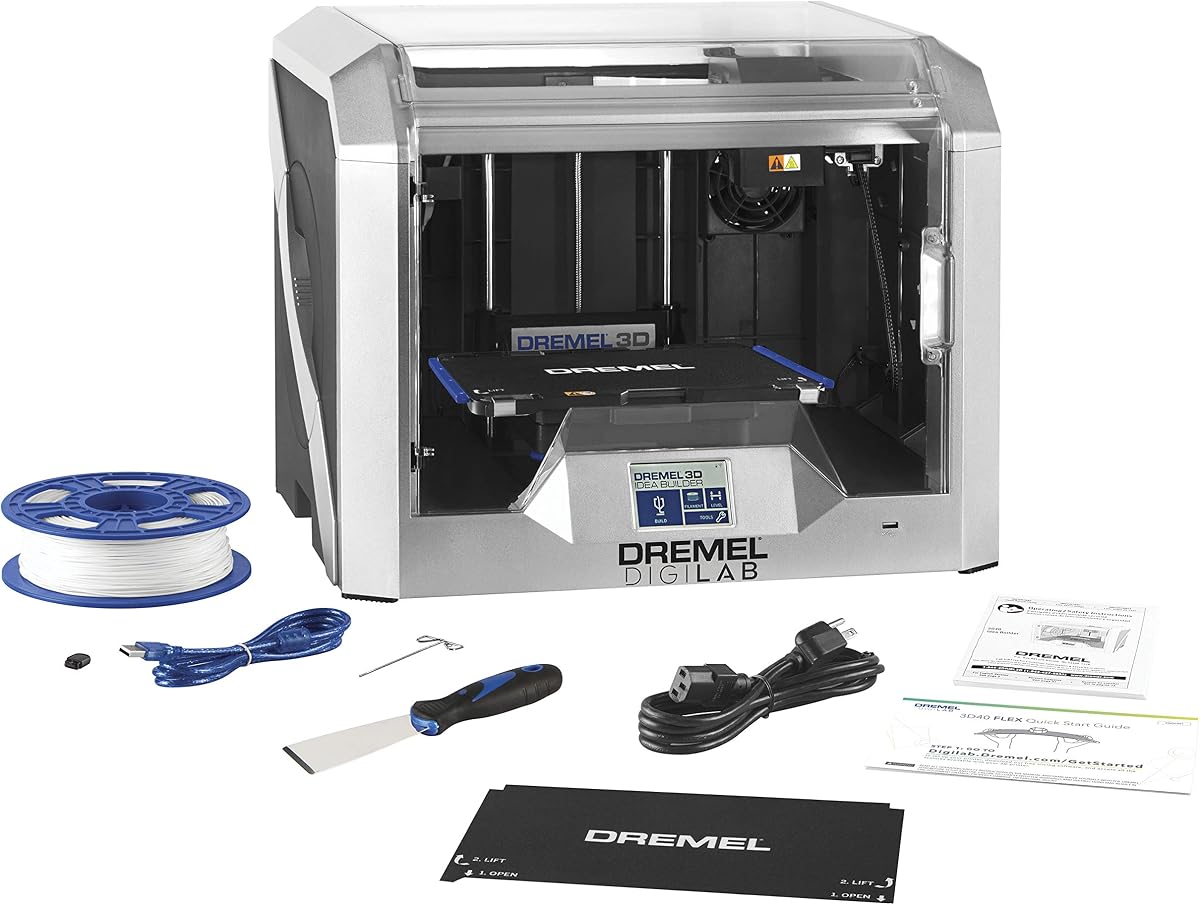
The Dremel DigiLab 3D40 offers reliable daily printing with a focus on ease of use and quality. Rated 4.4 by users, it is perfect for those who want a hassle-free experience with excellent customer support from a trusted brand.
We may earn a commission when you buy through this link, at no additional cost to you.
The flexible build plate makes removing models a snap without damaging them. Automated 9-point leveling ensures perfect first layers every time. The enclosed housing provides stability and safety for consistent printing results.
While reliable, the nozzle temperature limit of 230C restricts some advanced materials. The build volume is also standard. These are acceptable trade-offs given the quality and support Dremel provides for users.
This is a great choice for beginners and educators seeking reliability. The combination of flexible plate, auto-leveling, and brand support makes it easy to succeed with printing.
Flexible build plate with ergonomic handles and magnetic snap-on mechanism makes removing models a snap.
9-point leveling sensor detects bed variation accounting for it automatically for more successful printing.
We may earn a commission when you buy through this link, at no additional cost to you.
The Bambu Lab A1 Combo offers exceptional value by including multi-color capabilities and advanced calibration tools. Rated 4.6 by users, it provides precision speed and versatility perfect for enthusiasts and professionals alike seeking an affordable solution.
We may earn a commission when you buy through this link, at no additional cost to you.
It features active flow compensation using high-resolution sensors to ensure accurate extrusion. The AMS Lite system makes multi-color printing accessible to everyone. Fully automatic calibration handles shifts and leveling for every print automatically.
While it lacks an enclosed chamber for high-temp materials, the combination of speed accuracy and included features is hard to beat for the price. This makes it ideal for hobbyists wanting premium features on a budget.
If you want full multi-color capabilities without extra purchases this combo is perfect. Its blend of automation performance makes it a top budget choice for detailed models.
High-resolution eddy current sensors measure pressure and algorithmically compensate flow rate for accuracy.
Handles multiple calibrations like Z-shift bed level and resonance automatically ensuring perfect first layers.
We may earn a commission when you buy through this link, at no additional cost to you.
Choosing the right printer depends on your project needs budget and desired features. This guide covers key factors to help you select the perfect machine for creating detailed figurines.
For figurines and detailed models, balancing speed with precision is essential. Look for printers with high acceleration and flow compensation to reduce ghosting and ensure sharp details without compromising output speed.
Prioritize printers with active flow compensation and CoreXY motion systems for consistent high-quality prints at faster rates.
Many hobbyists want vibrant multi-color models. Check if the printer supports multi-material systems like AMS or IFS to enable color switching without manual intervention.
Select printers that offer seamless multi-color systems to enhance your creative possibilities without extra hardware.
The build volume determines the size of models you can print in one piece. Ensure the dimensions fit your typical project sizes whether small miniatures or larger figurines.
Choose a build volume that accommodates your largest anticipated projects to avoid unnecessary assembly.
Enclosed printers offer better temperature control which helps with warping for advanced filaments like ABS. Open frames are more affordable but might struggle with temperature-sensitive materials.
Opt for enclosed designs if you plan to print diverse materials beyond standard PLA or PETG.
Automatic leveling and calibration features save time and reduce failed prints. Look for machines that handle these tasks automatically to streamline your workflow.
Prioritize printers with auto-leveling and calibration to minimize setup effort and maximize uptime.
Consider the range of materials you want to use including PLA ABS and flexible TPU. Check nozzle temperature limits and chamber heating capabilities for broader material support.
Ensure the printer supports the specific filament types you intend to use for your projects.
Quiet operation is important for home or office use. Look for features like noise cancellation or silent stepper drivers to reduce distractions while printing.
Select models with active noise cancellation or quiet motors for uninterrupted work environments.
User-friendly slicing software and mobile monitoring options enhance usability. Ensure the printer integrates well with your existing tools for remote monitoring and management.
Choose printers with robust software ecosystems and app control for convenience and better tracking.
Start by properly leveling the bed using the printer's auto-leveling features if available. Ensure the build surface is clean and free from dust to improve adhesion for your first layers.
Select the appropriate filament and nozzle size for your project. Adjust slicer settings to optimize for detail and speed depending on your model's complexity to avoid print failures.
Maintain your printer by cleaning nozzles regularly and lubricating moving parts. Keep firmware updated and store filaments in dry environments to ensure consistent print quality over time.
The Bambu Lab A1 Combo offers excellent value with integrated multi-color printing via AMS Lite. It balances speed and precision making it ideal for vibrant detailed models.
Yes enclosed printers maintain stable chamber temperatures which prevent warping and cracking common with ABS. Consider models with active chamber heating for better results.
Modern printers can reach speeds up to 600 mm/s while maintaining detail with active flow compensation. Ensure settings prioritize quality for figurines to avoid surface defects.
Absolutely auto-leveling ensures a perfect first layer consistently reducing print failures and setup time for new users. Most models now include this feature as standard.
A 0.4mm nozzle offers a good balance between speed and detail. For finer details consider smaller 0.25mm nozzles but expect slower print times.
Ensure proper bed adhesion use supports where needed and maintain consistent filament quality. Check nozzle temperatures and cooling settings regularly to optimize success rates.
Yes but ensure your printer has a direct drive extruder to prevent filament jams. Adjust speed and retraction settings accordingly to accommodate flexible filaments.
Strong software support simplifies slicing and monitoring. Ensure the printer works with your preferred tools to streamline workflow and improve usability.
Choosing the right 3D printer depends on your specific needs and budget. The Bambu Lab A1 stands out for speed and automation while the Flashforge Creator 5 Pro offers industrial grade multi-material capabilities for professionals.
Consider factors like build volume multi-color options and material support when making your decision. Prioritize models that match your project complexity and ease of use requirements for the best experience.
Prices and availability can change so always verify current offerings before purchasing. With these insights you can confidently select a printer that brings your figurine and model designs to life.