
Revopoint MetroY Ultra 3D Scanner
4.9Editor score
Industrial-Grade Accuracy
90 FPS Speed
No-Spray Scanning
3D scanning technology has evolved rapidly, offering precise digital replicas of real-world objects for printing, design, and preservation. Whether you are a hobbyist or an engineer, choosing the right device depends on accuracy, speed, and ease of use.
We evaluated ten leading models based on real user feedback, technical specifications, and performance in diverse environments. This guide covers handheld devices, industrial-grade options, and versatile all-in-one solutions to help you make an informed decision.
Each pick highlights unique strengths, from AI-powered features to wireless connectivity. While the models here represent top performance, always verify current compatibility and features before purchasing to ensure the device meets your specific workflow needs.
4.9Editor score

5.0Editor score

3.0Editor score
As an Amazon Associate we earn from qualifying purchases.
This side-by-side comparison highlights key specifications across all ten models. Use it to quickly identify which scanner best fits your specific accuracy and budget requirements.


The Creality Pika Portable stands out as the most versatile handheld scanner available today. With its 5.0 rating and 0.03mm accuracy, it captures intricate details suitable for everything from miniatures to large industrial parts. Its dual-mode system ensures you never get stuck due to surface reflectivity or size constraints.
We may earn a commission when you buy through this link, at no additional cost to you.
This device offers unmatched flexibility through its combination of blue laser and NIR structured light. You can switch seamlessly between capturing fine details on small parts and scanning full-body models. The AI-powered features, including smart completion and retexturing, significantly reduce post-processing time. This makes it ideal for users who need professional-quality results without complex workflows.
While the Pika is a powerful tool, it does require some learning to optimize for different materials. The lack of an onboard CAD suite means you'll need separate software for advanced reverse engineering. However, the accuracy and speed justify this minor inconvenience for serious hobbyists and professionals.
If you need a single device that handles diverse scanning tasks effortlessly, the Pika is the best choice. It balances precision, speed, and portability better than any other model on this list. Start with the included accessories and expand your workflow as you become more comfortable with its advanced features.
Built-in AI handles hole filling and texture mapping automatically.
Switch between blue laser for detail and NIR for full-body coverage.
We may earn a commission when you buy through this link, at no additional cost to you.
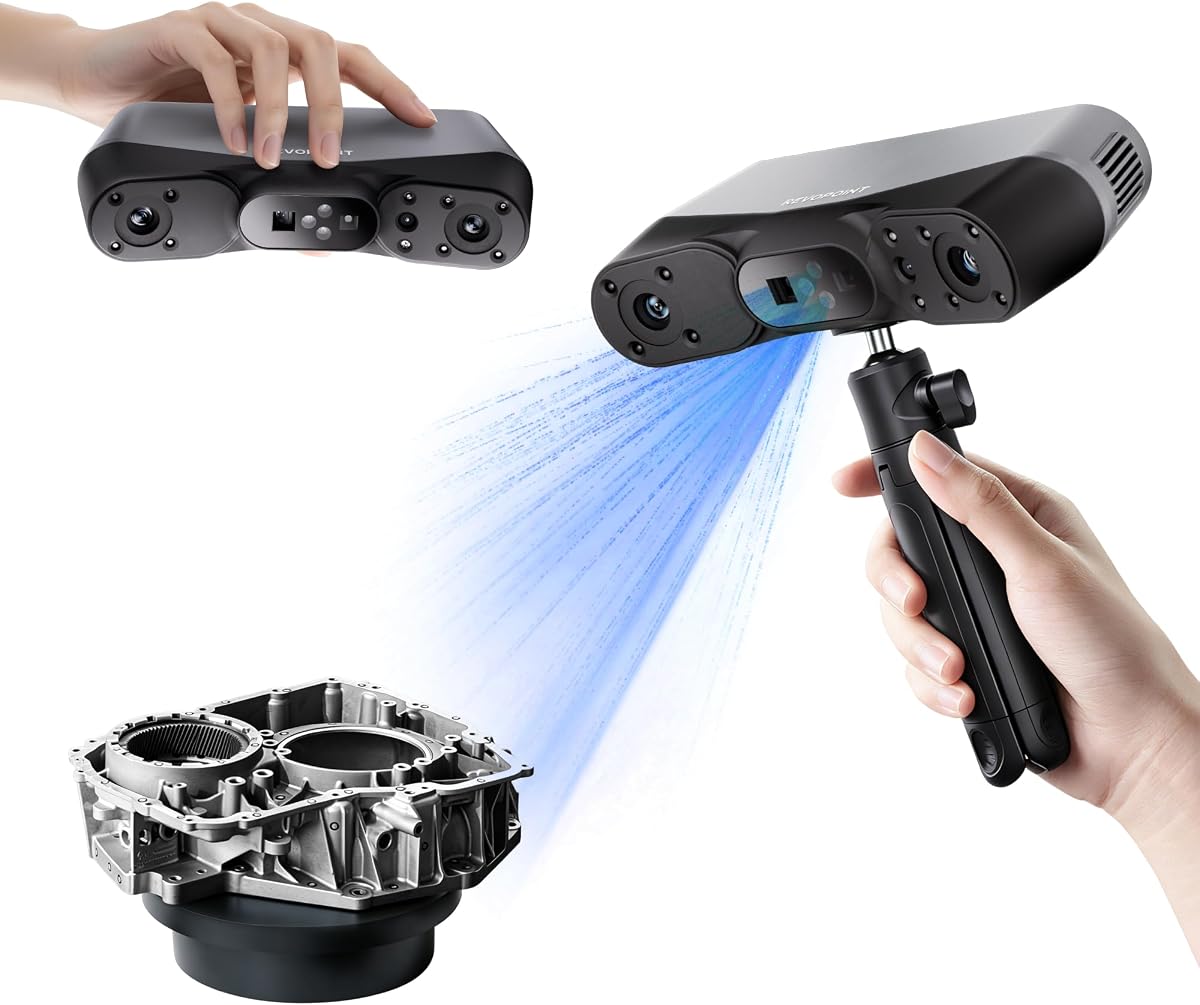
The MetroY Ultra is engineered for professionals who demand maximum precision. Its 0.01mm single-frame accuracy ensures that every micron of detail is captured faithfully. This makes it perfect for reverse engineering complex components or quality inspection tasks where tolerance is critical.
We may earn a commission when you buy through this link, at no additional cost to you.
Speed and reliability are hallmarks of this device. The 90 FPS scanning capability reduces total capture time significantly compared to slower models. Additionally, the ability to scan outdoors in bright sunlight without losing data integrity makes it a robust choice for fieldwork.
The primary trade-off is the requirement for a high-performance GPU to unlock its fastest speeds. Without it, performance may be slower. However, even on standard CPUs, it outperforms many competitors. This investment pays off in efficiency for daily professional use.
For industrial users, the MetroY Ultra delivers unmatched performance. It handles reflective and dark surfaces effortlessly, removing the need for messy sprays. Its wireless design provides the freedom needed for inspecting large machinery or equipment in tight spaces.
0.01mm precision ensures reliable measurements for tight tolerances.
90 FPS capture speeds drastically reduce workflow interruptions.
We may earn a commission when you buy through this link, at no additional cost to you.
The CR-Scan Ferret SE is designed to make 3D scanning accessible to everyone. Its low cost and easy-to-use interface remove the technical barriers that often discourage newcomers. Even with basic specs, it produces models suitable for hobby projects and prototyping.
We may earn a commission when you buy through this link, at no additional cost to you.
Anti-shake tracking is a standout feature that ensures smooth results even if your hand moves during a scan. This forgiveness is crucial for beginners who are still developing steady hand control. The ability to scan dark objects without spray adds significant convenience for everyday tasks.
Accuracy is naturally lower than high-end models, but sufficient for most non-critical applications. If you need precise measurements for engineering, this may not be enough. However, for printing and visual modeling, it strikes a good balance between cost and performance.
Start your scanning journey with the Ferret SE to learn the basics. It provides immediate results and builds confidence for tackling more complex projects. Once you understand your needs, you can decide if upgrading to a more precise device is necessary.
Stabilizes scans even with hand movements for error-free results.
Simplifies workflow by eliminating messy surface preparation.
We may earn a commission when you buy through this link, at no additional cost to you.
The POP 4 leverages artificial intelligence to simplify the post-processing phase. By automatically identifying your target object and filtering background noise, it saves hours of manual editing. This is particularly useful for scanning objects in complex environments like home offices or workshops.
We may earn a commission when you buy through this link, at no additional cost to you.
It offers a wide range of scanning modes, including VCSEL for rapid capture and structured light for detailed geometry. The outdoor capability ensures it performs well in natural light, expanding where you can work. Connectivity features allow you to view scans on a phone or tablet for better ergonomics.
Some advanced features like AI segmentation are limited to Windows platforms. This might be a hurdle for macOS users who need specific workflows. However, the core scanning capabilities remain strong regardless of the software environment used for basic alignment.
For users who prioritize speed and ease of use, the POP 4 is an excellent choice. Its AI tools streamline the path from raw data to finished model. It balances technical performance with user-friendly features, making it a versatile tool for creators.
Automatically isolates objects to remove background clutter.
Handles bright lighting conditions for outdoor projects.
We may earn a commission when you buy through this link, at no additional cost to you.
The INSPIRE 2 is engineered for mobility and ease of use in varied environments. Its incredibly light weight makes it easy to hold for extended periods without fatigue. This is vital for scanning large objects where arm movement is frequent and tiring.
We may earn a commission when you buy through this link, at no additional cost to you.
Optical zoom functionality allows you to adjust the field of view without moving the scanner physically. This flexibility helps capture details on complex geometries without constant repositioning. The dual modules ensure you can switch between structured light and laser modes based on material needs.
While it shines in shaded outdoor areas, direct bright sunlight can still pose challenges. For those working outside, understanding these limits helps avoid frustration. However, for most indoor and semi-outdoor tasks, it performs admirably and delivers consistent results.
Choose the INSPIRE 2 if you need a lightweight, flexible tool that travels well. It combines solid accuracy with user-friendly features that reduce physical strain. It is an ideal companion for fieldwork, heritage preservation, or travel-based scanning projects.
190g weight reduces hand fatigue during long sessions.
Adjustable magnification captures details without movement.
We may earn a commission when you buy through this link, at no additional cost to you.
The MetroX Pro automates many of the tedious aspects of 3D scanning. Its dual-axis turntable allows for one-click automated scans of complex objects. This consistency ensures uniform data collection without manual hand errors.
We may earn a commission when you buy through this link, at no additional cost to you.
Industrial-grade accuracy meets the needs of professional design and inspection. The blue laser ensures high fidelity on surfaces that might otherwise be difficult to capture. Real-time streaming lets you monitor progress from a mobile device, freeing up your workspace.
While the automated features are powerful, they require proper setup to work correctly. Users must calibrate the turntable and manage software settings carefully. However, once configured, the workflow becomes significantly faster and more reliable than manual scanning.
For users with repetitive scanning needs, the MetroX Pro is a worthwhile investment. It balances high precision with smart automation. This device helps streamline production lines or detailed design projects where consistency is paramount.
Automates scans for consistent data collection.
0.01mm precision meets professional engineering standards.
We may earn a commission when you buy through this link, at no additional cost to you.
The Fox offers a practical middle ground between hobbyist toys and expensive industrial units. Its medium-format design allows for capturing objects larger than a hand without the bulk of large scanners. The 0.07mm accuracy is sufficient for most printing and prototyping tasks.
We may earn a commission when you buy through this link, at no additional cost to you.
AI visual tracking is a key feature that prevents scans from failing if you move too fast. This robustness reduces anxiety during the scanning process and improves success rates. The JMStudio software integrates all steps, from capture to export, into one smooth workflow.
While it lacks the highest precision on the market, its reliability makes it a favorite for regular users. You can trust it to handle standard projects without constant troubleshooting. This dependability is often more valuable than raw specs for day-to-day work.
Choose the Fox if you need a reliable scanner that grows with you. It is affordable yet capable enough for serious tasks. As your skills improve, you will appreciate the balance of performance and ease of use it provides.
Relocks onto objects quickly to prevent lost scans.
Ideal size for standard hobby and small business needs.
We may earn a commission when you buy through this link, at no additional cost to you.
The Otter Lite stands out for its exceptional range of object sizes. With four cameras using different focal lengths, it can handle tiny coins and large furniture with ease. This versatility makes it a great choice for users who scan diverse items.
We may earn a commission when you buy through this link, at no additional cost to you.
The eye-safe infrared technology enables scanning people safely without harmful lasers. The 30fps speed ensures you can capture moving subjects if needed. Full color capture brings your models to life with rich textures and accurate colors.
While it works best indoors, its Wi-Fi 6 support improves connectivity with PCs. The software handles large datasets efficiently, but you may need optimization for very big scans. Overall, the flexibility of its hardware design is its strongest selling point.
If you need one device for mixed-size projects, the Otter Lite is an ideal pick. It balances detail with scale better than many competitors. Its ease of use and reliable performance make it accessible for both beginners and pros.
Combines long and short focal lenses for range.
Enables safe full-body scanning without harmful exposure.
We may earn a commission when you buy through this link, at no additional cost to you.
The Ferret Pro upgrades the classic Ferret experience with modern connectivity. Its WiFi6 support significantly speeds up data transfer to PCs. This reduces wait times when working with larger models or complex meshes.
We may earn a commission when you buy through this link, at no additional cost to you.
Outdoor capabilities have been enhanced to handle brighter light than previous versions. You can scan outside without losing track of the object. The anti-shake technology continues to make the device forgiving for new users.
While compatible with many devices, some mobile features require specific models or OS versions. Checking compatibility lists before purchasing ensures you avoid connectivity issues. For those with the right setup, the mobile workflow is seamless and intuitive.
This device is perfect for users who want freedom from cables. It offers reliable performance for both indoor and outdoor tasks. With its balance of speed and portability, it is a solid upgrade for existing Creality users.
Faster data transfer improves workflow efficiency.
Reliable in up to 30,000 lux ambient light.
We may earn a commission when you buy through this link, at no additional cost to you.
The MIRACO Plus combines scanning and computing into a single device. Its integrated 6-inch AMOLED screen lets you review scans immediately without needing a separate laptop. This self-contained approach simplifies field work significantly.
We may earn a commission when you buy through this link, at no additional cost to you.
Photogrammetric metrology adds high precision for measurements. This is useful for applications where exact dimensions are critical. The powerful processor and ample RAM ensure smooth operation even with massive datasets. It handles complex geometries without lag.
The device is heavier than handheld units, which can affect long-term usability. However, the convenience of not carrying extra laptops or cables offsets this. It is a robust solution for professionals who need a complete solution on the go.
For field engineers or surveyors, the MIRACO Plus is unmatched in convenience. Its all-in-one design eliminates the need for post-transfer processing. This device streamlines the entire process from capture to analysis effectively.
Integrated screen allows immediate data review.
High-precision measurements for professional engineering.
We may earn a commission when you buy through this link, at no additional cost to you.
Selecting the right 3D scanner involves balancing accuracy, speed, and cost. Understanding key factors ensures you choose a device that aligns with your workflow needs and project requirements.
Accuracy determines how precisely the scanner replicates real-world dimensions. For engineering or reverse engineering, look for sub-millimeter accuracy like 0.01mm or 0.03mm. Hobbyists may find 0.1mm sufficient for visual models and prototyping. Higher resolution captures finer details but often requires more processing power and storage.
Choose accuracy levels based on your specific application. Precision matters for technical parts but is less critical for art pieces.
Scanning speed affects your workflow efficiency. Devices offering 30 FPS or higher capture data quickly, reducing total time per object. Faster speeds are essential for dynamic scanning or large projects where time is a constraint. Slower scanners might be adequate for static, high-detail tasks where precision is prioritized.
Prioritize FPS ratings if you handle large or multiple objects frequently.
Wireless features like Wi-Fi 6 allow flexible movement and remote monitoring. Handheld devices with robust connectivity can reduce cable clutter and improve ergonomics. Wired options ensure stable data transfer for large datasets without signal interference. Some models support cross-screen streaming for mobile previews.
Consider your workspace layout and cable tolerance when choosing connectivity.
Certain surfaces like shiny metals or dark materials require special handling. Many modern scanners use structured light or lasers to handle these without spray. Models that explicitly mention spray-free scanning save significant preparation time. Verify the scanner's ability to handle the typical materials in your projects.
Choose devices with advanced light technologies to avoid surface prep work.
Post-processing software is as important as hardware. Look for tools that offer automatic hole filling, noise filtering, and texture mapping. AI-powered features can reduce manual editing time significantly. Ensure the software is compatible with your operating system and preferred export formats.
Evaluate the software suite before purchasing to avoid workflow bottlenecks.
Weight and ergonomics impact how long you can use the device. Lightweight units reduce fatigue during extended scanning sessions. Some models include battery packs or grips for better handling. Consider whether you need a truly portable solution for fieldwork or a stationary unit for studio use.
Opt for lightweight designs if you scan frequently or move around often.
Prices vary widely from hundreds to thousands of dollars. Entry-level devices offer basic features suitable for hobbyists. High-end models provide industrial-grade accuracy and automation. Align your budget with the value of your intended output. Sometimes mid-range devices offer the best balance for casual pros.
Invest in features that directly impact your project success rather than specs alone.
Always calibrate your scanner before each major session to ensure accuracy. Follow manufacturer instructions using the provided calibration board to adjust for any lens or sensor shifts. This simple step prevents errors during critical projects.
Keep lenses and sensors clean with a soft, lint-free cloth. Dust or smudges can degrade scan quality and cause tracking issues. Avoid touching glass surfaces directly to prevent oil deposits. Store the device in a dry case when not in use.
Update firmware regularly to access new features and bug fixes. Many manufacturers release improvements that enhance speed or add compatibility. Check for updates monthly to keep your device performing at its best. This ensures you benefit from ongoing software support.
Modern scanners often use structured light or lasers that handle reflective or dark surfaces without spray. However, always check the manufacturer's specs. High-end models typically skip spray, while budget ones may still require it for consistent results.
Most scanners export to STL, OBJ, or PLY formats. These are widely compatible with slicing software. Ensure your model is watertight and scaled correctly before importing. Most scanner software includes repair tools for this purpose.
Some models support full-body or face scanning safely. Look for eye-safe infrared lasers and sufficient field of view. Ensure the device is certified safe for skin exposure. Always scan in well-lit environments for better tracking.
Basic scanners work on standard laptops. However, high-end models may require strong GPUs for real-time processing. Check system requirements carefully. Most consumer devices run well on mid-range computers without dedicated graphics cards.
Consumer scanners typically range from 0.1mm to 0.03mm accuracy. This is sufficient for most prototyping and artistic projects. Industrial devices offer higher precision for engineering. Always match accuracy to your tolerance requirements.
Many scanners come with proprietary software for viewing and editing. You can also use free tools like Meshmixer or Meshlab. For CAD work, specialized software like Fusion 360 might be required. Check compatibility before purchasing.
The Creality Pika, Revopoint MetroY Ultra, and CR-Scan Ferret SE stand out for their diverse strengths. Whether you need precision, speed, or affordability, these three models cover most user needs. They represent the top choices available in the current market.
Prioritize accuracy and speed for engineering tasks but focus on usability for hobby projects. Balancing technical specs with practical workflow requirements ensures you invest wisely. Consider how each device fits into your existing tools and processes.
Always check current availability and compatibility before finalizing your purchase. Technology evolves quickly, and new firmware or models may impact performance. Stay informed to make the most of your scanning investment.