
xTool F2 Ultra 60W
4.2Editor score
MOPA & Diode Dual
Color Engraving
Industrial Speed
Finding the right 60W laser engraver is crucial for makers who need speed and precision without compromising on safety. These machines offer a powerful balance for cutting and engraving various materials like wood, acrylic, and leather efficiently. Whether you run a small business or have a dedicated workshop, selecting the correct model ensures you get professional results every time.
We have evaluated ten distinct models based on their power output, safety features, software compatibility, and overall build quality. Our analysis focuses on real-world performance metrics and user feedback to provide a clear picture of how each unit stands up to demanding tasks. This list covers diode, CO2, and fiber options to suit different material needs and budgets.
Each pick below highlights specific strengths and ideal use cases so you can match the machine to your project requirements. We include detailed breakdowns of cutting speeds, safety certifications, and included accessories to help you make an informed decision. Please note that availability and pricing may change, so verify current details before purchasing your next tool.
4.2Editor score

4.5Editor score

5.0Editor score
As an Amazon Associate we earn from qualifying purchases.
This table provides a side-by-side view of the most important specifications and features across all ten models. Use it to quickly compare safety ratings, laser types, and software options to find the best fit for your specific needs.




The Creality Falcon2 Pro 60W stands out as a top choice for users needing serious power and safety. It offers a class 1 fully enclosed design which is rare for high-powered desktop units. The dual laser system allows for precise positioning alongside heavy-duty cutting tasks.
We may earn a commission when you buy through this link, at no additional cost to you.
Its adjustable power settings let you switch between 60W, 40W, and 22W to match your material needs. The integrated HD camera streamlines your workflow by providing accurate material positioning and live previews. This reduces setup time significantly for batch production runs.
While the initial investment is higher than some competitors, the professional-grade features justify the cost for businesses. The enclosed structure minimizes smoke exposure and enhances operator safety during long sessions. You get a robust machine that handles demanding projects with consistency.
This model is ideal for small businesses and serious makers who prioritize safety and output quality. It balances speed and precision in a way that fewer machines at this price point can match. We recommend it for those ready to upgrade their engraving capabilities.
The Class 1 enclosure ensures that laser emissions are contained, making it safe for open environments without protective eyewear during operation.
The HD camera system allows for visual alignment and batch processing, which cuts down on manual measuring and setup errors.
We may earn a commission when you buy through this link, at no additional cost to you.
This version of the Falcon2 Pro emphasizes rapid batch production capabilities with its intelligent positioning functions. It features a built-in camera that connects to your computer for intuitive previewing of your designs. This is particularly useful for users who need to process multiple items quickly without errors.
We may earn a commission when you buy through this link, at no additional cost to you.
The machine includes multiple safety features such as flame detection and an emergency stop button for peace of mind. Its 60W output is capable of cutting through various thicknesses of wood and acrylic in a single pass. The enclosed design helps contain smoke and noise effectively during operation.
While the hardware is robust, some users might find the software setup slightly complex at first. The 10-minute quick install feature helps mitigate this, but the learning curve exists for advanced configurations. Safety mechanisms like the auto-stop when opened are excellent additions for busy workshops.
Ideal for sole traders or professional players needing high efficiency in production, this unit delivers speed. It is built to handle heavy use cases where consistency and safety are paramount concerns. Consider this if batch output is your primary goal.
Features like flame detectors and laser detection covers ensure that potential hazards are caught early during the engraving process.
The bottom drawer design allows for easy removal of debris after creation, simplifying cleaning tasks significantly.
We may earn a commission when you buy through this link, at no additional cost to you.
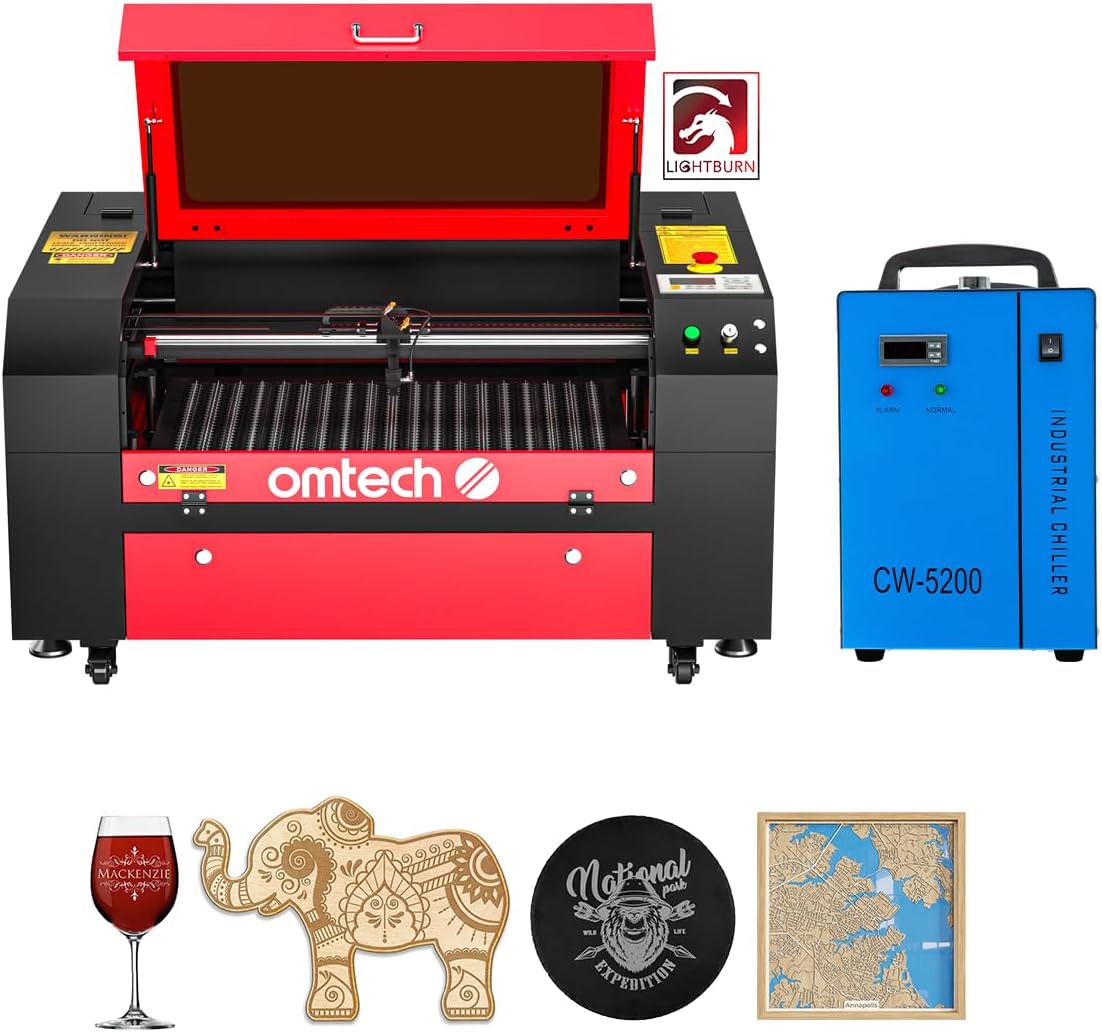
The OMTech Maker 60W CO2 laser engraver bundle offers excellent value with essential accessories like a water chiller. It features a large work area of 20 by 28 inches which accommodates bigger projects effortlessly. The autofocus function removes the guesswork from setting the focal distance for your materials.
We may earn a commission when you buy through this link, at no additional cost to you.
Users will appreciate the four-way pass-through doors that allow for handling longer items without removing them fully. The honeycomb and aluminum blade beds provide stability and support for various material types. Its design prioritizes safety with a widened flame retardant viewing window.
While CO2 lasers are typically larger and heavier, this model provides a stable platform for high-quality engraving. It is well-suited for businesses needing to cut thicker acrylics or woods with consistent results. The included software makes it ready to use right out of the box.
For those seeking a classic CO2 experience with modern conveniences like autofocus, this is a strong contender. It balances cost and performance well for users who need a reliable machine for non-metal cutting. The bundle nature adds significant convenience for new owners.
The 20×28 inch bed and pass-through doors mean you can work on larger signs or batches without limitations.
Autofocus capabilities mean you spend less time adjusting and more time cutting with precise focus every time.
We may earn a commission when you buy through this link, at no additional cost to you.
This model prioritizes safety with its Class 1 certification and fire-resistant metal enclosure design. The integrated auto-stop function adds an extra layer of security for users of all levels. It allows for visualized operations through a high-resolution camera that scans drawings automatically.
We may earn a commission when you buy through this link, at no additional cost to you.
The dual laser bundle provides competitive performance by offering ultra-fine engraving alongside standard cutting capabilities. Air assist and exhaust systems work together to keep the lens clean and the environment free of smoke. This makes it suitable for studios where clean operation is key.
Free professional software is included to help you get started without immediate additional costs. Pre-assembly means you can start using the machine quickly after a brief setup period. Customer support is available to guide you through any technical issues you may encounter.
This unit is excellent for small businesses needing high performance in a compact, safe package. The visual and automated features reduce the skill barrier for precise engraving work. It is a great choice for those valuing safety and ease of use.
The high-resolution camera turns operations into a visual process, making alignment and batch work much easier.
Effective exhaust systems filter smoke and dust, protecting your optics and ensuring a cleaner workspace environment.
We may earn a commission when you buy through this link, at no additional cost to you.
The xTool F2 Ultra combines a 60W MOPA fiber laser with a 40W diode laser for unmatched versatility. It can master metals, wood, acrylic, and more with vibrant color engraving capabilities. This dual setup makes it a one-machine solution for diverse production requirements.
We may earn a commission when you buy through this link, at no additional cost to you.
AI-powered cameras enhance precision significantly, allowing for material detection and one-click focus settings. The machine supports black marking and color engraving on various metals like stainless steel and aluminum. Its industrial-grade productivity features speed up 3D embossing tasks efficiently.
While it comes at a premium price point, the capability to handle color metal engraving alone justifies the investment. Safety is managed as it is a Class 4 laser requiring specific operational protocols. The expandable workspace supports automated batch processing for high-volume orders.
This tool is ideal for advanced users and businesses needing to cut color on metal. It pushes the boundaries of what desktop laser engravers can achieve in terms of material diversity. Consider it if you need professional results on metals without a dedicated floor machine.
With over 100 consistent colors on metal, you can create unique designs without paint or powder coating.
Dual AI cameras increase positioning accuracy to 0.2mm, ensuring your designs land exactly where intended.
We may earn a commission when you buy through this link, at no additional cost to you.
This Monport machine is designed specifically for high-precision metal marking with a fiber laser source. It offers a working area of 150 by 150 mm which is optimal for maintaining accuracy at the edges. The customized galvanometer system enables engraving speeds up to 10000 mm per second.
We may earn a commission when you buy through this link, at no additional cost to you.
The lifespan of the fiber laser reaches up to 100000 hours, providing long-term reliability for frequent users. LightBurn compatibility ensures you have access to industry-standard software for your design and control needs. Deep engraving capabilities allow for detailed 2.5D metal work.
The accuracy of 0.01mm is excellent for intricate designs and small text on various metals. It is a great choice for businesses focused on jewelry, tools, or industrial marking. The integrated mini design saves space while maintaining high performance standards.
Ideal for those needing to mark metal with precision, this unit delivers consistent results. The included software simplifies the setup process for new users. Consider this if your primary focus is metal marking and long equipment longevity.
With 100000 hours of lifespan, the fiber source ensures your machine remains operational for many years of daily use.
The galvanometer system delivers 10000mm/s speeds with 0.01mm precision for efficient and detailed metal work.
We may earn a commission when you buy through this link, at no additional cost to you.
The VEVOR 60W CO2 laser engraver offers a spacious 24 by 16 inch work area at a competitive price. It features a four-way pass-through design which allows for processing longer materials without manual repositioning. The built-in air-assist system helps clear smoke and keeps the lens clean.
We may earn a commission when you buy through this link, at no additional cost to you.
Users can enjoy a laser tube life of over 3500 hours, providing reliable uptime for production runs. The machine is compatible with popular design software like LightBurn and CorelDRAW for flexible workflow options. It is optimized for non-metal materials such as wood, acrylic, and glass.
While it requires manual focusing, the control panel knob system is straightforward to use for most projects. The pull-out waste tray makes cleanup simple after long engraving sessions. This machine prioritizes value and practicality for home businesses or small studios.
If you need a large bed for big projects on a budget, this model is an excellent option. Its pass-through capability makes it versatile for custom signs or longer items. It delivers clean edges on non-metal materials efficiently.
The four-way pass-through design lets you feed long materials through, enabling larger projects without extra cuts.
Compatibility with LightBurn, CorelDRAW, and RDWorks ensures you can use your preferred design tools seamlessly.
We may earn a commission when you buy through this link, at no additional cost to you.
This OMTech model brings automation to the desktop with its motorized Autolift workbed feature. You can adjust the bed height at the touch of a button, saving time during setup. The water chiller ensures consistent laser performance and extends the life of the laser tube.
We may earn a commission when you buy through this link, at no additional cost to you.
The 20 by 28 inch honeycomb bed supports large items with pass-through doors for long materials. Its high-performance DC tube delivers 60W of power for deep engraving on non-metallic materials. The machine is designed for commercial use with reliable operation during long hours.
Automation features make this unit appealing for users who value efficiency and ease of use. The high speed of 600 mm/s transforms artistic visions quickly. It is built to handle various projects from deep engraving to detailed cutting.
Ideal for commercial setups needing consistent output, this machine reduces manual effort. The Autolift feature is a significant time saver for batch jobs. Consider it if you need a reliable CO2 laser with modern conveniences.
Motorized workbed adjustment allows you to set focal height quickly without manual cranks or guesswork.
A water chiller maintains stable temperatures, ensuring your laser output remains consistent during long runs.
We may earn a commission when you buy through this link, at no additional cost to you.
The Aliencell X1 Lite 60W focuses on photo-quality engraving with high frequency pulses for sharp results. It features a massive 26 by 21 inch bed size ideal for small businesses working on larger projects. The simulated preview reduces waste by showing you exact depth and contrast before processing.
We may earn a commission when you buy through this link, at no additional cost to you.
Intelligent auto-focus locks onto your material instantly with mathematical precision for perfect depth. This machine is Class 1 enclosed with rigorous safety testing and flame sensors. It supports Lightburn for professional design control while offering its own intuitive software.
Its acceleration and frequency capabilities ensure clean gradients and grayscale detail even at high speeds. The space simulation minimizes trial and error, which saves time and materials during production. It combines industrial speed with desktop safety standards.
For those seeking detailed photo engraving without sacrificing precision, this unit is a top choice. The combination of preview accuracy and automation makes it efficient for varied workflows. Consider it if quality and waste reduction are your primary concerns.
Space simulation predicts engraving results with less than 5% deviation to minimize material waste.
20kHz frequency ensures dense laser pulses for smoother gradients and richer detail in photo engraving.
We may earn a commission when you buy through this link, at no additional cost to you.
This Cloudray model uses a JPT MOPA fiber laser source to deliver over 100+ color markings on metal. It is compact and portable with a gross weight of 43 lbs, making it easy to move. The machine offers deep engraving capabilities of up to 0.5mm for detailed metal work.
We may earn a commission when you buy through this link, at no additional cost to you.
Two F-Theta lenses provide different working areas allowing for versatility in your projects. Its accuracy of 0.01mm ensures that intricate designs and small text remain precise. The system is designed for metal fabrication and jewelry applications with consistent quality.
The color marking feature is a standout for users needing custom branding without paint. Portable packaging includes essential accessories like goggles and positioning bars for quick setup. It is ideal for specialized engraving tasks on metal surfaces.
If you need a focused metal marking machine with color capabilities, this is a strong option. Its lightweight build and included lenses add practical value for specialized work. Consider it for professional metal engraving tasks.
With MOPA technology, you can mark over 100+ vibrant colors directly on metal surfaces.
Reach engraving depths up to 0.5mm for durable and prominent marks on various metal materials.
We may earn a commission when you buy through this link, at no additional cost to you.
Choosing a 60W laser engraver involves balancing power, safety, and material needs. Here are key factors to consider to make the right decision.
The core of any machine is its laser source. Diode lasers are common for desktop use, while CO2 lasers excel at cutting non-metals, and fiber lasers are for metal. A 60W rating can vary between these types, so check actual power output in milliwatts to ensure it meets your needs.
Choose a type that matches your primary materials. Diodes are great for wood and acrylic, while fiber lasers are better for metal marking.
Safety should be a top priority. Look for Class 1 enclosures that contain laser emissions, allowing you to work without special eyewear. Models with flame detectors and emergency stops add extra protection against accidental fires.
Always prioritize models with certified safety features to protect your workspace and health.
Your design workflow depends on the software. Most professional models support LightBurn, which is a robust option for layout and control. Check if the machine comes with free software or requires additional purchases.
Ensure the software works with your operating system and design style before buying.
The bed size determines the maximum material you can engrave in one go. Larger beds are better for signs or batch production. Also check for pass-through doors if you work on long items.
Select a bed that accommodates your typical project dimensions.
High speeds reduce production time significantly. Look for engraving speeds over 500 mm/s for better throughput. Air assist systems help keep the lens clean and improve cutting quality.
Speed matters if you run a business where time is money.
Modern machines include autofocus and cameras for alignment. These features reduce manual setup time and improve consistency. Some models even offer batch processing modes.
Automation features can greatly simplify your workflow and reduce errors.
Check for available technical support and warranty coverage. A 12-month warranty is standard, but some brands offer lifetime support. Good documentation and installation guides help avoid early issues.
Good support ensures you can resolve problems quickly if they arise.
Different machines handle different materials. CO2 lasers are great for plastics and wood, fiber for metals, and diodes for a mix. Ensure the machine handles the specific materials you plan to cut.
Match the machine to your intended materials to get the best results.
Always start by reading the manual and understanding the safety features of your unit. Ensure you have proper ventilation and that the machine is placed on a stable surface.
Use the provided software to import your designs and adjust power and speed settings for your material. Run a test on a scrap piece to verify focus and settings before full production.
Clean the lens and mirrors regularly to maintain power and clarity. Check the air assist system and remove debris from the bed to prevent burns and ensure smooth operation.
A 60W laser engraver can cut wood, acrylic, leather, and paper easily. Fiber lasers are needed for metals, while CO2 or diode models handle non-metals. Avoid cutting PVC or plastics that release toxic fumes.
Yes, a Class 1 laser is considered safe because it is fully enclosed and emits no harmful radiation during operation. It is designed for use without protective eyewear in open spaces.
Most professional machines support LightBurn for precise control. Some come with free alternatives, but LightBurn offers advanced features and is widely used for 60W engravers.
Use a soft cloth and lens cleaner to wipe the lens periodically. Check for dust or debris after sessions and ensure the air assist system is working to prevent buildup.
CO2 tubes often last around 3000 to 5000 hours, while fiber lasers can last over 100000 hours. Regular maintenance and proper cooling help extend the lifespan.
Only fiber lasers can engrave on metal effectively. CO2 and diode models may mark coated metals but cannot etch bare metal surfaces.
We highlighted top picks like the Creality Falcon2 Pro for overall performance and the xTool F2 Ultra for premium metal capabilities. Each model offers unique features tailored to different needs.
Prioritize safety, material compatibility, and workflow automation when making your final decision. The right machine will serve your projects well for years to come.
Always verify current specifications and pricing before purchasing to ensure you get the best value. Prices and availability change so keep an eye on the latest offers.