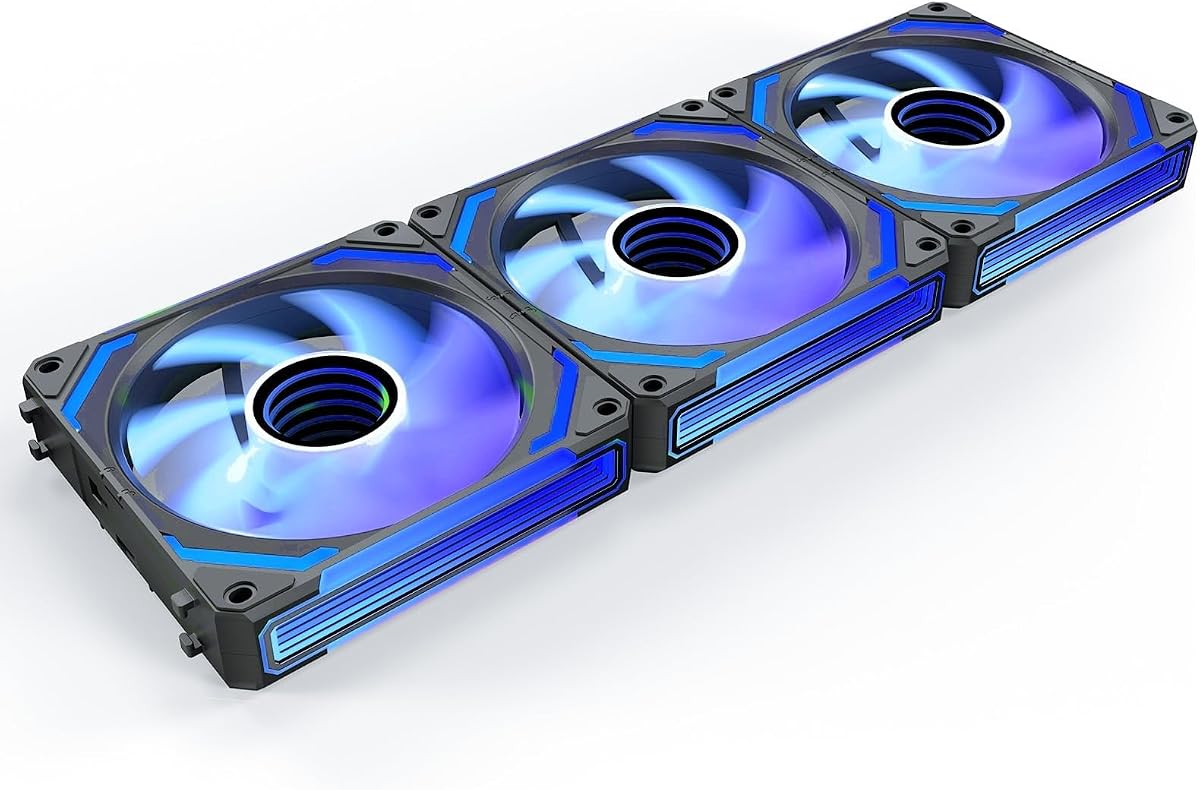
AsiaHorse COSMIQ 3 Pack
4.8Editor score
Infinity Mirror RGB
Music Sync Control
Daisy Chain Design
Discover the top addressable RGB fans for your PC build. We compare cooling performance, lighting sync, noise levels, and real user ratings to help you choose.
Addressable RGB fans have transformed how we personalize our PC builds, offering vibrant lighting effects that sync with your system. These fans not only cool your components but also add a stunning visual layer to your setup.
We evaluated ten top-rated addressable RGB fans based on cooling performance, noise levels, lighting quality, and ease of installation. Each product was analyzed for its unique features and real-world user feedback to ensure reliability.
Each pick in this guide highlights specific strengths, from budget-friendly options to premium models with advanced lighting. Note that prices and availability change frequently, so check the current listings before making your final decision.
4.8Editor score

4.7Editor score

4.7Editor score
This side-by-side comparison highlights the key specifications and features of all ten products reviewed. Use this table to quickly identify which fan best fits your specific cooling and aesthetic needs.




The Thermalright TL-C12C-S 5 Pack offers exceptional value for builders needing multiple fans. With a 4.7 rating, it delivers balanced cooling and quiet operation through its S-FDB bearings.
We may earn a commission when you buy through this link, at no additional cost to you.
Its PWM control adjusts speed automatically based on temperature, ensuring efficient cooling without unnecessary noise. The ARGB lighting is soft and integrates well with most cases and motherboards.
While the 1550 RPM max speed is modest compared to high-performance options, it remains sufficient for standard builds. The lack of a dedicated controller requires direct motherboard connection.
This pack is ideal for budget-conscious users seeking reliability and decent aesthetics. It is a strong all-around choice for both case and CPU cooler applications.
The S-FDB bearings minimize blade shaking and reduce operational noise significantly, ensuring smooth and reliable performance.
These fans work effectively as case fans or CPU cooler replacements, providing flexibility for various system configurations.
We may earn a commission when you buy through this link, at no additional cost to you.
The CORSAIR RS120 ARGB Triple Pack focuses on streamlined installation and efficient airflow. Its daisy-chain design reduces cable clutter significantly, making it great for tidy builds.
We may earn a commission when you buy through this link, at no additional cost to you.
With a max speed of 2100 RPM and 72.8 CFM airflow, it provides robust cooling for radiators and high-heat components. The AirGuide technology concentrates airflow where it is needed most.
The magnetic dome bearing ensures quiet operation over time, though the premium price reflects this durability. It requires a motherboard with ARGB support for full lighting control.
Ideal for users prioritizing clean aesthetics and strong cooling, this pack delivers reliable performance. It is a premium choice for those willing to invest in quality components.
Daisy-chaining allows multiple fans to connect through a single PWM and ARGB port, minimizing cable count and improving airflow.
Anti-vortex vanes direct air more efficiently, ensuring optimal cooling performance for hot components inside the case.
We may earn a commission when you buy through this link, at no additional cost to you.
The ARCTIC P12 Pro A-RGB is an outstanding budget option for performance-focused builders. It offers high static pressure and a massive 3000 RPM speed at a very affordable price point.
We may earn a commission when you buy through this link, at no additional cost to you.
Its fluid dynamic bearing minimizes noise and extends the fan's lifespan. The redesigned rotor blades optimize performance even at lower speeds, ensuring quiet operation during idle.
While the lighting options are standard compared to premium models, the cooling efficiency is top-tier. It excels in dense radiators and tight spaces where pressure matters most.
Best for users seeking raw cooling power without extra frills, this fan is a reliable choice. Its price makes it accessible for large multi-fan setups without breaking the budget.
The fan generates high static pressure, allowing it to push air effectively through dense radiators and mesh structures.
Automatic balancing and high-precision measurement reduce vibrations, contributing to smoother and quieter operation over time.
We may earn a commission when you buy through this link, at no additional cost to you.
The Thermaltake CT120 EX ARGB features MagForce 2.0, a magnetic connection design that simplifies multi-fan setups. This design reduces cable clutter and makes installation much easier.
We may earn a commission when you buy through this link, at no additional cost to you.
With nine addressable LEDs, the lighting covers a good portion of the fan, creating vibrant effects. The hydraulic bearing ensures quiet and reliable operation over extended use.
Anti-vibration mounting helps minimize noise, but the RPM range is narrower than some competitors. It requires careful setup to maximize the magnetic daisy-chain benefits.
Best for those prioritizing installation convenience and visual appeal, this pack is a solid contender. It works well in cases with flexible layouts and compatible cooling systems.
The MagForce 2.0 design connects fans directly, reducing cable count and improving airflow efficiency inside the case.
Optimized hydraulic bearing ensures smooth operation and reduces the likelihood of premature wear or noise issues.
We may earn a commission when you buy through this link, at no additional cost to you.
This unique 6-pack includes both forward and reverse fans, addressing airflow visibility challenges in modern cases. Reverse blades ensure the lighting remains visible even when installed as intake fans.
We may earn a commission when you buy through this link, at no additional cost to you.
Each fan packs 28 LEDs for vibrant illumination, and the included hub simplifies speed and lighting management. This centralized control reduces cable clutter effectively.
While the max speed is limited to 1550 RPM, the high LED count compensates with visual appeal. It is perfect for users prioritizing aesthetics alongside basic cooling needs.
Best for builders seeking a complete aesthetic package without external controllers, this pack is a strong choice. Its inclusion of reverse fans sets it apart from standard offerings.
Reverse fans maintain lighting visibility when mounted as bottom or side intake fans, ensuring visual consistency.
The 2-in-1 ARGB and PWM hub provides centralized management, reducing cable clutter and simplifying installation.
We may earn a commission when you buy through this link, at no additional cost to you.
The Thermalright TL-C12C-S X3 provides a compact solution for small cases or specific CPU cooler replacements. It maintains the same silent operation and performance as the 5-pack variant.
We may earn a commission when you buy through this link, at no additional cost to you.
S-FDB bearings ensure quiet operation even at full speed, and the ARGB lighting adds a subtle aesthetic touch. The 3-pack size is flexible for targeted cooling upgrades.
Performance is consistent with its larger sibling, offering reliable airflow without excessive noise. It is a straightforward upgrade for users needing a few high-quality fans.
Best for users requiring exactly three fans without excess waste, this pack is practical. It delivers the same reliability and quiet operation as other Thermalright models.
The S-FDB bearing technology minimizes noise while providing smooth and efficient rotation over long periods of use.
The 3-pack allows for targeted upgrades in case intake or exhaust positions without requiring larger multi-packs.
We may earn a commission when you buy through this link, at no additional cost to you.
The Thermalright TL-C12C-S X5 delivers consistent performance across five units, ideal for full case cooling. It shares the reliable specifications and silent operation of its siblings.
We may earn a commission when you buy through this link, at no additional cost to you.
PWM control adjusts speed based on temperature, ensuring efficient cooling when needed. The ARGB effects are soft and blend well with other components in a build.
While not designed for high-pressure applications, these fans are sufficient for standard airflow management. The price point makes them accessible for budget-focused builders.
Best for those seeking a complete five-fan solution without breaking the budget, this pack is excellent. It provides reliable performance and quiet operation across multiple slots.
The PWM function allows automatic speed adjustment based on temperature, balancing performance and noise levels effectively.
The 120mm size and balanced blade design ensure steady airflow suitable for standard case cooling needs.
We may earn a commission when you buy through this link, at no additional cost to you.
The Thermaltake CT120 ARGB 2 Pack offers high-speed cooling in a compact dual-pack format. With 2000 RPM and a 7-blade design, it delivers strong airflow for smaller setups.
We may earn a commission when you buy through this link, at no additional cost to you.
The hydraulic bearing provides durability and quiet operation, while the anti-vibration mounting minimizes unwanted noise. Daisy-chain connections simplify installation significantly.
It requires a 5V ARGB header for lighting sync, which is standard on most modern motherboards. The speed makes it suitable for users needing more aggressive cooling.
Best for those needing exactly two high-performance fans, this pack is efficient. Its speed and design make it a strong upgrade for limited slot setups.
The 7-blade design optimizes CFM and static pressure, ensuring better cooling performance than standard blades.
Hydraulic bearings reduce friction and noise, extending the fan's lifespan while maintaining smooth operation.
We may earn a commission when you buy through this link, at no additional cost to you.
The Thermaltake LE120 ARGB 3 Pack comes with a PWM splitter, simplifying cable management for multi-fan builds. Its 4.8 rating highlights user satisfaction with performance and value.
We may earn a commission when you buy through this link, at no additional cost to you.
It delivers 66.1 CFM airflow with hydraulic bearing stability. The daisy-chaining cables reduce clutter and leave room for other devices inside the case.
While the max speed is lower, the included splitter makes it easy to connect multiple fans without extra adapters. It is a practical choice for users wanting ease of installation.
Best for those seeking reliable performance with minimal fuss, this pack is strong. Its bundled splitter and stable bearings make it a hassle-free option.
The 3-way PWM splitter ensures quick installation, allowing easy connection of multiple fans to a single motherboard header.
Daisy-chained ARGB cables make wiring easier and reduce internal cable clutter, improving airflow and aesthetics.
We may earn a commission when you buy through this link, at no additional cost to you.
The AsiaHorse COSMIQ stands out with its premium infinity mirror design and music sync features. It delivers high performance with 2000 RPM and 68.5 CFM airflow.
We may earn a commission when you buy through this link, at no additional cost to you.
The FDB bearings ensure ultra-quiet operation even at maximum speed. The built-in sound pickup module changes lighting based on game sounds or music, adding interactive appeal.
Its price reflects these advanced features, making it a premium choice. The dedicated controller provides independent lighting control without extra cost or complexity.
Best for enthusiasts seeking high-end visuals and smart features, this pack is unmatched. Its music sync and mirror design transform a standard build into a dynamic experience.
The layered lighting design creates a high-end, immersive visual effect that elevates the overall aesthetic of the PC build.
Music sync and full-case light synchronization allow dynamic visual responses to audio, enhancing the gaming atmosphere significantly.
We may earn a commission when you buy through this link, at no additional cost to you.
Selecting the right addressable RGB fans involves balancing cooling performance, noise, lighting quality, and budget. This guide outlines the key factors to consider before purchasing.
Airflow, measured in CFM, indicates how much air a fan moves. Higher RPM generally increases airflow but also noise. For standard cases, 60-70 CFM is usually sufficient. High static pressure is critical for radiators.
Prioritize high CFM for intake/exhaust fans and high static pressure for radiators to ensure effective cooling.
Noise is measured in decibels (dBA). Silent builds require fans under 25 dBA at normal speeds. Look for fans with advanced bearings like fluid dynamic or hydraulic that reduce noise naturally.
Select fans with low dBA ratings to maintain a quiet and comfortable environment during gaming or work.
Check the number of addressable LEDs and whether the fan supports 5V 3-pin RGB sync. Better lighting effects come from diffused light sources and high LED counts. Ensure compatibility with your motherboard.
Choose fans with motherboard ARGB sync support to maintain consistent and customizable lighting across all components.
Bearing types like S-FDB, fluid dynamic, and hydraulic extend the fan's life and reduce noise. Magnetic dome bearings are often found in premium models. Avoid basic sleeve bearings for high-performance builds.
Opt for hydraulic or fluid dynamic bearings to ensure long-term reliability and consistent silent performance.
PWM allows precise speed control via a 4-pin connector, which is superior for temperature-based adjustments. DC control uses a 3-pin connector and is less precise. Most modern motherboards support PWM for better efficiency.
Select fans with 4-pin PWM connectors to take full advantage of motherboard temperature control features.
Fans with daisy-chain connectors allow multiple fans to connect through a single port, reducing cable clutter. This is a premium feature but highly desirable for clean builds. Look for magnetic daisy-chain options if available.
Consider daisy-chain capable fans to simplify wiring and improve internal airflow inside your PC case.
Packs of 3, 5, or 6 often offer better value per fan than buying individually. Budget models may have fewer features, while premium packs include controllers or reverse fans. Match the pack size to your exact case needs.
Compare the cost per fan in multi-packs to find the best value without overspending on unnecessary extras.
Some packs include dedicated controllers, reverse blades, or music sync capabilities. These features can simplify setup and enhance aesthetics. Ensure any included accessories are necessary for your specific build.
Evaluate if extra features like reverse blades or controllers add value to your specific case layout and aesthetic goals.
Install fans carefully by connecting the PWM and ARGB ports to the motherboard. Ensure the airflow direction matches your case layout, pushing air in for intake and out for exhaust.
Keep your system dust-free by cleaning fan blades regularly. Dust buildup can reduce airflow and increase noise levels significantly over time.
Use motherboard software to customize lighting effects and fan curves. Regularly update your BIOS and drivers to ensure full compatibility and stability.
Yes, addressable RGB fans typically require a 5V 3-pin ARGB header. Ensure your motherboard has this port. If not, you may need a compatible controller or adapter.
You can mix brands physically, but syncing colors may be difficult without third-party software. Using one brand ensures consistent lighting effects across all your fans.
4-pin connectors offer PWM speed control, which is more efficient. 3-pin connectors provide DC control. Most modern motherboards support 4-pin for better cooling efficiency.
Reverse fans allow lighting to remain visible when installed as intake. They are ideal for cases with glass panels where the back of the fan is visible.
Use the daisy-chain cables provided to connect fans in a series. This reduces cable clutter and simplifies connection to a single motherboard ARGB port.
Fluid dynamic and S-FDB bearings are best for silent operation. They reduce friction and vibrations compared to standard sleeve bearings.
This guide reviewed ten top addressable RGB fans, highlighting the Thermalright TL-C12C-S 5 Pack, AsiaHorse COSMIQ 3 Pack, and ARCTIC P12 Pro A-RGB as top choices.
Prioritize cooling performance and noise levels over lighting features. Choose fans with advanced bearings and PWM control to ensure reliability and efficiency.
Remember that prices and stock change frequently. Verify current listings and compatibility before purchasing to get the best value for your specific setup.