
Arduino Nano ESP32 with Headers
4.6Editor score
Built-in Wi-Fi and Bluetooth
ESP32-S3 dual-core processor
MicroPython compatible
Discover the top 10 Arduino Nano Boards of 2026. Compare features, ratings, and real user feedback to find the perfect microcontroller for your next project.
The Arduino Nano Board remains one of the most versatile microcontroller platforms available for hobbyists, students, and professionals alike. Its compact size and robust feature set make it ideal for embedded systems, IoT devices, and robotics projects where space is at a premium. Choosing the right version can significantly impact your development workflow and project success.
We compared ten leading Arduino Nano options based on compatibility, performance, connectivity, and user feedback. Our analysis covers classic ATmega328P models, modern USB-C variants, and advanced boards like the Nano ESP32 and Nano R4. Each entry was evaluated for build quality, driver support, and real-world usability across different operating systems.
Each pick highlights key strengths and trade-offs to help you match a board to your specific needs. Whether you need budget-friendly options, wireless capabilities, or enhanced memory, this guide provides clear insights. Please note that product availability and pricing can change frequently, so verify details before purchasing.
4.6Editor score
4.6Editor score

4.5Editor score
This side-by-side comparison highlights the key specifications and features of the top ten Arduino Nano Boards available today. From classic ATmega328P models to modern ESP32 and Renesas-based variants, you can quickly identify which board aligns with your project requirements and budget constraints.


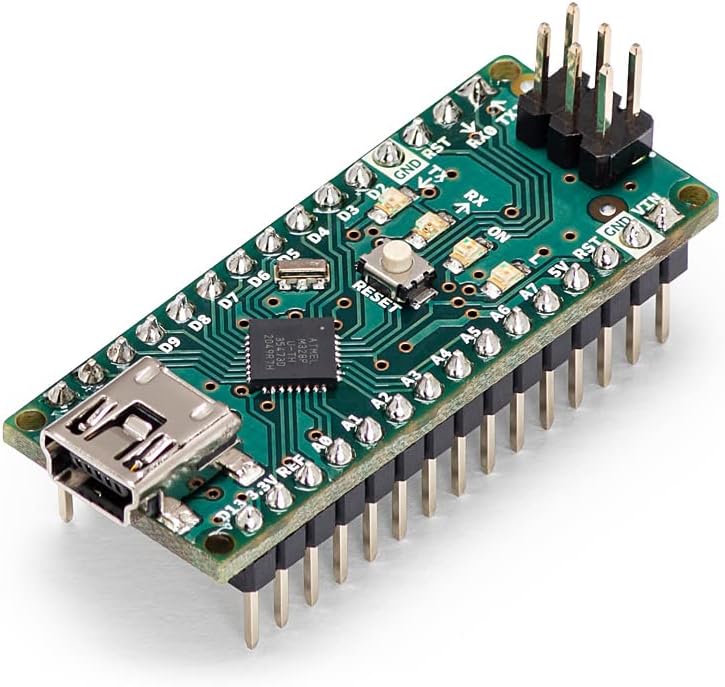
This official Arduino Nano is a trusted choice for makers who value reliability and long-term support. With a 4.6 rating from users, it consistently delivers stable performance for prototyping and embedded projects. Its compact form factor fits seamlessly into wearables and portable devices without sacrificing connectivity.
We may earn a commission when you buy through this link, at no additional cost to you.
The board features the ATmega328P microcontroller with 14 digital I/O pins and 8 analog inputs, providing ample flexibility for sensors, motors, and LEDs. Full compatibility with the Arduino IDE means you can access a vast library of pre-written code and examples. This makes it accessible for beginners while offering advanced users the flexibility to develop custom applications.
While the Mini-USB port is less modern than USB-C, it remains widely supported and sufficient for most development needs. The price point is higher than clone boards, but the investment ensures consistent quality and official documentation. For those prioritizing stability and community resources, this remains the gold standard.
Whether you are building IoT prototypes, robotics systems, or educational projects, this Nano variant provides a solid foundation. Its small size and powerful features make it ideal for space-constrained applications. We recommend this board for anyone seeking an official, reliable Nano experience.
Perfect for makers, students, and engineers building IoT applications and embedded systems with compact, high-performance devices.
Equipped with digital and analog pins plus PWM support for precise control of sensors, motors, and LEDs.
We may earn a commission when you buy through this link, at no additional cost to you.
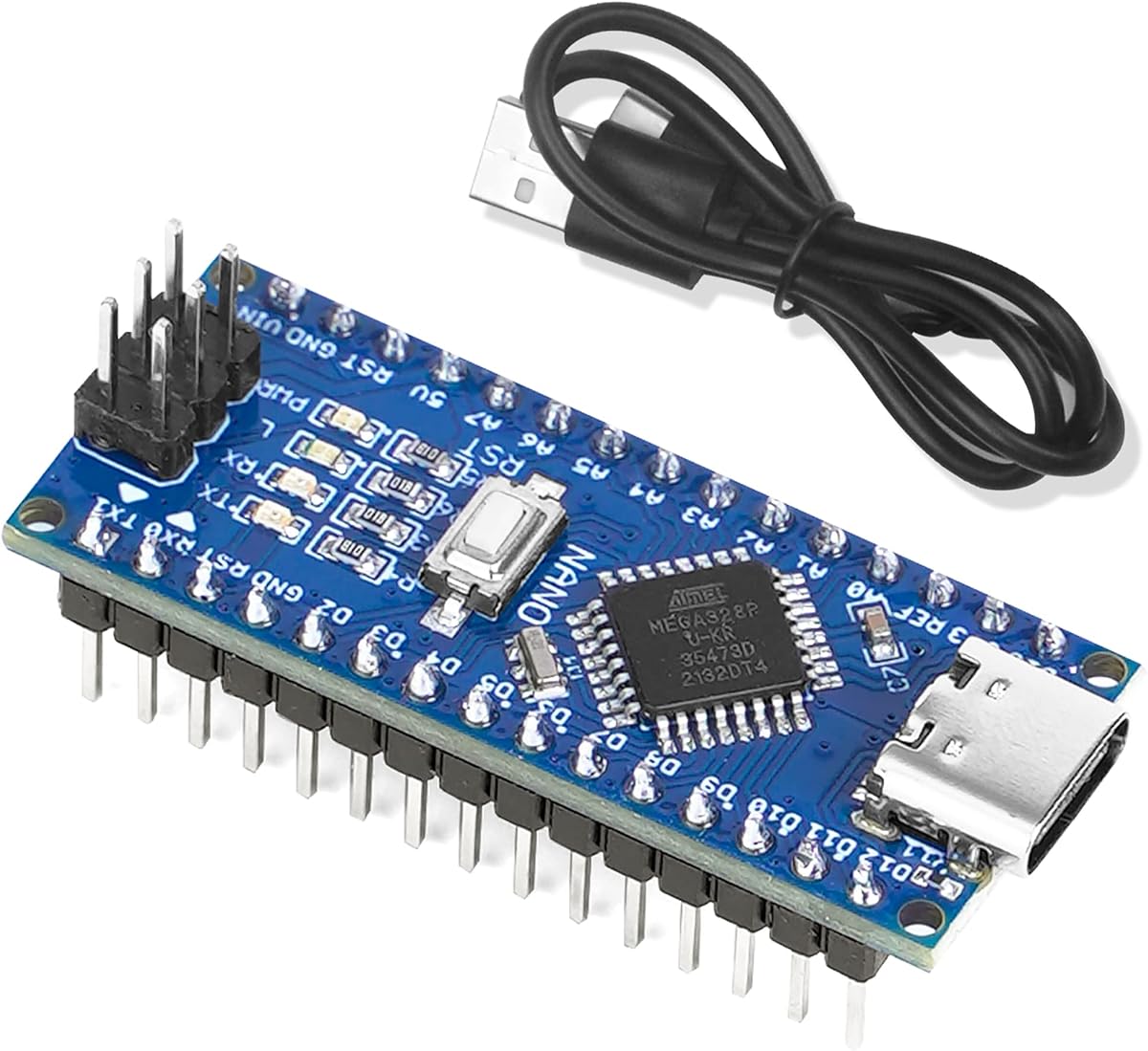
This budget-friendly two-pack offers exceptional value for hobbyists running multiple projects or needing replacements. With a 4.5 rating, users appreciate the seamless compatibility with the Arduino IDE and reliable performance. The inclusion of USB-C ports modernizes the classic Nano design for easier connectivity and power delivery.
We may earn a commission when you buy through this link, at no additional cost to you.
Built with the ATmega328P and CH340G chip, this board supports ISP and USB downloads across Windows, Mac, and Linux. It features 14 digital I/O pins with PWM capabilities, making it versatile for motors, LEDs, and sensors. The intelligent power supply automatically switches between USB and external sources without manual jumper selection.
As a clone, quality may vary slightly compared to official boards, but this kit provides reliable functionality for most tasks. The CH340 driver setup is straightforward but may require installation on some systems. This makes it an excellent choice for beginners or large-scale prototyping where cost efficiency matters.
We recommend this pack for educational settings, classrooms, or makers working on several prototypes simultaneously. The combination of modern connectivity and classic performance ensures you can start projects quickly. It is a practical solution for those prioritizing budget without sacrificing essential features.
Fully compatible with Arduino Nano IDE and operating systems for a hassle-free programming experience.
Supports USB-C, external regulated, or unregulated power with automatic source detection.
We may earn a commission when you buy through this link, at no additional cost to you.
The Arduino Nano ESP32 brings powerful wireless capabilities to the compact Nano form factor. With a 4.6 rating, it stands out for users needing Wi-Fi and Bluetooth in embedded applications. The ESP32-S3 chip offers dual-core processing at up to 240 MHz, enabling complex tasks like voice recognition and machine learning at the edge.
We may earn a commission when you buy through this link, at no additional cost to you.
This board supports seamless communication with cloud platforms and other devices through its built-in wireless modules. The USB-C port ensures stable power and faster programming compared to older micro-USB boards. Additionally, Human Interface Device profiles allow it to function as custom keyboards or mice for advanced interaction scenarios.
MicroPython compatibility makes rapid prototyping accessible for developers who prefer Python over C++. While power consumption is higher than classic AVR boards, the wireless features justify the trade-off for IoT applications. The onboard headers save time by eliminating the need for soldering in breadboard setups.
For smart home systems, wearables, and remote sensors, this Nano variant provides unmatched connectivity. We recommend it for projects requiring network access or advanced processing power. It represents the future of the Nano line, combining familiar sizing with modern technology.
Supports Wi-Fi and Bluetooth 5.0 for seamless data transfer to devices and cloud platforms.
Streamlined Python version for embedded systems enables faster development cycles for educational projects.
We may earn a commission when you buy through this link, at no additional cost to you.
This three-pack bundle provides a cost-effective solution for teams or individuals needing multiple boards for different projects. With a 4.6 rating, users confirm it works the same as original Nano boards on standard programming software. The CH340G chip replaces older FT232RL models, improving stability and compatibility across operating systems.
We may earn a commission when you buy through this link, at no additional cost to you.
The boards use the Atmel Atmega328P-AU MCU, supporting both ISP and USB downloads with power. Their footprint is similar to the R3 board but smaller than Diecimila, making them breadboard-friendly for compact setups. They run perfectly on the Arduino IDE and support all standard libraries for sensors and actuators.
While driver installation for CH340 may be needed on some systems, the process is well documented and straightforward. This version offers a balance between affordability and functionality for classic Arduino projects. It is particularly suitable for classrooms or workshops where multiple units are required.
We suggest this pack for users who need reliability without paying premium prices for official boards. It handles robotics, automation, and interactive projects with ease. For those sticking to standard AVR microcontrollers, this remains a solid and accessible choice.
Uses CH340G instead of FT232RL for better compatibility with Windows, Mac, and Linux systems.
Smaller footprint than older boards allows for easy integration into tight spaces.
We may earn a commission when you buy through this link, at no additional cost to you.
ELEGOO delivers convenience with this presoldered Nano pack, eliminating the need to solder header pins before starting. With a 4.6 rating, makers appreciate how quickly they can plug these boards into breadboards and begin prototyping. The USB-C port modernizes power and data transfer compared to older Mini-USB variants.
We may earn a commission when you buy through this link, at no additional cost to you.
Each board runs familiar 5V and 16MHz AVR sketches with 32 KB flash and 2 KB SRAM. It includes 14 digital I/O pins and 8 analog inputs for connecting sensors, displays, and motor drivers. Jumper wires and accessories are sold separately, but the boards arrive ready for immediate use.
The main limitation is that the current board does not support USB-C to USB-C host cables, requiring USB-A to USB-C connections. CH340 driver installation is sometimes necessary for serial port recognition. Despite this, the time saved on assembly makes it a strong contender for rapid development.
This pack is ideal for students, educators, or makers who want to focus on coding rather than assembly. Keep one on a breadboard, embed another in a robot, and reserve the third for testing. It simplifies the workflow for teams managing multiple prototypes simultaneously.
Arrives ready to plug into solderless breadboards without soldering pins before the first project.
Includes clear instructions for driver installation and uploading a Blink test successfully.
We may earn a commission when you buy through this link, at no additional cost to you.
The Arduino Nano Every offers enhanced performance through the ATmega4809 microcontroller, providing increased processing power and efficiency. With a 4.6 rating, it is praised for handling more complex programs and improved data handling. The 48 KB Flash and 6 KB SRAM allow for larger libraries and advanced functionality.
We may earn a commission when you buy through this link, at no additional cost to you.
Its ultra-compact form factor matches classic Nano dimensions, ensuring it fits existing projects without redesign. It connects via USB-C and remains fully compatible with the Arduino IDE and existing Nano shields. This makes transitioning older projects to better performance straightforward and intuitive.
While it is not directly code-compatible with all legacy sketches, most libraries work with minor adjustments. The improved efficiency benefits battery-powered applications and sensor-based systems requiring reliable connectivity. It strikes a balance between modern features and Arduino ecosystem compatibility.
This board is perfect for upgrading embedded systems where classic Nano memory or speed is insufficient. We recommend it for developers needing enhanced capabilities without switching entirely to a new platform. It represents a significant step forward in the Nano evolution.
Features larger Flash and SRAM enabling execution of complex programs and improved data handling.
Fully compatible with Arduino IDE and existing Nano shields for smooth project transitions.
We may earn a commission when you buy through this link, at no additional cost to you.
This three-pack of Nano V3.0 boards delivers excellent value for users needing multiple units for various applications. With a 4.5 rating, customers highlight its compatibility with Windows, Mac, and Linux operating systems. The USB-C power socket modernizes the design while maintaining the classic microcontroller functionality.
We may earn a commission when you buy through this link, at no additional cost to you.
The board uses ATmega328P-AU as MCU, supporting ISP and USB downloads with stable performance. It features 14 digital I/O pins and 6 analog inputs, providing ample connections for sensors and actuators. Power selection is automatic, switching between USB and external supplies without manual jumper changes.
Like other CH340-based boards, serial port drivers may need installation on your computer. However, once set up, the boards work seamlessly with the Arduino IDE and standard libraries. This makes them accessible for beginners who need reliable hardware for prototyping and testing.
We recommend this pack for workshops, classrooms, or makers working on several prototypes at once. The combination of modern ports and classic performance ensures flexibility across different project types. It is a practical solution for those prioritizing value and usability.
Supports USB-C, unregulated, or regulated external power with automatic higher voltage detection.
Designed for seamless communication with PCs and other microcontrollers across all major OS.
We may earn a commission when you buy through this link, at no additional cost to you.
The Arduino Nano R4 represents a significant leap forward with the Renesas RA4M1 microcontroller and enhanced memory capabilities. With a 4.5 rating, users praise its powerful performance in the familiar Nano form factor. The 256KB Flash and 32KB RAM enable advanced embedded applications previously impossible on classic boards.
We may earn a commission when you buy through this link, at no additional cost to you.
Pre-soldered headers allow instant connection to breadboards and Modulino nodes without extra assembly. A Qwiic connector and additional 5V I2C port simplify expansion with sensors and actuators. The onboard programmable RGB LED helps streamline debugging and provides customizable system feedback.
While it costs more than classic Nano variants, the performance increase justifies the investment for complex projects. It is perfect for both prototyping and embedding in custom PCBs due to its tiny footprint and castellated edges. This makes it ideal for education and small-scale production runs.
We recommend this board for users ready to move beyond AVR limitations into modern embedded development. Its connectivity options and processing power open new possibilities for interactive and sensor-driven applications. It marks the future direction of the Nano platform.
Built on RA4M1 microcontroller with 48MHz clock speed for advanced embedded applications.
Pre-soldered headers let you instantly connect to breadboards and nodes without extra assembly.
We may earn a commission when you buy through this link, at no additional cost to you.
This version of the Nano R4 ships with loose header pins for users who prefer to solder or use castellated edges. With a 4.2 rating, it appeals to makers wanting direct PCB integration for custom builds. The Renesas RA4M1 core offers the same robust performance as the soldered variant.
We may earn a commission when you buy through this link, at no additional cost to you.
The castellated edges allow mounting the board directly onto a custom PCB, reducing overall system size and complexity. It includes a Qwiic connector and 5V I2C port for effortless expansion with sensors and actuators. The programmable RGB LED adds visual feedback for user interaction scenarios.
While assembly requires more effort than pre-soldered boards, the flexibility benefits production and compact designs. This is ideal for embedding in custom hardware where traditional headers may interfere. It bridges the gap between prototyping and finished product manufacturing.
We suggest this board for engineers and advanced makers building custom enclosures or PCBs. It combines powerful processing with integration options for permanent installations. For those comfortable with soldering, it offers a professional-grade Nano experience.
Ships with loose pins for soldering or castellated edges for direct PCB mounting.
Includes Qwiic connector and additional I2C port for effortless peripheral expansion.
We may earn a commission when you buy through this link, at no additional cost to you.
This single Nano module offers a compact and reliable entry point for those needing just one unit. With a 4.6 rating, OSOYOO users praise its compatibility with Windows, Mac, and Linux systems. The USB-C connection ensures modern power and data capabilities in a small footprint.
We may earn a commission when you buy through this link, at no additional cost to you.
It uses the Atmel Atmega328P-AU as MCU, supporting ISP and USB downloads with stable performance. The board includes 14 digital I/O pins and automatic power switching between USB and external sources. This flexibility makes it easy to integrate into various project setups without manual configuration.
As a single unit, it is ideal for small projects or replacements where bulk pricing isn't necessary. The CH340 chip provides reliable USB connectivity with driver setup usually straightforward. Its design focuses on simplicity and ease of use for beginners.
We recommend this board for hobbyists starting a single project or needing a small backup unit. It delivers classic Nano performance with modern connectivity features. For those prioritizing simplicity and budget, this remains a solid and accessible choice.
Fully compatible with Windows, Mac, and Linux operating systems for broad usability.
Supports USB-C, regulated, or unregulated external power with automatic switching.
We may earn a commission when you buy through this link, at no additional cost to you.
Selecting the right Arduino Nano Board involves balancing performance, connectivity, budget, and project needs. This guide covers essential factors to help you make an informed decision.
The core microcontroller determines processing power and memory capacity. Classic boards use ATmega328P, while newer versions like Nano Every use ATmega4809 and Nano ESP32 uses ESP32-S3. Consider your project's computational needs and memory requirements when choosing.
For basic tasks, ATmega328P is sufficient, but complex apps require higher-end options.
Connectivity affects how you connect to computers and other devices. Modern boards offer USB-C for stable power and faster data transfer. Older models may use Mini-USB, which is becoming less common. Also consider wireless needs like Wi-Fi and Bluetooth.
Choose USB-C for convenience and wireless boards for IoT applications.
Ensure the board is fully compatible with the Arduino IDE and your existing libraries. Most clones work well, but some advanced boards like Nano R4 require specific settings. Official boards guarantee consistent support and documentation.
Stick to officially supported platforms for long-term project stability.
The Nano's compact size is a key advantage for space-constrained projects. Check if headers are pre-soldered for easy breadboard use or if they require soldering. Some boards offer castellated edges for direct PCB mounting.
Pre-soldered headers save time, while bare boards offer customization for custom designs.
Different boards offer various power options via USB, external regulators, or VIN pins. Auto-switching capabilities simplify power management without manual jumpers. Ensure your project can support the voltage and current requirements.
Look for boards with automatic power detection for easier setup and reliability.
Prices vary significantly between official boards and third-party clones. Multi-pack bundles offer better value if you need multiple units for testing or distribution. Consider the total cost including cables and adapters.
Clones provide cost savings while official boards offer guaranteed quality and support.
Some boards require installing specific drivers like CH340 to communicate with your computer. Verify compatibility with your operating system before purchasing. Official boards usually have broader out-of-the-box support.
Ensure driver installation is straightforward to avoid development delays.
Install the Arduino IDE on your computer and select the correct board type and COM port. Connect the board via USB and upload a simple test sketch like Blink to verify functionality.
Use jumper wires to connect sensors, LEDs, and modules to the digital and analog pins. Respect voltage limits when connecting external components to avoid damaging the board.
Store the board in a static-free environment when not in use and handle by edges to prevent electrical damage. Keep firmware updated for best compatibility with libraries.
The main difference lies in the microcontroller and connectivity. The classic Nano uses an ATmega328P for standard tasks, while Nano ESP32 uses an ESP32-S3 with built-in Wi-Fi and Bluetooth. This makes ESP32 ideal for wireless IoT projects.
Most third-party boards use the CH340 chip which requires installing a driver on your computer. Official Arduino boards usually work without additional drivers. Always check product descriptions to see if driver installation is necessary.
Traditional Nano boards use C++ and the Arduino IDE. However, Nano ESP32 supports MicroPython, allowing you to write Python code for embedded tasks. This makes it easier for developers familiar with Python to get started.
Most Nano boards accept 7 to 12V via the VIN pin or 5V regulated via USB. Always check the specific board documentation for exact voltage ranges. Exceeding limits can damage the onboard voltage regulator.
While great for prototyping, some boards like Nano R4 are designed with production in mind. They feature castellated edges for direct PCB mounting and robust components. Choose versions meant for embedding if moving to manufacturing.
Official boards offer consistent quality and support but cost more. Clone boards are affordable and functional for most projects. Choose based on your budget and need for guaranteed reliability.
We have explored ten top Arduino Nano options ranging from classic affordable clones to advanced ESP32 and R4 variants. Each offers unique strengths suited for different project requirements and skill levels. The official Nano remains a reliable standard while modern boards expand capabilities significantly.
Prioritize connectivity and microcontroller performance based on your specific application needs. If wireless communication is key, choose Nano ESP32. For pure Arduino ecosystem stability, classic or Every models work best.
Always verify current product details and compatibility before purchasing as specifications can evolve. These boards provide excellent platforms for bringing creative ideas to life efficiently.