
LAFVIN R3 Camera Smart Robot Car
4.5Editor score
Affordable entry point for beginners
Five intelligent operation modes
Open-source learning platform support
Discover the top Arduino robot kits for 2026. Compare features, ratings, and capabilities to find the perfect STEM learning tool for kids and adults.
Arduino robot kits offer an incredible entry point into the world of engineering, coding, and electronics. Whether you are a parent looking for a engaging STEM activity or a hobbyist eager to build your own autonomous vehicle, these kits provide the necessary hardware and software to bring your ideas to life.
We have carefully evaluated the leading options available on the market today. Our analysis focuses on build quality, programming accessibility, sensor capabilities, and overall value. This list covers a wide range of complexities from simple car chassis to advanced tracked tanks and robotic arms.
Each pick below showcases a unique strength tailored to different skill levels and project goals. You will find detailed breakdowns of what makes each kit stand out. Please note that pricing can fluctuate over time so verify current costs before purchasing.
4.5Editor score

4.5Editor score

4.3Editor score
This side-by-side comparison highlights the key specifications and capabilities of each kit to help you make an informed decision based on your specific needs and budget constraints.


This kit stands out as the top choice for those entering the world of robotics. It combines a robust chassis with advanced features like a live camera feed and obstacle avoidance. With a solid rating and comprehensive tutorials it provides a smooth learning curve for students and hobbyists alike.
We may earn a commission when you buy through this link, at no additional cost to you.
The standout feature is the FPV capability which allows you to see what the robot sees in real time. The connectors are keyed to prevent wiring errors which is crucial for beginners. You can control it via a smartphone app or a traditional infrared remote giving you flexibility in how you interact with the build.
While the setup requires careful attention to the tutorial the results are worth the effort. Some users might find the Wi-Fi dependency slightly limiting in areas with poor connectivity but the benefits of remote visual control outweigh this minor trade-off. The included rechargeable battery means you spend less time on power management and more on coding.
If you want a complete package that teaches engineering and programming skills this kit is the ideal starting point. It grows with you as you learn to modify code and add new sensors. We recommend this for anyone looking for a balance of fun and educational value in an Arduino robot kit.
The onboard camera streams video directly to your phone letting you navigate complex environments remotely without being physically present near the robot.
Keyed connectors and illustrated step-by-step guides ensure that even those with minimal electronics experience can assemble the kit successfully on the first try.
We may earn a commission when you buy through this link, at no additional cost to you.
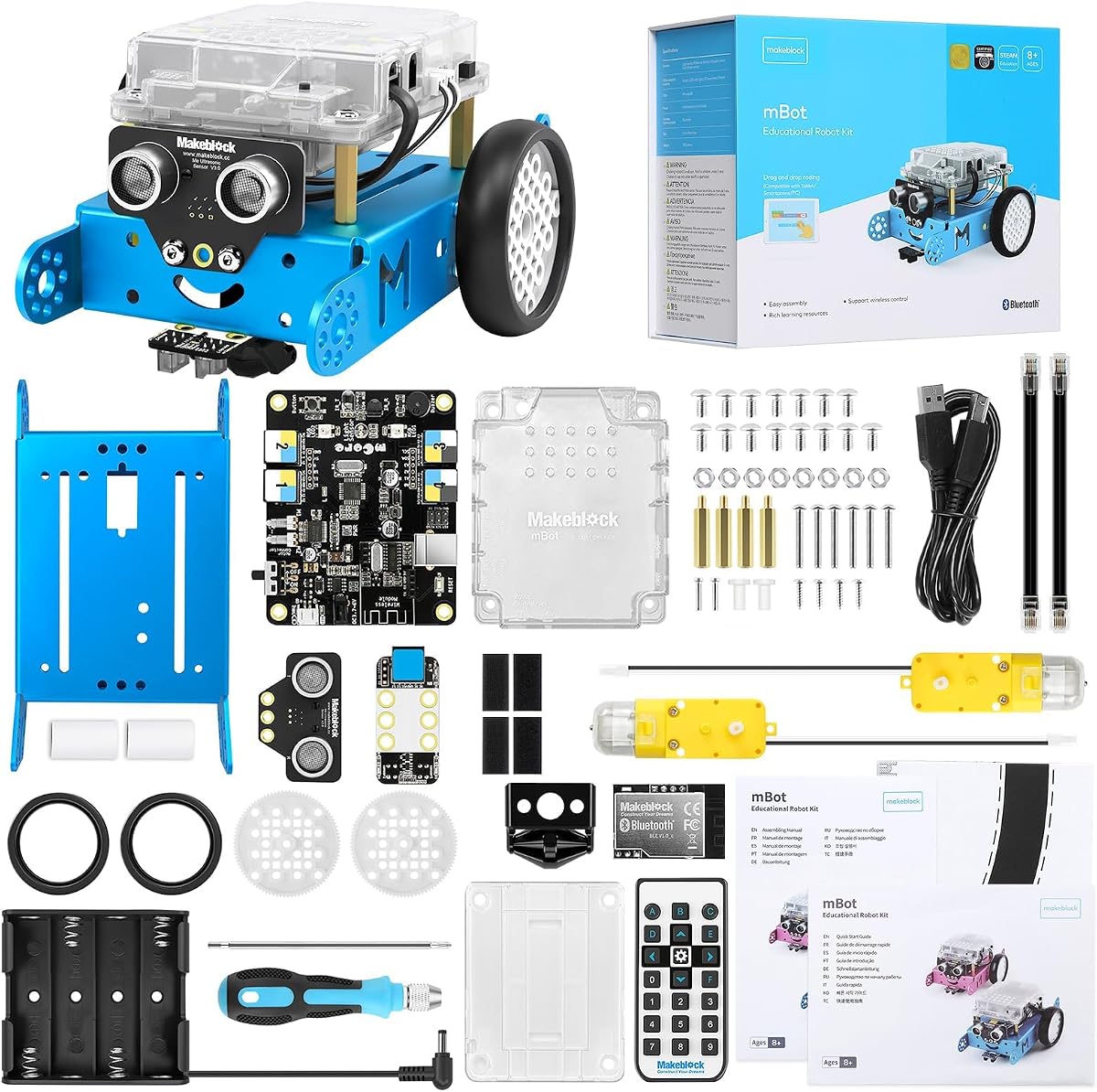
Makeblock mBot is designed specifically to engage young learners with robotics and coding. Its popularity stems from the easy transition between block-based coding and text-based programming. The kit is robust enough to withstand classroom use while remaining accessible for home projects.
We may earn a commission when you buy through this link, at no additional cost to you.
The ease of assembly is a major selling point with most users completing the build in under fifteen minutes. This quick setup gets kids interacting with the robot faster. The software ecosystem supports multiple platforms including mBlock which uses Scratch-based blocks for intuitive programming logic.
However the robot does not include batteries so you will need to purchase them separately. Additionally while it has strong educational features the camera capabilities are not as advanced as some other kits on this list. This limitation makes it better suited for coding exercises rather than visual exploration tasks.
For families looking to introduce STEM concepts early this kit is a reliable choice. It encourages creativity and logical thinking through interactive games and challenges. The ability to expand the robot with additional modules ensures longevity as your skills develop over time.
Start with drag-and-drop blocks and gradually move to text-based languages as you master the fundamentals of programming logic and structure.
The metal chassis ensures that the robot can handle rough play and frequent handling in educational settings without breaking easily.
We may earn a commission when you buy through this link, at no additional cost to you.
The Conqueror brings the ruggedness of a tank to the Arduino ecosystem. Its metal tracks allow it to traverse uneven surfaces that would stall a wheeled robot. This makes it an excellent choice for outdoor experiments or navigating stairs and carpets with ease.
We may earn a commission when you buy through this link, at no additional cost to you.
You get five distinct interactive modes including FPV driving and obstacle avoidance. The camera is mounted on a servo allowing you to look up and down while driving. This adds a layer of immersion and control not found in standard static camera setups. The stainless-steel chassis adds a premium feel to the build.
The heavier build means you need a more powerful battery which is included but still requires careful management. It might be slightly more complex to assemble than a car due to the track tensioning. However the stability and traction it offers are unmatched in this price range.
If your goal is to build something that can handle real-world obstacles this kit is perfect. It teaches valuable lessons in mechanical design and power management. We recommend it for users who want a more industrial feel to their robot project.
The metal tracks distribute weight evenly allowing the robot to climb inclines and navigate rough ground without slipping or losing grip.
Switch between remote control and autonomous modes to test different programming logic and observe how sensors influence movement decisions.
We may earn a commission when you buy through this link, at no additional cost to you.
This kit introduces a fascinating engineering challenge by building a robot that stays upright on two wheels. It uses motion sensing and real-time motor control to maintain balance. Watching it stabilize itself is a rewarding experience that brings physics to life in a tangible way.
We may earn a commission when you buy through this link, at no additional cost to you.
You can switch between six modes including obstacle avoidance and bounce mode which adds a playful element to the project. The build process is guided with tutorials explaining how the motors and sensors work together. It offers a deeper dive into control loops compared to standard car kits.
One challenge is that balancing robots can be sensitive to calibration and surface conditions. You might need to adjust settings to get it running smoothly on different floors. This trial and error is part of the learning experience though it might frustrate those wanting instant success.
For students interested in automation and dynamics this kit is a valuable tool. It pushes you to think about feedback systems and stability. We suggest it for learners who have some experience with coding and want to tackle a more complex mechanical system.
The robot constantly measures its tilt and adjusts motor speeds instantly to prevent falling mimicking how humans stand upright on two legs.
Beyond balancing you can use the IR remote to control speed or enable auto-follow to make the robot chase you around the room.
We may earn a commission when you buy through this link, at no additional cost to you.
What sets this kit apart is the use of mecanum wheels which allow the car to move in any direction including sideways and diagonally. This capability offers unique navigation possibilities that traditional wheels cannot achieve. It opens the door to more sophisticated path planning and robotics experiments.
We may earn a commission when you buy through this link, at no additional cost to you.
The kit is powered by an ESP32 controller which is faster and supports Wi-Fi features. You can use the app for control and remote operation. The tutorials are designed to teach programming principles step by step ensuring you understand the underlying logic behind each movement.
Programming omni-directional movement requires a slightly more complex approach to motor control logic. This might be a hurdle for absolute beginners but it is a great learning opportunity. The lack of included batteries is another consideration to keep in mind when budgeting for the project.
If you want to explore advanced robotics control this is an excellent platform. It encourages creative problem solving and expands your understanding of motor dynamics. We recommend it for users who have mastered basic movement and want to challenge themselves with new navigation techniques.
The specialized wheels allow the robot to slide laterally which is perfect for navigating tight spaces and complex obstacle courses.
You can attach additional packs like robotic arms or solar modules to transform the car into a multi-functional device as you learn.
We may earn a commission when you buy through this link, at no additional cost to you.
This kit delivers impressive features at a very competitive price. It includes a camera for real-time video streaming which is rare at this budget level. It provides excellent value for those who want visual capabilities without spending a premium on a high-end model.
We may earn a commission when you buy through this link, at no additional cost to you.
The assembly is designed to be beginner friendly with sensors that have easy-to-connect interfaces. You can access free learning resources and code examples online which helps you get started quickly. The Wi-Fi module allows you to control the car remotely and view the feed on your phone.
The chassis is basic compared to metal options which might limit durability over long-term use. However for a first robot it is sufficient to learn the basics. The focus is on learning how to integrate sensors and code rather than building a rugged vehicle.
For students on a tight budget this is an ideal choice to learn about remote control and robotics. It proves you do not need to spend a lot to access powerful features. We recommend it for anyone looking for an affordable entry into camera-based robotics.
You get FPV capabilities and Wi-Fi control typically found in more expensive kits making it a smart purchase for budget-conscious learners.
Access to open-source code means you can study how others solved problems and adapt their solutions to your own projects.
We may earn a commission when you buy through this link, at no additional cost to you.
This kit stands out because it allows you to build four different robot configurations including a robotic arm and a tank. This modularity means you can experiment with different forms of robotics from grasping objects to driving over terrain. It offers variety that static kits cannot match.
We may earn a commission when you buy through this link, at no additional cost to you.
The robotic arm is 5DOF giving you a range of motion similar to a human arm. You can program it to pick up and place objects which is a great introduction to industrial automation concepts. The app and remote control options make testing your code convenient.
The assembly process is detailed with video guides to help you navigate the extra components. Some users report that the complexity can be overwhelming for younger children but it is well suited for teens and adults. The rating reflects a slightly steeper learning curve but high engagement.
If you want to explore the interaction between robotics and object manipulation this kit is unique. It pushes you to think about spatial awareness and mechanical linkages. We recommend it for older kids who are ready to tackle advanced STEM challenges.
Switch between car and tank modes to see how different drive trains affect movement and stability in various environments.
Learn how servos work together to create smooth movements and precise positioning for tasks like picking up and moving objects.
We may earn a commission when you buy through this link, at no additional cost to you.
This kit is more than just a robot it is a comprehensive learning system. With 192 items and 87 projects it covers a massive range of electronics and coding topics. It includes a robot car build but also teaches IoT and sensor integration broadly.
We may earn a commission when you buy through this link, at no additional cost to you.
The expert-designed courses provide a structured path from blinking LEDs to building smart home devices. The online tutorials are high quality and help you understand the why behind the code. This structured approach ensures you do not get overwhelmed by the large number of components.
Because it is a generalist kit the robot aspect is one of many projects rather than the sole focus. You will spend time on many builds before finishing the car. This is a trade-off for the breadth of knowledge you gain across different engineering disciplines.
For a student who wants a long-term learning resource this kit is unbeatable. It grows with you as your skills improve. We recommend it for those who want a complete educational package rather than a single robot project.
The large box includes sensors displays and motors allowing you to build over 80 different projects beyond just the smart car.
Courses are organized by difficulty helping you build confidence gradually as you move from basic circuits to complex IoT apps.
We may earn a commission when you buy through this link, at no additional cost to you.
This kit represents the top end of consumer robotics. The aluminum alloy construction feels professional and durable. It allows you to build ten unique models ranging from robotic arms to complex tanks. It is designed for serious hobbyists who want a platform that grows with them.
We may earn a commission when you buy through this link, at no additional cost to you.
The MegaPi control board is powerful enough to handle complex logic and multiple sensors simultaneously. You can code in blocks Python or C++. The system is compatible with Raspberry Pi for even more advanced vision and AI projects. This future-proofs your investment.
The price is higher than other kits but the build quality justifies the cost. Assembly is detailed and involves more parts than basic sets. It is best suited for those who want a long term robot platform rather than a one-off project.
If you are looking for a professional grade experience this kit is the best option. It bridges the gap between toys and industrial prototypes. We recommend it for teens and adults who are serious about engineering and want a robust tool for experimentation.
Precision mechanical parts with threaded grooves ensure that your builds remain tight and stable even after frequent use and modification.
Move beyond basic loops to advanced logic and object-oriented programming using Python and C++ for serious development.
We may earn a commission when you buy through this link, at no additional cost to you.
This kit offers a unique twist on the traditional car robot by building a six-legged walker. It brings biology and robotics together allowing you to explore how living organisms move. It is a visually striking project that often draws attention from everyone around.
We may earn a commission when you buy through this link, at no additional cost to you.
Each leg has three motors allowing for highly controlled movement. You can program it to walk crawl or twist. The included remote and app support make it easy to control the legs individually. It teaches a lot about synchronization and kinematics.
Assembly is more complex than a car chassis due to the number of parts and servos. It requires patience and careful attention to detail. The servos also draw significant power so you need to manage battery life carefully. These factors contribute to the lower rating for ease of use.
For those who want something truly different this hexapod is a fantastic choice. It pushes you to learn how mechanical systems work in a new way. We recommend it for advanced users looking for a challenging and rewarding engineering experience.
Learn how insects move by programming your robot to walk and crawl mimicking biological gait patterns for smooth locomotion.
Master the control of multiple servos simultaneously to coordinate leg movements and keep the robot balanced during walking.
We may earn a commission when you buy through this link, at no additional cost to you.
Selecting the right kit depends on your goals and experience level. We break down the key factors to consider before you buy.
Consider how much coding experience you or your child has. Some kits use block-based coding which is easier to start with while others require text-based coding like C++ or Python for full functionality.
Choose a kit that matches your current ability so you stay motivated and do not get overwhelmed by complex logic.
Prices vary from basic models under fifty dollars to premium kits costing several hundred. Set a budget that fits your financial situation without compromising on essential features.
Remember to factor in extra costs like batteries and tools when calculating the total expense of the project.
Look for kits that offer structured learning paths like video courses or detailed documentation. Educational content helps you understand the principles behind the code and hardware.
Prioritize kits with community support and tutorials to ensure you have resources to help when you get stuck.
Check if the kit allows you to add more sensors or modules later. Expandable kits let you grow your project and keep it interesting as you learn new skills.
A modular design ensures the kit lasts longer because you can modify it rather than just building one static model.
Materials like aluminum or high-quality plastics will last longer than flimsy parts. If you plan to use the robot in classrooms or rough environments durability is key.
Invest in a sturdy chassis to prevent damage during assembly and operation which saves time and frustration.
Determine if you want Wi-Fi control via an app or traditional infrared remote. Wi-Fi offers more flexibility but requires a stable network connection.
Apps provide visual feedback and data logging which can be valuable for more advanced users tracking performance.
Decide between wheeled cars for speed and tracked robots for rugged terrain. Wheeled robots are generally easier to build and code while tracks offer better grip.
Your choice of chassis dictates where you can drive the robot so consider your testing environment.
Some kits include rechargeable batteries while others require disposable cells. Rechargeable options are more environmentally friendly and cost-effective in the long run.
Ensure the battery life is sufficient for your planned usage to avoid interruptions during coding sessions or play.
Always read the assembly instructions carefully before starting. Organize your parts by type to make the building process smoother and avoid missing components.
No most kits are designed for beginners and include block-based coding options. These visual tools let you build logic without typing code so anyone can start learning right away.
It depends on the specific product. Some include rechargeable batteries while others require you to purchase disposable AA batteries separately. Always check the product details before buying.
Most are suitable for ages 8 and up with adult guidance for younger kids. Teens and adults can enjoy the more advanced features in premium kits designed for complex projects.
Yes many kits are robust enough for outdoor use but avoid wet weather. Tracked models are better for rough terrain while wheeled ones work best on flat surfaces.
Most kits support Arduino IDE or Scratch-based software. Some also offer proprietary apps for mobile control which make it easier to interact with your robot.
Yes most manufacturers provide online tutorials and documentation. You can also find community forums where users share tips and solutions for common issues.
We have explored a wide range of kits from simple car models to complex robotic arms. Each option offers unique benefits depending on your specific interests and goals.