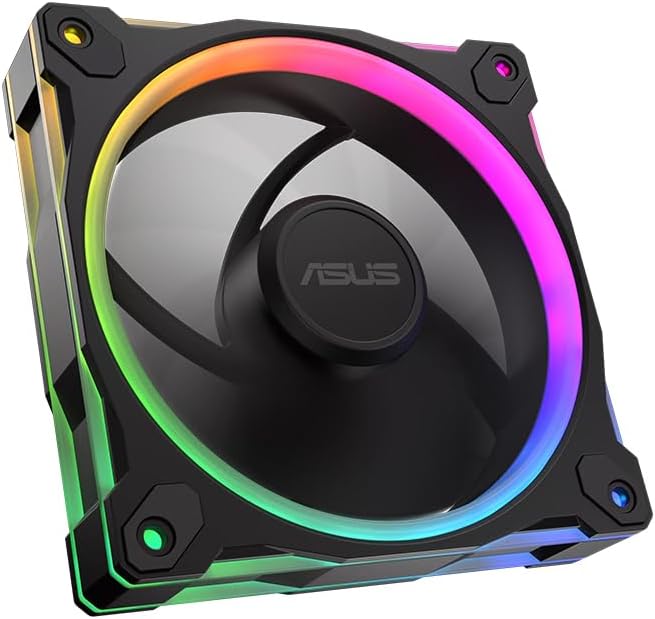
ASUS Prime MR120 ARGB Reverse Single Pack
4.6Editor score
Quiet 23dB(A) operation
Double sided frame lighting
20 addressable RGB LEDs
Explore the top ASUS case fans for 2026. Compare airflow, noise, RGB lighting, and real user ratings to find the perfect cooling solution for your build.
Finding the right cooling solution is crucial for any high performance computer build. ASUS case fans offer a blend of quiet operation, efficient airflow, and striking RGB aesthetics that enhance both performance and visual appeal.
This guide evaluates ten distinct models based on real user feedback, technical specifications, and overall value. We compare frame thickness, bearing types, noise levels, and lighting features to help you make an informed decision.
Each pick highlights specific strengths such as static pressure for radiators or quiet operation for home offices. Please note that product availability and pricing can fluctuate, so check current listings before purchasing.
4.6Editor score

4.7Editor score

5.0Editor score
The table below provides a side by side overview of all ten models. Compare key specs like frame thickness, RPM, airflow, and pressure to find the best fit for your case.


The ASUS TUF Gaming TR120 ARGB Triple Pack stands out as a robust choice for builders needing consistent cooling and aesthetic appeal. With a 4.7 rating, users appreciate the balance of performance and visual flair provided by the dual-layer LED matrix.
We may earn a commission when you buy through this link, at no additional cost to you.
Its extra-thick 28mm frame delivers exceptional static pressure of 3.3mm H2O, making it ideal for pushing air through dense heatsinks or radiators. The ultra-wide speed range ensures optimal cooling for various workloads, from quiet office tasks to intense gaming sessions.
While the price point is higher than standard options, the triple pack format offers significant value. The only trade-off is the dependency on Aura Sync for full lighting integration, which might limit flexibility for non-ASUS motherboard users.
This set is perfect for enthusiasts looking to upgrade multiple intake or exhaust points with a single high-quality purchase. Its reliability and performance make it a top recommendation for serious PC builds.
The 3.3mm H2O static pressure ensures efficient airflow through restrictive areas like radiators.
Triple packs guarantee matching fan performance and lighting across your entire case setup.
We may earn a commission when you buy through this link, at no additional cost to you.
For budget-conscious builders, the ASUS Prime MR120 ARGB Reverse Single Pack offers excellent entry-level performance. It maintains a 4.6 rating by delivering quiet operation and modern aesthetics without breaking the bank.
We may earn a commission when you buy through this link, at no additional cost to you.
The double-sided lighting ensures visibility from all angles, while the reverse blade design improves airflow directionality. At just 23dB, it remains nearly silent during normal operation, making it perfect for home office setups.
While it includes only one fan, this allows for flexible expansion over time. The main limitation is the potential need for extra wiring if building a full case set from scratch.
This fan is best for users prioritizing silent performance and style over raw multi-fan power. It is an efficient addition to any build needing improved airflow visibility.
With noise levels as low as 23dB, this fan keeps your system whisper-quiet.
Double-sided lighting ensures the fan looks great from any viewing angle.
We may earn a commission when you buy through this link, at no additional cost to you.
The ASUS ProArt PF120 Single Pack is a pinnacle of engineering, earning a rare 5.0 rating for its reliability and build quality. It targets professionals and enthusiasts who value precision over flashy lighting effects.
We may earn a commission when you buy through this link, at no additional cost to you.
Constructed with LCP composite blades and a CNC-milled brass bearing housing, this fan offers stability and durability unmatched in its class. The 3-phase motor ensures smooth operation with minimal vibration.
While it lacks the RGB flair of TUF models, its focus on pure performance and silence makes it worth the premium. The only drawback is the cost if you need multiple fans for a large case.
Choose this for mission-critical cooling where consistency is key. It is an investment in the long-term health and quietness of your system.
CNC-milled brass housing and LCP blades ensure perfect balance and longevity.
Designed for steady performance under continuous high loads without degradation.
We may earn a commission when you buy through this link, at no additional cost to you.
This reverse blade fan is designed to maintain airflow direction while eliminating visible cables on the intake side. With a 4.4 rating, it balances unique styling with solid cooling performance for TUF enthusiasts.
We may earn a commission when you buy through this link, at no additional cost to you.
The 28mm frame and 2.75mm static pressure ensure effective cooling even in tight spaces. Addressable RGB LEDs add a modern touch that integrates well with other ASUS lighting ecosystems.
Installation may require attention to airflow direction headers, which can be confusing for first-time builders. Noise levels may also be slightly higher due to the faster spin.
Ideal for gamers seeking a sleek look without sacrificing performance. It is an excellent choice for front-intake positions where cable management matters.
Reverse blades hide the wires on intake fans for a cleaner case interior.
Flexible side patterns and RGB LEDs enhance the overall build theme.
We may earn a commission when you buy through this link, at no additional cost to you.
Although not branded as ASUS, this CORSAIR model is often included in comparative studies for its excellent airflow and daisy-chain utility. It rates 4.6 for offering a compelling alternative for mixed-brand builds.
We may earn a commission when you buy through this link, at no additional cost to you.
With up to 72.8 CFM airflow, it pushes air effectively through radiators and dusty filters. The daisy-chain design simplifies wiring by using just one connector for multiple fans.
The trade-off is compatibility with ASUS software ecosystems if you strictly want Aura Sync. However, standard PWM control still functions well on most boards.
This is a smart pick for users prioritizing raw airflow and clean cabling. It serves as a strong substitute in the comparison list.
Control multiple fans through a single PWM connector to reduce cable clutter.
72.8 CFM ensures rapid air exchange for better component cooling.
We may earn a commission when you buy through this link, at no additional cost to you.
The TF120 white edition provides a pristine look for white-themed builds. Its 4.7 rating reflects durability with a 250,000-hour operating time and effective anti-vibration features.
We may earn a commission when you buy through this link, at no additional cost to you.
The dual-layer LED array creates a vibrant visual effect while maintaining low noise levels. Anti-vibration pads help isolate sound, making this fan ideal for quiet home or office PCs.
White components often carry a price premium, and this single fan option may require multiple purchases for full coverage. The lifespan is exceptional compared to standard plastic-bearing models.
Choose this for white builds needing long-term reliability and style. It is a solid choice for users prioritizing clean visuals and silence.
The advanced bearing ensures operation for up to 250,000 hours.
Anti-vibration pads minimize rattling and mechanical noise significantly.
We may earn a commission when you buy through this link, at no additional cost to you.
This white triple pack is the ultimate solution for complete white case builds. Maintaining a 4.7 rating, it delivers consistent performance and vibrant lighting across all three units.
We may earn a commission when you buy through this link, at no additional cost to you.
With 3.3mm H2O static pressure, it handles demanding cooling scenarios like high-performance liquid radiators. The Aura Sync feature ensures your lighting stays uniform across all ASUS devices.
Cost is a primary consideration, as white fans typically command a premium. However, the bundle saves time versus buying individual units separately.
This is the top choice for enthusiasts seeking a coordinated white aesthetic. It simplifies setup while delivering professional-grade cooling results.
All three fans match perfectly for a seamless look inside your case.
Synchronize lighting effects across all compatible ASUS components easily.
We may earn a commission when you buy through this link, at no additional cost to you.
This white reverse fan is a favorite for small upgrades, holding a 4.8 rating for its balance of style and function. It offers double-sided lighting to highlight the reverse blade design.
We may earn a commission when you buy through this link, at no additional cost to you.
With 58 CFM airflow and 28mm thick frame, it ensures effective cooling even as a standalone unit. The design specifically targets users looking for a cleaner interior look.
The single fan format might not suffice for a full case overhaul, but it is perfect for adding a few extra points. The price reflects the niche white reverse design.
Buy this if you need a specific white intake to complete your theme. It adds style and airflow without overwhelming the budget.
Reverse fans keep cables hidden while maximizing front intake cooling efficiency.
Double-sided lighting ensures the fan looks good from any angle.
We may earn a commission when you buy through this link, at no additional cost to you.
The black version of the MR120 offers similar benefits to the white variant at a potentially lower cost. It maintains a 4.6 rating for reliable performance in standard black builds.
We may earn a commission when you buy through this link, at no additional cost to you.
The double-sided lighting provides a modern touch, while the 28mm frame ensures durability and consistent cooling. It integrates well into standard chassis designs.
Like other single units, it is best used as part of a mixed build. RGB customization requires compatible software, which might limit users on non-ASUS boards.
This is a solid pick for general upgrades or intake additions. It delivers strong value for its price point.
Double-sided RGB effects enhance the visual appeal of any standard black case.
The 28mm thick frame prevents flexing and ensures longevity.
We may earn a commission when you buy through this link, at no additional cost to you.
The MR120 triple pack is a workhorse for budget builds needing three fans without overspending. Its 4.6 rating highlights its reliable cooling and quiet operation across multiple units.
We may earn a commission when you buy through this link, at no additional cost to you.
Operating at up to 21 dB(A), it keeps noise low even at higher speeds. The triple pack format is a strong value for users needing to fill out an entire case.
While it lacks the advanced dual-layer lighting of TUF models, it provides consistent performance. The frame design is standard but durable enough for long-term use.
Select this for cost-effective full-case coverage. It is a practical solution for entry-level to mid-range PC builds.
Noise levels as low as 21 dB(A) ensure a peaceful computing environment.
Three matched fans provide consistent airflow and lighting for all case zones.
We may earn a commission when you buy through this link, at no additional cost to you.
Selecting the right case fan involves balancing airflow, static pressure, and acoustic performance. This guide breaks down the key factors to consider.
Airflow is measured in CFM and matters for moving air through open case space, while static pressure (H2O) is critical for pushing air through dense radiators or filters. Choose high airflow for open chassis and high pressure for radiators.
For most general builds, a balanced fan works well. Prioritize pressure if you use water cooling or dense dust filters.
Many modern ASUS fans like the TUF and Prime MR series use 28mm thick frames. This provides better structural rigidity and more surface area for lighting compared to standard 25mm fans.
Check your case clearance. While 28mm is standard for these fans, ensure your case supports the added depth without interfering with components.
Noise is measured in decibels (dBA). Models like the Prime MR120 operate quietly at 21-23dB, while high-performance TUF fans might be louder at 3000 RPM.
Always check the noise rating alongside RPM. For home offices, prioritize lower dB values even if it means slightly less cooling power.
ASUS fans often feature Aura Sync and addressable LEDs. TUF models have double-layer matrices, while Prime models offer circular designs. Ensure your motherboard supports ARGB control for full customization.
If you do not need lighting, non-RGB versions may save money. RGB fans add value only if you plan to coordinate your system aesthetics.
TUF and ProArt fans use fluid dynamic or brass bearings for longevity. These are quieter and longer-lasting than sleeve bearings found in budget models.
For high-use scenarios, choose fans with fluid dynamic or brass bearings to ensure years of reliable operation without degradation.
Daisy-chain connectors allow multiple fans to share a single header. This simplifies cable management significantly. Ensure your motherboard has enough ARGB and PWM headers for your setup.
Check if fans are single or bundled. Triple packs usually come with splitters, but single packs require more connectors.
Fans come in Black, White, or specific editions. White models often cost more but match white case interiors perfectly. Black models offer standard contrast.
Ensure the fan color matches your case and motherboard to maintain a cohesive look.
Single packs are good for replacements, while triple packs offer better value for full builds. Compare per-fan cost when buying multiple units.
Buy triple packs if you need to replace multiple intake or exhaust points to save money.
Install fans correctly by ensuring arrows on the frame point in the desired airflow direction. Front and bottom fans typically push air in, while rear and top fans pull air out.
Connect fans to PWM headers on your motherboard for speed control. Use fan control software to balance noise and cooling based on your workload.
Regularly clean dust from blades and filters to maintain performance. Use compressed air or soft brushes to prevent buildup that restricts airflow.
Yes, standard PWM connectors work with any motherboard. However, Aura Sync lighting features may require ASUS software or specific controllers on other boards.
TUF fans feature durable frames and high-performance specs with advanced RGB lighting. Prime fans offer similar performance at a lower cost with standard RGB designs.
You can mix models, but lighting may not sync perfectly unless using Aura Sync compatible units. Ensure headers match for PWM control.
The TUF TR120 ARGB Triple Pack with 3.3mm H2O pressure is ideal for pushing air through water cooling radiators efficiently.
High-quality models with fluid dynamic or brass bearings can last up to 250,000 hours under normal use, ensuring years of reliability.
Yes, if your motherboard lacks an ARGB header, you may need an external controller. Otherwise, plug directly into the motherboard header.
Whether you need the quiet performance of the Prime MR120 or the high pressure of the TUF TR120, this list covers the top options for 2026.
Focus on static pressure if you use radiators, or airflow for general case ventilation. Consider your motherboard compatibility for RGB control.
Always check current prices and availability before purchasing to ensure you get the best deal for your specific build needs.