
WoneNice USB Laser Barcode Scanner
4.5Editor score
Affordable pricing
Plug and play setup
High scanning speed
Discover the top 10 barcode scanners for Square POS systems. Compare features, ratings, and compatibility to choose the right scanner for your business needs.
Finding the right barcode scanner for your Square POS system is crucial for efficient checkout and inventory management. A reliable scanner ensures quick transactions, reduces errors, and keeps your customers happy during busy periods.
We compared ten top-rated scanners based on connectivity, barcode compatibility, durability, and real user feedback. Each option was evaluated for its ability to work seamlessly with Square hardware and software ecosystems.
Every product below shows key specs, pros, cons, and real ratings to help you decide. Keep in mind that prices and availability can change frequently, so check current listings before purchasing.
4.5Editor score

4.5Editor score
4.3Editor score
This side-by-side comparison highlights the key features and capabilities of each scanner to help you quickly identify the best fit for your specific business environment.


The Symbol Zebra LS2208 Series is a trusted choice for businesses needing a reliable barcode scanner for Square POS systems. With a 4.5-star rating from many users, this corded handheld laser scanner delivers consistent performance for everyday checkout and inventory tasks.
We may earn a commission when you buy through this link, at no additional cost to you.
Its standard range laser technology effectively reads 1D barcodes on paper, screens, and through plastic wrap. The kit includes a gooseneck stand and USB cable, making setup straightforward without extra accessories. It works seamlessly with Windows, Mac, and Linux systems, integrating smoothly into most POS environments.
While the wired connection limits mobility, it ensures a stable link without battery concerns. Some users note the lack of wireless flexibility may be a drawback for mobile inventory tasks. However, for fixed checkout stations, the simplicity and durability are significant advantages.
This scanner is ideal for small to medium retail shops that prioritize reliability over mobility. If you want a scanner that just works every time you need it, the LS2208 Series is a top recommendation for Square users.
The laser engine quickly decodes standard 1D barcodes even if they are slightly damaged or printed on reflective surfaces.
Includes a stand and cable for immediate use, reducing the need to source extra accessories for your checkout counter.
We may earn a commission when you buy through this link, at no additional cost to you.
The NETUM Bluetooth Barcode Scanner offers versatile connectivity with support for Bluetooth, 2.4G wireless, and wired USB connections. With a 4.4-star rating, it is popular among users needing a scanner that can handle various barcode types and connection scenarios.
We may earn a commission when you buy through this link, at no additional cost to you.
Its 2500-pixel CCD sensor reads 1D barcodes including ISBN and stacked codes from paper, screens, or through plastic. The built-in storage mode allows storing up to 100,000 barcodes offline, ideal for warehouse or library use without constant connectivity. Battery life lasts about a month under normal use.
However, the product notes state it does not work with Square POS systems. This is a critical limitation if you rely on Square for transactions. Additionally, it requires scanning setting barcodes from the manual to configure modes, which may take time during setup.
This scanner is best suited for inventory tracking or non-Square POS setups. If you need wireless flexibility and offline storage, the NETUM is a strong contender, but verify compatibility with your specific POS before purchasing.
Supports Bluetooth, 2.4G, and wired modes to adapt to different devices and environments.
Store up to 100,000 barcodes locally for later upload when internet or connection is unavailable.
We may earn a commission when you buy through this link, at no additional cost to you.
The WoneNice USB Laser Barcode Scanner provides an affordable yet effective solution for businesses needing quick barcode scanning with Square POS systems. Rated 4.5 stars, it is praised for its speed and ease of use across multiple operating systems.
We may earn a commission when you buy through this link, at no additional cost to you.
It scans at 200 scans per second and supports a wide range of 1D codes like UPC, EAN, and Code 128. The plug-and-play USB connection means no driver installation is required, and it works with Windows, Mac, and Linux. Users can configure 300 options for prefixes, suffixes, and termination strings.
While the design is basic and it lacks wireless capability, the speed and compatibility make it a practical choice for high-volume checkouts. Some users report minor issues with screen scanning compared to CCD models, but it handles printed barcodes well.
This scanner is ideal for small shops or startups on a tight budget. If you need a no-frills, reliable wired scanner that integrates easily with Square, the WoneNice offers excellent value for money.
Achieves 200 scans per second to keep checkout lines moving quickly during busy periods.
Supports over 300 configurable options to customize scanning behavior for your workflow.
We may earn a commission when you buy through this link, at no additional cost to you.
The ScanAvenger Wireless Portable scanner supports both 1D and 2D barcodes, making it suitable for businesses needing QR code or PDF417 scanning alongside standard barcodes. With a 4.4-star rating, it is appreciated for its wireless capabilities and included smart stand.
We may earn a commission when you buy through this link, at no additional cost to you.
It features Bluetooth, wireless, and USB modes, allowing flexible use with computers, mobile devices, or POS systems. The Next Gen Smart Charging Stand holds and charges the scanner while acting as a wireless receiver. Users note it requires no software installation and includes vibration feedback for noisy environments.
Some limitations include incompatibility with Maxicode and potential hardware dependencies for certain POS integrations. Battery life is solid, but frequent users may need to recharge daily depending on volume. The vibration feature is helpful but may not suit all environments.
This scanner is best for businesses needing 2D scanning without investing in expensive enterprise hardware. If you work with QR codes or need wireless flexibility and Square, the ScanAvenger offers a balanced feature set at a reasonable price.
Reads QR, PDF417, and other 2D codes in addition to standard 1D barcodes for versatile scanning needs.
The base acts as a receiver while charging the scanner, reducing cable clutter and keeping the device powered.
We may earn a commission when you buy through this link, at no additional cost to you.
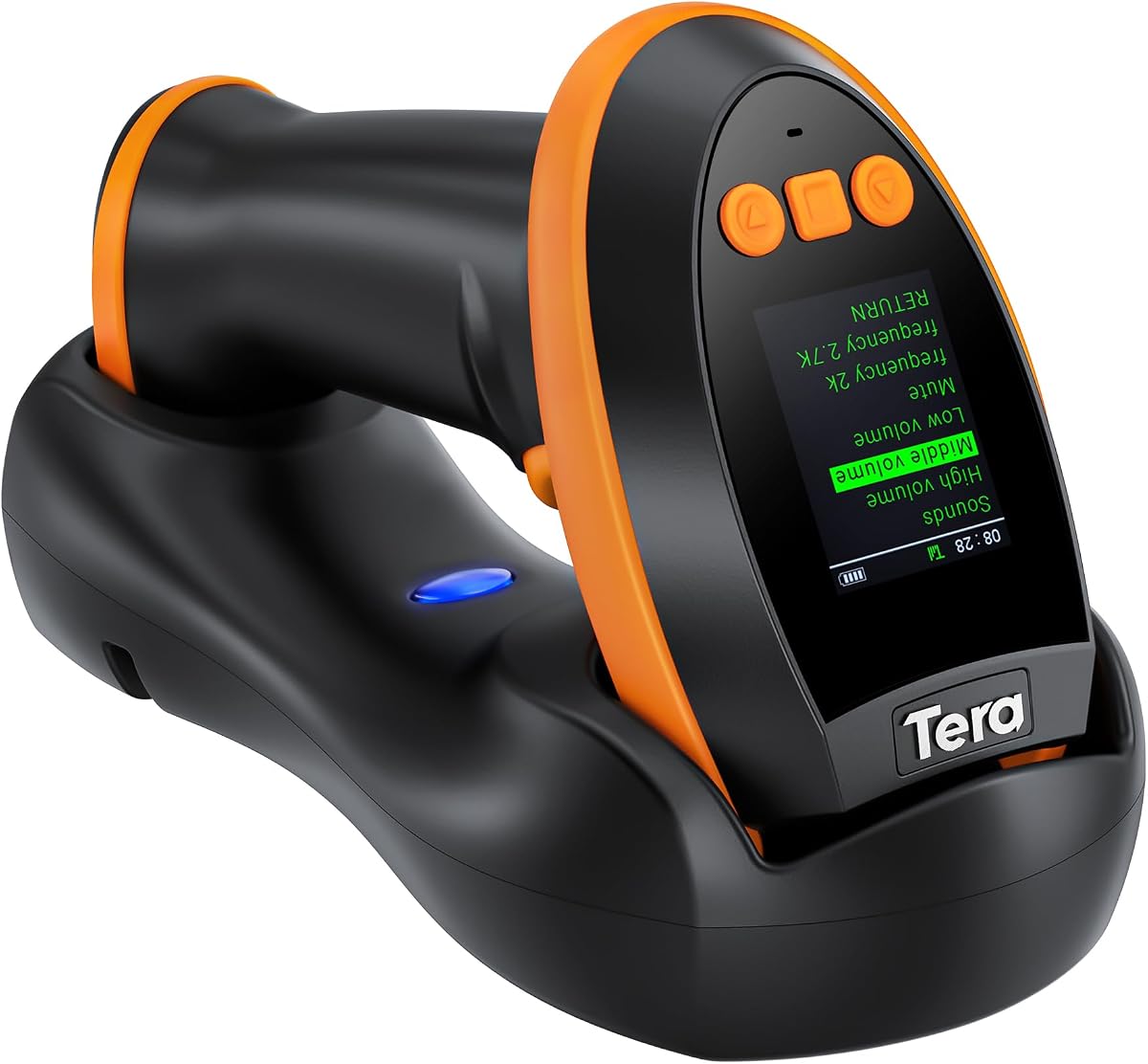
The Tera Barcode Scanner HW0009 features a built-in display for customizable settings, making it a premium choice for businesses wanting detailed control over scanner behavior. With a 4.3-star rating, it offers advanced features like screen-based configuration and extensive code support.
We may earn a commission when you buy through this link, at no additional cost to you.
It supports Bluetooth, 2.4G wireless, and wired USB modes with up to 328ft transmission range in open spaces. The 2500mAh battery enables all-day operation, and the charging cradle houses the 2.4G receiver to avoid separate dongles. Users can read complex codes like PDF417 on driver's licenses and reflective materials.
While the display adds convenience, the interface may take time to master. The higher price reflects the premium features, which may not be necessary for basic use cases. Additionally, compatibility with all POS systems should be verified before purchase.
This scanner suits businesses needing high-end features like screen configuration and extensive code compatibility. If you want a versatile, rechargeable scanner with advanced customization for complex workflows, the Tera HW0009 is a top-tier option.
Adjust settings like language, volume, and connection directly on the scanner's screen without needing external tools.
Handles challenging codes like PDF417 on licenses and reflective surfaces with its advanced CMOS imaging.
We may earn a commission when you buy through this link, at no additional cost to you.
This bundle includes an Epson thermal receipt printer, a Symbol USB barcode scanner, and an EOM-100 cash drawer designed specifically for Square Stand and Register systems. With a 4.6-star rating, it simplifies setup for businesses needing all checkout essentials in one package.
We may earn a commission when you buy through this link, at no additional cost to you.
The scanner and printer connect via USB to the Square Stand with no installation required. The cash drawer links to the printer and opens automatically when a sale is completed. Thermal printing eliminates ink or toner needs, and the kit comes with a 2-year warranty and lifetime tech support.
The main consideration is the overall cost compared to buying components separately. Users must also purchase thermal paper rolls, which are not included. However, the integration and reliability make it a convenient solution for setting up a full POS station.
This kit is ideal for new businesses or upgrades requiring a complete Square-compatible checkout setup. If you want a hassle-free bundle that ensures all components work together, this bundle offers strong value and support.
Provides scanner, printer, and drawer together to reduce compatibility issues and streamline setup.
The cash drawer opens automatically via printer connection when transactions are finalized.
We may earn a commission when you buy through this link, at no additional cost to you.
This scanner is the Symbol LS2208 bundled with a hands-free stand and USB cable specifically marketed for Square Stand, Register, and Terminal systems. With a 4.1-star rating, it is a straightforward option for businesses invested in the Square ecosystem.
We may earn a commission when you buy through this link, at no additional cost to you.
The package ensures compatibility with Square hardware out of the box. It includes the necessary USB cable and stand for immediate use. The scanner itself is reliable and durable, though it supports only wired connections. User feedback confirms it works well with iOS and Android Square setups when using the Stand or Register.
The limitation is its narrow compatibility focus. It does not support mobile Square Reader setups without a Stand or Register. Additionally, the wired design may limit flexibility compared to wireless alternatives. However, the convenience of guaranteed compatibility is a major benefit.
This scanner suits businesses using Square Stand or Register that want a guaranteed-compatible solution. If you prioritize seamless integration and simplicity over wireless mobility, this bundle provides a reliable path to adding barcode scanning.
Specifically tested to work with Square Stand, Register, and Terminal without compatibility issues.
Included stand allows for easy positioning on the counter for quick scanning without holding.
We may earn a commission when you buy through this link, at no additional cost to you.
The Eyoyo EYH2 is a USB-wired 2D scanner designed for POS and mobile payment scenarios. With a 4.3-star rating, it is valued for reading codes from smartphone screens and its sturdy build at an affordable price.
We may earn a commission when you buy through this link, at no additional cost to you.
It supports 1D and 2D codes like QR and PDF417, and can scan digital coupons or wallets by maximizing screen brightness. The anti-shock design withstands drops up to 5 feet, making it durable for busy environments. It is plug-and-play with Windows, Mac, Android, and Linux.
However, the product notes state it is not compatible with Square POS or Register systems. This is a key limitation for Square users. Additionally, very small or dense codes may be difficult to read. The wired connection limits mobility compared to wireless options.
This scanner works well for non-Square POS or inventory tasks requiring 2D scanning on a budget. If you need to scan digital mobile coupons and don't use Square, the Eyoyo EYH2 offers good value and durability.
Capable of reading barcodes from smartphone screens when brightness is set to maximum for mobile payments.
ABS construction withstands drops from 5 feet, ensuring longevity in active work environments.
We may earn a commission when you buy through this link, at no additional cost to you.
The NetumScan Desktop Scanner is designed for hands-free use with omnidirectional scanning, making it ideal for high-volume retail environments. With a 4.6-star rating, it is praised for speed, sensitivity, and ease of use without needing to hold the device.
We may earn a commission when you buy through this link, at no additional cost to you.
It features an auto-sensing trigger that activates when an item moves under the window, and it can read damaged or reflective codes accurately. The anti-slip base keeps it stable on counters, and the anti-vibration design protects against drops. Users report it improves efficiency and reduces training time for staff.
However, the product notes specify it is not compatible with Square, Clover, or Shopify POS systems. This makes it unsuitable for Square users. Additionally, it requires a wired USB connection, limiting placement options. The fixed position may not work for all workflows.
This scanner is best for retail or inventory stations where hands-free operation is prioritized and Square is not used. If you need rapid, automated scanning for high-volume items, the NetumScan offers excellent performance and reliability.
Place items under the window and the scanner reads automatically without needing to pick up the device.
Can capture damaged, distorted, or reflective barcodes that handheld scanners might miss.
We may earn a commission when you buy through this link, at no additional cost to you.
This Bluetooth and 2.4G wireless scanner offers dual connection modes with an ergonomic grip and offline storage. With a 3.8-star rating, it is affordable but receives mixed feedback on performance and reliability compared to other options.
We may earn a commission when you buy through this link, at no additional cost to you.
It supports 1D and 2D codes and includes 16MB memory for storing up to 50,000 offline barcodes. The base can store the 2.4G receiver, and the battery is rechargeable for portable use. Users note it works with Windows, Android, and iOS devices but requires a switch to turn on.
The lower rating suggests issues with connectivity or build quality over time. Additionally, the product notes explicitly state it is not compatible with Square POS systems. The offline storage is helpful, but performance consistency may vary in busy environments.
This scanner is a budget-friendly wireless option for non-Square setups needing offline data storage. If you require basic wireless scanning and can accept potential variability in performance, it provides affordable flexibility for light use.
Built-in memory holds up to 50,000 codes for later upload when connection is restored.
Switch between 2.4G wireless and Bluetooth to adapt to different devices and ranges.
We may earn a commission when you buy through this link, at no additional cost to you.
Selecting the right barcode scanner involves considering connectivity, barcode support, durability, and compatibility with your POS system.
Choose between wired USB, Bluetooth, or 2.4G wireless based on your workspace layout and mobility needs. Wired scanners offer stable connections without battery concerns, while wireless models provide flexibility for inventory checks away from the checkout counter.
Ensure the scanner supports the barcode formats you use, such as 1D UPC/EAN or 2D QR/PDF417. Some scanners read from screens and damaged codes, which is useful for digital coupons or worn labels.
Verify compatibility with Square or your specific POS system before purchasing. Some scanners explicitly state incompatibility with Square, which can hinder checkout operations if not checked beforehand.
Look for scanners with anti-shock designs that can withstand drops, especially in busy retail environments. A sturdy build ensures longevity and reduces replacement costs over time.
For wireless scanners, check battery capacity and charging methods. Models with rechargeable batteries and long life reduce downtime. Some come with charging stands for convenient power management.
Plug-and-play functionality simplifies installation without needing drivers or apps. Check if configuration requires manual steps like scanning setup barcodes, which may affect initial deployment time.
Balance features with your budget. Basic wired scanners are affordable and reliable, while premium models offer added features like screens or 2D support. Consider total cost including accessories or maintenance.
Review warranty terms and available technical support. Longer warranties and responsive service provide peace of mind in case of defects or compatibility issues with your setup.
Connect your scanner to your Square Stand or compatible device via USB or pair it wirelessly following manufacturer instructions. Ensure the connection is recognized by your POS software before processing transactions.
Not all barcode scanners are compatible with Square. Some explicitly state they do not support Square, so always verify compatibility before purchasing. Most USB scanners work with Square Stand and Register, but mobile readers may not.
1D scanners read linear barcodes like UPC and EAN, while 2D scanners read QR codes and matrix barcodes. If you need to scan digital coupons or mobile payments, a 2D scanner is necessary.
Yes, wireless scanners that connect via USB or Bluetooth can work with Square if they are compatible. Ensure the connection method matches your Square device, such as a Stand or Register, for proper integration.
Test the scanner on multiple barcodes to confirm it reads consistently. If it struggles with good-quality codes, check connections or settings. Many scanners have LED indicators to show successful scans.
A stand helps position the scanner for hands-free use and protects it during idle times. Many kits include stands, which are helpful for busy checkout counters where quick access is important.
Yes, 2D scanners with CCD sensors can read barcodes from screens if brightness is maximized. This is useful for digital wallets or loyalty cards but may not work on all models.
Choosing the right barcode scanner for Square depends on your specific workflow and budget. The Symbol Zebra LS2208 offers proven reliability, while options like the Tera HW0009 provide advanced features for premium users.
Consider connectivity, compatibility, and barcode types carefully to ensure smooth integration with your POS. Prioritize durability and ease of setup to minimize downtime and improve checkout efficiency for your business.
Remember to check current prices and availability as they can change. By reviewing the options and features above, you can select a scanner that supports your business growth and operational needs.