
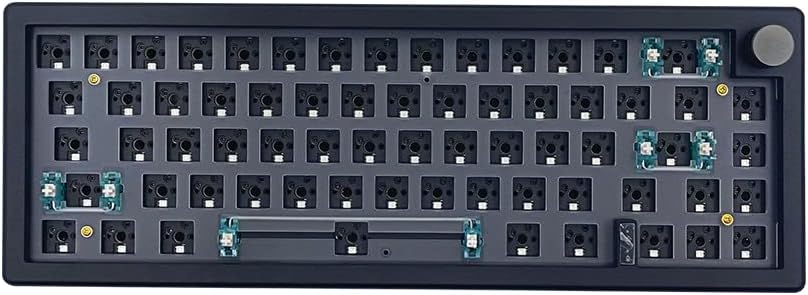
BOYI GMK67 Barebones Keyboard Kit
4.5Editor score
Compact 65% layout
South-facing RGB lighting
Includes multifunction knob
Explore the top 10 barebones keyboard kits of 2026. Compare specs, ratings, and features to find your perfect custom DIY mechanical keyboard.
Barebones keyboard kits offer enthusiasts the freedom to build a custom mechanical keyboard from the ground up. These kits typically include the case, PCB, plate, and sometimes switches or keycaps, allowing users to tailor the look, feel, and sound to their specific preferences.
To compile this list, we analyzed real user ratings, technical specifications, and feature sets across a wide range of options. We focused on kits that support hot-swappable switches, offer robust connectivity, and provide strong software customization via QMK or VIA.
Each pick below highlights a specific strength, whether it is premium features like OLED screens, compact layouts, or budget-friendly value. Note that availability and pricing can change frequently, so verify the current details before making your final purchase decision.
4.5Editor score

4.8Editor score

3.9Editor score
This side-by-side comparison highlights the key specifications and unique selling points of each kit. Use this table to quickly identify which layout and feature set best matches your workflow and aesthetic preferences.




The GMK104 White Kit stands out as a top contender in the barebones keyboard market with an impressive user rating. It provides a full-size layout ideal for those who rely on a numpad and function keys daily.
We may earn a commission when you buy through this link, at no additional cost to you.
Its standout feature is the inclusion of a smart display and multimedia knob, which adds a premium touch to the DIY experience. The kit supports both Bluetooth and 2.4GHz wireless modes alongside a wired connection, ensuring versatility across multiple devices.
While the price is higher than many compact options, the build quality and feature set justify the cost for users seeking a complete package. The gasket-mounted structure ensures a satisfying typing feel that reduces harsh vibrations during long sessions.
This kit is perfect for enthusiasts who want a powerful, feature-rich starting point for their custom build without compromising on layout or connectivity options.
The TFT screen allows real-time customization of images and information, adding a unique visual element to your desk setup.
With support for Bluetooth, 2.4GHz, and Type-C, you can seamlessly switch between work and personal devices on the fly.
We may earn a commission when you buy through this link, at no additional cost to you.
The BOYI GMK67 White Kit offers exceptional value for builders looking for a high-quality experience without breaking the bank. It features a compact 65% layout that saves desk space while retaining essential keys like arrows and navigation clusters.
We may earn a commission when you buy through this link, at no additional cost to you.
This model includes a multifunction knob for volume control and media playback, a feature often reserved for more expensive keyboards. The hot-swappable PCB supports both 3-pin and 5-pin switches, making it easy to swap switches without soldering.
While it lacks the premium screen of the GMK104, it compensates with robust software customization via VIA and solid typing performance thanks to the gasket mount design. The 4000mAh battery ensures long wireless usage between charges.
For budget-conscious enthusiasts who still want premium features like gasket mounting and wireless connectivity, this kit is an outstanding entry point into the world of custom keyboards.
The 65% form factor retains arrow keys and essential navigation functions, making it versatile for both typing and gaming.
The included rotary knob provides tactile feedback and precise control over system volume and media without leaving your keyboard.
We may earn a commission when you buy through this link, at no additional cost to you.
The GMK87 White Kit targets users who desire a balance between compact size and advanced features. It features a full TFT-LCD screen that allows for real-time customization of images, time, and date, making it a unique centerpiece for your desk.
We may earn a commission when you buy through this link, at no additional cost to you.
Despite having a slightly lower average rating compared to the 104 versions, it delivers a solid typing experience with a gasket-mounted design and hot-swappable PCB. The 80% TKL layout offers a great middle ground for those who don't need a full numpad.
The screen functionality adds a significant layer of personalization, appealing to gamers and streamers who want visual feedback from their input device. However, the battery capacity is smaller than the GMK104 options, requiring more frequent charging during heavy use.
If you prioritize visual flair and compact ergonomics over raw battery life, this kit offers a compelling package with interactive elements that stand out in the crowded barebones market.
The TFT screen can display custom images and system data, turning your keyboard into an interactive interface rather than just an input tool.
The TKL layout removes the numpad to save space while keeping arrow keys and navigation clusters, making it perfect for shared desks.
We may earn a commission when you buy through this link, at no additional cost to you.
The GMK104 Black Kit is the dark counterpart to the white version, offering the same powerful feature set in a classic colorway. It maintains the high user rating and full-size layout that makes it a reliable choice for productivity-focused builders.
We may earn a commission when you buy through this link, at no additional cost to you.
Like its white sibling, it includes a smart display and knob for enhanced control and personalization. The tri-mode connectivity ensures you can switch between devices effortlessly, whether you are working on a desktop or a laptop.
While it occupies a significant amount of desk space, the inclusion of a full numpad makes it ideal for professionals who rely heavily on numerical input. The hot-swappable PCB allows for endless customization of the typing feel.
Choose this kit if you need a full-size layout without sacrificing the modern features like wireless connectivity and programmable displays found in more compact models.
The full-size layout ensures you never miss out on function keys or a numpad, making it a robust tool for data entry and office work.
The gasket-mounted design reduces vibration noise, providing a softer and more consistent typing feel across the entire board.
We may earn a commission when you buy through this link, at no additional cost to you.
The BOYI GMK67 Black Kit offers the same great value and feature set as the white version but with a sleeker aesthetic. It is an ideal choice for gamers or those with limited desk space who still want a high-quality typing experience.
We may earn a commission when you buy through this link, at no additional cost to you.
It retains the 65% layout with arrow keys and a navigation cluster, making it versatile enough for both casual typing and intense gaming sessions. The gasket mount and hot-swappable switches provide a comfortable and customizable user experience.
The battery life is strong, ensuring that you won't be tethered to a cable for long periods. The knob adds convenience for quick volume adjustments, which is a nice touch for users who often switch between media and work.
If you are looking for a reliable and budget-friendly way to enter the mechanical keyboard scene without sacrificing core features, this black variant is an excellent starting point.
By removing the numpad, this kit provides a more ergonomic typing position and frees up mouse space for gamers with limited desk real estate.
The 4000mAh battery supports extended wireless use, making it practical for users who need reliability throughout a full workday.
We may earn a commission when you buy through this link, at no additional cost to you.
The GMK108 Black Kit expands on the traditional full-size layout by adding extra media keys, offering more functionality without changing the core design. It is a solid choice for users who need a full numpad and additional shortcuts for their workflow.
We may earn a commission when you buy through this link, at no additional cost to you.
It supports the same tri-mode connectivity and hot-swap capabilities as the other models in the line, ensuring versatility and customization. The gasket mount design provides a consistent typing feel that is comfortable for extended periods.
While it lacks the premium screen and knob features of the GMK104, it focuses on utility and reliability. The extended layout ensures you have quick access to media controls without needing secondary key combinations.
This kit is suitable for power users who need every possible key at their fingertips and prefer a straightforward, functional design over flashy extra features.
The 108-key layout adds dedicated media keys that streamline common tasks like volume adjustment and playback control.
With support for Bluetooth and 2.4GHz wireless, you can switch between devices quickly and reliably during your workday.
We may earn a commission when you buy through this link, at no additional cost to you.
The M87 Kit Black offers a no-frills approach to DIY keyboards, focusing on sound dampening and compact design. It includes pre-installed sound absorption foam, which helps create a quieter and more pleasant typing experience out of the box.
We may earn a commission when you buy through this link, at no additional cost to you.
This kit is designed for users who want a silent and practical keyboard without spending a fortune. The 75% layout saves space while keeping arrow keys and a function row, making it suitable for office environments where noise is a concern.
While it does not have wireless connectivity or advanced programming features like VIA, it covers the basics well with a hot-swappable PCB and RGB lighting. The included foam reduces the need for additional modifications.
If you need a budget-friendly, quiet keyboard kit for a shared space or office, this option delivers solid performance at a very accessible price point.
The included high-quality silencing pads absorb keystroke noise, making this kit ideal for quiet offices or libraries.
With no need for soldering and pre-installed foam, this kit offers a straightforward build process for beginners.
We may earn a commission when you buy through this link, at no additional cost to you.
The GMK87 Black Kit brings interactive features to a TKL form factor, perfect for users who want a balance of functionality and visual flair. The TFT-LCD screen allows for real-time customization, adding a unique interactive element to your setup.
We may earn a commission when you buy through this link, at no additional cost to you.
It retains the same wireless connectivity and programmable features as the white version, making it versatile for modern work environments. The gasket-mounted design ensures that the typing experience remains comfortable and consistent.
The smaller battery compared to the GMK104 models means you may need to charge it more often if you use wireless modes heavily. However, the screen and knob provide distinct advantages for personalization and media control.
Choose this kit if you want a compact wireless keyboard that doubles as a visual display for your desk setup, offering a unique blend of utility and style.
The TFT screen allows you to display system stats or custom art, transforming your keyboard into a central piece of your desk decor.
The multifunction knob simplifies volume control and media navigation, offering a tactile way to interact with your system.
We may earn a commission when you buy through this link, at no additional cost to you.
The BOYI GMK67Pro offers a robust option for users who prioritize deep customization via QMK and VIA software. It features a compact 65% layout that keeps essential keys while saving significant desk space for movement.
We may earn a commission when you buy through this link, at no additional cost to you.
The inclusion of a rotary knob for multimedia control adds convenience for daily tasks, while the 4000mAh battery ensures long wireless performance. The gasket-mounted construction provides a tactile and quiet typing experience.
While it may not have the visual flair of a screen, the programmability allows users to map complex macros and lighting effects. It is a solid choice for technical users who value function over flash.
If you need a reliable compact keyboard that allows for deep software customization and retains strong battery life, this kit is a versatile choice for both work and gaming.
With full QMK and VIA support, you can program macros and layer keys to optimize your workflow and gaming efficiency.
The 65% layout allows for a more natural mouse position and reduces shoulder strain during long work or gaming sessions.
We may earn a commission when you buy through this link, at no additional cost to you.
The M87 Kit White provides a clean and minimalist aesthetic for those building their first keyboard. It features sound-absorbing foam to dampen noise, making it suitable for shared spaces or office environments.
We may earn a commission when you buy through this link, at no additional cost to you.
This kit focuses on simplicity, offering a hot-swappable PCB and compact layout without unnecessary complex features. The gasket mounting helps to stabilize the board and improve the overall typing experience.
While it is basic compared to the more advanced kits on this list, it provides a solid foundation for learning the build process. The RGB lighting adds a touch of flair to the otherwise understated design.
Choose this kit if you want a quiet, affordable, and easy-to-build option that fits well in any room or shared workspace.
The white colorway and simple design make this kit a clean addition to any desk setup without drawing excessive attention.
The included foam and silicon pads absorb impact noise, ensuring your keystrokes do not disturb others around you.
We may earn a commission when you buy through this link, at no additional cost to you.
Selecting the right barebones keyboard kit requires understanding your specific needs regarding layout, connectivity, and build quality.
Layout size is one of the most critical factors to consider. Full-size (104 keys) layouts include a numpad, making them ideal for data entry and accounting. Compact layouts like 65% or 75% save desk space but may require you to get used to navigating without a dedicated numpad.
Choose a layout that matches your workspace constraints and how you use your computer daily.
Modern kits often offer tri-mode connectivity, including Bluetooth, 2.4GHz wireless, and wired USB-C. This flexibility allows you to connect multiple devices and switch between them easily, which is great for multitasking.
If you work across multiple devices, prioritize a kit with robust wireless options to minimize cable clutter.
A hot-swappable PCB allows you to change mechanical switches without soldering. This feature is essential for DIY enthusiasts who want to experiment with different switch types like linear, tactile, or clicky.
Ensure the kit supports the switch type you prefer, whether 3-pin or 5-pin, to maximize customization options.
Software support like QMK and VIA allows for deep customization of keys, macros, and lighting. This is crucial for users who need specific workflows or gaming shortcuts defined at the firmware level.
Prioritize kits with open-source firmware if you want total control over your keyboard's behavior.
Gasket mounting uses foam or rubber gaskets to isolate the PCB from the case. This design reduces vibration and noise, resulting in a softer and more consistent typing sound.
Look for gasket-mounted kits if you prefer a premium and comfortable typing experience over rigid structures.
Advanced features like TFT screens, multimedia knobs, and high-capacity batteries can elevate your keyboard experience. Screens allow for personalization, while knobs offer quick volume control.
Decide if these premium features align with your aesthetic and functional needs before investing in higher-end kits.
Materials like aluminum cases and polycarbonate plates can significantly affect durability and sound profile. Solid construction ensures your keyboard lasts longer and sounds more robust during typing.
Check reviews for build quality feedback to avoid kits with cheap or hollow casing materials.
For wireless keyboards, battery capacity is key. A 4000mAh battery will last much longer than a 3000mAh option, reducing the frequency of charges.
If you rely on wireless modes constantly, opt for a kit with a larger battery capacity.
When building your kit, start by installing the PCB and plate into the case. Ensure all screws are tightened evenly to maintain the gasket alignment which affects sound and feel.
For wireless usage, install the batteries or ensure the unit is charged. Use the function key combinations to switch between Bluetooth and 2.4GHz modes as needed.
Regularly clean your switches and keycaps with compressed air to prevent dust buildup. This maintains the switch performance and prolongs the life of your custom build.
Most barebones kits include the case, PCB, and plate, but often exclude keycaps and switches. Always check the product description to confirm what is included before purchasing to avoid missing components.
These kits generally support standard MX-style switches. However, ensure they are compatible with the PCB type, as some kits may be limited to 3-pin or 5-pin switches specifically.
No, most kits listed support hot-swap PCBs, which means you can install switches without soldering. This simplifies the assembly process significantly for beginners.
Most of the kits mentioned offer dual compatibility with Windows and macOS. The layouts and software usually support both operating systems out of the box.
You typically use software like VIA or QMK to program the keys. Download the software to your computer and map your desired keys and macros through the visual interface.
Gasket mounting isolates the PCB from the case to reduce noise and vibration. This results in a more consistent and softer typing feel that many enthusiasts prefer.
Choosing the right barebones keyboard kit depends largely on your layout needs and budget. The GMK104 offers a premium experience with a screen, while the BOYI GMK67 provides excellent value for compact setups.
Prioritize features like hot-swap support and software programmability to ensure your keyboard grows with you. A solid build quality will make the DIY process rewarding and the final product durable.
Remember to check current prices and availability as stock fluctuates often. Select the kit that best fits your desk space and technical requirements for a satisfying custom build.