
GLORIOUS GMMK PRO 75% Barebones Black
4.4Editor score
CNC machined aluminum frame
5-pin hotswap support
Modular top frame design
Explore the top 10 barebones keyboards of 2026. Compare specs, ratings, and features to find the perfect DIY mechanical keyboard for your needs.
Barebones keyboards offer enthusiasts the ultimate freedom to craft a custom typing experience. These kits provide the essential frame, PCB, and features, leaving switches and keycaps to your choice.
We evaluated ten top-rated models based on build quality, connectivity, and customization options. Our analysis covers everything from compact 65% layouts to full-size designs with advanced features.
Each pick highlights unique strengths like gasket mounting or VIA support. Keep in mind that availability and pricing fluctuate, so verify details before purchasing your ideal build.
4.4Editor score

4.8Editor score

4.2Editor score
This side-by-side comparison outlines the core specifications of all ten reviewed models to help you quickly identify the layout and features that best fit your workflow.




The GMK104 Barebones Kit stands out as the top choice for enthusiasts who want a full-size experience without sacrificing modern features. With its impressive 4.8 rating, it balances build quality and functionality seamlessly.
We may earn a commission when you buy through this link, at no additional cost to you.
Its standout features include a smart display and metal knob for real-time customization and volume control. The gasket-mounted structure ensures a cushioned typing experience, while the tri-mode connectivity supports up to three devices effortlessly.
While it is priced higher than entry-level options, the premium materials and advanced programmability justify the cost for power users. The full-size layout is perfect for those who rely on a numpad for data entry.
We recommend this kit for professionals and gamers seeking a versatile, high-end mechanical keyboard foundation. Its robust construction and extensive customization options make it a long-term investment.
The QMK/VIA programmability allows complex macros and remapping for optimized workflows across Windows and Mac systems.
With Bluetooth 5.0, 2.4GHz, and wired Type-C options, plus a 4000mAh battery, you stay connected without frequent charging.
We may earn a commission when you buy through this link, at no additional cost to you.
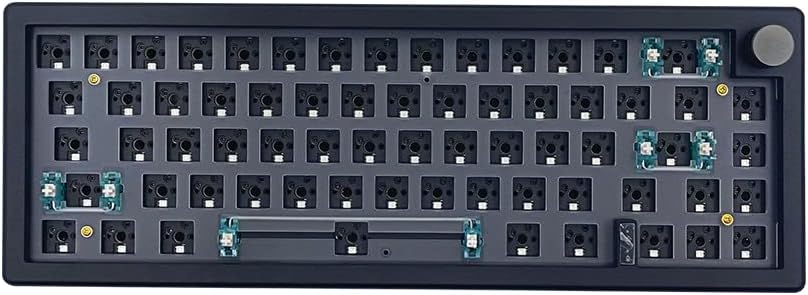
The BOYI GMK67 offers a compact 65% layout ideal for users who need arrow keys without the bulk of a full keyboard. Its 4.5 rating reflects strong performance in wireless reliability and build solid.
We may earn a commission when you buy through this link, at no additional cost to you.
Key strengths include the multifunction knob for easy multimedia control and the gasket-mounted design that reduces vibration. The 4000mAh battery ensures long-lasting usage for both gaming and office work.
Some users may find it lacks support for optical or magnetic switches, limiting specific customization paths. However, it remains a solid choice for standard mechanical switch enthusiasts.
This kit is perfect for travelers or desk-space-conscious users who want a high-quality DIY experience. Its balance of features and compact size makes it a versatile option.
Switch seamlessly between Bluetooth 5.0, 2.4GHz, and wired modes to connect multiple devices without hassle.
Ample preinstalled foam and a polycarbonate plate help minimize cavity noise for a satisfying thock sound.
We may earn a commission when you buy through this link, at no additional cost to you.
The M87 Kit delivers exceptional value for those seeking a silent, customizable 75% board on a budget. With a 4.2 rating, it focuses on core mechanical features without unnecessary costs.
We may earn a commission when you buy through this link, at no additional cost to you.
Its sound absorption foam and silicon bottom pad create a whisper-quiet typing experience, perfect for shared workspaces. The hot-swap PCB allows easy switch changes without soldering.
The lack of wireless options limits mobility, but the detachable USB-C cable ensures portability. This trade-off is acceptable for stationary users prioritizing sound control.
We recommend this kit for entry-level builders or office users needing a quiet setup. It proves that budget-friendly models can still offer robust DIY capabilities.
High-quality silencing pads absorb keystroke clatter for a smooth and peaceful typing session.
The 75% layout keeps arrow keys and function rows while saving significant desk space.
We may earn a commission when you buy through this link, at no additional cost to you.
The black variant of the GMK104 mirrors the white model's excellence, offering a robust 104-key platform for power users. Its 4.6 rating confirms strong reliability and feature richness.
We may earn a commission when you buy through this link, at no additional cost to you.
It shines with its smart display and metal knob, providing tactile feedback for volume and screen controls. The NKRO feature ensures no key conflicts during intense gaming or rapid typing.
Its size is its main drawback, as it demands substantial desk real. However, the premium feel and full functionality justify the footprint for many.
This is an ideal pick for those who need a complete numpad and advanced features in a reliable wireless package. It balances form and function effectively.
Includes a dedicated numpad, arrow keys, and function row for maximum productivity and gaming utility.
Switch between three connected devices easily using FN+Q/W/E keys for efficient multitasking.
We may earn a commission when you buy through this link, at no additional cost to you.
The white variant of the M87 Kit offers a clean look for budget-conscious users. While its 3.5 rating is lower, it still provides core customization features for DIY projects.
We may earn a commission when you buy through this link, at no additional cost to you.
Its sound absorption foam and silent design are key strengths for quiet typing. The south-facing RGB adds a touch of style without complicating the build process.
Users may notice a more basic construction compared to premium kits, but it remains functional. The lack of wireless is a significant limitation for modern workflows.
We recommend this for hobbyists wanting a simple, silent start to mechanical keyboard building. It serves as an affordable entry point for customization.
The 75% layout balances functionality and space, making it ideal for smaller desks.
Factory-set lights and music modes allow easy visual customization without extra software.
We may earn a commission when you buy through this link, at no additional cost to you.
The black GMK67 combines portability with a strong 4.3 rating, making it a favorite for hybrid work environments. Its 65% layout saves space without sacrificing essential keys.
We may earn a commission when you buy through this link, at no additional cost to you.
Tri-mode connectivity ensures flexibility for connecting to laptops, tablets, and phones. The multifunction knob adds convenience for media control on the go.
While it lacks optical switch support, it accommodates most standard mechanical options. The battery life ensures uninterrupted use throughout the day.
This kit is ideal for travelers or minimalists who need a reliable, wireless mechanical keyboard. Its solid build supports long-term daily use.
Its compact 65% footprint makes it easy to pack and use anywhere.
Gasket mounting reduces vibration for a softer and more comfortable typing experience.
We may earn a commission when you buy through this link, at no additional cost to you.
The GMK87 features a unique TFT LCD screen for real-time customization, appealing to tech enthusiasts. With a 3.9 rating, it offers innovative features but faces some reliability questions.
We may earn a commission when you buy through this link, at no additional cost to you.
Its screen allows image updates and time displays, adding a personalized touch. The gasket-mounted structure ensures a satisfying typing feel, while the metal knob aids volume control.
Some users report that the screen functionality can be complex to set up. This trade-off limits its appeal compared to simpler models.
We suggest this kit for users who prioritize visual customization over simplicity. It provides a novel DIY experience for those willing to experiment.
Update the TFT screen in real time for images, date, and time displays.
Supports Bluetooth, 2.4GHz, and wired Type-C for broad device compatibility.
We may earn a commission when you buy through this link, at no additional cost to you.
The GMMK PRO stands as a premium option with a CNC machined aluminum body for unmatched durability. Its 4.4 rating highlights the quality of its materials and design.
We may earn a commission when you buy through this link, at no additional cost to you.
Key strengths include the ability to swap aluminum for brass or polycarbonate plates to tailor sound and feel. The modular top frame allows for easy aesthetic changes.
Its weight makes it less suitable for portable use, but it excels on a fixed desk. The high price is justified by its exceptional build quality and longevity.
This kit is perfect for professionals seeking a high-end, custom mechanical keyboard. Its premium features make it a standout choice for enthusiasts.
Swap plates to achieve a firmer or softer typing feel and distinct acoustic profiles.
The solid aluminum body ensures high scratch resistance and an impressive tactile feel.
We may earn a commission when you buy through this link, at no additional cost to you.
The GMK108 extends the standard full-size layout with 108 keys for additional macros or shortcuts. Its 4.1 rating reflects solid performance and versatile connectivity.
We may earn a commission when you buy through this link, at no additional cost to you.
Its full-size layout supports reliable NKRO performance, making it ideal for office work and gaming. The gasket mounting ensures a cushioned typing experience.
While the design is functional, it lacks advanced multimedia features like a display or knob. The trade-off is acceptable for users needing extra keys.
We recommend this kit for data entry professionals or gamers who need a full set of keys. It offers a practical and customizable foundation.
The 108-key layout provides extra keys for complex macros and workflow optimization.
Switch between devices quickly using FN+Q/W/E for efficient multitasking.
We may earn a commission when you buy through this link, at no additional cost to you.
The GMMK 3 introduces a modular gasket system that allows unique tuning of the typing feel. With a 3.2 rating, it shows promise but has mixed user reception.
We may earn a commission when you buy through this link, at no additional cost to you.
Its two layers of dense foam absorb unwanted resonance for a clean acoustic profile. The programmable knob offers quick control over volume and media playback.
Some users may find the build inconsistent compared to other brands. The modular design requires some effort to fully realize its potential.
We suggest this kit for tinkerers who want to experiment with internal components. It provides an interesting platform for advanced customization.
Customize internal gaskets to achieve a firmer or more flexible typing feel.
Two layers of foam absorb resonance for a clean and satisfying sound.
We may earn a commission when you buy through this link, at no additional cost to you.
Selecting a barebones kit depends on layout, connectivity, and build quality. These factors ensure your custom keyboard meets both practical and aesthetic needs.
Layout determines desk footprint and key availability. Compact sizes like 65% save space but may lack a numpad, while full-size options include all function rows.
Choose a layout that matches your workflow and desk constraints for optimal comfort.
Tri-mode kits support wired, Bluetooth, and 2.4GHz wireless options. This flexibility allows seamless switching between multiple devices without physical cables.
Prioritize wireless modes if you work across several devices frequently.
A hot-swap PCB lets you change switches without soldering. Ensure it supports both 3-pin and 5-pin switches for maximum switch compatibility.
This feature simplifies future upgrades and customization.
Gasket mounting uses rubber dampeners for a softer and more consistent feel. Plate mounting is stiffer and more stable for gamers.
Gasket mounts generally provide a more premium typing experience.
Materials like aluminum offer durability and premium feel, while polycarbonate or plastic keep costs lower. Weight impacts portability and stability on the desk.
Select a material that balances your budget with desired durability.
Wireless kits require long-lasting batteries. Models with 4000mAh capacity can last weeks between charges depending on RGB usage.
Higher capacity ensures uninterrupted use for travelers or mobile workers.
QMK and VIA support enable key remapping and complex macros. Software compatibility is essential for tailoring the keyboard to your workflow.
Ensure the kit supports the software you prefer for maximum flexibility.
South-facing RGB improves keycap compatibility and reduces glare. Customizable lighting adds a personal touch to your setup.
Consider RGB options that align with your aesthetic preferences.
Assemble the kit by inserting hot-swap switches and attaching the keycaps according to the manufacturer diagram. Ensure all connections are secure for reliable operation.
Use VIA or QMK software to remap keys and set macros. This allows you to tailor the keyboard layout for your specific workflow or gaming needs.
Clean the surface regularly with a soft cloth and avoid excessive moisture to protect the electronics. Store the keyboard in a dry place when not in use.
A barebones kit includes the frame, PCB, and necessary components but excludes switches and keycaps. This allows users to choose their preferred parts for a custom build.
No, most kits feature hot-swap sockets that let you insert switches directly. This eliminates the need for soldering, making assembly easy for beginners.
VIA software allows you to remap keys, set macros, and customize lighting effects without flashing firmware. It simplifies customization across different operating systems.
Yes, many kits support both Windows and macOS systems. Check the product details for specific key mapping compatibility before purchasing.
The keycap size depends on the layout. A 65% kit needs standard sets without a numpad, while full-size kits require larger sets with a numpad.
Yes, hot-swap sockets allow you to change switches anytime without soldering. This makes it easy to experiment with different switch types.
We highlighted top picks like the GMK104 and GMMK PRO for their exceptional balance of features and build quality. Each model offers distinct advantages for different user needs.
Prioritize factors like layout, connectivity, and mounting style when making your decision. These elements define how the keyboard fits into your daily workflow.
Remember to check current availability and specifications before purchasing. Prices and stock vary, so staying updated ensures you get the best value for your build.