
JADENS Portable US Letter Thermal Printer
4.6Editor score
Inkless thermal technology
Bluetooth connectivity
Ultra-compact size
Finding a reliable battery powered portable printer can transform how you work on the go. These devices allow you to print documents, photos, and receipts without needing a wall outlet or a computer connection.
We evaluated ten top models based on portability, print quality, battery life, and ease of use. Our analysis includes inkjet and thermal options to suit different needs and budgets.
Each pick highlights key strengths and potential limitations to help you decide. Note that availability and specific model features may change over time as manufacturers update their lines.
4.6Editor score

4.4Editor score
4.5Editor score
As an Amazon Associate we earn from qualifying purchases.
This side-by-side comparison highlights the key specifications and capabilities of the top ten battery powered portable printers available today.


The HP OfficeJet 200 stands out as a top choice for professionals needing reliable mobile printing. With a strong rating and robust features, it handles documents efficiently without a network connection.
We may earn a commission when you buy through this link, at no additional cost to you.
Its built-in battery ensures you can print anywhere, whether in a car or at a remote site. The fast charging capability means minimal downtime when you need to get back to work quickly.
While the upfront cost is higher than thermal alternatives, the ability to print on various paper sizes like legal and envelopes adds significant value for business users who need flexibility.
If you require full color inkjet printing on the go and value speed and versatility, this model is an excellent investment for your mobile workflow needs.
The included battery provides essential portability, and the fast charge feature ensures you are rarely without power during critical tasks.
Support for multiple paper sizes including legal and various card types makes it suitable for diverse business document requirements.
We may earn a commission when you buy through this link, at no additional cost to you.
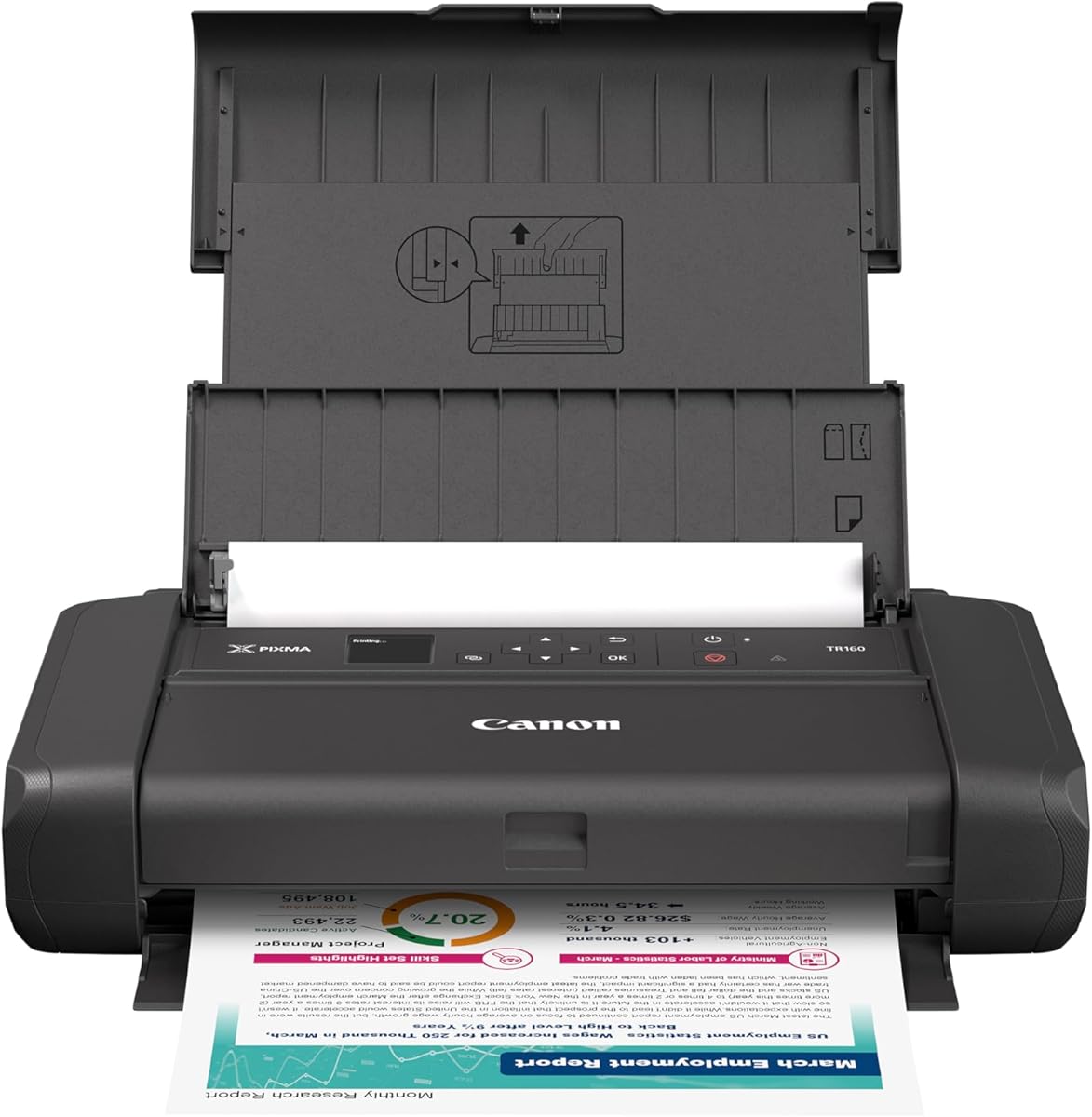
The Canon PIXMA TR160 offers impressive color quality in a lightweight package. Its 5-color hybrid ink system produces sharp text and vibrant details ideal for photos and documents alike.
We may earn a commission when you buy through this link, at no additional cost to you.
Simple connectivity through the Canon PRINT app or AirPrint makes printing effortless from mobile devices. The OLED display helps you monitor ink levels and settings without needing a computer.
While it lacks a built-in battery compared to some competitors, its compact size allows it to fit easily into a bag for travel when paired with a portable power bank.
This printer is perfect for users who prioritize print quality and ease of use for occasional mobile printing tasks involving color documents or photos.
The 5-color ink system ensures that your output looks professional with rich colors and sharp black text for any document type.
An OLED display provides quick access to printer status and settings making operation straightforward for users on the move.
We may earn a commission when you buy through this link, at no additional cost to you.
The JADENS Portable US Letter printer offers exceptional value for those needing a compact thermal solution. Its high rating reflects reliability and ease of use for various mobile printing scenarios.
We may earn a commission when you buy through this link, at no additional cost to you.
With an inkless design and a robust battery life capable of printing hundreds of sheets per charge, it reduces ongoing costs and maintenance. The companion app also adds creative features like AI tools.
Users should note that it prints only in black and white and requires specific thermal paper which limits compatibility with standard office documents but suits most travel needs.
For students travelers or remote workers looking for an affordable and efficient printing solution without ink mess this model is highly recommended.
Eliminating ink and toner costs makes this printer an economical choice for high volume everyday printing tasks.
Bluetooth pairing via the app allows seamless integration with smartphones for quick document transfers and prints.
We may earn a commission when you buy through this link, at no additional cost to you.
The HP OfficeJet 250 expands functionality by adding scanning and copying to portable printing. This versatility makes it a powerful tool for small businesses without office space.
We may earn a commission when you buy through this link, at no additional cost to you.
Its ability to handle legal size paper and business documents ensures it meets diverse professional needs. The included battery supports true wireless operation away from power outlets.
While it may be slightly bulkier than dedicated printers the added convenience of scanning on the go can save time and effort for users who handle physical paperwork regularly.
Choose this model if you need a complete mobile office solution that handles both printing and document capture tasks efficiently.
Combining print scan and copy functions in one device allows for comprehensive document management while traveling.
Support for larger formats like legal paper ensures compatibility with standard business contracts and documents.
We may earn a commission when you buy through this link, at no additional cost to you.
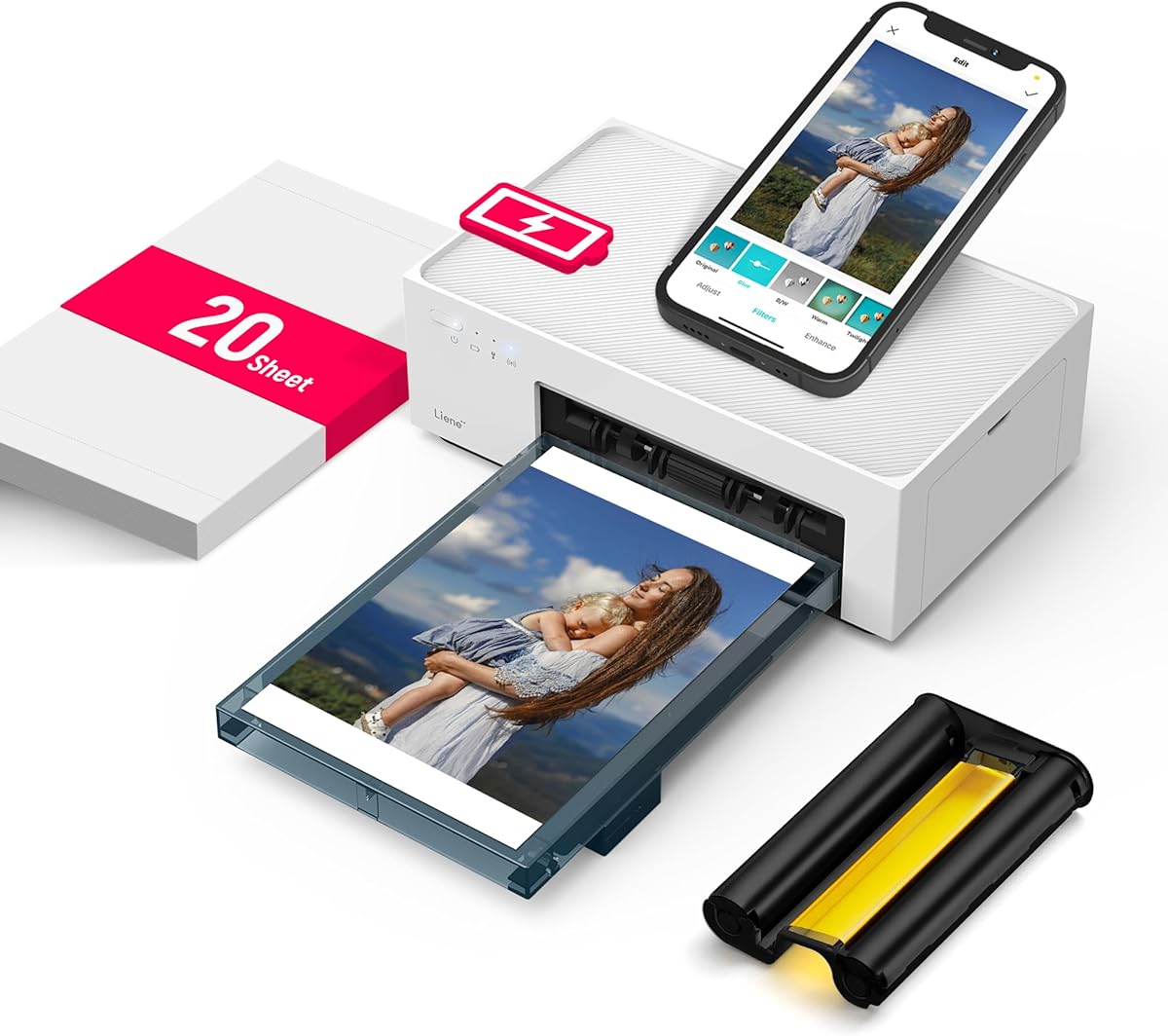
The Liene White M200 is specifically designed for high-quality photo printing on the go. Using dye sublimation technology it produces vibrant and durable images that resist fading and water damage.
We may earn a commission when you buy through this link, at no additional cost to you.
Its compact size and built-in battery make it ideal for travel allowing you to print cherished memories instantly at events or vacations. The app adds editing features to enhance your photos before printing.
While it is limited to 4×6 inch photos which makes it less suitable for document printing the quality it delivers for pictures is superior to most other portable options.
For photographers travelers or anyone who values tangible memories this printer offers a unique and rewarding portable printing experience.
Dye sublimation ensures your photos are protected from scratches and water for long lasting quality.
The companion app provides tools for filtering and editing so you can perfect your shots before printing.
We may earn a commission when you buy through this link, at no additional cost to you.
The Epson Workforce WF-110 is a solid option for those needing color printing without wires. Its wireless connectivity and Wi-Fi Direct support allow easy connection to various devices.
We may earn a commission when you buy through this link, at no additional cost to you.
It offers flexible charging options including USB and AC adapter which adds versatility depending on your power source availability. The compact design makes it easy to carry in a bag.
Without a built-in battery this model relies on external power sources but still delivers reliable performance for mobile color printing tasks when plugged in.
If color quality is your priority and you have access to power outlets this printer provides a reliable solution for on-demand color documents.
Support for multiple charging methods ensures you can power the device easily regardless of your location.
Direct Wi-Fi connections allow printing from devices without needing a separate router or network setup.
We may earn a commission when you buy through this link, at no additional cost to you.
The Gloryang Inkless Portable Printer is an excellent choice for travelers needing a ready-to-use kit. It includes a carry case and paper rolls making it convenient for immediate use upon arrival.
We may earn a commission when you buy through this link, at no additional cost to you.
Its compact design and Bluetooth connectivity allow easy pairing with phones for printing documents or images on the go. The inkless technology keeps ongoing costs low and maintenance simple.
While it is limited to thermal paper and black and white output this makes it ideal for basic documents notes or labels without the hassle of ink cartridges.
For those seeking a hassle-free travel printer with all essentials included in the box this model is a practical and budget-friendly option.
Included accessories like a case and paper ensure you have everything you need to start printing right away.
Designed to fit in backpacks this printer ensures you can carry it without added weight or bulk.
We may earn a commission when you buy through this link, at no additional cost to you.
The D90E Inkless Thermal Printer offers versatile connectivity with both Bluetooth and USB options for different device types. This flexibility makes it suitable for mobile phones as well as laptops.
We may earn a commission when you buy through this link, at no additional cost to you.
It supports standard letter size thermal paper ensuring compatibility with most document needs. The included case provides protection for transport while the lightweight body keeps it easy to carry.
Users should be aware that it requires specific thermal paper and does not support regular copy paper which is typical for this technology but limits some use cases.
For students or professionals needing a simple and effective thermal printer for basic documents this model delivers reliable performance at an accessible price.
Support for both Bluetooth and USB connections ensures compatibility with a wide range of devices.
The ability to print on standard letter size paper makes it suitable for creating contracts and notes.
We may earn a commission when you buy through this link, at no additional cost to you.
The A285M Small Inkless Printer stands out for supporting multiple paper sizes from small receipts to full letter documents. This versatility is rare for such a compact device.
We may earn a commission when you buy through this link, at no additional cost to you.
It connects via Bluetooth for mobile use and USB-C for computers making it adaptable to different workflows. Its small size allows it to fit easily into tight spaces or bags.
Computer users may need to install a driver which adds a small step to setup but ensures stable printing performance once configured.
If you need a compact printer that can handle a variety of paper sizes for receipts or documents this model is a practical choice.
Supporting multiple thermal paper widths allows you to print receipts notes or full page documents as needed.
USB-C and Bluetooth ensure easy connection to modern phones laptops and tablets for seamless printing.
We may earn a commission when you buy through this link, at no additional cost to you.
The N80 Bluetooth Thermal Printer is designed for efficiency on the road with a battery capable of printing over a hundred sheets per charge. It supports both Bluetooth and USB connections for flexibility.
We may earn a commission when you buy through this link, at no additional cost to you.
Its 203 DPI resolution ensures clear and readable text for contracts or notes making it suitable for professional use. The compact size and low weight make it easy to carry in a backpack.
While it is limited to thermal paper the convenience of portable printing without ink makes it a great tool for travelers and field workers.
For those who prioritize long battery life and portability for basic document printing this model offers a solid and reliable solution.
With a battery that supports hundreds of prints you can go longer without needing to recharge during busy travel days.
High resolution printing ensures your documents remain readable and professional even when printed on the go.
We may earn a commission when you buy through this link, at no additional cost to you.
Selecting the right battery powered portable printer requires understanding your specific needs and the limitations of different technologies. This guide outlines key factors to consider before making a purchase.
There are two main types of portable printers: inkjet and thermal. Inkjet printers offer color and standard paper compatibility but often require power or cartridges. Thermal printers are inkless cheaper and simpler but only print in black and white on special paper.
Choose inkjet for color photos or standard documents and thermal for receipts notes or budget-friendly black and white printing on the go.
Battery capacity varies significantly between models. Some printers can last for hundreds of sheets while others may only print a few dozen per charge. Consider how often you need to print away from a power outlet.
Look for models with rechargeable batteries and fast charging if you plan to use the printer for extended periods without access to an AC outlet.
Modern portable printers typically support Bluetooth and Wi-Fi Direct. Some also include USB-C for direct connection to laptops. Ensure the printer works with your devices and offers the connection methods you prefer.
Bluetooth is convenient for mobile printing from phones while USB is often necessary for laptops and desktops to ensure stable connections.
Thermal printers require specific thermal paper rolls which may not be available everywhere. Inkjet printers support standard office paper sizes like Letter and legal. Check the supported paper sizes before buying to match your document needs.
If you need to print contracts or official documents on standard paper inkjet is your better choice. For quick notes or labels thermal works well.
Portability is key for this category. Look for lightweight designs that fit in a backpack or briefcase. Weight and dimensions should align with how you plan to carry the device.
A compact and lightweight printer is essential if you plan to travel frequently or carry it daily in a bag.
Most printers support iOS and Android through dedicated apps. However some models may have limited or no support for Chromebooks or older operating systems. Verify app compatibility with your specific devices.
Ensure the printer has a well-reviewed app and driver support for the devices you plan to use for printing.
Resolution is measured in dots per inch (DPI). Higher DPI results in sharper text and images. For text documents 203 DPI is usually sufficient. For photos you need higher resolution and color capability.
Consider the clarity required for your prints. Business documents need sharp text while photos require color and finer detail.
Thermal printers are cheaper upfront but may cost more in paper rolls if you print frequently. Inkjet printers have higher upfront costs but can be cheaper per page if you use high-yield cartridges.
Calculate the total cost of printer and supplies over time to choose the most economical option for your usage level.
To begin using your portable printer ensure it is fully charged. For thermal models load the thermal paper correctly ensuring the coated side faces the print head to achieve clear results.
Connect your device via Bluetooth or USB through the dedicated app. Select the document you wish to print and choose the appropriate paper size and settings before sending the print job.
Keep the print head clean by avoiding touching it with bare hands and using a lint-free cloth if dust accumulates. Store the printer in a cool dry place to protect the battery and internal components.
Yes most models support direct wireless printing from smartphones and tablets using Bluetooth or Wi-Fi. This allows you to print without needing a computer connection making them ideal for travel.
Battery life varies by model ranging from about 160 to 360 sheets per charge. Always check the specifications for the specific device you choose to ensure it meets your needs.
Thermal printers generally produce black and white text. For color photos consider a dye sublimation printer which supports color output and produces durable photo-quality images.
Inkjet models support standard paper but thermal printers only work with thermal paper. Choose inkjet if you need to print on regular office paper for contracts or reports.
Yes thermal printers require specific thermal paper rolls that react with heat. Ensure you purchase the correct size and type to avoid jams or poor print quality.
Most laptops connect via USB cable. Some models also support wireless drivers. Check the manual for the correct driver installation steps for your operating system.
Thermal printers will not print on regular paper because they rely on heat to create images on thermal coated paper. Attempting to use standard paper will result in blank pages or jams.
Many models allow printing while connected to a power source. Always consult the user manual to confirm if your specific printer supports simultaneous charging and operation.
We have reviewed ten top options for battery powered portable printers ranging from inkjet to thermal technology. Each model offers unique strengths whether you prioritize color quality versatility or budget.
When choosing consider your specific printing needs such as color versus black and white and the types of paper you require. Battery life and connectivity options also play crucial roles in daily usability.
Keep in mind that pricing and availability can change so check current listings before purchasing. We hope this guide helps you find the perfect portable printer to enhance your mobile workflow.