
Canon EOS R6 Mark II Body with Stop Motion Animation Firmware Black
4.1Editor score
24.2 megapixel full-frame CMOS sensor
Up to 40 fps electronic shutter speed
Increased Live View Resolution for software
Choosing the right camera for stop motion animation is essential for creating smooth and professional-looking videos. You need a device that offers consistent focus, high resolution, and reliable connectivity to your computer for frame-by-frame capture.
This guide compares ten top-rated cameras and kits suitable for beginners, educators, and professional animators. We evaluated each product based on resolution, lens flexibility, software compatibility, and overall user feedback to help you make an informed decision.
Each pick highlights key strengths, pros, cons, and ideal use cases to streamline your selection process. Note that product availability and pricing may change over time, so always verify current details before purchasing your next animation camera.
4.1Editor score

4.0Editor score
4.1Editor score
As an Amazon Associate we earn from qualifying purchases.
The following table provides a side-by-side comparison of all ten cameras evaluated in this guide to help you quickly identify the specifications that matter most for your stop motion workflow and budget.


The HUE Animation Studio Pro is a top-rated stop motion kit that offers everything beginners need to start creating smooth animations. It holds a 4-star rating and stands out for its manual focus lens which ensures frame consistency during long projects.
We may earn a commission when you buy through this link, at no additional cost to you.
Its Full HD 1080p capture delivers clear images while the built-in LED lights help maintain consistent lighting without extra gear. The included stop motion software and 64-page book guide you through techniques like rotoscoping and time-lapse photography.
The camera also works as a document camera for classes or video conferencing when not animating. While its manual focus requires initial setup, this prevents autofocus hunting which is critical for professional looking stop motion frames.
This kit is ideal for teachers homeschoolers and hobbyists who want a reliable all-in-one solution. We highly recommend it for anyone starting stop motion animation who values simplicity and educational support.
The package comes with a full-color book covering animation basics and printable activities to help users learn quickly.
Beyond animation the flexible camera supports homeschooling and live demos making it a valuable long-term investment.
We may earn a commission when you buy through this link, at no additional cost to you.
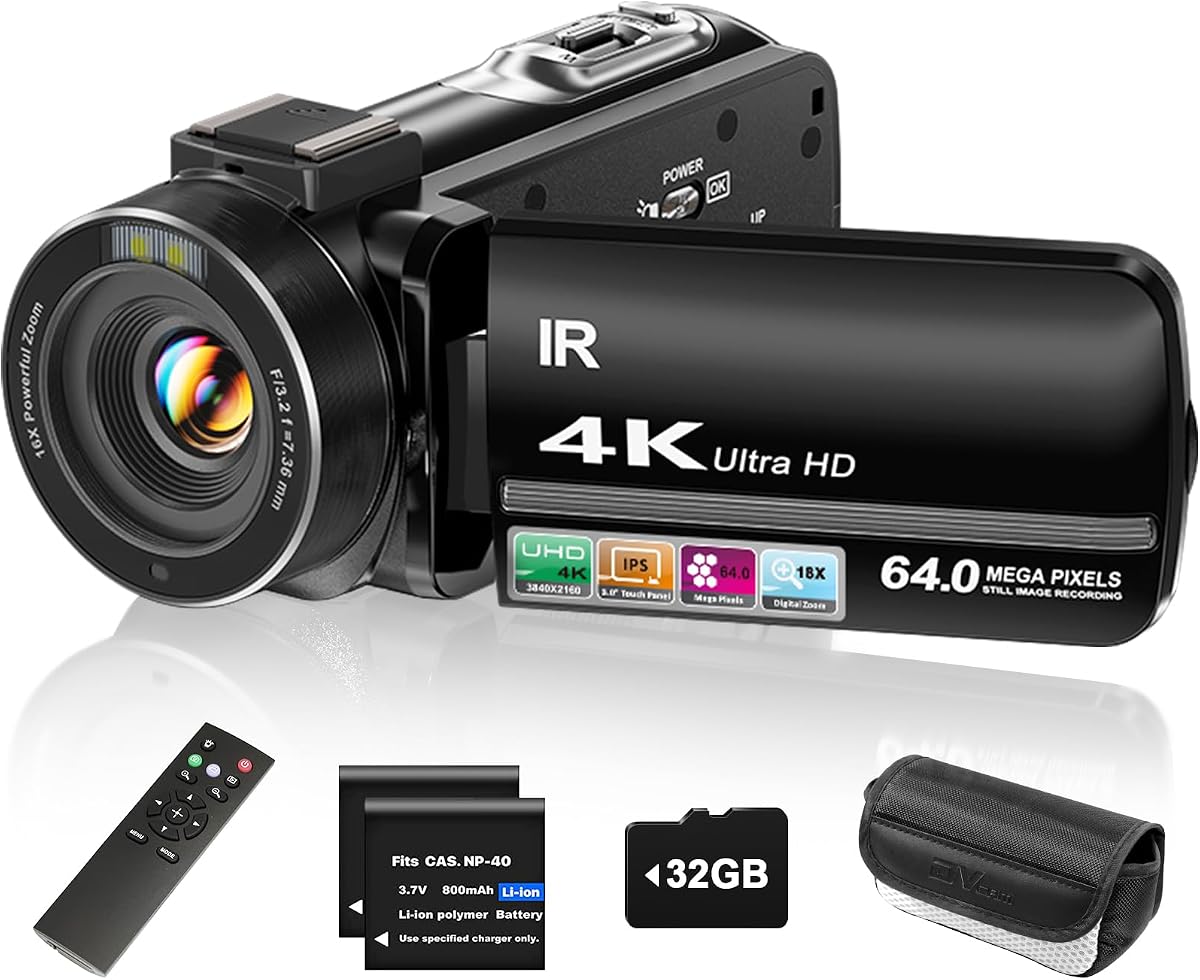
The ZYDIIE 4K Video Camera is a versatile camcorder that delivers high-resolution footage suitable for detailed stop motion projects. It features a 4.4-star rating and stands out with infrared night vision for shooting in low light environments.
We may earn a commission when you buy through this link, at no additional cost to you.
The 3-inch touchscreen rotates 270 degrees making it easy to frame overhead shots or unique angles required for animation. It also includes a wireless remote to control recording without touching the device which helps avoid frame shifts.
Its 4K capability provides sharp details and the 64MP photos are useful for storyboards or reference images. However it relies on digital zoom which can affect image clarity compared to optical lenses used in higher end cameras.
This camera is best for animators who need flexibility and night shooting capabilities. We recommend it for creators looking for an affordable 4K option with useful extras like the remote and included memory card.
Infrared night vision allows you to capture clear black and white footage even in total darkness conditions.
The wireless remote lets you start and stop recording from a distance to prevent accidental movement during frames.
We may earn a commission when you buy through this link, at no additional cost to you.
The Canon EOS R6 Mark II with Stop Motion Animation Firmware is a professional-grade camera designed for serious animators. It holds a 4.1-star rating and features a full-frame sensor that captures incredible detail and color for high-end productions.
We may earn a commission when you buy through this link, at no additional cost to you.
Its dedicated firmware increases Live View resolution and provides features like focus position memory to streamline frame-by-frame workflows. The high-speed electronic shutter allows up to 40 fps which is useful for capturing rapid movements or test sequences.
The sensor shift stabilization ensures steady shots and the wide ISO range helps in various lighting conditions. While expensive this camera offers unmatched image quality and reliability for professional stop motion work requiring precision.
We recommend this camera for filmmakers and studios needing top-tier image fidelity and control. It is the ideal choice for those ready to invest in a professional tool for high-quality animation projects.
The included firmware optimizes Live View resolution specifically for compatibility with professional stop motion software like Dragonframe.
With up to 40 fps electronic shutter speed you can capture fast action or test frames quickly.
We may earn a commission when you buy through this link, at no additional cost to you.
The FlyFrost 8K Video Camera offers extreme resolution for those who want maximum detail in their animation work. It has a 4.3-star rating and includes a variety of accessories like a stabilizer and microphone which are helpful for diverse shooting needs.
We may earn a commission when you buy through this link, at no additional cost to you.
WiFi connectivity allows you to view and transfer images via a mobile app reducing cable clutter. The 8K video at 15fps provides plenty of data for downscaling to 4K or Full HD while retaining sharp quality for stop motion frames.
Although the 8K mode requires significant storage space the included 18x digital zoom and night vision expand its versatility. The external microphone helps reduce wind noise ensuring your animations have clean audio if you record sound.
This camera is a great fit for vloggers and animators who want high resolution without spending a premium price. We suggest it for creators who need a versatile all-in-one package with useful accessories for field work.
A foldable stabilizer comes in the box to help keep your 8K video steady across different shooting angles.
The iSmart DV2 app connects via WiFi to let you browse and share media quickly from your smartphone.
We may earn a commission when you buy through this link, at no additional cost to you.
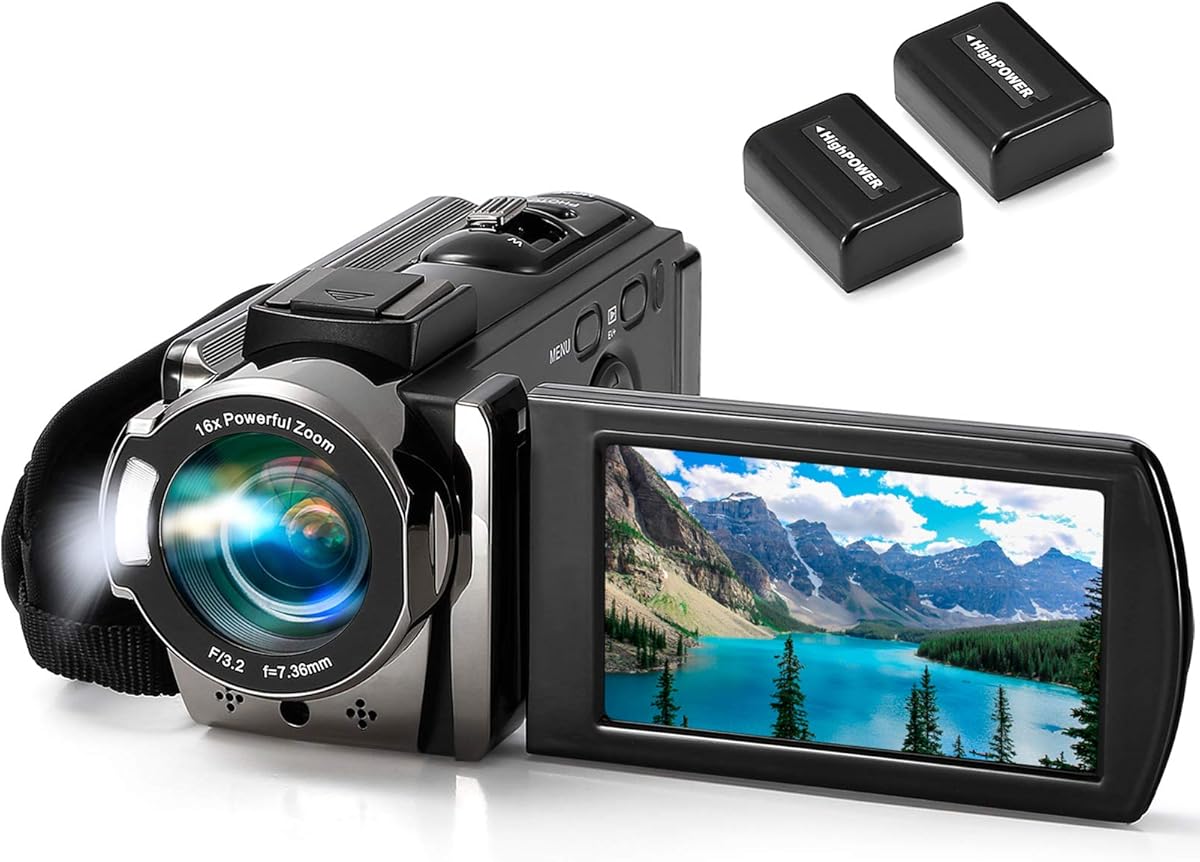
The kimire Video Camera is an excellent budget option for beginners seeking a dedicated device for stop motion projects. With a 4.1-star rating it features a simple pause function that allows you to interrupt and resume recording easily.
We may earn a commission when you buy through this link, at no additional cost to you.
Its Full HD 1080P resolution is sufficient for many online projects and the rotating 270-degree LCD helps frame shots from above or below. The two included NP-FV5 batteries extend recording time which is crucial for long animation sessions.
The camera supports recording while charging so you can keep shooting for longer periods without worrying about battery life. While it is compact and easy to use advanced users might find the 15 FPS limit restrictive for high-speed sequences.
We recommend this camera for students and hobbyists on a tight budget. It provides essential features like the pause function and extra batteries that make starting stop motion animation accessible and affordable.
The pause button lets you stop recording and continue later without starting a new file which simplifies editing.
Two NP-FV5 batteries ensure you can shoot continuously without needing to constantly recharge the device.
We may earn a commission when you buy through this link, at no additional cost to you.
The DJI Osmo Pocket 3 Creator Combo is a high-end vlogging camera with superior stabilization features ideal for dynamic stop motion work. It holds a 4.5-star rating and uses a 1-inch CMOS sensor to capture vivid colors and details.
We may earn a commission when you buy through this link, at no additional cost to you.
Its 3-axis mechanical stabilization keeps footage smooth which helps when moving the camera between frames manually. The ActiveTrack 6.0 feature keeps your subject centered automatically ensuring consistency if you move around your set.
The camera records in 4K at 120fps and supports 10-bit color depth for professional grading. While it is designed for vlogging its clarity and ease of use make it a powerful tool for animators needing steady high-quality shots.
We recommend this camera for creators who need reliable stabilization and top image quality. It is best suited for those who want a portable device that handles motion and lighting variations effortlessly.
The 3-axis gimbal ensures your shots remain steady even if you move the camera slightly between frames.
ActiveTrack 6.0 locks onto your subject and keeps it centered for consistent framing during animation sequences.
We may earn a commission when you buy through this link, at no additional cost to you.
This bundle includes the Canon EOS R6 Mark II with Stop Motion Animation Firmware plus essential accessories for professional workflows. It has a strong rating and combines high-end image quality with practical extras like a memory card and backpack.
We may earn a commission when you buy through this link, at no additional cost to you.
The firmware optimizes Live View resolution and provides tools like aperture lock and focus position memory for better frame consistency. It also supports 4K60 internal recording which gives flexibility for both motion and still capture in your projects.
Included accessories like the 64GB card and sling backpack save you from buying separately while dual card slots ensure reliable data storage. While heavy this bundle is built for professionals needing speed and reliability in demanding conditions.
We recommend this bundle for professionals or serious animators who want an all-in-one professional setup. It offers the reliability and features needed for high-end productions with convenient extras included.
The package includes a 64GB UHS-II card and a sling backpack so you have everything ready for a shoot.
Exclusive stop motion features simplify workflows with focus position memory to improve consistency between shots.
We may earn a commission when you buy through this link, at no additional cost to you.
The 4K Digital Camera with Macro & Wide Angle Lens is a compact option that provides versatility for different shot types. It has a 4-star rating and comes with a 2-in-1 lens allowing you to switch between detailed close-ups and wider views.
We may earn a commission when you buy through this link, at no additional cost to you.
The 48MP photos capture fine details which is helpful for stop motion animation of small objects. It also supports a webcam function making it easy to stream or test setups directly from your PC with USB connectivity.
While the included lenses are a nice bonus you may need to adjust them carefully to ensure sharp focus. The 1500mAh battery supports recording while charging which helps during long animation sessions without frequent changes.
We recommend this camera for hobbyists looking for an affordable camera with lens variety. It is ideal for those who need macro capabilities for detailed animation work without buying extra accessories.
The package includes a 2-in-1 macro and wide angle lens for versatile shooting without buying extras.
With 48MP resolution you can capture detailed stills for storyboards or close-up animation frames.
We may earn a commission when you buy through this link, at no additional cost to you.
The Complete HD Stop Motion Kit provides everything you need to create Full HD animations without buying separate components. It has a 4-star rating and includes a camera with an upgraded focus ring along with animation software and instructions.
We may earn a commission when you buy through this link, at no additional cost to you.
The Stopmotion Explosion software is easy to install and use without registration hassles making it beginner friendly. The included book offers step by-step instructions to help you learn techniques for animating toys clay and figures.
While the camera hardware is basic its low profile and easy focus ring make it convenient for desktop use. It works with both Windows and OS X systems and connects securely to your computer for stable frame capture.
We recommend this kit for schools and hobbyists who want a simple plug-and-play solution. It is perfect for LEGO Brickfilms and classroom projects where ease of use is more important than advanced hardware features.
The package includes a Stopmotion Explosion book that covers step-by-step instructions for various animation techniques.
The animation software can be installed without any registration hassles or sign-up requirements.
We may earn a commission when you buy through this link, at no additional cost to you.
The USB 2.0 HD Pro Webcam is a simple and affordable device that can be used for basic stop motion animation. It has a 4-star rating and features a manual focus lens which is a key advantage for maintaining frame-to-frame consistency.
We may earn a commission when you buy through this link, at no additional cost to you.
Its built-in noise-canceling microphone helps reduce background sounds if you are recording voiceovers directly. The flexible stand allows you to adjust the angle easily which is helpful when positioning the camera over a workspace.
While it is designed for video calls the manual focus ring prevents autofocus hunting that disrupts animations. This webcam supports Full HD output and connects directly to PCs or laptops without needing extra drivers.
We recommend this webcam for beginners who need a cheap and reliable desktop camera for simple projects. It is best suited for static scenes where the flexibility of a traditional camera is not required.
The unique heat resistant lens prevents defocusing issues allowing you to maintain a clear image throughout recording.
Internal noise canceling helps filter out low-frequency sounds like traffic or appliances during your recording.
We may earn a commission when you buy through this link, at no additional cost to you.
Selecting the right camera for stop motion requires understanding several technical and practical factors. This guide breaks down the key elements to consider when choosing a camera for your animation projects.
Resolution determines how sharp your frames will appear in the final animation. Full HD 1080p is often sufficient for online content while 4K provides extra detail for cropping or professional output.
Higher resolution also means more data to process so balance your needs with your computer's capabilities.
A manual focus lens is crucial for stop motion to prevent the camera from hunting between frames. Autofocus can cause unwanted shifts that disrupt the smoothness of your animation.
Always look for a camera with a reliable manual focus ring or adjustable settings.
Your camera must work seamlessly with your chosen stop motion software. Some kits come with dedicated software that simplifies the workflow and ensures compatibility.
Check that your camera supports Windows macOS or Linux if that is your operating system.
Stop motion usually runs at 12 to 24 frames per second but a camera that supports higher rates offers more flexibility. High-speed shutters reduce motion blur when moving objects manually.
Look for cameras that allow you to control exposure and shutter speed precisely.
Consistent lighting is vital for stop motion animation. Some cameras include built-in LED lights or work well with external lighting setups to avoid flickering.
Accessories like tripods remote controls and extra batteries can significantly improve your workflow efficiency.
Consider your budget and what you will be animating. Beginners may prefer all-in-one kits while professionals might invest in mirrorless cameras for higher quality.
Balance the cost with the features you actually need for your specific project types.
USB connectivity is common for connecting cameras to computers but some offer Wi-Fi for wireless transfer. Ensure your camera connects easily to your PC for smooth frame capture.
Direct USB connections reduce latency compared to wireless options which is important for timing.
Stop motion projects can take hours or days so choose a camera with reliable battery life and build quality. Support from the manufacturer can help if you encounter technical issues.
Look for warranties and customer support options when making your final decision.
Set up your camera on a stable tripod and adjust the focus manually to ensure sharp images. Check that your stop motion software recognizes the camera correctly before starting your project.
Maintain consistent lighting throughout your shoot and use a remote control or software trigger to avoid moving the camera between frames. This ensures smooth playback without unwanted jitters.
Keep your camera clean and store it in a dry place when not in use. Regularly update firmware and check your memory card capacity to avoid interruptions during long sessions.
While you can use many cameras a dedicated stop motion camera or kit simplifies the workflow. Look for manual focus and compatibility with stop motion software to avoid issues.
Full HD 1080p is sufficient for most projects while 4K offers higher detail for professional work. Choose based on your output needs and computer processing power.
Yes smartphones can work if you use compatible apps and a stable mount. However dedicated cameras offer more control over focus and settings.
Manual focus prevents the camera from adjusting between frames which can cause flickering or shifting. Consistency is key for smooth animation.
Most cameras support both Mac and PC but always verify compatibility. Some kits are designed for specific operating systems.
Use a sturdy tripod and a remote trigger to avoid touching the camera. Consistent lighting also helps maintain steady image quality.
Essential accessories include a tripod remote trigger and good lighting. Extra batteries and storage cards help during long shoots.
Yes webcams with manual focus can be used for basic stop motion. They are cost-effective but may have limited features.
Choosing the right camera depends on your skill level and project needs. The HUE Animation Studio Pro and Canon EOS R6 Mark II offer distinct advantages for beginners and professionals alike.
Focus on features like manual focus resolution and software compatibility to ensure smooth workflows. Investing in a camera that fits your budget and goals will help you create better animations.
Remember to check current pricing and availability before purchasing to get the best deal. With the right tools you can bring your creative ideas to life through stop motion.