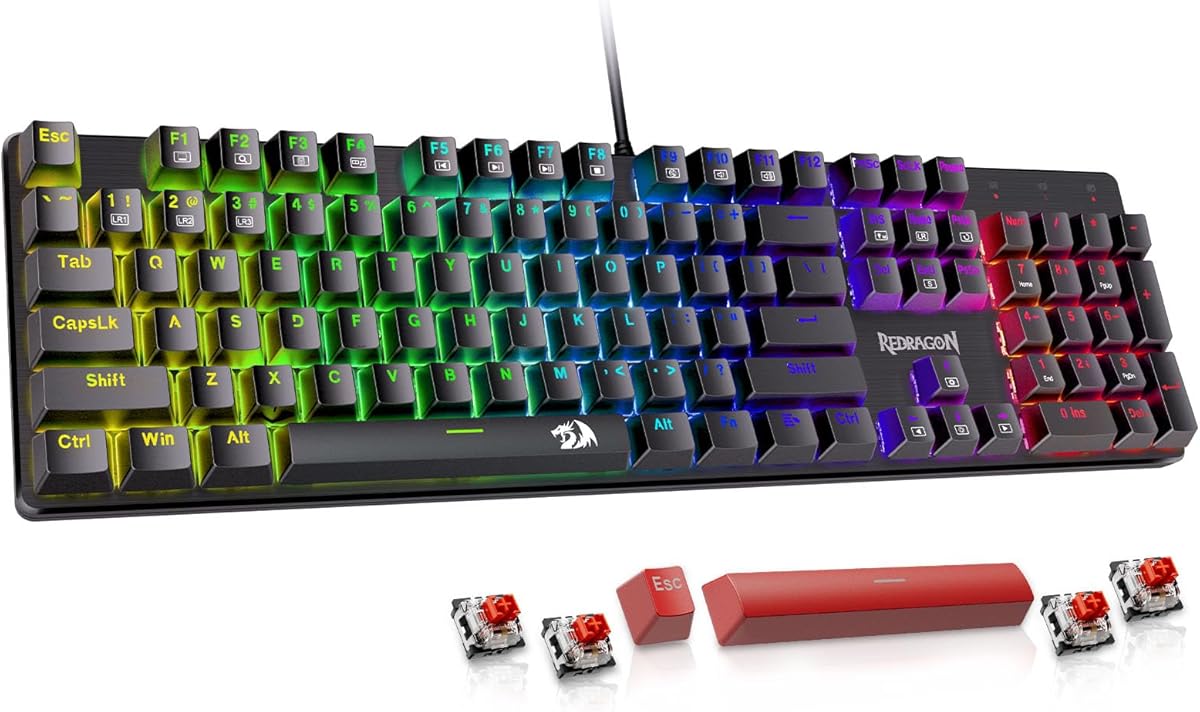
Redragon Mechanical Gaming Keyboard Wired
4.3Editor score
11 Programmable Backlit Modes
Hot-Swappable Red Switch Included
Double-Shot PBT Keycaps
Discover the 10 best cheap mechanical keyboards for gaming and typing. Compare features, ratings, and find the perfect budget-friendly option today.
Finding a reliable mechanical keyboard doesn't have to break the bank. Whether you are a gamer seeking responsive switches or a writer needing tactile feedback, affordable options now offer premium features like RGB lighting and hot-swappable switches.
We compared ten top-rated models based on build quality, switch performance, and user feedback. Our analysis covers everything from compact 60% layouts to full-size designs, ensuring you find the right tool for your specific workflow and budget constraints.
Each pick below highlights unique strengths and potential trade-offs to help you decide quickly. Remember that prices and availability can change frequently, so check the latest deals before making your final purchase decision for your setup.
4.3Editor score
4.6Editor score
4.5Editor score
This side-by-side comparison highlights the key specifications and unique features of each model to help you quickly identify the best fit for your specific needs and preferences.


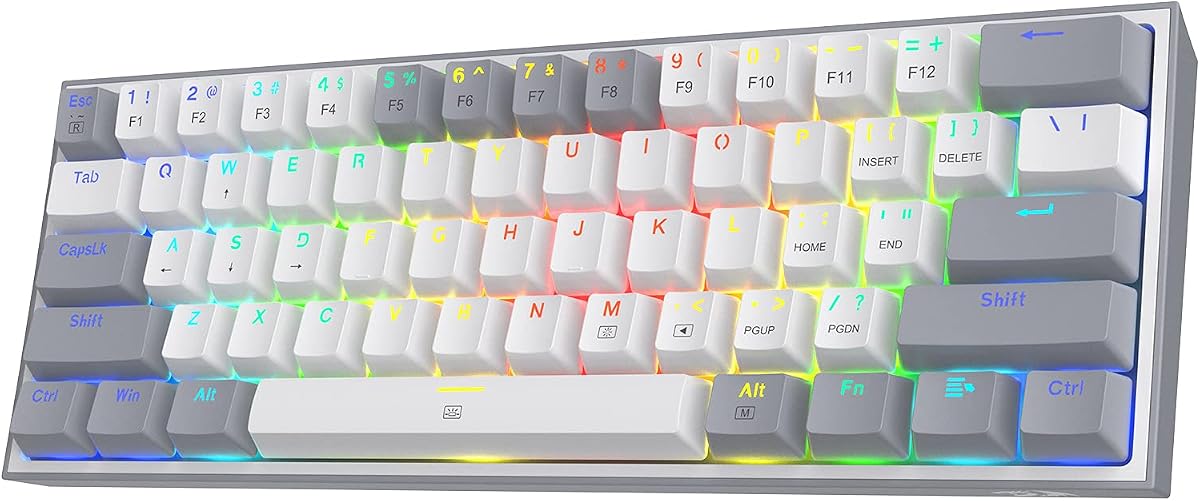
The Redragon K617 stands out as a top performer in the budget mechanical keyboard market. With a strong user rating of 4.6 stars, it combines a compact 60% layout with hot-swap functionality that lets users customize switches without soldering.
We may earn a commission when you buy through this link, at no additional cost to you.
Its standout features include 20 preset RGB lighting modes that create an immersive gaming atmosphere. The included red linear switches provide smooth keystrokes ideal for fast-paced gaming, while the white and grey colorway offers a clean aesthetic.
While the lack of a numpad and dedicated navigation cluster might deter heavy data entry users, the space savings benefit gamers who need room for mouse movement. The software customization options are powerful but require some initial setup time.
This keyboard is perfect for gamers and typists seeking a balance between performance and price. If you want a highly customizable board without spending a fortune, the K617 is a compelling choice that delivers reliability.
The upgraded socket accepts almost any 3-pin or 5-pin switch allowing you to change the feel of your keyboard easily.
Design your own lighting effects and program advanced macros with custom keybindings to adapt the board to how you work.
We may earn a commission when you buy through this link, at no additional cost to you.
Redragon K671 offers exceptional value for users needing a full-size mechanical keyboard. With a 4.3-star rating it features hot-swappable red switches that require less force for smoother typing and gaming experiences on a tight budget.
We may earn a commission when you buy through this link, at no additional cost to you.
The keyboard includes double-shot PBT keycaps which resist wear and ensure clear backlighting. You also receive four spare switches and two red keycaps to replace parts if they fail ensuring the longevity of your device.
One limitation is that the backlight color cannot be changed through software which restricts personalization options. However, the 11 unique backlights and adjustable brightness levels still provide a comfortable environment for any time of day.
Ideal for students or budget-conscious gamers, this keyboard delivers reliable performance. The 24-month warranty and support commitment from Redragon add peace of mind for your investment in this versatile gaming peripheral.
Remap keys functions or set shortcuts to get more efficient work and gaming with the macro editing support.
Double-shot PBT keycaps ensure clear backlight and precise typing for long-lasting use and resistance to fading.
We may earn a commission when you buy through this link, at no additional cost to you.
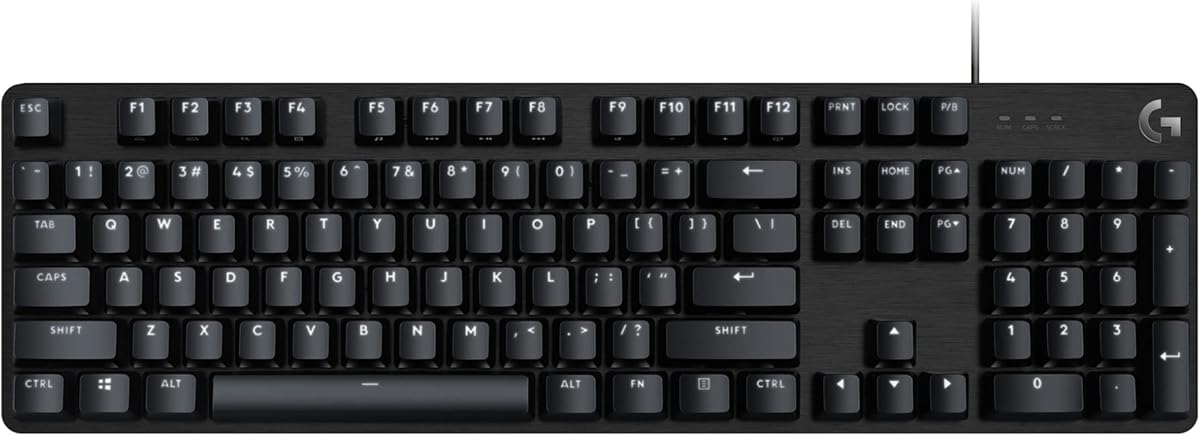
The Logitech G413 SE elevates the budget category with premium materials like a brushed aluminum-magnesium alloy top case. It maintains a high 4.5-star rating thanks to its robust build quality and gaming-first features.
We may earn a commission when you buy through this link, at no additional cost to you.
PBT keycaps resist heat and wear better than standard ABS materials ensuring a consistent typing feel over time. The tactile mechanical switches provide uncompromising performance with a satisfying feedback loop for every keystroke.
While it lacks the vibrant per-key RGB lighting found on other models it offers white LED backlighting that maintains elegance. The price is higher than most entries on this list but you pay for brand reliability and superior materials.
Competitive gamers and professionals looking for a durable daily driver will appreciate this keyboard. The tenkeyless option is also available if you prefer a smaller footprint while maintaining the same quality and performance standards.
The brushed aluminum-magnesium alloy top case serves as the corded keyboard backbone for minimal flex during use.
Twelve function keys let you control volume, play, pause, skip track, mute, and toggle lighting quickly.
We may earn a commission when you buy through this link, at no additional cost to you.
The AK96 offers a distinctive 96% layout that preserves arrow keys and a numpad while saving space. It features a smart display and knob for controlling volume and settings with a 4.1-star user rating.
We may earn a commission when you buy through this link, at no additional cost to you.
Hot-swappable switches allow you to customize the typing experience without soldering. PBT keycaps resist fading and ensure the arrow keys remain visible for work and gaming versatility on a compact board.
Dual-side LEDs enhance scene immersion and Fn shortcuts control modes brightness and speed effectively. However, the lower rating suggests some users may find the software or connectivity less refined than other brands.
This keyboard is ideal for those needing compact space saving without losing numpad functionality. If you value unique features like a smart display and USB-C support the AK96 provides a modern aesthetic for your desk.
The dedicated knob and display enhance scene immersion and provide quick access to volume and settings adjustments.
The 96% layout retains arrow keys and numpad for work and gaming versatility in a smaller footprint.
We may earn a commission when you buy through this link, at no additional cost to you.
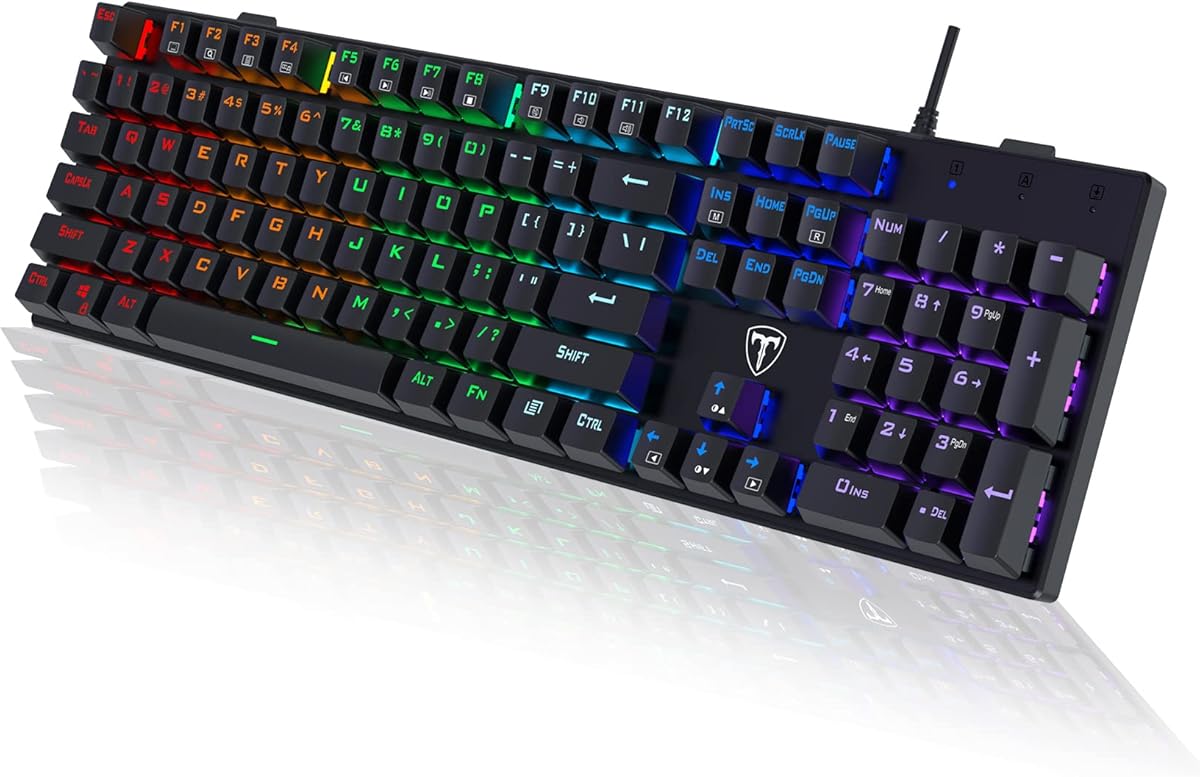
The wegear Wired Mechanical Gaming Keyboard delivers a classic clicky experience ideal for typists who enjoy audible feedback. With blue switches each keystroke offers crisp clicks and a tactile bump for productivity sprints.
We may earn a commission when you buy through this link, at no additional cost to you.
Double-shot keycaps ensure wear resistance and high-light-transmission fonts stay vibrant over time. The keyboard is rigorously tested for 50 million keystrokes ensuring longevity even during intense gaming marathons.
While the fixed color spectrum adds visual appeal it lacks some of the dynamic customization found in premium models. The loud click sound is excellent for feedback but might disturb others in shared spaces.
This option suits typists and gamers who prioritize tactile response and build quality. The ergonomic tilt and anti-slip pads keep the board stable ensuring you stay comfortable during long work or play sessions.
Professional Blue switches deliver precise typing joy with crisp clicks and a satisfying tactile bump every time.
Experience a visual evolution with striking spectrum of fixed colors and dynamic backlight modes for ambiance.
We may earn a commission when you buy through this link, at no additional cost to you.
The Redragon K668 combines a full-size layout with four extra hotkeys for quick access to mute and calculator functions. It features a 4.5-star rating and supports hot-swapping switches without soldering for ultimate customization.
We may earn a commission when you buy through this link, at no additional cost to you.
Its lighting system includes up to 19 modes with a unique music-sync feature that pulses with your desktop audio. Two sets of mixed color keycaps allow you to change the look of your desk whenever you want.
Reassigning hotkeys through pro software enables deeper customization for complex workflows. While you need to install software for full effects the result is a highly adaptable board for power users.
Ideal for streamers and gamers who need shortcuts for quick actions the K668 delivers. The ergonomic feet adjust wrist angles ensuring you stay relaxed during long sessions on your gaming rig.
Dedicated shortcut keys default to mute calculator screen lock and desktop for efficient workflow management.
Music-sync mode lights up in time with your desktop audio for a true eSports vibe and visual immersion.
We may earn a commission when you buy through this link, at no additional cost to you.
The Newmen GM611 adopts a 60% layout optimizing desktop space while retaining essential functions. It features a 4.3-star rating and 19 LED rainbow backlight effects to create an immersive gaming experience.
We may earn a commission when you buy through this link, at no additional cost to you.
Double-color injection molding ensures characters are transparent and luminous enhancing visibility in low light. N-key rollover and anti-ghosting technology ensure every keystroke is accurately registered during intense gaming sessions.
A detachable data cable adds portability for gamers on the go. The software customization allows custom macros and key bindings optimizing workflow and gaming performance significantly.
Best for users wanting a versatile portable keyboard without sacrificing performance. The compact design frees up desk space for mouse movement which helps keep sensitivity low and flicks accurate for gamers.
A detachable data cable allows for added portability so you can easily take your setup anywhere you want.
19 LED rainbow backlight effects with 4 brightness levels adapt to different lighting needs effectively.
We may earn a commission when you buy through this link, at no additional cost to you.
The Newmen GM325Pro features a rugged metal top plate providing outstanding durability and a refined tactile feel. It has a 4.2-star rating and offers side-edge illumination for a glowing command center look.
We may earn a commission when you buy through this link, at no additional cost to you.
Linear red switches deliver ultra-responsive typing and fast actuation perfect for competitive gaming and everyday use. The 1.8-meter detachable USB cable ensures stable setup and easy portability for LAN parties or travel.
Smart shortcuts and software customization let you remap keys and record macros to personalize lighting and workflow. While RGB is limited to side lighting it still transforms your desktop into a visual upgrade center.
Ideal for serious gamers valuing strength and aesthetics. The full-size layout with a numeric pad helps maintain productivity and speed without compromising on the robust metal build quality.
Crafted with a rugged metal top plate this wired keyboard offers outstanding durability and refined tactile feel.
Stunning RGB side-edge illumination transforms any desktop into a command center for visual upgrades.
We may earn a commission when you buy through this link, at no additional cost to you.
The RisoPhy Mechanical Gaming Keyboard stands out with its ultra-slim profile maintaining a 104-key full-size layout. It holds a 4.5-star rating and features blue clicky switches for higher accuracy and quicker response.
We may earn a commission when you buy through this link, at no additional cost to you.
Hydrophobic holes allow water to flow away quickly preventing damage from accidental spills. A keycap puller is included to make cleaning easy saving unnecessary trouble for maintenance and upkeep.
The stair-up keycap design keeps arms in a natural state minimizing hand fatigue for long use. However the slim design might feel less substantial to users preferring heavier traditional mechanical keyboards.
Best for users needing a sleek footprint without losing full function. The 12 multimedia shortcuts improve productivity and anti-ghosting ensures all keys work simultaneously for seamless accuracy during rapid typing.
We designed 4 hydrophobic holes allowing water to flow away quickly to prevent damage to the keyboard.
Scientific stair-up keycap design keeps arms in the most natural state to minimize hand fatigue.
We may earn a commission when you buy through this link, at no additional cost to you.
The Guiheng Wired Portable Keyboard features a 68 key design saving space on your desk while providing full mechanical feel. With a 4.3-star rating it is ideal for home work or on the go usage.
We may earn a commission when you buy through this link, at no additional cost to you.
Professional mechanical keys provide crisp paragraph feeling and excellent input feedback for typing and gaming. Double-shot injection keycaps ensure durability and non-slip suspension prevents unwanted movement during typing sessions.
Compatibility extends to Windows Mac Linux and even consoles like PS4 making it versatile. The adjustable kickstand feet ensure a perfect typing angle and firm placement on any surface effectively.
Perfect for users prioritizing portability and desk space. The splash-proof design and wide compatibility make it a reliable choice for typists or gamers needing a compact keyboard that travels well.
This mini size compact keyboard saves space and lets you utilize extra desk space effectively and efficiently.
Professional mechanical keys deliver crisp paragraph feeling and excellent input for gaming and writing.
We may earn a commission when you buy through this link, at no additional cost to you.
Selecting the right budget mechanical keyboard requires balancing features, build quality, and layout preferences to ensure it meets your specific typing or gaming needs.
Mechanical switches come in three main types: linear, tactile, and clicky. Linear switches offer smooth keystrokes without much noise, making them ideal for gaming. Tactile switches provide a bump to indicate actuation, while clicky switches add an audible click for typing satisfaction.
Consider your environment when choosing; clicky switches can be loud and disturb others in shared spaces.
Layouts range from full-size with a numpad to compact 60% designs that save space. Full-size boards are great for data entry, while 60% or 65% layouts provide more room for mouse movement during gaming.
Choose a layout that fits your desk space and ensures you have access to keys you use frequently.
Hot-swappable keyboards allow you to change switches without soldering. This feature offers future-proofing, letting you upgrade the feel of your board as you explore different switch options.
Prioritize this feature if you plan to customize your keyboard over time or want to experiment with different textures.
Build materials impact durability and weight. Metal top plates feel sturdy and premium, while plastic frames are lighter and more affordable. PBT keycaps resist wear and shine better than standard ABS plastic.
Look for PBT keycaps and a solid case if you want a keyboard that lasts longer and feels more premium.
RGB lighting adds aesthetic value, with some models offering per-key customization and others fixed patterns. Adjustable brightness and modes can help with visibility in low-light environments.
Decide if you need vibrant RGB for looks or simple backlighting for visibility to find the right balance.
Wired keyboards offer stable connections with no latency, while wireless options provide flexibility. USB-C ports are becoming standard for faster data transfer and easier cable management.
Ensure the connectivity option matches your setup; wired is generally preferred for competitive gaming performance.
Software enables customization of macros, lighting, and keybinding. Some budget models offer limited software, while others provide deep control for advanced users.
Check for software support if you plan to program macros or fully customize your keyboard's functions.
A solid warranty protects your investment against defects. Look for brands offering at least a one-year warranty and responsive customer service.
Read reviews about support experiences to ensure you won't face issues if the keyboard needs repair or replacement.
Start by connecting your keyboard to your computer via the included USB cable. Install any required software to customize lighting, macros, or keybindings to fit your workflow preferences effectively.
Clean your keyboard regularly by using a keycap puller to remove dust from switches. Compressed air can help clear debris from hard-to-reach areas around the keys for better performance.
Avoid spills by keeping drinks away from your desk or using a spill-resistant model. If you do spill liquid, unplug the keyboard immediately and let it dry completely before reconnecting it to your device.
Yes, many budget mechanical keyboards are built to last with high-quality switches rated for tens of millions of keystrokes. Brands like Redragon and Logitech often include durable PBT keycaps to resist wear.
Hot-swappable switches allow you to replace or upgrade switches without soldering. This gives you the flexibility to change the typing feel or fix a faulty switch quickly without voiding warranties.
Most modern mechanical keyboards are compatible with Mac via USB or USB-C. However, you might need to remap the Windows-specific keys to function correctly on macOS systems.
A 60% layout removes the numpad and navigation cluster to save desk space. This design is ideal for gamers who need room for mouse movement or users with limited workspace.
Use a keycap puller to remove keycaps and wipe the underlying plate with a damp cloth. Use compressed air to blow out dust and debris from switches regularly to maintain performance.
RGB lighting enhances aesthetics and visibility in dark environments. While some budget models have limited lighting modes, they still offer a visual upgrade that can improve your setup's overall look.
Our top picks range from the compact Redragon K617 for gamers to the durable Logitech G413 SE for premium quality. Each model offers distinct advantages depending on whether you prioritize size, build, or customization features.
When choosing, consider your primary use case such as gaming versus typing. Ensure the switch type and layout match your workflow so you enjoy a comfortable and efficient typing experience every day.
Prices for these keyboards fluctuate often due to promotions. Always check current deals before purchasing to secure the best value for your budget mechanical keyboard investment today.