
VIVO Premium Black Clamp-on 27 x 11 in Keyboard Tray
4.3Editor score
Tilt adjustment for comfort
Adjusting brackets and swivel clamps
Compatible with corner desks
Finding the right clamp on keyboard tray can transform your workspace into a more ergonomic and organized environment. These under-desk solutions free up valuable desktop space while promoting healthier typing angles for long work sessions.
We compared ten highly rated models based on their build quality, compatibility with different desk types, and ease of installation. Our analysis focuses on real user feedback and detailed product specifications to ensure accuracy.
Each pick highlights specific strengths and potential trade-offs to help you make an informed decision. Keep in mind that availability and offers may vary, so check current listings before purchasing your ideal tray.
4.3Editor score

4.4Editor score
4.4Editor score
As an Amazon Associate we earn from qualifying purchases.
This side-by-side comparison highlights the key specifications and unique attributes of each model to help you quickly identify the best fit for your workspace needs.


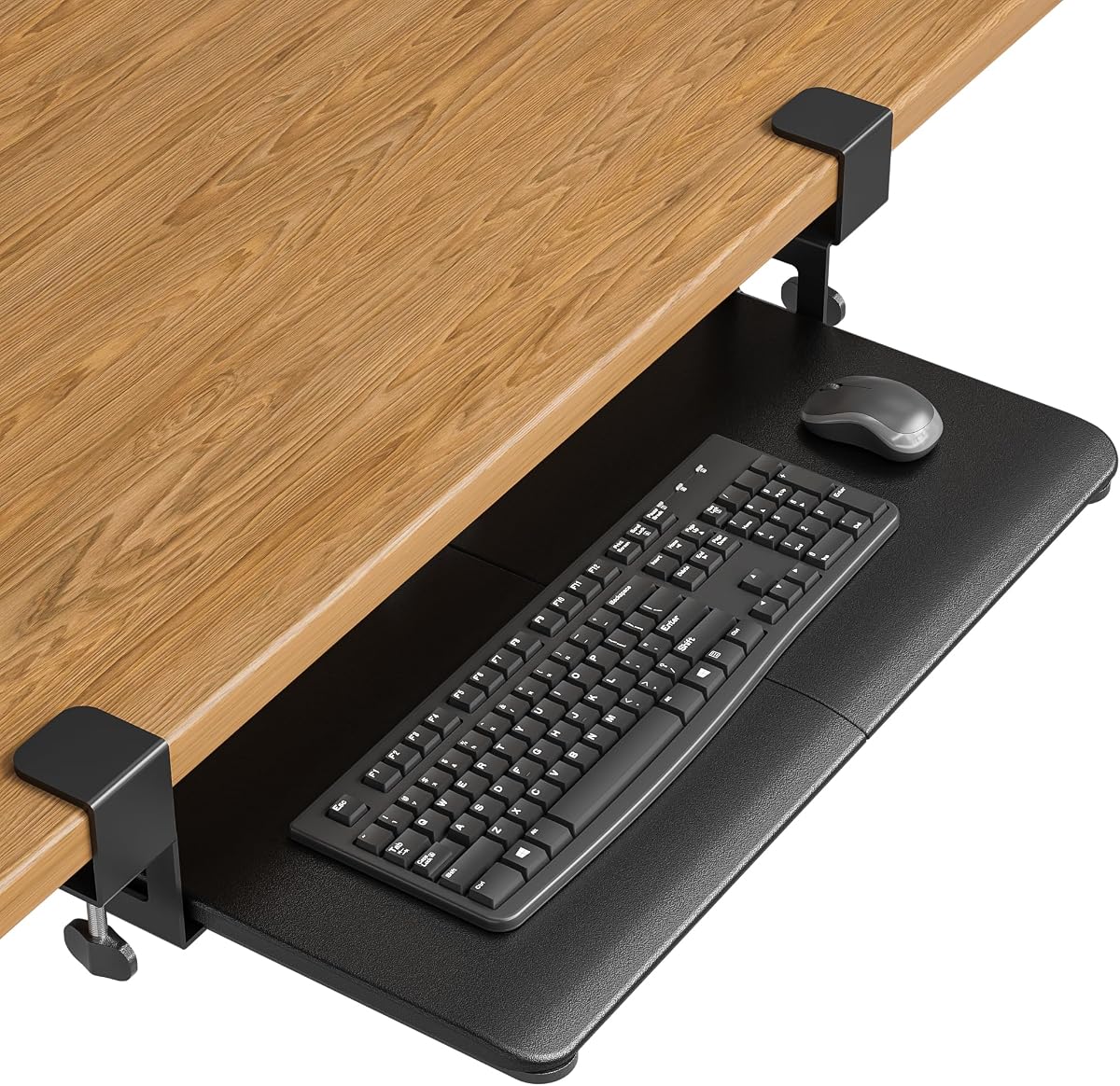
This VIVO tray earns its top spot by balancing space-saving design with ergonomic comfort. It offers a solid platform for keyboards and mice while keeping your desktop clear. With a 4.4 rating, users praise its stability and ease of use.
We may earn a commission when you buy through this link, at no additional cost to you.
The tray saves desk space by holding peripherals below the desktop. It features comfortable typing angles that relieve stress on wrists and shoulders. The C-clamps attach without damage, and the adjustable design ensures a snug fit.
However, it is not compatible with desktops that have beveled edges. You must ensure your desk surface does not exceed 1.25 inches in thickness. These limits are acceptable given the overall sturdy construction and value.
Ideal for anyone seeking a reliable standard clamp-on solution, this tray is a top recommendation. It fits well in most office or home setups. Check your desk dimensions to confirm compatibility before purchasing.
By moving your keyboard and mouse below the desk, you free up valuable surface area for documents or other tasks.
The ergonomic typing angles help maintain a neutral wrist position, reducing strain during long typing sessions.
We may earn a commission when you buy through this link, at no additional cost to you.
This adjustable model stands out for its flexibility. It allows you to customize the height and width to suit your specific needs. The 4.3 rating reflects its solid performance in diverse setups.
We may earn a commission when you buy through this link, at no additional cost to you.
The height adjustable tray offers 2.4 inches of total adjustment with five set points. It also adjusts width from 8.8 to 10 inches from the desk. This customization enhances ergonomic typing angles significantly.
While versatile, it is not compatible with desktops that have beveled edges. You need enough desk space for the clamps, which span up to 36 inches. These constraints are minor compared to the benefits.
Choose this if you need precise adjustments for a custom setup. It is great for users with thicker desks. Ensure your workspace accommodates the clamp length before installing.
Adjusting the height and width helps you find the perfect typing position for your body type.
With support for desks up to 3.4 inches thick, it works well with many standard and heavy-duty workstations.
We may earn a commission when you buy through this link, at no additional cost to you.
This rotating tray offers unique flexibility for your workspace. It lets you pivot the tray for convenient placement or storage. The 4.0 rating shows it meets basic needs well.
We may earn a commission when you buy through this link, at no additional cost to you.
The single desk clamp allows the tray to pivot a full 360 degrees. This flexibility provides ultimate freedom for customized placement. You can rotate it under the desktop when not in use.
Be aware that it is not compatible with lipped or beveled edges. The rotation requires about 32 inches of clearance for circumference. These requirements are reasonable for most users seeking versatility.
Perfect for those who need to move their keyboard frequently, this tray is a great choice. It saves space and adapts to different tasks. Check your desk edges before installation.
The 360-degree rotation allows you to position the tray exactly where you need it for typing or storage.
When not in use, the tray can be rotated under the desktop, keeping it out of sight and freeing up space.
We may earn a commission when you buy through this link, at no additional cost to you.
This tray simplifies setup with its no-drill C-clamps. It provides a strong, spacious platform for your peripherals. Users appreciate the ease of installation and the stability it offers.
We may earn a commission when you buy through this link, at no additional cost to you.
You can secure the tray to desktops up to 1.97 inches thick without drilling. The platform measures 25.6 by 11.8 inches, giving plenty of room. Protective pads prevent scratches and improve grip.
Ensure your desk has a flat underside without crossbars or curved edges. You also need at least 31.3 inches of width underneath for smooth sliding. These constraints are manageable for most flat desks.
If you value easy setup and desk protection, this tray is highly recommended. It maximizes your workspace effectively. Measure your desk before ordering to avoid issues.
The no-drill C-clamps make installation quick and simple, ideal for renters or shared offices.
Placing the keyboard below the desktop supports a more natural wrist and arm posture.
We may earn a commission when you buy through this link, at no additional cost to you.
This premium model adds tilt adjustment to the classic clamp-on design. It offers nine settings for comfortable typing angles. The 4.3 rating highlights its enhanced functionality.
We may earn a commission when you buy through this link, at no additional cost to you.
The tilt adjustment lets you find positive, neutral, or negative settings. The swivel clamps rotate independently for custom placement. It can be installed on corner or standard desks.
Note that the total length from clamp to clamp is 34 inches. Ensure your desk has that much space before purchasing. The beveled edge limit applies here as well.
For those wanting advanced ergonomics, this tray is a top premium option. It adapts to various desk types. Check your space to confirm it fits.
The nine tilt settings allow precise control over your typing angle for maximum comfort.
Independent swivel clamps make it suitable for L-shaped corner desks as well as standard setups.
We may earn a commission when you buy through this link, at no additional cost to you.
This tray is specifically designed for L-shaped workstations. It uses swiveling clamps to secure to corners safely. The 4.2 rating reflects its reliability in these unique setups.
We may earn a commission when you buy through this link, at no additional cost to you.
The swiveling C-clamps secure to desks up to 1.25 inches thick. They rotate 90 degrees independently for custom placement. This design ensures a secure hold without damaging the desktop.
Keep in mind that beveled edges are not compatible. You should also ensure your desk surface does not exceed the thickness limit. These requirements are standard for clamp-on systems.
If you have a corner desk, this tray is an ideal choice. It maximizes space and offers ergonomic typing angles. Verify your desk details before buying.
Specially made for L-shaped workstations, this tray utilizes swiveling clamps for perfect corner fitting.
Holding your keyboard below the desktop adds valuable work space for your corner setup.
We may earn a commission when you buy through this link, at no additional cost to you.
This model combines a standard tray with a practical pencil drawer. It adds storage for small accessories while keeping your desk organized. The 4.4 rating highlights its utility.
We may earn a commission when you buy through this link, at no additional cost to you.
The 17-inch pencil drawer provides extra storage for small items. The tray extends 8.5 inches, with a combined extension of 18.5 inches. C-clamps hold everything tightly without damage.
Note that the total length from clamp to clamp is 32.5 inches. Ensure your desk has that space. Beveled edges are not compatible as usual.
Great for users who need extra storage, this tray is a smart pick. It keeps accessories handy and your workspace tidy. Measure before purchasing.
The built-in pencil drawer holds small accessories, reducing clutter on your desktop.
The tray and drawer slide out together, providing access to both typing and storage space.
We may earn a commission when you buy through this link, at no additional cost to you.
This tray excels with its compatibility for thicker desks. It uses heavy-duty clamps for up to 2.76 inches. The 4.4 rating confirms its robust design.
We may earn a commission when you buy through this link, at no additional cost to you.
The adjustable dual C-clamps secure to a wide variety of desktop styles. The built-in back baffle prevents the keyboard from sliding. This ensures safe and efficient typing.
You must ensure your desk has 25.9 inches of space for the clamps. This is a key requirement for proper installation. Most flat desks will work fine.
If you have a thick desk, this tray is a reliable solution. It offers stability and smooth sliding. Check your desk length before buying.
With clamps supporting up to 2.76 inches thick, it works well with substantial desks.
The built-in back baffle keeps your keyboard secure, preventing unwanted sliding.
We may earn a commission when you buy through this link, at no additional cost to you.
This extender can serve as a keyboard tray or extra storage. It folds away when not in use for space saving. The 4.2 rating shows its utility.
We may earn a commission when you buy through this link, at no additional cost to you.
The 90-degree folding design lets you save desk space easily. Reinforced brackets support up to 44 lbs on the large platform. It installs on desks up to 3.5 inches thick.
Be aware it is not compatible with lipped or beveled edges. Ensure your desk thickness falls within the 0.5 to 3.5 inch range. These constraints are typical for clamps.
For those needing a flexible solution, this extender is a great choice. It adapts to various needs. Check your desk limits first.
Simply press the release levers to fold it out of the way for storage when not in use.
The large platform supports up to 44 lbs, making it suitable for printers or speakers too.
We may earn a commission when you buy through this link, at no additional cost to you.
This tray offers a lifetime warranty for peace of mind. It provides a wide platform and easy push-pull design. The 4.4 rating shows high user satisfaction.
We may earn a commission when you buy through this link, at no additional cost to you.
The clamp-on installation is secure without drilling. The 27 by 11 inch platform fits full-size keyboards well. It helps align wrists at a more natural height.
Glass desks are not compatible with this clamp system. The thickness limit is 2.2 inches. These are standard constraints for a clamp-on solution.
If you want long-term protection, this tray is a strong choice. It offers smooth daily use. Check your desk material before buying.
Products include a lifetime warranty and responsive US-based specialists for any questions.
Positioning the keyboard below the desktop helps align wrists and elbows at a natural height.
We may earn a commission when you buy through this link, at no additional cost to you.
Choosing the right tray involves considering desk compatibility, size, and ergonomic features to suit your workspace.
Always check the maximum desk thickness your tray can accommodate. Most models work with flat, unobstructed edges, and avoid lipped or beveled ones.
Measure your available under-desk space to ensure the tray fits. The length from clamp to clamp must match your desk's width.
Ensure the tray can hold your keyboard, mouse, and any accessories. Most standard trays support around 11 pounds.
Look for tilt adjustments or height settings to maintain a neutral wrist position during typing sessions.
No-drill C-clamps are standard and safe for most desks. Confirm your desk has a flat underside for secure attachment.
Consider rotating trays for flexibility or corner trays for L-shaped desks if your setup requires specific positioning.
Some models include drawers or compartments for accessories. Decide if you need extra storage beyond just the keyboard platform.
Start by securing the C-clamps firmly to the underside of your desk. Ensure they are tightened to prevent any movement during use.
Slide the tray in and out gently to maintain smooth operation. Avoid overloading it with heavy items beyond its weight capacity.
Regularly check the clamps and sliding mechanism for any signs of wear. This ensures long-lasting stability and ease of use.
A clamp on keyboard tray is a mounting accessory that attaches under your desk to hold your keyboard and mouse. It frees up desk space and improves ergonomics.
Most trays use C-clamps to attach without drilling. Ensure your desk is flat and unobstructed underneath for a secure fit.
Most clamp-on trays are not compatible with glass desks. They are designed for standard solid surfaces like wood or metal.
Most models support desks up to 1.25 to 2.76 inches thick. Check the specific product details before purchasing to confirm compatibility.
Some models are specifically designed for corner desks with swiveling clamps. Others may work depending on your setup and clamp angle.
Most trays are designed to hold both a keyboard and a mouse. Verify the platform dimensions to ensure enough room for both devices.
Some trays offer tilt settings to change the angle. Others rely on slide-out height adjustments for ergonomic positioning.
Most clamp-on trays are not compatible with beveled or lipped edges. They require flat surfaces for proper clamping and stability.
The VIVO Black Clamp-on 27 x 11 in Keyboard Tray remains our top pick for its balance of space-saving design and ergonomic comfort.
Prioritize features like tilt adjustments or corner compatibility based on your specific desk and typing needs.
Always verify your desk dimensions and edge type before purchasing to ensure a smooth installation experience.