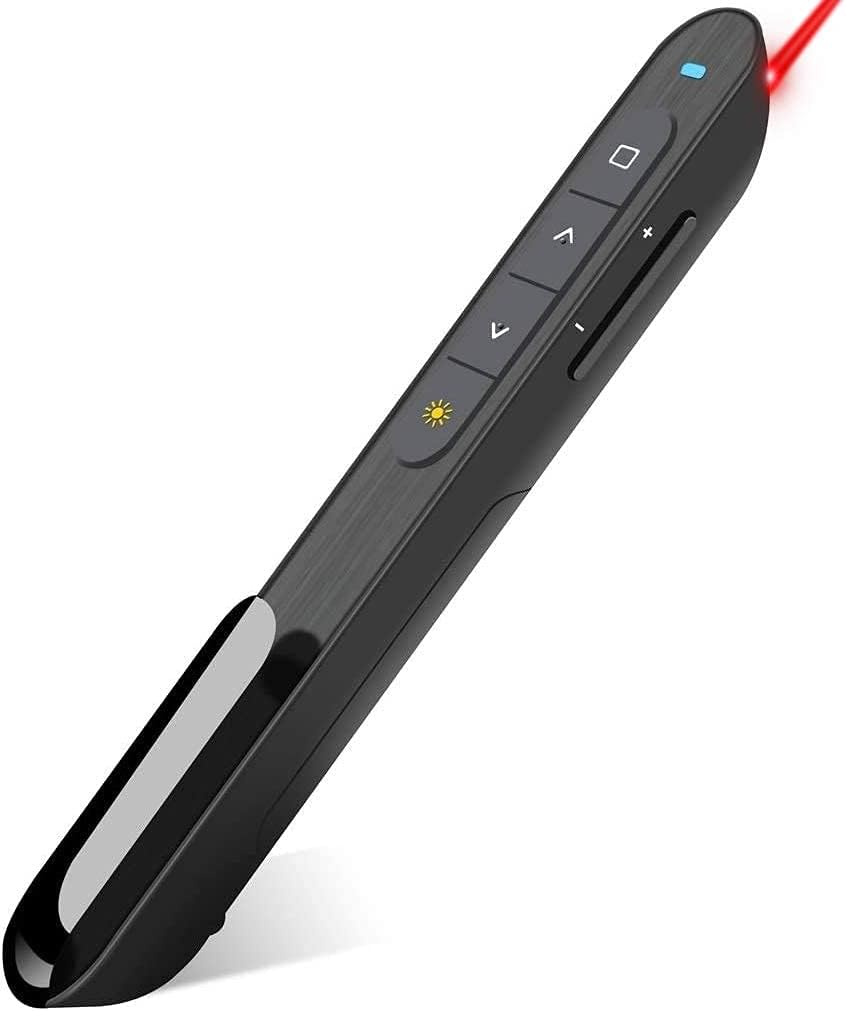
Hyperlink Volume Control Presentation Clicker
4.4Editor score
Volume control and hyperlink support
100-foot wireless range
Compact and lightweight design
Discover the top 10 clickers for PowerPoint presentations. Compare features, wireless range, and real user ratings to find the perfect presenter remote for your needs.
Finding the right clicker for PowerPoint presentations can transform how you engage with your audience. A good presenter remote offers reliable wireless connectivity, an intuitive layout, and a bright laser pointer to highlight key points effectively.
We evaluated ten top-rated models based on their wireless range, battery life, compatibility with various operating systems, and ergonomic design. Our goal was to identify tools that work seamlessly with PowerPoint and other presentation software without requiring complex setup.
Each pick highlights specific strengths like budget-friendly pricing, premium features, or unique connectivity options. Please note that prices and availability change frequently, so check the current listings before making your final decision.
4.4Editor score

4.6Editor score

4.4Editor score
This side-by-side comparison helps you quickly identify which presentation clicker meets your specific needs regarding range, compatibility, and additional features like volume control or rechargeable batteries.


The Logitech Wireless Presenter R400 stands out as a top choice for professionals seeking a reliable clicker for PowerPoint presentations. With a 4.6 rating, it offers a bright red laser pointer and intuitive touch keys that make slide control effortless without any software installation.
We may earn a commission when you buy through this link, at no additional cost to you.
Its built-in Class 2 red laser ensures you can highlight important points clearly against most backgrounds. The 50-foot wireless range gives you the freedom to move around the room while maintaining a stable connection to your computer or projector.
While the device does require two AAA batteries which are not included, the convenience of plug-and-play functionality outweighs this minor trade-off. The receiver stores neatly inside the unit, so you won't lose it during transport to different venues.
If you need a durable and straightforward tool for daily presentations, this model is highly recommended. Its proven track record and user-friendly design make it an excellent investment for teachers, business professionals, and conference speakers.
The intuitive touch keys allow you to navigate forward and backward through slides smoothly without fumbling for buttons during critical moments.
The 2.4GHz RF wireless technology ensures a stable connection up to 50 feet, giving you the confidence to present anywhere in the room.
We may earn a commission when you buy through this link, at no additional cost to you.
This budget-friendly clicker for PowerPoint presentations delivers impressive features for its price point. Rated 4.4 stars, it supports various functions like volume control and hyperlinks, making it versatile for interactive presentations where sound or links matter.
We may earn a commission when you buy through this link, at no additional cost to you.
Its 100-foot wireless range is exceptional, allowing presenters to roam large rooms without signal loss. The soft and rubber buttons provide tactile feedback, ensuring you press the right key even in dimly lit environments during critical moments.
One limitation is that the laser is not recommended for LCD or LED screens, but it works well on traditional projection screens. The auto-sleep function helps conserve battery life, so you can use one battery for weeks without frequent replacements.
For presenters on a tight budget who still need advanced features like hyperlink support and range, this clicker offers tremendous value. It is a practical choice for educators and professionals who present in varied room sizes.
Built-in volume control and hyperlink support let you manage media and navigate web links directly from the remote during your talk.
The one-piece magnetic USB storage ensures the receiver stays securely attached to the clicker, preventing loss during travel or setup.
We may earn a commission when you buy through this link, at no additional cost to you.
This presentation clicker for PowerPoint is designed with ergonomics and portability in mind. With a 4.6 rating, it allows you to circulate through the room with up to 98 feet of wireless range, helping you engage better with your audience without being tied to the podium.
We may earn a commission when you buy through this link, at no additional cost to you.
The ergonomic design ensures a soft touch and comfortable grip, while the buttons are large enough to prevent accidental clicks. It supports a wide range of systems including Windows, Mac OS, and Linux, making it a versatile choice for diverse tech environments.
A key advantage is that it comes with two AAA batteries included, so you can start using it immediately without purchasing extra components. The on/off switch on the side helps save battery when the device is not in use for extended periods.
If you need a reliable and lightweight tool that fits easily in your pocket or bag, this model is an excellent option. Its straightforward functionality and included accessories make it ready to go right out of the box.
The ergonomic shape and soft touch surface reduce hand fatigue during extended presentations, ensuring you stay comfortable throughout the talk.
Supporting Windows, Mac, and Linux means this clicker works regardless of the computer setup you encounter in different offices or classrooms.
We may earn a commission when you buy through this link, at no additional cost to you.
Designed for modern laptops with Type-C ports, this clicker for PowerPoint presentations features a built-in receiver with both USB-A and USB-C connectors. This dual compatibility eliminates the need for adapters, ensuring instant connectivity whether you are using a new Mac or an older PC.
We may earn a commission when you buy through this link, at no additional cost to you.
Its ergonomic body with soft touch oil coating fits naturally in your hand, while features like volume control and full screen/black screen toggle give you complete command over your presentation. The magnetic receiver storage secures the dongle at the bottom for safe transport.
With intelligent low power consumption and auto sleep technology, this device offers over 30 days of standby time on a single set of batteries. This efficiency is ideal for presenters who may not use the clicker daily but need it ready when required.
If you value convenience and compatibility with both old and new devices, this clicker is a smart choice. It simplifies your setup process and ensures you never miss a moment searching for the right adapter before presenting.
The built-in USB-A and USB-C receiver means you can connect directly to any computer without needing extra dongles or adapters.
Volume control and screen toggles allow you to manage audio and visuals seamlessly from your remote, keeping your flow uninterrupted.
We may earn a commission when you buy through this link, at no additional cost to you.
This wireless presentation clicker remote offers a balanced combination of features and affordability. Rated 4.5 stars, it provides a comfortable ergonomic design and a 98-foot wireless range, allowing you to move freely and emphasize important points during your presentation.
We may earn a commission when you buy through this link, at no additional cost to you.
The USB-A and USB-C 2-in-1 receiver ensures compatibility with a wide range of devices, and the included batteries mean you can start immediately. It supports various software like Google Slides, MS Office, and Excel, making it versatile for different content types.
While it may lack some premium features found in higher-end models, its sturdy build and reliable performance make it suitable for regular use. The on/off switch helps conserve battery life, ensuring the device remains ready for your next speaking engagement.
If you need a dependable clicker that works out of the box without breaking the bank, this model is worth considering. It offers essential functions efficiently and is a solid choice for teachers and presenters alike.
With included batteries and a dual-port receiver, you can plug in and present without waiting for additional purchases or complicated setup.
Compatibility with Google Slides, PowerPoint, and Excel ensures this clicker works for most common presentation and spreadsheet applications.
We may earn a commission when you buy through this link, at no additional cost to you.
This presentation clicker offers an impressive 4.7 rating and includes a fabric drawstring bag for storage, making it ideal for frequent travelers. The USB dongle fits into the end of the remote for easy access without needing to open battery compartments during setup.
We may earn a commission when you buy through this link, at no additional cost to you.
Its responsive button controls provide no delays, ensuring smooth transitions between slides. The 98-foot wireless range allows you to interact with your audience confidently, while the bright red laser helps highlight key points clearly on the screen.
Batteries are included in the package, saving you the hassle of buying them separately. The lightweight design ensures it does not add unnecessary weight to your bag, and the storage bag protects the device during transit.
For professionals who present frequently and need a complete kit ready to go, this clicker is a practical choice. The included accessories and high rating indicate strong reliability and user satisfaction.
The included fabric storage bag and built-in receiver slot ensure your clicker stays organized and protected while you travel to different venues.
Responsive buttons with tactile feedback guarantee that every click registers instantly, preventing awkward pauses during your presentation.
We may earn a commission when you buy through this link, at no additional cost to you.
This wireless presenter remote combines affordability with a rich feature set, including hyperlink and volume control. Rated 4.6 stars, it supports systems like Windows, Mac, and Linux, making it suitable for various presentation environments.
We may earn a commission when you buy through this link, at no additional cost to you.
The 100-foot long control range ensures you can move around freely, and the included battery means you can start using it right away. Its multifunctional design allows you to manage different types of content without switching tools.
While Mac users might need to perform a simple setup, the overall experience is smooth and intuitive. The bright red light makes it easy to see against most backgrounds, helping you draw attention to specific details on your slides.
If you want a feature-filled clicker that remains budget-friendly and comes ready to use, this is a great option. It handles both basic and interactive presentations with ease.
Hyperlink support allows you to open web pages or documents directly during your presentation, enhancing interactivity with your audience.
With a 100-foot control range, you can walk to the back of a large room while maintaining full control over your slides.
We may earn a commission when you buy through this link, at no additional cost to you.
Weighing only 38 grams, this presentation clicker is designed for maximum portability. With a 4.5 rating, it offers a 100-foot control distance and requires just one AAA battery, making it a lightweight companion for presenters on the move.
We may earn a commission when you buy through this link, at no additional cost to you.
The compact design fits easily in your pocket or bag, and the USB dongle is stored inside the battery compartment. It supports various software including Keynote and Google Slides, ensuring versatility across different presentation tools.
While the buttons are dark gray and simple, they provide enough contrast to use in most environments. The two-month battery life means you rarely need to replace them, adding to the convenience of daily use.
If you prioritize weight and portability above all else, this clicker is a strong candidate. It is perfect for those who travel often and need a reliable tool that takes up minimal space in their gear.
At just 38 grams, this remote is one of the lightest options available, ensuring it never feels like a burden during travel.
Using only one AAA battery that lasts about two months reduces waste and ensures you are always ready to present without frequent battery changes.
We may earn a commission when you buy through this link, at no additional cost to you.
The Logitech Spotlight Presentation Remote offers advanced features that go beyond traditional laser pointers. With a 4.4 rating, it allows you to highlight and magnify content on screen and even provides vibration alerts for time management during your presentation.
We may earn a commission when you buy through this link, at no additional cost to you.
Its mouse-like cursor control lets you play videos or open links seamlessly, while dual connectivity ensures compatibility with both Bluetooth and USB-A receivers. This universal approach supports Windows, Mac OS, and major presentation software including Prezi and Google Slides.
While the price is higher than standard models, the additional features justify the cost for professionals who deliver high-stakes presentations. The Logi Options+ App allows for personalized customization of effects to match your style.
If you need a premium tool that enhances audience engagement and helps you manage time effectively, this remote is unmatched. It is a sophisticated choice for speakers who value control and presentation quality.
The on-screen cursor allows you to play and pause videos or open links directly from the remote, creating a smoother interactive experience.
Receive vibration alerts during your talk to help you stay on schedule without having to constantly watch a clock.
We may earn a commission when you buy through this link, at no additional cost to you.
This presentation clicker stands out with its built-in rechargeable battery and air mouse control. Rated 4.4 stars, it charges for 3 hours to provide weeks of use, eliminating the need to constantly buy and replace standard batteries.
We may earn a commission when you buy through this link, at no additional cost to you.
The air mouse feature serves like a real mouse for wireless cursor control, offering a high degree of interaction during presentations. It supports systems like Windows, Mac, and Linux, and supports software including PowerPoint, Keynote, and Google Slides.
The remote includes a clip to attach to a pocket or book, preventing loss during transit. Its rechargeable nature makes it an environmentally friendly choice for frequent presenters who want convenience and versatility in one device.
If you want a modern clicker that saves you from buying batteries and adds cursor control capabilities, this model is highly suitable. It is designed for users who appreciate technological convenience and mobility.
The rechargeable battery eliminates the waste and cost of disposable cells, making this an eco-friendly choice for regular users.
The air mouse feature allows you to control the cursor wirelessly, giving you more flexibility during interactive slides or demos.
We may earn a commission when you buy through this link, at no additional cost to you.
Selecting the right clicker involves considering several key factors that impact usability, compatibility, and convenience. This guide breaks down the most important aspects to help you make an informed decision.
Wireless range determines how far you can move from your computer while still controlling your slides. Most reliable models offer a range of 50 to 100 feet, which is sufficient for most conference rooms and lecture halls. Connectivity types vary between 2.4GHz RF and Bluetooth, with RF often providing a more stable connection without interference.
Choose a clicker with a range that matches your typical venue size and a connectivity type that fits your setup to ensure smooth transitions.
Ensure the clicker works seamlessly with your operating system and presentation software. Most units support Windows and Mac OS, but it is essential to check for Linux or specific compatibility if you use tools like Prezi or Google Slides. Plug-and-play features are highly desirable to avoid driver issues.
Prioritize models that explicitly state support for your favorite software to guarantee instant functionality without troubleshooting.
Battery life affects how often you need to replace cells or charge the device. Some models use one or two AAA batteries, while others offer rechargeable options. Consider whether you prefer the convenience of disposable batteries or the sustainability of rechargeable units.
Look for models with auto-sleep features or included batteries to extend usability and reduce downtime between presentations.
An ergonomic design ensures comfort during long presentations, preventing hand fatigue. Buttons should be large enough to press easily but distinct enough to avoid accidental clicks. Tactile feedback is a plus, providing confirmation when you press a button in low-light environments.
Hold the clicker in your hand before purchasing if possible to ensure the shape and button placement feel natural for your grip.
Beyond basic slide navigation, some clickers offer volume control, hyperlink support, or air mouse capabilities. These extra features can enhance interactivity but may complicate the user interface. Evaluate whether these functions are necessary for your presentation style.
Select a model with features that add value to your workflow without introducing unnecessary complexity.
Since clickers are often carried in bags and exposed to different environments, durability is critical. Look for sturdy construction and protective features like included cases or storage bags. The ability to store the USB receiver inside the device also prevents loss.
Choose clickers from reputable brands with positive feedback on build quality to ensure longevity and reliability.
A bright laser pointer helps you highlight key points effectively on different screen types. Class 2 red lasers are standard and safe, but brightness can vary. Consider whether you need a pointer for projection screens or if you present on LED displays where lasers may be less visible.
Test the brightness if possible or read reviews regarding laser performance to ensure visibility in your typical presentation setting.
Presentation clickers range from affordable basic models to premium units with advanced features. Determine your budget but also consider the value of reliability and extra functionality. Investing slightly more can sometimes save time and effort in the long run.
Balance cost against essential features to find a clicker that meets your needs without overspending.
To get started, insert the batteries or ensure the device is charged, then plug the USB receiver into your computer. Open your presentation software like PowerPoint or Google Slides, and use the forward or backward buttons to navigate slides. Test the connection before your actual presentation to ensure everything works smoothly.
If your clicker has a laser pointer, press the designated button to activate it. Move your hand to direct the laser at specific areas on the screen to emphasize important points. Be mindful of the audience's eyes when using the laser and avoid pointing it directly at them.
For care and maintenance, keep the clicker in a protective case or bag when not in use. Store the USB receiver inside the device if possible to avoid losing it. Regularly check the battery levels or charge the device as needed to ensure it is always ready for your next presentation.
Most modern clickers are designed to be plug-and-play, meaning they work immediately after plugging the USB receiver into your computer without needing drivers. However, some advanced models like the Logitech Spotlight may require a specific app for customization. Always check the product details to confirm installation requirements for your system.
Yes, most presentation clickers are compatible with Mac OS and work seamlessly with Keynote and PowerPoint. Ensure the product specifically mentions Mac support in its specifications. Some units may need a simple setup process to function correctly with Mac presentation software.
First check the battery levels or charging status to ensure the device has power. Next, verify that the USB receiver is still securely connected to your computer. If the connection is lost, you may need to unplug and replug the receiver or restart the presentation software to reestablish the link.
Standard Class 2 red laser pointers included with clickers are generally safe for use in presentation environments as they are low power. However, avoid pointing the laser directly at anyone's eyes to prevent discomfort. Keep the pointer active only when highlighting specific points to minimize exposure time.
Battery life varies depending on usage frequency and features like laser pointer use. Some clickers can last weeks on a single set of AAA batteries, while rechargeable models may provide weeks of use after a few hours of charging. Look for auto-sleep features that help conserve power when the device is not active.
Some clickers support Android systems, but this is less common than support for Windows or Mac. Check the product specifications to confirm Android compatibility. If supported, you may need to use the clicker with specific presentation apps available on Android devices.
Presentation clickers are specialized remotes designed specifically to control slide advancement in software like PowerPoint or Keynote. They often include features like laser pointers, volume control, and specialized buttons for full-screen toggles. Regular remotes typically lack these presentation-specific functions and connectivity options.
Most clickers come with a built-in slot or storage compartment where the USB receiver can be stored securely. This prevents loss and ensures you have everything needed for future presentations. If your model does not have a built-in slot, consider keeping the receiver in a small protective case.
Our top picks range from the reliable Logitech Wireless Presenter R400 for everyday use to the feature-rich DINOSTRIKE model with rechargeable capabilities. Whether you need a simple clicker for classroom presentations or a premium tool for business meetings, there is an option that fits your needs.
Prioritize compatibility with your devices, battery convenience, and ergonomic design when making your selection. A clicker that works smoothly and feels comfortable in your hand can significantly improve your confidence and delivery during presentations.
Always check current prices and availability before purchasing, as offers may change. With the right clicker for PowerPoint presentations, you can engage your audience effectively and present with professional ease.