
Lian Li A4-H2O
4.1Editor score
Sandwich layout with PCIe 5.0 riser
Supports 240mm AIO water cooling
Premium aluminum minimal exterior
Explore our expert comparison of the top 10 Mini ITX cases. We analyze airflow, build quality, and ratings to help you choose the perfect small form factor chassis for your next build.
Mini ITX cases represent the pinnacle of compact computing, allowing enthusiasts to build powerful systems that fit anywhere. These small form factor chassis challenge designers to balance thermal performance with aesthetic appeal in a tiny footprint.
We compared ten leading models based on real user ratings, airflow capabilities, build quality, and compatibility with modern hardware. Our analysis focuses on how each case handles heat, noise, and component fit without compromising on style.
Each pick below highlights specific strengths like vertical GPU support, premium materials, or budget-friendly pricing. Remember that stock levels and promotions change frequently so verify current availability before purchasing your next chassis.
4.1Editor score

4.8Editor score
4.6Editor score
This table provides a side-by-side overview of the top ten Mini ITX cases available today. Compare key specifications like volume, motherboard support, GPU limits, and unique features to find the ideal match for your hardware.


The JONSBO NV10 stands out as the most visually striking option in our roundup. With a 4.5L footprint and premium walnut trim, it transforms a PC into a piece of furniture while maintaining strict small form factor constraints.
We may earn a commission when you buy through this link, at no additional cost to you.
Its aluminum alloy shell provides excellent structural rigidity and passive cooling potential. The tool-free upper cover makes maintenance simple. It supports a 1U FLEX power supply up to 150mm and low profile GPUs under 190mm.
Trade-offs include the limited GPU and CPU cooler height. The low profile GPU requirement means you cannot use standard full size graphics cards. The compact space also restricts airflow compared to larger SFF cases.
This case is ideal for users prioritizing style and portability over raw power. If you need a silent media PC or portable gaming system that looks elegant on a desk, the NV10 delivers unmatched aesthetics.
The North American walnut trim and sandblasted aluminum finish create a high end look that blends well in living room environments.
Weighing very little and measuring only 205mm wide, this case is easy to transport for LAN parties or travel builds.
We may earn a commission when you buy through this link, at no additional cost to you.
The Lian Li A4-H2O brings premium water cooling to the compact world. It strikes a perfect balance between size and performance by supporting a triple slot GPU and a 240mm AIO radiator in an 11L chassis.
We may earn a commission when you buy through this link, at no additional cost to you.
Its unique sandwich layout mounts the GPU behind the motherboard using a PCIe 5.0 riser. This design allows optimal airflow and a clean look. The case comes with silver or black aluminum finishes and extensive mesh panels.
However, the build process requires patience. The tight space and custom cable routing mean installation can be challenging. The price also sits higher than many competitors in this category.
Choose this case if you want high-end cooling in a small chassis. It is perfect for builders seeking a stylish, powerful system that looks great on display while maintaining thermal stability.
The collaboration with DAN Cases allows for a 240mm AIO radiator which provides superior cooling for high wattage CPUs.
The included PCIe 5.0 riser delivers 32Gb/s bandwidth and supports modern GPUs while ensuring stable signal transmission.
We may earn a commission when you buy through this link, at no additional cost to you.
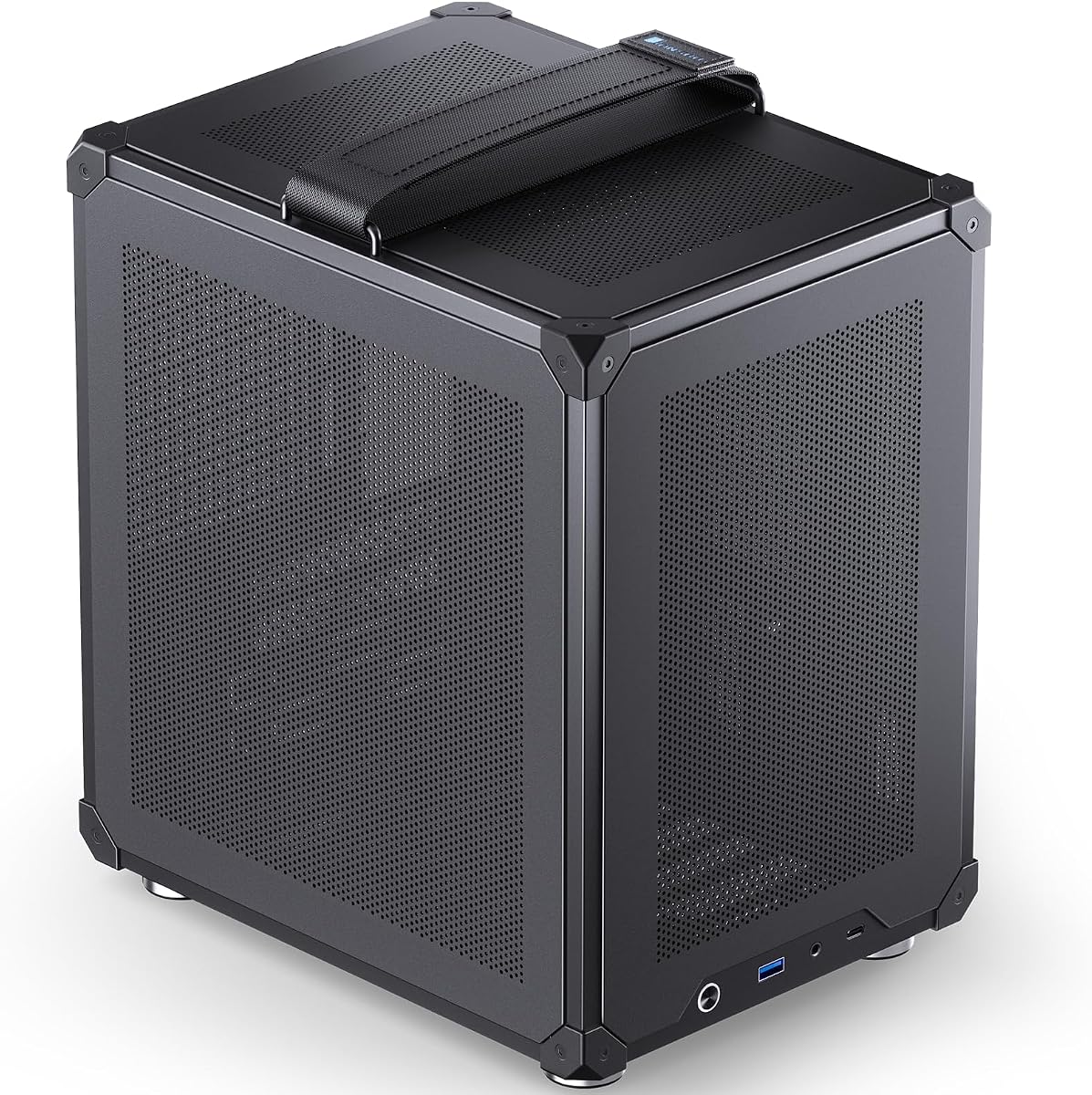
The JONSBO C6-ITX offers exceptional value for builders on a budget. It features all side mesh panels for max airflow and supports ATX power supplies, which removes a major cost barrier compared to SFX-only options.
We may earn a commission when you buy through this link, at no additional cost to you.
It includes an adjustable handle and tool-free upper cover for easy maintenance. The chassis supports standard ATX PSU units under 140mm and CPU coolers up to 170mm. The front I/O includes Type-C and USB 3.0 ports.
The construction uses 0.7mm steel plates which are lighter and cheaper than aluminum. While durable, it may dent easier under rough handling. The design is functional rather than decorative.
This case is best for cost-conscious gamers needing thermal efficiency. If you want a simple, portable ITX chassis without spending a premium on exotic materials, this model delivers solid performance.
The full mesh design ensures hot air escapes quickly preventing heat soak during long gaming sessions.
Tool-free panels mean you can open the case in seconds for component swaps without fighting with screws.
We may earn a commission when you buy through this link, at no additional cost to you.
The Cooler Master NR200 is a well-rounded case that prioritizes flexibility. It supports GPUs up to 330mm and CPU coolers up to 165mm inside an 18.25L footprint. This size allows for excellent thermal headroom.
We may earn a commission when you buy through this link, at no additional cost to you.
You can mount the GPU horizontally or vertically depending on your radiator needs. The removable side bracket lets you install 240mm or 280mm radiators easily. It requires an SFX power supply to fit properly.
While the NR200 is a reliable choice, its size is larger than true pocket cases. If you need to fit it in a tight shelf space, the 18L volume might be too bulky.
This case suits users needing high performance without liquid cooling. If you want a balance of cooling capacity and GPU support without custom cables, the NR200 remains a top contender.
Supporting 330mm GPUs allows users to install powerful dual fan cards that might not fit in smaller chassis.
The support for 240mm radiators offers a solid middle ground for cooling without sacrificing too much internal space.
We may earn a commission when you buy through this link, at no additional cost to you.
The JONSBO TK-0 stands out with its hyperboloid glass design. It features a dual curved glass side panel and walnut wood veneer to create a striking visual experience. The cabinet is separated to help cable routing.
We may earn a commission when you buy through this link, at no additional cost to you.
It supports ITX or DTX motherboards and SFX PSUs up to 160mm. The GPU length limit is 230mm which fits most standard cards. The design allows multi angle display of your hardware.
Glass adds a premium feel but requires care during transport. The build process is more complex than standard steel cases. It requires careful attention to detail during installation.
This case is for users who want to make a statement. If you prioritize style and unique materials over pure utility, the TK-0 delivers a look that is hard to match.
The 270 degree curved glass allows you to admire your build from almost any angle on your desk.
The dual warehouse structure separates cables from hardware making it easier to route wires neatly.
We may earn a commission when you buy through this link, at no additional cost to you.
The S300 is designed for true portability with an 8.1L footprint. It features a small leather handle and three-sided mesh panels for air exchange. The front I/O includes a USB 3.0 Type-C port for modern connectivity.
We may earn a commission when you buy through this link, at no additional cost to you.
It supports SFX power supplies up to 130mm and GPUs up to 305mm using a riser cable. The height limit for CPU fans is 60mm which restricts cooler choices. The aluminum material adds durability.
Using this case requires setting the PCIe speed to GEN3 in BIOS. The compact space limits cooling potential. You must plan your components carefully to avoid conflicts.
Ideal for portable builds, this case fits easily in a backpack. If you need a system you can carry to different locations without sacrificing GPU size, the S300 is a strong candidate.
The leather handle and 8L size make this case one of the most travel friendly options for ITX builds.
Three-sided mesh panels allow fresh air to reach the GPU and CPU from multiple directions.
We may earn a commission when you buy through this link, at no additional cost to you.
The Fractal Design Terra combines natural materials with modern tech. It features a front panel cut from FSC-certified solid walnut and anodized aluminum panels. The 10.4L case offers a stepless internal wall for cable balance.
We may earn a commission when you buy through this link, at no additional cost to you.
It supports GPUs up to 322mm and includes a PCIe 4.0 riser cable. The front I/O includes USB-C and aluminum power buttons. The design is sleek and fits well in home offices.
The price point reflects the high quality materials used in production. You pay a premium for the aesthetic finish and build precision. Thermal performance is adequate but not the best.
Choose this if style is your primary concern. The Terra turns your PC into a piece of decor. If you want a build that looks great in a minimalist room, this case is perfect.
The FSC-certified walnut front panel adds a touch of organic warmth to a tech-heavy environment.
The stepless slidable wall allows you to adjust space for your specific hardware layout easily.
We may earn a commission when you buy through this link, at no additional cost to you.
The NR200P V3 is the ultimate choice for high-end graphics cards. It supports GPUs up to 361.5mm which is rare for ITX cases. The design also includes a bundled PCIe 5.0 riser for vertical mounting.
We may earn a commission when you buy through this link, at no additional cost to you.
You can install top-mounted 240mm or 280mm radiators for liquid cooling. The side panel is vented mesh to highlight your GPU. It fits SFX power supplies up to 130mm for compact internal layout.
The volume is slightly larger than the standard NR200 to allow the GPU clearance. This extra bulk may not fit in smaller shelves. The cost is higher than standard models.
For builders with powerful GPUs, this case offers the best fit. If you have an RTX 5090 or similar large card, the V3 is one of the few ITX cases that can house it.
Vertical GPU mounting allows better airflow through the card and looks impressive with RGB lighting.
Supporting 280mm radiators means you can use liquid cooling without a huge case footprint.
We may earn a commission when you buy through this link, at no additional cost to you.
The JOYJOM Mini PC offers a 4.3L volume ideal for tiny builds. It features a body made of 2.0mm aluminum alloy for good heat dissipation. It includes a PCIe 3.0 riser for vertical GPU mounting.
We may earn a commission when you buy through this link, at no additional cost to you.
It supports FLEX-Small 1U power supplies and standard ITX motherboards. The CPU cooler must be under 36mm. The case comes with screws and the riser but no power supply.
This case is a budget-friendly option for minimalists. The small space limits component selection. You must choose low profile parts to fit properly inside the chassis.
It is best for basic office PCs or media centers. If you want a build that fits inside a bookshelf without taking up much space, the JOYJOM Mini PC is a strong choice.
The 2.0mm aluminum body helps conduct heat away from components better than standard steel cases.
Measuring just 7.3 inches wide, this case can disappear into tight corners or shelves.
We may earn a commission when you buy through this link, at no additional cost to you.
The TGDGAMER MATX is the most budget-friendly option in our list. It supports ATX power supplies and mini ITX motherboards. The front is perforated for direct filtered air to cool components.
We may earn a commission when you buy through this link, at no additional cost to you.
It fits up to 250mm GPUs without front fans. The case includes one 80mm fan for basic cooling. USB 3.0 and 2.0 ports are provided for connectivity. It is a functional entry-level chassis.
Build quality is basic compared to premium models. The materials are thinner and the design is simple. It is not intended for heavy gaming or high-end components.
Choose this case for basic entry systems. If you need a cheap way to house a low power ITX system without spending much, this model offers good value for money.
For those on a strict budget, this case allows you to save money for other critical components.
The perforated front ensures air reaches the inside directly which helps prevent heat buildup.
We may earn a commission when you buy through this link, at no additional cost to you.
Selecting a Mini ITX case requires balancing size, thermal performance, and component compatibility. Use this guide to understand key factors that impact your build experience.
Many Mini ITX cases require SFX power supplies which are smaller but often more expensive than standard ATX units. Some models support both SFX and ATX giving you flexibility. Check the max PSU length allowed before buying.
Prioritize cases that support standard ATX PSUs if you want to save money on the power unit. If you need maximum compactness, choose an SFX-only model but budget accordingly.
Graphics card length is a critical constraint in small cases. Models vary from supporting 190mm low profile cards to 360mm full-size cards. Ensure your card fits with the included riser cable if used.
Select a case that matches your GPU size. If you plan to upgrade your graphics card in the future, choose a model with higher clearance to avoid future incompatibility.
Airflow is vital in compact spaces. Look for mesh panels on all sides or perforated front designs. Some cases support radiators up to 280mm while others only allow 80mm fans.
Choose a case with flexible fan support if you run high-heat components. Better airflow options lead to quieter and more stable system performance over time.
Many modern cases include PCIe riser cables for vertical GPU mounting. Check if the riser is included or sold separately. Ensure it supports PCIe 4.0 or 5.0 for modern graphics cards.
Verify the riser quality to avoid signal issues. Some cheaper cables may not provide enough bandwidth for high-end GPUs. Always confirm compatibility with your GPU generation.
Aluminum cases offer better aesthetics and passive cooling but cost more than steel. Steel cases are durable and cheaper but may have more sharp edges. Check if the case has tool-free panels.
Prioritize aluminum if you want a premium look and feel. Choose steel if you are on a budget but ensure it has adequate thickness to resist dents during shipping or transport.
Some cases are strictly ITX while others support Mini-DTX. A Mini-DTX support allows for slightly larger motherboards which can offer more ports. Ensure the motherboard fits your exact dimensions.
Consider future needs when selecting the form factor. If you might need more PCIe slots or ports, choose a case that supports Mini-DTX or DTX motherboards for extra flexibility.
Tool-free designs and removable panels make maintenance simpler. Cases with clear cable management features help keep your build organized. Look for Velcro straps or dedicated cable tie points.
Select a case with an easy-to-open design if you plan to upgrade often. Tool-free options save time and prevent damage to parts during installation or removal.
Modern builds benefit from USB Type-C support on the front. Standard USB 3.0 and audio ports are essential for connectivity. Check if the case includes internal headers for front I/O.
Prioritize front USB-C if you connect devices regularly. Ensure the case has enough USB ports to match your peripherals so you do not need extra hubs.
When installing components, follow the manufacturer layout guides strictly. In small cases, cable management is key to maintaining airflow. Route cables behind the motherboard tray where possible to avoid blocking fans.
Regularly clean dust from the mesh panels using compressed air. Dust buildup restricts airflow and causes overheating. Check the filters and fan grills every few months to ensure your system stays cool.
Place the case on a flat stable surface to avoid vibration issues. If using a portable case with a handle, secure the latches firmly before transporting. Avoid extreme temperatures to protect internal components.
Some Mini ITX cases support standard ATX power supplies but many require SFX or SFX-L units. Check the specific clearance in the case specs before purchasing. SFX PSUs are smaller but often cost more than ATX units.
Mini-DTX is slightly larger than Mini-ITX and offers more space for additional ports. Cases supporting Mini-DTX give you more flexibility for motherboard choice. Always measure your board to ensure a perfect fit.
Yes vertical GPU mounting requires a compatible PCIe riser cable. Many modern cases include these but verify if it is included or sold separately. Ensure the cable supports your GPU version like PCIe 4.0 or 5.0.
Use compressed air to blow dust out of the mesh panels and fan grills. Remove the panels if possible to access internal components. Avoid vacuum cleaners near electronics as they can create static electricity.
Mini ITX cases can be noisier due to smaller fans spinning faster. Choose a model with good airflow and quality fans to reduce noise. Proper cable management also helps prevent vibration noise.
Some Mini ITX cases support AIO coolers up to 240mm or 280mm. Others are too small for radiators and rely on air cooling. Check the radiator clearance in the case manual before buying.
Building in a Mini ITX case requires patience due to tight space. Follow the case manual step by step to avoid issues. Tool-free designs make the process easier for beginners.
Many Mini ITX cases come with one or two pre-installed fans. Others require you to buy fans separately. Check the box contents to see what cooling options are included.
We reviewed ten top Mini ITX cases ranging from ultra compact to high performance models. Each offers unique strengths like premium materials, excellent airflow, or budget-friendly pricing.
Prioritize thermal performance and GPU size if you need high-end power. Choose style-focused cases if aesthetics matter most in your living space.
Verify current stock levels and compatibility before buying. Prices and promotions change so check the product pages for the latest details before finalizing your order.