
Blackmagic Design Davinci Resolve Speed Editor
4.7Editor score
Built-in search dial included
Studio activation card bundle
USB-C and Bluetooth modes
Dedicated edit function keys
Discover the top compact editing keyboards for 2026. Compare features, ratings, and real user feedback to find the perfect portable typing solution for your workflow.
Finding the right compact editing keyboard can transform your mobile workflow. Whether you edit video on a tablet or type on the go, a small keyboard saves space and boosts productivity without sacrificing comfort or functionality.
We compared ten top-rated models based on portability, connectivity, battery life, and typing experience. Our analysis covers Bluetooth options, wired solutions, and specialized editors designed for creative professionals who need reliability.
Each pick highlights unique strengths and potential trade-offs to help you decide. Note that product availability and pricing change frequently, so check current listings before purchasing to ensure you get the best value available today.
4.7Editor score

4.4Editor score

4.5Editor score
This table compares all ten selected models side-by-side. Review key specs like connectivity type, layout, special features, and compatibility to find the best fit for your editing setup.



The Logitech MX Keys Mini stands out as the top choice for editors who value premium typing experiences. With a high 4.4 rating, it combines minimalist design with powerful features like smart illumination and perfect stroke keys.
We may earn a commission when you buy through this link, at no additional cost to you.
Its smart backlighting adjusts automatically to ambient light, saving battery while ensuring visibility. The multi-device support allows seamless switching between your laptop and tablet via Bluetooth Low Energy, which is critical for mobile editors.
While the battery life is decent at up to 10 days with lighting or five months without, it is not as long as non-lit alternatives. The price is also higher than standard keyboards, but the quality justifies the cost.
Buy this if you prioritize typing comfort and premium build. It is ideal for professionals editing on the go who want a reliable, sleek keyboard that integrates perfectly with their ecosystem.
The keys are shaped to match your fingertips, providing a comfortable and precise typing experience that reduces fatigue during long editing sessions.
Backlit keys light up when your hands approach and adjust brightness based on lighting conditions, ensuring visibility without wasting battery life.
We may earn a commission when you buy through this link, at no additional cost to you.
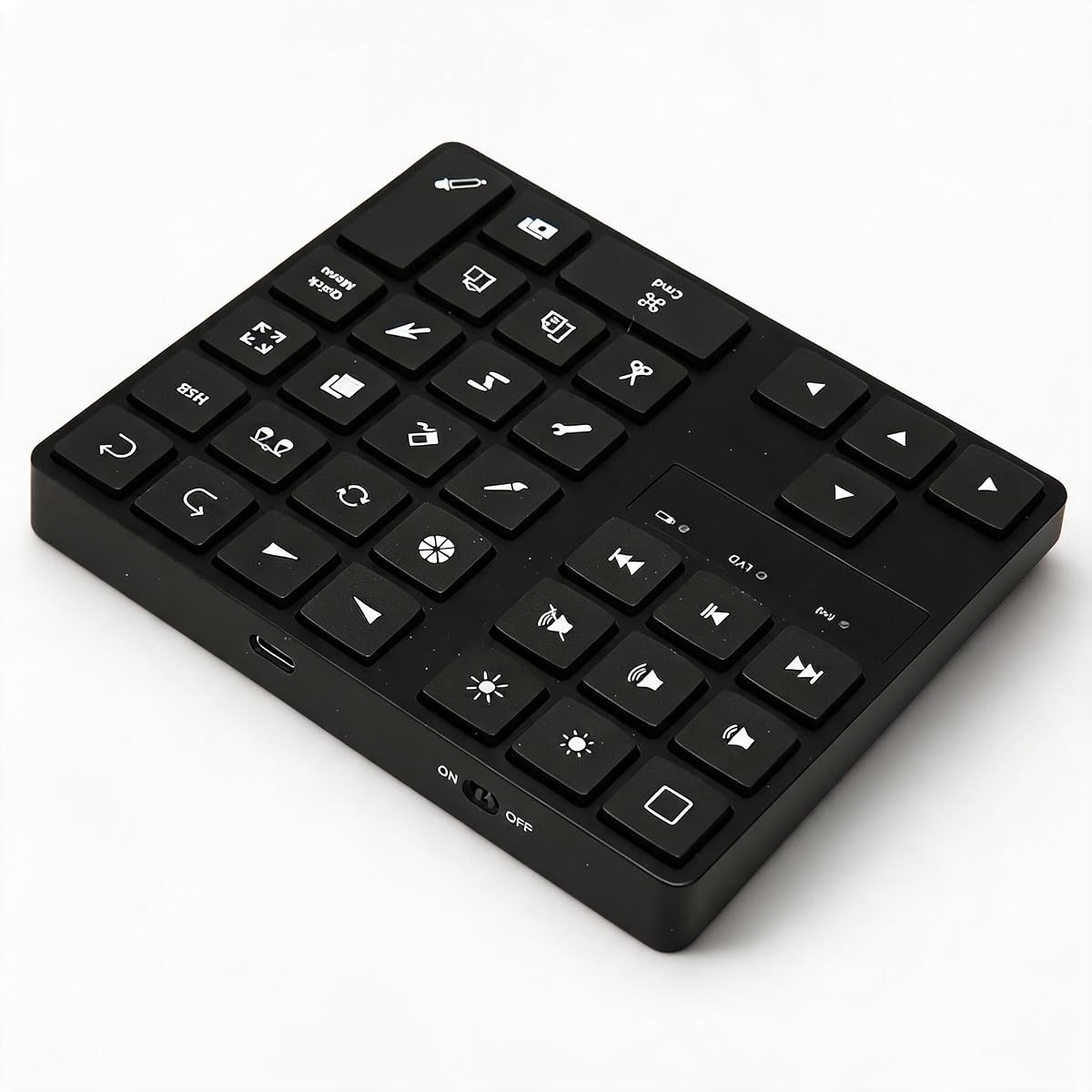
The Blackmagic Design Davinci Resolve Speed Editor is a powerhouse for professional video editors. With a 4.7 rating, it offers specialized keys and a built-in search dial that dramatically speed up the editing workflow in Resolve.
We may earn a commission when you buy through this link, at no additional cost to you.
It connects via Bluetooth or USB-C, giving you flexibility for your setup. The bundle includes a DaVinci Resolve Studio Activation Card, adding significant value for those upgrading to the full software suite.
The major trade-off is the high price and specialization. This keyboard is best suited for DaVinci Resolve users who need hardware shortcuts. It may be overkill for general text editors or casual users.
Choose this for professional workflows where every second counts. If you work with Resolve regularly, this keyboard is a worthwhile investment to streamline your editing process.
The dedicated search dial allows you to scroll through clips and find edits quickly without using the mouse, streamlining your editing workflow significantly.
Includes a DaVinci Resolve Studio Activation Card, offering full access to advanced features like color grading and audio tools alongside the hardware.
We may earn a commission when you buy through this link, at no additional cost to you.
The ProtoArc XK04 is the top budget pick for travelers needing a compact keyboard. With a 4.5 rating, it folds into a small case and weighs just 7.8 ounces, making it easy to carry anywhere.
We may earn a commission when you buy through this link, at no additional cost to you.
It features Bluetooth 5.1 to connect up to three devices and includes a PU leather cover for protection. The USB-C rechargeable battery ensures you stay powered up without needing disposable cells.
Because it is so small, the keycaps are 0.55 inches, which might feel tight for large hands. It is optimized for phones and tablets, so it is less suited for heavy desktop use.
Get this for on-the-go typing and note-taking. If you prioritize portability and price, the ProtoArc XK04 offers incredible value for mobile creators.
The ultra-compact two-fold design allows you to fit the keyboard in a bag or briefcase easily, making it the perfect travel companion.
An integrated PU leather cover shields the keys from scratches and adds a premium look, protecting your investment during daily carry.
We may earn a commission when you buy through this link, at no additional cost to you.
The Microsoft Designer Compact Keyboard is tailored for Windows users seeking a space-saving wireless option. With a 4.3 rating, it offers a low-profile design that complements modern desktop setups while maintaining fluid typing.
We may earn a commission when you buy through this link, at no additional cost to you.
It includes an Expressive Input key for quick access to emojis and symbols, which speeds up communication. The ability to switch between three devices makes it versatile for multi-device workflows.
While it is compatible with Mac, some features may be optimized for Windows. The materials are functional but not as premium as the Logitech options. It is a solid choice for general office tasks.
Buy this if you want a clean, affordable keyboard that pairs well with your PC. It is best for casual users and office environments prioritizing aesthetics and space.
The dedicated key provides instant access to emojis, symbols, and special characters, reducing the need to hunt through menus.
Key spacing and travel are optimized for fast and fluid typing, ensuring comfort during extended writing or editing sessions.
We may earn a commission when you buy through this link, at no additional cost to you.
The Logitech Pebble Keys 2 K380s is a stylish and eco-friendly portable keyboard. With a 4.3 rating, it features a slim design made with recycled plastic and offers quiet, comfortable typing for everyday use.
We may earn a commission when you buy through this link, at no additional cost to you.
Its battery life is exceptional, lasting up to three years on standard batteries. The Easy-Switch buttons allow you to connect to three devices and toggle between them with one click, ideal for hybrid setups.
The keys are round and scooped, which takes a bit of adjustment but reduces noise. There is no backlighting, which limits its utility in dim environments compared to the MX Mini.
Choose this for everyday use and portability. It is perfect for students and casual users who want a reliable, stylish, and environmentally responsible keyboard.
With auto-sleep power-saving modes, the keyboard can run for up to three years on standard batteries, reducing the need for frequent replacements.
You can connect up to three devices and switch between them instantly with one press, making it easy to multitask across platforms.
We may earn a commission when you buy through this link, at no additional cost to you.
The XPPen Mini Keydial ACK05 is designed for creators needing a shortcut companion. With a 4.3 rating, it offers ten customizable keys and a rotary dial for precise control over zoom and brush sizes in creative apps.
We may earn a commission when you buy through this link, at no additional cost to you.
It supports up to forty shortcuts through driver customization, significantly speeding up repetitive tasks. The anti-ghosting technology ensures all ten keys work simultaneously, preventing missed inputs during complex macros.
It functions best as a supplement to a main keyboard rather than a replacement. Driver setup is required for full customization, which adds a minor setup step for users.
Buy this for editing and graphic design workflows. If you use software like Photoshop or Premiere Pro, this device adds efficiency to your toolkit.
The rotating dial provides clear feedback for zooming or adjusting brush sizes, allowing for precise control without reaching for the mouse.
You can program up to forty shortcuts across four sets, letting you tailor the keyboard to your specific editing or drawing needs.
We may earn a commission when you buy through this link, at no additional cost to you.
The Macally Compact Wireless Keyboard offers a simple and reliable typing solution. With a 4.4 rating, it connects via a 2.4G USB dongle for stable wireless performance without needing Bluetooth or complex pairing.
We may earn a commission when you buy through this link, at no additional cost to you.
It comes ready to use out of the box with included AAA batteries. The 78-key layout removes the number pad to save space while retaining essential keys for productivity and navigation.
The dongle is convenient for PCs and Chromebooks but may require a storage slot when not in use. Battery life is modest compared to rechargeable Bluetooth models, but it is straightforward to replace.
Choose this for desktop setups needing a space-saving secondary keyboard. It is ideal for users who prefer simple USB connectivity over Bluetooth pairing.
No drivers are needed; simply plug in the USB dongle and start typing immediately, making it great for quick setups.
The reduced size eliminates the number pad, freeing up desk space while keeping shortcut keys for efficient daily tasks.
We may earn a commission when you buy through this link, at no additional cost to you.
The Logitech K250 is a practical choice for those needing a number pad in a smaller frame. With a 4.2 rating, it connects via Bluetooth without a dongle and offers a comfortable typing experience with deep-profile keys.
We may earn a commission when you buy through this link, at no additional cost to you.
Its spill-resistant design adds durability for office environments. The battery life lasts up to 12 months of daily use, providing reliable performance between changes.
While affordable and functional, it lacks premium features like backlighting or multi-device switching. It is best suited for basic office work and data entry tasks.
Buy this for budget-friendly number pad needs. It is ideal for users who need quick number entry without the bulk of a full-sized keyboard.
The keyboard is built to withstand minor spills, ensuring longevity and reliability even in active workspaces.
Includes a number pad and arrow keys in a space-saving layout, perfect for accounting or data entry without taking up too much desk space.
We may earn a commission when you buy through this link, at no additional cost to you.
The One-Handed Ergonomic Keyboard is specialized for creative professionals seeking comfort. With a 4.0 rating, it features 35 customizable shortcuts and an ergonomic layout designed to reduce muscle fatigue during long sessions.
We may earn a commission when you buy through this link, at no additional cost to you.
It connects via a stable USB-C wired connection to eliminate lag and pairing issues. The angled key well promotes neutral wrist posture, making it excellent for artists and designers who use a mouse heavily.
Because it is one-handed, you will need a standard keyboard for typing. The wired connection also limits portability compared to wireless options.
Choose this as a secondary tool for creative work. It is best for users wanting to optimize their workflow and protect their wrists while working.
The sculpted key well naturally positions your hand to reduce strain, allowing you to work for longer without discomfort.
Access up to 35 macros easily, streamlining your creative workflow by automating repetitive drawing and design commands.
We may earn a commission when you buy through this link, at no additional cost to you.
The Cherry Stream Wired Keyboard offers reliable performance and safety. With a 4.3 rating, it is GS certified for safety and features high-quality scissor switches that provide a whisper-quiet and precise typing experience.
We may earn a commission when you buy through this link, at no additional cost to you.
The compact TKL layout saves space while including essential keys. Its metal plate and rubberized feet ensure stability, making it a sturdy option for professional workstations.
It lacks wireless flexibility, relying on a wired USB connection. While this ensures zero latency, it restricts portability compared to Bluetooth alternatives.
Buy this for office or public spaces requiring safe, reliable hardware. It is best for users prioritizing build quality and quiet operation over wireless features.
The globally recognized GS mark ensures the keyboard meets high safety standards, offering peace of mind for public or shared environments.
Precise pressure points and scissor mechanisms provide a clean and quiet typing feel, perfect for shared offices or quiet zones.
We may earn a commission when you buy through this link, at no additional cost to you.
Selecting the right compact keyboard involves balancing portability, connectivity, and features. Use these factors to narrow down your options based on your specific workflow needs.
Bluetooth is ideal for mobile use and clean setups without dongles, but ensure it supports your OS. Wired keyboards offer zero latency and no battery concerns, making them reliable for stationary editing rigs.
Prioritize Bluetooth if you move frequently; choose wired if you need stable performance without charging.
TKL or 75% layouts save space while keeping arrow keys. Foldable options are best for travel but may compromise typing comfort. Ensure the size fits your bag and your desk.
Check the dimensions and key spacing to ensure it matches your typing style before purchasing.
Rechargeable keyboards via USB-C are cost-effective and eco-friendly. Models with replaceable batteries may last longer but add waste. Look for auto-sleep features to extend usage time.
Select a model with at least several weeks of use between charges for minimal interruptions.
Ensure the keyboard works with your OS and software. Some specialized editors are optimized for specific apps like DaVinci Resolve. Check driver requirements for customization features.
Verify OS support lists on the product page to avoid compatibility issues with your devices.
Look for materials like recycled plastic or metal plates for stability. Spill-resistant designs add durability for daily use. Premium builds justify higher prices with better longevity.
Invest in durable construction to protect your workspace investment from accidental spills or drops.
Foldable keyboards often include carrying cases or covers. Weight matters for backpacks; aim for under 1 pound if traveling. Slim designs fit easily into tight spots.
Consider the weight and folded size to ensure it fits comfortably in your travel bag.
Ergonomic layouts reduce wrist strain during long sessions. Adjustable tilt legs or angled keys promote natural posture. One-handed options can complement a main keyboard for creative workflows.
Prioritize ergonomic features if you type for hours to prevent discomfort and fatigue.
Budget models offer basic functionality, while premium ones add smart features like illumination. Bundle deals with software activation cards add value for professionals. Evaluate based on actual needs.
Balance your budget with the features that directly impact your daily productivity and comfort.
Connect the keyboard to your device by entering pairing mode in settings or plugging in the USB dongle. For Bluetooth models, allow a few seconds for recognition and switch between devices using designated keys if supported.
Keep the keys clean by using a soft brush or compressed air to remove dust. Avoid eating or drinking near the keyboard to prevent spills that could damage internal components.
For rechargeable models, monitor battery levels and charge fully when low to extend battery health. Store folded keyboards in their protective case to prevent scratches and bending during transport.
Yes, most compact keyboards support Bluetooth 5.1 or 2.4G wireless connection compatible with tablets like iPads or Android devices. Ensure you select a model that explicitly states compatibility with your tablet OS for full functionality.
Ergonomic compact keyboards can be suitable if they have comfortable key travel and tilt options. However, prolonged use may require a wrist rest. Choose models with deep-profile keys to reduce fatigue during long work periods.
Some compact models include a number pad in a TKL layout, but many omit it for portability. Check the layout carefully; number pads are essential for data entry but add bulk to the keyboard.
Multi-device keyboards typically have Easy-Switch buttons or dedicated keys to toggle connections. You can pair up to three devices simultaneously and switch instantly by pressing the corresponding button for the target device.
Yes, specialized keyboards like the Blackmagic Davinci Speed Editor include shortcuts tailored for specific software. These can streamline your workflow but are best suited for users working exclusively within that ecosystem.
Battery life varies widely; non-lit keyboards can last years on AAA batteries, while rechargeable ones may last weeks or months depending on backlight usage. Always check the specs for specific endurance ratings.
The Logitech MX Keys Mini leads our list with premium typing and smart features. The Blackmagic Speed Editor is unmatched for professional video editing, and the ProtoArc XK04 offers the best portable budget solution for travelers.
Prioritize your main use case: choose specialized tools for workflow speed or standard keyboards for general typing. Consider connectivity and battery life to ensure the device fits your daily routine seamlessly.
Prices and availability change frequently on Amazon. Always check the current listings before purchasing to ensure you get the best value and stock for your selected model.