
SUPCASE Charging Dock for Nintendo Switch 2 Joy Con
4.7Editor score
Dual-side magnetic charging design
9 RGB lighting modes
Safety protection against overcharging
Discover the top 10 controller charging docks for Switch 2. Compare features, ratings, and compatibility to find the perfect charging station for your gaming setup.
Keeping your controllers powered is essential for uninterrupted gaming sessions on the Nintendo Switch 2. A reliable charging dock ensures your Pro Controllers or JoyCons are always ready when you are. Without one, you risk running out of battery mid-game or dealing with messy cables across your desk.
We evaluated ten top-rated charging docks based on compatibility, charging speed, safety features, and design. Our analysis considers real user ratings and technical specifications to highlight the most efficient and durable options available. This guide helps you avoid incompatible chargers and find the best fit for your console.
Each product entry details key specs, pros, cons, and ideal use cases to streamline your decision-making process. Prices and availability may change over time, so verify current listings before purchasing. Read on to explore the best docks that keep your Switch 2 accessories charged and organized.
4.7Editor score

4.7Editor score

3.5Editor score
This side-by-side comparison highlights the key differences across all ten reviewed charging docks. Each entry lists core specifications to help you quickly identify which model matches your specific controller needs and setup requirements.

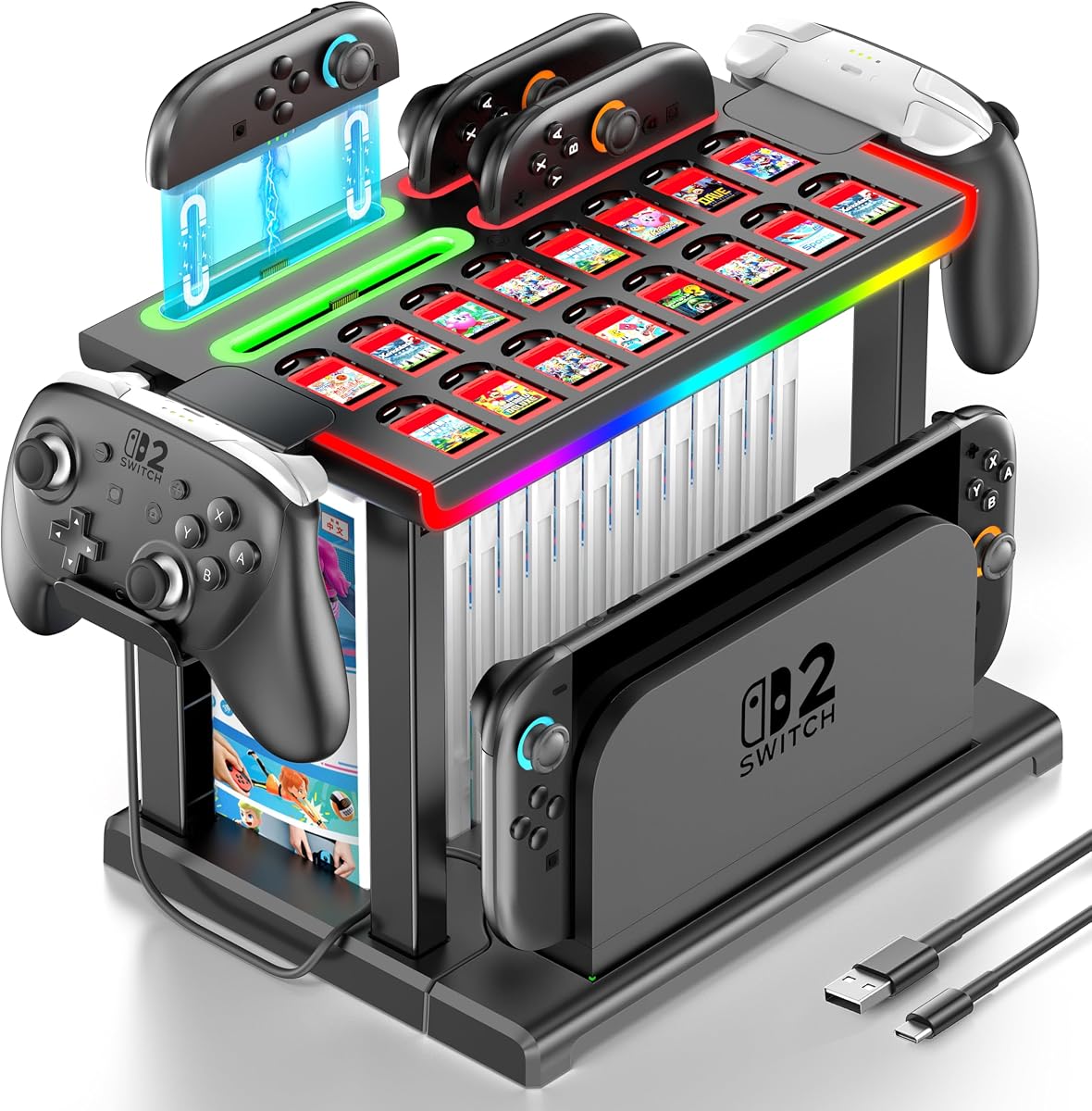


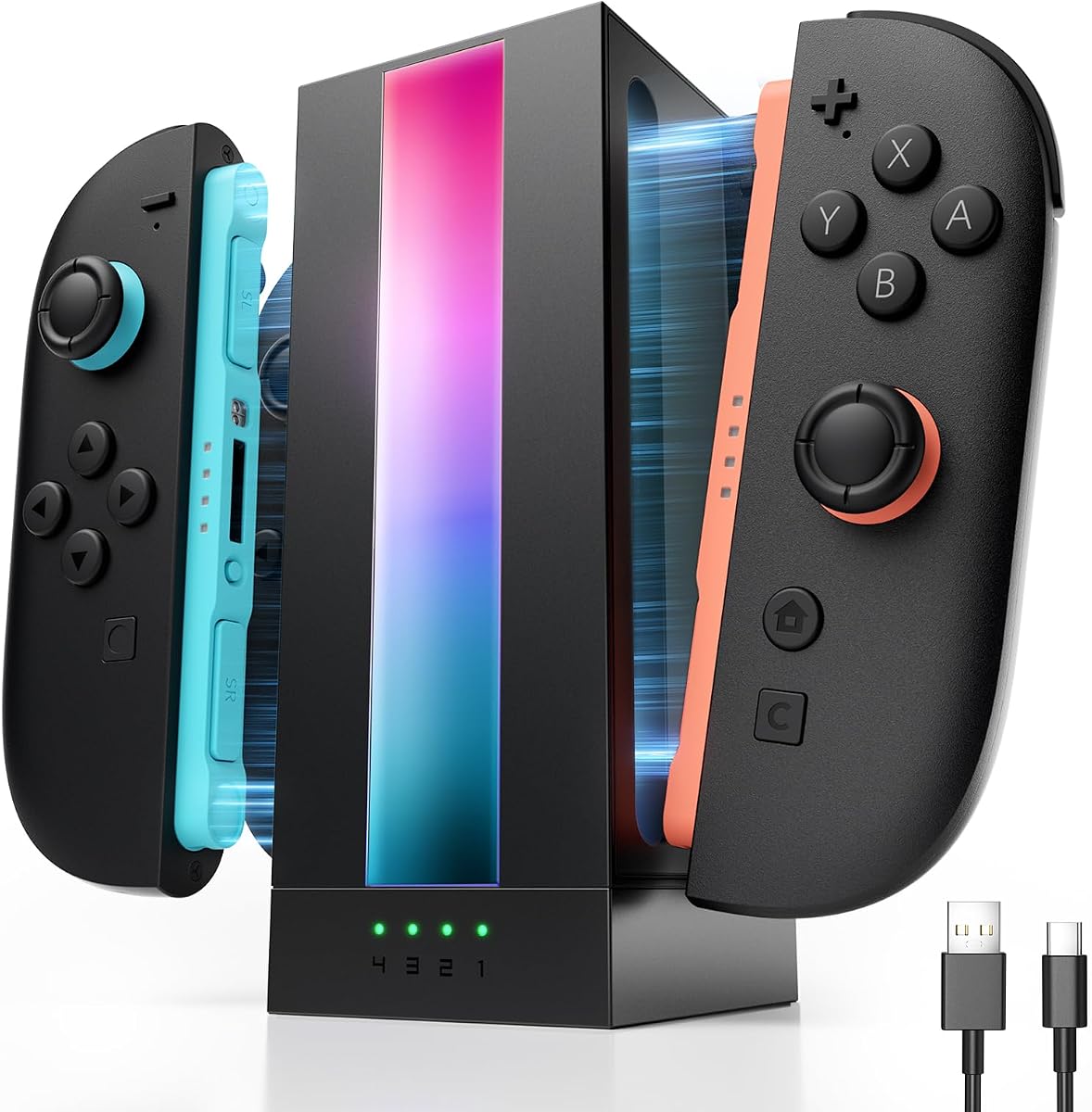
This FASTSNAIL charging dock is designed exclusively for the Nintendo Switch 2 JoyCon 2025 release. With a 4.7 rating, it stands out for its magnetic alignment that simplifies charging. The dock allows you to charge up to four controllers simultaneously, making it ideal for multiplayer sessions.
We may earn a commission when you buy through this link, at no additional cost to you.
The magnetic feature ensures secure placement without needing to distinguish between plus and minus joypads. It includes nine vivid RGB lighting modes that enhance your gaming ambiance. Smart memory functions retain your last lighting settings when the dock powers on.
While highly efficient, it requires a separate power supply such as an AC adapter or console dock. Some users may find the lighting modes unnecessary if they prefer a minimal setup. However, these features add significant value to the gaming environment.
Ideal for Switch 2 enthusiasts seeking a reliable and aesthetically pleasing charging solution. This dock combines convenience with style. Its safety features ensure your controllers are protected against overcharging and overheating.
Magnetic alignment ensures effortless and secure charging without distinguishing joypad types.
Charges up to four controllers simultaneously, perfect for multiplayer nights.
We may earn a commission when you buy through this link, at no additional cost to you.
The SUPCASE Charging Dock is a premium option tailored for the Switch 2 JoyCon 2025 controllers. It features four dedicated charging slots with magnetic design for easy alignment. Users praise its ability to keep gaming areas neat and organized efficiently.
We may earn a commission when you buy through this link, at no additional cost to you.
Dual-side charging allows you to place JoyCons either way, simplifying the process. The dock includes nine RGB lighting modes to personalize your gaming space. Safety chips prevent overcharging and overheating to ensure reliable use over time.
While effective, it comes at a higher price compared to simpler docks. It does not include controllers, requiring a separate purchase. Some users may find the lighting features less essential than core charging functions.
This dock suits those valuing high-end design and multi-controller support. Its magnetic efficiency and safety features provide peace of mind. Consider it if you want a stylish and functional station for your setup.
Supports dual-side charging for flexible placement of JoyCon controllers.
Smart chip ensures safe charging while keeping your desk organized.
We may earn a commission when you buy through this link, at no additional cost to you.
This budget-friendly charging station is designed for Switch 2 Pro Controllers. It allows you to charge two controllers at once with LED indicators showing status. It offers a compact design that fits neatly on desktops or TV stands.
We may earn a commission when you buy through this link, at no additional cost to you.
The 5V/2A input ensures stable and efficient charging performance. LED indicators clearly show red for charging and green for fully charged. It includes smart protection to prevent overcharging and overheating during use.
However, it only supports Pro Controllers and not JoyCons. Some users report slower charging speeds depending on the power source. The limited features may not satisfy those needing multi-device support.
Ideal for gamers prioritizing affordability and basic functionality. It keeps your Pro Controllers organized and powered. Consider your controller types before purchasing to ensure compatibility.
Charges two Pro Controllers simultaneously at an accessible price.
LED lights provide immediate feedback on charging status.
We may earn a commission when you buy through this link, at no additional cost to you.
This versatile dock supports Switch 2 Pro, PS5, and Xbox Series controllers. It features two ports for simultaneous charging. The Type-C adapters ensure easy drop-in charging. Users value its adaptability across different gaming platforms.
We may earn a commission when you buy through this link, at no additional cost to you.
LED indicators display red for charging and green for full. The 5V2A power input ensures stable charging speeds. Built-in smart protection protects against low power consumption issues. It helps maintain controller health over time.
PowerA controllers are not compatible with this station. The included adapters are removable but may need careful insertion. Some users must source a dedicated wall adapter for best performance.
Best for multi-console gamers needing a unified charging solution. It keeps your setup organized while charging multiple device types. Verify compatibility with your specific controller models before purchase.
Supports multiple controllers from Switch, PS5, and Xbox.
Designed for 5V2A power to minimize charging times.
We may earn a commission when you buy through this link, at no additional cost to you.
This organizer station holds up to 16 game cases and charges four JoyCons. It features RGB lighting to enhance your gaming vibe. The tool-free installation simplifies setup. It is a popular gift for Switch 2 enthusiasts.
We may earn a commission when you buy through this link, at no additional cost to you.
The charging indicator shows red for charging and green for full. RGB modes include breathing and color cycles that sync with gaming rhythm. It keeps your accessories neat and saves space on your TV stand.
The TV dock is not included with the station. It requires significant desk space due to its large capacity. Some users may find it bulky for smaller gaming setups.
Ideal for users needing extensive storage and controller charging in one unit. It combines functionality with visual flair. Consider your available space before choosing this large organizer.
Accommodates game cases, cards, and controllers in one unit.
Customizable lighting modes add flair to your gaming area.
We may earn a commission when you buy through this link, at no additional cost to you.
The PowerA base charges Joy-Cons and wireless controllers with ease. Its bold design fits any gaming setup. LED lights indicate charge status clearly. It is fully compatible with Nintendo Switch Pro Controllers.
We may earn a commission when you buy through this link, at no additional cost to you.
Users appreciate its simplicity and reliable performance. The base supports rechargeable batteries and offers straightforward charging. It is easy to plug in and operate without complex steps.
Charging speeds are adequate but not the fastest available. Compatibility is limited to specific controllers like PowerA wireless models. Some users may need to test compatibility with their devices.
Great for users preferring a simple and stylish charging solution. It keeps your controllers organized and powered up. Check model compatibility to ensure it meets your needs.
Eye-catching design that complements any gaming setup.
Charges Joy-Cons and Pro Controllers with a single base.
We may earn a commission when you buy through this link, at no additional cost to you.
This 6-in-1 station charges JoyCons, Pro Controllers, and PS5 controllers. It features a fireproof panel and smart IC chip for safety. Users find it easy to set up and use without hassle. A charging cable is included in the package.
We may earn a commission when you buy through this link, at no additional cost to you.
The USB Type-C port design allows flexible power sources like wall adapters. LED indicators display charging status for all connected controllers. It offers multiple charging methods including console docks or hubs.
Power adapters are not included, requiring you to provide one. Controllers are not bundled with the dock, so plan accordingly. Some users may prefer models that offer additional accessories.
Suitable for gamers needing one station for various controllers. It ensures safe and organized charging. Verify included components match your setup needs before purchasing.
Built with fireproof panel for secure and safe charging.
Supports power from console, hubs, or wall adapters.
We may earn a commission when you buy through this link, at no additional cost to you.
The HEATFUN dock supports Switch Pro and Switch 2 Pro controllers plus PS5. It features dual USB-C ports for efficient charging. Includes adapters for easy drop-in charging to reduce port wear. It keeps gaming setups organized.
We may earn a commission when you buy through this link, at no additional cost to you.
Stable 5V/2A power input ensures reliable charging performance. LED indicators show charging status at a glance. The compact design fits neatly on desks or TV stands. It reduces downtime between gaming sessions.
Third-party controllers like PowerA are not supported. Using lower-power USB ports may slow charging. Users must ensure power sources meet recommended specs for best results.
Ideal for official controller users seeking a compact dual charger. It simplifies cable management and charging. Verify controller compatibility before purchase.
Designed for official Switch and PS5 controllers.
Adapters included to reduce wear on controller ports.
We may earn a commission when you buy through this link, at no additional cost to you.
This 10-in-1 dock supports Switch 2/1/OLED JoyCons and Pro controllers. It includes USB 2.0 ports for data or additional device charging. Users like the 11 RGB modes and Y-Type cable for NS2 docks. It helps reduce costs by avoiding multiple chargers.
We may earn a commission when you buy through this link, at no additional cost to you.
LED indicators show blue for fully charged and orange for charging. Smart protection extends battery life and prevents overheating. The organizer keeps your desktop clean and tidy during use.
NS2 official dock is recommended as a power source. Third-party controllers are not compatible with this model. Some users may need to check power options carefully.
Great for multi-version Switch users needing extensive compatibility. It offers versatile lighting and charging in one unit. Verify power sources and controller types for optimal use.
Supports multiple Switch models and controller types.
Includes 2 USB 2.0 ports for added utility.
We may earn a commission when you buy through this link, at no additional cost to you.
The JSAUX dock is designed exclusively for Switch 2 JoyCons. It charges four units in about 2.5 hours. A dynamic RGB bar enhances your setup. Independent LEDs show charging status clearly for each port.
We may earn a commission when you buy through this link, at no additional cost to you.
Safety chip protects against short-circuiting and overheating. The included 1.5m cable adds flexibility to your setup. It reduces waiting time during multiplayer gaming sessions effectively.
Power adapters are not included in the package. Older Switch JoyCons are not compatible with this dock. Some users must buy a separate adapter for full functionality.
Perfect for Switch 2 owners wanting rapid 4-controller charging. It combines speed with modern RGB aesthetics. Check compatibility and power requirements before purchase.
Reduces waiting time by charging four controllers quickly.
LEDs provide clear status for each individual controller port.
We may earn a commission when you buy through this link, at no additional cost to you.
Selecting the right charging dock ensures your Switch 2 controllers remain powered without disrupting gameplay. Consider compatibility, charging speed, safety, and design when evaluating options.
Check that the dock explicitly supports Switch 2 JoyCons or Pro Controllers. Some chargers work only with older Switch models or specific third-party brands. Always verify the product details to avoid purchasing incompatible accessories.
Look for docks supporting 5V/2A power input for faster charging. Standard USB ports may charge slowly. Faster docks reduce waiting times during gaming sessions.
Choose docks with built-in smart chips that prevent overcharging and overheating. These safeguards extend controller battery life. Safety is critical for protecting valuable gaming hardware.
Decide how many controllers you need to charge simultaneously. Multi-port docks up to four JoyCons or Pro Controllers are ideal for multiplayer. Single or dual port docks suit solo players.
Measure your desk space before purchasing. Compact docks fit small setups while large organizers may require more room. RGB lighting adds style but may not appeal to all users.
Some docks include USB-C adapters to reduce port wear. Others come with Y-Type cables for power. Check included accessories to minimize extra costs.
Ensure the dock supports your available power sources such as wall adapters or console docks. Some models recommend specific adapters for stable performance. Lack of a power source can slow charging.
Balance features against cost to find the best value. Budget docks may lack RGB lighting or multi-device support. Premium docks offer extra organization and advanced features for enthusiasts.
Place the dock on a stable flat surface and connect it to a suitable power source. Insert controllers or JoyCons carefully ensuring any included adapters are fully seated. Monitor LED indicators to track charging progress effectively.
Regularly clean the dock ports with a dry cloth to remove dust. Avoid placing the dock near water sources or excessive heat. Ensure cables are not bent sharply to prevent damage to wires.
Unplug the dock during thunderstorms to avoid power surges. If not using for extended periods, disconnect from power to preserve battery health. Follow manufacturer instructions for resetting features if lights malfunction.
Some docks support both Pro Controllers and JoyCons but many focus on one type. Always check product specs for compatibility. Mixing controllers may require a versatile dock like the 10-in-1 models.
Most docks do not include wall adapters and require separate purchase. They often recommend 5V/2A adapters for best performance. Check package contents carefully before buying to avoid extra costs.
Charge times range from two to four hours depending on dock efficiency. Multi-port docks may charge all controllers fully in two and a half hours. Always ensure stable power input for consistent results.
Many official docks exclude third-party brands like PowerA due to technical differences. Some universal models support specific third-party controllers but verification is needed. Stick to compatible models for best results.
RGB lighting does not impact charging speed but uses minor additional power. It adds aesthetic value without affecting functionality. Some users disable lighting to save power if preferred.
Yes if the dock includes smart protection features that prevent overcharging. These chips stop charging when batteries reach full. Ensure the dock has such safety features before extended use.
This guide reviewed ten top-rated charging docks ranging from budget-friendly to premium models. The FASTSNAIL and SUPCASE docks lead with magnetic features and multi-controller support. Budget options like the Switch 2 Pro Station offer basic dual charging at lower costs.
Prioritize compatibility with your specific controllers and charging speed for best performance. Safety features like smart chips protect your investment over time. Choose designs that match your available space and aesthetic preferences for a tidy setup.
Verify current availability and any updated features before purchasing. Prices and stock may change based on demand. Consider your gaming needs carefully to select the dock that keeps your Switch 2 accessories fully powered.