
Tokluck PS5/Slim/Pro Cooling Station with Auto Turbofan
4.4Editor score
Automatic temperature probe adjustment
Nine RGB lighting effects
Two and a half hour charging
Find the best cooling stand for PS5 console. Compare top-rated models with fans, chargers, and RGB lights to keep your gaming setup cool.
Keeping your PlayStation 5 console cool is essential for optimal performance and longevity. A dedicated cooling stand helps dissipate heat generated during intense gaming sessions, preventing overheating issues that can lead to hardware damage or reduced lifespan. These accessories often combine functionality with style, offering charging docks and storage solutions.
We compared ten top-rated cooling stands based on fan performance, compatibility with PS5 models, charging capabilities, and user feedback. Our analysis focuses on real-world usability, build quality, and additional features like USB hubs and LED lighting. This list covers vertical and horizontal options to suit different desk setups and preferences.
Each product pick highlights specific strengths such as auto fan control, fast charging speeds, or compact designs. Note that prices and availability may change frequently on Amazon, so check current listings before purchasing. We aim to provide clear insights to help you choose the right accessory for your gaming station today.
4.4Editor score
4.4Editor score

4.3Editor score
This side-by-side comparison evaluates all ten cooling stands based on key specifications like fan control type, charging speed, USB port availability, and overall compatibility with PS5 standard, slim, and Pro models.


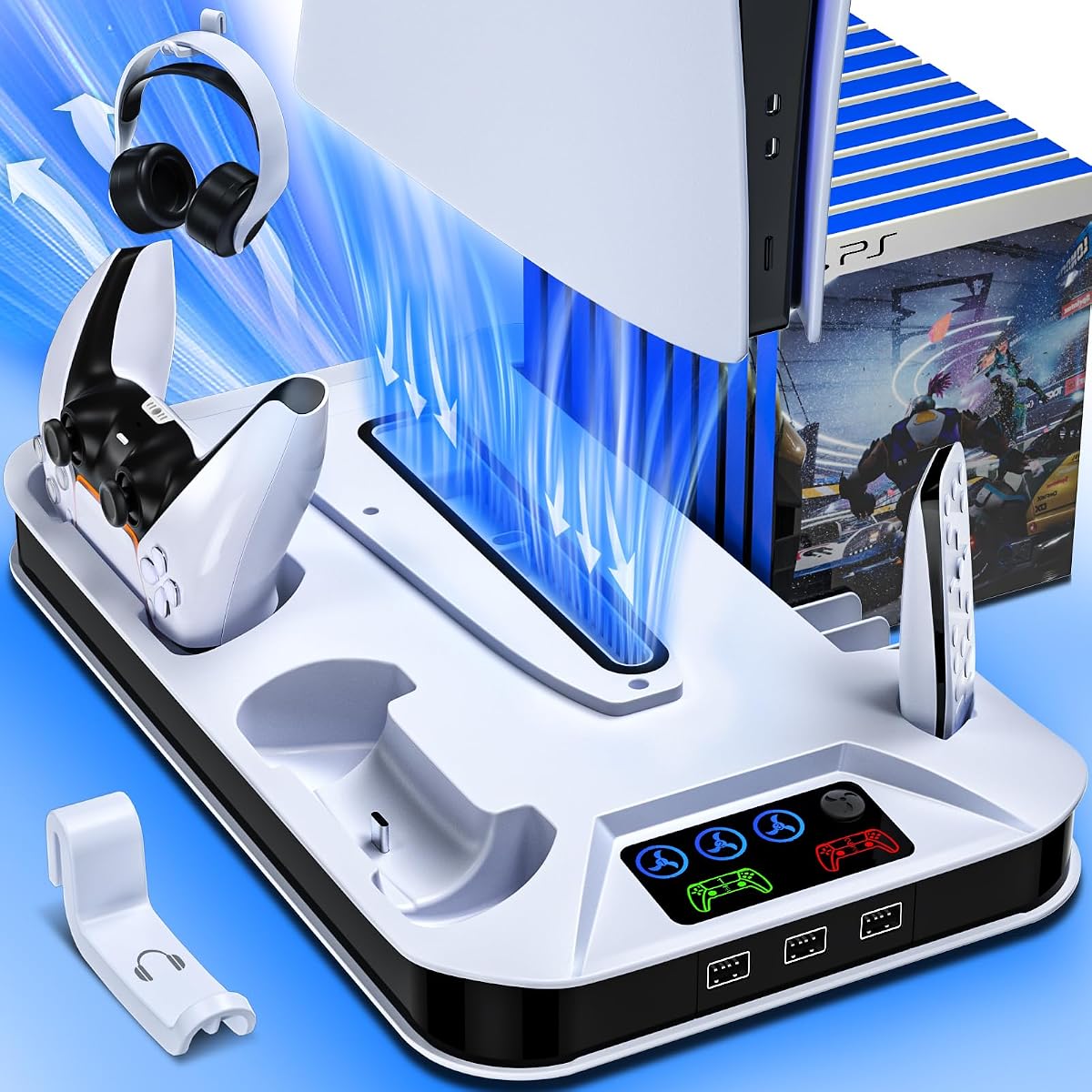
This PS5 cooling station earns the Editor's Choice badge for its robust feature set and reliable performance. It holds a strong 4.4-star rating from users who appreciate its ability to keep consoles cool during extended sessions. The combination of three-speed fan control and dual charging docks makes it a versatile hub for gaming accessories.
We may earn a commission when you buy through this link, at no additional cost to you.
The turbo cooling fan effectively dissipates heat from the bottom of the console, preventing overheating risks. LED indicators clearly show both fan speed and charging status, removing guesswork during gameplay. The stand also includes three USB hubs and a headset holder, consolidating multiple peripherals into one tidy unit on your desk.
While effective, the model does require removing a panel adapter for Slim digital versions, which might seem minor but requires attention during setup. Additionally, the charging docks are designed for original PS5 controllers and do not support the Edge controller, which could be a limitation for some users seeking broader compatibility.
For most gamers, this stand offers the best balance of cooling power and convenience. If you prioritize organized storage and reliable thermal management, it delivers strong value. The safety screw and non-slip pads ensure stability, making it a solid choice for daily use without worrying about accidental knocks.
The three-speed fan allows you to customize cooling based on heat generation, ensuring efficiency without unnecessary noise during lighter sessions.
With USB hubs and a media remote slot, you can charge headsets and control devices while keeping the area clutter-free and accessible.
We may earn a commission when you buy through this link, at no additional cost to you.
This horizontal stand offers a unique alternative to traditional vertical cooling units. With a 4.3-star rating, users highlight its scalability across PS5 generations including the newer Slim and Pro models. The inclusion of EVA foam ensures a snug fit for digital editions, enhancing stability on flat surfaces.
We may earn a commission when you buy through this link, at no additional cost to you.
The dual-controller charging dock supports both original and Edge controllers, appealing to enthusiasts who own the premium accessory. Its up-and-down push design secures controllers firmly while LED lights indicate status clearly. The turbo fan provides three speed settings to manage heat without excessive noise during casual play.
Installation is straightforward and requires no tools, which is ideal for beginners or those who dislike complex assembly. However, charging takes around three and a half hours, which is slightly longer than some vertical competitors. The horizontal layout also means less vertical space efficiency for storage purposes.
If your desk setup favors horizontal layouts or you need Edge controller support, this stand is a strong contender. It eliminates the need for separate charging stations while keeping the console organized. The compact footprint frees up valuable space for other gaming gear without compromising cooling performance.
The dock accommodates both standard and Edge controllers, ensuring premium users can charge their preferred controller without needing a separate dock.
With no complex tools required, setup takes just minutes, letting you start enjoying a tidy gaming area immediately after opening the box.
We may earn a commission when you buy through this link, at no additional cost to you.
This model stands out with intelligent temperature monitoring that adjusts fan speed automatically, earning it a premium badge for advanced features. Users praise the 4.4-star rating for its ability to maintain optimal thermal levels without manual intervention. The combination of auto mode and manual override provides flexibility for different gaming environments.
We may earn a commission when you buy through this link, at no additional cost to you.
Fast charging is a key benefit, fully powering two controllers in just two and a half hours. The movable USB port allows better alignment for original or Edge controllers, ensuring a secure connection. Nine RGB lighting effects add a customizable aesthetic touch that enhances the visual appeal of any entertainment center.
While the RGB lights create a stunning atmosphere, some users might find them too bright in dark rooms. The lighting memory function remembers your last setting but requires adjusting brightness via long presses which can be less intuitive. However, these cosmetic features do not detract from core cooling and charging reliability.
For gamers who want both high performance and customizable aesthetics, this station delivers. The auto cooling mode ensures your console stays protected even if you forget to adjust settings. It balances practical functionality with style, making it a top choice for those seeking a modern gaming station with premium touches.
The built-in temperature probe automatically adapts fan speed based on console heat, reducing wear and ensuring efficient cooling when needed most.
With nine lighting modes and brightness controls, you can match the stand's appearance to your room's style or personal gaming preferences easily.
We may earn a commission when you buy through this link, at no additional cost to you.
With a high 4.5-star rating, this cooling stand offers strong value for its comprehensive accessory support. It provides a clean white design that matches the console aesthetics while delivering effective cooling through its turbo fan. The inclusion of a headset holder adds to its all-in-one appeal for organized setups.
We may earn a commission when you buy through this link, at no additional cost to you.
Charging two controllers in two and a half hours ensures quick turnaround between gaming sessions without delays. The intelligent circuit protection chip stops charging at 80 percent to prevent battery degradation over time, extending the life of your accessories. Three USB hubs allow simultaneous charging for other devices like cameras or remotes.
While it lacks Edge controller compatibility, it remains reliable for standard users. The safety screw and non-slip pads keep the console balanced and secure on desks. However, removing the panel adapter for slim digital versions is required, which can be a minor inconvenience during initial assembly and setup.
This stand is an excellent choice for those prioritizing accessory management and battery safety. It keeps your area tidy while protecting both the console and controllers from overheating or overcharging. For a reliable daily driver that balances cost and function, this model performs consistently well.
The intelligent circuit stops charging at 80 percent to prevent overcharging, which helps maintain battery health and extends controller lifespan significantly.
Extra USB ports allow you to charge multiple devices at once, keeping your media remote, headset, and camera powered without extra cables.
We may earn a commission when you buy through this link, at no additional cost to you.
This cooling station is particularly valuable for owners of the PS5 Edge controller, which many competitors do not support. It maintains a solid 4.4-star rating with users appreciating its reliable fit across all PS5 models. The inclusion of a dedicated headset holder ensures your audio gear stays organized within reach.
We may earn a commission when you buy through this link, at no additional cost to you.
The smart chip protects controllers from overcharging by stopping at 80 percent, which helps preserve battery life over long-term use. Three USB ports on the side offer flexible charging for other devices like cameras or remotes. The fan speed memory function remembers your preferred setting after restart, adding convenience to daily use.
While it lacks RGB lighting for aesthetic flair, its focus on functionality ensures consistent performance. The safety screw secures the console firmly to prevent accidental knocks, adding peace of mind. However, the design is standard and may not appeal to users seeking custom visual features or vibrant lighting effects for their setup.
If Edge controller compatibility is a priority, this stand meets that need effectively. It balances practical features with reliable cooling to ensure your console runs smoothly. For gamers who value utility and controller support over flashy lights, this is a dependable and practical choice for their setup.
Unlike many competitors, this dock supports the premium Edge controller, ensuring all users can charge their preferred controller without buying extra accessories.
Three USB ports allow quick charging of headsets and cameras, keeping your accessories powered and accessible without cluttering your desk space.
We may earn a commission when you buy through this link, at no additional cost to you.
This station combines thermal performance with a striking honeycomb LED lighting system that appeals to visual-focused gamers. With a 4.5-star rating, users praise how well the cooling fan maintains console temperatures automatically. The nine lighting modes offer variety, including breathing modes that create dynamic visual effects around your desk.
We may earn a commission when you buy through this link, at no additional cost to you.
The intelligent temperature-controlled fan adjusts speed based on heat levels, ensuring efficiency without manual tweaking. Charging two controllers in just two and a half hours minimizes downtime between intense gaming sessions. The memory function resumes your last fan speed setting automatically, adding convenience to your workflow.
The lighting controls are straightforward, using quick or long presses to manage brightness and modes. However, the bright LEDs might be distracting during dark gameplay or movie sessions. Despite this, the combination of reliable cooling and aesthetic appeal makes it a strong option for those wanting a stylish gaming setup with functional support.
For gamers who prioritize both looks and performance, this station delivers a balanced solution. It keeps your console cool while adding personality to your room. If you value customizable lighting that matches your mood and need reliable charging, this model stands out as a top visual choice for your setup.
Nine honeycomb lighting modes let you customize brightness and color, enhancing your gaming atmosphere with customizable visual effects.
The fan adapts to heat levels automatically, ensuring optimal cooling performance without requiring manual adjustment during gameplay or idle times.
We may earn a commission when you buy through this link, at no additional cost to you.
This horizontal option excels in accommodating Edge controllers while supporting all PS5 models seamlessly. Users appreciate the scalable design that adapts to standard, slim, and Pro versions without issues. The charging dock is intuitive and includes clear LED lights to track status instantly during daily use.
We may earn a commission when you buy through this link, at no additional cost to you.
The turbo fan offers three manual speed settings to manage heat effectively during intensive gaming. Charging takes around three and a half hours, which is reliable but slightly slower than vertical competitors. Installation is tool-free and quick, ensuring you can set up your organized space without frustration.
The horizontal layout saves vertical space but may not support extensive accessory storage like headsets. It consolidates charging and cooling into one unit but relies on USB ports for external device power. The design is practical for desks where vertical stands might feel intrusive or space-consuming for your setup.
For those needing Edge controller support and a compact horizontal solution, this is a solid choice. It keeps your console safe and charged while freeing up desk space. If you prefer a streamlined look without complex features, this model delivers essential functionality reliably.
The docking mechanism securely holds both standard and Edge controllers, ensuring premium accessories remain supported without needing extra purchases.
The horizontal orientation minimizes vertical footprint, freeing up shelf space and keeping your setup streamlined for smaller rooms or desks.
We may earn a commission when you buy through this link, at no additional cost to you.
This stand offers one of the fastest charging speeds available, fully powering two controllers in just two hours. With a 4.5-star rating, users praise its auto mode that adjusts fan speed based on temperature. The smart chip stops charging at 70 percent to protect battery health and extend lifespan over time.
We may earn a commission when you buy through this link, at no additional cost to you.
A Type-C cable is included, offering flexible power options from wall outlets or console ports. The media remote slot and headset holder provide convenient storage for daily gaming essentials. The auto cooling ensures the console remains protected even if you forget to adjust settings manually during active use.
While charging is quick, the automatic stopping point might require patience for users expecting full 100 percent charging. Removing the panel adapter for slim versions is necessary but straightforward. The lack of RGB lighting keeps the design minimal but might not appeal to those wanting visual customization for their setup.
For those who prioritize charging speed and battery safety, this stand is ideal. The Type-C support adds modern convenience for varied power sources. If you need a reliable cooling system with minimal hassle and fast turnaround, this model delivers practical benefits efficiently.
Dual controllers fully charge in two hours, reducing downtime and ensuring you always have powered controllers ready for long sessions.
Smart chips stop charging at 70 percent to prevent overcharge damage, extending the battery life of your controllers significantly.
We may earn a commission when you buy through this link, at no additional cost to you.
This stand emphasizes quiet performance and vibrant visuals with eight RGB color modes and silent fan speeds. Users highlight its ability to reduce console noise during heavy load while maintaining effective cooling. The LED indicators show charging status clearly, allowing quick checks during gameplay interruptions.
We may earn a commission when you buy through this link, at no additional cost to you.
The fan speed is indicated by corresponding color LEDs, which simplifies status checks without looking closely at buttons. Two USB A hub ports provide extra power for devices like headsets or cameras. The safety screw prevents accidental knocks, ensuring the console stays stable on your desk throughout active use.
While it offers great visual customization, it does not support Edge controllers. The standard three-hour charge is reliable but not the fastest available. If you want a balance of quiet cooling and aesthetic customization, this model fits those needs well without sacrificing essential thermal management functions.
For gamers seeking a silent and colorful gaming station, this is a strong contender. The combination of overheat protection and USB hubs makes it practical for diverse accessory needs. If lighting and quiet performance are priorities, this model delivers a consistent user experience effectively.
The turbo fan operates quietly even at high speeds, ensuring your focus remains on the game without distracting mechanical noise.
Eight vibrant RGB colors and four lighting modes let you personalize your desk setup to match your gaming style and room ambiance.
We may earn a commission when you buy through this link, at no additional cost to you.
This stand stands out by including a Type-C port alongside USB hubs, making it highly versatile for modern devices. With a 4.5-star rating, users appreciate its ability to charge phones and tablets while keeping the console cool. The security screws ensure stable connection, preventing accidental displacement during use.
We may earn a commission when you buy through this link, at no additional cost to you.
The three-level turbo fan effectively dissipates heat to prevent overheating risks. LED indicators provide clear charging status so you never miss when controllers are ready. The headset holder keeps your audio gear organized, contributing to a tidy setup. The Type-C support extends charging options beyond just controllers.
While charge time is standard, the device diversity support makes it adaptable for mixed gaming and general device needs. The sturdy materials withstand daily use without shaking. However, the requirement for screws and panel adapters adds minor steps during initial setup, which may require patience for new users.
For users with multiple device types needing charging, this stand offers broad utility. It balances cooling performance with modern connectivity. If you value compatibility with phones or laptops in addition to gaming gear, this model delivers a versatile and durable solution for your desk setup.
The inclusion of Type-C and USB ports allows charging of phones and laptops alongside controllers, making it a versatile hub for all devices.
Sturdy materials and security screws ensure the stand remains stable and secure, preventing accidental knocks or displacement during daily use.
We may earn a commission when you buy through this link, at no additional cost to you.
Selecting the right cooling stand involves evaluating cooling performance, compatibility, and extra features like charging and storage.
Stands offer manual or automatic fan control. Manual allows precise speed setting, while auto adjusts based on console temperature. Choose auto for convenience and consistent cooling without manual input.
Look for dual controllers charging that fully powers units quickly. Speeds range from two to three and a half hours. Faster charging reduces downtime between gaming sessions significantly.
Ensure the stand supports your specific PS5 model including Slim or Pro. Some require panel adapters or screws for proper fit. Check adapter removal steps for digital editions before purchase.
Premium Edge controllers need special docks. Many stands support standard controllers only. If you own Edge, verify docking compatibility to avoid buying incompatible hardware unnecessarily.
Lighting enhances aesthetics but may distract during dark sessions. Choose stands with adjustable brightness or removable lighting if minimalism is preferred for your setup.
Extra USB ports allow charging headsets and remotes simultaneously. Look for models with at least three hubs to consolidate multiple accessories into one station.
Security screws and non-slip pads prevent console movement. Smart chips that stop charging at 70 to 80 percent protect battery health and extend accessory lifespan.
Horizontal stands save vertical space but may limit accessory storage. Vertical stands save floor space and often support more storage. Choose based on desk layout and size needs.
First, assemble the stand by attaching any screws or panels included in the package. Ensure the panel adapter matches your console version before placing it on the base.
Second, connect the power cable to the console or a wall outlet to activate cooling and charging functions. Adjust fan speeds based on heat levels for optimal performance during gaming.
Third, clean the stand regularly with a soft cloth to prevent dust buildup. Keep vents clear to maintain airflow and ensure consistent cooling efficiency over time.
Yes, cooling stands help dissipate heat generated during long sessions. By keeping temperatures low, they prevent overheating and thermal throttling which can maintain stable performance.
Most stands support standard, slim, and Pro models but may require removing panel adapters for digital editions. Always check product details for compatibility with your specific console version.
Only specific models support Edge controllers. Most standard stands work with original controllers only. Check the product specs before buying if you own a premium Edge controller.
Charging times range from two to three and a half hours depending on the model. Faster options reduce downtime and keep your controllers ready for the next session quickly.
Some users find bright lights distracting. Look for stands with adjustable brightness or toggle switches. You can usually turn off lighting effects if minimalism is preferred for dark rooms.
Most stands connect to the PS5 console via included cables. Some may support wall outlets for additional device charging. Check the power options listed in the product specifications carefully.
Choosing the right cooling stand depends on your specific needs for cooling, charging, and organization. Top picks like the Editor's Choice offer a balanced mix of performance and accessory support.
Prioritize models with reliable fan control and Edge support if you own premium accessories. Safety features like overcharge protection add long-term value to your gaming setup investment.
Always check current listings for price and availability before purchasing. Cooling technology and features vary, so selecting the right model ensures your console stays protected and organized efficiently.