
CORSAIR AIR 5400 LX RGB
4.7Editor score
Triple-chamber cooling design
Isolated CPU and GPU zones
Optimized airflow ducts
Discover the top 10 Corsair PC cases ranked by real user ratings. Compare airflow, glass panels, and modular features to build your ideal rig.
Choosing the right Corsair PC case is essential for balancing aesthetics with thermal performance. These cases offer unique features like modular frames and panoramic glass to showcase your hardware.
We compared ten top models based on airflow ratings, cooling capacity, and user reviews. Each pick highlights specific strengths for different build styles and component sizes.
Every selection includes detailed pros and cons to help you decide. Note that availability and pricing change frequently so check current listings before purchasing.
4.7Editor score

4.7Editor score
4.6Editor score
This side-by-side comparison highlights key specifications across all ten models to help you identify the best fit for your specific build requirements and aesthetic preferences.


The CORSAIR 4000D RS ARGB stands out as the premier choice for builders prioritizing airflow and future-proofing. Its high rating reflects a balance of performance and practical design elements.
We may earn a commission when you buy through this link, at no additional cost to you.
This model features the revolutionary FRAME modular system allowing you to swap components like the motherboard tray or I/O panel. The InfiniRail fan mounting offers unmatched flexibility for roof fans.
While the solid steel front panel maximizes cooling it means no built-in glass viewing of your hardware. This trade-off is acceptable for those focused purely on thermal performance.
Ideal for enthusiasts who want to upgrade parts easily or optimize airflow paths dynamically. It remains a top-tier investment for mid-range to high-end builds.
Upgrade the motherboard tray to billet aluminum or swap the front I/O panel for more USB ports as your needs evolve.
Slide the rail to mount fans up to 200mm wherever you like ensuring targeted airflow without fixed mounting constraints.
We may earn a commission when you buy through this link, at no additional cost to you.
The 3500X delivers a wraparound glass aesthetic that looks amazing on any desk. Its rating confirms excellent balance between visual appeal and functional cooling capabilities.
We may earn a commission when you buy through this link, at no additional cost to you.
With support for up to ten 120mm fans it ensures you never sacrifice cooling for the glass front panel. Removable tempered glass makes building and cleaning easy.
Glass panels do require regular cleaning to maintain clarity and can show fingerprints easily. This is a minor trade-off for the incredible visual impact provided.
Perfect for builders wanting a display-style build with maximum cooling headroom. It supports everything from Mini-ITX to EATX motherboards flexibly.
The front and side panels provide an unobstructed view of your hardware making this case a showcase for custom loops.
Side roof and PSU fan mounting points ensure massive airflow potential without restricting your cooling options.
We may earn a commission when you buy through this link, at no additional cost to you.
The 4500X LX RGB Frame combines modern design with advanced cooling tech. Its high rating shows satisfaction with its unique reverse-rotor fans and glass aesthetics.
We may earn a commission when you buy through this link, at no additional cost to you.
Single-piece curved glass offers an unobstructed wraparound view of your hardware. The reverse-rotor fans blow cool air into the case while keeping RGB LEDs visible.
The included iCUE Link System Hub simplifies cabling significantly reducing clutter inside the case. However the premium pricing might be steep for budget builders.
Recommended for users seeking a seamless RGB experience with minimal cable visibility. Its design sets it apart with clean lines and generous airflow openings.
Side-mounted 120mm fans use a reverse-rotor design to blow cool air while maintaining a clear view of LEDs.
Upgrade the motherboard tray or swap the side-mounted fans for a cable cover to suit your build style.
We may earn a commission when you buy through this link, at no additional cost to you.
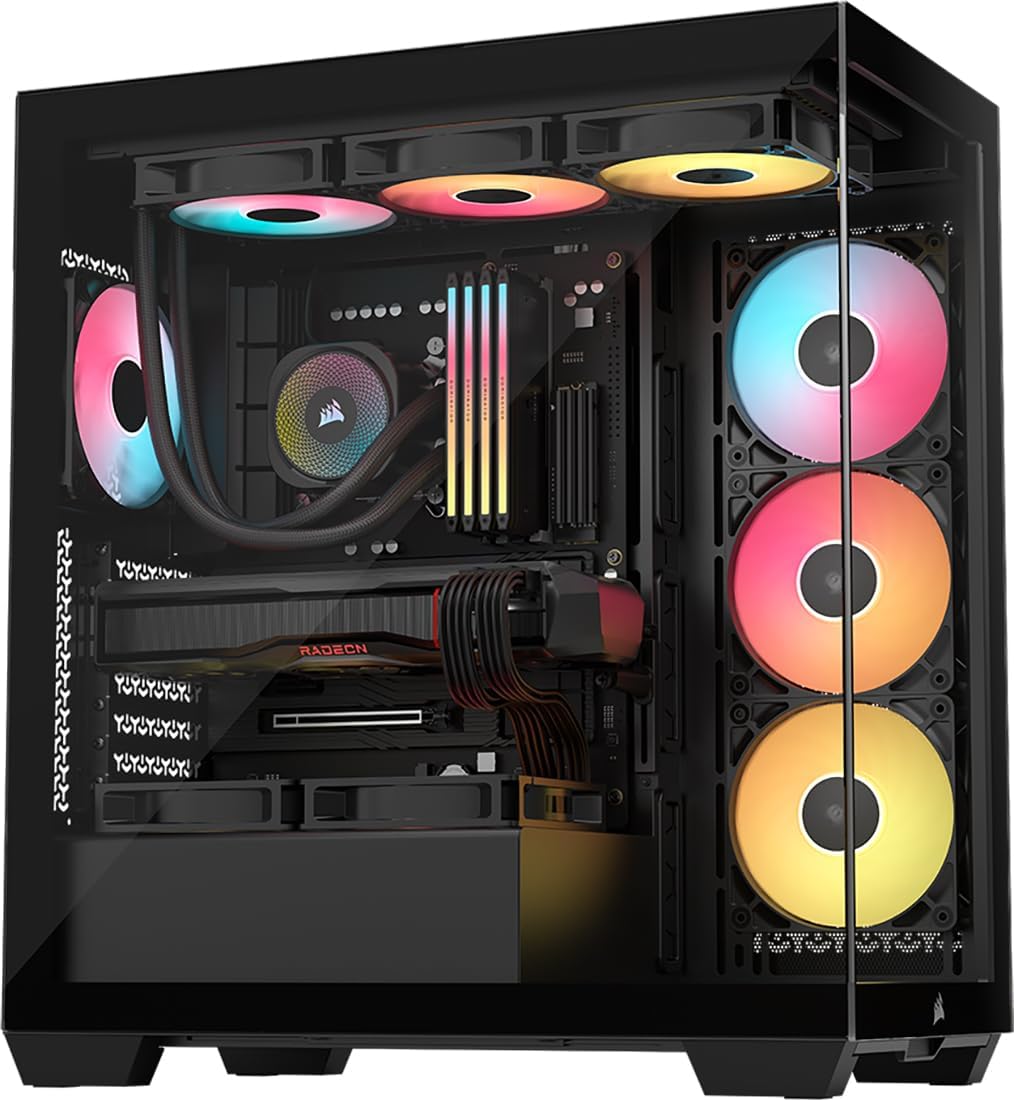
The AIR 5400 LX RGB defines premium cooling with its triple-chamber design separating CPU GPU and PSU zones. It rates highly for thermal efficiency and spacious internal layout.
We may earn a commission when you buy through this link, at no additional cost to you.
An isolated CPU cooling chamber holds a 360mm radiator ensuring heat does not affect other components. The central chamber offers massive vertical airflow for GPU cooling.
Airflow ducts accelerate air velocity without increasing fan speed reducing noise. However the case is physically large and may not fit smaller desks easily.
Ideal for top-tier builds needing absolute thermal separation and maximum component space. Its innovative design ensures your system runs cool and quiet under load.
The separate front chamber holds a 360mm radiator keeping CPU heat away from the GPU and motherboard.
Bottom fan ducts accelerate airflow into narrow channels improving cooling without adding extra fan noise.
We may earn a commission when you buy through this link, at no additional cost to you.
The AIR 5400 RS ARGB provides the same elite cooling architecture as its LX sibling but with RS ARGB fans. It excels at separating heat sources effectively.
We may earn a commission when you buy through this link, at no additional cost to you.
An isolated CPU chamber and dedicated PSU zone prevent hot air recirculation. Massive vertical airflow in the central chamber cools components thoroughly.
Airflow ducts on the bottom fan array increase velocity efficiently. It remains physically large so check your desk dimensions before buying.
Perfect for users prioritizing thermal performance over compact form factors. It ensures every component stays cool even during extended gaming sessions.
Separate chambers ensure that heat generated by the CPU does not negatively impact GPU temperatures.
The central chamber is designed for vertical airflow cooling all components and exhausting hot air upward.
We may earn a commission when you buy through this link, at no additional cost to you.
The 3500X LX RGB Link simplifies cabling with an iCUE Link System Hub and pre-installed LX fans. This makes the build process significantly cleaner.
We may earn a commission when you buy through this link, at no additional cost to you.
Three pre-installed LX120-R reverse rotor RGB fans connect via the hub reducing wires. It supports up to ten 120mm fans for massive cooling.
Removable glass panels make access easy after assembly. While the hub requires specific fans the reduction in clutter is worth the investment for clean builds.
Best for those who want a streamlined setup with minimal visible wiring. It combines visual appeal with modern connectivity standards seamlessly.
The included System Hub controls RGB and simplifies connections reducing cabling for a cleaner streamlined build.
Validated for ASUS BTF MSI Zero and Gigabyte Stealth boards so cables do not spoil your view.
We may earn a commission when you buy through this link, at no additional cost to you.
The Frame 4500X RS offers a striking white finish that looks premium on any desk. It maintains the high cooling performance of the black versions.
We may earn a commission when you buy through this link, at no additional cost to you.
Clean lines cascade like a waterfall over the exterior providing generous airflow openings. The steel multi-point InfiniRail mounting allows flexible fan placement.
Reverse-rotor RGB fans ensure cool air enters while keeping LEDs visible. White cases require more maintenance to stay pristine but the look is unmatched.
Recommended for white builds wanting a wraparound glass view. It balances aesthetics and thermal efficiency perfectly for mid-tower setups.
A white chassis finish offers a clean modern look for high-end gaming PCs.
Slide the rail to mount fans wherever you like ensuring targeted airflow without fixed constraints.
We may earn a commission when you buy through this link, at no additional cost to you.
The 9000D is a cavernous case for ambitious builds with up to eighteen 120mm fans. It delivers elite cooling for extreme enthusiast setups.
We may earn a commission when you buy through this link, at no additional cost to you.
Supports radiators up to 480mm in front and roof. InfiniRail aluminum mounting ensures flexible fan configuration without fixed constraints.
Its size makes it difficult to fit standard desks and shipping is bulky. Also the high price reflects its specialized nature for top-tier rigs.
Only recommended for extreme enthusiasts with massive components or water cooling loops. It offers unlimited potential for system expansion.
A cavernous interior supports extensive cooling configurations making it a magnum opus build environment.
An included iCUE LINK System Hub controls RGB and expands ecosystem up to 13 additional devices.
We may earn a commission when you buy through this link, at no additional cost to you.
The 5000D Frame offers modular flexibility with 3D Y-Pattern panels and InfiniRail mounting. It includes four fans out of the box for immediate high airflow.
We may earn a commission when you buy through this link, at no additional cost to you.
You can upgrade the motherboard tray to billet aluminum or swap panels easily. Top mounting supports 420mm radiators which is rare for this size.
Internal side panels can act as cable covers or be removed for extra cooling. While highly flexible some users may find storage options limited.
Ideal for builders wanting maximum airflow and future customization. It adapts to your evolving hardware needs seamlessly.
This system gives new meaning to customization allowing upgrades like aluminum trays and different I/O panels.
Take cooling to the next level with a top-mounted 420mm radiator and 360mm on front or side.
We may earn a commission when you buy through this link, at no additional cost to you.
The 5000D RS Frame in black provides a sleek modular design. It supports 420mm radiators and offers a high airflow path for cooling.
We may earn a commission when you buy through this link, at no additional cost to you.
You can swap the motherboard tray for aluminum and mount fans flexibly. 3D Y-Pattern panels provide an unobstructed path for cool air to enter.
Clean lines or turbo cooled modes allow you to balance noise and cooling easily. Some users may find initial assembly complex due to customization.
Best for builders wanting to customize cooling and aesthetics. It adapts to hardware needs while maintaining excellent thermal efficiency.
Upgrade the motherboard tray or swap front panels to evolve the case with your needs.
Mount up to 14x 120mm fans simultaneously or adjust for 140mm and 200mm locations easily.
We may earn a commission when you buy through this link, at no additional cost to you.
Selecting the right Corsair case requires balancing cooling needs with your aesthetic goals. We break down eight critical factors to consider before buying.
Form factor determines the motherboard size your case supports. Most Corsair models support ATX but some like the 9000D handle EATX. Always check compatibility with your board.
Glass panels look beautiful but restrict airflow compared to mesh. If thermal performance is your priority choose a mesh front like the 4000D. For visuals choose glass like the 3500X.
Look for fan mounting points and radiator support. Models like the 9000D support massive radiators while mid-towers handle 360mm. Consider if you plan water cooling.
The FRAME modular system lets you swap trays and panels. This is useful if you plan to upgrade hardware later. Check if the model includes FRAME features.
Good cases include rubber grommets and tie-downs. The 4000D has a side panel to hide cables. Consider how many wires your GPU or PSU will require.
Many models come with pre-installed RS or LX fans. This saves you money. Check if fans are PWM or ARGB to match your motherboard.
High airflow cases can be noisy if fans spin fast. Zero RPM modes on RS fans help. Consider noise dampening features if you need a quiet PC.
Some cases include iCUE Link hubs for simplified RGB. If you plan to use multiple Corsair fans consider Link compatible models. It reduces cable clutter significantly.
Start by planning your component layout to optimize airflow. Install the motherboard first and route cables through the tie-downs.
Clean dust filters regularly using a vacuum or compressed air. This prevents dust buildup that can clog fans over time.
If you have glass panels use a microfiber cloth to clean them gently. Avoid chemicals that might scratch the tempered glass.
Most Corsair mid-tower cases support up to 360mm radiators. The 9000D can even handle 480mm radiators for custom loops.
Simply detach the rail by sliding it off. Use a soft cloth to wipe away dust before reattaching it securely.
Yes. Most models like the 3500X have mounting points for up to ten 120mm fans. Check your specific manual for details.
RS fans are high-performance cooling fans. LX fans are designed for RGB aesthetics and work with the iCUE Link hub.
If you plan to upgrade your motherboard tray or I/O panel later it is definitely worth it. It future-proofs your build significantly.
The 9000D is very large. Ensure you have a wide desk with at least 20 inches of depth to accommodate its size.
Many newer models like the 3500X are validated for BTF and Zero motherboards. Check the product page for specific compatibility.
No. The 4000D RS ARGB model comes with three RS fans pre-installed. Standard versions may not include fans so check the title.
The CORSAIR 4000D RS ARGB stands out as the best overall choice for its versatility. The AIR 5400 LX RGB is perfect for high-end thermal needs.
Prioritize cooling and airflow for long-term performance. If you care about visuals choose the 3500X or 4500X for panoramic views.
Prices and availability change frequently so always verify specs before buying. Check the current links to confirm fan inclusions and compatibility.