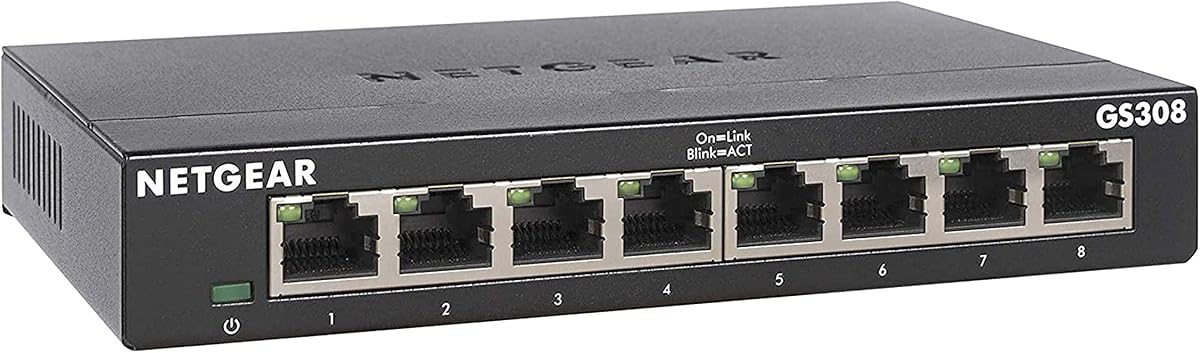
NETGEAR GS308
4.8Editor score
Eight Gigabit ports
Plug and play setup
Compact metal casing
Compare the top 10 network switches for small business. Find reliable Gigabit options with real ratings, features, and expert insights to upgrade your office network today.
Choosing the right network switch is critical for small business operations. A reliable switch ensures fast data transfer, stable connectivity, and efficient resource sharing across all your devices without unnecessary downtime or performance bottlenecks.
We evaluated ten leading models based on port count, speed, management features, and build quality. Our analysis focuses on real-world performance, energy efficiency, and ease of setup to help you make an informed decision for your specific office needs.
Each selection below highlights key strengths, limitations, and ideal use cases. Keep in mind that stock levels and pricing fluctuate frequently, so verifying current availability and costs before purchasing is always recommended for accurate budgeting.
4.8Editor score

4.7Editor score

4.5Editor score
This side-by-side comparison highlights the core specifications and capabilities of each switch to help you quickly identify the model that best fits your port requirements and management preferences.


The TP-Link TL-SG116 stands out as a highly reliable option for small businesses needing sixteen Gigabit connections. With a strong rating of 4.7 stars, it offers solid performance and energy efficiency without requiring complex configuration or ongoing maintenance.
We may earn a commission when you buy through this link, at no additional cost to you.
Its standout qualities include Auto Negotiation and Auto MDI/MDIX which simplify cabling. The energy efficient technology reduces power consumption significantly while the fanless design ensures quiet operation ideal for open office environments.
Trade-offs include the lack of advanced management features found in premium models. However, for basic expansion needs, the plug and play setup and port based QoS provide sufficient control for prioritizing voice or video traffic effectively.
This switch is ideal for growing offices needing reliable wired connectivity. Its durable build and industry leading three year warranty offer peace of mind for businesses looking for a cost effective expansion solution today.
Innovative technology greatly expands network capacity with less power consumption helping save money over time.
IEEE 802.3X flow control provides reliable data transfer ensuring stable connections for critical business applications.
We may earn a commission when you buy through this link, at no additional cost to you.
The Cisco Business CBS110-16T is engineered for businesses valuing long term reliability and support. Its limited lifetime warranty provides exceptional peace of mind making it a secure investment for critical network infrastructure.
We may earn a commission when you buy through this link, at no additional cost to you.
Key strengths include integrated quality of service intelligence that optimizes delay sensitive services. The elegant compact design suits retail stores or classrooms while energy efficiency standards lower operational costs significantly.
Trade-offs involve a higher upfront cost compared to budget alternatives. However the factory replacement process and one year technical support justify the investment for organizations prioritizing uptime and durability.
This model is best for environments needing robust support and flexibility. Choose it when long term reliability and brand reputation are top priorities over initial budget constraints.
Limited lifetime warranty with return to factory replacement ensures your network stays up and running.
Gigabit Ethernet and integrated QoS improve overall network performance for smooth data flow.
We may earn a commission when you buy through this link, at no additional cost to you.
The Cisco CBS110-8T-D offers a compact solution for smaller offices needing eight Gigabit connections. Its elegant design fits seamlessly into open plan offices without cluttering workspaces or requiring a dedicated wiring closet.
We may earn a commission when you buy through this link, at no additional cost to you.
Key strengths include the limited lifetime warranty and fanless operation ensuring silent performance. Energy efficiency compliance helps lower operational costs making it a smart choice for environmentally conscious businesses.
Trade-offs involve fewer ports which may limit future expansion without additional units. However the plug and play setup and integrated QoS ensure smooth operation for essential services like VoIP or video streaming.
This switch is ideal for small teams needing reliable connectivity. Its robust build and warranty make it a dependable choice for workspaces requiring simplicity and long term support.
Ideal for installation outside wiring closets such as retail stores and open plan offices.
Optimizes power usage to lower operational cost while reducing environmental impact.
We may earn a commission when you buy through this link, at no additional cost to you.
The D-Link DGS-1016D brings advanced security features to unmanaged switching with port isolation and storm control. These tools reduce packet loss and help mitigate rogue software making it a safe choice for sensitive business environments.
We may earn a commission when you buy through this link, at no additional cost to you.
Key strengths include the sturdy metal case with shielded ports ensuring reliable connectivity. Energy saving methods conserve power automatically while the compliant design meets regulatory standards for government work.
Trade-offs include a larger size compared to some compact models. However the robust feature set and lifetime product coverage provide excellent value for businesses prioritizing network stability and protection.
This switch is ideal for secure setups needing reliable performance. Choose it when you need protection against network threats without complex management overhead.
Flow control and port isolation help mitigate rogue software and malware threats effectively.
RoHS compliant switches use recyclable packaging and minimize harmful substances.
We may earn a commission when you buy through this link, at no additional cost to you.
The NETGEAR GS308 is a highly affordable and reliable switch for small offices needing eight Gigabit connections. With an exceptional rating of 4.8 stars it delivers consistent performance and silent operation at a budget friendly price point.
We may earn a commission when you buy through this link, at no additional cost to you.
Key strengths include the compact metal design supporting desktop or wall mount placement. Auto-negotiating ports detect optimal speeds ensuring fast connectivity without any software installation or configuration requirements.
Trade-offs involve a lack of advanced management features. However its simplicity and energy efficient operation make it perfect for basic network expansion needs in home offices or small retail spaces.
This switch is best for those seeking value and reliability. Choose it when you need a proven solution that requires minimal setup and maintenance effort.
Compact metal design supports desktop or wall-mount placement for versatile installation options.
Auto-negotiating ports work with existing cables for high-speed connectivity.
We may earn a commission when you buy through this link, at no additional cost to you.
The NETGEAR GS308E bridges the gap between unmanaged and fully managed switches offering easy smart features. Its web GUI allows simple configuration of VLANs and QoS without complex software utilities making management accessible for non-IT staff.
We may earn a commission when you buy through this link, at no additional cost to you.
Key strengths include built-in protection features like loop detection and cable tests. These tools keep networks stable and easy to troubleshoot while maintaining silent fanless operation in office environments.
Trade-offs involve a slightly higher cost than basic models. However the added control over traffic segmentation and security makes it a smart choice for growing businesses needing more flexibility.
This switch is ideal for offices needing basic management. Choose it when you want to organize network traffic without investing in enterprise-grade hardware.
Prioritize traffic to keep voice video and data fast secure and organized.
Auto DoS prevention and loop detection keep your network stable.
We may earn a commission when you buy through this link, at no additional cost to you.
The NETGEAR GS108 is a staple for reliable unmanaged networking in small businesses. Its compact metal design and fanless operation ensure it blends into any workspace while delivering consistent high-speed data transfer.
We may earn a commission when you buy through this link, at no additional cost to you.
Key strengths include auto-negotiating ports and energy efficient technology. These features reduce power consumption without compromising speed ensuring your devices perform at their best with minimal heat generation.
Trade-offs include basic functionality without advanced management options. However for straightforward connectivity needs its durability and simplicity make it a trusted choice for many business owners.
This switch is best for standard office setups. Choose it when you need a robust reliable connection for essential wired devices.
Compact metal design supports desktop or wall-mount placement for versatile installation.
Energy Efficient Ethernet reduces power consumption without compromising performance.
We may earn a commission when you buy through this link, at no additional cost to you.
The UGREEN 24 Port Switch offers substantial expansion capacity with twenty-four Gigabit ports. Its rackmount ears make it ideal for server rooms while four working modes provide flexibility for different networking needs without complex setup.
We may earn a commission when you buy through this link, at no additional cost to you.
Key strengths include link aggregation for increased bandwidth and built-in surge protection. The advanced cooling design ensures stable operation under continuous use keeping your connected devices running smoothly.
Trade-offs involve a larger footprint requiring dedicated space. However its versatility and robust build quality make it a powerful tool for busy office environments needing high capacity connections.
This switch is ideal for growing businesses. Choose it when you need to connect many devices reliably in a centralized location.
Switch between standard mode port isolation and link aggregation for optimized networking.
6KV surge protection guards against lightning and power surges in demanding environments.
We may earn a commission when you buy through this link, at no additional cost to you.
The TP-Link TL-SG1428PE delivers premium PoE capabilities with a 250W budget supporting up to 30W per port. This makes it perfect for powering IP cameras and access points while offering advanced smart management via a web interface.
We may earn a commission when you buy through this link, at no additional cost to you.
Key strengths include auto reboot features for dropped devices reducing manual intervention. Abundant VLAN features improve security through traffic segmentation allowing better organization of your business network.
Trade-offs include higher complexity and cost compared to basic switches. However for businesses needing both data and power delivery this model provides a comprehensive solution that streamlines infrastructure.
This switch is ideal for tech-driven offices. Choose it when you need to power devices remotely and manage network traffic efficiently.
Automatically detects and reboots dropped or unresponsive PoE powered devices.
Web based management interface makes network monitoring straightforward.
We may earn a commission when you buy through this link, at no additional cost to you.
The NETGEAR GS108MX provides exceptional speed with a dedicated 10Gbps multi-gigabit port for high-speed connectivity. This feature is ideal for connecting to fast internet plans or storage servers while maintaining reliable Gigabit connections for other devices.
We may earn a commission when you buy through this link, at no additional cost to you.
Key strengths include auto-negotiating ports that detect optimal speeds and compact metal design. Its fanless operation ensures silent performance making it suitable for any office environment without adding noise.
Trade-offs involve having only one 10G port. However this model offers future-proofing for networks needing faster backbone speeds without requiring fully multi-gigabit infrastructure immediately.
This switch is best for high-performance needs. Choose it when you need to boost your network's core speed effectively.
Features 1 x 10Gbps Multi-Gig and 8 x 1Gbps Ethernet ports.
Simple plug and play setup with no software to install or configuration required.
We may earn a commission when you buy through this link, at no additional cost to you.
Selecting the right network switch requires balancing performance needs with budget constraints. This guide outlines the essential factors to consider for a smart purchase.
Evaluate your current device count and future growth plans. Choose a switch with enough ports to avoid daisy-chaining which can introduce latency and complexity. If you anticipate growth, consider models with 16 or 24 ports to accommodate new devices without hardware changes.
Look for switches that offer scalable port counts so you can upgrade later if needed.
Unmanaged switches are plug-and-play devices ideal for simple setups needing basic connectivity. Managed switches allow you to configure VLANs prioritize traffic and monitor security. For small businesses needing control over network traffic, an Easy Smart managed switch is a good middle ground.
Opt for managed features only if you need to segment traffic or prioritize specific applications.
Ensure the switch supports Gigabit Ethernet for fast data transfer between devices. If you have high bandwidth needs like video editing or large file sharing, consider models with multi-gigabit uplinks to handle heavier loads without bottlenecks.
Match switch speeds to your network demands to maintain optimal performance.
PoE switches deliver power and data over a single cable reducing clutter and cost. If you use IP cameras VoIP phones or wireless access points check the power budget to ensure it supports all your connected devices simultaneously.
Verify the total wattage capacity matches your device requirements for reliable power.
Consider where the switch will be installed such as on a desk or in a rack. Desktop switches should be compact and quiet while rackmount models need sturdy construction for server rooms. Check if wall mounting options are available for flexible placement.
Choose a form factor that fits your available space and installation environment.
Energy Efficient Ethernet (EEE) reduces power consumption by adjusting power usage based on activity. This feature helps lower utility bills and is essential for switches left on continuously in office environments.
Prioritize models with EEE compliance to reduce operational costs over time.
Look for switches with metal casings that dissipate heat effectively and protect internal components. A solid build ensures long term reliability reducing the risk of hardware failure that could disrupt business operations.
Metal housings are preferable for environments with high usage or varying temperatures.
A robust warranty like a limited lifetime or multi-year coverage provides peace of mind. Also check for availability of technical support and replacement options to handle any potential issues quickly.
Invest in switches with strong warranty terms for long term security.
To set up your switch connect your modem or router to an uplink port using an Ethernet cable. Then connect your devices to the remaining ports ensuring cables are securely seated. Most unmanaged switches will light up and start working immediately without configuration.
Regularly inspect cables and ports for dust or debris that could affect connectivity. Keep the switch in a well-ventilated area to prevent overheating. Avoid blocking ventilation holes if your model has fanless cooling systems.
Perform periodic power cycles to clear any network glitches by unplugging and replugging the power cord. Keep your firmware updated if using managed switches to ensure security patches are applied. Maintain spare cables for easy replacements when needed.
Unmanaged switches are plug-and-play devices requiring no configuration. Managed switches allow you to control traffic, prioritize data, and secure your network. For small businesses needing basic connectivity unmanaged is sufficient while managed offers more control for complex networks.
Only if you plan to power devices like IP cameras or access points through the switch. Otherwise, a standard switch is more cost-effective. Check your devices power requirements before choosing a PoE model to avoid unnecessary expenses.
Count your current devices and add a few extras for growth. If you have ten computers and printers consider a 16-port switch to avoid clutter. Buying too few ports may require daisy-chaining which can slow down your network.
Yes for most modern small businesses Gigabit speeds ensure fast file transfers and smooth communication. Fast Ethernet switches are slower and may bottleneck performance. Gigabit is now standard and affordable for reliable operation.
Choose fanless models which use metal heat sinks instead of fans for cooling. Place the switch in a well-ventilated area away from workstations. Quiet switches help maintain a professional environment especially in open offices.
Yes you can link switches using an Ethernet cable connecting two free ports. This expands your network but may introduce latency if overused. Keep chains short to maintain performance.
Ensure it has enough space for airflow and is not placed near heat sources. Clean dust from vents regularly. If it shuts down automatically move it to a cooler location to prevent damage.
High quality switches last five to seven years but technology evolves quickly. Replace if you notice slow performance or if you need new features like PoE. A timely upgrade ensures your network remains reliable.
Choosing the right switch depends on balancing your port needs with desired features. Models like the TP-Link TL-SG116 and NETGEAR GS308 offer excellent value for different business scales while PoE switches cater to specialized devices.
Prioritize reliability and warranty when investing in network hardware. A well-chosen switch ensures smooth operations and supports future growth without costly downtime. Consider your management needs to decide between unmanaged and smart options.
Always verify current stock and pricing before purchasing as these details change frequently. We hope this guide helps you select the perfect network solution for your business needs.