
Cudy AC1200 AP1300
4.3Editor score
Affordable entry-level business access point
Flexible PoE and DC power options
Built-in VPN server and client support
Compare the top ceiling mount access points for 2026. Find the best Wi-Fi 6, 7, and business-grade APs with real ratings and expert analysis.
Modern businesses and homes require reliable wireless connectivity to function effectively. Ceiling mount access points provide the best solution for distributing Wi-Fi signals evenly across large spaces. These devices are designed to be installed out of sight while delivering powerful performance.
We evaluated nine top-rated access points based on speed, coverage, management features, and value. Our analysis includes models from leading brands like Omada, Cudy, and Ubiquiti. Each product was reviewed for its ability to handle multiple devices and support modern Wi-Fi standards.
Each pick highlights specific strengths and ideal use cases for different environments. Whether you need enterprise-grade management or a simple home setup, this guide covers your options. Prices and availability can change, so verify details before purchasing.
4.3Editor score

4.5Editor score

4.3Editor score
This side-by-side comparison highlights the key specifications and features of each access point to help you decide quickly.


The Omada EAP650 is a robust Wi-Fi 6 access point designed for small to medium businesses. It offers high-speed dual-band connectivity with a clean design that suits modern offices and cafes. With a rating of 4.5, it stands out for its reliable performance and easy cloud management.
We may earn a commission when you buy through this link, at no additional cost to you.
Its standout qualities include support for 1024-QAM and HE60 technologies which boost throughput. The device integrates seamlessly into the Omada SDN platform allowing centralized control from the cloud. You can manage it via the Omada app or a controller for flexibility across multiple sites.
While it offers many advanced features like WPA3 and beamforming, full potential requires an SDN controller. Standalone mode works but limits some capabilities like seamless roaming. The power options are flexible but note that passive PoE may need a specific adapter.
Buy this if you need a powerful, scalable Wi-Fi 6 solution with minimal upfront cost for management. The five-year warranty provides peace of mind for business deployments. It is ideal for environments needing reliable wireless coverage and easy monitoring.
Free Omada cloud control lets you manage networks without hardware controllers saving cost and complexity.
Wi-Fi 6 features like OFDM and 1024-QAM ensure fast speeds even with many connected devices.
We may earn a commission when you buy through this link, at no additional cost to you.
The EAP610 is a slightly more affordable Wi-Fi 6 option from Omada with an impressive 4.6 rating. It delivers reliable dual-band speeds up to 1800 Mbps with four spatial streams. This makes it well-suited for environments with many concurrent users needing stable connections.
We may earn a commission when you buy through this link, at no additional cost to you.
Key strengths include its seamless integration into Omada's software-defined networking platform. You can control it remotely via the app or cloud controller just like the EAP650. The device supports advanced features like band steering and load balancing to optimize traffic.
One trade-off is that its maximum speed is lower than the EAP650 which may matter in high-density areas. Also like other Omada devices full mesh and roaming features require an SDN controller. It remains a solid choice for general office or classroom use.
Choose this if you want a proven Wi-Fi 6 access point with strong user feedback. It balances performance and cost well for businesses growing their network. The free cloud management adds significant value for small to medium setups.
Four spatial streams allow more data to be sent simultaneously improving efficiency in busy networks.
Shares management tools and features with other Omada devices for unified network control.
We may earn a commission when you buy through this link, at no additional cost to you.
The EAP225 is an entry-level Wi-Fi 5 access point that delivers reliable performance at a low cost. It comes with a PoE injector making installation easier without extra purchases. With a 4.6 rating it is trusted for business environments needing straightforward connectivity.
We may earn a commission when you buy through this link, at no additional cost to you.
Its strengths include MU-MIMO technology which allows simultaneous data transmission to multiple devices. The built-in mesh capability lets you extend coverage without additional wiring. Omada SDN integration provides centralized control if you grow your network later.
While it lacks Wi-Fi 6 features like OFDMA it still handles everyday tasks well. The Gigabit ports ensure wired connections remain fast and reliable. For smaller offices or less demanding setups it offers great value.
Buy this for budget-conscious projects where Wi-Fi 6 isn't critical. It is ideal for small businesses starting their network with trusted hardware. The included PoE injector adds convenience and reduces total cost.
PoE injector included in the box simplifies deployment without needing separate hardware.
Built-in mesh lets you add more APs easily for wider coverage without cables.
We may earn a commission when you buy through this link, at no additional cost to you.
The EAP772 represents the future of wireless with Wi-Fi 7 offering blazing-fast speeds and capacity. It supports up to 11000 Mbps combined across tri-bands with a 2.5G uplink port. This is perfect for high-density environments needing maximum performance and future-proofing.
We may earn a commission when you buy through this link, at no additional cost to you.
Its premium features include 320 MHz bandwidth and Multi-Link Operation which reduces latency and boosts efficiency. The 6 GHz band provides cleaner spectrum for new devices. Omada's management tools allow centralized control similar to their other APs.
The main trade-off is cost and the need for client devices that support Wi-Fi 7. Current laptops and phones may not fully utilize its potential. However it is an investment for networks requiring top-tier speed and capacity.
Choose this for enterprise setups or high-demand areas like stadiums or large offices. It ensures your network stays ahead of increasing bandwidth needs. The 2.5G port is essential for maximizing modern internet speeds.
Wider channels allow more data to move simultaneously dramatically increasing maximum wireless speeds.
MLO connects devices across bands for lower latency and higher reliability in busy networks.
We may earn a commission when you buy through this link, at no additional cost to you.
The Cudy AP3000 stands out for its 2.5GbE uplink and OpenWRT-ready firmware allowing deep customization. It delivers Wi-Fi 6 speeds up to 3000 Mbps with a powerful antenna array. The rating of 4.3 reflects solid performance and flexibility for tech-savvy users.
We may earn a commission when you buy through this link, at no additional cost to you.
Its key strength is the 2.5GbE port which removes wired bottlenecks during peak usage. This ensures the wireless side isn't held back by the uplink. The beamforming array covers large areas effectively penetrating walls and obstacles.
Advanced users can flash OpenWRT to unlock custom packages and routing options. However this requires technical knowledge and may affect warranty terms. The power options are versatile supporting PoE and DC for various installations.
Buy this if you need a high-performance AP with upgradeability and custom control. It suits small businesses or enthusiasts wanting more than standard features. The 2.5GbE port makes it future-ready for gigabit internet connections.
The 2.5GbE uplink ensures wired speeds match wireless performance during peak usage times.
OpenWRT support lets advanced users install custom packages and optimize network routing.
We may earn a commission when you buy through this link, at no additional cost to you.
The Cudy AP1300 is a budget-friendly Wi-Fi 5 access point packed with business features like VPN and VLAN support. It offers dual-band connectivity with beamforming to improve signal strength. With a 4.3 rating it is a trusted option for cost-sensitive deployments.
We may earn a commission when you buy through this link, at no additional cost to you.
Its unique selling points include built-in VPN server and client modes which reduce hardware needs. The captive portal with VLAN tagging allows guest and staff networks on one device. This simplifies setup for small offices without extra equipment.
While Wi-Fi 5 is older it still handles standard tasks well. The power flexibility lets you use existing PoE switches or DC adapters. It lacks mesh support which limits expansion without extra units.
Choose this for simple setups needing secure network segmentation without high cost. It is great for small businesses or remote offices requiring basic security features. The VPN capabilities add significant value at this price.
Built-in VPN server and client modes reduce the need for separate security appliances.
VLAN tagging lets you separate guest and staff traffic for better security and control.
We may earn a commission when you buy through this link, at no additional cost to you.
The Ubiquiti U6+ is a popular choice for those invested in the UniFi ecosystem offering reliable Wi-Fi 6 performance. It supports up to 3 Gbit/s wireless speeds with a clean design. A 4.6 rating confirms its reliability and user satisfaction in diverse environments.
We may earn a commission when you buy through this link, at no additional cost to you.
Its strengths lie in seamless integration with UniFi software for intuitive network management. The PoE+ port simplifies installation with single cable power and data. It handles high traffic well making it suitable for busy offices and hotels.
Full capabilities require the UniFi controller which is free but adds setup steps. The price is higher but justifies enterprise-grade features and support. Wall mountable design adds placement flexibility.
Buy this if you plan to expand with UniFi products for a unified network. It is ideal for businesses needing stable, high-speed wireless with easy management. The hardware is robust and built for longevity.
Seamlessly integrates with UniFi controller for unified management of network and security.
Supports up to 3 Gbit/s wireless speeds for fast and efficient data transfer.
We may earn a commission when you buy through this link, at no additional cost to you.
This mounting bracket is an essential accessory for installing Ubiquiti access points securely on ceilings or walls. It ensures your AP stays firmly in place for optimal signal distribution. With a 4.6 rating it is trusted by users for reliable and easy installation.
We may earn a commission when you buy through this link, at no additional cost to you.
Its design supports several UniFi models making it versatile for network expansions. The bracket simplifies setup by providing a firm foundation for the AP. Proper mounting ensures the device performs at its best without wobbling.
While it does not provide connectivity it is critical for physical setup. The installation is straightforward requiring basic tools. It helps maintain a clean professional appearance in any environment.
Buy this if you are installing Ubiquiti access points and need a solid mounting solution. It ensures your network hardware is secure and correctly positioned. Compatibility with multiple models adds flexibility for future changes.
A secure mounting bracket ensures your AP stays firmly in place for optimal performance.
Compatible with multiple UniFi models allowing flexible use across different access points.
We may earn a commission when you buy through this link, at no additional cost to you.
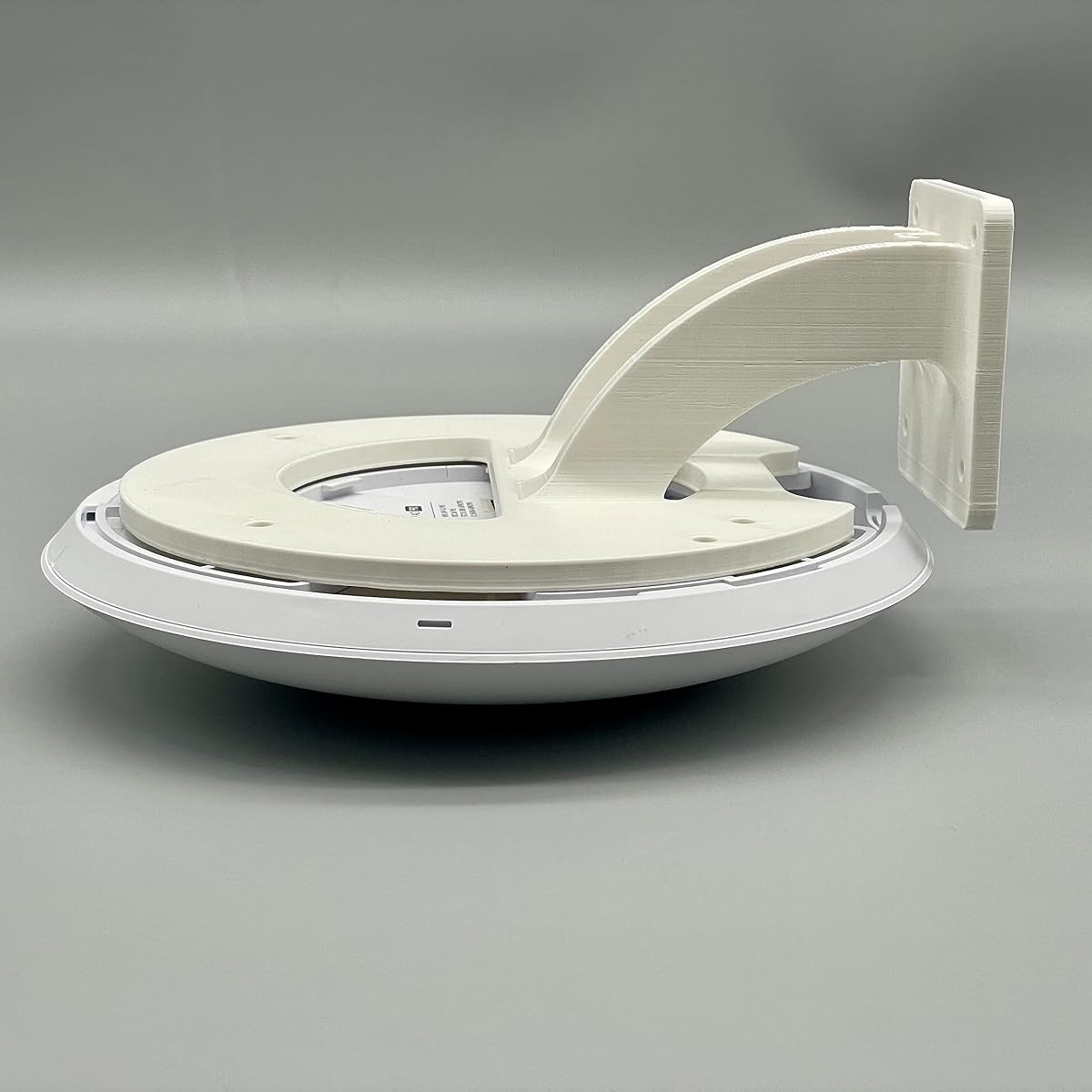
This horizontal wall mount offers a specialized solution for mounting Ubiquiti access points when wall placement is preferred. It supports a wide range of models including the latest U7-Pro. With a 4.2 rating it provides solid support for various UniFi APs.
We may earn a commission when you buy through this link, at no additional cost to you.
Its unique horizontal design accommodates specific AP shapes ensuring a clean install. It is useful where ceiling mounting isn't possible or when aesthetics require wall placement. The compatibility list is extensive covering current and older models.
The bracket is sturdy but limited to wall applications. Installation is simple with screws and basic tools. Ensure your wall can support the device weight before mounting.
Buy this for wall installations requiring a reliable horizontal mount. It fits well in hallways or meeting rooms where ceiling mounting is impractical. Compatibility with latest models makes it a future-ready choice.
Accommodates a broad range of UniFi APs from older to latest Pro models.
Specifically designed for horizontal wall placement ensuring secure fit for compatible APs.
We may earn a commission when you buy through this link, at no additional cost to you.
Selecting the right access point depends on your environment, device count, and budget. Consider these factors to ensure optimal performance.
Newer Wi-Fi 6 and 7 standards offer faster speeds and better efficiency with multiple devices. Ensure the AP supports current and future devices to avoid quick obsolescence. Speed ratings indicate maximum throughput but real-world results vary by environment.
Look for APs with beamforming technology to direct signals to clients for better coverage. The number of antennas affects range and penetration through walls. Match the coverage area to your space size to avoid dead zones.
Most APs use PoE which simplifies installation by using one cable for power and data. Verify compatibility with your existing switch or budget for an injector. Passive PoE options exist but require specific power sources.
Cloud-based management allows remote control and monitoring without hardware controllers. Some vendors require a controller for advanced features like seamless roaming. Free cloud options save costs but may have limitations.
Advanced security like WPA3 encryption protects your network from unauthorized access. Look for support of captive portals and VLANs to segment traffic. Enterprise networks benefit from robust security protocols and authentication methods.
Check if the AP supports mesh networking for easy expansion without extra wiring. Compatibility with other devices in the ecosystem ensures seamless integration. Consider future growth when choosing a platform.
A good warranty protects your investment against defects. Look for models with industry-leading coverage like five years. Technical support availability matters for troubleshooting setup issues.
Compare total costs including accessories like power adapters and brackets. Higher-priced models may offer more features that reduce long-term expenses. Balance initial cost with expected performance and lifespan.
Install the AP in a central location away from obstructions for optimal coverage. Use the provided bracket or compatible mounts to secure it firmly. Connect via Ethernet or PoE switch for power and data.
Access the management interface via web browser or app using default credentials. Update firmware regularly to ensure security and performance improvements. Configure SSIDs and security settings to match your network needs.
Keep the unit clean from dust which can affect heat dissipation. Ensure airflow is not blocked by ceiling panels or debris. Monitor signal strength and adjust placement if coverage is inconsistent.
PoE follows the IEEE 802.3af or at standards which negotiate power safely between switch and device. Passive PoE uses a fixed voltage without negotiation which requires compatible hardware. Always check device compatibility to avoid damage.
Some models like Omada and Ubiquiti offer free software or cloud controllers for management. Others can work standalone but advanced features like roaming require a controller. Check each product's management options before purchasing.
Modern Wi-Fi 6 access points can handle dozens to hundreds of devices depending on model. Higher-end models offer better throughput for high-density areas. Real-world capacity depends on traffic types and usage patterns.
Yes many models offer free versions or simpler setups suitable for home use. Look for cloud-based management which is easier than on-prem controllers. Ensure the features match your home network size.
Seamless roaming allows clients to switch between APs without dropping connection. It requires compatible APs and a controller in most systems. This is essential for large spaces where users move frequently.
Yes all listed APs require a wired Ethernet connection for data backhaul. Wireless backhaul is not supported on these models. Proper cabling ensures maximum performance and reliability.
We highlighted top picks like the Omada EAP650 for its balance of speed and management ease. Budget options like the Cudy AP1300 offer solid features at lower prices. Premium choices like the Omada EAP772 provide future-proof Wi-Fi 7 capabilities.
Prioritize your needs for speed, management flexibility, and budget when selecting. Check power options and security features to match your setup. Consider future growth for network scalability.
Prices and availability may change so verify current deals before buying. Use the comparison table to see specs side-by-side for quick decisions. Choose the AP that fits your specific environment.