
Skylight Calendar – 15" Touchscreen
4.4Editor score
Disney Mode
Premium Plus Plan
Sleek HD Display
Keeping a household organized requires clear communication and consistent routines. Digital chore charts transform traditional paper lists into interactive, colorful displays that engage children and reduce parental stress. These smart devices sync with family calendars to ensure everyone knows their responsibilities at a glance.
We compared ten leading digital chore charts based on screen size, sync capabilities, reward systems, and ease of use. Our analysis focuses on real-world performance for busy families needing a central command center. Each product offers unique features to streamline scheduling and motivate kids effectively.
Every pick in this guide highlights specific strengths like touch responsiveness, app integration, and design flexibility. Prices and availability may change, so verify current details before purchasing. We aim to help you choose the right tool to simplify your daily family logistics and build lasting habits.
4.4Editor score

4.4Editor score

4.4Editor score
As an Amazon Associate we earn from qualifying purchases.
This side-by-side comparison highlights key specifications and unique features across all ten models to help you decide quickly.
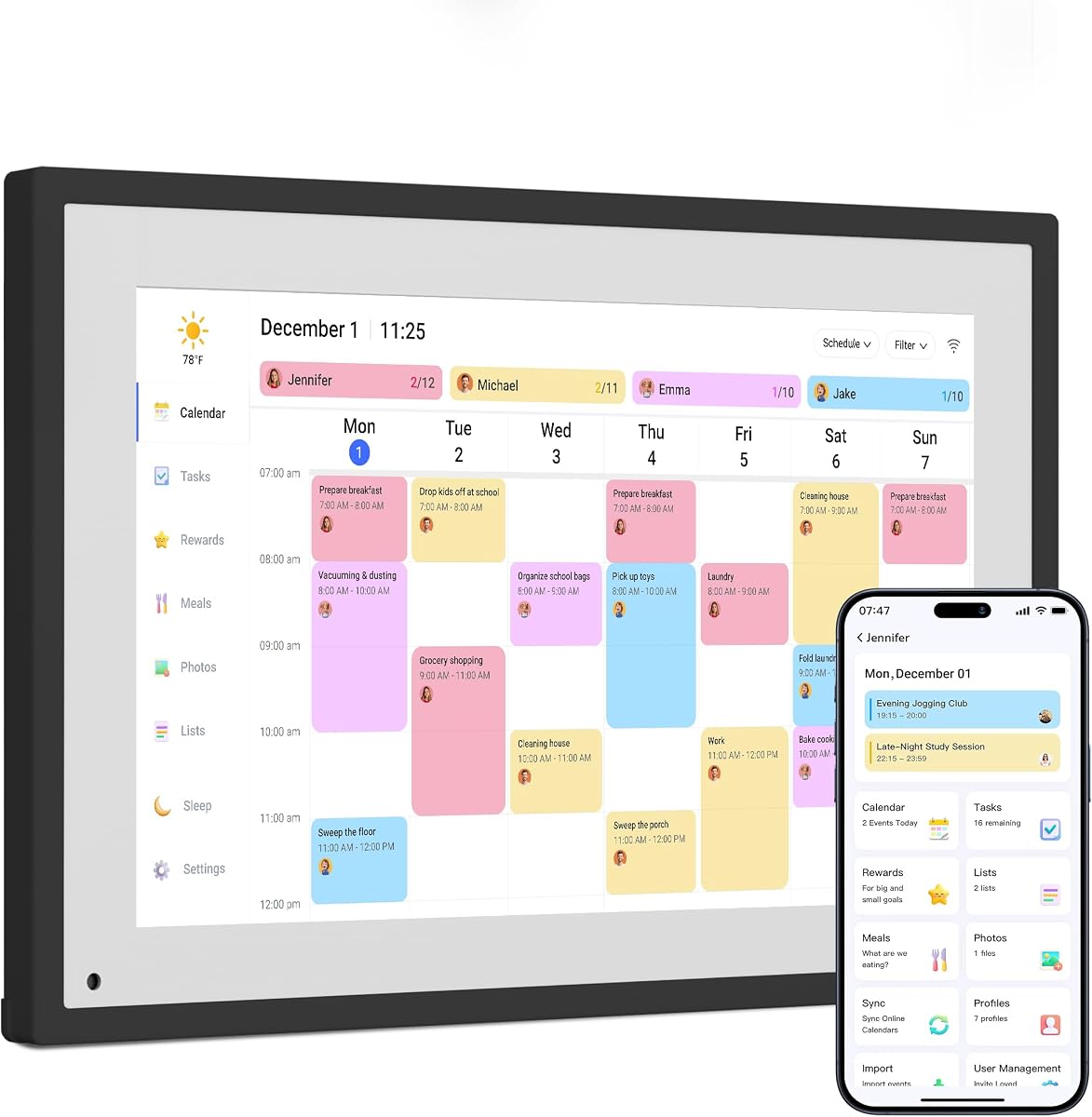



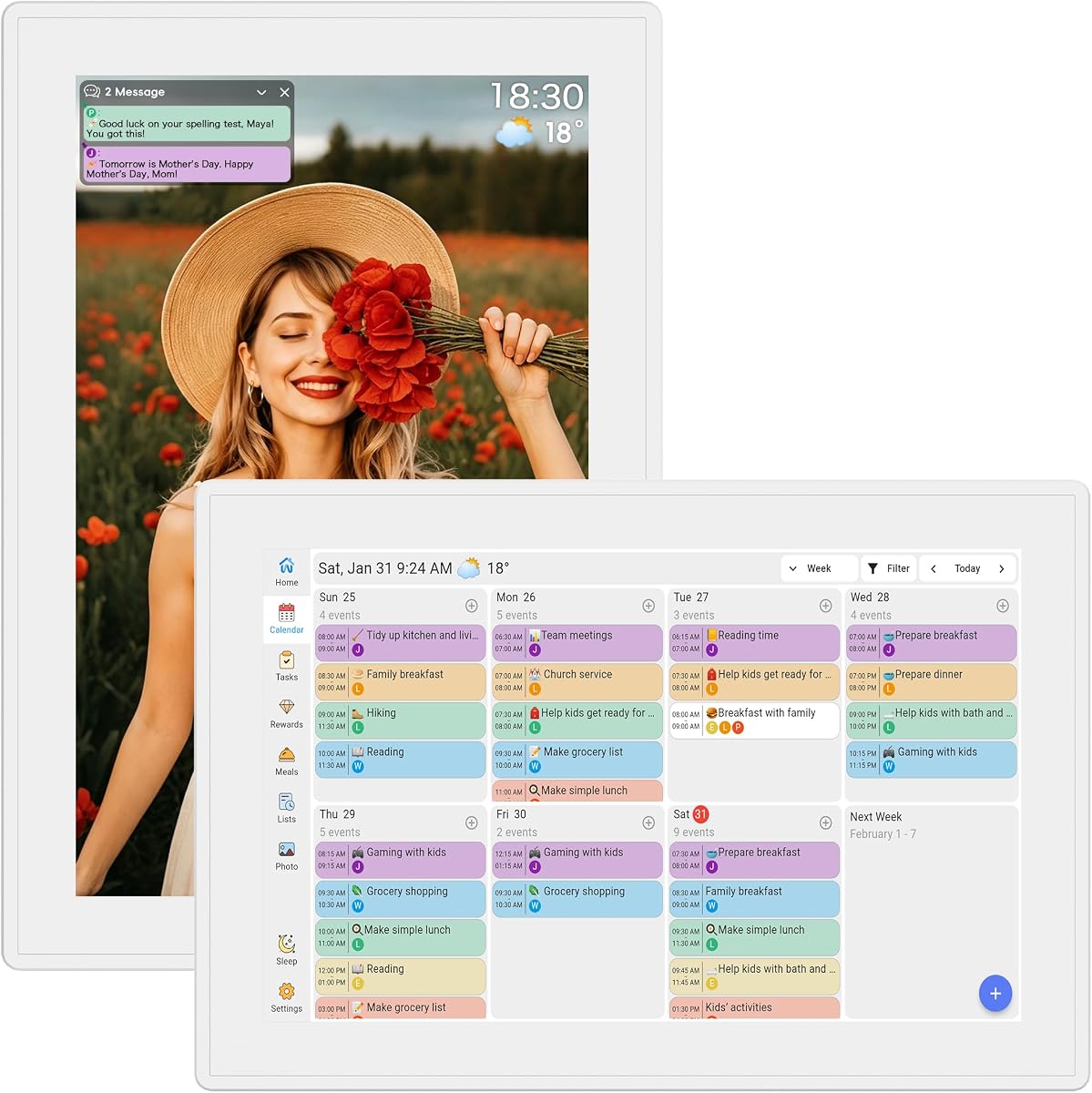
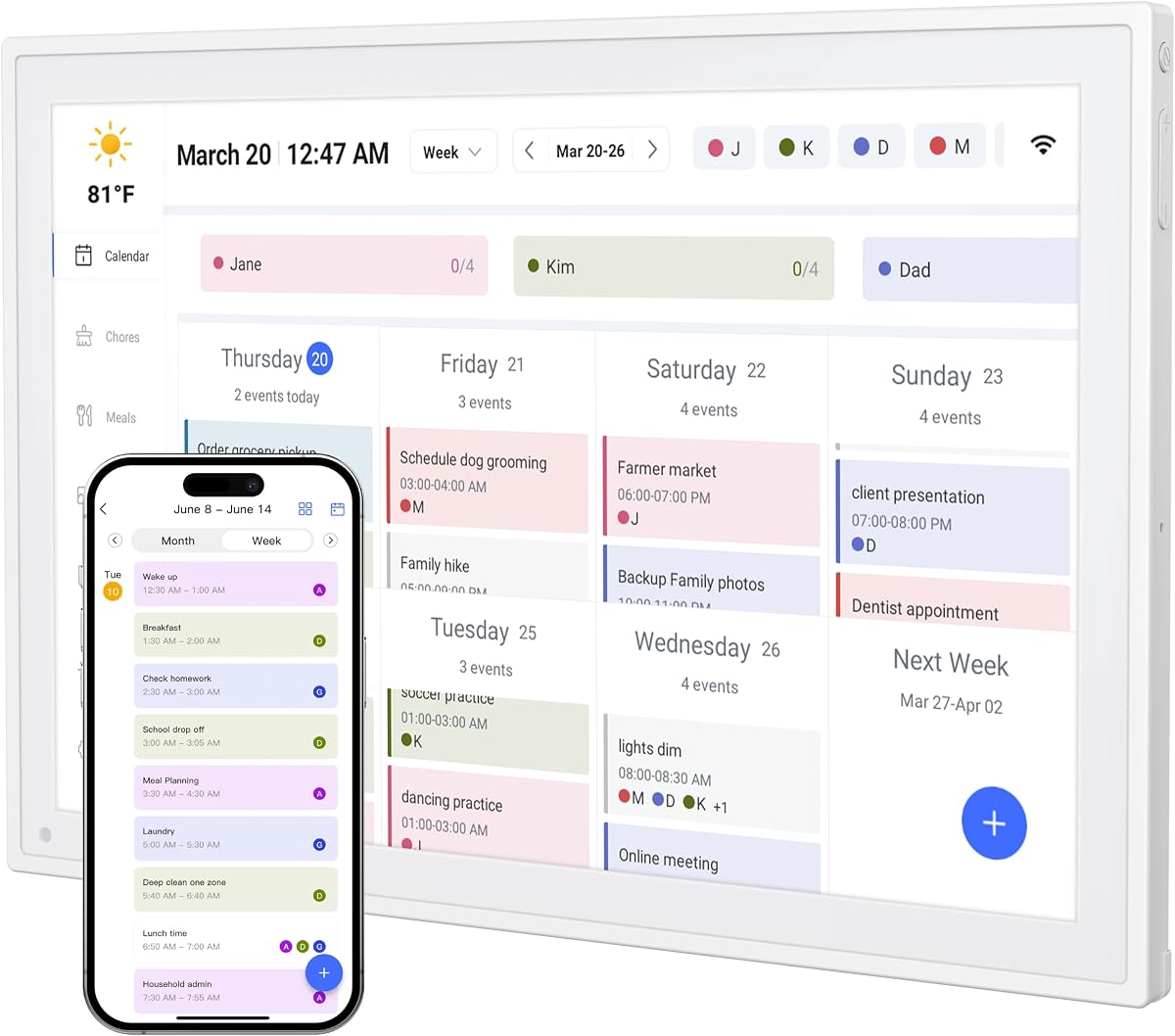
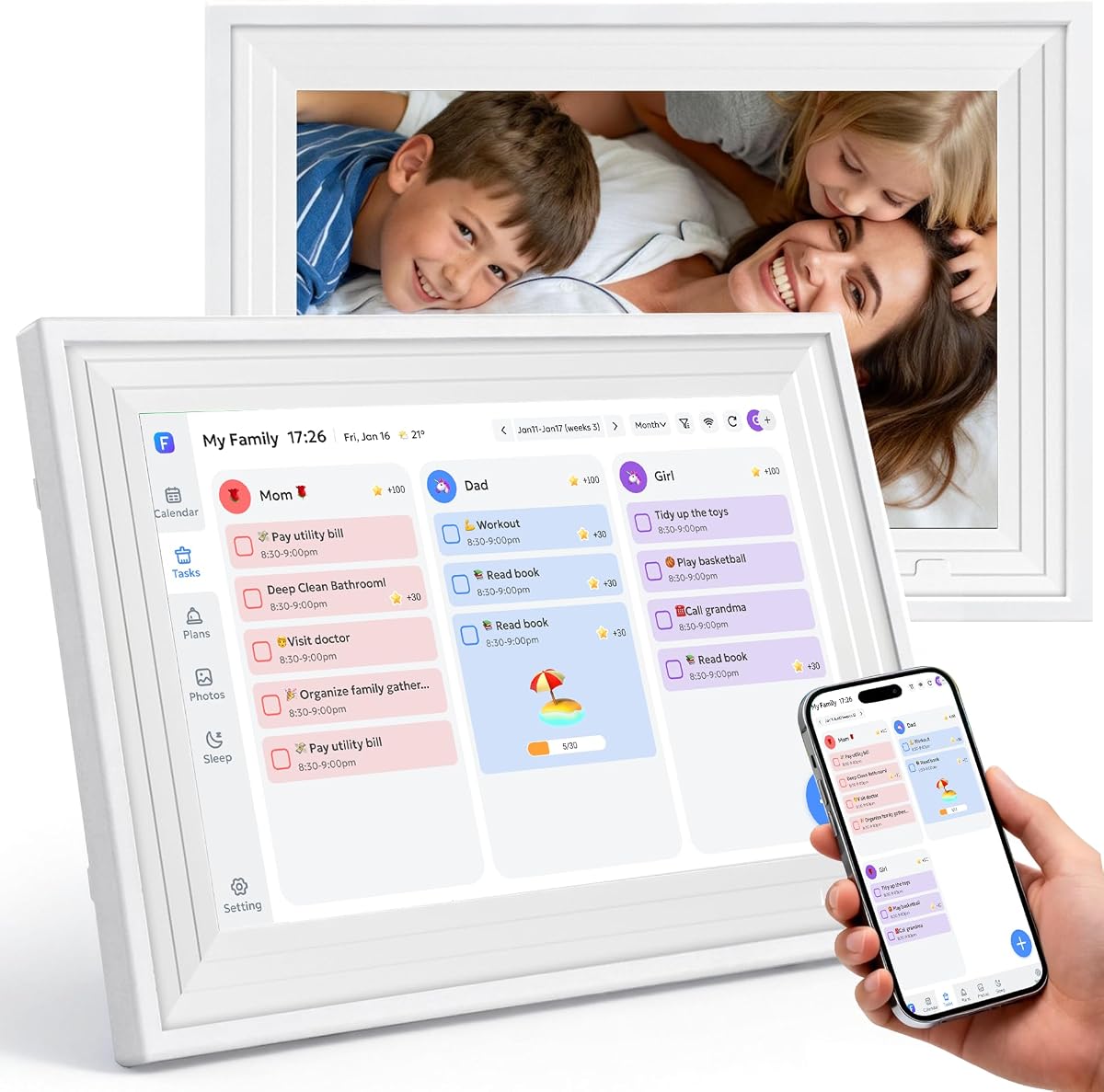
This digital chore chart stands out with its expansive 15.6-inch HD touchscreen and real-time syncing capabilities. It earns our top pick for families needing a central command center that integrates calendars, meals, and chores without subscription costs. The reward system effectively motivates children while the AI photo enhancement adds warmth to your home decor.
We may earn a commission when you buy through this link, at no additional cost to you.
The device supports seamless synchronization with Google, Outlook, iCloud, and other platforms, ensuring everyone sees updates instantly. Its built-in chore chart allows parents to assign tasks and track completion with points. The storage expansion and AI restoration features keep memories looking their best when the calendar is idle.
While the larger size commands a premium price, the versatility justifies the investment for busy multi-generational homes. Wall mounting hardware is included for flexible installation. The only minor drawback is that batteries are not included, requiring setup planning.
This product is ideal for parents seeking a comprehensive organizational tool that grows with the family. It bridges the gap between functional scheduling and engaging home decor effectively.
Real-time synchronization ensures that schedule changes made on a phone appear instantly on the wall display, preventing conflicts.
The gamified interface turns chores into achievements, fostering independence and reducing daily nagging for parents.
We may earn a commission when you buy through this link, at no additional cost to you.
The Skylight Calendar delivers a premium experience with its sleek white design and dedicated Disney Mode for added family fun. It serves as an excellent command center for busy households looking for reliable syncing and intuitive chore management. The interactive chart encourages independence while keeping the family organized.
We may earn a commission when you buy through this link, at no additional cost to you.
Setup is straightforward with quick Wi-Fi connectivity that integrates Google, iCloud, Outlook, Cozi, and Yahoo calendars effortlessly. The device supports flexible mounting or desktop use to fit any room layout. Access to the companion app allows managing schedules from anywhere, adding convenience for busy parents.
While some advanced features like Magic Import require a Plus subscription, the core functionality remains strong. The larger screen offers better visibility from across the room. The premium cost might be a consideration for budget-conscious buyers.
This model is best suited for families who value brand reliability and unique entertainment features. Its design ensures it blends beautifully with modern home interiors while providing essential organizational support.
The exclusive Disney Mode adds character animations that make the device more engaging for younger children and the whole family.
The high-quality finish and robust construction ensure durability and a sophisticated look suitable for any living space.
We may earn a commission when you buy through this link, at no additional cost to you.
This budget-friendly option packs a punch with a full suite of features including meal management and reward tracking without subscription costs. It is an excellent choice for families looking to digitize routines without breaking the bank. The simple interface makes it accessible for all ages.
We may earn a commission when you buy through this link, at no additional cost to you.
The calendar syncs with Google, iCloud, and Outlook in real time ensuring that schedules stay current across devices. Kids enjoy earning stars and unlocking rewards which builds self-discipline through positive reinforcement. The visual meal manager simplifies dinner planning and reduces last-minute stress.
While the screen size is smaller compared to premium models, it remains highly functional for essential tasks. The compact footprint fits well on desks or counters without consuming much space. The only trade-off is that display resolution is standard.
This product is perfect for entry-level digital planning needs or smaller households. It provides a cost-effective way to organize family life while maintaining high utility and ease of use.
With zero subscription fees, this device offers long-term value by keeping core functions unlocked without recurring costs.
The interactive star system turns daily tasks into exciting challenges that kids want to complete actively.
We may earn a commission when you buy through this link, at no additional cost to you.
This smart calendar offers a balanced experience with dual-band Wi-Fi ensuring quick updates and seamless syncing with multiple services. It combines meal planning with chore tracking to simplify daily routines for parents and children alike. The compact design fits well in any kitchen or office space.
We may earn a commission when you buy through this link, at no additional cost to you.
The responsive touchscreen allows kids to check off tasks easily helping them build independence and responsibility over time. Custom colors assign schedules to each family member preventing overlaps. The integrated meal planner helps map out weekly menus and grocery needs efficiently.
Wall mounting options provide flexibility to suit different room setups. The device transitions into a photo frame when idle adding a decorative touch to the home. Some users may find the customization options limited compared to premium models.
It is an ideal choice for families needing a reliable and straightforward organizer. The blend of functionality and style makes it a thoughtful gift for organizing a home.
Dual-band Wi-Fi ensures that schedule changes are reflected instantly across all connected devices without delay.
Its compact 10.1 inch footprint ensures it fits easily on counters without overwhelming the workspace or room decor.
We may earn a commission when you buy through this link, at no additional cost to you.
The Dragon Touch frame provides a crystal-clear interface for organizing schedules and chores with intuitive color-coding for each member. It serves as both a practical planner and a beautiful digital picture frame when not in active use. The high customer rating reflects its reliability and user-friendly design.
We may earn a commission when you buy through this link, at no additional cost to you.
Assigning different colors to tasks makes it visually easy to track who is responsible for what at a glance. The screen is bright and responsive allowing easy navigation through menus. When idle, it cycles through family photos to add warmth to the living space.
This model focuses on core organization without complex add-ons. It is suitable for those who want a straightforward solution. The lack of advanced third-party sync might be a limitation for some tech-savvy users.
It is a great option for families seeking simplicity and elegance. The dual purpose as a frame ensures it remains a valued part of your home decor.
Color-coded tasks ensure that every family member can instantly identify their responsibilities without confusion.
The device seamlessly switches between a functional planner and a decorative photo frame depending on usage.
We may earn a commission when you buy through this link, at no additional cost to you.
This version enhances the original with features like a dedicated dinner planner to eliminate daily questions about meals. It syncs seamlessly with personal calendars to consolidate schedules into one interface. The elegant design ensures it looks great on any desk or wall.
We may earn a commission when you buy through this link, at no additional cost to you.
Users can manage tasks from anywhere using the companion app keeping the household connected. The interactive chart motivates kids to develop healthy habits by making chores engaging. Syncing with Google and iOS devices ensures everyone stays on the same page.
Some advanced features may require paid functions which adds cost. The device remains a strong contender for families who value meal planning. The high resolution screen delivers a clear viewing experience.
It is well suited for gift giving or upgrading a standard family planner. The comprehensive features make it a powerful tool for organizing home life.
The dinner planner feature simplifies evening routine by displaying weekly menus clearly for the whole family.
The companion app allows parents to add events or tasks on the go without needing to access the device directly.
We may earn a commission when you buy through this link, at no additional cost to you.
This model offers a large 15.6-inch FHD display perfect for viewing schedules and photos clearly from a distance. The star points system gamifies chores helping kids build responsibility through positive reinforcement. The built-in storage allows for thousands of media files to be displayed.
We may earn a commission when you buy through this link, at no additional cost to you.
Drag-and-drop widgets let you customize the screen with meal planners or weather info. The auto-dimming feature adjusts brightness for day and night use without strain. The wall mount kit is included for stable installation in shared spaces.
The reliance on a specific app for syncing might limit flexibility for some users. However, the large storage and screen size make it a strong competitor. The star points system works effectively to reduce nagging.
It is ideal for larger households that need a high-capacity display. The combination of utility and storage makes it a comprehensive home organizer.
Drag-and-drop widgets allow you to tailor the display to your exact scheduling and information needs.
The auto-dimming sensor adjusts brightness automatically to reduce eye strain during night time viewing.
We may earn a commission when you buy through this link, at no additional cost to you.
With a perfect rating this digital planner stands out for its user-friendly setup and instant syncing capabilities. It handles schedules, chores, and meal planning without any subscription fees making it a budget-friendly choice. The weather integration adds practical value for daily planning.
We may earn a commission when you buy through this link, at no additional cost to you.
The kids activity planner helps track extracurricular classes and routines to reduce stress for parents. Smart reminders ensure that appointments and school events are never missed. The flexible installation options allow for wall or desktop placement as needed.
While it lacks some advanced features found in larger models its efficiency is unmatched. The high user satisfaction indicates reliable performance. The only minor issue is that it is newer so long-term data is limited.
This is a great choice for those prioritizing user satisfaction and simplicity. It ensures family organization remains straightforward and effective.
The instant sync feature ensures updates reflect immediately across devices reducing confusion about schedules.
Weather updates and activity planners help families prepare for the day ahead without extra tools.
We may earn a commission when you buy through this link, at no additional cost to you.
This device offers a Full HD IPS screen with wide viewing angles making it easy to read from any position. The silent vibration motor provides alerts without disturbing others during the night. The recipe keeper helps organize kitchen tasks alongside daily chores.
We may earn a commission when you buy through this link, at no additional cost to you.
It supports both portrait and landscape orientations to fit different spaces. The zero subscription requirement ensures all features remain accessible at all times. The adjustable stand allows for flexible placement on desks or shelves.
Wall mounting is not included so desk use is the primary focus. While the interface is basic it covers essential organization needs effectively. The recipe feature adds value for busy cooks.
It is well suited for small families or individual use. The flexible orientation and alert system make it a versatile organizer.
Vibration alerts ensure that important appointments are not missed without causing noise disturbances.
The integrated recipe keeper allows easy storage and access to meal plans directly from the device.
We may earn a commission when you buy through this link, at no additional cost to you.
This calendar simplifies meal planning by displaying titles like Taco Tuesday to keep everyone informed. The auto sleep mode ensures zero light pollution at night making it suitable for bedrooms. Its slim design blends well with modern decor.
We may earn a commission when you buy through this link, at no additional cost to you.
It supports grocery lists and wish lists to streamline shopping. The screen switches to photo mode when idle adding a decorative touch. The included stand and mount options offer flexibility for placement.
The menu display focuses on titles rather than detailed recipes which may be a trade-off. However, the efficiency and clean interface make it a solid choice for daily planning. No subscription fees keep costs low.
It is ideal for families wanting a stylish and functional tool. The auto scheduling helps reduce power consumption and distraction.
The ultra-thin design allows the device to blend seamlessly into modern home interiors without bulk.
Auto sleep mode saves energy and reduces light pollution ensuring a better night environment.
We may earn a commission when you buy through this link, at no additional cost to you.
Selecting the right digital chore chart involves evaluating screen size, sync features, and usability for your specific household needs.
Screen size determines how much information you can view at once and where the device fits. Larger screens like 15 inches offer better visibility for shared spaces but require more wall or desk area. Smaller 10-inch models fit compact kitchens but may be harder to read from a distance.
Choose a size that balances visibility with available space in your home command center.
Sync capabilities ensure that schedules stay consistent across family devices. Look for support for major platforms like Google Calendar iCloud and Outlook to avoid manual updates. Real-time syncing prevents conflicts and ensures everyone has the latest information.
Prioritize models with broad compatibility to integrate seamlessly with your existing digital ecosystem.
A good chore system motivates children through gamification and clear visual tracking. Look for features like star rewards points or color coding that make tasks engaging. The interface should be simple enough for kids to check off independently.
Select a system that aligns with your parenting style to encourage consistent participation.
Subscription fees can add up over time so consider models with zero recurring costs for basic features. Some premium features may require a plan but core functionality should be free. Ensure the device remains functional if you choose not to pay for extras.
Opt for subscription-free models to maximize long-term value and avoid hidden costs.
Display quality affects readability and photo presentation. HD or Full HD resolution ensures text is crisp and images look vibrant. Adjustable brightness settings help reduce eye strain in different lighting conditions.
Invest in high-resolution screens for better visibility and a more polished appearance.
Installation options determine how the device fits into your space. Wall mounts save counter space but require drilling while stands offer flexibility for desks. Check what mounting hardware is included before purchasing.
Choose an installation method that suits your room layout and mounting capabilities.
Meal planning features help organize weekly menus and grocery lists. Look for tools that display dinner plans or allow recipe storage to reduce decision fatigue. Integration with grocery lists can streamline shopping trips.
Prioritize models with clear meal displays to reduce daily stress around dinner time.
Many calendars double as photo frames which adds decor value. Look for options with storage or cloud syncing to display family memories. High-quality photo modes enhance the device's aesthetic appeal.
Select a model with robust photo features to maximize its dual-purpose utility.
Start by connecting the device to Wi-Fi and syncing your existing calendar accounts to populate events automatically. Assign color codes to each family member to distinguish schedules clearly on the main display.
Regularly update tasks and rewards to keep children motivated and engaged. Use the companion app to add events remotely if you cannot access the screen directly.
Keep the screen clean with a microfiber cloth to avoid scratches and maintain visibility. Adjust sleep settings to ensure energy savings and reduce nighttime light pollution.
Most models require Wi-Fi to sync calendars and share updates but some basic features may function offline. However core functionality like syncing is dependent on internet access for best performance.
Yes most digital chore charts allow you to assign specific colors to each family member. This visual differentiation helps everyone identify their tasks quickly and clearly.
Many models offer core features without subscriptions but advanced tools may require a plan. Check the product details to confirm if any features are behind a paywall.
Most devices have companion apps that let you add tasks or events from your smartphone. Syncing happens automatically so the screen updates without manual input.
Yes most models include a photo frame mode that cycles through family images when idle. This dual purpose adds decorative value to your home space.
Most digital charts plug directly into a wall outlet using a standard adapter. Check if batteries are included if you plan to move the device frequently.
These ten digital chore charts offer diverse solutions to simplify family organization and motivate kids. Whether you need a large command center or a budget-friendly tool there is a model that fits your needs.
Prioritize features like syncing capabilities and reward systems to ensure long-term adoption. A well-chosen device can significantly reduce household chaos and improve communication.
Remember to verify current pricing and availability as these details may change over time. Investing in the right tool today ensures a smoother home life tomorrow.