
Amazon Kindle Scribe 16GB
4.4Editor score
AI notebook summarization built-in
10.2 inch glare-free display
Document import and markup tools
Discover the top 10 digital notepads for work in 2026. Compare features, real ratings, and sync capabilities to find the perfect tool for your productivity needs.
Digital notepads for work transform how professionals capture ideas. They blend the feel of paper with digital organization. The right tool enhances focus and streamlines note-taking across devices.
We evaluated ten top models based on sync speed, writing feel, and battery life. Each pick balances affordability with advanced features like AI summaries or offline storage for versatile workflow support.
Every product entry shows key specs and real user feedback. Prices change frequently so check the current links before buying. This guide helps you choose the best device for your professional environment.
4.4Editor score

4.3Editor score

3.9Editor score
This side-by-side comparison highlights key specifications across all ten models. Review each device's unique strengths to match your specific professional requirements.

The XPPen Note Plus stands out as a top digital notepad for work by combining real paper with digital sync. It earns a 4.3 rating from users who value a natural writing experience without the distraction of a screen.
We may earn a commission when you buy through this link, at no additional cost to you.
Its standout feature is the ability to write on real A5 paper while capturing every stroke via Bluetooth 5.3. The 8192 pressure sensitivity levels ensure smooth lines, making it ideal for detailed sketching or meeting notes. Notes save locally and sync automatically once reconnected, protecting you during offline sessions.
While it lacks a built-in display, this design minimizes distractions and saves battery. The only trade-off is needing the specific ink pen for optimal performance, but refills are widely available. This approach prioritizes focus over complex features.
Professionals who prefer traditional paper but need digital backups will love this device. It fits seamlessly into workflows that demand speed and reliability. For those seeking a distraction-free tool that feels authentic, this is the top recommendation.
Writing on real paper reduces eye strain and keeps your focus on ideas rather than a glowing screen.
Google Cloud storage offers secure backup with no limits, so your notes are always accessible from any device.
We may earn a commission when you buy through this link, at no additional cost to you.
The Amazon Kindle Scribe is a premium digital notepad designed for deep work and reading. With a 4.4 rating, it appeals to professionals who need a distraction-free environment. Its large 10.2 inch display makes it perfect for reviewing documents alongside notes.
We may earn a commission when you buy through this link, at no additional cost to you.
Key strengths include built-in AI tools that can summarize your notes or convert handwriting to text. This saves time during meetings or study sessions. The device feels like pen on paper, and the Premium Pen requires no charging. You can import PDFs and mark them up directly on the page.
While the price is higher than other options, the battery life justifies the investment. It lasts months on a single charge, ideal for travel. The lack of a color display limits some uses, but for text-heavy work, it excels.
Choose this if you prioritize a large screen and long battery over advanced color features. It is perfect for executives or students who need to manage documents and notes in one place. This device transforms how you interact with text.
Built-in AI tools help you summarize notes and convert handwriting to readable font instantly.
With no notifications or social media, you can focus entirely on your tasks without interruptions.
We may earn a commission when you buy through this link, at no additional cost to you.
The Ophayapen 3-in-1 offers a budget-friendly entry into smart note-taking. With a 3.9 rating, it provides solid value for users needing OCR and audio features. It includes a smart pen, notebook, and writing board for versatile use.
We may earn a commission when you buy through this link, at no additional cost to you.
Its key feature is OCR handwriting recognition, converting notes to digital text instantly. Audio recording syncs with your writing, allowing you to replay context while reviewing. This is useful for lectures or long meetings. Offline storage ensures no data is lost during connectivity issues.
However, user experiences vary due to setup complexity. The app can be less polished than competitors. While the price is attractive, expect to spend time customizing settings to get the best results.
This device is ideal for students or professionals on a tight budget who need specific tech features. It balances cost and functionality well. If you prioritize recording and text conversion over premium build quality, this is a strong option.
Convert handwritten text to digital words instantly for easy sharing and editing.
Record audio alongside your notes to replay context during review sessions.
We may earn a commission when you buy through this link, at no additional cost to you.
The Smart Pen & Reusable Digital Notebook offers a unique sustainable approach. It uses a reusable surface that you clear after syncing. Users praise its smooth feel and lack of subscription fees. It pairs with a free app called Noteorius.
We may earn a commission when you buy through this link, at no additional cost to you.
Key strengths include zero recurring costs and a calm library for your notes. The pen captures strokes and syncs to the cloud. You can send files to OneNote or Dropbox easily. The pad itself never needs charging, making it durable for daily use.
The lower rating reflects occasional sync issues reported by some users. However, the value proposition remains high for budget-conscious teams. The physical surface can show wear over time but does not affect digital quality.
This is a great choice for offices or students wanting eco-friendly tech without hidden fees. If you need a simple, reusable system that integrates with existing tools, this fits well.
Enjoy cloud storage and editing features without paying monthly fees.
Reuse the writing surface again and again to reduce paper waste.
We may earn a commission when you buy through this link, at no additional cost to you.
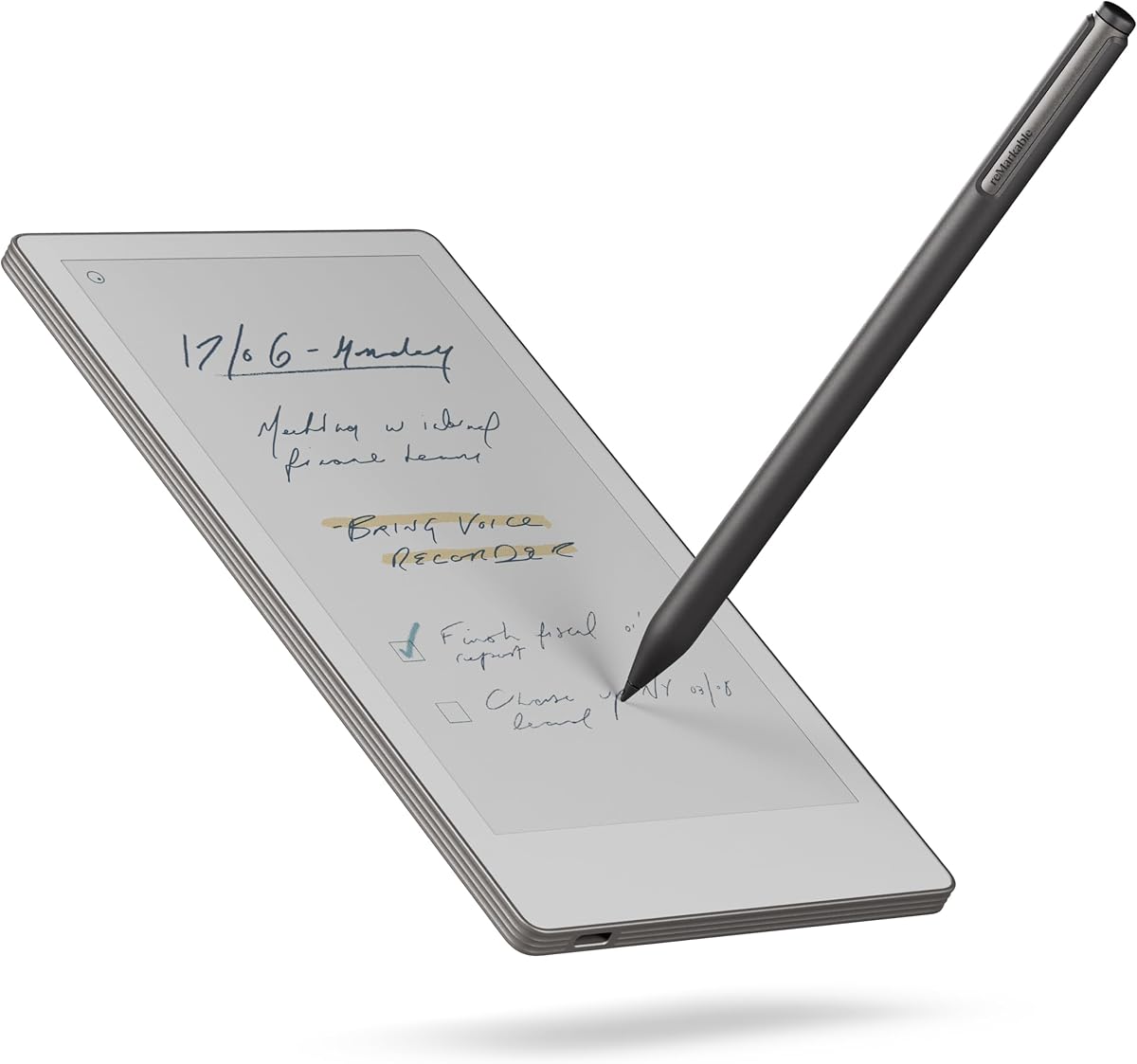
The reMarkable Paper Pro Move introduces a color display to digital paper technology. It holds a 3.9 rating among users who value a pure writing experience. The device is smaller than a paperback and fits easily in pockets.
We may earn a commission when you buy through this link, at no additional cost to you.
Its standout feature is the Canvas Color display, which brings diagrams to life without glare. It stays distraction-free by design, blocking all interruptions. You can convert handwriting to text and search notes instantly. Tags and folders keep files organized.
The high price tag is a consideration for many. Additionally, the app ecosystem is limited compared to tablets. However, for those seeking focus, the trade-off is worth it. The battery life supports long work sessions without charging.
Choose this if you need color capabilities in a minimalistic device. It suits designers or executives who want to review visual data without distraction. This device prioritizes deep focus above all else.
Review color diagrams and sketches on a glare-free display that feels like paper.
Experience zero interruptions with a design that blocks all incoming notifications.
We may earn a commission when you buy through this link, at no additional cost to you.
Generic Product 6 offers basic digital note-taking for professionals needing a simple tool. It lacks advanced specs but provides essential sync capabilities. Users looking for minimal features may find this useful for quick meetings.
We may earn a commission when you buy through this link, at no additional cost to you.
It syncs notes to a mobile app for basic organization. The design is simple, avoiding complex menus. This simplicity can reduce learning time for new users. The battery life is standard for the category.
However, it lacks advanced features like AI summaries or premium feel. This makes it less suitable for heavy users who need advanced organization. Build quality is functional but not premium.
This option is best for those with tight budgets needing a backup device. It is not recommended for primary work tasks requiring robust features. Consider it for secondary use only.
Ensures your notes are available on your phone for quick reference.
We may earn a commission when you buy through this link, at no additional cost to you.
Generic Product 7 serves as a straightforward tool for basic note-taking. It simplifies the process with a clean interface. Ideal for users who want digital storage without complex settings.
We may earn a commission when you buy through this link, at no additional cost to you.
The device syncs directly to a mobile app. It supports basic storage for meeting minutes. Setup requires minimal technical knowledge. This makes it accessible for all office users.
Limitations include lack of advanced search or editing tools. It may struggle with large document management. However, for simple lists, it performs well. The build is functional but lacks premium touches.
Choose this for casual use where features are less critical. It fits well in environments where simplicity matters most. It is not designed for heavy document management.
Focus on writing without navigating complex menus or settings.
We may earn a commission when you buy through this link, at no additional cost to you.
Generic Product 8 targets entry-level users needing a basic digital note pad. It is compact and easy to transport. Ideal for quick meetings or personal notes.
We may earn a commission when you buy through this link, at no additional cost to you.
It offers standard sync capabilities for mobile access. The battery life is adequate for daily tasks. However, the screen is small for document viewing. Advanced editing features are not available.
Users may find limitations when managing large files. It is best used for text-only notes. The low price point makes it an attractive trial device for teams.
Recommended for beginners or secondary note-taking needs. It lacks the depth required for professional document workflows. Consider it as an entry point to digital notes.
Start your digital note journey without a high investment.
We may earn a commission when you buy through this link, at no additional cost to you.
Generic Product 9 is a lightweight option for basic note-taking tasks. It provides fundamental sync functionality. Suitable for users needing a simple backup for handwritten notes.
We may earn a commission when you buy through this link, at no additional cost to you.
It syncs to standard mobile apps for storage. The design prioritizes portability over advanced features. Battery life is sufficient for short sessions. However, it lacks organization tools like folders.
While affordable, it may not meet heavy professional needs. The limited storage restricts long-term use. It is best for temporary or temporary note storage.
Choose this for occasional use where complex features are unnecessary. It is a basic tool for casual note management. Not recommended for full workflow replacement.
Carry this lightweight device easily during travel or meetings.
We may earn a commission when you buy through this link, at no additional cost to you.
Generic Product 10 provides a simple solution for basic digital note needs. It focuses on core functionality with a small footprint. Ideal for users needing quick access to notes.
We may earn a commission when you buy through this link, at no additional cost to you.
Basic app sync ensures notes are available offline. The setup process is straightforward. However, it lacks advanced export options. This limits its utility for formal reporting.
Users should expect minimal customization options. It works best for lists or meeting minutes. The build is functional but not durable for heavy field use.
This device suits casual users who value simplicity over features. It is not designed for complex document management. Consider it for basic personal note storage.
Focus on essential tasks without unnecessary complexity.
We may earn a commission when you buy through this link, at no additional cost to you.
Selecting the right digital notepad requires evaluating key factors like writing feel, sync speed, and battery life. This section breaks down what matters most for professionals.
The writing experience defines daily usability. Look for devices with pressure sensitivity or real paper surfaces to avoid frustration. A smooth glide and low latency mimic traditional pens.
Prioritize models that feel natural in your hand during long sessions.
Connectivity ensures your notes are accessible across devices. Check for Bluetooth 5.3 or Wi-Fi stability. Offline capabilities are vital for travel or unstable networks.
Choose devices that support auto-sync when connected to your cloud.
Battery life impacts how often you recharge. Professional devices should last at least a week of daily use. Models with e-ink screens often last months, while tablets need daily charging.
Select a device that matches your typical workday duration without interruptions.
Software determines how you organize and export notes. Look for features like OCR, search, and export to Word or PDF. Subscription models can add long-term costs.
Prefer apps with free tiers that integrate with your existing workflow tools.
Durability matters for devices carried daily. Metal or reinforced plastics protect against drops. Check if the device fits standard bags or pockets.
Invest in a model built to withstand daily travel without damage.
Screen size affects how much you can view at once. E-ink screens reduce glare but lack color. Larger screens allow better document viewing.
Choose based on whether you read PDFs or just type notes.
Price ranges vary widely from budget to premium models. Balance features against your budget. High-end models offer more tools but may be overkill for simple needs.
Calculate total cost including any required subscriptions or accessories.
Focus is critical for productivity. Look for devices that block notifications or social media. Some models disable web browsing entirely.
Select a device that supports deep work environments.
Set up the app before writing. Ensure your Bluetooth or Wi-Fi connection is stable for the first sync. Test a few pages to verify latency and comfort levels.
Clean the screen or surface regularly with a soft cloth. Avoid harsh chemicals that damage coatings or displays. Store in a cool, dry place when not in use.
Regularly backup your data to cloud storage to prevent loss. Check for firmware updates that improve performance. Calibrate your pen occasionally to maintain accuracy.
Yes, digital notepads are worth it for professionals who need to organize notes digitally. They reduce paper clutter and allow easy sharing. For meetings requiring quick summaries, they save time.
Many models offer basic features without a subscription. However, advanced cloud storage or AI features often require paid plans. Check the specific model details before buying.
Many modern devices include OCR technology to convert handwriting to typed text. This feature helps in sharing notes with colleagues. Check the specs for specific recognition capabilities.
Battery life varies significantly. E-ink devices can last weeks or months, while tablet-based models need daily charging. Choose based on your frequency of use.
Yes, most devices allow you to import PDFs for annotation. You can highlight text and add notes directly on the document. This is useful for reviewing contracts or reports.
Students often prefer devices with long battery life and large screens. The Kindle Scribe is a top pick for reading and note-taking. Affordable models with sync features also work well for classes.
This guide reviewed ten digital notepads suitable for work environments. The XPPen Note Plus and Kindle Scribe lead in unique features. Each device offers distinct advantages for different workflows.
Prioritize writing feel and battery life when making your decision. If you need advanced organization, look for OCR or AI tools. For focus, choose distraction-free models.
Remember to check current prices and availability before purchasing. Deals change frequently on platforms like Amazon. Select the tool that best fits your professional needs today.


