
Apolosign 21.5-inch Digital Calendar
4.6Editor score
Dual mode calendar and android dashboard
Built-in Google Gemini voice assistant
21.5-inch large interactive display
Modern households often struggle with scattered schedules and forgotten chores. A digital touchscreen organizer brings family coordination into one central display. These smart devices replace paper planners with interactive screens that sync with your favorite calendar apps effortlessly.
We compared ten leading models based on screen quality, syncing capabilities, and ease of use. Our analysis focused on features that matter most to busy families like chore tracking and meal planning. Each product offers unique strengths for different household needs and budgets.
This guide highlights the top picks along with detailed reviews of every option. You will see pros and cons to help you decide quickly. Note that prices and availability can change so check current listings before buying your new command center.
4.6Editor score

4.4Editor score

4.4Editor score
As an Amazon Associate we earn from qualifying purchases.
This side-by-side comparison shows the key specifications for all ten models. You can quickly see which devices offer the best screen size and unique features like voice control or photo framing capabilities for your needs.


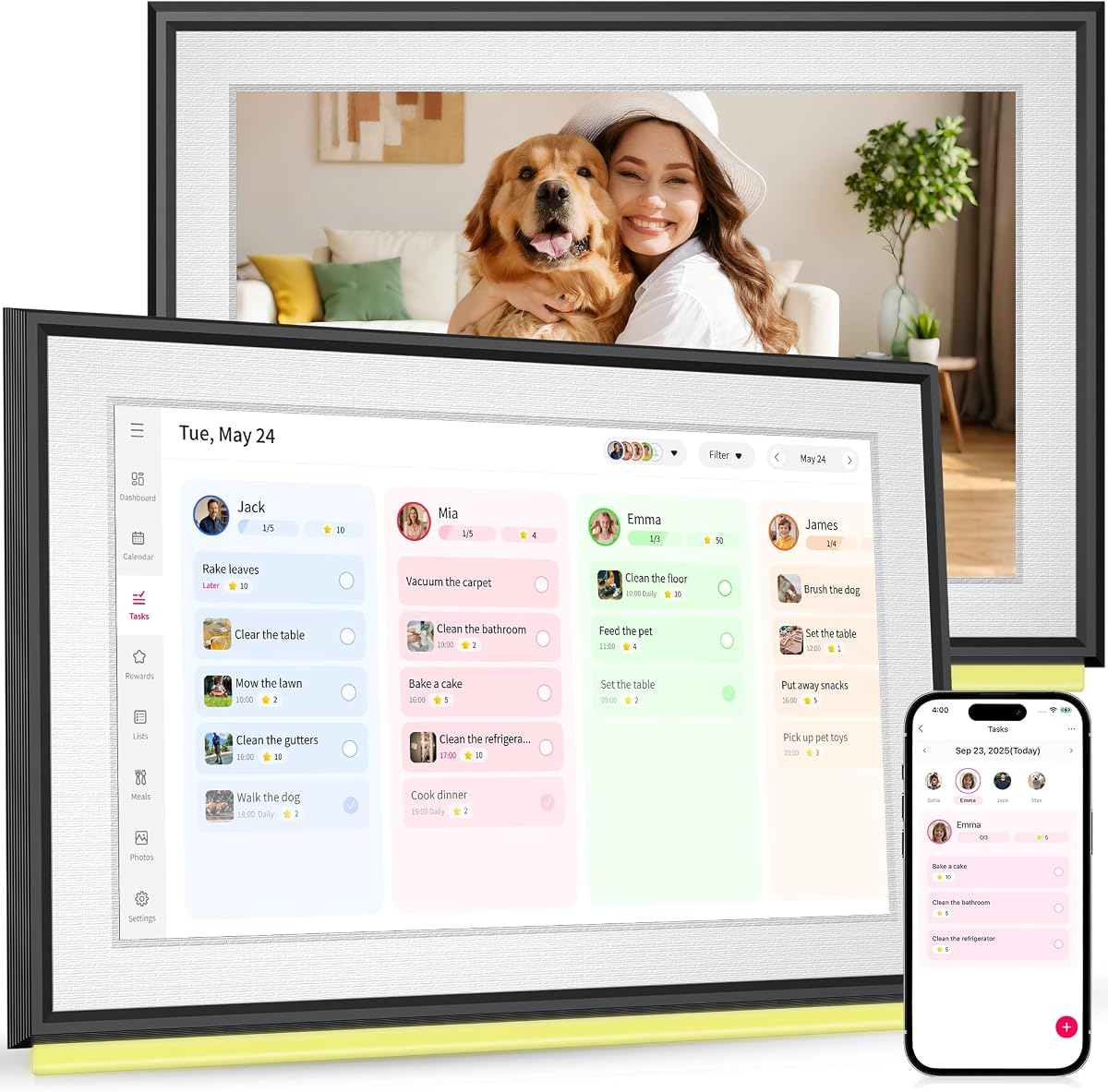

This 15.6-inch digital calendar wall touch screen stands out as our top pick for families needing a central command hub. With a 4.4 rating from users it delivers reliable performance and intuitive features that simplify household scheduling effectively.
We may earn a commission when you buy through this link, at no additional cost to you.
The standout quality is its seamless real-time sync with major calendar platforms like Google and Outlook. Families can assign tasks and view meal plans on the vibrant HD touchscreen ensuring everyone stays coordinated without confusion or missed events.
While the interface is polished some users note the initial setup requires careful Wi-Fi configuration. The lack of included batteries for any accessories is a minor trade-off for the high-quality display and robust chore tracking capabilities offered.
This device is ideal for busy households seeking to eliminate paper clutter. Its combination of scheduling and photo framing makes it a versatile addition to any kitchen or living room for seamless family organization.
The built-in chore chart allows parents to assign tasks while kids earn rewards building responsibility through positive reinforcement daily.
When not scheduling the screen transforms into a digital photo frame cycling through family memories to add warmth to your space.
We may earn a commission when you buy through this link, at no additional cost to you.
The Skylight Calendar offers a premium 15-inch touchscreen designed for busy families who value style and fun. It integrates shared schedules and interactive chore charts to keep routines orderly while adding a playful touch with Disney characters.
We may earn a commission when you buy through this link, at no additional cost to you.
Users love how effortlessly it connects to Wi-Fi and syncs with platforms like iCloud and Outlook. The customizable design allows it to sit on a countertop or mount on a wall making it a versatile hub for any home environment.
Some advanced features like Magic Import require a premium subscription plan. The screen size is slightly smaller than the largest models which might limit visibility for larger families gathering in one space.
This option is perfect for families wanting a stylish hub that engages children. Its focus on visual customization and fun rewards makes daily planning more enjoyable for everyone involved.
Disney mode brings favorite characters to life encouraging kids to complete tasks through engaging animations and avatars daily.
The device mounts easily to walls or sits on tables giving you flexibility to fit your specific home layout perfectly.
We may earn a commission when you buy through this link, at no additional cost to you.
This 10.1-inch digital calendar is a fantastic budget-friendly option that doesn't compromise on essential features. It syncs with major calendar platforms and offers a smart meal manager making it a practical choice for those new to smart organizers.
We may earn a commission when you buy through this link, at no additional cost to you.
The device stands out by offering all features like chore lists and meal planning without any subscription fees. Users appreciate the automatic grocery list generation which saves time during weekly prep and keeps the kitchen organized efficiently.
The screen is smaller than the 15-inch models which may be less visible from a distance. While functional the design is basic compared to higher-end units but it delivers solid performance for the price point.
It is an ideal gift for busy moms or anyone needing a simple organizer. This device simplifies household tasks effectively ensuring you get excellent value for your investment in smart home technology.
The visual weekly meal manager displays menus beautifully helping you reduce last-minute takeout and plan healthy family dinners.
Every feature is unlocked without hidden fees ensuring you get a complete command center for a fraction of the cost.
We may earn a commission when you buy through this link, at no additional cost to you.
This smart electronic family organizer features a crisp 1080p HD touchscreen that delivers vibrant colors for easy viewing. It integrates seamlessly with calendar apps and uses AI to simplify imports making setup faster for busy households.
We may earn a commission when you buy through this link, at no additional cost to you.
Users love the combination of digital planning and photo framing capabilities. The 32GB storage allows for thousands of photos and videos ensuring your command center also doubles as a beautiful memory display when idle.
Some users report initial setup takes a few minutes to configure correctly. The chore rewards are straightforward which is great for kids but might lack the gamification found in more expensive models.
This device is perfect for those wanting high clarity and smart features. Its versatility as a planner and photo frame makes it a strong contender for any modern family looking to organize their life.
AI-powered imports streamline the process of adding events saving you time when setting up your family schedule.
The 10.1-inch display works as both a functional planner and an elegant photo frame for your cherished moments.
We may earn a commission when you buy through this link, at no additional cost to you.
This 15.6-inch smart wall planner holds a perfect 5.0 rating for its reliability and user-friendly design. It serves as a central hub for tasks and meal plans keeping every family member organized without monthly fees.
We may earn a commission when you buy through this link, at no additional cost to you.
The device features a vibrant HD touchscreen that is easy to read from any angle. Users appreciate the built-in weather display which keeps everyone informed of daily conditions without needing to check a separate device.
Some users find the sleep/wake mode adjustment can be tricky in low light. While the screen is large it requires specific mounting hardware for wall installation which must be planned before setup.
Ideal for families seeking a high-quality display this organizer simplifies daily routines. Its large screen and weather features make it a practical and impressive addition to any home space.
Stay prepared with up-to-date weather information displayed right alongside your daily schedule for seamless planning.
The plug-and-play design ensures you can connect to Wi-Fi and sync your calendars within minutes.
We may earn a commission when you buy through this link, at no additional cost to you.
This digital wall planner focuses on organizing family tasks with a unique color-coded chore system. It streamlines daily routines and helps standardize household management with a sleek and minimalist design that fits any home.
We may earn a commission when you buy through this link, at no additional cost to you.
The device supports horizontal and vertical placement allowing for flexible installation on walls or desktops. Users appreciate the one-click recipe saving function which simplifies meal planning and reduces grocery list stress significantly.
Some users report syncing can be slower compared to premium models. The design is simple which works well but might lack the advanced visual flair found in other high-end options.
It is perfect for those needing a reliable and easy-to-use organizer. The color classification system makes assigning tasks easy ensuring a calm and orderly home environment for everyone.
Exclusive color markers distinguish plans for different members helping everyone track their daily tasks easily.
The built-in recipe function simplifies meal planning by allowing you to save favorite cuisines and generate lists.
We may earn a commission when you buy through this link, at no additional cost to you.
This 21.5-inch digital calendar stands out with a massive display and advanced smart home capabilities. It combines a calendar with an Android dashboard allowing you to download apps and control compatible smart devices easily.
We may earn a commission when you buy through this link, at no additional cost to you.
Users love the built-in Google Gemini voice assistant which helps manage tasks and check schedules hands-free. The dual mode lets you switch between simple scheduling and a fully customizable dashboard for maximum flexibility.
The large screen requires significant wall space which may not suit all rooms. Setup involves navigating Android settings which can be complex for less tech-savvy family members initially.
Ideal for tech-forward families this device transforms your wall into a living display. Its voice control and app support make it a powerful command center for modern home management.
Use the built-in voice assistant to check schedules and control smart home devices directly from your calendar.
Switch to Android mode to download apps and widgets expanding functionality beyond just a simple calendar.
We may earn a commission when you buy through this link, at no additional cost to you.
This 15.6-inch digital calendar offers the same advanced features as its larger sibling but in a compact size perfect for desks. It comes with a stand for easy placement on countertops or office desks without wall mounting.
We may earn a commission when you buy through this link, at no additional cost to you.
The dual mode allows you to use simple scheduling or an Android dashboard for apps and widgets. Users appreciate the voice assistant which helps manage tasks and smart home devices hands-free efficiently.
The white finish can show dust more easily than darker models. Android setup may require some technical knowledge which might be a barrier for some families seeking immediate ease of use.
Perfect for home offices or kitchens where desk space is available. This device brings powerful smart features to a smaller form factor ensuring flexibility in your home office setup.
The included stand makes it easy to place on any desk or countertop without needing to drill holes.
Use the voice assistant to manage compatible smart home devices directly from the electronic display.
We may earn a commission when you buy through this link, at no additional cost to you.
This smart digital calendar excels at offering flexible views for monthly weekly and daily agendas. It allows you to color-code tasks and assign them to family members ensuring smooth visual coordination for all schedules.
We may earn a commission when you buy through this link, at no additional cost to you.
The device features an interactive chore chart and meal planner to keep everyone in sync. Updates like version R-1.5.0 enhance features and ensure the system runs smoothly with precise timekeeping.
It is not designed for wall mounting which limits placement options to desks or countertops. Some users find initial setup requires patience for the system to process data correctly.
Ideal for those needing a robust monthly planner this organizer simplifies family life. Its focus on detailed agendas makes it a solid choice for managing complex household schedules.
View monthly weekly and daily agendas to see your plans clearly and stay organized throughout the month.
Color-code tasks and assign them to family members for smooth visual coordination without confusion.
We may earn a commission when you buy through this link, at no additional cost to you.
This 21.5-inch digital calendar features an interface designed with grandparents in mind. It offers large fonts and customizable themes ensuring everyone can use it easily without eye strain or confusion.
We may earn a commission when you buy through this link, at no additional cost to you.
The device syncs with major platforms like Google and iCloud keeping schedules up to date instantly. Users appreciate the customizable themes which allow for a look that fits their personal style.
The chore system is basic which might not appeal to all kids. It requires either a stand or wall mount for proper installation which adds a step to the setup process.
Perfect for multi-generational homes this organizer bridges the gap between ages. Its focus on accessibility and ease of use makes it a great gift for grandparents and busy families.
Customizable font sizes and minimalist themes ensure the device is easy for everyone to read and use.
Download the free app and sync your schedule from anywhere for instant updates across all devices.
We may earn a commission when you buy through this link, at no additional cost to you.
Choosing the right digital touchscreen organizer depends on your specific household needs and space constraints. Consider screen size and syncing capabilities to find a model that keeps your family coordinated effortlessly.
Screen size determines how easily everyone can read the display from a distance. Larger screens like 21.5 inches are better for open kitchens while 10.1 inches suit smaller spaces.
Choose a size that allows all family members to view the schedule clearly without strain.
Ensure the device syncs with the calendar apps you already use such as Google or Outlook. Seamless sync ensures everyone stays updated on events without manual entry.
Check supported platforms before buying to avoid integration issues later.
Many models offer free features but some require a premium subscription for advanced tools like unlimited photo storage. Verify if the device works fully without monthly fees.
Opt for no-subscription models to save money long-term and avoid recurring costs.
Interactive chore charts motivate kids to complete tasks by tracking progress and offering rewards. Look for models with customizable tasks and gamified experiences for better engagement.
A strong reward system encourages responsibility and keeps daily routines consistent.
Most organizers double as digital photo frames displaying memories when not in use. Consider storage capacity and ease of photo uploading to keep your display personal and warm.
High-resolution screens make photos look vibrant and add a personal touch to your home.
Decide if you want a wall-mounted unit or a desk model with a stand. Ensure the device supports flexible mounting options to fit your home layout comfortably.
Check if mounting hardware is included before purchase to avoid extra expenses.
Advanced models include voice assistants and smart home controls for a hands-free experience. These features can enhance convenience for managing tasks and lighting simultaneously.
Consider if these high-tech extras are necessary for your daily routine.
Quick setup and reliable customer support are vital for troubleshooting issues effectively. Look for brands offering clear guides and responsive help centers.
Easy setup ensures you start organizing your home immediately without frustration.
Begin by connecting the device to your home Wi-Fi network and syncing your preferred calendar accounts. This initial setup ensures all schedules load automatically and stay updated without manual input.
Assign chores and meal plans using the built-in tools. Customize color codes and rewards to keep children engaged and maintain a smooth routine throughout the week.
Regularly update the software and clean the screen with a soft microfiber cloth. Proper maintenance keeps the touchscreen responsive and ensures the device lasts for years.
Most of the models reviewed offer full functionality without any monthly fees. Some premium features like unlimited photo storage or Disney characters may require a subscription but basic calendar and chore tools are free.
Yes most devices support real-time syncing which allows multiple users to edit schedules simultaneously. Changes made on a phone or tablet appear instantly on the wall organizer.
Popular models support major platforms like Google Calendar iCloud Outlook and Cozi. Check the specific product data to confirm compatibility with your preferred app before purchasing.
You can upload photos via a free mobile app or the device directly. The organizer then displays them in a slideshow automatically when it is not in use for scheduling.
Yes most units come with mounting hardware for easy wall installation. Some models include a stand for desk use offering flexible placement options for different rooms.
Yes many devices feature sleep and wake modes to save energy. You can customize settings so the screen dims at night and turns on when movement is detected.
Our top picks like the 15.6 Digital Calendar Wall Touch Screen offer the best balance of features and value. These models provide robust chore tracking and sync capabilities to keep your family organized effortlessly.
Prioritize screen size and no-subscription plans when making your decision. This ensures the device meets your needs long-term without adding hidden costs to your budget.
Prices and availability can change so always verify current listings before buying. With the right organizer your home will become a more coordinated and stress-free environment.