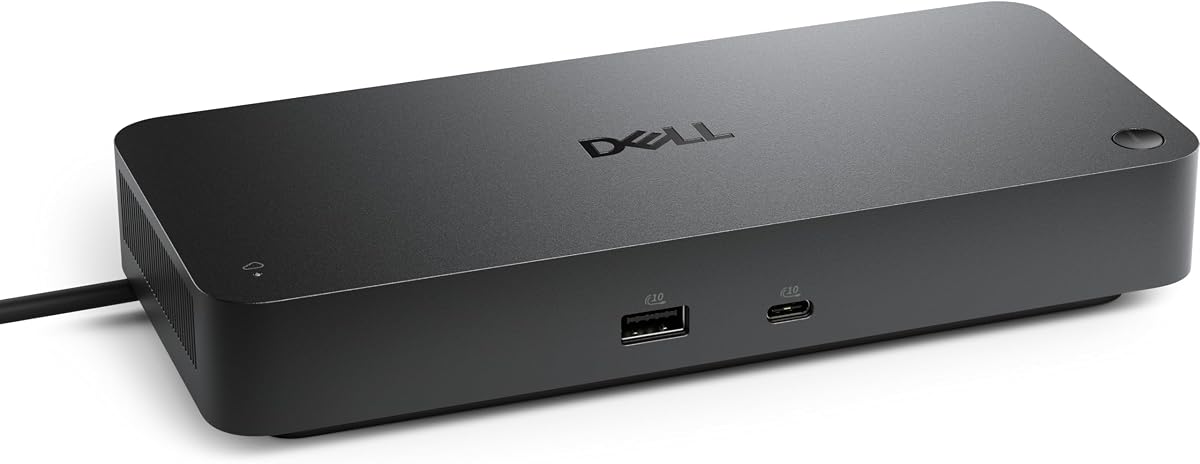
Dell Pro Thunderbolt 4 Smart Dock SD25TB4
4.2Editor score
Thunderbolt 4 Speeds
130W Charging
4K Display Support
Discover the top 10 docking stations for Dell Pro 14 Plus. Compare specs, ratings, and features to find the perfect USB-C hub for your workspace.
Finding the right docking station for your Dell Pro 14 Plus is essential for maximizing productivity and expanding your workspace capabilities effectively.
We compared ten top-rated models based on port variety, power delivery, display support, and user ratings to help you choose the ideal connection hub today.
Each pick shows key specs and real user feedback so you can decide confidently. Remember that prices and availability can change frequently on Amazon.
4.2Editor score

4.5Editor score

4.3Editor score
This side-by-side comparison highlights the key specifications of all ten top-rated docking stations to help you visualize differences in ports and power.

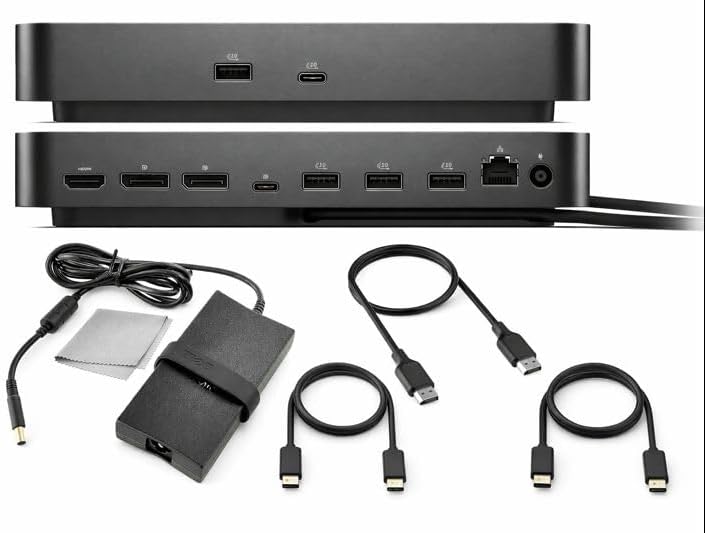


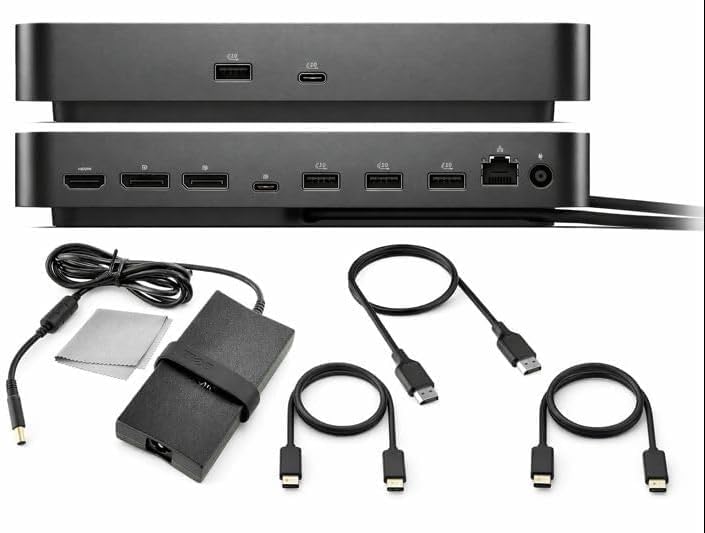

The Dell Pro Laptop Docking Station WD25 stands out as the top choice with a 4.5 rating. It offers powerful compatibility for AI PCs and mainstream Dell systems alike.
We may earn a commission when you buy through this link, at no additional cost to you.
Its standout feature is the ability to drive up to four high-resolution displays simultaneously. The 100W power delivery ensures your laptop stays charged while connected to peripherals.
While it is not the cheapest option, the robust design and sustainable materials justify the investment. The ambidextrous cable routing adds flexibility to your desk setup.
If you need a reliable, high-performance dock for your Dell Pro 14 Plus, this is the model to buy for long-term productivity.
It enhances compatibility across AI PC workspaces and delivers up to 100W to new mainstream Dell AI PCs and non-Dell PCs.
It is part of the world's most manageable commercial docking family, designed to uplevel IT efficiency.
We may earn a commission when you buy through this link, at no additional cost to you.
The Dell Pro Smart Dock SD25 earns a 4.5 rating for its focus on manageability and security. It is ideal for environments where remote control is essential.
We may earn a commission when you buy through this link, at no additional cost to you.
You can remotely manage these smart docks without end-user presence using the Dell Device Management Console. This configures and updates docks over Wi-Fi easily.
Security is prioritized with WPA-3 192-bit encryption and hardware-based tamper-resistant features. This protects sensitive data effectively during communication.
Choose this dock if you prioritize enterprise security and streamlined IT management alongside standard connectivity needs.
Remotely manage your smart docks without end-user presence from the Dell Device Management Console.
Keep working confidently with enterprise-grade WPA-3 192-bit encryption for secure Wi-Fi communication.
We may earn a commission when you buy through this link, at no additional cost to you.
This Thunderbolt 4 dock is a powerhouse for creative and data professionals needing massive bandwidth and resolution. It rates 4.2 based on user feedback.
We may earn a commission when you buy through this link, at no additional cost to you.
It offers powerful multidisplay support for up to four 4K monitors using HDMI 2.1 and DP 1.4. This is ideal for complex workflows.
The 130W charging performance ensures your device runs at full speed while plugged in. Dual Thunderbolt 4 ports allow chaining up to six devices.
If you require the highest speed and display fidelity for your Dell Pro 14 Plus, this premium model is the top recommendation.
It supports up to 4 4K monitors per HDMI 2.1, DP 1.4, USB-C and Thunderbolt 4 ideal for creative work.
Dual data port dual 4K video and chain up to 6 devices with Thunderbolt 4 speed and connectivity.
We may earn a commission when you buy through this link, at no additional cost to you.
The Anker Prime Docking Station offers a 14-in-1 solution that brings together all your devices efficiently. It holds a 4.3 rating from users.
We may earn a commission when you buy through this link, at no additional cost to you.
You get ultra-fast docking with 160W total output capable of charging four devices simultaneously. This includes three USB-C ports at 100W max each.
The dual HDMI ports allow crystal-clear streaming or mirroring across two displays. However, note that it does not support 5120×1440 monitors.
If you need a versatile hub for various devices rather than just Dell specific models, this Anker option provides excellent connectivity value.
Deliver a powerful charge with 160W of total output capable of charging up to four devices simultaneously.
Efficiently manage data across multiple devices with versatile ports offering speeds up to 10Gbps.
We may earn a commission when you buy through this link, at no additional cost to you.
This bundle is designed for instant connectivity with all essential cables and accessories included. It rates lower at 3.9 but offers convenience.
We may earn a commission when you buy through this link, at no additional cost to you.
It comes fully equipped with the Dell WD25 Dock powerful 100W adapter and original Dell cables. This setup is perfect for quick multi-monitor connectivity.
A bonus cleaning cloth is included to keep your screens spotless. This makes it a complete professional setup package for new users.
Choose this bundle if you want a complete solution without buying extra cables separately, despite the slightly higher cost.
Comes fully equipped with the Dell WD25 Dock powerful 100W adapter original Dell cable plus HDMI DisplayPort and USB-C cables.
Comes with a premium microfiber cleaning cloth to keep your screens laptops and monitors dust-free and spotless.
We may earn a commission when you buy through this link, at no additional cost to you.
The Dell Pro Dock WD25Z stands out for its impressive 180W power delivery capability. It holds a very high 4.9 rating among users.
We may earn a commission when you buy through this link, at no additional cost to you.
While specific details are limited, the power output suggests it can drive demanding workloads and multiple peripherals easily. It ensures your system stays charged while connected.
The USB-C docking capability means modern laptops can connect directly. This reduces cable clutter significantly on your desk.
If you need maximum power for demanding tasks, this WD25Z model is the top choice based on user satisfaction ratings.
Delivers up to 180W of power to laptops ensuring your system stays charged while connected to peripherals.
Connects via USB-C for easy integration with modern Dell Pro 14 Plus laptops without extra adapters.
We may earn a commission when you buy through this link, at no additional cost to you.
This dock is optimized for visual professionals needing crisp dual 4K displays. It holds a 4.5 rating for reliability and port variety.
We may earn a commission when you buy through this link, at no additional cost to you.
Comprehensive connectivity includes HDMI 2.1 and two DisplayPort 1.4 ports for multiple display setups. It delivers up to 100W to laptops for reliable performance.
Faster networking is possible with the 2.5GbE Ethernet port. This provides stable and quick network connectivity essential for large file transfers.
If dual high-resolution monitors are your priority, this dock provides the specific video ports and speed you need efficiently.
Expand your workspace with 1 x HDMI 2.1, 2 x DisplayPort 1.4, and 1 x USB-C multi-function display port.
Delivers up to 100W of power to laptops and 96W to devices ensuring your system stays charged.
We may earn a commission when you buy through this link, at no additional cost to you.
This bundle holds a perfect 5.0 rating because it provides everything you need to set up your workspace instantly. It is a comprehensive solution.
We may earn a commission when you buy through this link, at no additional cost to you.
It supports up to four displays simultaneously via HDMI 2.1 and Dual DisplayPort 1.4. This allows for serious multitasking and productivity.
The full connectivity kit includes premium HDMI USB-C and DisplayPort cables plus a cleaning cloth. No extra purchases are necessary for setup.
If you want a smart dock that comes fully equipped, this bundle is the top choice for a hassle-free experience.
Supports up to four displays simultaneously via HDMI 2.1 and Dual DisplayPort 1.4.
Multiple USB-A and USB-C ports 2.5GbE Ethernet audio output and versatile data transfer options for all your devices.
We may earn a commission when you buy through this link, at no additional cost to you.
This model comes with a reassuring 3-year warranty for peace of mind. It rates highly at 4.8 for performance and reliability.
We may earn a commission when you buy through this link, at no additional cost to you.
Enhance your workspace with versatile connection options including HDMI 2.1 and DisplayPort 1.4 ports. It supports up to 100W power delivery for Dell laptops.
Stay connected with the built-in 2.5GbE Ethernet port for secure wired internet. This is faster and more stable than standard Gigabit ports.
Choose this dock if you value long-term support and secure high-speed internet connectivity alongside standard docking features.
Stay connected with the built-in 2.5GbE Ethernet port offering faster more stable and secure wired internet connections.
Includes 4 x USB-A 3.2 Gen 2 ports and 1 x USB-C 3.2 Gen 2 for fast data transfer.
We may earn a commission when you buy through this link, at no additional cost to you.
This compact dock offers powerful multi-screen performance without taking up too much desk space. It holds a 4.4 rating from satisfied users.
We may earn a commission when you buy through this link, at no additional cost to you.
It supports up to four WQHD displays via HDMI 2.1 and dual DP1.4 ports. This is ideal for high-resolution multitasking without clutter.
Equipped with six USB 3.2 Gen 2 ports it handles multiple peripherals easily. The ambidextrous cable routing adds flexibility to your desktop setup.
If you want a space-efficient dock that still delivers high-performance multi-screen capabilities, this compact model is the smart choice.
Supports up to four WQHD displays via HDMI 2.1 dual DP1.4 and multi-function USB-C ports.
Ambidextrous 0.8m USB-C cable that can be left or right facing for an optimized desktop setup.
We may earn a commission when you buy through this link, at no additional cost to you.
Choosing the right dock requires balancing power delivery, port variety, and video support to match your specific workflow needs.
Look for docking stations that support at least 100W to ensure your Dell Pro 14 Plus charges quickly while connected. Higher wattage like 130W or 180W is beneficial if you run heavy workloads.
Higher wattage ensures your laptop runs at full speed while connected to multiple external devices.
If you need multiple external displays check for docks supporting HDMI 2.1 and DisplayPort 1.4. These standards allow 4K resolutions up to 60Hz.
Ensure the dock supports the number and resolution of monitors you plan to use for your workflow.
Check the total count and type of USB ports available. You need enough USB-C and USB-A ports for your drives keyboard and mouse without needing extra hubs.
Select a dock with enough ports to eliminate the need for additional USB hubs.
For stable high-speed internet look for docks with 2.5GbE Ethernet ports. This provides faster wired internet connections than standard Gigabit ports.
Gigabit Ethernet ensures your wired internet connection remains stable and fast.
Many modern docks are built with recycled materials and packaging. Look for designs that reduce standby power consumption to save energy.
Recycled materials and reduced power usage help lower environmental impact.
Some bundles include HDMI and DisplayPort cables which save you from buying them separately. This makes setup easier but may cost slightly more.
Bundles with cables make setup easier but cost slightly more than standalone docks.
Enterprise docks offer Wi-Fi management capabilities that IT admins use to update and configure docks remotely. This is useful for large setups.
Remote management tools allow IT admins to configure docks without physical access.
Check the warranty length before buying. Some models offer up to three years of coverage which provides peace of mind for long-term use.
A longer warranty provides peace of mind for long-term reliability.
Connect the upstream USB-C cable from the dock to your Dell Pro 14 Plus to establish a data and power link.
Plug in your monitor and peripherals to the relevant ports and check that your system recognizes the displays.
Clean the ports with a soft cloth occasionally to prevent dust buildup that could affect connectivity.
The Dell Pro Laptop Docking Station WD25 is considered the best overall due to its 100W power delivery and 4K display support. It balances performance and port variety effectively.
Yes many Dell Pro docks like the Thunderbolt 4 model support up to four displays simultaneously. Ensure your laptop has the necessary video output capabilities.
Most modern Dell docks work with any USB-C laptop supporting DisplayPort Alt Mode. The WD25 models specifically offer enhanced compatibility for non-Dell PCs.
The standard WD25 dock provides up to 100W to Dell systems and 96W to other USB-C devices. This is sufficient for most Dell Pro 14 Plus power needs.
The Anker Prime dock works with Windows and ChromeOS but may have display mirroring limitations on macOS. Check specific OS compatibility before buying.
Bundles include HDMI and DisplayPort cables so you do not need to buy them separately. This saves time and ensures you have all necessary accessories.
Yes 2.5GbE Ethernet provides faster and more stable wired internet connections than standard Gigabit ports. This is useful for large file transfers.
Dell Smart docks like the SD25 offer Wi-Fi management through the Dell Device Management Console. This allows updates without needing to be at the desk.
We covered the top 10 docking stations including the Dell WD25 Smart Dock and Anker Prime hub to meet various needs.
Prioritize power delivery and video support when choosing to ensure your workspace stays productive and connected.
Remember to check current prices and availability on Amazon before making your final purchase decision today.