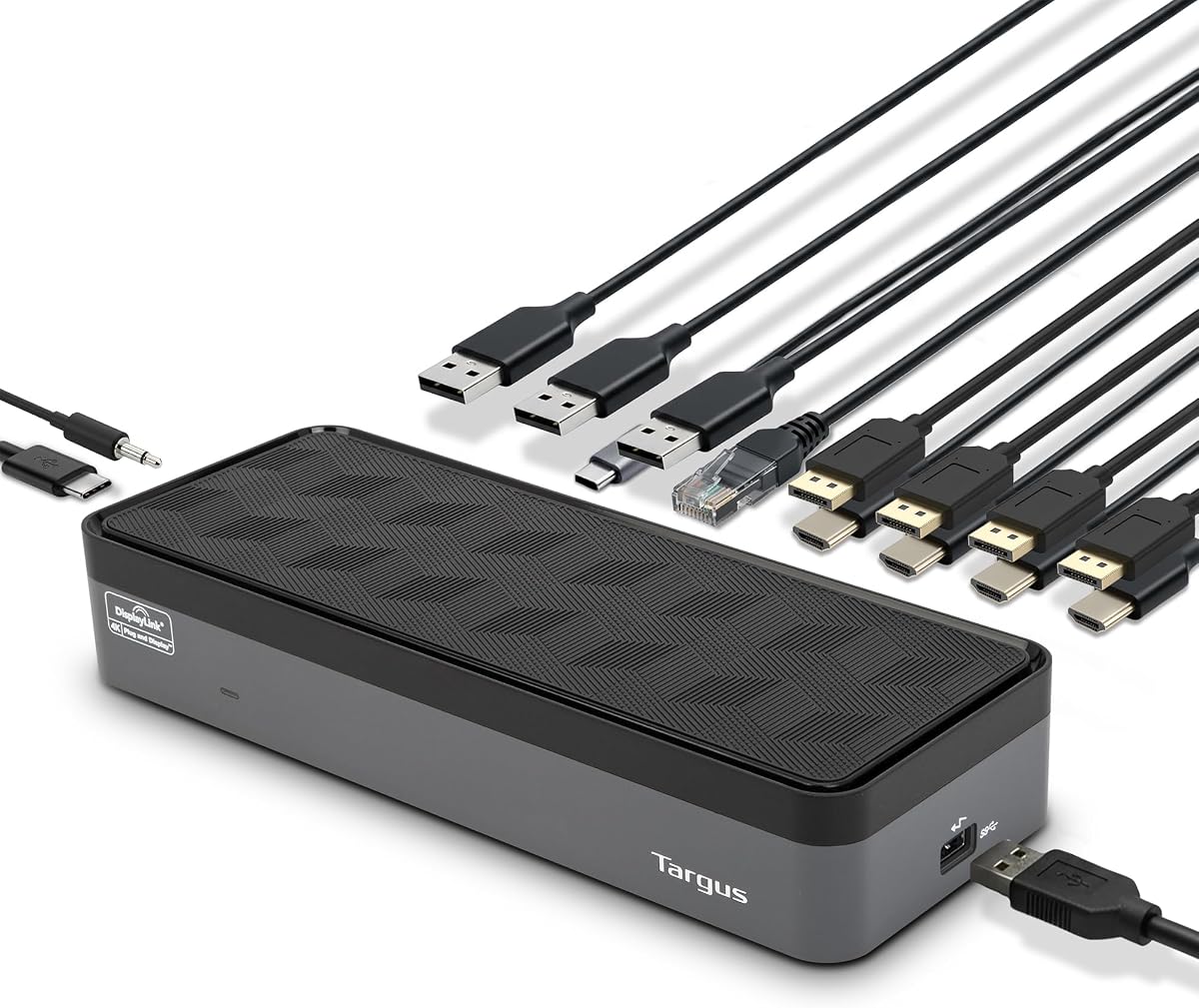
Targus USB-C Universal Quad 4K Docking Station
4.4Editor score
Four 4K UHD displays
100W Power Delivery
Includes legacy host tips
Compare the top docking stations with quad monitor support. Real ratings, detailed specs, and expert insights to find the perfect multi-monitor solution for your workflow.
Finding the right docking station with quad monitor support can transform your workstation into a powerful productivity hub. Whether you are a trader, developer, or creative professional, having multiple high-resolution displays simultaneously is essential for efficient multitasking and seamless workflow management.
We have carefully evaluated the leading options available on the market today. Our analysis focuses on display capabilities, connection types, power delivery, and overall compatibility with various laptops and operating systems to help you make an informed decision.
Each pick below highlights key features, pros, and cons based on real user feedback and technical specifications. Keep in mind that product availability and prices can change, so always verify the latest details before making your final purchase decision.
4.4Editor score

4.7Editor score
4.0Editor score
This side-by-side comparison highlights the critical specifications and capabilities of the top ten docking stations with quad monitor support available today. Reviewing these details will help you quickly identify which model aligns best with your specific hardware and workflow requirements.


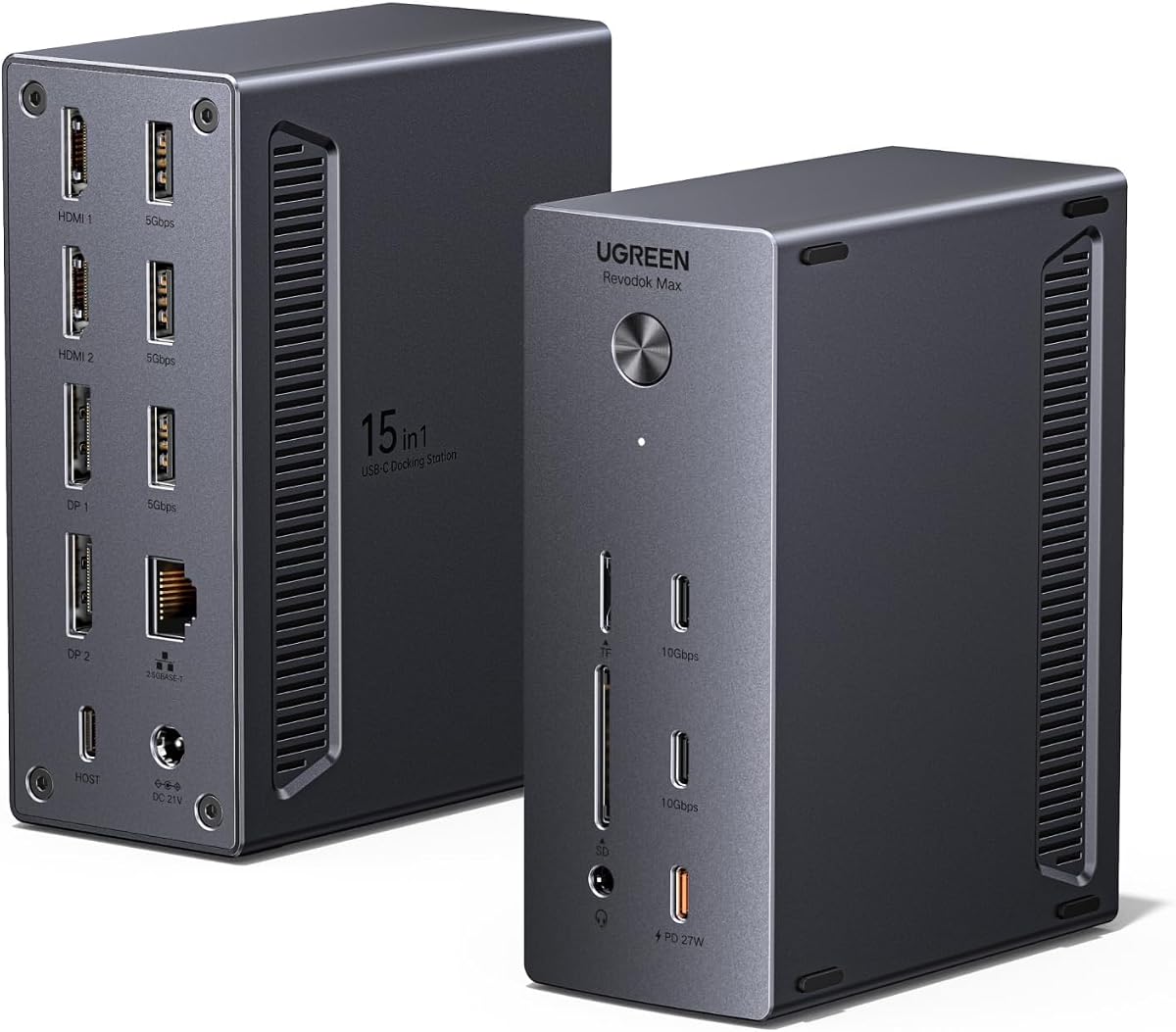
This product listing currently lacks detailed public information regarding its specific capabilities for quad monitor support. Users are encouraged to visit the manufacturer or retailer site for the most accurate and up-to-date specifications.
We may earn a commission when you buy through this link, at no additional cost to you.
When evaluating this item, focus on verifying its compatibility with your specific laptop model and operating system. Ensure that the docking station supports the display resolution and refresh rates you require for your workflow.
Due to the limited available data, it is essential to confirm pricing and warranty details before purchasing. This ensures you are making an informed decision that aligns with your budget and technical needs.
For those seeking a reliable quad monitor solution, always check recent user reviews and technical documentation. This helps avoid potential compatibility issues and ensures a smooth setup experience.
Always refer to the official product page for the latest technical details and compatibility lists.
Ensure your laptop supports the required connection types for quad display output.
We may earn a commission when you buy through this link, at no additional cost to you.
The Targus USB-C Universal Quad 4K Docking Station is a versatile solution for expanding your workstation. With a strong rating of 4.4 stars, it supports single 5K and four 4K UHD displays through DisplayPort or HDMI, offering crisp visuals for demanding tasks.
We may earn a commission when you buy through this link, at no additional cost to you.
Key strengths include universal compatibility with major brands like Dell, HP, and Lenovo via USB-C. The dock provides five USB ports for peripherals and includes Gigabit Ethernet for stable network connections, making it ideal for office environments.
While the dock is robust, it does have a larger footprint that may require desk space. Additionally, users should verify driver requirements for specific operating systems to ensure full functionality across all ports.
This dock is an excellent choice for professionals needing multiple high-resolution displays and reliable connectivity. It balances performance with universal support, making it a top pick for varied laptop setups.
This dock works with nearly any USB-C laptop, making it a flexible choice for diverse workplaces.
Support for single 5K or four 4K displays ensures you get the best visual quality possible.
We may earn a commission when you buy through this link, at no additional cost to you.
The TobenONE DisplayLink Docking Station offers an impressive array of 18 ports to expand your laptop's capabilities. Rated 4.4 stars, it enables up to three or four 4K displays depending on your system, making it perfect for multitasking and content creation.
We may earn a commission when you buy through this link, at no additional cost to you.
Its standout feature is the robust power support with a 120W adapter that charges your laptop and dock simultaneously. The inclusion of 2.5G Ethernet and high-speed USB ports ensures you have fast connectivity for all your peripherals and data transfers.
A minor limitation is the requirement for DisplayLink driver installation, which may take extra setup time. Additionally, macOS users are limited to three displays, while Windows supports up to four with the right configuration.
This docking station is ideal for professionals who need extensive connectivity and multiple screens. The lifetime support and wide compatibility make it a trustworthy investment for home offices and professional workspaces.
With 18 ports, you can connect almost any peripheral without needing additional hubs.
The included 120W adapter simplifies your desk by charging both your laptop and the dock.
We may earn a commission when you buy through this link, at no additional cost to you.
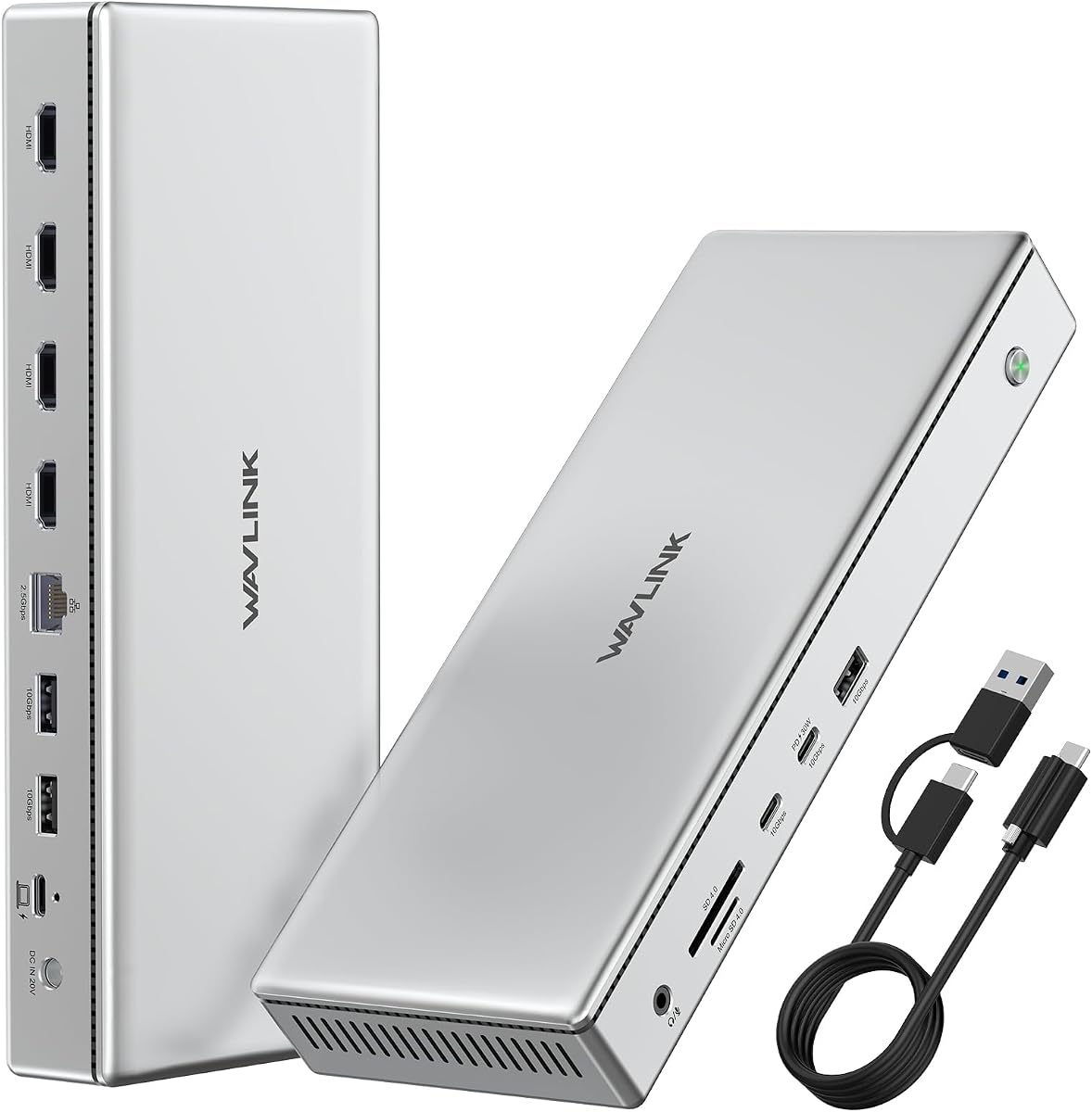
The WAVLINK Pro Docking Station is designed to overcome common display limits on Mac and Windows systems. With a rating of 4.0 stars, it supports four 4K@60Hz HDMI displays via DisplayLink technology, offering a powerful upgrade for multi-monitor workflows.
We may earn a commission when you buy through this link, at no additional cost to you.
Its robust 160W power adapter ensures your laptop stays charged while powering multiple peripherals. The 2.5G Ethernet port and high-speed USB 3.2 ports provide the data transfer speeds needed for professional media work and fast file sharing.
While the aluminum build feels premium and aids heat dissipation, the reliance on DisplayLink drivers means users should ensure their system is compatible before purchasing. This is especially important for those on macOS or specific Linux distributions.
This docking station is a strong choice for users who need to maximize screen real estate beyond standard limits. The combination of high-power delivery and extensive ports makes it a versatile tool for creative and technical professionals.
This dock allows Mac users to connect more displays than typically possible with standard ports.
The aluminum casing provides durability and efficient heat management during heavy use.
We may earn a commission when you buy through this link, at no additional cost to you.
The StarTech Thunderbolt 5 Universal Docking Station is a top-tier choice for high-performance workstations. With an impressive rating of 4.7 stars, it supports quad 4K displays and offers true plug-and-play functionality, eliminating driver hassles for shared workspaces.
We may earn a commission when you buy through this link, at no additional cost to you.
Its standout feature is Thunderbolt 5 compatibility, which delivers unmatched speed and connectivity. The 140W Power Delivery ensures even demanding laptops stay powered while connected to multiple high-resolution monitors and peripherals.
While it requires a Thunderbolt 5 host for full performance, the investment pays off in reliability and speed. The integrated security slots protect valuable equipment, making it suitable for public or high-traffic environments.
This docking station is best for IT professionals and power users who prioritize stability and speed. The combination of advanced Thunderbolt tech and robust support makes it a leader in the premium docking station category.
Avoid the hassle of driver installation with a dock that works out of the box on major systems.
Integrated lock slots allow you to physically secure the dock and connected equipment.
We may earn a commission when you buy through this link, at no additional cost to you.
The TobenONE 18-in-1 DisplayLink Docking Station brings extensive connectivity to any laptop setup. With a strong rating of 4.5 stars, it supports up to four external displays on Windows and three on macOS, providing ample screen space for multitasking.
We may earn a commission when you buy through this link, at no additional cost to you.
Its 18 ports include HDMI, USB, Ethernet, and audio options, covering almost all connectivity needs in one device. The included 120W adapter ensures your laptop charges efficiently, while the SD card slot adds convenience for media workflows.
Users should note that installing the DisplayLink driver is a prerequisite for display functionality. While this step is simple, it may require a restart, and macOS users are limited to three HDMI ports due to OS restrictions.
This dock is an excellent choice for home office users who need a comprehensive connection hub. Its balance of affordability, features, and reliable support makes it a highly recommended option for daily productivity.
With 18 ports, this dock eliminates the need for multiple adapters and hubs on your desk.
Lifetime technical support ensures you have assistance whenever setup or usage issues arise.
We may earn a commission when you buy through this link, at no additional cost to you.
The UGREEN USB-C DisplayLink Docking Station offers a high level of flexibility with support for up to 8K displays. Rated 4.6 stars, it supports multiple display configurations, allowing you to choose resolutions that match your productivity or creative needs.
We may earn a commission when you buy through this link, at no additional cost to you.
Its 2.5G Ethernet and high-speed USB ports ensure fast networking and data transfer. The included 150W adapter and dedicated PD-Out port let you charge your laptop and a secondary device simultaneously, simplifying your desk setup.
Dynamic power sharing is a feature that adjusts laptop charging based on peripheral usage, which can limit power under load. While convenient, this may require monitoring if you need full speed for both charging and data simultaneously.
This docking station is ideal for users who require high-resolution support and versatile connectivity. The included driver and cable make setup straightforward, and the robust build quality ensures reliable performance over time.
Support for up to 8K displays provides future-proof options for visual work.
The dedicated PD-Out port allows simultaneous charging of your laptop and a mobile device.
We may earn a commission when you buy through this link, at no additional cost to you.
Choosing a docking station with quad monitor support requires careful consideration of your hardware compatibility and workflow needs. This guide explores the essential factors that ensure you select a device that enhances productivity and offers reliable long-term performance.
Ensure the docking station supports the number of monitors and resolutions you need. Look for options that advertise quad 4K support or higher to ensure crisp visuals across all screens. Always check if the resolution is consistent across all ports or if some ports have lower capabilities.
Selecting the correct resolution support is critical to avoid under-utilizing your expensive monitors. Verify the refresh rates as well, especially if you are involved in gaming or video editing.
The connection type between your laptop and the dock determines data transfer speed and display output. Thunderbolt 4 or 5 offers the highest bandwidth, while USB-C with DisplayLink can achieve similar display results with drivers. Check your laptop's specifications to confirm what it supports.
Faster connections not only improve monitor performance but also reduce latency when transferring large files. Prioritize Thunderbolt or high-speed USB-C if your budget allows and your laptop supports it.
A docking station with Power Delivery (PD) can charge your laptop while you work. Ensure the wattage output matches your laptop's requirements, typically 65W to 100W or more for high-performance machines. A dock that cannot provide enough power may result in slow charging or battery drain.
Investing in a dock with sufficient power delivery simplifies your desk by reducing the need for multiple chargers. This is particularly important for mobile professionals who want a clean and efficient workspace.
Beyond video outputs, assess the variety of ports available on the dock. Look for USB ports for peripherals, Ethernet for stable internet, and audio jacks for headsets. A versatile port selection eliminates the need for additional hubs and keeps your setup organized.
Adequate USB ports ensure you can connect all your devices without constant switching. Consider how many devices you typically use and choose a dock that exceeds that number slightly for future flexibility.
Some docking stations require specific drivers to function correctly, while others offer plug-and-play functionality. Driver-based docks like DisplayLink offer broader compatibility but require setup. Plug-and-play docks are often more convenient for shared environments or users who prefer simplicity.
Check the operating system compatibility before purchase to ensure you are comfortable with any driver installations. For IT-managed environments, plug-and-play options can significantly reduce support overhead.
A sturdy build ensures the docking station can withstand daily use and protect your connected devices. Materials like aluminum offer better heat dissipation and a premium feel. Avoid plastic-heavy designs if you plan to use the dock frequently in a high-demand environment.
Durability is essential for long-term value. A well-constructed dock protects your expensive peripherals and laptop by ensuring stable connections and better thermal management.
Not all docking stations support both Windows and macOS equally. Some models may have limitations on Mac due to OS restrictions on external displays. Always verify the manufacturer's compatibility list to ensure full functionality with your current operating system.
Compatibility is key to avoiding frustration after purchase. Ensure the dock supports the specific version of your OS to guarantee all features work as expected.
Prices for quad monitor docking stations can vary significantly based on features and brand. Determine your budget while balancing it against the features you truly need. A cheaper option may save money upfront but could lack essential features that impact your workflow.
Consider the long-term value and potential cost savings from increased productivity. Investing in a high-quality dock often pays off by improving your daily efficiency and reducing downtime.
To get started, connect your laptop to the dock using the appropriate cable, ensuring it is firmly seated for a stable connection. Then, connect all your peripherals and monitors to the available ports. Turn on your monitors before powering up your laptop to ensure they are detected correctly.
Adjust your display settings through your operating system to extend or mirror your screens as needed. Make sure to update the drivers if required by the manufacturer to unlock all features. Proper configuration ensures that all monitors display the correct resolution and refresh rate.
To maintain your docking station, keep it in a well-ventilated area to prevent overheating. Regularly check cables for wear and replace them if necessary to avoid connection issues. Avoid exposing the dock to liquids or extreme temperatures to ensure its longevity.
No, not all docking stations support four monitors. You specifically need a dock with quad monitor support and sufficient bandwidth. Check the product specifications to ensure it explicitly states it can handle four external displays simultaneously.
Thunderbolt docks offer higher data transfer speeds and more bandwidth for multiple displays compared to standard USB-C. Thunderbolt also supports daisy-chaining, which allows you to connect more devices in a chain. USB-C with DisplayLink can work similarly but may require drivers.
Not necessarily. Some Thunderbolt docks are plug-and-play and do not require drivers. However, docks using DisplayLink technology usually require you to install specific drivers to enable video output. Always check the product details for driver requirements.
macOS has native limitations on external displays for certain Apple Silicon chips. Some docks bypass this using DisplayLink technology, but even then, macOS support may be capped at three displays. Check manufacturer documentation for specific Mac compatibility.
The Power Delivery wattage depends on your laptop's requirements. Most standard laptops need 65W or 100W. High-performance gaming laptops may require more. Always match the dock's output wattage to your laptop's input requirements to ensure proper charging.
Yes, you can use a quad monitor dock for gaming, but performance depends on your GPU and the connection type. Thunderbolt docks offer better performance for gaming due to higher bandwidth. Ensure your system can handle the resolution and refresh rate of all connected screens.
Choosing the right docking station with quad monitor support is about finding the balance between performance, compatibility, and budget. Our top picks like the StarTech Thunderbolt 5 offer premium performance for power users, while options like the Targus Quad 4K provide versatile and reliable support for general professionals.
When making your final decision, prioritize features that directly impact your daily workflow. Whether it is high-speed Ethernet for stable internet or Power Delivery to simplify charging, the ideal dock will streamline your setup and enhance your productivity significantly.
Remember that product availability and pricing can fluctuate. Always double-check the current specifications and compatibility details before purchasing to ensure you are getting exactly what you need for your specific workstation requirements.