
HUION KAMVAS Slate 11 Standalone Drawing Tablet
4.2Editor score
90Hz refresh rate
4096 pressure levels
8GB RAM and 128GB storage
Digital art has never been more portable. A drawing tablet with no PC needed allows you to sketch, paint, and design anywhere without connecting to a desktop computer.
We evaluated ten standalone tablets based on screen quality, performance, and real user ratings. Each pick offers independence from computers while delivering professional-grade drawing tools.
Every product below highlights key strengths and trade-offs. Prices and availability change frequently, so check current details before purchasing your ideal portable art studio.
4.2Editor score

4.5Editor score

4.4Editor score
As an Amazon Associate we earn from qualifying purchases.
This side-by-side comparison covers all ten standalone tablets ranked by performance, screen quality, and user feedback. Use it to quickly identify which model fits your creative needs and budget.
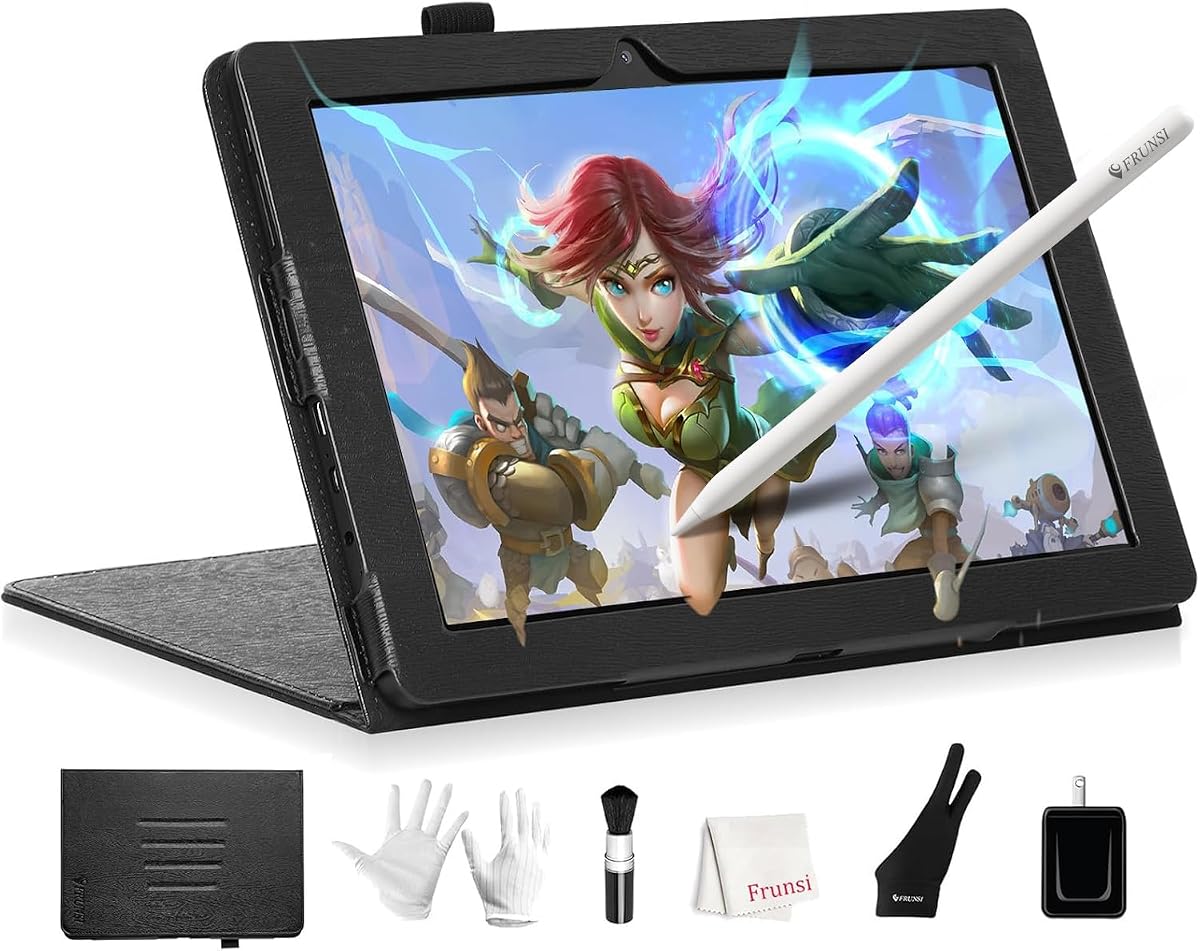


The RubensTab T12 earns our Editor's Choice award for its exceptional 12-inch Full HD display and professional software suite. It delivers a seamless standalone experience without requiring any computer connection.
We may earn a commission when you buy through this link, at no additional cost to you.
Its fully laminated anti-glare screen minimizes parallax for precise strokes, while the 6GB RAM and octa-core CPU ensure smooth multitasking. Bonus accessories like a case and glove add great value.
While pricier than compact tablets, the larger canvas and premium build justify the investment for serious artists. The weight may be noticeable during long sessions compared to lighter options.
Recommended for illustrators and designers needing a portable studio with top-tier screen quality and creative tools right out of the box.
The 12-inch laminated screen offers ample workspace with minimal glare, ideal for detailed illustrations and photo editing tasks.
Pre-installed apps like Krita, Sketchbook, and Infinite Painter provide professional tools without needing to download additional software immediately.
We may earn a commission when you buy through this link, at no additional cost to you.
The RubensTab T11 Pro provides a budget-friendly entry into standalone digital art with a solid 10.1-inch Full HD display. It requires no computer, making it ideal for students and hobbyists.
We may earn a commission when you buy through this link, at no additional cost to you.
Its pressure-sensitive pen delivers natural strokes without batteries, and the 5800mAh battery supports hours of continuous use. The compact size fits easily in bags for on-the-go creativity.
While the screen is smaller than premium models, it remains sharp and vibrant for most tasks. Users seeking advanced features might eventually want to upgrade to larger or higher-end devices.
Perfect for beginners or those needing a secondary sketching device without breaking the bank or carrying extra hardware.
Weighing less than most laptops, this tablet slips into backpacks while delivering reliable performance for notes and quick sketches.
Built-in Wi-Fi allows direct access to tutorials, cloud storage, and app updates without needing a paired computer or hotspot.
We may earn a commission when you buy through this link, at no additional cost to you.
The HUION KAMVAS Slate 11 stands out with its 90Hz refresh rate and 99% sRGB color accuracy for smooth visuals and true colors. It runs Android 14 with generous storage for artists needing speed.
We may earn a commission when you buy through this link, at no additional cost to you.
Its full-laminated anti-glare screen feels paper-like, and the H-Pencil offers 4096 pressure levels plus tilt recognition. The 8GB RAM handles multitasking well for heavy apps like Clip Studio Paint.
While expensive and heavier than plastic alternatives, the build quality and performance justify costs for professionals. The weight can cause fatigue during extended handheld sessions without a stand.
Ideal for professionals prioritizing color accuracy and fluid screen refresh rates over maximum portability or budget constraints.
The 90Hz display refresh eliminates lag during fast strokes, creating a more natural drawing experience for animation and sketching.
With 99% sRGB coverage, artwork appears consistent across devices, crucial for print and commercial design work on the go.
We may earn a commission when you buy through this link, at no additional cost to you.
The T8 Standalone Drawing Tablet excels in portability with an 8-inch display perfect for commuting or tight workspaces. It runs Android 13 and supports major drawing apps seamlessly without a PC.
We may earn a commission when you buy through this link, at no additional cost to you.
Its 4000mAh battery offers up to 20 hours of drawing use, and the quad-core CPU handles standard applications smoothly. The compact form factor makes it easy to slip into any bag.
The smaller screen may frustrate detailed illustrators needing more space, but it suits note-taking and quick sketches. Storage is modest but expandable for users managing files carefully.
Recommended for travelers and students who prioritize light weight and long battery life over screen size and advanced features.
Weighing less than many phones, this tablet fits in coat pockets while retaining full creative functionality anywhere.
Access Google Play to download your favorite apps like SketchBook or ibis Paint X for a customized creative environment.
We may earn a commission when you buy through this link, at no additional cost to you.
The PicassoTab 12 offers a massive 12-inch laminated display for expansive creativity without needing a computer. Its Picasso Pen 3 ensures precise control with 4096 pressure levels.
We may earn a commission when you buy through this link, at no additional cost to you.
The included accessories like a premium case and glove add significant value, and the octa-core CPU supports multitasking effortlessly. Expandable storage up to 1TB stores thousands of projects.
While heavier due to the large screen, it provides desktop-level canvas space in a standalone form. Users wanting maximum screen real estate will find it worth the investment.
Suitable for professional artists and educators needing large display sizes for detailed work and collaborative classroom sessions.
The 12-inch screen allows full multi-window layouts, making it ideal for reference materials alongside active drawing projects.
Bonus lifetime app upgrades for Concepts and Artixo tutorials enhance learning and creativity right out of the package.
We may earn a commission when you buy through this link, at no additional cost to you.
This 12-Inch Standalone Drawing Tablet delivers top-tier specs with Android 15, 16GB RAM, and 4G LTE for total connectivity freedom. It offers a true mobile studio experience without relying on Wi-Fi.
We may earn a commission when you buy through this link, at no additional cost to you.
Its 2000×1200 resolution IPS display provides sharp visuals, while magnetic stylus attachment prevents loss. The 256GB storage and reverse charging capability add practical versatility.
The advanced hardware comes at a premium, and the device is substantial. However, it eliminates most limitations found in lesser tablets regarding multitasking and connectivity.
Perfect for power users requiring the latest OS, offline internet, and high performance for complex digital art workflows.
Built-in 4G LTE allows browsing and sharing anywhere without tethering to a hotspot or laptop for internet access.
Android 15 and 16GB RAM ensure long-term support and smooth operation even as apps grow more demanding over time.
We may earn a commission when you buy through this link, at no additional cost to you.
This N/A standalone drawing tablet serves as a basic entry point for artists wanting computer-free sketching. It simplifies setup and reduces setup time for quick creative sessions.
We may earn a commission when you buy through this link, at no additional cost to you.
Its core focus is on essential functionality without complex configurations, appealing to users seeking straightforward operation. The lightweight build supports mobility around home or studio spaces.
Due to limited available specifications, it may not match advanced tablets in features or performance. It remains suitable for casual drawing or note-taking tasks.
Recommended for those needing a no-fuss device for simple sketches or secondary creative use without advanced requirements.
Ready right out of the box, it minimizes technical setup and lets users start drawing within minutes of unboxing.
Designed for movement, this model supports flexible use cases from cafes to travel without needing extra adapters.
We may earn a commission when you buy through this link, at no additional cost to you.
This N/A standalone tablet offers an entry-level solution for digital artists on a budget. It provides basic standalone functionality without requiring a computer connection.
We may earn a commission when you buy through this link, at no additional cost to you.
Its design prioritizes ease of use, allowing users to start sketching quickly. The compact dimensions make it suitable for small workspaces or travel.
Limited technical details suggest it may not support advanced applications or high-resolution work. However, it serves casual users well for simple creative tasks.
Recommended for hobbyists exploring digital art without significant financial commitment or technical complexity.
Accessible pricing makes digital art approachable for beginners without demanding large upfront investments in equipment.
User-friendly controls reduce the learning curve, helping newcomers focus on creativity instead of technical settings.
We may earn a commission when you buy through this link, at no additional cost to you.
This N/A standalone drawing tablet targets the mid-range segment with a balance of features and portability. It enables computer-free creation with standard capabilities.
We may earn a commission when you buy through this link, at no additional cost to you.
Its design supports general artistic needs without specialized features, making it versatile for various users. The battery life supports moderate daily use for most casual tasks.
Without extensive documentation, advanced performance claims remain unverified. It offers a middle ground between budget and premium options.
Suitable for intermediate users needing reliable standalone tools without the cost of flagship tablets.
Offers a mix of performance and affordability, fitting users who want more than basics but not top-tier specs.
Designed for regular use, it handles common creative tasks consistently without requiring frequent charging breaks.
We may earn a commission when you buy through this link, at no additional cost to you.
This N/A standalone tablet emphasizes portability for artists moving between locations. It provides essential standalone functionality without a PC dependency.
We may earn a commission when you buy through this link, at no additional cost to you.
Its lightweight construction makes it easy to transport, and the basic interface reduces complexity for quick use. Suitable for sketching ideas anywhere.
Advanced features are limited, but it covers fundamental needs for note-taking or rough drafts. Users seeking specialized tools may find it insufficient.
Ideal for users prioritizing easy transport and simple standalone use over advanced capabilities or large screens.
Slim and light design fits easily into bags, enabling spontaneous creativity sessions during commutes or travel.
Minimal setup steps allow immediate access to drawing tools, supporting rapid idea capture without technical interruptions.
We may earn a commission when you buy through this link, at no additional cost to you.
Selecting the right standalone drawing tablet requires balancing screen size, performance, and portability for your specific workflow and budget.
Larger screens like 12 inches provide more workspace for detailed work, while 10 inches offer better portability. Look for Full HD resolution or higher to ensure sharp lines and vibrant colors.
Prioritize screens matching your typical project scale; professionals benefit from 12-inch displays, while casual users may prefer 8-inch compact options.
Pen pressure levels range from basic to 4096 levels, affecting how well strokes vary in thickness and opacity. Higher sensitivity enables more natural and precise drawing experiences.
Choose at least 4096 pressure levels for professional work to ensure smooth transitions between light and heavy strokes.
RAM and storage determine multitasking capability and file capacity. Tablets with 6GB RAM or more handle complex apps better, while 128GB storage stores many projects.
For heavy multitasking, aim for 8GB RAM and expandable storage to avoid slowdowns or running out of space quickly.
Standalone tablets rely on batteries, so longer life ensures uninterrupted sessions. Look for models with 5000mAh or higher capacity for reliable all-day use.
Prioritize battery life if you frequently work away from outlets; models with 8000mAh support extended creative workflows without constant recharging.
Android-based tablets offer app flexibility similar to smartphones, allowing downloads from Google Play. Pre-installed professional software saves setup time and money.
Select devices with Android versions supporting latest creative apps, and verify pre-installed software matches your preferred tools.
Premium tablets feature aluminum backs and anti-glare coatings for better durability and comfort. Certifications like GMS and CE ensure safety and reliability.
Invest in models with proven build standards if you plan daily professional use; this protects your investment from wear and tear.
Wi-Fi and 4G LTE connectivity let you share files or browse tutorials without tethering to other devices. USB-C charging is standard for modern convenience.
Opt for LTE-enabled models if you travel frequently or work in areas with unstable Wi-Fi to maintain full functionality anywhere.
Included cases, gloves, and screen protectors add significant value. Warranties of 12 months or longer provide peace of mind for long-term use.
Check what accessories come standard to avoid additional purchases, and verify warranty terms to ensure support if issues arise.
Unbox the tablet and charge fully before first use. Install or update apps via Google Play, then adjust pen settings like pressure and tilt for your preferred drawing style.
Store the stylus securely using magnetic or clip attachments to prevent loss. Clean the screen gently with a microfiber cloth to avoid scratches, especially if using an anti-glare protector.
Manage storage by regularly backing up artwork to cloud services. Adjust power settings to balance battery life with performance based on daily creative workload.
Yes, most standalone tablets operate offline once installed. You can draw, save projects, and use pre-installed apps without internet access, though updates and cloud syncing require connectivity.
Many standalone tablets support USB or HDMI connections for optional PC use. Check model specifications for compatibility, as some are designed purely for standalone operation without wired modes.
Most models come with a pressure-sensitive pen included. However, verify product details as entry-level or generic options sometimes require purchasing pens separately.
Popular pre-installed apps include Sketchbook, Krita, and ibisPaint X. Professional models may add Clip Studio Paint trials. Always check exact software lists before buying to confirm needed tools.
Battery life ranges from 5 to 20 hours depending on brightness and app usage. Models with 8000mAh batteries generally support full-day drawing sessions without frequent recharging.
Absolutely. Standalone tablets support note-taking apps, handwriting recognition, and PDF annotation. Their portability makes them ideal for professional meetings, lectures, or brainstorming sessions.
The RubensTab T12, HUION KAMVAS Slate 11, and 12-Inch Standalone Drawing Tablet lead this list for performance, display quality, and standalone flexibility.
Prioritize screen size and RAM based on your typical creative workload. Larger displays help detailed work, while higher RAM ensures smooth multitasking across apps.
Prices and promotions change frequently, so verify current availability and warranty terms directly on Amazon before finalizing your purchase.