
Acer 4-in-1 USB C Hub
4.2Editor score
4K@60Hz dual output
100W power delivery
Compact 4-in-1 design
Compare the top 10 Dual HDMI Monitor Adapters of 2026. Expert reviews on 4K support, compatibility, and performance to boost your productivity.
Finding the right dual HDMI monitor adapter can transform your workspace by allowing you to extend your display across two screens. Whether you are working from home or managing a complex office setup, having reliable connectivity is essential for maximizing productivity and efficiency.
We evaluated ten top-rated adapters based on compatibility, video resolution support, build quality, and user feedback. Each product was carefully analyzed to ensure it meets the demands of modern professionals who require stable and high-quality display output.
Every selection in this list highlights specific strengths and potential limitations to help you make an informed decision. Please note that prices and availability can change frequently, so check the latest listings before making your purchase.
4.2Editor score

4.5Editor score
4.1Editor score
This side-by-side comparison highlights the key specifications and features of all ten selected adapters to help you quickly identify which one fits your specific technical requirements and budget constraints.


The StarTech USB-A 3.0 to Dual HDMI Adapter stands out as a robust solution for Windows users looking to expand their workspace. With a strong rating from users, it offers a reliable way to connect two monitors to a single USB port, significantly boosting multitasking capabilities.
We may earn a commission when you buy through this link, at no additional cost to you.
This adapter supports video resolutions up to 4K at 30Hz on one port and 1080p at 60Hz on the other, providing enough clarity for most professional tasks. It is designed specifically for Windows environments, ensuring seamless integration without the compatibility issues often found in cross-platform solutions.
While it requires administrator rights for driver installation, this ensures a secure and stable connection. The 3-year warranty and lifetime technical support add significant value, making it a trusted choice for IT professionals and home office users alike who prioritize reliability over raw speed.
If you are running a Windows-based setup and need a dependable way to dual your desktop, this adapter is an excellent investment. Its focus on stability and support makes it the top recommendation for those who need their display setup to work flawlessly every day.
Designed specifically for Windows X86, X64, and ARM platforms, this adapter ensures maximum compatibility with a wide range of Intel, AMD, and Snapdragon systems.
Backed by a 3-year warranty and free lifetime 24/5 multi-lingual technical assistance, users receive long-term support that few competitors offer in this price range.
We may earn a commission when you buy through this link, at no additional cost to you.
The Acer 4-in-1 USB C Hub offers exceptional value for users seeking a versatile connectivity solution without breaking the bank. Rated highly for its performance, it delivers crisp 4K@60Hz visuals on both external monitors, which is rare at this price point.
We may earn a commission when you buy through this link, at no additional cost to you.
It features a high-speed USB-A port for data transfer and a 100W power delivery port to keep your laptop charged while you work. This hub is ideal for professionals who need a reliable docking solution for their ultrabook or modern laptop with a USB-C port.
However, users should note that macOS only supports mirroring with this device, not extended displays. Additionally, the cable is relatively short, so placement flexibility might be limited. Despite these minor drawbacks, the combination of features makes it a top budget-friendly option.
For anyone looking to maximize their productivity on a budget, this hub provides the best balance of price and performance. It is particularly well-suited for Windows users or those who are okay with mirroring on macOS while needing multiple ports for peripherals.
This hub enables crisp 4K@60Hz output for both single and dual displays via HDMI 2.0, delivering smooth and vivid visuals for high-definition content.
The 100W PD port efficiently charges your host device at a consistent 90W, ensuring your laptop stays powered during long work sessions.
We may earn a commission when you buy through this link, at no additional cost to you.
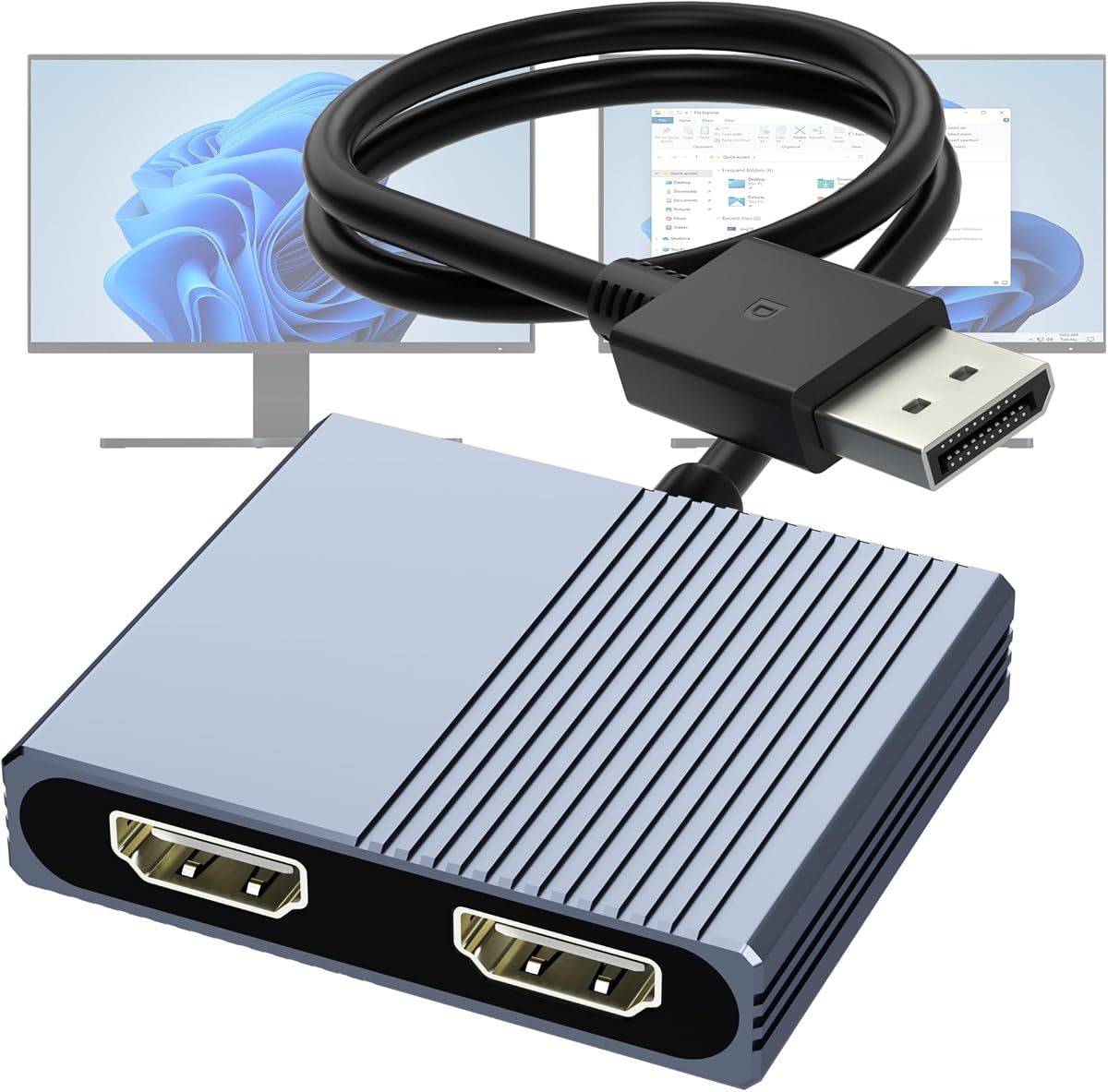
This DisplayPort to Dual HDMI Adapter is engineered for users with dedicated graphics cards who need high-fidelity extended displays. With a solid rating, it leverages MST technology to allow two monitors to show different content, which is essential for serious productivity tasks.
We may earn a commission when you buy through this link, at no additional cost to you.
The adapter supports stunning 4K@60Hz UHD resolution, rendering every detail with clarity. It connects directly to a DisplayPort source, bypassing USB limitations and providing a more stable signal path for high-resolution output. It requires a specific power adapter to function correctly.
Compatibility is key here; it works best with dedicated GPUs from AMD, NVIDIA, or Intel. Integrated graphics may not support extended modes, so checking your system's capabilities is crucial before purchasing. Despite the power requirement, the performance is top-tier for desktop setups.
If you have a powerful desktop or laptop with a DisplayPort output and need extended dual screens, this is the premium choice. It delivers the high performance required for video editing, data analysis, or any task requiring multiple screens.
Utilizes cutting-edge technology to achieve stunning 4K@60Hz UHD resolution on both screens if your system supports DP1.4 and the required hardware.
Built-in smart chip and multi-layer shielding ensure stable signal transmission and protect your graphics card from potential damage during use.
We may earn a commission when you buy through this link, at no additional cost to you.
The WAVLINK adapter is a strong contender for users who need flexibility across different operating systems. It supports both Windows and macOS, making it a versatile choice for teams that use mixed environments. With a high rating, it proves effective for daily productivity tasks.
We may earn a commission when you buy through this link, at no additional cost to you.
It allows you to extend or mirror screens as desired, though you will need to install drivers to enable extended mode. This step might be a hurdle for some, but the result is a stable multi-monitor setup that can boost workflow efficiency significantly.
This device is not recommended for gaming or graphic-intensive work due to its resolution limitations. However, for office work, web browsing, and standard applications, it performs well. The included driver support ensures you can get the most out of your hardware.
For those who value compatibility over raw speed, this adapter offers a reliable way to add dual screens. It is particularly useful if you need a solution that works across both Windows and macOS without needing separate hardware.
The USB-C adapter equipped with USB 3.0 easily connects to USB4, Thunderbolt, or standard USB 3.0 ports for flexible connection options.
Designed to offer dual monitor solutions through a single connection, allowing for effective multitasking in office and home setups.
We may earn a commission when you buy through this link, at no additional cost to you.
The OREI SplitExtend HDMI Splitter is designed to connect a single HDMI source to two external displays for extended viewing. This tool is ideal for boosting productivity with a 3-screen setup, combining your laptop screen with two external monitors for a comprehensive workspace.
We may earn a commission when you buy through this link, at no additional cost to you.
It works with a wide range of operating systems, including Windows, macOS, and Chrome OS. However, it requires driver installation and an Intel i5 processor or higher for optimal performance. These requirements ensure the device runs smoothly but may limit compatibility with older machines.
For corporate environments, it is important to check with your IT admin before installation. The device is built for reliability and comes with a year of support. Its 2-in-1 USB-A and USB-C connection offers flexibility in how you connect to your host device.
If you need a solid solution for extending your display across multiple screens and meet the system requirements, this adapter is worth considering. It provides a straightforward way to enhance your setup without needing complex docking stations.
Features an integrated USB-A to USB-C adapter, making it compatible with USB-C, USB-A, Thunderbolt 3/4, and USB4 laptops.
Connects a single HDMI source to two external displays for mirrored or extended viewing to boost productivity in any setting.
We may earn a commission when you buy through this link, at no additional cost to you.
The Selore USB C Docking Station is an all-in-one solution that transforms your laptop into a full workstation. With an 8-in-1 design, it provides dual HDMI ports along with USB ports, a card reader, and power delivery, making it perfect for home and office use.
We may earn a commission when you buy through this link, at no additional cost to you.
It supports dual 4K@60Hz displays, allowing for smooth and detailed visuals. However, macOS users should note that this adapter only supports mirroring, not extended screens. Windows users can enjoy full MST support to extend their desktop across multiple monitors.
The docking station includes a 100W PD charging port to keep your laptop powered while in use. Although the power adapter is not included, the hub itself delivers up to 85W of charging power. This ensures your device stays charged even under heavy load.
For users who need a comprehensive connectivity solution in one device, this docking station is an excellent choice. It simplifies cable management and adds essential ports, making it a convenient upgrade for modern laptops with limited connectivity.
Transforms your laptop with dual 4K@60Hz HDMI ports, USB-C, USB-A ports, and an SD/microSD card slot in a sleek design.
Charges your laptop anytime with a USB-C power delivery port, inputting 100W and outputting 85W to keep your device powered.
We may earn a commission when you buy through this link, at no additional cost to you.
This 4K HDMI Splitter is a straightforward solution for users who need to mirror their display to two screens simultaneously. It takes a single signal source and splits it into two identical outputs, which is useful for presentations or public displays.
We may earn a commission when you buy through this link, at no additional cost to you.
It supports up to 4K resolution at 30Hz and synchronizes audio with the video signal. Since there is no driver required, it is plug and play, making it easy to set up without technical knowledge. It works with a wide range of devices including laptops and PCs.
However, this adapter does not support extended displays, meaning both monitors will show the same content. If you need independent screens for multitasking, this is not the right choice. But for mirroring, it is a reliable and cost-effective option.
If your goal is to display the same content on two screens easily, this splitter is perfect. It is an ideal choice for classrooms, meeting rooms, or simple home setups where mirroring is the only requirement.
Audio signals are synchronized with HDMI output, so no additional audio cables are needed for a complete multimedia experience.
Designed for ease of use with no driver installation needed, allowing you to start using your displays immediately.
We may earn a commission when you buy through this link, at no additional cost to you.
The Selore&S Global USB-C to Dual HDMI Adapter offers a sleek way to expand your laptop's connectivity with multiple high-performance ports. With a top-tier rating, it supports dual 4K@60Hz outputs, making it excellent for high-resolution content and multitasking.
We may earn a commission when you buy through this link, at no additional cost to you.
This hub includes a USB-A port for data transfer and a 100W power delivery port for fast charging. It is designed to be compact and portable, so you can take it anywhere. However, note that macOS supports only mirroring, while Windows supports extended modes.
It requires a full-function USB-C port with DisplayPort Alt Mode to work correctly. The high-quality design ensures stable performance, but you will need to provide your own power adapter. This setup offers great value for those needing a portable docking solution.
If you want a compact hub that delivers high-resolution video and charging on the go, this adapter is a top pick. It balances performance and portability, making it suitable for frequent travelers and remote workers.
Features dual 4K@60Hz HDMI ports, a USB-A port, and a 100W PD charging port in a compact and portable design.
The USB-A 3.0 port supports high-speed file transfers up to 5Gbps, meeting the needs of professional users.
We may earn a commission when you buy through this link, at no additional cost to you.
This DisplayPort to Dual HDMI Adapter is built for high-performance needs, offering dual 4K@60Hz output through an MST hub. It is ideal for desktop users with dedicated graphics cards who need separate content on two screens for maximum productivity.
We may earn a commission when you buy through this link, at no additional cost to you.
The adapter supports extended and mirror modes, giving you flexibility in how you use your displays. Its aluminum alloy housing ensures efficient heat dissipation and a durable design that withstands frequent plugging and unplugging. It is designed to work with NVIDIA and AMD graphics cards.
Note that it requires a DP 1.4 source for dual 4K@60Hz. If your system supports this, you will get excellent visual quality. It does not work with docking stations, so you must connect directly to your computer's graphics port for best results.
If you need a reliable solution for extending displays with high resolution, this adapter is a great choice. It delivers stable performance and high-quality construction, making it a top pick for technical professionals and power users.
Both HDMI ports can simultaneously output ultra-high definition 4K@60Hz video, delivering ultra-smooth visuals with stunning clarity.
Features an integrated aluminum alloy housing and gold-plated ports for exceptional durability and stable signal transmission.
We may earn a commission when you buy through this link, at no additional cost to you.
The UANTIN 6-in-1 USB C Hub is a versatile solution that offers dual HDMI output along with multiple USB ports for peripheral connections. It is designed to be compact and lightweight, making it easy to carry in a laptop bag for travel.
We may earn a commission when you buy through this link, at no additional cost to you.
It supports 4K@60Hz on both HDMI ports, providing high-quality visuals for work and entertainment. The hub includes three USB-A ports to connect keyboards, mice, and drives while keeping your workspace organized. It also features a 100W power delivery port to charge your laptop.
This hub is plug and play, requiring no drivers for operation. However, macOS users should note that they may be limited to mirroring or single extension. For Windows users, it offers full flexibility to extend their desktop across multiple monitors easily.
If you want a slim and functional hub that handles dual screens and charging, this is an excellent option. It provides a clean setup with plenty of ports, making it a practical choice for hybrid workers who move between locations.
Delivers crisp 4K@60Hz video via two HDMI 2.0 ports, supporting both single-screen and dual-screen setups.
Features three USB-A ports allowing you to easily connect a keyboard, mouse, and other devices.
We may earn a commission when you buy through this link, at no additional cost to you.
Choosing the right adapter requires understanding your system capabilities and what you need from your setup. This guide outlines the key factors to consider.
Different adapters support different operating systems. Some work with both Windows and macOS, while others may only support one. For Mac users, note that many adapters only support mirroring rather than extended displays due to hardware limitations in macOS.
The most critical specification is the resolution and refresh rate support. Some adapters allow dual 4K at 60Hz, while others may only support 4K at 30Hz or 1080p. Higher refresh rates provide smoother visuals which is important for detailed work.
Adapters connect via USB-A, USB-C, or DisplayPort. USB-C hubs are ideal for modern laptops, while USB-A adapters are better for older machines. DisplayPort to HDMI adapters are great for desktops with dedicated graphics cards.
Many USB-C adapters include a power delivery port to charge your laptop while in use. This is useful for keeping your device powered during long work sessions. Look for at least 65W to 100W support for full charging.
Some adapters are plug and play while others require driver installation. Drivers can add complexity but may enable extended modes. If you need extended displays on Windows, check if drivers are required and if they are easy to install.
Materials like aluminum alloy improve heat dissipation and durability. Gold-plated ports ensure stable signal transmission over time. A robust build reduces the risk of damage during frequent plugging and unplugging.
The length of the included cable determines placement flexibility. Some adapters come with short cables of 6 inches to 1 foot, which may limit how far the hub can be placed from your laptop.
In addition to HDMI ports, many hubs offer USB-A, USB-C, SD card slots, and Ethernet. Select a model that provides the ports you need for your peripherals to avoid buying multiple adapters.
When setting up your adapter, connect it to your laptop or desktop first before attaching the monitors. This ensures the system recognizes the device correctly. Then plug in your HDMI cables to the adapter and connect them to your displays.
Yes, many USB adapters allow you to connect two monitors to a laptop. However, the capability depends on your laptop's USB port and operating system. Some laptops support extended displays while others may only mirror screens. Check your device specs before purchasing.
Mirroring shows the same content on both screens while extending allows each monitor to display different content. Extending increases productivity by letting you work on multiple tasks simultaneously. Most Windows adapters support extending but Mac adapters often limit to mirroring.
Some adapters are plug and play and do not need drivers. Others require drivers to enable extended modes especially on Windows. Check the product description to see if installation is needed. Having admin rights may be required for installation.
This usually happens if your cable does not support HDMI 2.0 or if your source port is limited. Ensure your cable is rated for high bandwidth. Also check if your system supports the refresh rate. Using older cables can limit refresh rates.
Yes but macOS often only supports mirroring with USB adapters due to M1 chips or other hardware limits. Extended displays may not be available. Check specific product notes for macOS compatibility. Some docks may have better support than others.
Look for a lightning bolt icon near the port or check your manual for Thunderbolt or DisplayPort Alt Mode. Not all USB-C ports support video output. If unsure, try connecting a monitor directly to confirm. Only compatible ports will output video.
They are not recommended for gaming due to potential lag and resolution limits. Most adapters target productivity tasks like office work. For gaming use dedicated graphics cards or docking stations. Check refresh rates before using for media content.
In this guide we have reviewed the top 10 dual HDMI monitor adapters to help you find the perfect solution for your setup. Each product offers unique features from budget-friendly options to premium hubs designed for high performance.