
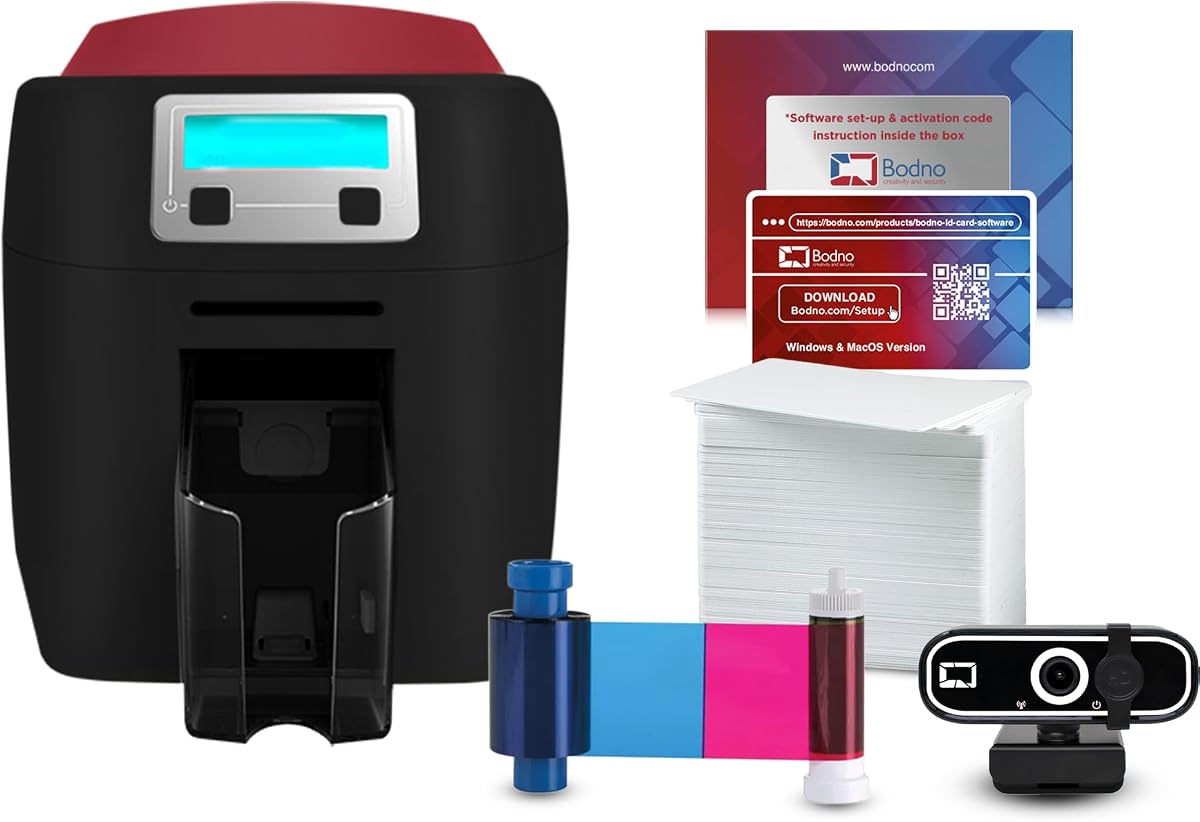
Bodno Seaory S28 Dual Sided ID Card Printer & Complete Supplies Package ID Software and Camera – Bronze Edition
4.6Editor score
Dual-sided printing in one pass
Compatible with Windows Mac Linux
Lifetime software license included
Discover the top 10 dual sided card printers for 2026. Compare features, ratings, and specs to find the perfect ID card printing solution for your business.
Finding the right dual sided card printer can transform how your organization manages identification and access control. These machines offer the ability to print high-quality graphics and data on both sides of a plastic card in a single efficient workflow.
We evaluated ten leading models based on print quality, speed, software ease, and overall value. Our analysis considers real user feedback and technical specifications to help you make an informed decision for your specific needs.
Each pick below highlights key strengths and potential limitations based on available data. Remember that pricing and availability change frequently, so always check the latest details before making a final purchase decision.
4.6Editor score
4.6Editor score

4.3Editor score
This side-by-side comparison outlines the core specifications and features of the top dual sided card printers available today. Use this table to quickly identify which model aligns best with your volume requirements and budget constraints.


The Bodno Magicard 400X stands out as a comprehensive solution for organizations needing professional ID cards. With a rating of 4.6, it offers a complete package that includes supplies and software to get started immediately.
We may earn a commission when you buy through this link, at no additional cost to you.
Its all-inclusive package ensures you have everything needed to begin printing high-quality ID cards right out of the box. The included 300-print YMCKO ribbon allows for vibrant full-color designs on both sides of the card.
While the initial cost may be higher than some alternatives, the lifetime software support and 4-year warranty provide significant long-term value. The drag-and-drop design capabilities make it accessible even for non-technical users.
This printer is ideal for businesses seeking a reliable, easy-to-use dual-sided card printing solution. We recommend it for those who want a complete package without the hassle of sourcing separate supplies.
The printer comes with supplies and a ribbon to start printing immediately.
Enjoy peace of mind with ongoing software support and a lifetime license.
We may earn a commission when you buy through this link, at no additional cost to you.
The Bodno Seaory S28 is an excellent choice for budget-conscious buyers needing dual-sided printing. It receives a 4.6 rating for its efficient one-pass printing technology and comprehensive supply package.
We may earn a commission when you buy through this link, at no additional cost to you.
This printer prints vibrant images on both sides in a single pass, boosting productivity with resolutions up to 300 x 1200 dpi. It is compatible with Windows, Mac, and Linux operating systems.
While the hardware warranty is two years compared to others, the lifetime software support adds value. The bronze edition software offers pre-made templates for easy design creation.
Choose this model if you need a cost-effective solution that does not compromise on dual-sided capabilities. It is well-suited for small to medium businesses requiring versatile printing.
Print on both sides of the card in a single pass to save time.
Compatible with Windows Mac and Linux for flexible deployment.
We may earn a commission when you buy through this link, at no additional cost to you.
The Evolis Primacy 2 represents a premium option for high-volume printing environments. It prints up to 280 full-color cards per hour, making it ideal for organizations with frequent card issuance needs.
We may earn a commission when you buy through this link, at no additional cost to you.
Its direct to card dye sublimation technology ensures durable, professional quality prints. The bundle includes a color ribbon, blank cards, and card imaging design software to start operations quickly.
While the base model uses an LED panel, an optional LCD touch screen can be added for enhanced user experience. The 3-year warranty supports long-term operational stability.
We recommend this printer for businesses prioritizing speed and reliability. It is a robust choice for schools, hospitals, or companies requiring high throughput.
Produces 280 full-color cards per hour for efficient operations.
Upgrade to an optional LCD touch screen with QR code display.
We may earn a commission when you buy through this link, at no additional cost to you.
The Magicard 300 Dual Sided is designed for users needing reliable ID card printing with detailed graphics. It supports 300 dpi printing, which is ideal for images, logos, and micro-text.
We may earn a commission when you buy through this link, at no additional cost to you.
This bundle includes a color ribbon, 100 PVC cards, and Card Imaging design software. It also comes with free tech support to help with printer setup and operation.
The LED panel provides easy-to-understand messages and instructions for daily operations. A 3-year warranty offers protection for your investment against unexpected issues.
This printer is a solid choice for small businesses or departments needing standard dual-sided printing. Its straightforward interface makes it accessible for new users.
Experts will help with printer set up to ensure smooth operations.
Ideal for images logos and micro-text for enhanced security.
We may earn a commission when you buy through this link, at no additional cost to you.
The Fargo DTC4500e is a robust printer designed for secure card production. It includes a color ribbon capable of 500 images and 100 PVC cards in the supplies kit.
We may earn a commission when you buy through this link, at no additional cost to you.
A unique feature is the dual hopper, which can hold two different card types for flexible workflow. The smart LED screen provides easy access to simple and complex print commands.
An optional laminator is available to enhance card durability for long-term use. The printer is backed by a 3-year warranty for reliable service over time.
Choose this printer for environments needing higher volume and security. It is well-suited for larger organizations requiring versatile card options.
Can hold 2 different card types for flexible printing operations.
Available laminator option enhances card durability for long-term use.
We may earn a commission when you buy through this link, at no additional cost to you.
The Fargo DTC4250e is praised for its high quality and efficiency. It has a perfect 5.0 rating from users who appreciate its direct to card printing and erase capabilities.
We may earn a commission when you buy through this link, at no additional cost to you.
This model includes a color ribbon with 250 prints and 100 PVC cards. It supports printing on both sides of the card for comprehensive designs and information.
The built-in erase and rewrite feature allows for reuse of cards, which is useful for temporary or changing identification needs. The smart LED screen simplifies command access.
Ideal for businesses that need reliable dual-sided printing with some flexibility. It is a good option for organizations valuing card reusability.
Built-in erase and rewrite capability for card reuse.
Direct to card printing ensures high-quality durable image transfer.
We may earn a commission when you buy through this link, at no additional cost to you.
The Bodno Magicard 300 is a great entry point for dual-sided printing. It features a rating of 4.4 and comes with a complete supplies package for immediate use.
We may earn a commission when you buy through this link, at no additional cost to you.
It includes a 300-print YMCKO ribbon and supports dual-sided printing for more comprehensive card designs. The software features pre-made templates and drag-and-drop capabilities for ease of use.
The 3-year warranty and lifetime software support provide security for your purchase. It is compatible with both Windows and Mac systems for flexible deployment.
Choose this printer if you need a simple, complete solution. It is best for small businesses requiring straightforward ID card production.
Includes supplies and a 300-print YMCKO ribbon to start printing.
Features pre-made templates and intuitive drag-and-drop design capabilities.
We may earn a commission when you buy through this link, at no additional cost to you.
The Zebra ZC300 offers flexibility with printing in both color or monochrome. It features a highly graphical LED/LCD interface for intuitive user interaction in preferred languages.
We may earn a commission when you buy through this link, at no additional cost to you.
It supports multiple encoding options for creating swipe-and-go magnetic stripe or contactless cards. Advanced security features include government-grade AES data encryption during printing.
The redesigned hopper makes loading and unloading cards easier than ever, enhancing daily usability. It is a robust choice for organizations needing specific encoding capabilities.
Consider this printer if you require specific encoding or security features. It is suitable for environments where data protection is a priority.
Government-grade AES data encryption protects sensitive data during printing.
Makes loading and unloading cards easier with saloon-style output doors.
We may earn a commission when you buy through this link, at no additional cost to you.
The Bodno Matica MC320 is known for cost-effective dual-sided printing. It delivers high-quality results at an affordable price point compared to typical dual-sided printers.
We may earn a commission when you buy through this link, at no additional cost to you.
The printer is ready to use with all necessary supplies, including a ribbon producing up to 100 dual-sided prints. It offers compatibility with both Windows and MAC platforms.
It comes with a full 3-year warranty and dedicated customer support for long-lasting dependability. The software allows for convenient, hassle-free use via secure activation code.
Choose this model for tight budgets without sacrificing dual-sided capabilities. It is a solid option for small organizations needing standard card production.
Provides dual-sided printing at an affordable price with high-quality results.
Ready to use with all necessary supplies and platforms for ease.
We may earn a commission when you buy through this link, at no additional cost to you.
The Zebra ZC350 offers incredible printing speeds that surpass others in its class. This allows you to get the job done in no time, saving valuable resources.
We may earn a commission when you buy through this link, at no additional cost to you.
It features a great visual interface that provides an easier way to print with just the touch of the screen. The display allows you to look at your card before printing to eliminate test runs.
The printer is ready to print the second you get it, with an easy installation process. The redesigned hopper and snug-fit ribbon design simplify daily operations.
Ideal for high-volume needs where speed and efficiency are critical. It is recommended for organizations wanting a quick start and reliable performance.
Speeds surpass all others in its class for getting the job done quickly.
Visual interface provides easier way to print with touch of screen.
We may earn a commission when you buy through this link, at no additional cost to you.
Selecting the right printer involves considering speed, software, and durability.
Look for a printer with at least 300 DPI resolution for clear text and images. Higher speeds reduce production time for large batches.
Prioritize high resolution and faster cycle times to meet your volume needs.
Ensure the software supports your operating system such as Windows, Mac, or Linux. User-friendly interfaces simplify design creation.
Choose software that integrates well with your existing systems and offers templates.
Some bundles include ribbons and blank cards which lowers initial setup costs. Check the capacity of included supplies to plan future expenses.
Always check what is included to avoid unexpected costs after purchase.
A longer warranty period protects your investment against hardware failures. Lifetime software support ensures ongoing access to updates and help.
Opt for models with comprehensive warranty and support packages for peace of mind.
Look for USB and Ethernet ports to connect to your network or local computer. Advanced models may offer wireless options for flexibility.
Choose connectivity options that match your office network setup requirements.
Consider if you need magnetic stripe or contactless encoding for secure access. Some printers offer dual hoppers for different card types.
Evaluate encoding options based on your security and card usage requirements.
Measure your workspace to ensure the printer fits comfortably on a desk. A compact design is beneficial for smaller offices.
Check the physical dimensions to ensure the printer fits your available space.
Start by installing the included software and drivers according to the manual instructions. Ensure your computer is connected via USB or Ethernet.
Load the ribbon and blank cards carefully following the hopper guides. Close the printer securely to avoid jams during the printing cycle.
Regularly clean the print heads and rollers with provided cleaning cards to maintain image quality. This simple maintenance extends the life of the machine.
Dye sublimation transfers dye onto the card surface for vibrant and durable prints. Direct to card printing applies ink directly to the surface and may be more affordable.
Most models listed are compatible with both Windows and Mac operating systems. Always verify specific software requirements before purchasing.
Ribbons usually print between 250 to 500 cards depending on the model and design coverage. This affects the cost per card over time.
Some models allow dual-sided printing in one pass which speeds up the process. Others require manual flipping or a separate pass for the reverse side.
Most manufacturers offer a 3-year warranty as standard. Some models include a 4-year warranty or extended coverage options.
They typically use standard PVC cards with specific surface properties. Ensure compatibility between the printer and the blank cards you buy.
We have explored ten excellent models for dual sided card printing in 2026. The Bodno Magicard 400X leads as the Editor's Choice for its all-inclusive package.
Prioritize software ease and warranty coverage when selecting your machine. The right fit depends on your specific volume and design requirements.
Remember to check current availability and pricing before finalizing your order. This ensures you get the best value for your investment.