
DTECH DVI to HDMI Adapter
4.6Editor score
Compact and lightweight design
Supports 4K 30Hz video
Compatible with DVI-I and DVI-D
Compare the top 10 DVI I Dual Link to HDMI Adapters. Find the best connection for your monitor or projector with real ratings and detailed specs.
Connecting older equipment to modern displays often requires specific adapters. DVI I Dual Link to HDMI adapters bridge the gap between legacy graphics cards and new TVs or monitors. They ensure high-quality video transmission without compromising on resolution or signal stability.
We evaluated ten top-rated adapters based on build quality, compatibility, and user feedback. Our analysis focuses on gold-plated connectors, dual-link support, and bi-directional capabilities. This list helps you choose the right model for your specific setup and budget needs.
Each pick includes detailed specs, pros, and cons to guide your decision. Prices and availability change frequently, so check current listings before buying. We aim to provide clear, honest insights to help you connect your devices confidently and efficiently.
4.6Editor score

4.8Editor score

4.7Editor score
This side-by-side comparison highlights key differences across all ten models. We examine connector types, resolution support, and build materials to help you quickly identify the best fit for your hardware configuration and usage scenarios.


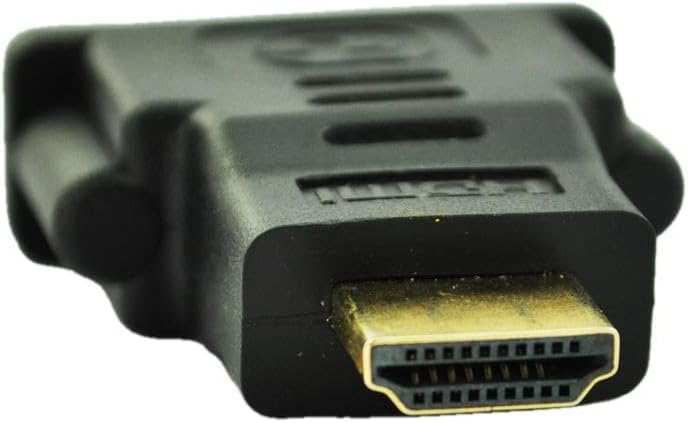


This adapter offers excellent versatility for connecting older computers to modern displays. It supports high-resolution video up to 1080P Full HD. The bi-directional design means you can connect either way depending on your setup needs.
We may earn a commission when you buy through this link, at no additional cost to you.
Users praise the solid build quality and stable connections provided by the gold-plated connectors. The screw-on mechanism ensures the adapter stays firmly in place during use. This prevents accidental disconnections that can happen with friction-fit adapters.
While it does not transmit audio, this is standard for DVI adapters. You can use a separate audio cable if needed. The compact size makes it easy to store or carry in a laptop bag for travel presentations.
Ideal for office workers and home users with DVI ports needing HDMI output. Its high rating reflects consistent performance and reliability. This model stands out as a top choice for anyone needing a simple effective conversion solution.
Use this adapter to connect a DVI-I source to an HDMI display or an HDMI source to a DVI monitor depending on your specific hardware ports.
The hand-tightened screws on the DVI end prevent the adapter from slipping out or becoming loose due to cable tension over time.
We may earn a commission when you buy through this link, at no additional cost to you.
This adapter is designed specifically for connecting HDMI sources to M1 digital inputs found on certain projectors. It provides a direct link between your device and the projector input. The design ensures a clean signal path for visual presentations.
We may earn a commission when you buy through this link, at no additional cost to you.
Monoprice is known for quality accessories and this adapter reflects that standard. The gold plating helps resist corrosion and maintain signal integrity. Users report reliable connections when working with compatible M1 port equipment.
The primary limitation is its specialization for M1 ports. If your projector has a standard HDMI input this is not needed. Also note it handles video only so plan your audio setup separately for presentations.
Choose this if you have older InFocus projectors or similar M1-equipped hardware. It fills a specific niche effectively. For general DVI to HDMI needs other models might be more versatile options.
This adapter addresses the unique M1 digital input standard found on some legacy projectors ensuring you can connect modern HDMI sources easily.
The gold plating on the connectors protects against oxidation and ensures a stable electrical connection over extended periods of use.
We may earn a commission when you buy through this link, at no additional cost to you.
This adapter provides solid support for both analog and digital DVI signals. The 24+5 pin configuration ensures compatibility with a wide range of DVI-I ports. It maintains signal quality through gold-plated connectors.
We may earn a commission when you buy through this link, at no additional cost to you.
Users appreciate the straightforward design that works reliably for basic display connections. The dual-link capability helps support higher resolutions compared to single-link options. It is a good choice for general computer to monitor setups.
While functional it does not add audio capabilities like active adapters. It is purely a video conversion tool. For setups where audio is separate this works perfectly fine without extra cost.
Select this if you need a simple cost-effective solution for DVI-I to HDMI conversion. It handles standard resolutions well. Ensure your source supports dual-link for best performance with high-resolution displays.
The DVI-I 24+5 pin layout allows this adapter to work with systems that output analog or digital signals offering broader compatibility.
Dual-link support means this adapter can manage higher bandwidth required for higher resolutions beyond the limitations of single-link DVI.
We may earn a commission when you buy through this link, at no additional cost to you.
This adapter provides a basic digital link from DVI-D sources to HDMI displays. It features a black housing that fits neatly with most computer hardware. The gold plated connector helps maintain signal integrity during transmission.
We may earn a commission when you buy through this link, at no additional cost to you.
It is designed for digital video only so audio must be routed separately. Users looking for a simple conversion tool will find it functional. The design keeps things straightforward without extra unnecessary features.
Lack of detailed specs might make setup slightly uncertain compared to other models. However, standard DVI-D to HDMI connections are generally uniform. It works well for displays that do not require analog signals.
Choose this for basic DVI-D to HDMI needs at a reasonable price. It serves the primary purpose of video conversion well. Verify your hardware compatibility before purchase to ensure proper function.
This adapter converts digital video signals from a DVI-D male port to an HDMI female port for modern display compatibility.
The compact black design blends in with most PC setups without drawing attention or adding bulk to your connection area.
We may earn a commission when you buy through this link, at no additional cost to you.
This adapter delivers strong performance at a budget-friendly price point. It supports 4K resolutions at 30Hz which is impressive for its cost range. The bi-directional design offers flexibility for different connection scenarios.
We may earn a commission when you buy through this link, at no additional cost to you.
Users value the gold-plated connectors for maintaining a stable connection. The compact design fits easily in travel kits. While it does not support 144Hz refresh rates it is sufficient for standard usage and media viewing.
The main limitation is the lack of analog signal support. If your hardware requires analog DVI this will not work. For digital DVI-D setups however it provides excellent value for money.
Ideal for cost-conscious buyers needing reliable DVI-D to HDMI conversion. The high rating confirms consistent quality. Pick this for everyday use where cost efficiency matters most.
This adapter allows you to drive 4K displays at 30Hz without spending much money making high resolution accessible on a budget.
Connect DVI sources to HDMI displays or HDMI sources to DVI monitors with a single adapter depending on your direction of flow.
We may earn a commission when you buy through this link, at no additional cost to you.
This model supports DVI-I 24+5 ports enabling both analog and digital compatibility. It handles 1080P at 60Hz smoothly for standard desktop usage. The bi-directional connection adds flexibility for various setups.
We may earn a commission when you buy through this link, at no additional cost to you.
Users report reliable performance for daily office work and media viewing. The compact size makes it portable for travel. It keeps the setup clean without adding bulk to your desk.
Like most DVI adapters it does not carry audio signals. You will need separate audio wiring for sound. This is expected but worth noting for all-in-one setups.
Buy this if you need DVI-I flexibility on a budget. It supports standard resolutions well and offers good value. Verify your port type matches the adapter requirements before ordering.
The DVI-I 24+5 port support ensures you can connect to devices that use this specific pin configuration without issues.
This adapter supports 1080P resolutions at 60Hz providing smooth video playback for standard desktop applications and movies.
We may earn a commission when you buy through this link, at no additional cost to you.
This adapter features gold and nickel plating to resist corrosion and signal degradation. It maintains stable connections even with extended use. The high rating reflects consistent reliability among users.
We may earn a commission when you buy through this link, at no additional cost to you.
The design focuses on keeping video signals intact for clear image output. It is suitable for use with various consumer electronics. The black finish is discreet and professional for home or office.
Note that this adapter does not handle audio transmission. You may need to connect speakers separately from your source device. This is a standard limitation for passive video adapters.
Select this for reliable DVI-I dual link connections. The plating adds a layer of protection against wear. It is a strong option for users prioritizing connection stability.
Gold and nickel plated connectors prevent oxidation and ensure long-lasting signal integrity for repeated plugging and unplugging.
The internal design and materials help prevent data and signal loss ensuring your display receives a clear uninterrupted video feed.
We may earn a commission when you buy through this link, at no additional cost to you.
This adapter offers a straightforward way to connect DVI-I female ports to HDMI male cables. The design is minimalist and functional for standard needs. It supports dual link for better video quality.
We may earn a commission when you buy through this link, at no additional cost to you.
Users generally find it easy to set up and use. The black finish matches most PC hardware styles. It works well for basic display extension or mirroring.
As with passive adapters audio requires a separate connection. Ensure your system can handle this separately. The limited feedback makes it less known but functional for standard tasks.
Choose this for simple DVI-I to HDMI conversion needs. It provides a reliable link for video without unnecessary features. Keep in mind the need for external audio setup.
This adapter is designed for easy setup with no software or driver installation required for immediate connectivity.
Dual link capabilities allow for higher resolution support compared to single link adapters ensuring better image quality.
We may earn a commission when you buy through this link, at no additional cost to you.
This adapter from Belkin supports HDMI 2.0 technology for high bandwidth video. It is ready for 4K and Ultra HD content. The company offers a lifetime warranty which adds peace of mind for buyers.
We may earn a commission when you buy through this link, at no additional cost to you.
Users appreciate the brand reputation for durability and support. It is designed for high-resolution setups that require stable bandwidth. The build quality generally matches premium expectations.
Ratings vary which may reflect specific device compatibility issues. Ensure your devices support the required HDMI version. It may be a higher investment but offers strong after-sales support.
Select this if you need a reliable HDMI 2.0 connection with warranty coverage. It is suitable for high-end displays. Verify compatibility carefully before purchasing to avoid issues.
Belkin provides a lifetime warranty with this adapter offering long-term protection against defects or failures for your purchase.
This adapter supports HDMI 2.0 technology allowing for increased bandwidth necessary for 4K and Ultra HD video content.
We may earn a commission when you buy through this link, at no additional cost to you.
This adapter is a newer release promising high quality construction. It features the standard 24+5pin DVI-I male configuration. The design aims to support HDTV and DVD devices effectively.
We may earn a commission when you buy through this link, at no additional cost to you.
Users may appreciate the newer build technologies potentially improving durability. It fits standard female HDMI ports easily. The quality claims suggest a focus on reliable performance.
As a new arrival reviews are still limited. This makes verification of long-term performance slightly harder. However the description highlights key quality aspects for buyers.
Try this if you prefer newer models with updated construction. It fits standard setups well. Check available feedback before purchase to confirm its real-world performance.
This model represents newer arrival technology which may include improved materials or manufacturing processes for better longevity.
The 24+5pin layout ensures compatibility with standard DVI-I ports found on many legacy graphics cards and monitors.
We may earn a commission when you buy through this link, at no additional cost to you.
Selecting the right adapter requires understanding your ports and connection needs. Consider resolution support material quality and directionality to ensure compatibility.
Ensure the adapter matches your source and destination ports. DVI-I allows both analog and digital signals while DVI-D is digital only. Using the wrong type can result in no signal or reduced quality.
Dual link adapters support higher resolutions by using both sets of data pins. If you need 1080p or higher resolution on a large screen dual link is necessary. Single link may fail to display correctly at high resolutions.
Most passive adapters do not carry audio. You will need a separate audio cable from your source to speakers. Confirm if your setup requires integrated audio before purchasing to avoid extra cables.
Look for gold-plated connectors to resist corrosion and signal loss. Better plating ensures stable transmission over time. This is especially important for adapters used frequently or in varying humidity.
Some adapters work in both directions allowing DVI to HDMI and HDMI to DVI connections. This flexibility is useful for mixed setups. Check the product description to confirm bi-directional support before buying.
Check the maximum supported resolution and refresh rate. Some adapters cap at 1080p 60Hz while others might struggle with 4K. Ensure the adapter meets your display requirements to avoid performance bottlenecks.
Consider the housing material and connector fit. Screw-on designs are more secure than friction fits. Durable materials reduce breakage risk during daily use or transport.
Compare prices against features and warranties. Higher cost does not always mean better quality but reputable brands often offer support. Look for lifetime warranties to protect your investment against defects.
Start by connecting the adapter firmly to your source DVI port. Ensure the screws are tightened to prevent disconnection. Then connect an HDMI cable from the adapter to your display.