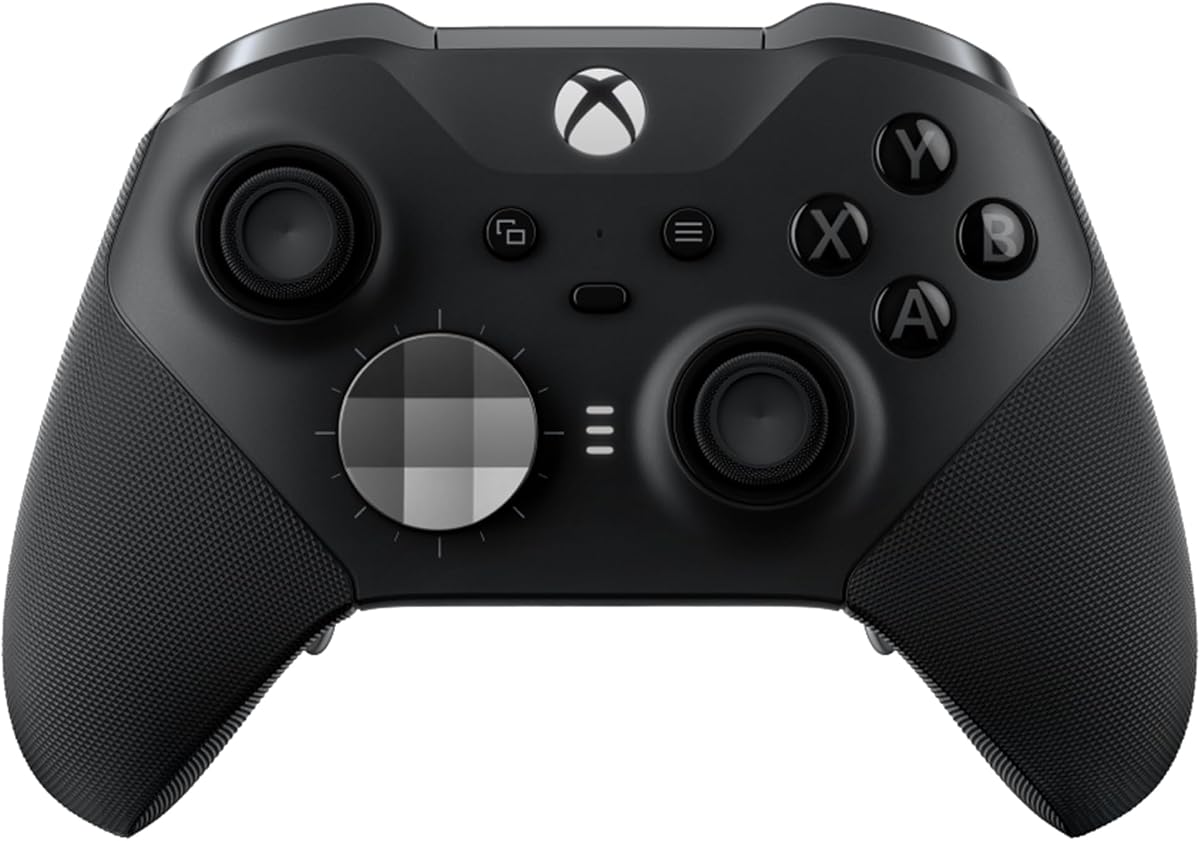
Xbox Wireless Gaming Controller Elite Series 2
4.3Editor score
Adjustable-Tension Thumbsticks
Shorter Hair Trigger Locks
Save and Switch Profiles
Explore the top adaptive Xbox controllers for limited mobility. Compare features, ratings, and customization options to find the perfect controller for your needs.
Finding the right controller when you have limited mobility can be a significant challenge for gamers. Adaptive controllers offer specialized features like customizable buttons, alternative layouts, and ergonomic designs to ensure everyone can play comfortably. These devices are engineered to reduce strain and improve accessibility without sacrificing performance during intense gaming sessions.
We have compared seven leading Xbox-compatible controllers based on their adaptability, build quality, and user feedback. Each product was evaluated on key criteria such as button mapping, trigger sensitivity, and overall comfort for extended use. Our analysis highlights the strengths and weaknesses of each model to help you make an informed decision.
This guide provides detailed reviews of the top options available this month, including premium and budget-friendly choices. Each pick showcases specific features that cater to different mobility needs and play styles. Please note that availability and pricing may change over time, so checking current listings is recommended before purchasing.
4.3Editor score

4.3Editor score

4.2Editor score
This side-by-side comparison highlights the key specifications and features of each controller to help you identify the best fit for your specific needs and preferences.


The GameSir G7 Pro Wired Controller stands out as a top choice for gamers seeking precision and durability. With a solid 4.3 rating, it offers advanced features like Hall Effect analog triggers and TMR sticks that ensure smooth and drift-free performance. This controller is designed to meet the needs of competitive players who require consistent input.
We may earn a commission when you buy through this link, at no additional cost to you.
Key strengths include its ultra-responsive 1000Hz polling rate on PC and the ability to switch between wired, 2.4G, and Bluetooth modes. The Hall Effect triggers provide linear input that is ideal for varied gaming scenarios. Additionally, the GameSir Nexus app allows for deep customization including stick curve adjustments and button mapping.
While the controller is highly capable, users should note that it is wired for Xbox console use which may limit mobility slightly. The gyroscope feature is also limited to PC gaming which might not be relevant for all users. These trade-offs are generally acceptable given the high level of control and precision it offers.
This controller is perfect for gamers who want a reliable and highly customizable option for both console and PC play. It is especially beneficial for those who need precise analog input and responsive triggers for competitive gaming. We recommend it for anyone looking to upgrade their setup with premium features.
The Hall Effect analog triggers offer unmatched smoothness and linear input for precise control during gameplay.
TMR sticks combine durability with accuracy to eliminate stick drift and ensure long-lasting performance.
We may earn a commission when you buy through this link, at no additional cost to you.
The Xbox Elite Series 2 Controller is a premium option that offers over 30 ways to customize your gameplay experience. With a rating of 4.3, it is built for those who demand exceptional performance and durability. The controller includes a wide range of interchangeable components to tailor it to your specific needs.
We may earn a commission when you buy through this link, at no additional cost to you.
Its standout features include adjustable-tension thumbsticks that allow you to fine-tune your aim and three-step hair trigger locks for faster reactions. You can save up to three custom profiles and switch between them on the fly. The controller also supports multiple connectivity options including Xbox Wireless and Bluetooth for versatile use.
One trade-off is the higher price point compared to standard controllers which may not fit all budgets. The design is also bulkier which might be less comfortable for users with very small hands. However these factors are often outweighed by the extensive customization and performance benefits.
This controller is ideal for gamers who want a high-end experience with extensive customization options. It is particularly beneficial for competitive players who need precise control and the ability to switch profiles quickly. We recommend it for those willing to invest in a premium controller.
Fine-tune your aim with thumbsticks that let you adjust resistance for improved accuracy and consistency.
Fire faster and react quicker with hair trigger locks that reduce pull distance for rapid input.
We may earn a commission when you buy through this link, at no additional cost to you.
The 8BitDo Lite SE Controller is an excellent budget-friendly choice designed with accessibility in mind. It holds a rating of 4.2 and features a unified face-button layout with lower-resistance buttons to reduce strain. This controller is officially licensed for Xbox and offers a reliable 2.4G wireless connection.
We may earn a commission when you buy through this link, at no additional cost to you.
Its key strengths include Hall Effect joysticks that prevent drift and dual Super Buttons that are large and programmable without needing software. The design is optimized for ease of use which makes it a great option for gamers with limited mobility. It also includes a 3.5mm audio jack for headset compatibility.
Some trade-offs include limited customization compared to premium models and the lack of a rechargeable battery which requires disposable batteries. However the focus on accessibility and affordability makes it a compelling choice. These factors are minor given the core features it offers at this price point.
This controller is perfect for gamers looking for an affordable and accessible option for Xbox gaming. It is especially beneficial for those who need easier button presses and reliable wireless connectivity. We recommend it for anyone on a budget who still wants quality performance.
Designed for accessibility with a unified face-button layout and lower-resistance buttons for easier use.
Hall Effect joysticks provide durable and drift-free movement for consistent control.
We may earn a commission when you buy through this link, at no additional cost to you.
The HEXGAMING ADVANCE Controller has achieved a perfect 5.0 rating due to its advanced features and high quality. It is built with TMR thumbstick technology that ensures enhanced precision and long-lasting performance. This controller is designed to provide adaptable control across various gaming genres.
We may earn a commission when you buy through this link, at no additional cost to you.
Key strengths include the 4 rear buttons with customizable mapping and 8 interchangeable thumbsticks to match different play styles. The adjustable trigger control allows you to switch between smooth full-pull triggers and click triggers for faster reactions. These features make it highly versatile for competitive gameplay.
One consideration is that the package does not include a charging cable which may be inconvenient for some users. Availability may also be limited compared to more established brands. However the high rating and feature set suggest these issues are minor for most buyers.
This controller is ideal for gamers who want high customization and precision without compromising on quality. It is especially beneficial for those who need adaptable triggers and multiple thumbstick options. We recommend it for anyone looking for a specialized controller with excellent feedback.
Advanced TMR thumbstick technology provides enhanced precision and smoother movement during gameplay.
4 rear buttons with customizable mapping allow for faster and more flexible control during gameplay.
We may earn a commission when you buy through this link, at no additional cost to you.
The BACKBONE One Mobile Gaming Controller offers a console-style experience for mobile devices. With a 4.2 rating it is designed to mirror the familiar Xbox Wireless Controller layout for responsive play on the go. It supports both Android phones and iPhone models with a direct USB-C connection.
We may earn a commission when you buy through this link, at no additional cost to you.
Key strengths include its immersive Xbox design and an integrated Game Hub that organizes titles and services in one place. The low-latency USB-C link minimizes input delay and avoids the need for charging. This makes it ideal for cloud gaming and streaming applications.
Trade-offs include its limitation to mobile devices which restricts use with consoles directly. It also relies on screen interaction for some menu functions which may be less intuitive. However these factors are acceptable given its focus on mobile gaming flexibility.
This controller is perfect for gamers who want a console experience on their mobile devices. It is especially beneficial for those who use cloud gaming services or stream from their console. We recommend it for anyone looking to play on the go with high quality.
Supports Android phones and iPhone models with a direct USB-C connection for instant recognition.
Integrated with the Backbone app to organize titles and services in one place.
We may earn a commission when you buy through this link, at no additional cost to you.
The Xbox Electric Volt Controller provides a modernized design with enhanced comfort during gameplay. It has a high rating of 4.6 which reflects its reliable performance and build quality. This controller features a new hybrid D-pad and textured grip on triggers for better control.
We may earn a commission when you buy through this link, at no additional cost to you.
Key strengths include the Share button for seamless content capture and battery life up to 40 hours. It supports Xbox Wireless and Bluetooth technology for easy switching between devices including consoles and PCs. The USB-C port allows for direct plug and play connectivity.
Trade-offs include limited customization compared to elite models and a standard layout that may not suit all users. However its high rating and comfort features make it a strong standard choice. These factors are minor given the reliability and performance it offers.
This controller is ideal for gamers who want a reliable and comfortable standard Xbox controller. It is especially beneficial for those who need good battery life and multi-device support. We recommend it for anyone looking for a quality wireless option.
Textured grip on the triggers, bumpers, and back-case enhances comfort during gameplay.
The Share button allows you to seamlessly capture and share content such as screenshots and recordings.
We may earn a commission when you buy through this link, at no additional cost to you.
The GameSir G7 Pro Wireless Controller is an officially licensed Xbox controller with no stick drift TMR joysticks. It holds a 4.4 rating and is designed in collaboration with HoYoverse for a unique style. This controller offers a stable 2.4G wireless connection for reliable console gameplay.
We may earn a commission when you buy through this link, at no additional cost to you.
Key strengths include a 1000Hz polling rate on PC for ultra-low latency and Hall Effect analog triggers with seamless switching. The Smart Auto Start-Stop Charging Station provides extended battery life and convenience. Additionally, it features four remappable buttons for customized control.
Trade-offs include the 1000Hz polling rate being supported on PC only which may not affect Xbox users. The design is also specific which may not appeal to everyone. However these factors are minor given the performance and customization options it provides.
This controller is perfect for gamers who want a high-performance wireless option for both Xbox and PC. It is especially beneficial for those who need zero drift and high responsiveness. We recommend it for anyone looking for a premium wireless experience.
Enjoy ultra-smooth precise control with virtually zero stick drift powered by Mag-Res TMR technology.
The Smart Auto Start-Stop Charging Station delivers extended battery life for hours of uninterrupted gameplay.
We may earn a commission when you buy through this link, at no additional cost to you.
Selecting the right adaptive controller involves evaluating several key factors to ensure it meets your specific needs.
The ergonomic design of a controller is crucial for reducing strain during extended gaming sessions. Look for controllers with textured grips and comfortable shapes that fit your hand naturally.
Prioritize models with features like wrap-around grips to ensure comfort over time.
Customizable buttons allow you to map functions to locations that are easier to reach or press. This is especially important for those with limited mobility who need specific layouts.
Choose controllers that offer rear buttons or remappable face buttons for flexibility.
Adjustable triggers can reduce the force needed to activate actions which helps users with limited hand strength. Some controllers offer switchable triggers for different play styles.
Opt for controllers with hair trigger locks or switchable trigger mechanisms.
Advanced joystick technology like Hall Effect sensors ensures smooth movement and prevents drift. This leads to more precise and reliable control over time.
Look for controllers featuring Hall Effect or TMR joystick technology for durability.
Consider how you plan to connect the controller whether via wired or wireless methods. Different modes may offer varying levels of latency and convenience.
Select controllers with multiple connectivity options like Bluetooth and 2.4G wireless for versatility.
Long battery life is essential for uninterrupted gaming without frequent recharging or battery changes. This ensures you can focus on gameplay without interruptions.
Choose controllers with at least 40 hours of battery life or a charging station included.
Ensure the controller is compatible with your specific console or PC setup. Officially licensed controllers often provide better integration and features.
Verify compatibility with Xbox Series X S One and PC before purchasing.
High build quality ensures durability and reliability over time. This reduces the need for frequent replacements and maintains performance.
Look for controllers with reinforced components and high user ratings for durability.
Proper setup is essential for maximizing the benefits of an adaptive controller. Follow the manufacturer's instructions to configure button mappings and sensitivity settings according to your needs.
Regular cleaning helps maintain the functionality and longevity of your controller. Use a soft, dry cloth to wipe down the surface and avoid liquids that could damage internal components.
Store your controller in a safe place when not in use to prevent damage. Using a protective case or charging dock can help keep it in optimal condition.
Adaptive controllers feature customizable layouts, reduced resistance buttons, and ergonomic designs to accommodate users with limited hand strength or dexterity. These features help reduce strain and improve control during gameplay.
Yes, most controllers in this guide are compatible with Xbox Series X and S. They support standard connectivity options like Xbox Wireless and Bluetooth for seamless integration.
Some controllers offer optional software for advanced customization like button mapping and trigger settings. However basic functionality works without installing any software on your console.
Yes, there are budget-friendly controllers designed with accessibility in mind. These options provide essential features like lower resistance buttons at a more affordable price point.
Battery life varies by model but many modern controllers offer up to 40 hours of use. Rechargeable options with charging stations provide extended play without frequent battery changes.
Many adaptive controllers are compatible with PC gaming via Bluetooth or USB-C connection. They often include additional features like high polling rates for responsive performance on PC.
Most reputable brands offer warranty coverage for their controllers against defects. Check the product details or manufacturer website for specific warranty terms and conditions.
Use a soft dry cloth to wipe the surface and avoid liquids. For sticky residue use a slightly damp cloth and dry immediately to prevent damage to internal components.
Choosing the right adaptive controller depends on your specific needs and gaming preferences. The GameSir G7 Pro Wired and Xbox Elite Series 2 offer top-tier features for those seeking maximum customization and performance.
For those prioritizing budget and accessibility the 8BitDo Lite SE provides a compelling alternative with essential adaptive features. Consider factors like button customization and connectivity options when making your decision.
Remember that availability and pricing may change so check current listings before purchasing. Investing in the right controller can significantly enhance your gaming experience and comfort.