
xTool M2 Laser Engraver
4.5Editor score
Built-in Dual Cameras
Class 1 Enclosed Safety
Versatile Dual-Mode Architecture
Starting a small business often requires versatile tools that can handle diverse materials with precision. An engraving machine allows you to personalize products, create custom signage, and produce high-quality branded merchandise efficiently.
We compared eight top-rated laser engravers based on power, precision, software compatibility, and ease of use. Our analysis focuses on models that balance performance with affordability for entrepreneurs and hobbyists alike.
Each pick highlights key strengths, pros, cons, and ideal use cases to help you make an informed decision. Prices and availability change frequently, so verify current details before purchasing your next tool.
4.5Editor score

4.3Editor score

4.3Editor score
As an Amazon Associate we earn from qualifying purchases.
This side-by-side comparison helps you evaluate the core specifications of each machine. From laser power and workspace size to safety features and software support, find the model that fits your workflow best.


The K15 Pro stands out as a top contender for small business owners seeking a reliable entry-level laser engraver. With a verified 10.36–10.58W output, it delivers consistent performance on over 300 materials, including wood, acrylic, and coated metals. Its user-friendly software and offline capabilities make it an excellent choice for production environments where downtime is costly.
We may earn a commission when you buy through this link, at no additional cost to you.
This machine features a dual-fan cooling system that reduces heat buildup by 50%, allowing for extended use without overheating. The 0.01mm precision ensures intricate details remain sharp, which is crucial for personalized jewelry or branded merchandise. Its compact A4 workspace fits easily on most desks, and the included starter kit provides everything you need to begin immediately.
While the K15 Pro offers impressive value, its working area is limited to 11.8×7.9 inches. This may restrict larger projects like full-size signs without segmentation. Additionally, the lack of an integrated enclosure means you must manually manage safety and ventilation, which can be a consideration for shared workspaces.
If you need a versatile, affordable engraver that balances power and ease of use, the K15 Pro is an outstanding investment. It is particularly well-suited for entrepreneurs crafting tumblers, coasters, and small home decor items. Its community support and upgrade path ensure you won't outgrow the machine quickly.
The ability to load files onto a TF card and engrave without a PC is a major advantage for production runs. This feature ensures you can focus on multiple jobs simultaneously without tying up a computer.
Users can later add an optional 2W IR laser head to engrave stainless steel and aluminum, making this a future-proof option for expanding your service offerings.
We may earn a commission when you buy through this link, at no additional cost to you.
The ACMER S2 is designed for makers who need more room to work without sacrificing detail. Its true 12W laser module and 300x300mm workspace allow you to tackle larger signs, layered art, and multi-piece layouts in a single session. The refined 0.08×0.08mm laser spot ensures clean, consistent results for intricate patterns.
We may earn a commission when you buy through this link, at no additional cost to you.
Safety is a priority with this model, featuring an anti-UV protective shield and motion protection that pauses operation if abnormal movement is detected. The machine handles over 100 materials, cutting up to 15mm paulownia wood and 12mm black acrylic with multiple passes. This flexibility is ideal for businesses offering both engraving and light cutting services.
The larger workspace and higher power mean the S2 is bulkier than pocket-sized options. Assembly and setup take a bit longer than ultra-compact units, but the results justify the effort. While the price is higher than basic models, the increased capability and precision often pay off for serious crafters.
Choose the ACMER S2 if you regularly produce medium-to-large projects and need the precision to match. Its robust build and safety features make it a reliable partner for growing small businesses focused on quality and variety.
The 300x300mm bed gives you ample room to arrange multiple items at once, reducing setup time and increasing production efficiency for batch orders.
Motion protection and the anti-UV shield provide peace of mind, especially if you are working in a shared space or around family members.
We may earn a commission when you buy through this link, at no additional cost to you.
The AlgoLaser Pixi redefines convenience with its standalone touchscreen interface, eliminating the need for a computer connection. Users can draw, type, or upload designs directly on the device, making it incredibly accessible for those without technical expertise. Its Class 1 safety certification and auto-pause lid provide a secure environment for home use.
We may earn a commission when you buy through this link, at no additional cost to you.
Despite its portability, the Pixi delivers professional results with adjustable power and speed settings fine-tuned for crisp details on various materials. The reverse engraving feature produces high-contrast results on acrylic and glass, expanding your creative options. Built-in tutorials and over 160 templates further simplify the learning curve for new users.
While the touchscreen is a significant convenience, the machine's working area is smaller than full-sized models, which may limit larger projects. Additionally, the 10W power is sufficient for most materials but may not match the cutting depth of higher-wattage units on thicker substrates.
If you prioritize ease of use and portability, the AlgoLaser Pixi is an excellent choice. It is ideal for educators, hobbyists, and small businesses that need a straightforward, safe engraver that requires minimal setup and maintenance.
The ability to operate without a PC means you can place the engraver anywhere, making it perfect for workshops with limited desk space or mobile setups.
This unique feature allows you to achieve high-contrast engravings on transparent materials, a feature often reserved for much more expensive machines.
We may earn a commission when you buy through this link, at no additional cost to you.
The Artilume Laser Engraver is designed for maximum portability, with a foldable design that saves space when not in use. Its smartphone app control allows you to engrave directly from your phone for simple tasks, while still supporting advanced software for more complex projects. The rigid aluminum alloy frame ensures stable engraving with 0.01mm accuracy.
We may earn a commission when you buy through this link, at no additional cost to you.
With up to 10,000 mm/min maximum speed, this machine efficiently handles projects like coasters, small signs, and leather patches. It engraves a wide range of materials, including wood, leather, and coated metals. For bare metal, using marking spray allows for effective marking, expanding its utility beyond standard diode capabilities.
The compact 200x150mm workspace is a limitation for larger items but perfect for small, detailed work. The 7W power is adequate for engraving and light cutting, though it may struggle with thick materials compared to 10W units. This makes it a best option for on-the-go customization.
Choose the Artilume 7W if you need a lightweight, affordable tool for personalized gifts or events. Its speed and portability make it a great addition for craft fairs or small studios with limited space.
Controlling the engraver via an app is a game-changer for quick edits and on-site customization, making it ideal for mobile businesses.
The foldable design ensures the machine can be stored easily when not in use, making it a practical choice for small homes or shared workspaces.
We may earn a commission when you buy through this link, at no additional cost to you.
The BlazeX M3 is a comprehensive starter kit that includes a protective enclosure, tool kit, and essential materials. This all-in-one approach ensures you can start creating immediately, making it ideal for beginners or those focused on safety. The Class 1 safety rating and integrated fan exhaust provide a secure and quiet workspace for daily use.
We may earn a commission when you buy through this link, at no additional cost to you.
With a high-precision 10W laser module, the M3 delivers detailed engraving and cutting on various materials. The honeycomb bed is integral for stable support and airflow, enhancing cut quality. Its wide compatibility with popular software like LightBurn and LaserGRBL ensures you have the tools to customize your workflow effectively.
While the enclosure is a significant benefit, some users may find the interface basic compared to more premium models. The upgrade ecosystem is available but may not be as extensive as other brands. However, the value provided by the included accessories is hard to match at this price point.
If you need a safe, ready-to-use engraver without extra costs, the BlazeX M3 is a top recommendation. It is perfect for educational use, home studios, and small businesses prioritizing safety and immediate productivity.
The included enclosure ensures you don't need to buy additional protective gear, saving money and ensuring compliance with safety standards immediately.
The honeycomb bed design minimizes backscatter and provides better support for cuts, resulting in cleaner edges and less material waste.
We may earn a commission when you buy through this link, at no additional cost to you.
The xTool M2 redefines the DIY laser landscape with its innovative dual-mode architecture and built-in dual cameras. This system offers a real-time preview of your workspace, fusing vision with motion control for a 'Place & Go' experience. The result is high accuracy with minimal wasted material, a key benefit for businesses producing custom products.
We may earn a commission when you buy through this link, at no additional cost to you.
With a Class 1 safety rating and fully enclosed design, the M2 is one of the safest options for home and office use. It supports over 300 materials and comes with 10W diode lasers. The modular design allows you to add an CMYK Inkjet module or 3W IR laser separately, transforming the machine into a full-color printer or metal engraver.
The xTool Studio software is beginner-friendly, offering hundreds of templates and an integrated AI image generator. This reduces the learning curve significantly, allowing you to focus on design rather than technical setup. However, the premium price and cost of add-ons may be a barrier for some small businesses.
Choose the xTool M2 if you want a premium, safe, and highly expandable laser engraver. It is perfect for entrepreneurs who need versatility and precision without compromising on safety or user experience.
The cameras eliminate guesswork when positioning items, allowing for precise alignment even for complex or irregular shapes.
Adding modules like the CMYK Inkjet allows you to create full-color prints, opening up new product lines like custom stickers and labels.
We may earn a commission when you buy through this link, at no additional cost to you.
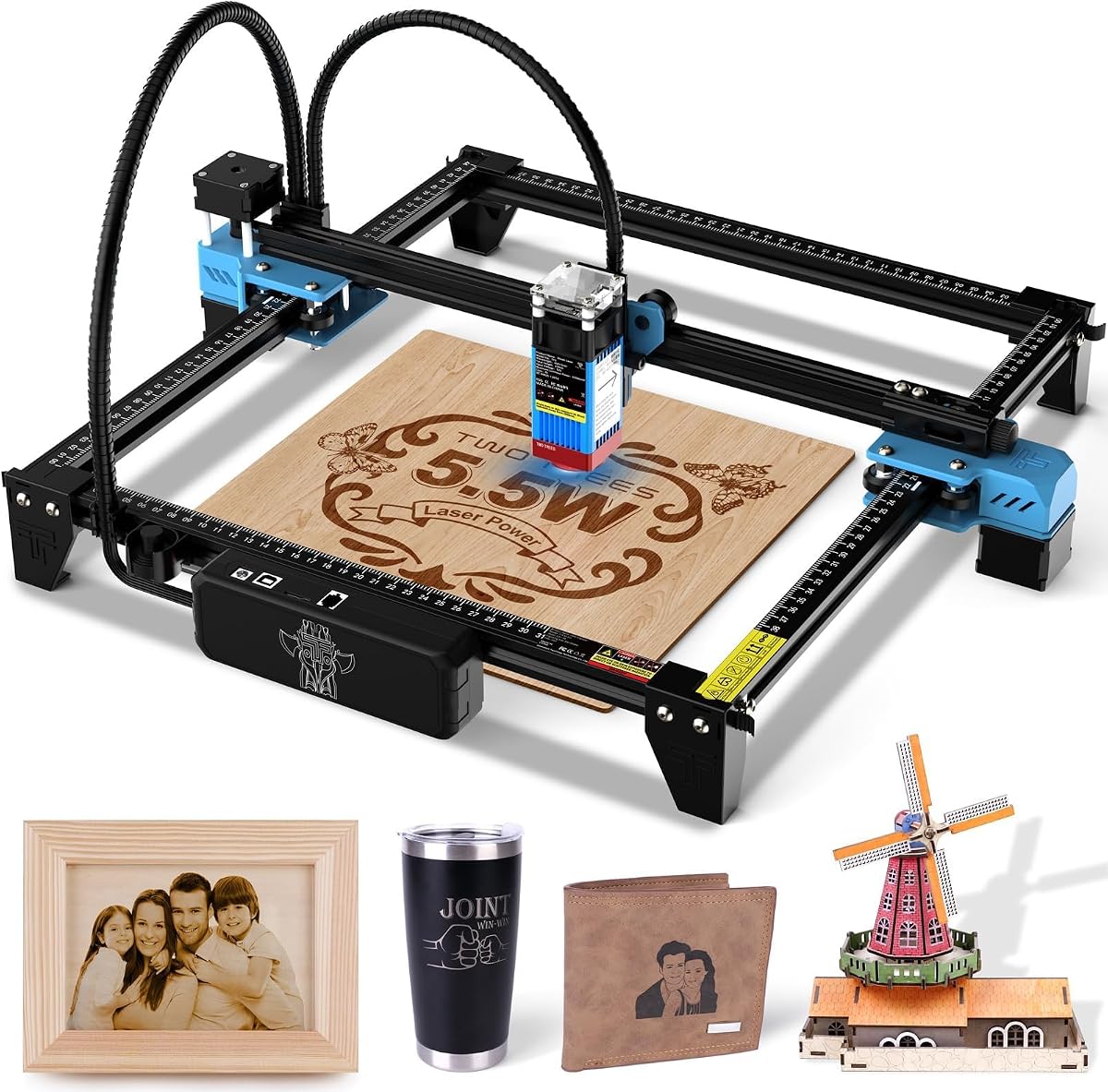
The Twotrees TTS-55 Pro balances performance and affordability with a 5500mW laser and air assist support. This combination allows for deeper, cleaner cuts in materials like wood and acrylic, while the 32-bit control board enables impressive engraving speeds. The large 300x300mm workspace accommodates various project sizes, making it versatile for hobbyists and small businesses.
We may earn a commission when you buy through this link, at no additional cost to you.
Wi-Fi support and TF card offline engraving offer flexible control options, allowing you to work wirelessly from your phone or computer. The advanced compression laser technology delivers fine detail, and the support team is available 24/7 for assistance. This ensures you can maintain productivity without extended downtime.
While the power is slightly lower than 10W models, the air assist compensates by improving cut quality. The machine is robust but requires proper ventilation for best results. It is a solid choice for those who need speed and space without a premium price tag.
If you need a high-speed, budget-friendly engraver with Wi-Fi capability, the Twotrees TTS-55 Pro is an excellent value. It is well-suited for small businesses focused on efficiency and cost-effective production.
The included metal air-assisted nozzle helps prevent charring and improves cut quality, which is critical for professional-looking results on wood.
The 32-bit MCU ensures smooth operation at high speeds, reducing the time required for complex jobs and increasing daily output.
We may earn a commission when you buy through this link, at no additional cost to you.
The ACMER S1 is the ultimate entry-level engraver, offering a lightweight, preassembled design that requires minimal setup. With 2500mW power and a compact 130x130mm workspace, it is ideal for small projects like keychains, small signs, and personal gifts. Its durable aluminum alloy frame ensures stability despite its portability.
We may earn a commission when you buy through this link, at no additional cost to you.
The free Acmerstudio software is user-friendly and supports popular file formats, making it easy for beginners to get started. It achieves 0.01mm repeatable positioning accuracy, ensuring consistent results for detailed engraving. While it may not handle heavy-duty tasks, it provides a low-risk introduction to laser engraving.
The S1's limited power means it is best suited for engraving and very light cutting. It lacks advanced features like enclosure or offline modes, but the price point makes it accessible. For those on a tight budget or testing the waters, it is an ideal starting point.
Choose the ACMER S1 if you need an affordable, portable engraver for personal projects or very small business needs. It is a practical tool for anyone looking to explore laser engraving without a significant upfront investment.
With just a minute for laser head installation, the S1 reduces setup time, allowing you to start projects immediately after unboxing.
The low cost makes this the most accessible option for beginners, allowing you to learn the basics of laser engraving without financial strain.
We may earn a commission when you buy through this link, at no additional cost to you.
Selecting the right laser engraver involves balancing power, precision, safety, and budget. This guide outlines the key factors to consider before making your purchase.
Laser power, measured in watts (W), determines the machine's ability to cut and engrave different materials. Higher wattage, such as 10W or 12W, allows for deeper cuts and faster processing, which is crucial for production environments. For small businesses focused on detailed engraving on wood, leather, or coated metals, a 10W unit often provides the best balance. Consider your primary materials; if you need to cut thicker substrates regularly, investing in higher power will increase efficiency.
Look for a machine with verified power output rather than inflated claims. Consistent performance ensures you can meet deadlines without compromising quality.
The workspace dimensions define the maximum size of projects you can produce in a single run. Smaller work areas, like 130x130mm, are compact and portable but limit larger designs. Larger beds, such as 300x300mm, offer more flexibility for signs or multiple pieces. Consider your physical space and the typical size of your products when choosing a machine. If you plan to move the engraver frequently, a lighter, foldable design may be more practical.
For small businesses, a workspace that matches your most common project sizes ensures you aren't paying for unused capacity or struggling with segmentation.
Laser engravers emit harmful radiation and fumes, so safety features are non-negotiable. Class 1 enclosed machines provide the highest level of safety by filtering radiation and containing fumes. This is particularly important for home businesses or shared workspaces. If you choose an open-frame machine, ensure you use proper ventilation and protective eyewear. Some models include shields or auto-pause lids that stop the laser when opened, adding an extra layer of protection.
Prioritizing safety not only protects your health but also ensures compliance with local regulations and reduces liability.
Software dictates how easy it is to design and manage projects. User-friendly options like free proprietary software or compatibility with industry standards like LightBurn and LaserGRBL offer flexibility. Some machines feature touchscreens or mobile app control, simplifying the workflow for beginners. Check if the software supports your file types and if offline operation is available, which can streamline batch processing without relying on a computer.
A intuitive software reduces the learning curve, allowing you to focus on creativity and production rather than technical troubleshooting.
Precision determines the clarity of your engravings, especially for intricate designs or small text. Look for machines with positioning accuracy of 0.01mm or finer. This ensures consistent results across different materials, which is vital for professional branding. High-precision optics and stable frames contribute to sharper lines and better image reproduction. Testing samples on different materials can help you gauge the machine's real-world performance.
Investing in precision pays off in customer satisfaction, as detailed, crisp engravings are perceived as higher value.
Extended use generates heat, which can affect performance and lifespan. Machines with efficient cooling systems, such as dual-fan modules, maintain consistency during long production runs. Durability also depends on the build quality, like aluminum alloy frames, which provide stability and resistance to wear. Check the warranty and availability of replacement parts, as these indicate manufacturer confidence and long-term support.
A durable machine minimizes downtime and maintenance costs, ensuring your business runs smoothly over time.
Responsive customer support and a robust user community can be invaluable when troubleshooting or learning new techniques. Look for brands that offer tutorials, active forums, and responsive warranty service. This support network helps you overcome challenges quickly and keep production on track. For small businesses, reliable after-sales service can make the difference between a successful tool and a frustrating one.
Choose a manufacturer with a track record of supporting their users, ensuring you have resources when you need them most.
Consider whether the machine allows for upgrades, such as adding infrared lasers for metal engraving or rotary attachments for cylindrical objects. This expandability can future-proof your investment, allowing your business to grow without replacing equipment. Accessories like air assist, honeycomb beds, and enclosures can also enhance performance. Verify that these options are compatible and reasonably priced.
A flexible machine adapts to your evolving needs, offering a better return on investment as your business expands its capabilities.
Before operating your laser engraver, ensure you have proper ventilation and protective gear. Place the machine on a stable, heat-resistant surface and verify that all safety covers or enclosures are properly secured. Calibrate the focus according to the manufacturer's instructions to ensure optimal engraving quality.
When engraving, start with a test piece to adjust power and speed settings for your specific material. Use software to upload your design and preview the job to prevent wasted materials. During operation, monitor the process closely and never leave the machine unattended for extended periods.
After use, clean the lens and bed regularly to maintain performance. Store the machine in a dry, dust-free environment and check connections periodically. Following these care routines will extend the lifespan of your equipment and ensure consistent results over time.
Most modern laser engravers work with wood, leather, acrylic, coated metals, and paper. Higher-wattage machines can cut thicker wood and acrylic. Always check manufacturer guidelines for safe materials; bare metals require specific laser types or marking sprays.
An enclosure improves safety by containing fumes and radiation. For home-based businesses or shared spaces, a Class 1 enclosed machine is recommended. If using open-frame models, ensure you have adequate ventilation and protective eyewear.
Speed varies by model and power. Many units reach up to 10,000mm/min to 30,000mm/min. Faster speeds are ideal for light markings, while slower speeds are needed for deep engraving or cutting. Balance speed with quality for best results.
Standard diode lasers can engrave coated metals but struggle with bare metal. For stainless steel or aluminum, an infrared laser module or marking spray is required. Some machines offer optional IR heads for this purpose.
Most require a computer for design software, but some models offer offline operation via SD cards or touchscreens. Mobile app control is also available on newer models, providing flexibility for different workflows.
Regularly clean the lens, mirrors, and bed to prevent dust buildup. Check belts and screws for tightness. Store the machine in a dry place. Refer to the manual for specific maintenance intervals and part replacements.
Selecting the right laser engraver is a critical decision for any small business looking to expand its product offerings. The K15 Pro offers a balanced blend of power and affordability, while the xTool M2 provides premium safety and expandability. For those on a budget, the ACMER S1 delivers entry-level accessibility with ease of use.
Prioritize factors like laser power, workspace size, and safety features based on your specific business needs. Investing in a machine that matches your production goals will help you maintain quality and efficiency as your business grows. Remember that software compatibility and support also play vital roles in your daily workflow.
Prices and availability change frequently, so verify current details before purchasing. Choose the model that offers the best value and flexibility for your unique requirements. With the right engraver, you can create personalized, high-quality products that elevate your brand and customer satisfaction.