
FIFINE K669B USB Microphone
4.5Editor score
Plug and play
Durable metal design
Clear output voice
Discover the top USB microphones for Youtube creators. Compare features, ratings, and performance of the best mics for streaming and podcasting.
Creating high-quality video content requires clear audio that engages viewers from the start. A reliable USB microphone simplifies this process by delivering professional sound without complex setups. Whether you stream games, host podcasts, or record tutorials, the right mic ensures your voice stands out.
This guide evaluates ten top-rated USB microphones based on sound quality, ease of use, and value. We analyzed user reviews, technical specifications, and real-world performance to help you find the best fit. Each model offers unique strengths for different recording needs and budgets.
Each pick includes detailed pros, cons, and key features to streamline your decision-making process. You will see how these microphones perform across various scenarios like gaming, talking, and music recording. Keep in mind that availability and pricing may fluctuate over time.
4.5Editor score

4.6Editor score

4.3Editor score
Explore this side-by-side comparison of ten leading USB microphones designed for YouTube creators. Each entry highlights essential specifications to help you quickly identify the model that best matches your recording style and technical needs.

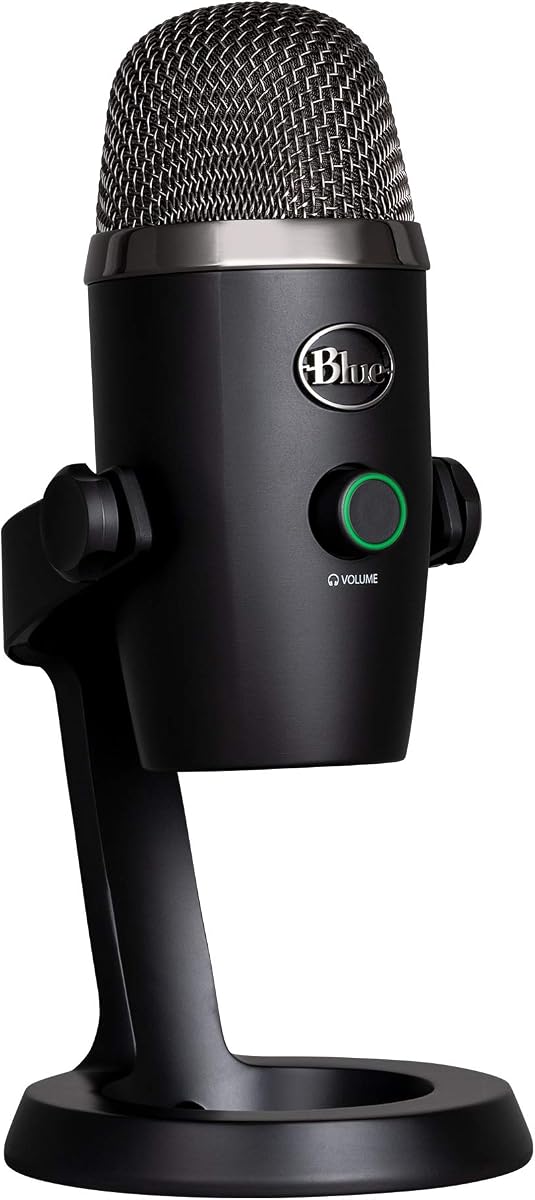



The Logitech Creators Blue Yeti stands out as a top choice for serious YouTube creators needing professional audio. With a 4.6 rating, it delivers powerful, clear sound suitable for streaming, podcasting, and music recording. Its custom three-capsule array ensures your voice sounds broadcast-ready without extra hardware.
We may earn a commission when you buy through this link, at no additional cost to you.
Key strengths include its four pickup patterns—cardioid, omni, bidirectional, and stereo—which offer flexibility for solo recordings or group interviews. The Blue VO!CE software enhances vocals with effects and modulation, while onboard controls let you adjust gain and mute instantly. This versatility makes it ideal for diverse content styles.
However, its sensitivity means it picks up desk vibrations, so a shock mount or stand is essential for clean audio. Additionally, its size requires desk space, which may be tight for smaller setups. These trade-offs are acceptable given the superior audio quality and flexibility it provides.
Buyers seeking a reliable, high-performance mic for long-term use will find this model worth the investment. It suits streamers, podcasters, and voice-over artists who need consistent results across platforms. Overall, the Blue Yeti remains a benchmark for USB microphones in 2026.
The three-capsule array captures rich vocals with minimal distortion, perfect for high-fidelity YouTube videos.
Switch between pickup patterns to match your setup, from solo vlogging to panel discussions.
We may earn a commission when you buy through this link, at no additional cost to you.
The FIFINE K669B offers exceptional value for new YouTubers on a tight budget. Rated 4.5, it provides crisp sound for meetings, vocals, and streaming without demanding extra drivers. Its solid metal build ensures longevity, making it a practical start for content creators.
We may earn a commission when you buy through this link, at no additional cost to you.
Strengths lie in its ease of use and reliable cardioid pattern that focuses on your voice while reducing background noise. The included volume knob lets you control levels quickly, and the durable design withstands regular handling. This simplicity appeals to those prioritizing function over fancy features.
Limitations include the lack of advanced options like RGB lighting or multiple pickup modes, which might restrict creative setups. Also, it does not work with Xbox or phones, limiting mobile use. These constraints are minor for desktop-focused creators seeking basic quality.
This mic is ideal for beginners who want decent audio without complexity. It works well for Zoom calls, Discord chats, and simple YouTube recordings. If budget is a concern, the K669B delivers a solid foundation for growth.
Access professional-grade condenser tech without spending a premium, perfect for starting creators.
Metal construction and stable tripod ensure durability during daily streaming or recording sessions.
We may earn a commission when you buy through this link, at no additional cost to you.
The RØDE PodMic USB targets professionals wanting broadcast-quality audio directly to their computer. With a 4.3 rating, it combines XLR and USB-C connectivity for maximum flexibility. Its dynamic capsule rejects room echo and keyboard noise, making it perfect for podcasting and streaming.
We may earn a commission when you buy through this link, at no additional cost to you.
Key advantages include the onboard APHEX DSP, which adds compression and presence via a free app. This reduces post-production work, while zero-latency monitoring ensures real-time feedback. The sturdy design reflects its premium status, suitable for serious creators seeking studio-grade results.
Drawbacks involve the higher cost and weight, which may be overkill for casual users. It also requires a dedicated spot on your desk due to its size. These factors are justified for those needing top-tier sound without an external interface.
This mic suits YouTubers focused on high-production podcasts or voice work. It integrates smoothly with Mac, PC, and mobile devices. If quality is paramount, the PodMic USB delivers exceptional performance.
Use XLR for studio setups or USB-C for quick laptop recording without additional gear.
On-board DSP provides studio-style enhancement directly from the microphone.
We may earn a commission when you buy through this link, at no additional cost to you.
The ZealSound Podcast Microphone excels at filtering background noise for clearer recordings. Rated 4.4, it offers studio-quality sound with a 40Hz–18kHz response. Its intelligent noise reduction mode helps eliminate fan hum and keyboard clicks, making it great for home studios.
We may earn a commission when you buy through this link, at no additional cost to you.
Features like adjustable echo and gain knobs provide creative control without software. Plug-and-play compatibility extends to phones and tablets via included adapters, adding versatility. Real-time monitoring ensures you hear your audio exactly as recorded.
However, fully utilizing noise reduction may require understanding the mute button controls. Users new to these settings might find adjustments tricky initially. This learning curve is minor once accustomed to the physical controls.
Ideal for creators in noisy environments, this mic ensures focus on your voice. It suits podcasting, online classes, and streaming. The all-in-one package with adapters makes it a practical choice for multi-platform creators.
Advanced reduction mode isolates your voice from ambient sounds for cleaner output.
Works seamlessly with PC, mobile, and tablets thanks to included USB-C and Lightning adapters.
We may earn a commission when you buy through this link, at no additional cost to you.
The Logitech Blue Yeti Nano delivers big sound in a smaller package. With a 4.6 rating, it features two custom capsules for detailed voice capture. Its compact design fits neatly on desks, making it perfect for streamers with limited space.
We may earn a commission when you buy through this link, at no additional cost to you.
Strengths include Blue VO!CE software for vocal enhancement and onboard controls for gain and mute. The two pickup patterns—cardioid and omni—cover most solo and group needs. No-latency monitoring ensures precision during live recording sessions.
Compared to the full Yeti, it has fewer patterns and a smaller base, which might limit flexibility. Some users find the stand less robust for boom arm attachment. These limitations are acceptable for its size and performance trade-off.
This mic suits gamers and vloggers wanting professional audio without clutter. It works well on PC and Mac for Discord or YouTube. Its aesthetic appeal and quality make it a top contender for compact setups.
A smaller footprint keeps your desk organized while maintaining broadcast-level audio.
Dual custom capsules ensure your voice sounds rich and detailed on camera.
We may earn a commission when you buy through this link, at no additional cost to you.
The FIFINE AmpliGame AM8 combines gaming style with flexible connectivity. Rated 4.5, it uses a dynamic capsule to reject background noise during intense streams. Its USB and XLR options let you start simple or upgrade to an interface later.
We may earn a commission when you buy through this link, at no additional cost to you.
Features like RGB lighting and a tap-to-mute button enhance the gaming experience. The dynamic design ensures your voice remains clear even with loud game sounds. A windscreen helps reduce plosive noise, improving overall clarity.
Limitations include that RGB and function keys only work in USB mode, limiting XLR utility for effects. It is also heavier than typical condensers, requiring a sturdy mount. These are minor issues for streamers prioritizing durability and style.
This mic is ideal for Twitch and YouTube gamers needing reliable audio and flair. It works well on PS5 and PC. The upgrade path to XLR makes it a smart long-term choice.
Dynamic capsules filter out keyboard clatter and game audio for focused vocals.
RGB lighting matches your gaming rig, adding visual appeal to your streaming setup.
We may earn a commission when you buy through this link, at no additional cost to you.
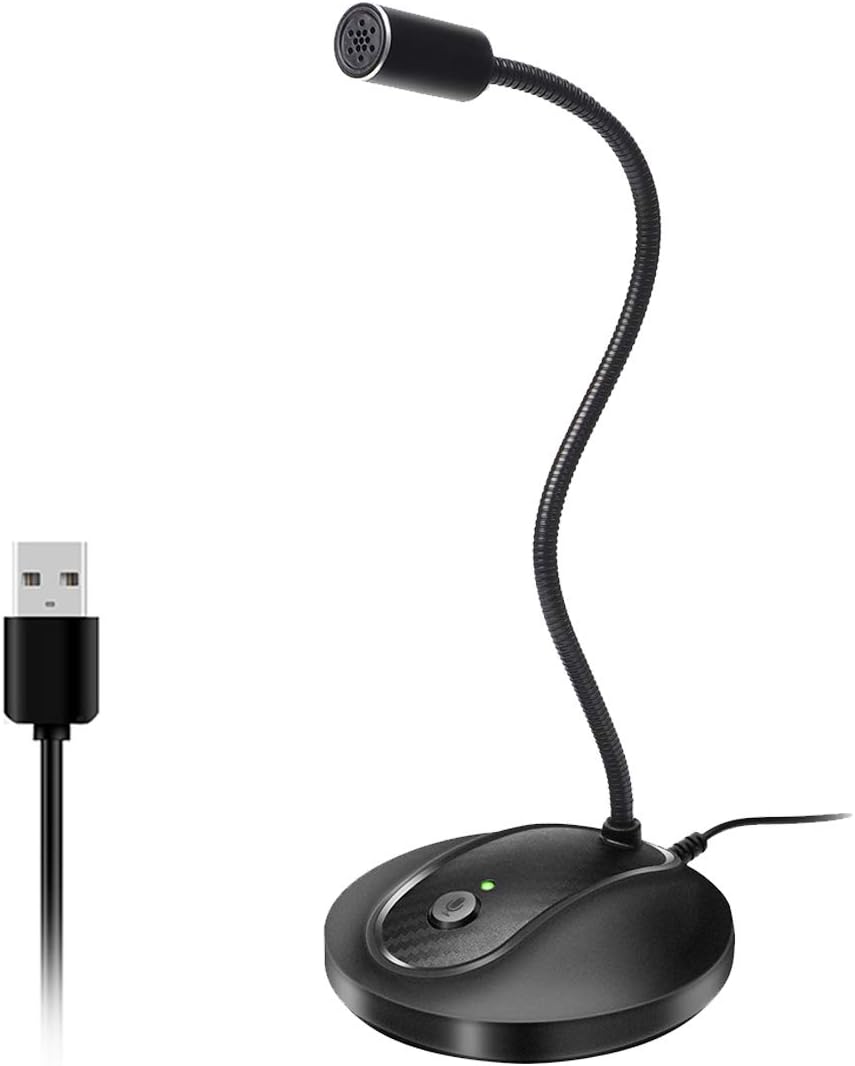
The USB Microphone with a 360-degree gooseneck offers unique flexibility for varied setups. With a 4.4 rating, it uses an omnidirectional condenser to capture voice clearly. The adjustable neck lets you position the mic perfectly for your angle.
We may earn a commission when you buy through this link, at no additional cost to you.
Benefits include a one-click mute button with LED status and noise-canceling tech for clean speech. Its plug-and-play nature works with Windows and macOS seamlessly. The solid metal and ABS construction ensures stability on desks.
Downsides include potential instability if the neck is not tightened, and lower audio fidelity compared to dedicated mics. It might not suit high-production needs. However, for casual use, it provides good value and adaptability.
Buyers needing a versatile mic for dictation or light recording will appreciate this model. It fits well in home offices or gaming corners. The gooseneck allows easy adjustments without moving your PC.
Adjust the gooseneck to any angle for optimal voice capture in tight spaces.
Mute and LED indicators provide instant feedback during calls and recordings.
We may earn a commission when you buy through this link, at no additional cost to you.
The FIFINE AmpliTank K688CT provides a full solution with a boom arm and mic. Rated 4.5, its dynamic capsule reduces ambient noise for clear podcasts. The kit includes a shock mount and windscreen, making it ready to use.
We may earn a commission when you buy through this link, at no additional cost to you.
Strengths include versatile USB/XLR connections and a robust boom arm that minimizes vibrations. Onboard gain and mute controls offer easy management. The cardioid pattern ensures your voice stays centered during streams.
Limitations involve initial setup of the clamp and arm, which may take time. Some function keys work only in USB mode, limiting XLR customization. These issues are minor given the comprehensive package.
This kit suits podcasters and streamers wanting an all-in-one setup. It saves time and money versus buying separately. With a solid boom arm, it delivers professional results for YouTube.
Includes boom arm, shock mount, and windscreen for immediate professional use.
Dynamic capsule rejects background noise, keeping your voice clear and centered.
We may earn a commission when you buy through this link, at no additional cost to you.
The FIFINE AmpliGame A6T brings gaming aesthetics to your desk with vivid RGB. Rated 4.6, it delivers warm, energetic vocals via an upgraded condenser capsule. The kit includes a boom arm, pop filter, and long cable for flexible placement.
We may earn a commission when you buy through this link, at no additional cost to you.
Features like touch-mute and volume knobs improve usability during live streams. The cardioid pattern isolates voice, reducing game noise. RGB effects make your channel visually appealing without extra lighting gear.
Drawbacks include the RGB requiring USB power and a larger desk footprint. It may also be sensitive to desk bumps. These are acceptable for streamers prioritizing visuals and sound quality.
This kit is perfect for gamers on YouTube wanting a polished look. It works well on PS5 and PC. The included accessories simplify setup for immediate recording.
All needed accessories like boom arm and pop filter come in the box for quick installation.
Dual-tone RGB lighting adds a dynamic visual element to your gaming videos.
We may earn a commission when you buy through this link, at no additional cost to you.
The MAONO A04 delivers high-resolution audio with a 192kHz/24Bit chipset. Rated 4.5, it captures detailed vocals perfect for music or podcasts. The kit includes a shock mount, pop filter, and scissor arm for a professional setup.
We may earn a commission when you buy through this link, at no additional cost to you.
Benefits include strong bass response and anti-interference on the cable. Its plug-and-play nature works with Discord, Zoom, and Twitch easily. The arm stand adjusts to various positions, keeping the mic stable.
Limitations include lack of visual features like RGB and reliance on arm adjustments. It may not suit gamers wanting lighting effects. However, for pure sound quality, it excels among budget-friendly kits.
Buyers focused on clear, detailed voice recordings will love this model. It suits voice-over artists and educators. The high sampling rate ensures your audio sounds polished online.
192kHz sampling delivers rich, studio-quality audio for professional productions.
Includes shock mount and arm for noise-free, adjustable recording setups.
We may earn a commission when you buy through this link, at no additional cost to you.
Choosing the right USB microphone depends on your specific recording needs and environment. Consider these factors to find a model that delivers clear audio and fits your workflow.
Condenser mics are more sensitive and capture detailed sound, ideal for quiet studios or vocals. Dynamic mics are robust and reject background noise better, suiting noisy environments or gaming.
Choose condensers for podcasts and dynamic for live streaming with ambient sounds.
Pickup patterns determine how the mic captures sound. Cardioid focuses on the front for solo use. Omni captures all directions, useful for group discussions.
Select cardioid for single-person streams and omnidirectional for panels.
USB offers simplicity, while XLR requires an interface for professional setups. Some mics support both for future upgrades. Ensure compatibility with your devices.
Opt for USB-only for plug-and-play or dual for expandability.
Features like gain knobs, mute buttons, and monitoring jacks streamline recording. Instant mute helps privacy. Zero-latency monitoring prevents delay.
Prioritize mics with essential controls for efficient workflow.
Metal construction ensures durability. Consider size and weight for desk space. Some include shock mounts or boom arms.
Look for sturdy builds to withstand daily use and vibrations.
Some mics come with software suites for audio enhancement. Check OS compatibility like Windows or Mac. Ensure support for your streaming tools.
Choose mics with software that matches your recording needs.
Balance cost with features. Higher prices often mean better sound or extras like RGB. Determine your priority features.
Invest in quality that matches your content goals without overspending.
Position the microphone about 6 inches from your mouth to capture clear audio without distortion. Use a boom arm or stand to reduce desk vibrations that can affect sound quality.
Regularly clean the mic with a soft cloth to remove dust. Avoid touching the capsule directly to prevent oils from affecting performance.
Store the microphone in a dry place when not in use. If possible, cover it with a windscreen to protect against debris and plosive sounds.
Yes, modern USB microphones deliver broadcast-quality sound suitable for professional content. They eliminate the need for an audio interface, making high-quality recording accessible for creators.
Most USB microphones are plug-and-play, requiring no drivers. However, some models offer optional software for audio enhancement and control customization.
Cardioid pickup patterns focus on sound from the front, making them ideal for solo streaming by reducing background noise.
Some USB microphones support mobile devices via adapters like USB-C or Lightning. Check compatibility before purchasing if mobile use is a priority.
Use a microphone with noise-cancellation features and position it away from noisy appliances. Proper room setup and proximity to the mic also help.
Zero-latency monitoring allows you to hear your voice in real-time through headphones connected to the mic, ensuring accurate recording without delay.
The Logitech Creators Blue Yeti, FIFINE K669B, and RØDE PodMic USB top our list for their balance of performance and versatility. Each offers unique strengths catering to different creator needs.
Prioritize features like sound quality, noise rejection, and ease of use based on your specific workflow. A good microphone significantly enhances your content's professionalism.
Check current pricing and availability before purchasing to ensure you get the best value. Technology evolves quickly, so reviews help guide informed decisions.