
Amazon Fire 7 Kids
4.3Editor score
One year Amazon Kids+ included
Two-year worry-free guarantee
Ad-free content and parental controls
Finding the right educational device for your child can be challenging with so many options on the market. We have curated a list of top-rated tablets designed specifically for young learners that balance performance, durability, and safety features.
Our selection process involved analyzing real user reviews, technical specifications, and parental control capabilities. We focused on devices that offer robust educational content, long battery life, and sturdy cases to withstand daily use by active children.
Each product in this guide highlights key strengths and potential trade-offs to help you make an informed decision. Please note that prices and availability can change frequently, so check the latest details before purchasing your child's new learning companion.
4.3Editor score

4.3Editor score

4.8Editor score
As an Amazon Associate we earn from qualifying purchases.
This side-by-side comparison helps you quickly identify the right device for your child's needs. Each entry includes key specifications and ratings to streamline your decision-making process.



The LeapFrog LeapPad Academy stands out as a comprehensive learning tool designed specifically for children aged 3 to 8. With a rating of 4.3 stars it has earned trust from parents who value educational content that evolves with their child skills development.
We may earn a commission when you buy through this link, at no additional cost to you.
This tablet includes over 20 educator-approved learning apps that cover math reading writing and coding skills. The inclusion of a stylus and a tough bumper with kickstand makes it practical for interactive learning sessions at home or on the go.
While the device offers a three-month trial of LeapFrog Academy with thousands of activities parents should be aware of the subscription cost after the trial period ends. The screen is shatter-safe but does not offer expandable storage like some competitors.
If you prioritize structured educational content and parental controls this tablet is an excellent investment. It is ideal for families who want a dedicated device that focuses on school-ready skills rather than general entertainment.
The apps are designed by educators to ensure children build foundational skills effectively through interactive play.
Parents can set time limits and manage apps easily to ensure healthy screen time habits.
We may earn a commission when you buy through this link, at no additional cost to you.
The Amazon Fire 7 Kids tablet is a top-selling option that combines a full-featured tablet with essential safety features. Its 4.3-star rating reflects satisfaction among parents who appreciate the durable case and worry-free guarantee included in the bundle.
We may earn a commission when you buy through this link, at no additional cost to you.
This package includes one year of Amazon Kids+ which offers thousands of ad-free books games and videos from trusted brands. The 10-hour battery life ensures the device stays ready for long trips or full days of learning without frequent recharging.
While the two-year guarantee is a major benefit parents should note the monthly renewal fee for the Kids+ subscription after the first year. Some content may include ads if the subscription is not active requiring careful management of access settings.
For families seeking reliability and extensive content options this tablet is highly recommended. The warranty provides peace of mind against accidental damage which is common with young children using electronics daily.
If the tablet breaks within two years Amazon will replace it for free without any hassle or hidden fees.
Access to Disney Nickelodeon and PBS Kids content makes this a versatile device for entertainment and education.
We may earn a commission when you buy through this link, at no additional cost to you.
The SVITOO Kids Tablet offers impressive specifications for its price point with a 4.8-star rating indicating high user satisfaction. It runs on Android 16 and provides a large 10-inch display which is beneficial for watching educational videos or reading digital books.
We may earn a commission when you buy through this link, at no additional cost to you.
This device includes robust parental controls and a protective case designed for durability. The 32GB storage can be expanded up to 1TB via microSD allowing parents to download a wide variety of educational apps and media without running out of space.
While it lacks built-in GPS and split-screen functionality these limitations are acceptable given the budget-friendly nature of the device. The face unlock feature adds a modern touch making it easy for children to access their profiles quickly.
Families looking for a large screen option without a high price tag will find this tablet appealing. It balances performance and affordability well making it a strong contender in the budget category for learning tablets.
The 10-inch IPS display provides vibrant colors and wide viewing angles suitable for shared viewing or individual study.
Expandability up to 1TB ensures you can store extensive libraries of games and videos for offline use.
We may earn a commission when you buy through this link, at no additional cost to you.
The COLORROOM 2026 Upgraded Android Tablet features a 10.1-inch screen with anti-blue light technology to protect young eyes. With a 4.2-star rating it appeals to parents who want a larger display for educational apps without spending a premium price.
We may earn a commission when you buy through this link, at no additional cost to you.
Powered by an Octa-core CPU this tablet offers smooth multitasking and fast performance. The 6000mAh battery supports long sessions of reading or video watching making it suitable for travel or classroom use where charging access might be limited.
Users should be aware that the device requires a full initial charge before first use to ensure optimal battery health. While Google Kids Space is pre-installed the general software experience may feel less polished compared to name brand tablets.
This device is ideal for those prioritizing screen size and battery life on a budget. The eye-care features and expandable storage make it a practical choice for extended daily use by school-aged children.
The anti-blue light design reduces eye strain allowing children to read and learn comfortably for longer periods.
The high-performance CPU ensures apps run smoothly without lag providing a frustration-free experience for kids.
We may earn a commission when you buy through this link, at no additional cost to you.
The Trayoo Kids Tablet is designed with toddlers in mind featuring a 7-inch screen and a protective case included in the package. With a rating of 3.8 stars it offers a solid entry point for parents looking for basic functionality and safety features.
We may earn a commission when you buy through this link, at no additional cost to you.
It comes pre-installed with the Yu babe app which provides thousands of free learning apps that work without Wi-Fi. This is particularly useful for families traveling or living in areas with unstable internet connections where offline access is critical.
While the parent control mode allows for separate profiles and screen time management some users report less responsive customer support compared to major brands. The device is suitable for basic entertainment and learning but may lack advanced features found elsewhere.
This tablet is a good choice for parents who want immediate access to educational content without setup. The included case and offline capabilities make it convenient for young children who need protection and self-contained learning options.
The Yu babe app allows kids to access educational content anywhere without relying on an active internet connection.
Multiple accounts are supported so each child can have their own personalized experience and app access.
We may earn a commission when you buy through this link, at no additional cost to you.
The HOTTABLET Kids Tablet provides a balanced feature set with a 4.0-star rating and a one-year warranty for added security. It includes a 7-inch IPS screen which offers clear visuals for reading and watching educational videos comfortably.
We may earn a commission when you buy through this link, at no additional cost to you.
A key advantage is the comprehensive parental control system that allows parents to manage screen time and content access effectively. The 3000mAh battery supports mixed use for several hours making it adequate for short travel trips or daily home use.
Parents should change the default password immediately after setup to ensure security and privacy for their children. The resolution is standard for this price range but may not be as sharp as higher-end models available in the market.
This device is suitable for families needing a reliable tablet with basic protection features. The warranty and included case reduce risks associated with accidental damage making it a low-risk purchase for budget-conscious shoppers.
The 365-day warranty offers peace of mind that the manufacturer supports the product for a full year.
Parental controls allow filtering of websites and apps to ensure a safe and age-appropriate digital environment.
We may earn a commission when you buy through this link, at no additional cost to you.
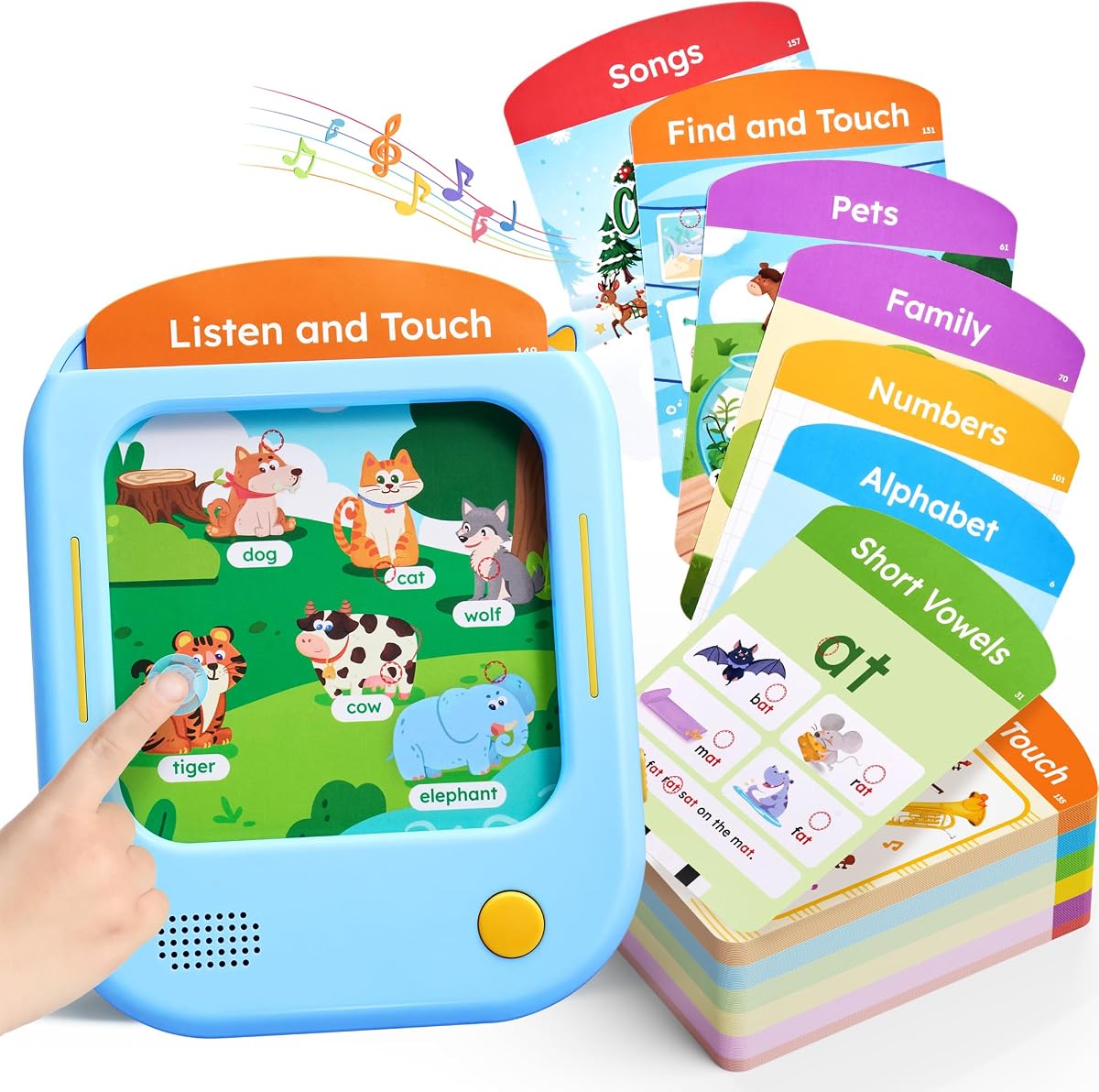
The JoyCat Kids Learning Tablet offers a unique screen-free approach to education with a 4.5-star rating reflecting its high quality. It combines a learning pad with talking flash cards to reinforce reading and math skills through audio interaction.
We may earn a commission when you buy through this link, at no additional cost to you.
This device includes 156 pages of FSC-certified paper cards covering letters short vowels and math. The press-to-learn mechanism allows children to hear standard American accent pronunciation supporting early literacy development without relying on digital screens.
While it is not a traditional digital tablet this tool is excellent for parents aiming to reduce screen time while maintaining educational engagement. It encourages fine motor skills and active participation which is beneficial for preschool-aged children.
Ideal as a complementary tool alongside digital devices this product supports balanced learning habits. It serves as a perfect gift for younger children who need engaging physical activities to supplement their digital educational experiences.
The talking flash cards help children master phonics rules and vocabulary through auditory reinforcement.
Inserting cards and tapping buttons enhances hand-eye coordination and fine motor skills development.
We may earn a commission when you buy through this link, at no additional cost to you.
The YosaToo Kids Tablet runs on Android 16 and offers a versatile option with offline learning capabilities. With a 4.2-star rating it provides access to Google Kids Space while including pre-installed apps that work without internet connectivity.
We may earn a commission when you buy through this link, at no additional cost to you.
This device features a shockproof case designed to absorb impact and protect against daily drops and tumbles. Parents can manage usage through advanced parental controls allowing them to filter content and set daily screen time limits easily.
While the offline apps offer convenience for travel parents should note that additional content may require internet access. The build quality is functional but may not match premium durability standards expected by heavy users over long periods.
For families needing a reliable device for road trips or areas with poor connectivity this tablet is a strong choice. The combination of Android flexibility and protective design makes it suitable for daily use by active children.
Pre-installed offline apps ensure children can continue learning even when internet access is unavailable or limited.
The silicone case absorbs impact and protects the screen ensuring the device survives everyday toddler chaos.
We may earn a commission when you buy through this link, at no additional cost to you.
Selecting the right tablet involves considering performance safety and educational value to ensure it meets your child's needs.
Look for tablets that come pre-loaded with age-appropriate educational apps or offer subscriptions to trusted learning services. Content should cover core subjects like math reading and science to support school learning.
Prioritize devices with apps that grow with your child to extend the device's useful life as your child advances in school.
Robust parental controls allow you to filter content set time limits and monitor usage effectively. These settings help maintain a safe digital environment and prevent exposure to inappropriate material.
Ensure the tablet allows easy management of these controls via a parent dashboard to streamline oversight of your child's activity.
Since kids are active choose a tablet with a durable case or built-in shockproof features. Rugged designs protect against drops and bumps which are common during play.
Check if a protective case is included in the package to save money and ensure immediate protection upon unboxing the device.
A battery that lasts at least 8 to 10 hours is essential for long trips or full school days without constant recharging. Long battery life ensures uninterrupted learning and entertainment sessions.
Look for efficient power management features to maximize usage time and reduce the frequency of charging cycles.
A clear and comfortable screen protects children's eyes during extended use. Features like anti-blue light technology and good resolution enhance visual comfort and clarity.
Choose a screen size that is comfortable for your child to hold and read with a 7 to 10 inch range being standard.
Internal storage should be sufficient to hold apps games and downloaded videos. Expandable storage via microSD cards offers flexibility to add more content as needed.
Select a model with at least 32GB of internal storage or the option to expand storage to avoid running out of space quickly.
An up-to-date operating system ensures security and smooth performance. Check if the manufacturer provides regular software updates to keep the device secure and functional.
Android tablets with access to Google Play Store offer more app variety while custom systems may focus on curated educational content.
While staying within budget consider the total value including included accessories and warranties. A slightly higher price may be worth it for better durability and support features.
Compare features against price points to ensure you are getting a device that meets your needs without unnecessary costs.
Set up parental controls immediately after unboxing to create a safe environment. Customize profiles and app access to match your child's age and developmental stage for a personalized experience.
Keep the tablet clean by wiping the screen with a soft cloth regularly. Avoid using harsh chemicals or abrasive materials that could damage the display or casing during daily use.
Store the device in a cool dry place to preserve battery health and prevent overheating. Charging the tablet fully before first use and avoiding extreme temperatures will extend its overall lifespan.
Yes most tablets in this guide include parental controls and kid-safe modes to restrict access to inappropriate content. Parents should review settings and monitor usage regularly to ensure safety and responsible use habits.
Many tablets come with pre-loaded apps and subscriptions such as Amazon Kids+ or LeapFrog Academy. However additional content may require separate purchases or subscriptions so check what is included before buying.
Battery life ranges from 6 to 10 hours depending on usage and screen brightness. Look for models with at least 8 hours of use to minimize interruptions during learning or travel.
Many models support microSD card expansion allowing you to add up to 1TB of storage. Check the specific device details to confirm expandability and ensure it fits your storage needs.
Choose a tablet with a included kid-proof case or purchase a compatible protective cover separately. Rugged cases absorb shocks and protect corners from damage when children drop the device accidentally.
Yes all tablets listed include Wi-Fi connectivity for streaming content and downloading apps. Some models also offer offline learning options for use when internet access is limited or unavailable during travel.
The LeapFrog LeapPad Academy and Amazon Fire 7 Kids lead our list due to their comprehensive educational features and safety assurances. Both options provide robust parent controls and content designed to support early learning effectively.
When choosing prioritize durability and battery life to ensure the device lasts through daily use. Also consider the educational content included to make sure it aligns with your child's learning goals and interests.
Prices and availability fluctuate so verify current details before purchasing to get the best deal. With these options you can find a high-quality learning tablet that fits your budget and your child's developmental needs.