
LG Smart Monitor Swing 32U889SA-W
4.1Editor score
webOS Built-in Apps
Rolling Wheeled Base
AirPlay 2 Support
Touchscreen monitors have transformed how we interact with digital content. A 32 inch model offers a massive canvas for creativity, productivity, and entertainment. Finding the right one requires understanding resolution, touch technology, and connectivity options.
We compared ten real products based on user ratings, technical specifications, and feature sets. Our analysis covers everything from budget-friendly options to premium smart displays. We focused on performance, build quality, and versatility for various use cases.
Each pick highlights specific strengths like refresh rate, color accuracy, or smart features. Prices and availability change frequently so verify details before purchasing. This guide helps you navigate the market with confidence and clarity.
4.1Editor score

5.0Editor score

4.2Editor score
As an Amazon Associate we earn from qualifying purchases.
This side-by-side comparison highlights key specifications across all ten models. From resolution and refresh rates to connectivity and smart features you can quickly identify which monitor fits your specific needs and budget constraints.



This 32 inch 4K touchscreen monitor stands out as the top choice for users seeking high performance and versatility. With a perfect 5.0 rating it delivers a flawless experience for gaming creative design and daily multitasking. Its 4K UHD resolution combined with a lightning-fast 144Hz refresh rate ensures crystal-clear text and ultra-sharp details.
We may earn a commission when you buy through this link, at no additional cost to you.
The responsive 10-point capacitive touchscreen elevates interaction allowing seamless swiping pinching and navigation. Whether you are working on digital whiteboards or interactive presentations the lag-free touch response is impressive. Versatile connectivity options including HDMI 2.1 DP 1.4 and a full-featured Type-C port make integration easy for desktops laptops and more.
An ergonomic height-adjustable and rotatable stand provides ultimate comfort with tilt swivel and 90-degree pivot options. The 100x100mm VESA mount compatibility also supports flexible mounting solutions. While macOS devices are limited to 2-point touch and consoles offer display-only functionality these constraints are minor given the overall robust feature set.
This monitor is ideal for professionals creators and power users who demand massive screen real estate and interactive capabilities. It transforms your desktop setup into an elite productivity powerhouse. For those wanting the best balance of resolution speed and touch accuracy this model is the definitive recommendation.
The 144Hz refresh rate guarantees buttery-smooth motion perfect for fast-paced gaming and fluid video playback.
Full-featured Type-C ports enable video power and touch transmission through one cable for a clean setup.
We may earn a commission when you buy through this link, at no additional cost to you.
The LG Smart Monitor Swing reimagines display flexibility with its rolling stand and 360-degree adjustability. Featuring a 32-inch 4K UHD IPS touchscreen it offers vibrant colors and detailed visuals. The 4.1 rating reflects strong performance in smart features and adaptability making it a premium choice for modern workspaces.
We may earn a commission when you buy through this link, at no additional cost to you.
Powered by webOS this monitor enables seamless entertainment and productivity without needing a connected PC. You can access streaming services video conferencing and cloud apps directly. Three USB-C ports support data transfer charging up to 65W and signal delivery via single cable. AirPlay 2 and Screen Share enhance mobile integration.
The wheeled base with hidden adapter compartments ensures organized mobility across rooms. A torsion spring hinge allows effortless tilt swivel height and portrait adjustments. While the premium price may be a consideration the built-in smart capabilities and robust connectivity provide exceptional value for offices and collaborative environments.
This monitor suits users who need a versatile all-in-one solution for work entertainment and smart home control. Its ability to move freely and function independently makes it unique. For those prioritizing smart features and mobility alongside high-quality touch interaction this is the top premium pick.
webOS lets you manage home office tasks and stream content directly without a PC.
The rolling stand with hidden cables keeps your space tidy as you move the display anywhere.
We may earn a commission when you buy through this link, at no additional cost to you.
The FYHXele 32 inch large touchscreen monitor offers a compelling budget option with strong features. Its 2K QHD resolution and 100Hz refresh rate deliver sharp imagery and fluid motion at a competitive price. With a 4.2 rating it appeals to cost-conscious users needing reliable touch interaction for office or creative work.
We may earn a commission when you buy through this link, at no additional cost to you.
Color accuracy is highlighted with 100% sRGB coverage ensuring vibrant true-to-life hues. The 10-point touchscreen supports intuitive gestures for design software presentations and gaming. A flexible stand with height adjustment and VESA mounting adds ergonomic value. USB-C ports provide easy connection and charging for laptops and mobile devices.
Users should note incompatibility with major gaming consoles like PlayStation and Xbox as well as some Apple products. The 350cd/m2 brightness is suitable for indoor settings but may struggle in bright rooms. These limitations are acceptable given the overall balance of performance and affordability.
This monitor is perfect for students budget teams and casual users needing a large interactive screen. It handles multitasking and creative tasks efficiently without breaking the bank. For those seeking the best value in the 32 inch touchscreen category this model is a smart investment.
100% sRGB coverage ensures designers and photographers see true colors on the 32 inch panel.
The 100Hz refresh rate reduces ghosting and blur for smoother scrolling and fast-paced content.
We may earn a commission when you buy through this link, at no additional cost to you.
This Xyrio 32 inch 2K touchscreen monitor provides a solid option for users needing reliable touch functionality. Its native 2K resolution and 100Hz refresh rate ensure crisp distortion-free visuals ideal for immersive viewing. While unverified by user ratings the technical specs suggest a robust build for daily office and home use.
We may earn a commission when you buy through this link, at no additional cost to you.
The 10-point capacitive touch via plug-and-play USB-B simplifies setup without driver installation. RGB ambient lighting adds a stylish desktop aesthetic. Built-in 2x2W speakers free from external audio hardware for casual multimedia. Compatibility with Windows Linux Raspberry Pi and Android systems broadens its utility.
The ergonomic stand supports tilt swivel and 90-degree portrait rotation with 75×75 VESA mounting options. A stylus is included for precise control. The lack of verified ratings means relying on technical assurances rather than community feedback. Still the wide OS compatibility and included accessories add practical value.
Ideal for industrial control commercial presentation and casual entertainment this monitor balances functionality and style. It fits well in dynamic workspaces needing flexible positioning. For users seeking an affordable 2K touch monitor with aesthetic lighting this is a strong contender.
Rear RGB lighting creates a premium desktop look enhancing your workspace setup.
Support for multiple OSes ensures seamless integration across different devices and systems.
We may earn a commission when you buy through this link, at no additional cost to you.
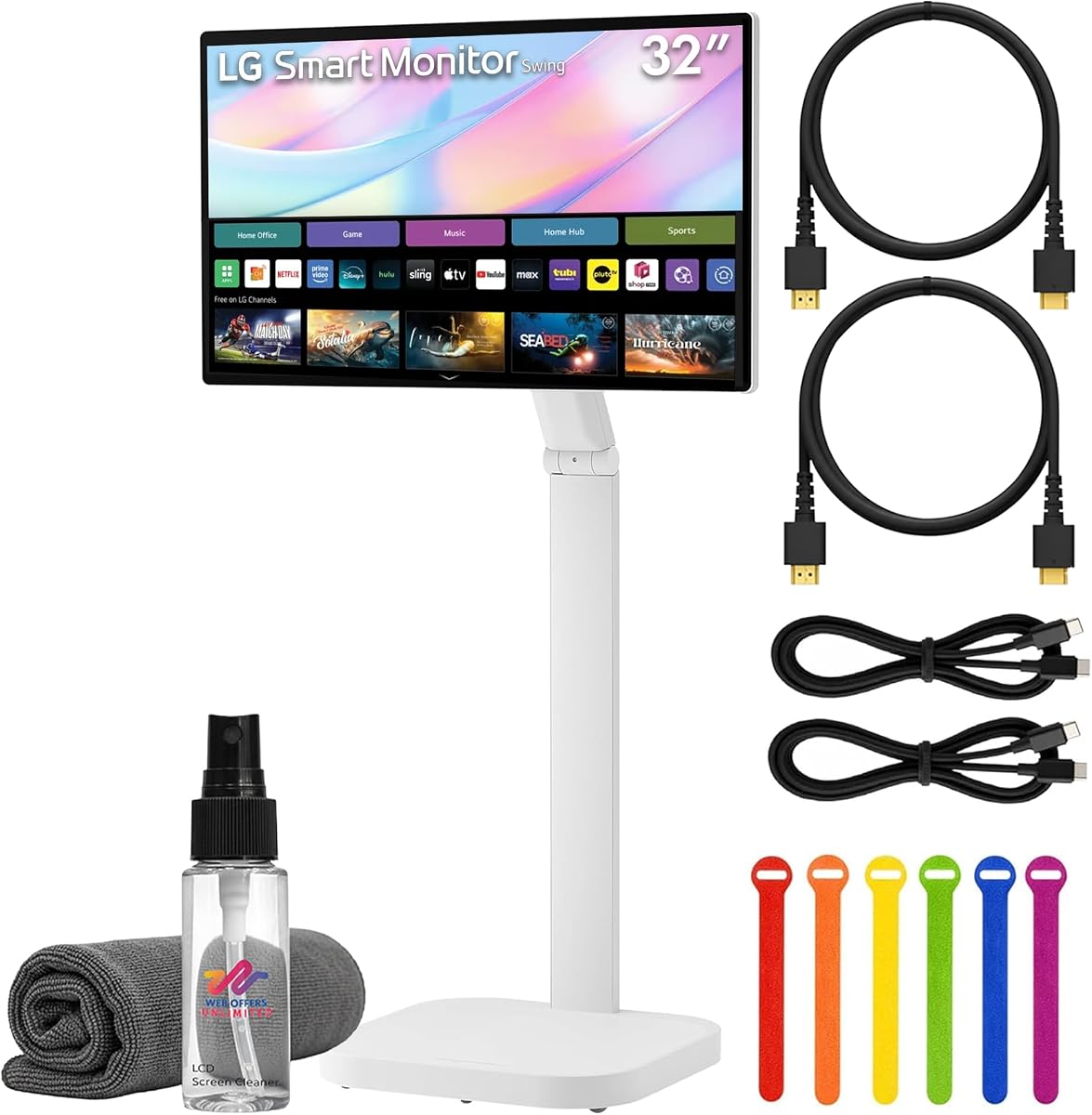
This LG Swing bundle offers exceptional versatility with a 32 inch 4K UHD touchscreen mounted on an adjustable rolling stand. Including essential accessories like HDMI and USB-C cables plus cleaning kits it provides a ready-to-use solution. The 4K resolution and HDR10 support ensure vivid visuals for work presentations and entertainment.
We may earn a commission when you buy through this link, at no additional cost to you.
Accessing entertainment and productivity apps via built-in webOS enables cloud access remote PC features and streaming without a PC. USB-C with 65W power delivery simplifies laptop connectivity. Integrated 5W stereo speakers enhance video calls and multimedia experiences. The rolling stand allows easy repositioning for collaborative environments.
While the premium price and lack of verified ratings require consideration the comprehensive package reduces setup hassle. The rolling mechanism ensures stability during movement. For teams needing an all-in-one display solution this bundle saves time and effort.
Perfect for collaborative offices and creative studios this bundle delivers premium features with added convenience. The included accessories mean no extra purchases needed for basic operation. For those wanting a turnkey high-end touchscreen experience this bundle is the logical choice.
HDMI and USB-C cables plus cable ties ensure you start using the monitor immediately.
The rolling stand allows moving the display between meetings and workspaces effortlessly.
We may earn a commission when you buy through this link, at no additional cost to you.
The Elo 3204L is designed specifically for commercial signage environments requiring robust durability. It supports 24/7 operation in high traffic areas without performance degradation. Its UL-60950 and IK-07 compliance ensures safety and impact resistance. This makes it ideal for retail kiosks digital menu boards and public information displays.
We may earn a commission when you buy through this link, at no additional cost to you.
Power passthrough and VESA mounting simplify external PC integration for customized content management. Built-in IoT control enables remote management and monitoring reducing maintenance efforts. The rugged build protects against accidental bumps and constant use. While priced higher it delivers enterprise-grade reliability and longevity.
Users seeking consumer-grade entertainment features may find this model lacking as it prioritizes industrial resilience. However for business applications demanding consistent uptime and security it is unmatched. The straightforward design supports easy maintenance and cable management.
For retail hospitality and corporate settings needing a reliable touchscreen signage solution this monitor is the standard. It handles continuous operation and environmental challenges effectively. If durability and compliance are top priorities this is the definitive professional choice.
Designed for 24/7 operation ensuring consistent performance in busy commercial environments.
Built-in IoT control allows you to manage displays remotely from a central location.
We may earn a commission when you buy through this link, at no additional cost to you.
This LG Electronics 32SE3B-B offers a basic 32-inch LED-lit display for standard viewing needs. With 1920×1080 resolution and an IPS panel it provides wide viewing angles and consistent color. While it lacks touch functionality its straightforward design suits simple desktop setups or secondary displays.
We may earn a commission when you buy through this link, at no additional cost to you.
The 350 cd/m2 brightness ensures clear visuals indoors or under ambient light. The 1080p resolution is adequate for general browsing and productivity tasks. As a legacy model it may have fewer ports compared to modern options. Still the reliability and LG brand support remain valuable.
For users needing a large non-touch screen at an affordable price this model delivers basic functionality well. It is not suited for interactive workloads but excels as a monitor for passive viewing. Consider current connectivity requirements before purchase.
This monitor is suitable for basic office tasks where large screen real estate is needed without touch features. Its IPS panel ensures clear viewing from different positions. If you prioritize simplicity and cost over interactive capabilities this is a practical option.
Basic LED-lit screen designed for consistent everyday viewing and productivity.
A budget-friendly way to get a large 32-inch screen for general computer use.
We may earn a commission when you buy through this link, at no additional cost to you.
The Samsung QM32R-T is a commercial-grade 32-inch FHD touch display earning a perfect 5.0 rating. While limited in modern features its touch functionality and 1920×1080 resolution support basic interactive tasks. Designed for professional use it balances affordability with essential touch capabilities.
We may earn a commission when you buy through this link, at no additional cost to you.
The touch screen enables simple navigation and input for kiosks or digital signage. As a commercial model it is built for reliability in controlled environments. Specifications beyond basic resolution are minimal making it suited for straightforward applications where detailed touch precision isn't critical.
Users should note this is a basic touch model compared to higher-end interactive displays. It lacks advanced smart features or high refresh rates. For fundamental touch interaction in professional settings it remains a strong option.
This display fits simple commercial needs where Samsung reliability and basic touch are required. It is best for static applications or informational displays. If you need a straightforward touch screen at a lower cost this model meets those needs.
Basic touch functionality sufficient for simple navigation and input tasks.
Built for professional environments ensuring stable performance in office settings.
We may earn a commission when you buy through this link, at no additional cost to you.
This Samsung 32-inch QM32R-T offers a straightforward 1920×1080 LCD display with 75Hz refresh rate. It delivers clear Full HD visuals suitable for office work and general browsing. The 75Hz rate provides slightly smoother motion than standard 60Hz panels. Its professional black finish blends into corporate environments seamlessly.
We may earn a commission when you buy through this link, at no additional cost to you.
The V.37 interface supports basic display needs for legacy or standard setups. Without touch capabilities it is focused purely on visual output. As a dedicated display it avoids smart features or interactive complexities. Users value its reliability and simple operation.
For environments needing a large visual panel without interactive features this model serves well. It is not ideal for gaming or dynamic touch workloads but excels at static content display. The LCD panel ensures stable image quality over time.
This monitor suits basic business setups requiring large screen real estate at a low cost. It is best for reading documents viewing dashboards or secondary screen needs. If touch is not a requirement this provides dependable visual performance.
1920×1080 Full HD resolution ensures sharp text and clear image display.
75Hz refresh rate offers smoother motion than standard 60Hz panels for video.
We may earn a commission when you buy through this link, at no additional cost to you.
The LG Swing 31.5-inch model brings 4K UHD IPS smart capabilities with eyecare technology. Its webOS platform enables app access and remote PC usage without a connected computer. The rolling stand allows smooth mobility across rooms. A 3.8 rating indicates solid features mixed with some user concerns.
We may earn a commission when you buy through this link, at no additional cost to you.
AirPlay 2 and Screen Share provide seamless content mirroring from mobile devices. Built-in speakers and USB-C 65W power delivery simplify desk organization. Tilt height swivel and pivot adjustments ensure ergonomic positioning. The white design matches modern home offices aesthetically.
Despite the lower rating the comprehensive smart features and mobility make it a strong contender. Users may experience minor quirks with software updates or connectivity. For those valuing convenience and mobility this model offers significant benefits.
This monitor is ideal for home office users needing flexible entertainment and productivity tools. The eyecare features support long working hours comfortably. If smart functionality and adjustability are priorities this is a versatile alternative.
Eyecare technology reduces eye strain during extended work sessions.
Rolling stand and webOS enable flexible use anywhere in your home or office.
We may earn a commission when you buy through this link, at no additional cost to you.
Selecting the right 32 inch touchscreen monitor involves understanding several technical and practical factors. This guide breaks down the key elements to ensure you find a display that meets your needs.
Resolution determines how sharp and detailed your image appears. For a 32 inch screen 4K UHD (3840×2160) offers the crispest text and graphics making it ideal for creative work and gaming. QHD (2560×1440) provides excellent clarity at a lower cost while Full HD (1920×1080) is sufficient for basic tasks. Higher resolution means you can see more content at once without sacrificing legibility.
Prioritize 4K or QHD for interactive tasks where text sharpness and image detail matter most.
Refresh rate affects how smoothly motion appears on screen. A 144Hz rate is perfect for gaming and video editing providing fluid visuals. Standard rates around 75Hz or 100Hz are adequate for office work and general browsing. Faster refresh rates reduce blur during rapid movement making interactions feel more responsive.
Choose a higher refresh rate if you plan to use the monitor for gaming or dynamic content.
Capacitive touchscreens offer precise and multi-point interaction similar to smartphones. Look for 10-point touch support for seamless multi-finger gestures like pinch-to-zoom. Some displays only support limited touch points which can hinder creative work. Always verify touch compatibility with your operating system as macOS and consoles often have restricted support.
Ensure the touch technology matches your workflow and device compatibility requirements.
Modern monitors should offer versatile ports including HDMI DisplayPort and USB-C. USB-C with power delivery simplifies laptop setups by delivering video power and data through one cable. HDMI 2.1 supports high resolutions and refresh rates for gaming. Multiple ports allow simultaneous connections to desktops laptops and mobile devices without adapters.
Select a monitor with USB-C and HDMI 2.1 for future-proof connectivity and simplified cabling.
An adjustable stand is essential for reducing neck and eye strain. Look for tilt swivel height and pivot adjustments to customize your viewing angle. VESA mount compatibility enables wall mounting or use with monitor arms. A sturdy base prevents wobbling during touch interactions especially important for collaborative environments.
Prioritize stands with full ergonomic adjustments and VESA compatibility for flexible and comfortable use.
IPS panels deliver wide viewing angles and accurate colors making them ideal for designers and general users. They prevent color shifts when viewing from the side. Look for high sRGB coverage like 100% for vibrant true-to-life hues. Brightness around 350 cd/m2 is suitable for indoor environments though higher values help in well-lit spaces.
Choose an IPS panel with high color coverage for consistent quality across different viewing positions.
Some monitors include built-in operating systems like webOS allowing standalone use without a PC. These feature streaming apps video conferencing tools and remote access capabilities. Smart displays enhance productivity in collaborative settings but add to the cost. Evaluate if you need independent smart functionality or just a traditional display.
Consider smart features if you want streaming capabilities and reduced reliance on a connected computer.
Commercial-grade displays are built for 24/7 operation and high traffic environments. They often come with UL certification and impact resistance. For home use standard consumer models are sufficient. Check warranty terms and support availability to ensure long-term reliability. A more durable unit pays off in professional settings.
Match the monitor's durability rating to your expected daily usage intensity and environment.
To set up your touchscreen monitor connect the power adapter before any video cables. Then plug in HDMI DisplayPort or USB-C for video and a USB cable if required for touch. Follow on-screen prompts to calibrate touch sensitivity for accurate input and gestures.
Clean the screen regularly using a microfiber cloth and approved cleaner. Avoid using rough paper towels or chemicals that can damage the touch coating. Store the monitor in a dry environment to prevent moisture damage to internal components.
Update your graphics drivers and firmware periodically to ensure compatibility and performance. Adjust display brightness and color settings to match your workspace lighting. Rotate or pivot the screen as needed to reduce eye strain during long sessions.
Many monitors support Macs but touch functionality is often limited due to protocol restrictions. Some models work with 2-point touch on macOS while others provide display only. Check manufacturer compatibility guides before purchasing to confirm touch features on Apple devices.
Most consoles like PlayStation Xbox and Switch support video but not touch functionality. The monitor acts as a standard display for console output. Touch features are primarily designed for PCs and mobile devices with compatible OSes.
Full-featured USB-C with power delivery can support video data and power simultaneously for many laptops. Ensure your port supports enough wattage typically 65W or higher for stable performance. Some setups may still require an external power adapter for full functionality.
4K UHD resolution provides the sharpest images ideal for photo and video editing. QHD offers a balance of clarity and cost. Higher resolution ensures fine details are visible which is crucial for professional design tasks.
Consumer models are built for regular interaction but avoid excessive force on the screen. Commercial-grade monitors offer enhanced durability for high traffic environments. Proper care and cleaning extend the lifespan of the touch layer significantly.
Some models feature built-in speakers for basic audio needs but quality varies. For better sound external speakers or headphones are recommended. Always check product specs for speaker wattage and audio capabilities.
Most models support VESA wall mounts allowing flexible placement. Ensure you have the correct mount bracket and that your wall structure supports the weight. Proper installation prevents damage and ensures safety.
Capacitive touch is more responsive and supports multi-finger gestures like smartphones. Resistive touch requires pressure and is less common on modern monitors. Capacitive provides a smoother and more natural interactive experience.
This guide highlighted ten standout options ranging from high-performance 4K displays to versatile smart monitors. The Editor's Choice offers unmatched speed and clarity while the Premium pick delivers unique smart features. Budget-conscious users will appreciate the value-packed alternatives.
When choosing prioritize resolution and touch accuracy if you work on creative projects. Consider smart features and mobility for collaborative environments. Ensure connectivity matches your devices to avoid extra cables or adapters.
Prices and availability fluctuate so verify current offers before finalizing your purchase. Checking real-time ratings and reviews can also ensure you get the best deal available. A well-chosen touchscreen monitor enhances productivity and creativity for years.