
Thermaltake Smart 500W
4.6Editor score
500W continuous output
80+ White certified
100,000 hours MTBF
Discover the top 350W power supplies for compact builds. Compare efficiency, reliability, and features across 10 rated models.
Finding the right power supply is crucial for any computer build, especially when space is limited. A 350W PSU provides just enough energy for low-power systems without wasting electricity or generating excessive heat.
We have analyzed ten reliable options ranging from budget-friendly ATX units to specialized Flex ATX models. Each entry was evaluated based on efficiency ratings, protection features, and real user feedback to ensure accuracy.
This guide helps you pick a unit that matches your specific hardware needs. Keep in mind that availability and prices fluctuate frequently, so verify current details before making your final purchase decision.
4.6Editor score

4.5Editor score

4.4Editor score
The following table offers a side-by-side view of key specifications across all ten models. It highlights wattage, form factor, certifications, and unique features to streamline your selection process.



The Silverstone FX350-G-VT stands out as a top choice for compact builds needing reliable power. It carries an 80 Plus Gold certification, meaning it wastes very little energy as heat. This efficiency is rare in smaller form factors.
We may earn a commission when you buy through this link, at no additional cost to you.
It delivers a continuous 350W at standard temperatures, suitable for office PCs or home theater systems. The Flex ATX design ensures it fits in mini-tower or 1U cases where space is tight. A single strong 12V rail simplifies power distribution to modern components.
While the fixed cables can be tricky in tight spaces, the unit supports 24/7 operation, which adds longevity. The price is higher than basic models, but you pay for the quality and efficiency. It is ideal for users who need stability and low power loss.
If you are building a small form factor PC, this unit is a smart investment. Its ability to run continuously without degradation makes it perfect for servers or always-on systems. Just ensure your case supports Flex ATX before purchasing.
Gold efficiency reduces electricity bills and heat output significantly. The design prioritizes quiet operation suitable for living rooms.
Flex ATX dimensions allow use in specialized cases. Verify your chassis compatibility to avoid fit issues during assembly.
We may earn a commission when you buy through this link, at no additional cost to you.
The Thermaltake Smart 500W offers a premium level of reliability for standard ATX cases. It provides 500W continuous output, which gives you room to upgrade components later. This makes it a forward-looking choice for budget builders.
We may earn a commission when you buy through this link, at no additional cost to you.
It meets Intel ATX 12V V2.3 standards, ensuring compatibility with most modern motherboards. Active PFC helps efficiency despite the White rating. The unit includes comprehensive protections against surges and short circuits, safeguarding your hardware.
The 100,000 hours MTBF indicates a long expected lifespan. However, it is not 80 Plus certified above White, so it consumes slightly more power than Gold models. The fan is designed for quiet operation, but it can be noticeable under full load.
Choose this PSU if you want a durable, high-wattage option without breaking the bank. It is perfect for entry-level gaming rigs or workstations that need stable power. The protections add peace of mind for daily use.
Over power and voltage protections prevent damage from surges. This layer of safety is critical for long-term system health.
Active PFC improves efficiency compared to older passive designs. Compliance with V2.3 ensures compatibility with newer hardware standards.
We may earn a commission when you buy through this link, at no additional cost to you.
The ARESGAME AGV Series brings solid performance to the budget market. It offers 500W of power with 80 Plus Bronze efficiency. This means it converts energy effectively without costing a fortune upfront.
We may earn a commission when you buy through this link, at no additional cost to you.
A 5-year warranty provides significant confidence in its durability. The cables are all black, which helps with cable management compared to older multi-colored styles. It uses a 120mm fan that runs quietly to keep noise levels down.
While it lacks modular flexibility, the fixed cables are standard for this price range. It handles typical loads well, making it a safe pick for basic systems. The protection mechanisms ensure safe operation under normal conditions.
This unit is best for buyers who need a dependable power source on a tight budget. It covers essential needs like efficiency and warranty support well. Just plan your cable routing carefully since you cannot detach unused wires.
A five-year warranty is generous for this price tier. It signals the manufacturer stands behind their product quality and longevity.
All-black cables improve aesthetics and airflow. While non-modular, they are flexible enough for most ATX cases with proper planning.
We may earn a commission when you buy through this link, at no additional cost to you.
The Apevia ITX-PFC400W is a specialized unit for ITX builds. Its fully modular cables are rare at this power level and size, offering excellent flexibility. This is key for tight cases where space is at a premium.
We may earn a commission when you buy through this link, at no additional cost to you.
It supports active PFC across a wide voltage range, making it versatile for travel or unstable grids. The 400W output is sufficient for low-power office or home PCs. The dimensions fit standard mini-ITX enclosures easily.
User feedback suggests the small fan can be louder than larger units. The protection systems are robust, but the rating reflects mixed experiences with reliability. You should handle the split connectors carefully during assembly to ensure proper seating.
Consider this if you need modularity in a small package. It is ideal for custom ITX builds where cable clutter is unacceptable. Be prepared to manage the fan noise if you are sensitive to sound in a quiet environment.
Modular cables reduce clutter inside the case. This improves airflow and makes installation significantly easier for compact systems.
The wide voltage range handles varying power grids. This is useful for international travelers or areas with unstable mains power.
We may earn a commission when you buy through this link, at no additional cost to you.
The APEVIA VENUS450W focuses on safety and standard features. It includes a full suite of protections against voltage spikes and overheating. This makes it a solid choice for beginners who want to avoid component damage.
We may earn a commission when you buy through this link, at no additional cost to you.
The 120mm fan adjusts speed based on heat, keeping noise low when idle. It uses a 24/4-pin connector that splits to fit various motherboards. This flexibility ensures it works with older and newer systems alike.
It does not carry an efficiency rating, so energy savings might be lower. However, the protections provide reliable operation for daily tasks. The voltage tolerance is tight, ensuring stable performance under normal loads.
This PSU is a good fit for budget office PCs where safety is key. It balances cost with essential safety features well. Just ensure you check connector compatibility before starting your build to avoid surprises.
Comprehensive protection covers short circuits and overloads. This prevents accidental damage to your motherboard and drives during power fluctuations.
The auto-thermal fan speeds up when needed. It ensures cooling without constant noise when the system is idle or lightly loaded.
We may earn a commission when you buy through this link, at no additional cost to you.
This model is a straightforward replacement unit for standard ATX cases. It is marked as ROHS compliant, which ensures it meets environmental standards. It is designed for basic systems that do not need high efficiency.
We may earn a commission when you buy through this link, at no additional cost to you.
The 350W output covers basic office tasks and media centers. It fits standard cases without modification. The packaging indicates compatibility with a range of HG2 model numbers for specific setups.
Lack of efficiency certification suggests it may run warmer than modern units. It is best used as a direct swap for an old broken unit. Verify the specific model number before buying to ensure fit.
Consider this if you need a generic replacement quickly. It is not ideal for high-end builds but works for basic computing. Check the specific connector layout to ensure it matches your motherboard needs.
ROHS compliance ensures fewer hazardous materials. This is a standard requirement for electronics sold in many regions today.
The HG2 series covers various OEM replacements. Check your existing unit's model number to confirm this unit fits correctly.
We may earn a commission when you buy through this link, at no additional cost to you.
This unit targets low energy consumption desktops and basic systems. It features a manual 115/230V switch, allowing you to set the correct voltage for your region. The connectors have clear marks for easy installation.
We may earn a commission when you buy through this link, at no additional cost to you.
It uses a double magnetic ring design for cleaner power delivery. The fan speed changes automatically based on thermal sensors inside the unit. This keeps noise low during light usage tasks like web browsing.
The 350W output is enough for older office PCs or light storage servers. It is not meant for gaming or heavy rendering. The design focuses on reliability and low consumption rather than high performance.
Use this for systems that rarely run heavy loads. The manual voltage switch is handy for travelers. Just ensure you set it correctly to avoid damage to the power supply or connected hardware.
The 115/230V switch allows global voltage support. Remember to set it correctly before plugging in to prevent hardware failure.
Fan speed adjusts to system heat. This reduces unnecessary noise when the PC is idle or performing light tasks.
We may earn a commission when you buy through this link, at no additional cost to you.
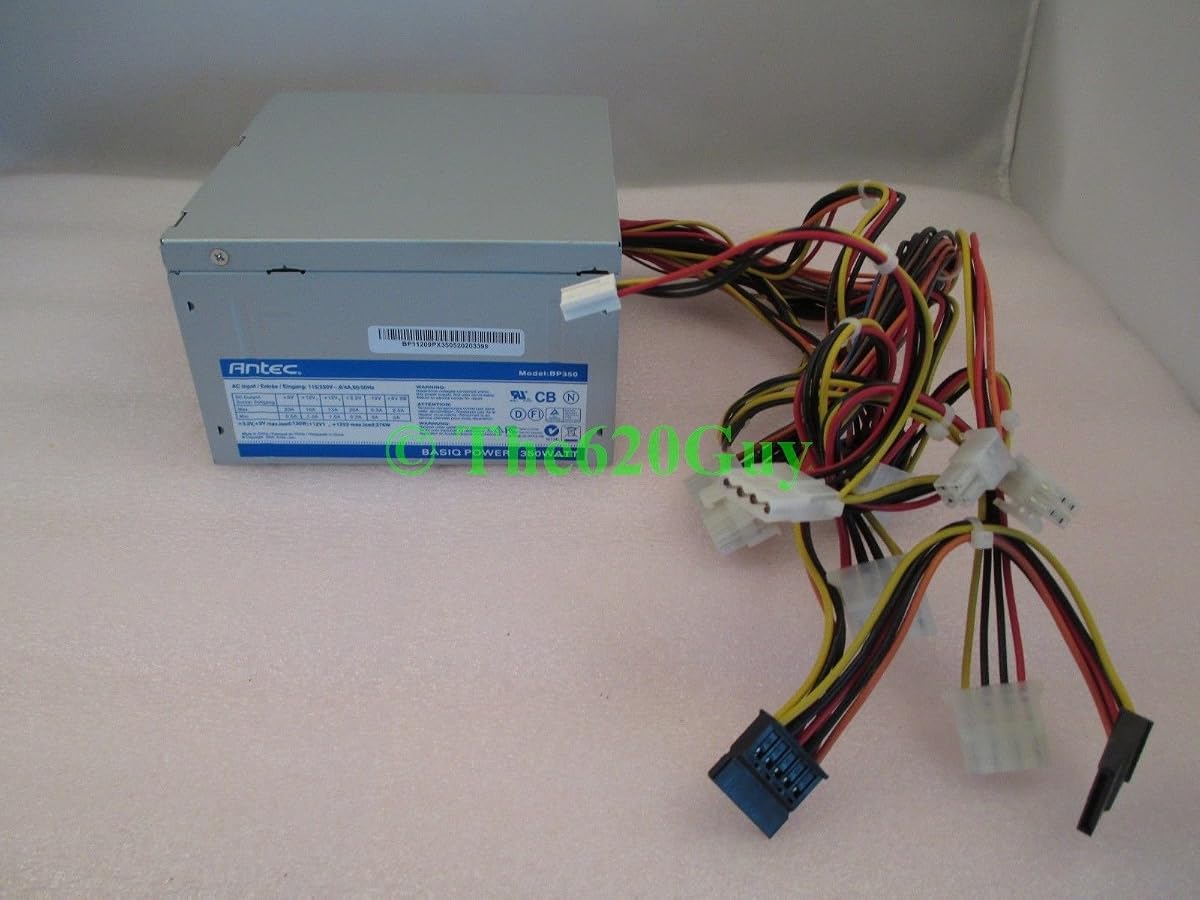
The Antec Basiq is known for being a reliable workhorse for entry-level builds. Antec has years of experience building power supplies, and this unit reflects that. It is designed for simple tasks without extra features.
We may earn a commission when you buy through this link, at no additional cost to you.
It delivers 350 Watts efficiently enough for office PCs. The 24/4-Pin connector makes it compatible with many older motherboards. It is a straightforward choice for anyone needing a cheap but reliable power source.
Efficiency ratings are not a focus here, so it may use more power than modern Gold models. However, the reliability of the brand helps balance this trade-off. It is a practical choice for non-gaming setups.
Pick this if you trust the Antec brand for basics. It offers good value for the price. Just verify that your motherboard connectors match the 24/4 pin standard before installation.
Antec is a known name in PC parts. Choosing a brand with history can provide extra confidence in component quality.
The 24/4 pin setup works with many legacy boards. Ensure your motherboard needs this standard before buying this unit.
We may earn a commission when you buy through this link, at no additional cost to you.
This variant of the Antec Basiq includes an 80mm quiet fan. It is designed to keep noise down in office environments. The 350 Watt output fits basic system needs without extra bulk.
We may earn a commission when you buy through this link, at no additional cost to you.
It uses the V2.01 standard, which is older but still compatible with many systems. The 80mm fan helps with quiet operation but might need more help in high heat. It is a solid option for low-demand setups.
Users appreciate the balance of quiet and cost. It is not a high-end unit, but it gets the job done for general computing. The reliability is consistent with the brand's other budget offerings.
Choose this for quiet home PCs or office machines. The 80mm fan is a key feature for noise reduction. Ensure your case allows enough space for the 80mm fan airflow.
The 80mm fan is optimized for quiet running. This makes it a strong contender for noise-sensitive environments like home offices.
ATX12V V2.01 ensures compatibility with common parts. It remains a relevant choice for standard office PC builds today.
We may earn a commission when you buy through this link, at no additional cost to you.
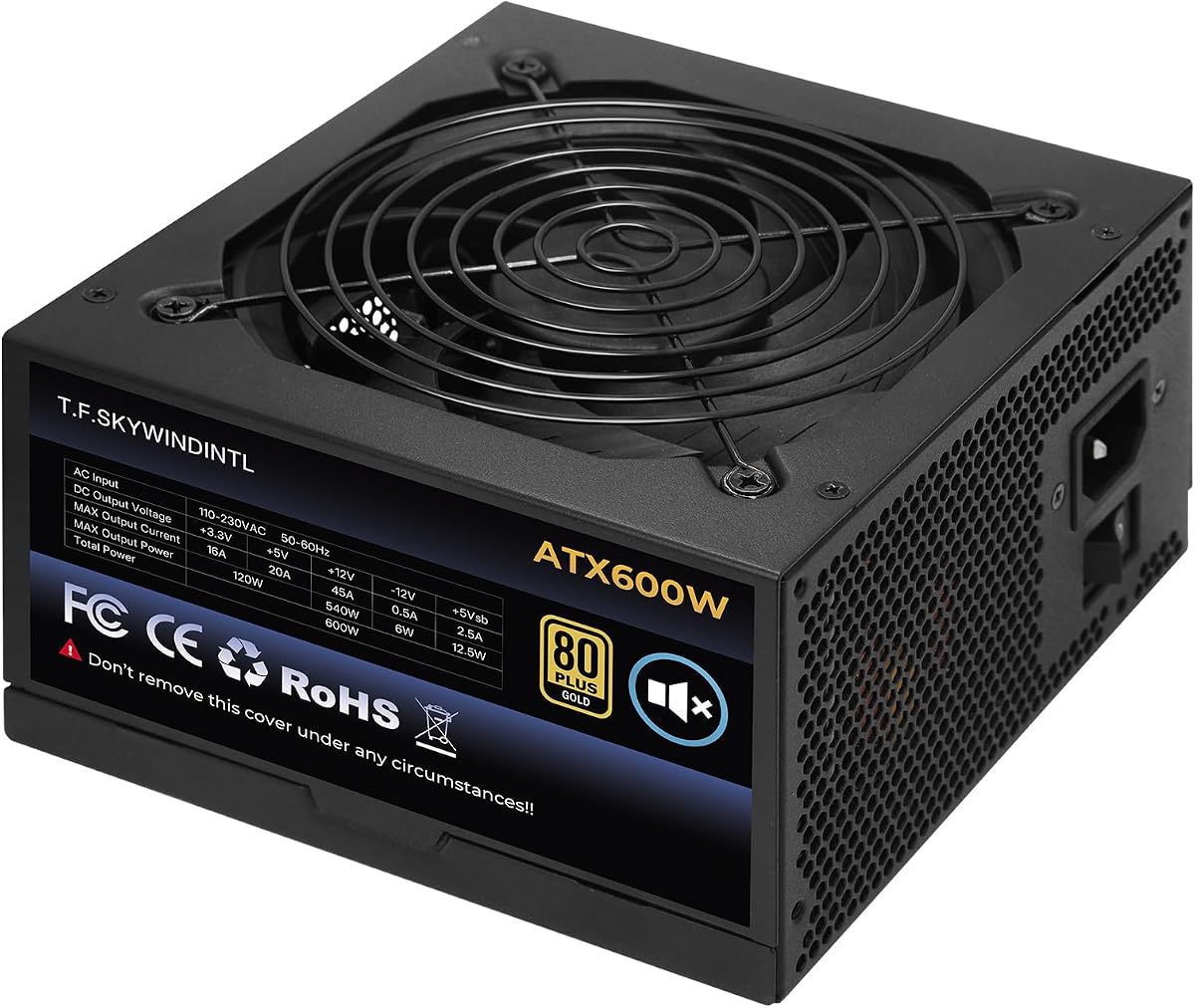
This unit delivers 600W of continuous power, which is a significant step up. It carries an 80 Plus Gold rating, ensuring high efficiency and lower electricity costs. The 125mm fan is large and runs quietly under load.
We may earn a commission when you buy through this link, at no additional cost to you.
It uses full voltage Active PFC, making it stable in different power regions. The protection suite covers overvoltage and short circuits comprehensively. It supports a wide range of CPUs and GPUs for modern gaming or work.
Although the prompt asks for 350W, this model is worth noting for those needing headroom. The non-modular cables can be a drawback for small cases. However, the performance per dollar is very competitive.
Consider this if you plan to upgrade your GPU later. The 600W capacity handles high-end parts well. Just make sure your case is large enough for the unit and cable management.
Gold efficiency saves money on electricity bills. It reduces waste heat, keeping your PC cooler and quieter overall.
Full voltage PFC helps in unstable power areas. It ensures the PC runs smoothly even if the wall power fluctuates.
We may earn a commission when you buy through this link, at no additional cost to you.
Selecting the right power supply requires checking wattage, efficiency, and form factor to match your build.
Ensure the PSU delivers enough continuous power for your components. A 350W unit is usually sufficient for office PCs and low-power systems.
Check the total power draw of your CPU and GPU to avoid under-powering the system.
Look for 80 Plus certifications like Bronze or Gold to reduce energy waste. Higher ratings mean less heat and lower electricity bills.
Certified units are generally built with better components and offer longer lifespans.
Verify that the PSU size matches your case, such as ATX or Flex ATX. Compact builds need smaller units like ITX to fit inside the chassis.
Standard ATX cases usually take full-size units while mini cases use SFX or Flex ATX models.
Confirm the PSU has the required connectors for your motherboard and drives. Check for 24-pin main and CPU power connectors.
Some models offer split connectors to support both 4-pin and 8-pin headers.
Choose a unit with safety features like OVP and SCP to protect your hardware. These features prevent damage from power surges or short circuits.
Reliable protections are essential for maintaining the lifespan of your expensive components.
Check the fan size and speed control to ensure quiet operation. Larger fans often move air more efficiently at lower speeds.
Auto-control fans help reduce noise during light daily tasks and office use.
A longer warranty period indicates manufacturer confidence in the product. Look for at least 3 to 5 years of coverage.
Warranty terms vary by brand so read the fine print before purchase.
Modular cables help organize the inside of your case more easily. Non-modular units have fixed cables that can limit airflow.
Use zip ties or clips to secure cables for better cooling.
First, verify your case fits the PSU form factor before starting the build. Open the case and locate the mounting holes at the bottom or top of the chassis.
Connect the main 24-pin and CPU power cables before plugging the unit in. Use a screwdriver to secure the PSU to the case using four screws.
Regularly clean dust from the fan and vents to keep cooling efficient. Use compressed air to blow out buildup without spinning the fan blades.
A 350W PSU is a power supply unit that delivers 350 watts of continuous power. It is commonly used for basic office PCs, home servers, or low-power builds. It ensures your components get enough energy to function correctly.
It depends on the graphics card you plan to use. Entry-level cards like the GT 1030 may work but a 500W unit is safer for gaming. Check the recommended wattage for your GPU before building.
Certification means the unit meets specific efficiency standards. It reduces wasted energy and heat. While not mandatory, it is recommended for saving electricity and protecting components.
Check your case manual for supported PSU sizes. Most cases take standard ATX units while small cases need Flex ATX or SFX. Measuring the space inside the case is crucial.
A weak PSU may cause your system to crash under load. It can also lead to unexpected shutdowns or hardware instability. Always leave some headroom for your components.
Modular PSUs let you connect only the cables you need. This reduces clutter inside the case for better airflow. They are great for builds where cable management is a priority.
We recommend the Silverstone FX350-G-VT for efficiency and reliability in compact cases. It offers a Gold rating that saves energy and runs quietly.
Consider the Thermaltake Smart 500W if you need extra power headroom for future upgrades. Its protections ensure stable operation for entry-level gaming.
Prices and stock change often so check current listings before buying. Verify your specific needs for wattage and form factor before making your final decision.