
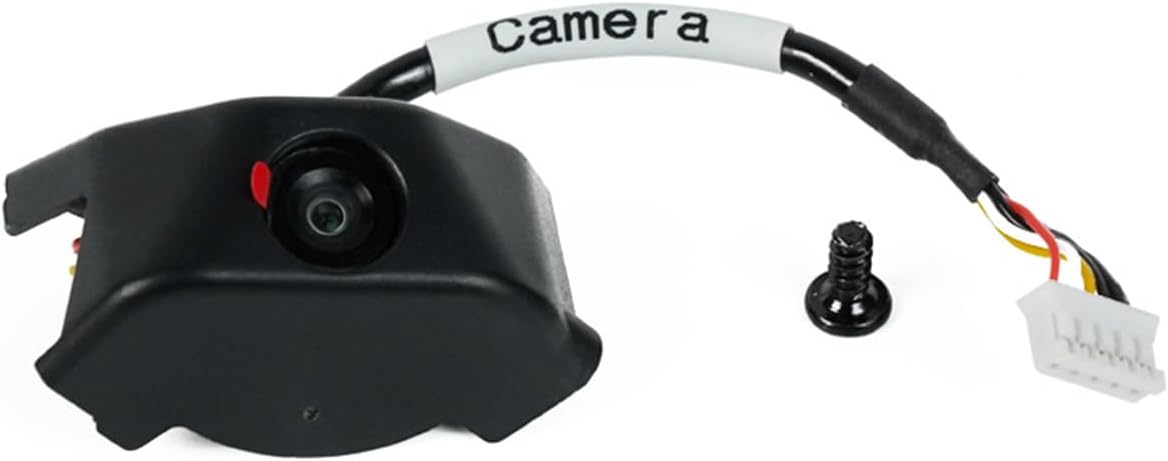
Anycubic Kobra 3 Camera
4.5Editor score
Easy DIY Frame Assembly
Ultra Clear Resolution
Wide Printer Compatibility
Compare the top 10 3D printer cameras for remote monitoring. Expert reviews on features, compatibility, and real user ratings to help you choose the right camera.
Monitoring your 3D prints remotely is essential for ensuring quality and preventing failures. A good camera provides real-time visibility, time-lapse recording, and early error detection. This guide reviews the best options available to help you safeguard your prints.
We analyzed ten top-rated cameras based on resolution, compatibility, ease of setup, and user feedback. Each product offers unique features like night vision, AI detection, or specific printer integration. Our goal is to simplify your decision-making process with detailed insights.
Each pick highlights key strengths, specifications, and ideal use cases for different printer models. Prices and availability may change, so verify details on the retailer site. Our aim is to empower you with accurate information for a successful printing experience.
4.5Editor score

4.3Editor score

4.1Editor score
This side-by-side comparison outlines the key specifications and features of each camera to help you decide quickly.



The Creality Nebula Camera is a robust solution for monitoring 3D prints remotely with ease. It holds a strong rating from users who appreciate its simplicity and functionality. This camera stands out for its automatic time-lapse features and seamless WiFi integration.
We may earn a commission when you buy through this link, at no additional cost to you.
You can keep track of your printing progress anytime using the Creality Cloud app. The camera captures images per layer to create stunning time-lapse videos without extra settings. Its 940 nm infrared light ensures clear visibility even in low-light conditions.
While it is excellent for supported models, it may not fit all printers without adapters. The focus requires manual adjustment which might take a few tries for perfect framing. These trade-offs are minimal given the overall value and performance.
Ideal for Creality users seeking reliability and advanced features like spaghetti detection. This camera helps prevent filament waste and saves time by alerting you to issues quickly. We recommend it for anyone wanting a hassle-free monitoring experience.
Simply connect the cable and download the app to start monitoring immediately without complicated configurations.
The embedded code system captures layer images automatically to generate videos for sharing your masterpieces.
We may earn a commission when you buy through this link, at no additional cost to you.
This camera is designed specifically for the Anycubic Kobra 3 series but works well with others. It offers ultra-clear resolution to ensure detailed views of your prints. Users love the ability to customize the frame for a personal touch.
We may earn a commission when you buy through this link, at no additional cost to you.
You can monitor printing progress anywhere using the Anycubic APP to identify issues like layer adhesion. The DIY frame feature allows you to create unique designs that match your setup. This adds fun and creativity to your printing journey.
The installation is straightforward but requires some assembly which might not suit everyone. The frame replacement can be tricky for those unfamiliar with basic tools. However, the quality and features justify the effort for most users.
Perfect for hobbyists who enjoy customization and need reliable monitoring for their Anycubic printers. It helps save filament by catching problems early. We suggest this for those who value both function and form in their equipment.
Ensures your printing images are detailed and accurate for better quality control and monitoring.
The frame can be replaced to create unique designs that add personal flair to your printer.
We may earn a commission when you buy through this link, at no additional cost to you.
This official kit is tailored for the Flashforge Adventurer 5M and AD5X printers. It provides high-definition image quality to capture every detail of your print. Installation is made simple with provided guides and videos for all users.
We may earn a commission when you buy through this link, at no additional cost to you.
You can check printing status via PC browser or Flash Maker App to control your printer remotely. The kit records the printing process allowing you to share exciting moments with others. This enhances your workflow by adding convenience and fun.
The price is slightly higher than third-party options but justifies the official compatibility. Limited compatibility means it might not work with other brands easily. This is acceptable for dedicated Flashforge users seeking reliability.
Ideal for those using Flashforge printers who want seamless integration without extra setup. It saves time and ensures optimal performance. We recommend it for users prioritizing official support and high-quality monitoring.
Specially designed for Flashforge models to ensure smooth integration and consistent performance.
Installation videos and guides allow you to set up the camera without complex steps.
We may earn a commission when you buy through this link, at no additional cost to you.
This model enhances night vision capabilities for continuous 24-hour monitoring. The manual focus lens allows you to achieve sharp HD images easily. It connects via USB making setup convenient for compatible Creality pads.
We may earn a commission when you buy through this link, at no additional cost to you.
You can monitor status anytime anywhere through the Nebula camera app. The night vision function uses 940nm infrared to ensure clarity in dark environments. This is essential for long overnight prints where light might be scarce.
The manual focus knob needs rotation to adjust which some might find slightly tedious. It is also limited to specific printer pads which restricts broader use. However, for supported users the quality is excellent.
Great for night printers needing constant visibility and control. The high resolution ensures you don't miss any details. We suggest this for those who prioritize image clarity in low-light conditions.
Night vision ensures your prints are visible clearly even in total darkness throughout the night.
Rotate the lens manually to adjust focal length and achieve high-definition image quality.
We may earn a commission when you buy through this link, at no additional cost to you.
This kit offers remote control features via the Flash Maker App for flexibility. It is designed for simplicity ensuring all components are included for quick setup. Users appreciate the official support and compatibility with AD5M series.
We may earn a commission when you buy through this link, at no additional cost to you.
You can view and control your 3D printer from anywhere using your phone. This remote access is vital for managing prints while away from home. The real-time monitoring helps identify issues promptly to save time.
The app dependency means you need a stable internet connection for full functionality. Compatibility is narrow limiting its use to specific models. Despite this, it remains a top choice for Flashforge owners.
Perfect for users who want flexibility to manage prints remotely. The official design ensures it fits well without modifications. We recommend it for those seeking a reliable remote monitoring solution.
View and control your printer from anywhere offering convenience and flexibility for busy users.
Designed for ease of use with all necessary components included for a quick setup.
We may earn a commission when you buy through this link, at no additional cost to you.
This camera offers exceptional value with easy assembly and technical support. It features ultra-clear resolution to ensure detailed print visibility. Anycubic provides a 3 month after-sale service along with lifetime technical support.
We may earn a commission when you buy through this link, at no additional cost to you.
You can identify and resolve issues like layer adhesion promptly using the Anycubic APP. This saves filament and improves your printing success rate significantly. The assembly is straightforward requiring just a few minutes.
The warranty period is shorter than some competitors which may concern some users. However the lifetime technical support balances this out well. Most users find the overall package very reliable.
Ideal for budget-conscious users needing reliable monitoring and support. It saves filament and prevents costly failures. We suggest this for those who value strong after-sales support.
Each camera undergoes strict testing and comes with a three-month service and lifetime technical support.
No complicated steps required just connect to USB and insert into the printer.
We may earn a commission when you buy through this link, at no additional cost to you.
Designed specifically for the K1 series this camera offers 1080P HD quality. It ensures clear visuals without missing any details during the print. Automatic time-lapse generation makes sharing easy after printing.
We may earn a commission when you buy through this link, at no additional cost to you.
You can keep track of prints through Creality Cloud or Creality Print apps. The camera interface is reserved on the printer for effortless installation. This enhances efficiency by reducing setup time for users.
It is limited to K1 SE and K1 Max printers which limits its broader appeal. This is not an issue for K1 users but restricts others. The quality is high for the specific models.
Best for K1 owners wanting high-def monitoring and seamless integration. It prevents issues by providing clear visibility at all times. We recommend it for K1 users seeking top performance.
The K1 series camera captures images in 1080P high definition ensuring clear visuals.
There is a camera interface reserved on the printer for effortless installation without tools.
We may earn a commission when you buy through this link, at no additional cost to you.
This camera offers robust anomaly monitoring to prevent waste during printing. It uses a 1920×1080 resolution to provide clear real-time monitoring. The system alerts you to issues and pauses printing automatically to save filament.
We may earn a commission when you buy through this link, at no additional cost to you.
You can download the Creality Cloud app to connect to WiFi and start monitoring. It supports manual focus adjustment for horizontal and vertical clarity. This ensures you get the best possible outcome for every print.
The compatibility list is specific meaning it won't work with all printers. Manual focus might take time to get right for sharp images. These are minor trade-offs considering the reliability.
Great for preventing failed prints with its smart detection features. It ensures efficient and accurate printing. We suggest this for those who value safety and precision.
The system keeps an eye on anomalies and pauses printing to avoid waste.
Capture exciting moments without additional settings to ensure accurate recording of every moment.
We may earn a commission when you buy through this link, at no additional cost to you.
This camera features advanced spaghetti detection to eliminate waste during prints. It allows you to visualize progress with time-lapse photography. The WiFi connection ensures seamless monitoring via the Creality Cloud app.
We may earn a commission when you buy through this link, at no additional cost to you.
You can identify errors or misprints quickly thanks to the detection system. The manual focus feature ensures high-definition quality for close examination. This helps achieve the best possible outcome for your prints.
Requires a stable WiFi connection which might be an issue in some areas. Compatibility is limited to specific pads and printers. Despite this, the detection features are highly valued.
Perfect for preventing spaghetti failures that ruin long prints. It ensures efficient and accurate prints with smart alerts. We recommend it for those who want added safety during printing.
Advanced feature helps eliminate waste by identifying and alerting you of any printing errors.
Connect seamlessly to the Creality Cloud app using Wi-Fi on your phone or computer.
We may earn a commission when you buy through this link, at no additional cost to you.
This kit is a good helper for monitoring the AD5M and AD5X printers. It offers high definition to provide a detailed view of the printing process. Video files are generated after printing and can be exported to USB.
We may earn a commission when you buy through this link, at no additional cost to you.
You can real-time monitor the printer remotely when away from it. The cable is made longer to fit the enclosure making installation a breeze. This ensures convenience and accessibility for all needs.
Video files are only accessible via USB drive which lacks cloud flexibility. Limited to AD5X series which restricts its broader appeal. Still, for AD5X owners it is the official choice.
Ideal for those needing to review prints after completion easily. It saves filament by allowing remote checks. We suggest this for AD5X users prioritizing official compatibility.
Turn on video switch to generate files after printing for viewing on USB drives.
The cable is made longer to fit the enclosure making it a breeze to install.
We may earn a commission when you buy through this link, at no additional cost to you.
Selecting the right camera involves understanding key features that impact your printing workflow and results.
Ensure the camera supports your specific printer model to avoid installation issues and ensure seamless integration. Some cameras are designed for specific brands like Creality or Flashforge while others are universal. Check the supported list to guarantee proper function.
Always verify compatibility with your printer model before purchasing to ensure it works as expected.
Higher resolution cameras provide clearer views which are essential for detecting small print failures. Look for HD options like 1080p to ensure details are visible on your mobile device. Clear images help you identify errors accurately.
Prioritize high resolution to ensure clear visuals and accurate monitoring of your prints.
If you print overnight or in low-light environments, night vision is a critical feature. Infrared fill lights allow visibility without bright lights that disturb your home. This ensures continuous monitoring regardless of room lighting conditions.
Choose a camera with infrared night vision for uninterrupted monitoring in dark environments.
A user-friendly mobile app allows you to monitor prints from anywhere easily. Look for apps that offer intuitive controls and notifications for errors. Seamless integration enhances your ability to manage prints remotely.
Select cameras with robust apps that provide easy access and real-time alerts for your mobile device.
Automatic time-lapse generation adds value by capturing your print progress without manual effort. This feature is perfect for sharing your creations on social media. Ensure the camera supports layer-based capture for smooth videos.
Look for cameras that automatically generate time-lapse videos to showcase your 3D prints effectively.
Advanced cameras offer AI features like spaghetti detection to alert you of failures instantly. This saves filament and prevents damage to your printer. Ensure the system includes pause functionality to stop problematic prints.
Prioritize cameras with AI anomaly detection to save material and prevent failed prints.
Simple setup ensures you can start monitoring quickly without frustration. Look for USB connections or plug-and-play designs that require minimal configuration. Check for included guides or videos to assist the setup.
Choose cameras with straightforward installation to begin monitoring your prints immediately.
Durable construction ensures the camera survives the heat and vibration of printing. Good customer support is vital if issues arise during usage. Look for warranties and technical assistance options from the manufacturer.
Select cameras from brands offering warranties and technical support to ensure long-term reliability.
Begin by connecting the camera via USB or WiFi as per the manufacturer's instructions. Download the required app on your phone or computer and create an account if needed. Follow the setup guide to pair the camera with your printer effectively.
Adjust the camera focus and angle to capture the print bed clearly. Use the manual focus knobs if available to ensure sharp images. Check the view periodically to confirm it captures the entire print area.
Keep the lens clean by wiping it gently with a microfiber cloth. Avoid direct sunlight on the lens to prevent overheating. Regularly update the app to ensure you have the latest features and security patches.
A 3D printer camera allows you to monitor prints remotely which helps catch errors like spaghetti early. This saves filament and prevents failed prints from ruining your time. It also enables time-lapse creation for sharing your work.
Many cameras are designed for specific brands or models to ensure compatibility. Check the supported printer list before buying to avoid issues. Some universal cameras exist but they may require additional adapters for full function.
WiFi connection allows you to view the camera feed via an app from anywhere. You must connect the camera to your home network to enable this. This means you can check on prints even when away from home.
Night vision is crucial if you print overnight or in dark environments. It uses infrared light to capture clear images without bright lights. This ensures you don't miss failures that happen at night.
Spaghetti detection uses AI to identify tangled filament during a print. When detected it alerts you and often pauses the print. This prevents wasting time and filament on failed prints.
You can use a web camera but it might lack integration with your printer. Specialized cameras offer features like time-lapse and direct printer communication. For best results a purpose-built camera is recommended.
The Creality Nebula Camera leads as our top choice due to its balance of features and ease of use. It offers excellent night vision and time-lapse capabilities that suit most users needs. For those on a budget the Anycubic Kobra 3 provides great value.
When choosing prioritize compatibility and AI detection features to save time and filament. Ensure the camera supports your specific printer model for smooth operation. Investing in a quality camera prevents costly failures and enhances your workflow.
Always check current prices and availability on the retailer site before purchasing. Features and warranties may change so verify the details with the manufacturer. Make the right choice to ensure your 3D printing success.