
M-AUDIO Keystation 49 MK3
4.5Editor score
Plug-and-play USB connection
Velocity-sensitive full-size keys
Includes MPC Beats software
Compare the top 10 49 Key MIDI Keyboards with real user ratings, features, and DAW integration to find the perfect controller for your music setup.
Choosing the right 49 Key MIDI Keyboard can transform your music production workflow. These controllers balance portability with enough keys to play chords and melodies comfortably. Whether you are a beginner or a pro, finding the right match matters.
We evaluated ten leading models based on build quality, software inclusion, and integration capabilities. Each product was assessed for its key feel, control layout, and compatibility with popular digital audio workstations to ensure a fair comparison.
This guide highlights top picks for different needs, from budget-friendly options to premium controllers. Prices and availability change frequently, so verify current details before buying. Each pick includes key features and honest pros to help you decide.
4.5Editor score

4.7Editor score

4.4Editor score
This table compares all ten selected models side by side. Review the core specifications, compatibility, and key features to quickly identify which controller aligns with your studio needs and budget constraints.




The Novation Launchkey 49 MK4 stands out as the top pick for serious producers seeking a versatile 49 Key MIDI Keyboard. With a 4.7 user rating, it offers seamless integration with major digital audio workstations and premium control features.
We may earn a commission when you buy through this link, at no additional cost to you.
Its standout feature is the integration of 16 FSR drum pads that support polyphonic aftertouch. This allows for expressive drumming and clip launching capabilities that exceed many competitors. The NKS-ready compatibility ensures native control over Native Instruments plugins without manual mapping.
While the price is higher than entry-level options, the included software suite and hardware quality justify the investment. Users report that the key feel is natural and responsive, making long composition sessions comfortable without fatigue.
Buy this if you need an all-in-one controller that works deeply with your DAW. It is perfect for those who want to control mixing, sequencing, and sound design directly from the keyboard interface.
Launchkey offers custom scripts for major DAWs, allowing instant control over transport, track selection, and mixing without touching the mouse.
The drum pads double as step sequencers and chord triggers, providing creative flexibility for beat production and live performance.
We may earn a commission when you buy through this link, at no additional cost to you.
The M-AUDIO Keystation 49 MK3 is an ideal entry point for beginners needing a reliable 49 Key MIDI Keyboard. Rated 4.5 by users, it focuses on core functionality like velocity sensitivity and straightforward connectivity.
We may earn a commission when you buy through this link, at no additional cost to you.
Its simplicity is its biggest strength. With no drivers required and a standard USB connection, it connects instantly to Mac or PC. The included software package like MPC Beats and Ableton Live Lite gives new users a production platform immediately.
The main trade-off is the lack of assignable knobs or faders for tweaking parameters. This means you rely more on your DAW interface for sound shaping. However, for pure playing and recording MIDI, it remains effective and durable.
This is the best choice for students or hobbyists on a tight budget. If you only need a keyboard to input notes without advanced control surface features, this model delivers exceptional value.
The controller works immediately upon connection to USB, eliminating setup barriers for users who want to start composing right away.
Included lessons from Skoove and Melodics help new producers develop skills alongside using the hardware effectively.
We may earn a commission when you buy through this link, at no additional cost to you.
The Nektar SE49 provides a practical solution for those needing a 49 Key MIDI Keyboard with robust software support. With a 4.5 rating, it balances price and features effectively for home studios.
We may earn a commission when you buy through this link, at no additional cost to you.
Its primary benefit is comprehensive DAW integration that automates mapping for most popular software. This reduces setup time significantly. The controller is compatible across Mac, PC, and iOS, ensuring flexibility for different operating systems.
While it lacks the flashy lighting or extra pads of premium models, it remains reliable for daily tasks. The included Bigwig Studio DAW adds extra value for those without existing software.
Choose this if you want reliable MIDI entry with minimal configuration. It fits well for writers who need a straightforward keyboard without complex control surfaces.
The SE49 works consistently across different operating systems, making it a safe choice for shared studio environments.
Nektar DAW integration handles mapping automatically, saving users time setting up controls for transport and track selection.
We may earn a commission when you buy through this link, at no additional cost to you.
The M-AUDIO Oxygen 49 MKV is designed for producers who need hands-on control over their virtual instruments. Its 4.6 rating reflects satisfaction with its layout and functionality in various recording scenarios.
We may earn a commission when you buy through this link, at no additional cost to you.
It offers 8 assignable knobs and 9 faders, allowing detailed tweaking of synth parameters and mixing levels. The Smart Chord and Smart Scale modes help users create harmonies without extensive music theory knowledge.
The NKS integration provides access to Native Instruments presets directly. While the footprint is larger than basic keyboards, the control depth makes it essential for studio work. Users appreciate the auto-mapping for DAW functions.
This model suits those moving beyond simple recording into sound design. If you need physical control over effects and synthesis, the Oxygen MKV delivers excellent utility.
The combination of faders and knobs allows for simultaneous adjustment of volume, pan, and parameters without touching a mouse.
Smart Chord and Scale modes simplify complex musical tasks, making beat creation accessible for non-theorists.
We may earn a commission when you buy through this link, at no additional cost to you.
The Arturia KeyLab Essential mk3 brings high-end features to the mid-range category. With a 4.5 rating, it is highly regarded for its visual feedback and included analog synthesis software.
We may earn a commission when you buy through this link, at no additional cost to you.
The standout feature is the Analog Lab V software, which offers over 2000 presets. This gives immediate access to rich vintage and modern sounds. The 2.5 LCD screen provides real-time parameter visibility while you play.
The pads are velocity and pressure sensitive, adding expression to drum tracks. Custom DAW integration scripts ensure deep control without manual mapping. While the price is higher than basic keys, the software value justifies it.
Select this if you want a modern controller that supports detailed tweaking and rich sound creation. It is perfect for producers looking to expand their sonic palette easily.
The LCD screen displays instrument settings and parameters in real time, reducing the need to look at the computer screen.
Analog Lab V provides a vast collection of synthesizer and keyboard sounds, eliminating the need to buy separate instrument packs.
We may earn a commission when you buy through this link, at no additional cost to you.
This generic 49 Key MIDI Keyboard offers a basic entry point for casual users. With a simple design, it focuses on core MIDI input without complex software or features. It is suitable for simple composition tasks.
We may earn a commission when you buy through this link, at no additional cost to you.
The ABS construction makes it lightweight and portable. Its compact dimensions allow it to fit on tight desks or desks. The black finish blends into any workspace setup, providing a professional look without flashy details.
However, it lacks the advanced features found in branded controllers like knobs or faders. Users should expect a straightforward input device rather than a full control surface. It works well as a backup or secondary controller.
Consider this if you need a cheap backup controller for basic tasks. It serves well for those testing a hobby or needing a simple input device for specific MIDI applications.
Its small size and light weight make it easy to transport for casual mobile recording sessions.
With fewer features to configure, this controller reduces setup complexity for basic MIDI entry.
We may earn a commission when you buy through this link, at no additional cost to you.
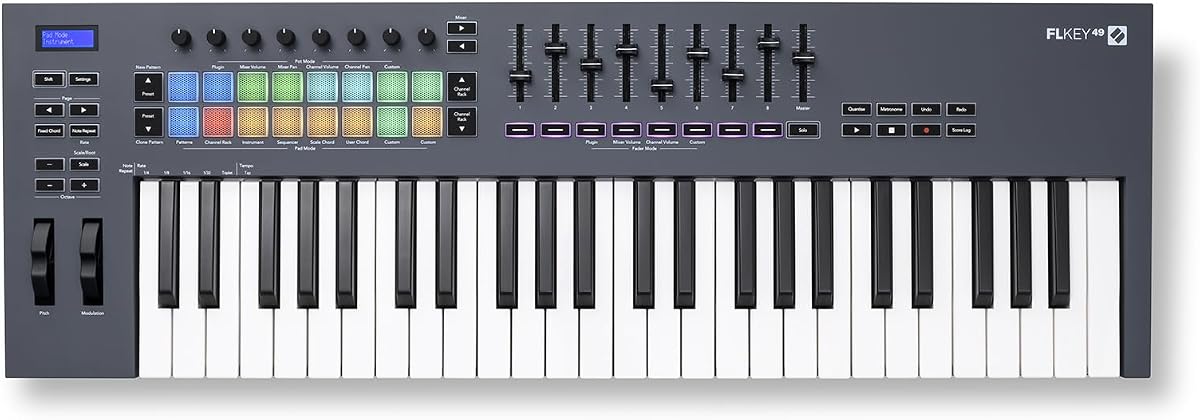
The Novation FLkey 49 is specialized for users of FL Studio. With a 4.6 rating, it excels at bringing the software's mixer and channel rack controls directly to your hands without manual assignment.
We may earn a commission when you buy through this link, at no additional cost to you.
Its sequencer mode maps pads to the step sequencer for fast beat programming. The Scale mode ensures you always hit the right note, while Chord modes allow complex harmonies with a single finger.
Users appreciate the ability to record automation on the fly using the 8 pots and 9 faders. This keeps the creative flow going without interrupting the session to use a mouse for volume adjustments.
Choose this if FL Studio is your primary DAW. It removes the friction of manual mapping and offers a truly integrated production experience.
The controller maps directly to FL Studio functions like channel racks and mixers, reducing setup time.
Undo, redo, and quantize buttons are physically accessible, allowing quick corrections during recording.
We may earn a commission when you buy through this link, at no additional cost to you.
The M-AUDIO Oxygen Pro 49 brings professional features to the 49 Key MIDI Keyboard category. With a 4.5 rating, it is respected for its semi-weighted keys and aftertouch capabilities that add expressiveness to performances.
We may earn a commission when you buy through this link, at no additional cost to you.
Its semi-weighted keys mimic the feel of a piano more closely than unweighted alternatives. The 5-pin MIDI output allows connection to hardware synthesizers, expanding the hardware ecosystem. This model supports both software and hardware workflows.
The included 16 RGB backlit pads and extensive control surface make it a complete studio centerpiece. Users appreciate the auto-mapping for DAW controls, which simplifies complex production tasks significantly.
This is ideal for advanced producers who need aftertouch and physical connectivity. If you perform live or use external gear, this keyboard offers the necessary flexibility.
The combination of semi-weighted keys and aftertouch allows for dynamic control over sound modulation during performance.
The 5-pin MIDI output enables direct connection to legacy hardware synthesizers, broadening creative options.
We may earn a commission when you buy through this link, at no additional cost to you.
The midiplus AK490 is a straightforward controller focused on essential MIDI functions. With a 4.3 rating, it offers a standard playing experience without advanced digital features or complex integration options.
We may earn a commission when you buy through this link, at no additional cost to you.
It includes velocity-sensitive keys and standard wheels for pitch and modulation. The MIDI Din output is a rare feature at this price point, allowing connection to non-USB hardware. This makes it versatile for older studio setups.
Users appreciate its simplicity and low cost. While it lacks the software bundles found in other models, it serves well for those who only need a basic input device for recording and composition.
Choose this if you need a simple, functional controller for basic MIDI tasks. It is a practical choice for those who prioritize physical connectivity over digital software integration.
The MIDI Din Jack allows connection to older hardware devices, expanding compatibility beyond just USB.
Octave buttons and sustain inputs cover the fundamental requirements for most playing and recording needs.
We may earn a commission when you buy through this link, at no additional cost to you.
The Arturia KeyLab mk3 represents the top tier of 49 Key MIDI Keyboards in terms of build and features. Its 4.4 rating reflects satisfaction with its robust hardware and refined design for professional environments.
We may earn a commission when you buy through this link, at no additional cost to you.
It features 12 pressure-sensitive performance pads and 9 encoders for deep control. The USB-C interface ensures modern connectivity and stable power. The white finish offers a distinct look for studios preferring a unique aesthetic.
While the price is premium, the quality of materials and tactile feel are top-notch. The controller includes advanced features like aftertouch which allow for nuanced performance. It is a significant step up from budget options.
Buy this if you demand the highest quality hardware and advanced controls. It is best suited for professional studios where reliability and feature depth justify the investment.
The USB-C port ensures compatibility with current laptops and provides efficient power delivery without external bricks.
The 9 encoders and performance pads offer precise control over sound parameters and performance elements.
We may earn a commission when you buy through this link, at no additional cost to you.
Selecting the right controller depends on your workflow, budget, and software needs. This guide explains the critical factors to consider.
The feel of the keys affects how naturally you can play melodies and chords. Semi-weighted keys mimic piano action better for dynamic performance, while unweighted synth keys are lighter for fast playing.
Consider your playing style: if you prioritize speed, synth-action is better; if dynamics are key, semi-weighted is ideal.
Seamless integration with your Digital Audio Workstation allows you to control transport, mixing, and track selection without using the mouse. Controllers like Novation Launchkey and Arturia KeyLab offer custom scripts for major DAWs.
Check if the controller supports your specific DAW software to maximize workflow efficiency.
Faders, knobs, and pads allow tactile control over volume, panning, and effects. A controller with 8 knobs and 9 faders offers extensive mixing capability without relying on software interfaces.
Decide if you need hands-on mixing or just MIDI note input based on your production complexity.
Many keyboards include DAWs like Ableton Live Lite or virtual instruments like Analog Lab V. These bonuses save money and provide immediate production tools upon purchase.
Verify the included software matches your needs to ensure the bundle adds real value to your setup.
USB-C or standard USB ensures compatibility with modern computers. Some models also offer 5-pin MIDI outputs for connecting to hardware synthesizers, providing greater versatility for hybrid studios.
Choose a controller that matches your connection standards to avoid needing extra adapters.
The physical footprint matters for desk space. Compact models fit well in small home studios, while those with more controls take up more room.
Measure your workspace before buying to ensure the controller fits comfortably without clutter.
Aftertouch allows you to modulate sound by pressing harder on keys after playing. This adds expressiveness to synthesizer sounds that cannot be achieved with standard velocity.
If expressive performance is a priority, look for models with channel or polyphonic aftertouch support.
Budget controllers offer essential inputs at low prices, while premium models offer durability and advanced features. Calculate the value of included software to determine the true cost of ownership.
Set a realistic budget and weigh it against the features needed for your current and future projects.
Connect your keyboard to your computer using the provided USB cable. Ensure your drivers are installed if required, or rely on plug-and-play functionality for immediate connection. Most modern systems recognize these devices automatically.
Keep the surface clean using a dry cloth to prevent dust buildup on keys and pads. Avoid exposing the unit to moisture or extreme temperatures to maintain longevity. Store it in a dry place when not in use.
Utilize the included software manuals to learn advanced features like chord modes or pad sequencing. Regular updates often bring new features or compatibility fixes, so check the manufacturer's website periodically.
No, modern 49 Key MIDI Keyboards send data to your computer where software synthesizers and samples generate the sound. They do not produce audio on their own but rely on your DAW and plugins.
Yes, 49 keys cover over four octaves, which is sufficient for most melodies and chord progressions. It is a standard size that balances playability with portability for home studios.
Many models are compatible with iOS devices using a USB camera adapter. However, power requirements vary, so ensure your computer or power source can supply enough current for the device.
Velocity measures how hard you strike a key, while aftertouch measures pressure applied after the key is pressed. Velocity affects initial volume, while aftertouch allows ongoing modulation like vibrato.
Most operate as class-compliant devices requiring no drivers. However, some advanced features or specific DAW integrations may require software updates or proprietary drivers for full functionality.
Visit the manufacturer's support website and download the latest update tool. Follow the instructions provided to install firmware updates that may add features or improve stability.
The top three picks highlight diverse needs: Novation Launchkey 49 MK4 for overall integration, M-AUDIO Keystation 49 MK3 for budget entry, and Arturia KeyLab mk3 49 for premium control. Each model excels in specific areas to suit different users.
Prioritize the features that match your workflow. If you need advanced sound design, look for knobs and aftertouch. If you need a simple controller, focus on key feel and price. Ensure the software included meets your requirements.
Prices and availability fluctuate frequently so verify current listings before purchasing. Always check the latest user reviews for any recent firmware issues or hardware changes to ensure a smooth buying experience.