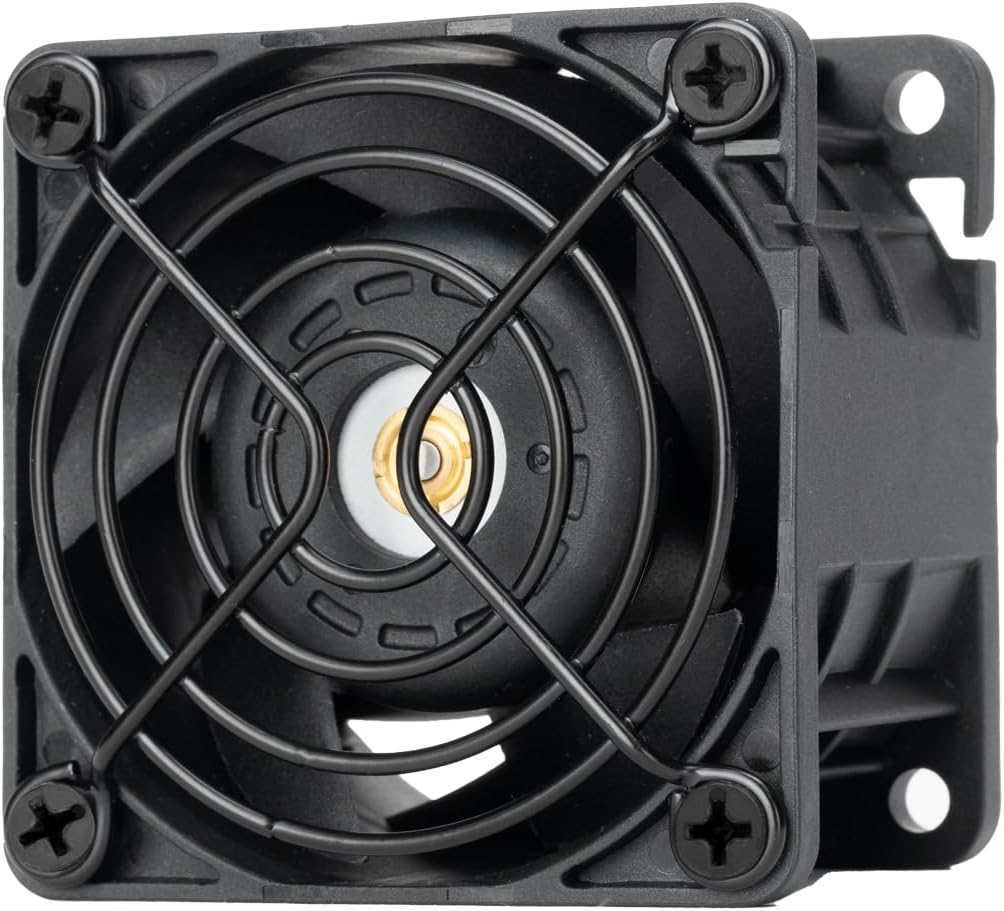
Silverstone FHS 60X
4.9Editor score
Up to 15,000 RPM speed
65.74 CFM max airflow
Industrial server grade durability
Explore the top 60mm cooling fans for quiet performance and durability. Compare ratings, specs, and features to find the perfect fit for your NAS, 3D printer, or PC.
When you need reliable cooling in a compact space, 60mm cooling fans are the go-to solution. They fit perfectly into small enclosures, network devices, and custom builds where larger fans simply won't fit. Choosing the right one means balancing airflow, noise levels, and build quality to ensure your hardware stays cool without becoming a nuisance.
We have carefully compared ten of the most popular 60mm fans available on the market today. Our selection includes top-rated models from trusted brands like Noctua and Thermalright, as well as specialized AC and DC options for industrial use. We evaluated each fan based on its rating, technical specifications, and user feedback to give you a clear picture of performance.
Each product pick below includes a detailed breakdown of its strengths, weaknesses, and ideal use cases. Whether you are upgrading a silent home server or adding extra airflow to a 3D printer, these options cover a wide range of needs. Keep in mind that product availability and pricing can fluctuate, so checking the current links is always recommended before you make a final decision.
4.9Editor score

4.8Editor score

4.6Editor score
This side-by-side comparison highlights the key specifications and features of all ten selected fans. You can quickly see differences in voltage, speed, bearing type, and noise levels to determine which model aligns best with your specific project requirements and budget constraints.


The Noctua NF-A6x25 PWM is the definitive choice for anyone seeking premium cooling in a small 60mm form factor. With an impressive 4.8 star rating, this fan consistently delivers on its promise of high performance without excessive noise. Its A-series design features Flow Acceleration Channels that optimize airflow while maintaining a whisper-quiet operation.
We may earn a commission when you buy through this link, at no additional cost to you.
Key strengths include its advanced acoustic optimization frame and robust build quality. The fan operates at a maximum of 3000 RPM yet stays under 19.3 dB(A), making it ideal for quiet NAS units or media centers. It comes with anti-vibration mounts, screws, and a Low-Noise Adaptor to let you dial down the speed even further for near-silent performance.
While it is priced higher than many competitors, the trade-off is minimal considering the longevity and reliability. The 150,000-hour MTTF rating ensures it will last for years of continuous operation. The only drawback might be the premium cost if you are on a tight budget or only need a temporary solution.
Buy this if you value silent operation and reliability above all else. It is the perfect replacement for noisy fans in DVRs, routers, and storage devices. For most users, this fan offers the best balance of cooling capability and acoustic comfort available on the market today.
The advanced frame design minimizes resonance and turbulence, ensuring the fan remains silent even at high speeds.
Everything needed for installation is included, from vibration dampers to extension cables, making setup effortless.
We may earn a commission when you buy through this link, at no additional cost to you.
If your device does not support PWM headers, the Noctua NF-A6x25 FLX is the perfect alternative. It maintains the same high-quality 4.8 star rating and acoustic performance as the PWM version. The 3-pin Molex connector ensures it works with almost any standard power supply or fan header.
We may earn a commission when you buy through this link, at no additional cost to you.
This model includes multiple Low-Noise Adaptors that allow you to manually switch between speed settings. You can choose 3000 RPM for maximum airflow or drop down to 1600 RPM for ultra-quiet operation. This flexibility makes it ideal for projects where you cannot control speed via software or BIOS.
The main trade-off is the lack of automatic speed regulation based on temperature. You need to set the speed manually, which might not be convenient for some users. However, for stationary equipment like external drives or audio amplifiers, fixed speeds are often perfectly acceptable.
Choose this fan if you need premium cooling but have a 3-pin setup. It is a reliable drop-in replacement that ensures your equipment stays cool without introducing unwanted noise into your workspace.
Adjust your fan speed easily with included adaptors to match your specific noise and airflow needs.
The 3-pin design fits almost any standard power connection, broadening its use cases significantly.
We may earn a commission when you buy through this link, at no additional cost to you.
The Silverstone FHS 60X stands out with its industrial-grade performance and high 4.9 star rating. Designed for servers and tough environments, it offers a thick 38mm frame and a massive 65.74 CFM airflow capacity. This is a heavy-duty fan intended for situations where cooling priority outweighs noise concerns.
We may earn a commission when you buy through this link, at no additional cost to you.
Its ultra-wide 0 to 15,000 RPM speed range gives you extreme control. You can run it slowly for moderate cooling or push it to the limit for intense heat dissipation. The metal grille included adds safety and durability, making it suitable for open-frame servers or workshop equipment.
Noise is a significant consideration with this fan. At full speed, it can reach 61.5 dBA, which is quite loud. However, in a server room or industrial cabinet, this is often acceptable. The thick frame also means it requires more depth than typical 25mm fans, so check your clearance first.
Pick this if you need serious cooling power in a small footprint. It is excellent for high-performance servers or DIY builds that run hot and need robust airflow to stay stable under load.
With over 65 CFM of airflow, this fan handles heat loads that would overwhelm standard consumer fans.
Metal grilles and a robust frame ensure the fan can withstand harsh industrial or workshop conditions.
We may earn a commission when you buy through this link, at no additional cost to you.
The Thermalright TL-B6B offers incredible value with a solid 4.6 star rating and a budget-friendly price. It provides reliable PWM control and stays surprisingly quiet at 20.17 dB(A) even when spinning at 3200 RPM. This makes it a smart choice for those who want quality without the premium price tag.
We may earn a commission when you buy through this link, at no additional cost to you.
Its S-FDB V2 bearing design solves common vibration issues and promises a long service life. The 7-blade impeller is optimized for high air volume, ensuring your case or component stays cool. It is lightweight yet sturdy enough for regular computer case cooling or small NAS projects.
While it lacks the extensive accessories that come with Noctua fans, it still gets the job done. You might need to source your own screws or vibration dampers if your project requires extra stability. However, for standard mounting scenarios, it performs exceptionally well.
Opt for this fan if you are building on a tight budget or need multiple fans for a large setup. It delivers quiet, efficient cooling that rivals much more expensive options on the market.
The S-FDB V2 bearing technology minimizes shake, ensuring smoother operation and less noise over time.
Seven optimized blades move air effectively to prevent overheating without consuming excessive power.
We may earn a commission when you buy through this link, at no additional cost to you.
The ANVISION 2-Pack provides an excellent solution when space is extremely tight. With a slim 15mm profile, these fans fit into narrow enclosures where standard 25mm fans cannot. They carry a 4.5 star rating and feature dual ball bearings for reliability and a lifespan of many years.
We may earn a commission when you buy through this link, at no additional cost to you.
Spinning at 4000 RPM, they deliver 17.6 CFM of airflow. While this is decent for the size, the trade-off is higher noise levels of 30.7 dBA. They are best used in environments where noise is less critical than getting a fan inside a compact box.
Buying two at once is a great deal for projects needing multiple fans. The 2-pin connector is simple but limits you to on/off speed control unless you modify the wiring. This simplicity is perfect for fixed applications like small appliances or hobby electronics.
Select this option if you are working on a 3D printer or similar device that requires slim fans. The dual ball bearings ensure they can handle continuous use without breaking down quickly.
A 15mm thickness allows installation in cramped spaces where height clearance is a limiting factor.
Dual ball bearings enhance durability and allow the fan to operate in various orientations reliably.
We may earn a commission when you buy through this link, at no additional cost to you.
If you need multiple slim fans for a project, the Antrader 3-Pack is a cost-effective choice. Each unit measures 60x60x15mm, making them perfect for 3D printers and small electronic enclosures. They feature a 2-pin connector for simple installation and a brushless motor for long life.
We may earn a commission when you buy through this link, at no additional cost to you.
Running at 3600 RPM, they offer 22.7 CFM of airflow which is impressive for such a slim profile. While they are not silent, their performance is solid for cooling hotends or small electronics. They are lightweight and easy to mount with screws.
The main limitation is that they use sleeve bearings, which may wear faster than dual ball bearings in harsh environments. However, for standard indoor use, they perform well enough. Getting three at once means you can upgrade multiple spots without spending much.
These are ideal for DIY 3D printer upgrades or small hobby electronics. If you need multiple fans and have limited space, this pack provides great value and performance for the price.
Their slim profile and airflow make them perfect for cooling 3D printer hotends and electronics.
With simple 2-pin connectors and small size, they are easy to wire and mount in any project.
We may earn a commission when you buy through this link, at no additional cost to you.
The UMLIFE 2PACK is unique because it runs directly on AC mains power. It supports a wide range of voltages from 110V to 240V, making it highly versatile for international use. With a 4.6 star rating, these fans are built for durability with dual ball bearings.
We may earn a commission when you buy through this link, at no additional cost to you.
Spinning at 4800 RPM, they provide 24.8 CFM airflow for ventilation. This makes them perfect for small campers, keezers, or industrial cabinets where you don't want a DC power supply. The lifespan is rated at 67,000 hours ensuring long-term reliability.
Since they are AC powered, they lack speed control and use more power than DC equivalents. However, for simple exhaust or ventilation tasks, they are extremely convenient. You can simply plug them into a wall outlet or switch without complex wiring.
Buy this for projects like coolers or small ventilation systems. It offers simplicity and reliability where DC fans would require a power adapter or complex setup.
Plug directly into wall power, eliminating the need for extra DC adapters or controllers.
Supports 110V to 240V so you can use it in almost any country without modification.
We may earn a commission when you buy through this link, at no additional cost to you.
Combining slim profile and premium quality, the Noctua NF-A6x15 PWM scores a perfect 4.9 rating. It brings the same quiet A-series technology to a 15mm frame. This is a rare find because most slim fans are loud, but this one stays under 19.8 dB(A).
We may earn a commission when you buy through this link, at no additional cost to you.
With 4-pin PWM control, you can adjust speeds easily via your motherboard. It reaches 3500 RPM max and comes with a Low-Noise Adaptor to reduce that to 3050 RPM. The included anti-vibration mounts help minimize noise further, ensuring a smooth and quiet experience.
The main drawbacks are the cost and the need for specific mounting screws. You might need to buy separate mounting kits if your project uses non-standard holes. But for the quietest slim fan available, the value is there for serious enthusiasts.
Choose this if you need to fit a fan in a tight slot without sacrificing silence. It is perfect for slim PC cases, routers, or any device where depth is a constraint.
Maintains Noctua's whisper-quiet performance in a thin profile that fits tight spaces.
Full PWM compatibility lets you dynamically adjust fan speeds based on temperature demands.
We may earn a commission when you buy through this link, at no additional cost to you.
The Noctua NF-A6x25 5V is a specialized fan for devices that run on 5V power. With a 4.8 rating, it retains the premium quiet performance of the A-series line. It is perfect for routers, switches, and modern 3D printers that use 5V rails.
We may earn a commission when you buy through this link, at no additional cost to you.
It supports 4-pin PWM for automatic speed control, making integration easy with modern systems. The polarity protection ensures safe operation even if wired incorrectly. It runs cool and quiet, staying under 19.3 dB(A) at its 3000 RPM top speed.
You cannot use this fan on 12V systems without damage, so double-check your voltage needs. While it is specific, it is the best option for 5V applications where silence and reliability matter. The OmniJoin adaptor adds flexibility for proprietary connectors.
Opt for this if your equipment requires 5V power. It ensures stable cooling for sensitive electronics without introducing unnecessary noise or power issues.
Tailored for 5V systems like routers and modern electronics, offering safe and efficient cooling.
The OmniJoin adaptor set allows connection to various proprietary fan headers found in small devices.
We may earn a commission when you buy through this link, at no additional cost to you.
The Wathai EC AC Axial fan is another great option for AC-powered ventilation needs. It supports 90V to 270V and runs at 4800 RPM for strong airflow. With a 4.4 rating, it is a solid choice for industrial or hobby projects needing constant ventilation.
We may earn a commission when you buy through this link, at no additional cost to you.
Its dual ball bearings provide a 67,000-hour lifespan and allow mounting in any orientation. The fan is efficient and consumes less power than standard AC fans. However, you may need to connect the wires yourself since they are not pre-wired for plug-and-play.
Noise levels are higher than DC fans, but this is acceptable for workshops or cabinets. It is a versatile fan for DIY cooling or exhaust systems where you want to avoid DC supplies. If you can handle basic wiring, it offers great value.
Select this for projects requiring simple AC exhaust without a control system. It provides reliable ventilation for small industrial spaces or home projects.
Consume less power than traditional AC fans while maintaining high speed and airflow output.
Dual ball bearings let you mount the fan flat or upright without performance loss.
We may earn a commission when you buy through this link, at no additional cost to you.
Choosing the right 60mm cooling fan involves understanding your specific needs and constraints. This guide covers the critical factors to help you select a fan that offers the best performance for your application.
Always check if your system requires 5V, 12V, or AC mains power. Using the wrong voltage can damage the fan or your equipment.
Match the fan voltage to your power supply exactly to avoid issues.
Fans come in 15mm, 25mm, or thicker profiles. Measure your available depth to ensure the fan fits.
Choose a thinner fan if space is tight, but expect potentially lower airflow.
Noise is measured in decibels (dBA). Silent applications need fans under 20 dB, while industrial ones may tolerate higher levels.
Look for lower dB ratings if your workspace requires quiet operation.
4-pin PWM fans allow automatic speed adjustments based on temperature. 2-pin or 3-pin fans often run at fixed speeds.
Choose PWM if you need dynamic cooling control; fixed speed works for constant loads.
Dual ball bearings last longer and handle vibrations better than sleeve bearings. They are ideal for industrial use.
Invest in dual ball bearings for long-term reliability and durability.
CFM indicates how much air the fan moves. Higher CFM is needed for hot components or small enclosures.
Pick a fan with sufficient CFM to prevent overheating in your setup.
Check if the fan includes screws and vibration mounts. Some require special brackets or custom solutions.
Ensure the fan includes necessary hardware for easy installation.
Premium brands like Noctua cost more but offer better acoustics and reliability. Budget brands work well for standard cooling.
Decide if you need high-end acoustics or basic performance.
Install the fan with the arrow on the frame pointing in the desired airflow direction. This ensures proper ventilation through your enclosure or component.
Clean dust from the blades regularly using compressed air or a soft brush. Dust buildup can reduce airflow and increase noise over time.
If you hear unusual noises, check that the fan is mounted securely and not vibrating against the case. Proper mounting extends its lifespan significantly.
A 2-pin fan has no speed control and runs at full speed. A 3-pin fan allows voltage-based speed control but no RPM monitoring. A 4-pin PWM fan offers precise digital speed control and can report RPM back to the motherboard.
No, do not run a 12V fan on a 5V supply as it will spin too slow and may overheat. Use a fan designed specifically for the voltage you have.
A 20 dB fan is very quiet, comparable to a whisper. You can typically operate it in quiet rooms without hearing it over normal conversation.
Yes, PWM fans are better for PC cases because they adjust speed based on temperature. This saves power and reduces noise when full cooling is not needed.
For 3D printers, choose slim fans that fit the printer frame. Look for models that are specifically rated for electronics cooling and have durable bearings.
Quality fans with ball bearings can last 50,000 hours or more. Budget fans may last 10,000 to 30,000 hours depending on usage and environment.
We covered ten excellent 60mm cooling fans suited for everything from home servers to industrial projects. Each offers a unique balance of size, performance, and noise to match different needs.
Prioritize compatibility and airflow requirements first. Ensure the fan fits your space and provides enough cooling power before considering extra features.
Always verify current pricing and availability before purchasing. These options are highly rated, but prices may change based on demand and supply.