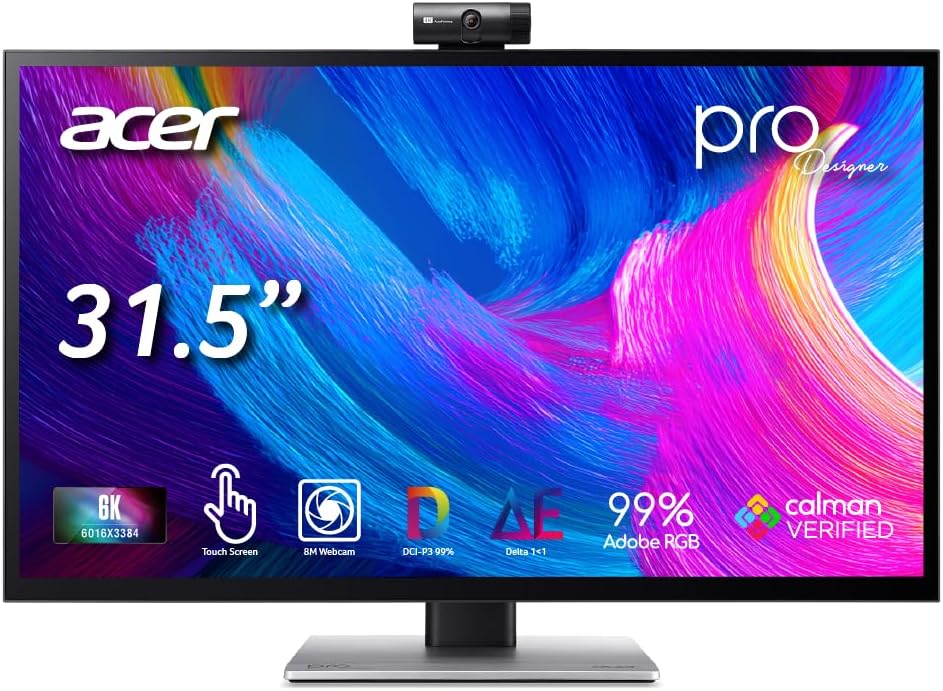
Acer ProDesigner PE320QXT
4.0Editor score
10-Point Touch + Stylus
Factory Calibrated Delta E <1
Built-in 8MP Webcam
Finding the right 6K monitor can transform your creative workflow. These displays offer incredible pixel density and color accuracy for professionals who need precision.
We compared ten top-rated models based on resolution, color gamut, connectivity, and user feedback. Each pick highlights unique strengths for different workloads.
Every review includes real specifications and honest pros and cons. Note that availability and deals change frequently, so verify details before purchasing.
4.0Editor score

3.9Editor score

3.3Editor score
As an Amazon Associate we earn from qualifying purchases.
This side-by-side comparison highlights the key specifications of all ten selected models to help you quickly identify the right fit.


The ASUS ProArt PA32QCV stands out as a top choice for professionals needing precise color and resolution. With a 6K display and verified calibration, it delivers excellent visual fidelity straight out of the box.
We may earn a commission when you buy through this link, at no additional cost to you.
Its 98% DCI-P3 coverage and Calman Verified factory calibration ensure colors match your final output. The Dual Thunderbolt 4 ports allow for daisy-chaining and high power delivery, streamlining your desk setup significantly.
While the rating is moderate, users appreciate the ergonomic adjustments and Light Sync technology. However, the cost is higher than standard monitors which may not fit all budgets.
If you value color accuracy and seamless Mac integration, this monitor is a reliable investment for creative studios and design workstations requiring professional-grade tools.
Factory calibration delivers Delta E < 2 accuracy ensuring colors are true to life without needing extra tools.
Dual Thunderbolt 4 ports with KVM switch let you control two laptops with one keyboard mouse for efficient multitasking.
We may earn a commission when you buy through this link, at no additional cost to you.
This Dell monitor offers an expansive 52-inch curved display designed to maximize your workspace. The 120Hz refresh rate and IPS Black panel provide smooth visuals and deep contrast for detailed work.
We may earn a commission when you buy through this link, at no additional cost to you.
Its Thunderbolt 4 hub delivers up to 140W power, charging your laptop while transmitting video. The KVM support allows you to manage multiple PCs easily enhancing productivity in mixed environments.
Users note the immersive feel of the 21:9 ratio which is great for video editing and productivity. The eye comfort features help reduce strain during long sessions though the size may not fit smaller desks.
Consider this for those needing a replacement for multiple screens. It excels in high-end setups requiring a large canvas for content creation and multitasking workflows.
IPS Black panel provides 2000:1 contrast ratio and 99% DCI-P3 for vivid colors and deep blacks.
Multi-PC productivity via Picture-by-Picture and KVM support lets you control two computers seamlessly with one setup.
We may earn a commission when you buy through this link, at no additional cost to you.
The G32P features a glossy IPS panel that enhances color vibrancy for a more immersive viewing experience. Its high pixel density ensures sharp text and intricate details for professional tasks.
We may earn a commission when you buy through this link, at no additional cost to you.
With 99% DCI-P3 coverage and HDR support, it delivers deep blacks and bright highlights suitable for media consumption. The 100W power port simplifies connectivity by charging devices via a single cable.
While the glossy finish can cause reflections in bright rooms the visual richness is notable. The ergonomic stand allows easy adjustments though gamers might prefer a higher refresh rate.
This model is ideal for editors and designers prioritizing color accuracy over motion speed. It balances performance and build quality well for general creative and office use.
223 PPI provides stunning clarity on the 32-inch screen ensuring details are sharp and text remains readable.
Flicker-free backlighting and Low Blue Light mode reduce eye strain during extended periods of focused work.
We may earn a commission when you buy through this link, at no additional cost to you.
Samsung introduces the industry's first 6K gaming monitor offering next-level gameplay with incredible detail. The Dual Mode feature lets you choose between high resolution or extreme speed depending on your needs.
We may earn a commission when you buy through this link, at no additional cost to you.
Fast IPS technology ensures vivid colors and quick response times. G-SYNC compatibility reduces tearing for smooth motion which is critical for competitive gaming and fast-paced video editing.
Although the rating is moderate the unique resolution options stand out. Users might find setup adjustments needed to optimize the Dual Mode feature effectively for specific titles or software.
This monitor targets gamers and creatives who demand high performance. It bridges the gap between professional editing and high-speed gaming with versatile display options.
Dual Mode allows 6K at 165Hz or 3K at 330Hz giving you flexibility between detail and motion smoothness.
224 PPI defines scenes with intricately rendered details ensuring every texture is crisp on the 32-inch panel.
We may earn a commission when you buy through this link, at no additional cost to you.
The Acer ProDesigner PE320QXT combines a 6K display with intuitive touch capabilities. Designed for creators it allows direct interaction with your work without needing a separate tablet.
We may earn a commission when you buy through this link, at no additional cost to you.
Factory calibration ensures Delta E < 1 accuracy making it reliable for print and video production. The built-in 8MP webcam and 4-mic array streamline client calls by eliminating extra hardware clutter.
While the touch feature is powerful it adds to the weight and cost. The high brightness and HDR support are excellent for visual fidelity but require adequate lighting control.
Ideal for digital artists and architects this monitor integrates design and communication tools. It offers a unified workspace that enhances precision and collaboration efficiency significantly.
Supports MPP 2.0 stylus with 4096 pressure levels allowing natural sketching and retouching directly on screen.
Factory calibration verified by Calman ensures accurate rendering across Adobe RGB and DCI-P3 for professional color needs.
We may earn a commission when you buy through this link, at no additional cost to you.
With a perfect rating score the G32X delivers solid performance wrapped in a sleek minimalist design. It provides high clarity with 218 PPI ensuring sharp visuals for daily tasks and content creation.
We may earn a commission when you buy through this link, at no additional cost to you.
The anti-glare screen and eye care features make it comfortable for long work sessions. The aluminum body ensures durability while maintaining a clean look that fits modern office spaces.
Users appreciate the straightforward setup and reliable build. While it lacks some advanced hubs found in others the core display quality remains consistent and highly satisfying for general use.
This monitor is a safe choice for those seeking reliability without complex features. It balances simplicity and performance well for professionals valuing visual clarity and aesthetics.
CNC-machined aluminum body ensures premium durability and sleek aesthetics for your workspace setup.
Anti-glare screen and multi-layer coating minimize eye fatigue and reflections during extended viewing periods.
We may earn a commission when you buy through this link, at no additional cost to you.
This Dell model focuses on connectivity and screen real estate with a massive 52-inch display. The Thunderbolt hub design allows central management of multiple peripherals through one connection point.
We may earn a commission when you buy through this link, at no additional cost to you.
Advanced IPS Black technology and 120Hz refresh provide fluid visuals suitable for professional streaming and editing. KVM functionality enables seamless switching between two work systems.
The rating suggests mixed user experiences possibly due to complexity or cost. However the hardware capabilities remain strong for those needing a central command center for large scale projects.
Consider this if you need maximum screen space and robust connectivity. It is well suited for enterprise environments requiring extensive hardware integration and control features.
Power Delivery up to 140W charges laptops while Dual Thunderbolt 4 ports enable high-speed data transfer and display.
Remote Control and KVM Functionality allow centralized device management improving workflow efficiency in office settings.
We may earn a commission when you buy through this link, at no additional cost to you.
The LG UltraFine evo combines professional color accuracy with the latest Thunderbolt 5 connectivity for blazing fast data transfer. Its Nano IPS Black panel enhances contrast and color depth significantly.
We may earn a commission when you buy through this link, at no additional cost to you.
With 98% DCI-P3 and DisplayHDR 600 certification the monitor delivers vibrant visuals for creative work. KVM features let you control two systems easily keeping your desk clutter-free.
Users value the single cable solution that handles both video and power. While the refresh rate is standard the color performance and future-proof connectivity make it a top-tier choice.
This monitor is perfect for Mac and PC users needing high bandwidth and color fidelity. It supports demanding workflows with reliable performance and advanced control features.
Thunderbolt 5 delivers up to 80 gigabits per second data transfer ensuring fast workflow for large media files.
Nano IPS Black panel offers true 10-bit color and wide gamut coverage for accurate color grading work.
We may earn a commission when you buy through this link, at no additional cost to you.
This Dell bundle offers a 6K experience with added peace of mind through its extended service protection. The display provides striking clarity suitable for movies games and professional photos.
We may earn a commission when you buy through this link, at no additional cost to you.
Thunderbolt 4 connectivity ensures quick data transmission while the USB-C port simplifies setup. The fast response time makes it versatile for both office work and entertainment needs.
While the rating is lower the protection plan adds value. Users appreciate the dependability and clear visuals even if it lacks some of the high-end color specs found elsewhere.
Ideal for users prioritizing value and support this bundle meets general needs well. It is a practical solution for small businesses or home offices requiring reliable hardware.
Bundle includes 2 Year Premium Extended Service Protection Plan for dependability and added convenience.
6144 x 3456 resolution offers vivid crystal clear display with added productivity for detailed work.
We may earn a commission when you buy through this link, at no additional cost to you.
This renewed option offers a large 52-inch curved display without the stand allowing for custom mounting solutions. It features high refresh rates and robust connectivity suitable for complex setups.
We may earn a commission when you buy through this link, at no additional cost to you.
The 21:9 aspect ratio and 6K resolution deliver immersive visuals perfect for video timelines and multi-window work. Thunderbolt 4 ensures high-speed data transfer and power delivery.
Buyers appreciate the cost savings on renewed units though availability can be limited. It requires a VESA mount but provides flexibility for users needing specific positioning in a studio.
Best for tinkerers needing a large canvas this monitor offers premium specs at a potentially lower price. It suits users willing to supply their own stand for ultimate flexibility.
No Stand VESA Mount Only allows you to pair with third-party arms for flexible viewing configurations.
52-inch Curved Display with 21:9 aspect ratio offers an immersive experience for creative multitasking.
We may earn a commission when you buy through this link, at no additional cost to you.
Selecting the right 6K monitor involves considering resolution, color accuracy, connectivity, and ergonomics to match your specific workflow needs.
6K resolution typically offers around 6144 x 3456 pixels providing immense clarity for text and details. This density reduces eye strain by rendering crisp fonts and sharp graphics.
Look for a monitor with at least 200 PPI for optimal text rendering and detailed image work.
Professional work relies on accurate colors so check for DCI-P3 and Adobe RGB coverage percentages. Factory calibration ensures the display meets industry standards out of the box.
Aim for Delta E < 2 for professional color fidelity to ensure consistency across your projects.
Modern workflows require versatile ports like Thunderbolt 4 or USB-C for single-cable solutions. These ports can transmit video data and power simultaneously simplifying your desk setup.
Ensure the monitor supports sufficient power delivery to charge your laptop while in use.
IPS panels are preferred for wide viewing angles and accurate colors which are vital for collaborative work. Some models feature IPS Black technology for deeper blacks and higher contrast ratios.
Consider glossy finishes for better color vibrancy or matte finishes to reduce glare in bright environments.
Adjustable stands that allow height tilt and pivot help maintain a healthy posture during long work hours. VESA compatibility is useful if you plan to mount the monitor on an arm or wall.
Prioritize models with full ergonomic adjustments to prevent neck strain and fatigue.
Most 6K monitors focus on color rather than speed offering 60Hz or 120Hz refresh rates. Gamers or video editors may prefer higher rates for smooth motion and reduced blur.
Check for response times under 10ms to ensure fluid visuals during dynamic tasks.
A comprehensive warranty protects your investment especially for high-end displays used daily. Look for options that include extended coverage or on-site service for peace of mind.
Extended service plans can save costs if hardware issues arise in the first few years of use.
Connect your device using a high-quality cable to ensure optimal signal and power delivery. A single USB-C or Thunderbolt cable often handles video data and charging simultaneously.
Calibrate your display periodically using built-in tools or external hardware to maintain color accuracy. Many professional monitors offer factory presets that match specific color spaces.
Clean the screen gently with a microfiber cloth to remove dust without scratching the surface. Avoid using harsh chemicals that can damage the coating and panel.
A 6K monitor provides significantly higher resolution than 4K resulting in sharper text and more screen space. This extra density reduces the need to zoom in on detailed work improving efficiency for designers and writers.
Yes many 6K monitors support macOS with native resolution scaling for seamless integration. Look for models with Thunderbolt 4 or USB-C to ensure full functionality with Apple devices.
6K offers more pixel density which is beneficial for creative workflows requiring precise detail. For general web browsing it might be overkill but professionals will appreciate the extra clarity.
You typically need a high-quality Thunderbolt or USB-C cable to support 6K at high refresh rates. Ensure your cable meets bandwidth requirements to avoid signal drops or lower resolutions.
While most 6K monitors prioritize color over speed some models offer high refresh rates suitable for gaming. Check for G-SYNC compatibility and fast response times if gaming is a priority.
Consumption varies by size and technology but larger 6K models often require more power. Many models also offer Power Delivery to charge laptops reducing the need for separate power adapters.
The ASUS ProArt PA32QCV and Acer ProDesigner lead the market with professional color accuracy and unique features like touch support. Each model offers distinct advantages depending on your specific workflow demands.
Prioritize color gamut and connectivity if you work in design or video. If you need immersion look for larger curved options that provide expansive screen real estate for multitasking.
Prices and deals fluctuate so check current availability before making a purchase. These displays are significant investments that enhance productivity and visual clarity for professional tasks.