
AULA S75 PRO Wireless Mechanical Gaming Keyboard
4.6Editor score
Customizable LCD screen
Advanced gasket structure
South-facing RGB LEDs
Explore the top 75 percent mechanical keyboards for gaming and work. Compare features, switch types, and real user ratings to find your perfect compact board.
A 75 percent mechanical keyboard offers the perfect balance between compact design and full functionality. These boards retain essential arrow keys and function rows while saving valuable desk space for better mouse movement and ergonomic positioning.
We compared ten top-rated models based on build quality, switch smoothness, connectivity options, and customization features. Our analysis focuses on real user feedback and technical specifications to help you choose the right keyboard for your needs.
Each pick highlights unique strengths like gasket mounting, hot-swappable sockets, or multi-device connectivity. Keep in mind that availability and promotions change frequently, so check current listings before making your final decision.
4.6Editor score

4.6Editor score
4.6Editor score
This side-by-side comparison breaks down the key specifications and features of each keyboard to help you quickly identify the model that best fits your workflow and budget requirements.


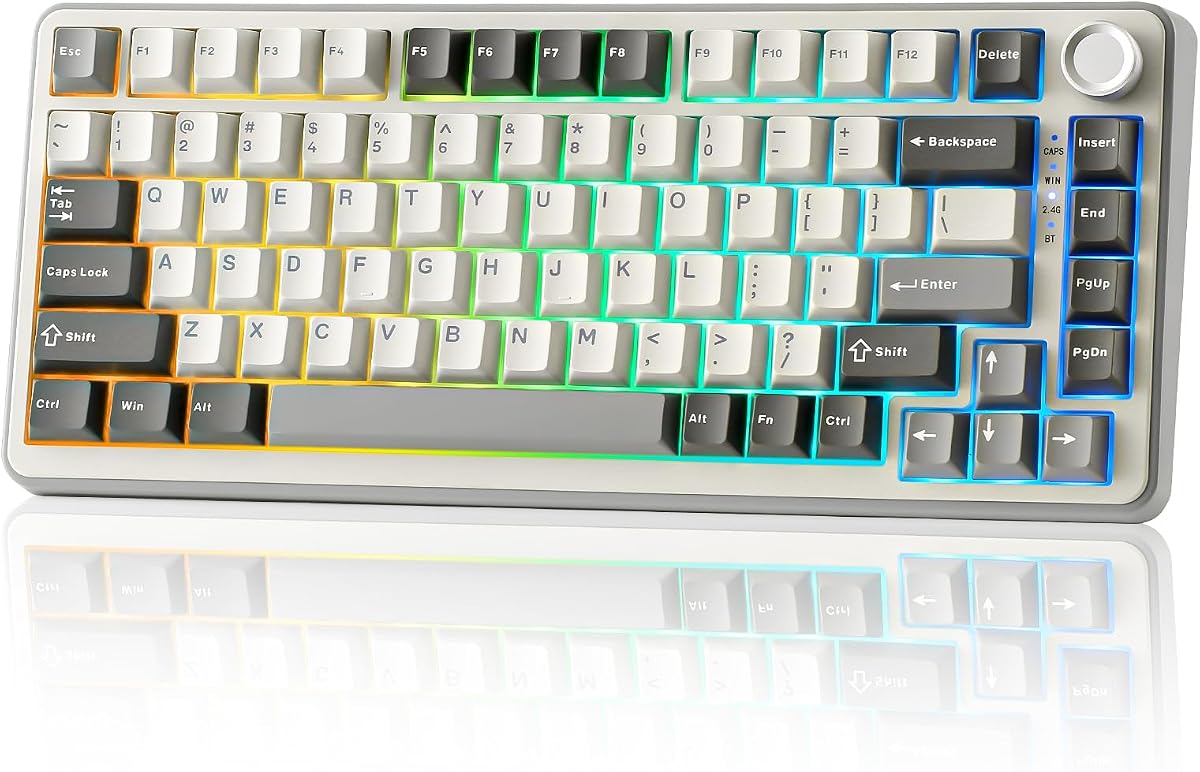


The AULA F75 Pro stands out as a top-tier wireless mechanical keyboard with excellent build quality and versatile connectivity. It holds a solid 4.6 rating from users who appreciate its smooth typing experience and robust feature set.
We may earn a commission when you buy through this link, at no additional cost to you.
Its tri-mode connection allows seamless switching between Bluetooth, 2.4GHz wireless, and USB-C wired modes. The hot-swappable PCB supports both three-pin and five-pin switches, making it easy to customize without soldering. Pre-lubed stabilizers and Reaper switches deliver a creamy sound that many enthusiasts favor.
While the driver is limited to Windows systems, the hardware offers enough functionality to satisfy most users. The side-printed PBT keycaps are stylish but may take time to adjust to if you are used to traditional legends.
This keyboard is ideal for users who want a premium wireless experience with extensive customization options. Whether you are gaming or working across multiple devices, the F75 Pro delivers consistent performance and reliability.
The 4000mAh battery ensures long-lasting usage even with RGB lighting enabled, reducing the need for frequent recharging.
Five layers of filling silencer effectively reduce cavity noise, providing a thocky and solid typing feel.
We may earn a commission when you buy through this link, at no additional cost to you.
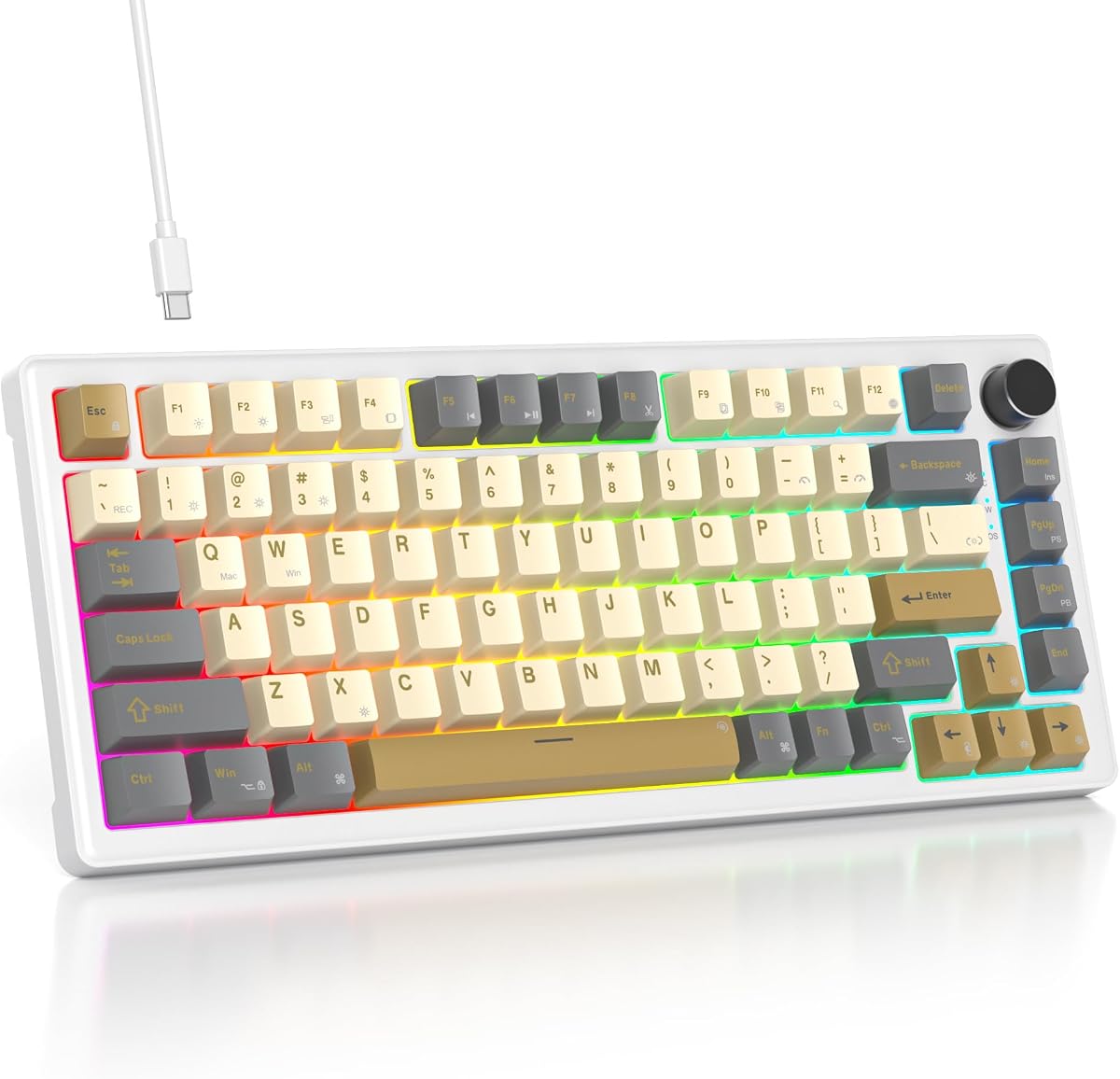
The AULA S75 PRO brings a unique twist with its integrated LCD screen, offering real-time customization and status monitoring. Its 4.6 rating reflects strong satisfaction with both its visual flair and functional performance.
We may earn a commission when you buy through this link, at no additional cost to you.
Users can display GIFs, battery status, or system info on the screen, controlled via a multi-function knob. The keyboard supports Bluetooth, 2.4GHz, and USB-C connections, accommodating up to five devices. Hot-swappable sockets make it beginner-friendly for customization.
While the screen requires a wired connection for initial setup, the convenience it offers is significant. The advanced structure with integrated silicone pads ensures a soft, responsive typing feel that rivals more expensive boards.
This model suits users who want a modern, high-tech keyboard with premium features. It balances aesthetic appeal with serious performance, making it a standout choice for gaming and productivity setups.
The LCD screen allows you to personalize your setup with custom images and quick access to system information.
Five layers of filling silencer and single key slotting create a quiet and thocky sound profile.
We may earn a commission when you buy through this link, at no additional cost to you.
This Retro Mechanical Keyboard offers exceptional value with a gasket mount structure typically found in higher-priced boards. Its 4.6 rating highlights strong performance for users seeking premium features without a premium price tag.
We may earn a commission when you buy through this link, at no additional cost to you.
The five-layer padding and gasketed mount provide a cushioned, quiet typing experience. Pre-lubed White Jade switches deliver smooth linear action, while the hot-swappable PCB allows future customization. RGB lighting includes music rhythm effects for added flair.
Although it is wired only, the compact design saves desk space effectively. The driver supports full-key macros, enhancing efficiency for both work and gaming. Compatibility with Mac and Windows systems adds to its versatility.
Ideal for budget-conscious buyers, this keyboard delivers a premium feel and solid performance. It is an excellent starting point for anyone interested in mechanical keyboards or looking for a compact setup.
The gasketed mount structure provides a bouncy, cushioned feel that reduces finger fatigue during long sessions.
With 16.8 million colors and music rhythm modes, the lighting adds a personalized touch to your workspace.
We may earn a commission when you buy through this link, at no additional cost to you.
The MageGee 75% is a straightforward mechanical keyboard designed for gamers who want reliable performance without extra complexity. It holds a 4.1 rating, reflecting its value and functional design.
We may earn a commission when you buy through this link, at no additional cost to you.
Featuring linear red switches, it offers a smooth and fast typing experience without tactile bumps. The blue LED backlight provides sufficient visibility, and N-key rollover ensures accurate inputs during intense gaming. Its metal panel adds to the durability.
Users should note the ABS keycaps may develop shine over time compared to PBT alternatives. However, for the price and simplicity, it remains a strong option for casual gamers.
This keyboard is perfect for those needing a compact, no-fuss gaming board. It delivers consistent performance and is ready to use right out of the box.
The TKL design retains essential arrow keys while freeing up mouse space for lower DPI gaming.
Red switches provide fast actuation and minimal resistance for rapid typing and gaming.
We may earn a commission when you buy through this link, at no additional cost to you.
This Keyboard offers a balanced mix of comfort and customization with its gasket-mounted design. It has a 4.6 rating from users who value its durable build and acoustic performance.
We may earn a commission when you buy through this link, at no additional cost to you.
The hot-swappable sockets let you experiment with different switches easily. Premium PBT keycaps resist wear and oil, ensuring a clean texture over time. RGB lighting is customizable via software, allowing for personalization.
While limited to wired connections, the keyboard provides a stable and responsive experience. The gasket mount helps dampen vibrations, contributing to a more pleasant typing feel.
It suits users looking for a reliable, high-quality mechanical keyboard without unnecessary wireless features. This model is well-suited for office work and casual gaming.
PBT keycaps ensure long-term texture retention and resistance to shine and oil buildup.
The mounting design provides a softer typing experience while maintaining solid structural support.
We may earn a commission when you buy through this link, at no additional cost to you.
The YUNZII B75 PRO is renowned for its creamy sound profile and smooth typing experience. With a 4.6 rating, it appeals to enthusiasts who prioritize acoustics and wireless functionality.
We may earn a commission when you buy through this link, at no additional cost to you.
Five-layer padding and precision-tuned stabilizers create a consistent and quiet feel. The tri-mode connection ensures reliable usage across devices. South-facing LEDs provide clear key illumination without light bleed.
While it lacks an integrated display, the core mechanical performance remains strong. The hot-swappable sockets support various switch types, and the large battery ensures extended wireless use.
This board is ideal for users seeking a premium typing feel in a wireless form factor. It excels in both typing and gaming scenarios, delivering smooth and reliable performance.
Five-layer padding and pre-lubed switches deliver a consistent creamy sound that users enjoy.
South-facing LEDs reduce light interference with custom keycaps and ensure clear backlight visibility.
We may earn a commission when you buy through this link, at no additional cost to you.
The Keychron K2 is a well-regarded keyboard designed with both Mac and Windows users in mind. It maintains a 4.4 rating for its versatile connectivity and robust build.
We may earn a commission when you buy through this link, at no additional cost to you.
With native Mac function keys and optional Mac keycaps, it integrates seamlessly into Apple ecosystems. Bluetooth 5.1 allows easy switching between devices. The Super Red switches offer linear responsiveness for both typing and gaming.
This model does not include hot-swappable sockets, limiting switch customization. Additionally, the white LED backlighting lacks RGB options. However, its battery life and build quality remain standout features.
This keyboard is perfect for Mac users who want a reliable mechanical keyboard. It delivers strong performance and compatibility with modern multi-device workflows.
The included Mac keycaps and layout ensure seamless integration with macOS systems.
The 4000mAh battery supports up to 72 hours of typing or seven days of normal use.
We may earn a commission when you buy through this link, at no additional cost to you.
The Newmen GM326 offers essential mechanical features at an entry-level price. It holds a 4.4 rating, reflecting its appeal to casual users seeking functionality without complexity.
We may earn a commission when you buy through this link, at no additional cost to you.
Hot-swap sockets allow switch customization without soldering. The multi-function knob provides quick volume control, while the rainbow LED backlight adds visual appeal. Ergonomic stepped keycaps enhance typing comfort.
While software customization is limited compared to premium boards, the core functionality remains solid. The keyboard is lightweight and portable, making it suitable for travel.
This keyboard is ideal for users who want a compact mechanical board without breaking the bank. It delivers consistent performance for everyday tasks and light gaming.
Hot-swap sockets make it easy to change switches without technical expertise or soldering.
The multi-function knob provides quick access to volume adjustment and system indicators.
We may earn a commission when you buy through this link, at no additional cost to you.
The Womier SK80 features a color multimedia screen for enhanced customization and system info. It has a high 4.7 rating for its innovative design and solid build quality.
We may earn a commission when you buy through this link, at no additional cost to you.
The screen displays system status, custom GIFs, and RGB settings. The gasket mount provides a responsive typing feel. South-facing LED diffusers improve lighting clarity and support custom keycaps.
Music syncing adds a dynamic lighting element to gaming. The hot-swappable PCB allows easy customization. While software is required for full screen customization, the experience is rewarding.
This keyboard is ideal for users who want visual flair and strong performance. It balances modern features with reliable mechanical performance.
The color screen allows you to display custom images and monitor system status in real time.
RGB lighting reacts to music played on your system, creating a dynamic and immersive atmosphere.
We may earn a commission when you buy through this link, at no additional cost to you.
The RK ROYAL KLUDGE R75 balances performance and affordability with its gasket mount design. It holds a 4.4 rating from users who appreciate its creamy switches and versatile connectivity.
We may earn a commission when you buy through this link, at no additional cost to you.
Pre-lubed linear switches deliver a smooth typing experience. PBT keycaps ensure durability and resistance to wear. The triple-mode connection supports seamless device switching, making it ideal for multitasking.
The 4000mAh battery ensures long wireless usage. RGB lighting offers over 20 modes, though brightness could be improved. The hot-swap PCB allows further customization without technical barriers.
This model suits users seeking a reliable wireless mechanical keyboard with good value. It performs well for both gaming and office tasks.
The gasket mount reduces vibrations and enhances comfort during extended typing sessions.
PBT keycaps offer a textured feel that resists oil and maintains texture over time.
We may earn a commission when you buy through this link, at no additional cost to you.
Choosing the right keyboard depends on balancing layout, switch type, connectivity, and customization options. This guide breaks down the most important factors to consider.
The 75 percent layout retains arrow keys and function rows while eliminating the number pad. This offers a space-saving design without sacrificing essential keys needed for most workflows.
Choose a layout that fits your desk space and keeps required keys accessible without sacrificing productivity or gaming performance.
Mechanical switches come in linear, tactile, or clicky varieties. Linear switches offer smooth keystrokes without bumps, while tactile switches provide feedback without the loudness of clicky variants.
Pick a switch type that matches your preference for feedback and noise to ensure comfortable long sessions.
Wireless keyboards offer Bluetooth, 2.4GHz, or USB-C connections. Multi-device support is crucial for users who switch between computers or devices frequently.
Ensure the keyboard supports your preferred connection methods and battery life expectations for uninterrupted use.
Hot-swappable PCBs let you change switches without soldering. This future-proofs your setup and allows you to experiment with different switch types easily.
Look for hot-swap sockets if you want the flexibility to customize your keyboard over time.
Gasket-mounted designs provide a softer, quieter typing experience compared to traditional screw-mounted boards. Quality materials like aluminum or high-grade plastic affect durability and sound.
Prioritize keyboards with gasket mounting and quality materials for better acoustics and build longevity.
Customizable RGB lighting and programmable macros enhance functionality. Look for drivers that allow key remapping, macro creation, and lighting adjustments.
Ensure the software supports your operating system and offers sufficient control over lighting and key assignments.
For wireless keyboards, battery capacity determines usage time between charges. Larger batteries reduce charging frequency and support longer sessions.
Check the battery capacity and estimated usage time to match your workflow needs.
PBT keycaps are more durable and resistant to shine than ABS. They offer a better texture and longevity for everyday use.
Prefer PBT keycaps for a better typing feel and resistance to wear over time.
Clean your keyboard regularly with compressed air to remove dust and debris from the switches. A soft brush can help dislodge particles without damaging keycaps.
For wireless models, recharge the battery before it fully drains to extend overall battery lifespan. Use the provided USB-C cable for optimal charging performance.
Customize RGB lighting and macros using the official driver software. Adjust settings to suit your environment and workflow, ensuring you save changes before unplugging.
Yes, 75 percent keyboards are excellent for gaming as they retain essential arrow keys and function rows while saving desk space for mouse movement. Many models include anti-ghosting and N-key rollover to support multiple simultaneous key presses.
PBT keycaps are made from polybutylene terephthalate, which is more durable and resistant to shine than ABS. They offer a textured feel and last longer, though they may be more expensive and have fewer customization options.
Yes, if the keyboard features a hot-swappable PCB. This allows you to change switches using a puller tool without any soldering, making customization easy and accessible.
Many 75 percent keyboards support both Windows and macOS. Some come with Mac-specific keycaps or layout options, making them compatible for use across different operating systems.
A gasket mount uses soft gaskets instead of screws to hold the PCB, creating a softer and quieter typing experience. It reduces vibrations and often results in a more pleasant acoustic profile.
Keep the keyboard clean with compressed air and avoid spills. Charge the battery regularly to maintain health and update firmware if available to ensure optimal performance.
RGB lighting adds visual appeal and helps with typing in low-light conditions. If aesthetics matter to you, keyboards with customizable RGB can enhance your setup's look.
The 75 percent mechanical keyboards reviewed here offer a range of options from budget-friendly wired boards to premium wireless models with multimedia displays.
Focus on what matters most to you, such as switch feel, wireless connectivity, or acoustic performance. A keyboard that matches your workflow will provide better value and satisfaction over time.
Prices and availability change frequently, so check current listings and promotions before buying. Investing in a quality mechanical keyboard can significantly improve your typing and gaming experience.