
ASUS Zenbook A16
5.0Editor score
80 TOPS NPU Power
3K OLED Touchscreen
Ultra-Portable Design
Artificial intelligence is rapidly transforming how we interact with personal computers. Modern laptops now feature dedicated Neural Processing Units designed to handle AI workloads locally. This shift enables faster processing, better privacy, and new productivity features without relying on the cloud.
We have analyzed the latest models from leading manufacturers to bring you a curated list. Each device was evaluated based on its NPU performance, display quality, battery life, and overall build. Our goal is to help you navigate the complex landscape of AI-enabled hardware effectively.
Below you will find detailed reviews of ten standout options available today. Each pick highlights specific strengths and potential trade-offs for different user profiles. Please note that prices and availability can fluctuate rapidly in this evolving market sector.
5.0Editor score

5.0Editor score

4.3Editor score
As an Amazon Associate we earn from qualifying purchases.
This side-by-side comparison highlights the key specifications across all ten selected devices. We focus on processor types, NPU performance, memory capacity, and display features to help you make an informed decision based on your specific workflow requirements.


The ASUS Vivobook S16 stands out as the top choice for users seeking a balance of performance and visual fidelity. Its high rating reflects the consistent satisfaction among users who value both productivity and entertainment. The device delivers on its promise of an intelligent computing experience.
We may earn a commission when you buy through this link, at no additional cost to you.
Powered by the AMD Ryzen AI 9 465 processor, this laptop offers up to 50 TOPS of NPU performance. This capability ensures that AI tasks such as real-time video conferencing enhancements and content creation tools run smoothly. The 32 GB of RAM provides ample headroom for multitasking heavy workloads.
While the OLED display is a major highlight, users should note that it may require calibration for specific professional color work. The battery life is impressive, offering up to 23 hours of use which is rare for high-performance devices. The fast charging feature ensures you can quickly return to work if needed.
This laptop is ideal for creatives and professionals who need a reliable portable workstation. The combination of a large OLED screen and robust AI capabilities makes it a versatile tool. We recommend it for those who want a future-proof device without compromising on screen quality.
The WUXGA OLED display delivers deep blacks and vivid colors, making it perfect for media consumption and photo editing. Its 16:10 aspect ratio provides more vertical space for productivity tasks.
With a 70Wh battery and fast charging support, this laptop keeps you productive throughout the day. The system manages power efficiently to ensure long usage times between charges.
We may earn a commission when you buy through this link, at no additional cost to you.
The ASUS Zenbook A16 represents the pinnacle of AI laptop technology available today. Its perfect rating indicates that users who invest in this machine find it exceeds expectations in every way. It is built for those who demand the absolute best in performance.
We may earn a commission when you buy through this link, at no additional cost to you.
Equipped with the Snapdragon X2 Elite Extreme processor, this device boasts up to 80 TOPS of NPU performance. This level of power allows for complex AI workloads to be handled locally without delay. The inclusion of 48GB of LPDDR5x memory ensures that even the most demanding applications run without interruption.
The 3K OLED touchscreen is a visual masterpiece, offering incredible detail and responsiveness for touch interactions. While the price is a consideration, the features justify the investment for professionals. The lightweight chassis makes it easy to carry despite the powerful internals.
This laptop is best suited for power users and executives who need top-tier performance on the go. The advanced AI capabilities combined with premium hardware make it a standout choice. If budget is not a constraint, this device offers the most comprehensive AI experience.
With 80 TOPS of NPU performance, this laptop handles advanced AI tasks with ease. It is designed to support future software features that require heavy local processing.
Running Windows 11 Pro adds enterprise-level security and management tools. The 48GB memory ensures smooth operation for virtual machines and heavy data processing.
We may earn a commission when you buy through this link, at no additional cost to you.
The Acer Aspire 14 is an excellent entry point for those looking to experience AI laptops without a high price tag. Its solid rating reflects good value and reliability for everyday users. This device brings premium AI features to a more accessible segment.
We may earn a commission when you buy through this link, at no additional cost to you.
Powered by the Intel Core Ultra 7 processor, it offers up to 47 TOPS of NPU performance which is impressive for this price range. The battery life is a standout feature, offering up to 22 hours for extended mobile productivity. The lightweight design makes it easy to carry in any bag.
The 14-inch display is compact but offers good resolution for general tasks. While it may not match larger screens for detailed work, it is perfect for portability. Users should expect solid performance for office tasks and light creative work.
We recommend this laptop for students and professionals who prioritize budget and battery life. It provides a genuine Copilot+ PC experience at a fraction of the cost of premium models. It is a smart choice for those entering the AI computing ecosystem.
This model brings the latest Copilot+ features to a budget-friendly price point. Users can enjoy AI search and content creation tools without breaking the bank.
With up to 22 hours of battery life, this laptop is ready for long days away from power. It is designed to support mobile workers who need reliability on the move.
We may earn a commission when you buy through this link, at no additional cost to you.
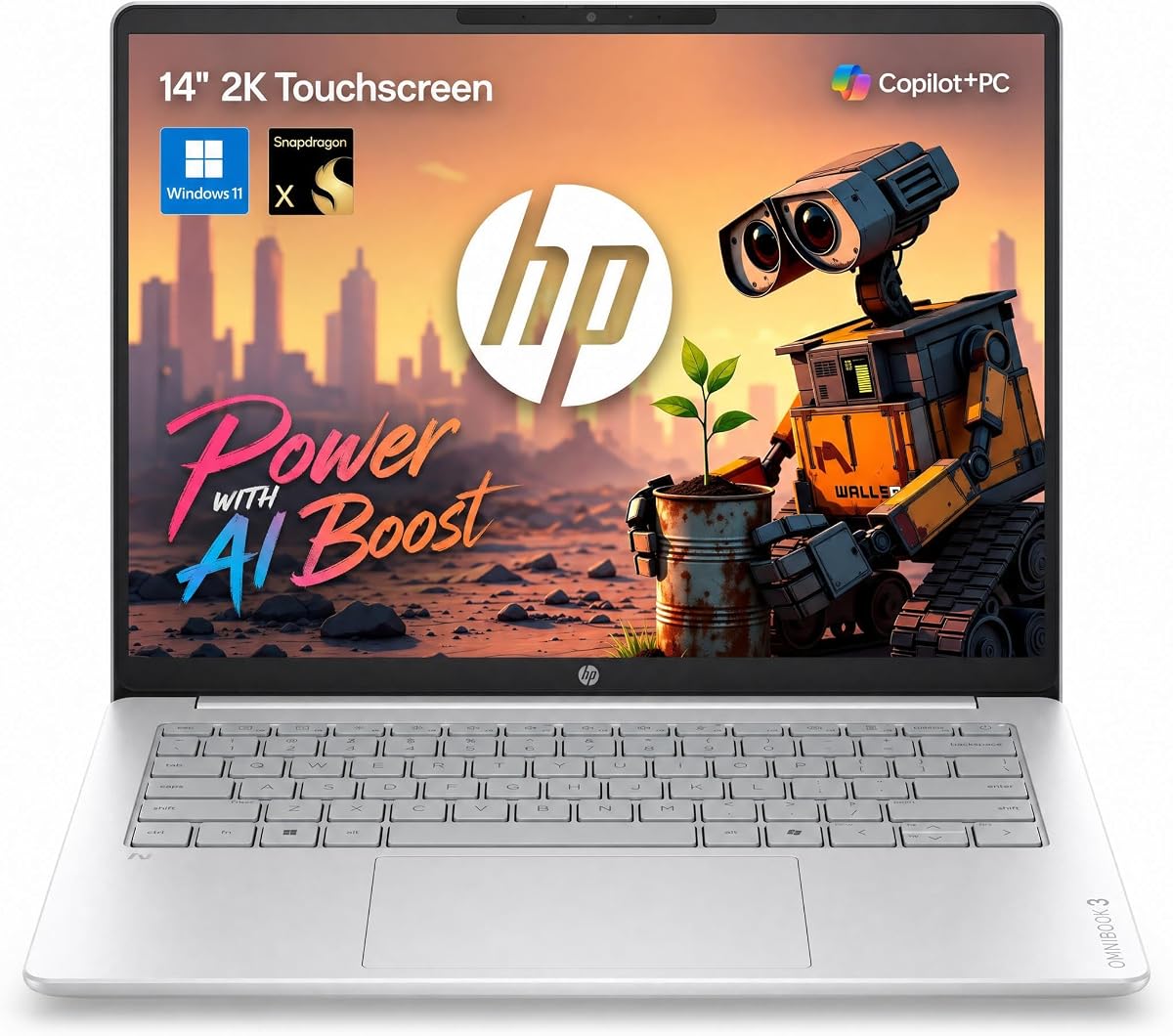
The HP OmniBook 3 14 combines a modern touch interface with solid AI performance. Users appreciate its responsiveness and the quality of the screen. It is well suited for those who interact frequently with touch gestures.
We may earn a commission when you buy through this link, at no additional cost to you.
Equipped with the Snapdragon X processor, it delivers up to 45 TOPS of NPU performance. The battery life is exceptional, promising up to 30 hours of video playback. This ensures that you can work for extended periods without searching for an outlet.
The 2K IPS touchscreen provides sharp visuals and good color accuracy for a 14-inch device. However the port selection is somewhat limited which may require dongles for some users. The lightweight design is a major plus for travelers.
This laptop is recommended for users who value portability and touch interaction. It is a strong competitor in the mid-range market offering good battery life. It suits professionals who need a reliable daily driver for presentations and travel.
The 2K touchscreen offers a responsive interface for navigating content. It enhances usability for presentations and direct interaction with files.
With a massive battery capacity, this laptop supports long work sessions. It is ideal for frequent travelers who cannot always access power.
We may earn a commission when you buy through this link, at no additional cost to you.
The NIMO 16" AI Laptop is designed for developers and creators who need extreme capabilities. Its rating indicates strong performance for specialized tasks. This device stands out for its massive memory and storage configurations.
We may earn a commission when you buy through this link, at no additional cost to you.
Powered by the AMD Ryzen AI Max+ 395 processor it offers 128GB of LPDDR5X memory. This allows for running massive local language models without external dependencies. The 50 TOPS NPU ensures that AI tasks are handled efficiently on the device.
The 165Hz display provides smooth visuals which is great for video editing and gaming. The OCuLink port enables external GPU expansion for even more power. However the weight and size make it less portable than ultrabooks.
We recommend this laptop for professionals focused on AI development and high-end content creation. It provides a desktop-like experience in a laptop form factor. It is an ideal choice for those who need to run complex local workflows.
With 128GB of memory, you can run large language models locally. This is essential for developers who require privacy and low latency.
The OCuLink port allows you to connect external graphics cards. This future-proofs your investment by letting you upgrade performance over time.
We may earn a commission when you buy through this link, at no additional cost to you.
The NIMO 17.3" AI Laptop provides a large workspace for multitasking and content creation. Its rating suggests satisfaction with its performance and build quality. It is a great option for users who need screen real estate.
We may earn a commission when you buy through this link, at no additional cost to you.
Powered by the AMD Ryzen AI 9 HX 370 processor it offers up to 50 TOPS of NPU performance. The dual expandable memory and storage slots allow you to customize the system to your needs. The USB4.0 port ensures fast data transfer and external connectivity.
The 17.3-inch display offers a wide area for working with multiple windows simultaneously. While the resolution is Full HD it is sufficient for general productivity. The keyboard includes a numeric keypad which is helpful for data entry.
We recommend this laptop for users who need a large screen for productivity and gaming. It is well suited for home offices or stationary workspaces. It offers a strong balance of performance and value for those prioritizing screen size.
The dual expandable slots allow you to upgrade RAM and storage as needed. This ensures the laptop can grow with your professional requirements.
USB4.0 support allows for high-speed data transfer and multi-screen setups. This makes it easy to connect to external displays and storage.
We may earn a commission when you buy through this link, at no additional cost to you.
The HP Omnibook 16 is designed for productivity and business use. Its high rating reflects user satisfaction with its performance and reliability. It offers a robust configuration for professional workflows.
We may earn a commission when you buy through this link, at no additional cost to you.
Equipped with the AMD Ryzen AI 7 350 processor it provides 50 TOPS of NPU performance. The 32GB of DDR5 RAM ensures smooth operation for demanding applications. The 2TB SSD storage provides ample space for large files and datasets.
The 2K touchscreen is vibrant and responsive for touch interactions. While it is a strong performer the battery life is average compared to other models. The Windows 11 Pro license adds enterprise security features.
We recommend this laptop for business professionals who need reliable performance. It is well suited for office environments where security and storage are priorities. It is a strong contender for users needing a powerful business laptop.
Windows 11 Pro provides advanced security features for business environments. This ensures your data remains protected during daily operations.
With a 2TB SSD you have plenty of space for large files. This is ideal for users who work with high-resolution video or data sets.
We may earn a commission when you buy through this link, at no additional cost to you.
The Dell 16 Plus is a premium business laptop with advanced connectivity options. Its rating indicates strong reliability and performance for work tasks. It is built to meet the demands of professional environments.
We may earn a commission when you buy through this link, at no additional cost to you.
Powered by the Intel Core Ultra 9 processor it offers up to 48 TOPS of NPU performance. The inclusion of Wi-Fi 7 ensures ultra-fast and stable wireless connections. The 32GB of memory supports heavy multitasking effectively.
The 16-inch display offers a good balance of screen real estate and portability. The build quality is durable and designed for daily business use. However the design is heavier than ultra-portable options.
We recommend this laptop for business users who need high-end connectivity. It is ideal for corporate environments where security and network speed are critical. It offers a robust solution for professional productivity needs.
Wi-Fi 7 provides ultra-fast and stable connections for your workflow. This is essential for video conferencing and large file transfers.
Dell designed this laptop to withstand daily business travel. The durability ensures it remains functional over years of use.
We may earn a commission when you buy through this link, at no additional cost to you.
The HP 16 inch Touchscreen is a powerful all-rounder for diverse tasks. Its perfect rating shows it meets user needs across the board. It is a reliable choice for both personal and professional use.
We may earn a commission when you buy through this link, at no additional cost to you.
Equipped with the Intel Ultra 7 255U processor it delivers up to 47 TOPS of NPU performance. The 32GB of DDR5 RAM ensures smooth operation for demanding apps. The 2K touchscreen provides a clear and vibrant visual experience.
The design is lightweight and portable making it easy to carry. The battery life is strong enough to get you through a work day. Connectivity options are comprehensive for most standard peripherals.
We recommend this laptop for users seeking a reliable and powerful daily driver. It is well suited for general computing tasks and entertainment. It is a versatile device that adapts to various needs.
The 2K touchscreen offers clarity and color for media and work. It is bright enough for use in various lighting conditions.
Weighing under 4 pounds it is easy to transport daily. The design ensures you can take your work anywhere comfortably.
We may earn a commission when you buy through this link, at no additional cost to you.
The Acer Aspire 16 offers a large screen experience at a competitive price point. Its rating suggests it is a solid choice for value seekers. It provides a good balance of features for everyday users.
We may earn a commission when you buy through this link, at no additional cost to you.
Powered by the Snapdragon X processor it offers up to 45 TOPS of NPU performance. The 16-inch display with a 120Hz refresh rate ensures smooth visuals for content. The 100% sRGB color accuracy is a nice touch for creative tasks.
The lightweight design makes it easy to move between rooms or locations. While the storage is limited compared to other models it is sufficient for most users. The Wi-Fi 7 support ensures modern connectivity standards.
We recommend this laptop for users needing a large screen for work and leisure. It is well suited for casual users who want more screen space. It is a good option for those prioritizing display quality over storage.
The 120Hz refresh rate makes scrolling and animations feel fluid. This is great for media consumption and general navigation.
With 100% sRGB coverage colors are accurate and vibrant. This helps when working on images or watching high quality video.
We may earn a commission when you buy through this link, at no additional cost to you.
Selecting the right AI laptop requires understanding key specifications and how they align with your specific workflow requirements.
The Neural Processing Unit or NPU is the core component for local AI tasks. Look for models with at least 45 TOPS to ensure smooth Copilot+ experiences and future features. Higher TOPS ratings mean better performance for image generation and video effects.
Always check the NPU specs before buying to ensure longevity and capability.
AI applications often require significant RAM to run efficiently. Aim for 16GB as a minimum but consider 32GB or higher for heavy multitasking. High-speed LPDDR5x memory is preferred for better responsiveness.
Sufficient memory prevents bottlenecks when running AI tools alongside other apps.
A high-resolution display enhances the visual experience of AI tools. Consider OLED panels for better contrast and color accuracy. A larger screen size improves productivity for creative work and coding.
Prioritize a display with at least 1920×1200 resolution for clarity.
Battery life is crucial for maintaining productivity while mobile. Look for models promising over 15 hours for realistic daily usage. Fast charging support is a valuable feature for quick top-ups.
Check battery specs to ensure they meet your daily usage habits.
Both Intel and AMD offer AI-optimized processors with dedicated NPUs. Snapdragon chips often excel in battery efficiency and connectivity. Choose based on your preference for software compatibility.
Ensure the processor is part of the Copilot+ ecosystem for best support.
Ports determine how easily you can connect peripherals and external displays. USB-C with Thunderbolt support allows for high-speed data and docking. HDMI ports are essential for connecting to monitors without dongles.
Verify the port layout matches your peripheral needs before purchasing.
A durable chassis ensures the laptop withstands daily wear and tear. Look for aluminum bodies which offer better heat dissipation. A lightweight design is important for travelers and commuters.
Invest in a build that matches your physical usage environment.
AI laptops often include advanced biometric security like facial recognition. Ensure there is a physical privacy shutter for the webcam. Enterprise models may offer vPro security for business environments.
Security features are vital for protecting sensitive data on the device.
To maximize performance keep your system updated to the latest Windows 11 version. This ensures all AI features like Recall and Windows Studio Effects are available. Regular updates also improve security and system stability.
Manage your thermal performance by keeping vents clear and using a cooling pad for heavy tasks. This prevents overheating which can throttle AI and GPU performance. Avoid placing the laptop on soft surfaces like beds while using it.
Take advantage of the Copilot+ features to enhance productivity. Use AI search to find files quickly and leverage local AI models for privacy. Regularly restart the device to clear system cache and maintain speed.
An NPU or Neural Processing Unit is a dedicated processor for AI tasks. It handles background AI work like noise cancellation and video effects efficiently. This offloads work from the CPU and GPU to save power.
A Copilot+ PC offers exclusive AI features like advanced recall and search. It is not strictly necessary for basic use but provides a more intelligent experience. Most users will benefit from the enhanced productivity tools.
Both AMD and Intel offer competitive NPU performance for AI tasks. AMD Ryzen AI models often provide high TOPS and good efficiency. Intel Core Ultra chips are strong for compatibility and security features.
Yes you can run local AI models with sufficient RAM and NPU power. This ensures privacy since data does not leave your device. It is ideal for developers and users with strict security needs.
Most modern AI laptops support Windows Studio Effects like background blur. This feature uses the NPU to enhance video call quality. It is a standard feature for most Copilot+ ready devices.
16GB is sufficient for basic AI tools and Copilot+ features. For heavy development or large model inference 32GB is recommended. Higher RAM ensures smoother multitasking with AI applications.
We have explored the top ten AI laptops with NPU capabilities to help you find your perfect match. Each model offers a unique balance of performance and features for different user needs.
Consider your specific workflow whether it is creative work or business productivity when selecting a device. Prioritize the features that matter most to your daily tasks.
Remember to check current prices and availability as these models evolve quickly. This list serves as a solid starting point for your purchasing decision.