
HP OmniBook X 14 inch Next Gen AI PC
4.3Editor score
3K OLED Touchscreen
Intel Core Ultra 7 Processor
Up to 27.5 Hours Battery
AI laptops are reshaping how we work, create, and connect by integrating intelligent assistants directly into hardware. These devices promise faster workflows, smarter multitasking, and enhanced productivity through dedicated neural processing units.
We evaluated ten leading models based on performance, display quality, battery life, and AI capabilities. Our analysis focuses on real-world usability, ensuring each pick meets the demands of professionals, students, and creators alike.
Each entry highlights key specs, standout features, and potential trade-offs to help you decide quickly. Prices and availability fluctuate, so verify current details before purchasing to ensure you get the best value.
4.3Editor score
4.8Editor score

4.4Editor score
As an Amazon Associate we earn from qualifying purchases.
This side-by-side comparison highlights the core specifications of each model to help you identify the right fit for your needs.


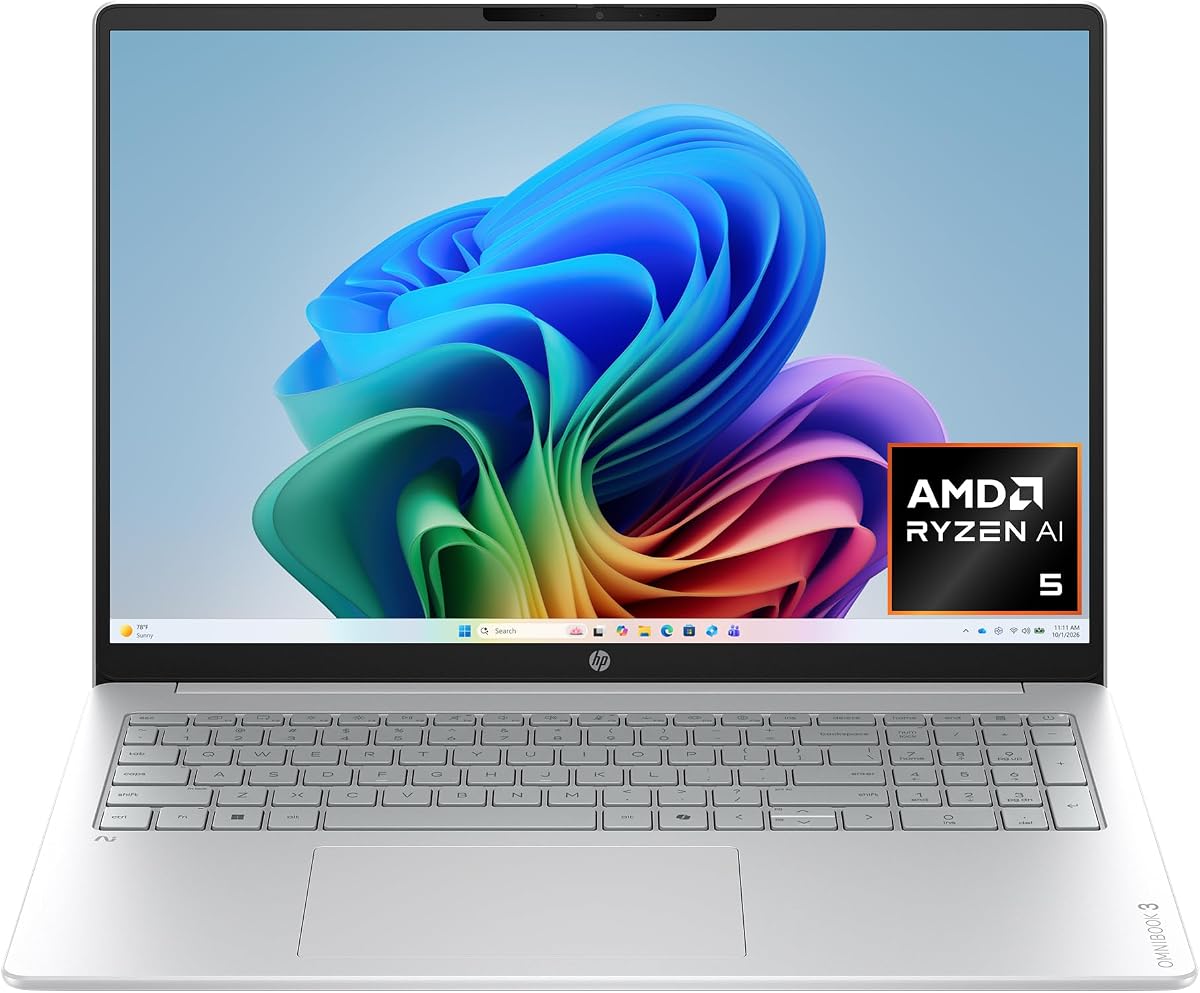
The HP OmniBook 3 stands out as a top contender with its strong ratings and solid performance. This model balances AI capabilities with everyday usability, making it ideal for both work and leisure tasks.
We may earn a commission when you buy through this link, at no additional cost to you.
Its AMD Ryzen AI 5 processor delivers efficient multitasking and handles Copilot+ PC experiences smoothly. The 2K IPS touchscreen offers vibrant colors and wide viewing angles, while the battery lasts up to nineteen hours under normal use.
While the storage is limited to 512GB, the fast NVMe SSD ensures quick boot times and application launches. The AI noise reduction feature significantly improves call quality, which is essential for remote workers and students.
This laptop is perfect for users seeking reliable performance without breaking the bank. If you prioritize battery life and display quality, the OmniBook 3 is a compelling choice for 2026.
AI-driven noise reduction and HDR auto-switch on the camera ensure professional video calls in any environment.
The fast charge technology restores half the battery in just forty-five minutes, keeping you productive on the go.
We may earn a commission when you buy through this link, at no additional cost to you.
The Lenovo ThinkBook 16 is designed for business users who need power and security. With 32GB of RAM and a 1TB SSD, it handles heavy enterprise applications without lag.
We may earn a commission when you buy through this link, at no additional cost to you.
Its Intel Ultra 7 processor supports AI acceleration for spreadsheets and data analysis. The FHD+ display provides ample screen real estate for multitasking, while WiFi 6E ensures stable connections during critical meetings.
Windows 11 Professional offers enhanced security features crucial for sensitive business data. However, the weight and size may make it less portable for frequent travelers compared to ultrabooks.
Ideal for corporate professionals, this laptop delivers the reliability and performance needed for demanding workflows. It is a solid investment for those prioritizing productivity over portability.
Built-in fingerprint reader and Windows 11 Professional ensure your business data remains protected against unauthorized access.
Thirty-two gigabytes of RAM allow seamless switching between multiple heavy applications without performance bottlenecks.
We may earn a commission when you buy through this link, at no additional cost to you.
The HP OmniBook X offers a premium experience with its exceptional OLED screen and long battery life. It stands out for visual fidelity and power efficiency, making it great for media consumption and creative tasks.
We may earn a commission when you buy through this link, at no additional cost to you.
Its Intel Core Ultra 7 processor balances performance with battery optimization. The 3K OLED touchscreen delivers deep blacks and vibrant colors, while the Smart Sense feature adjusts performance based on your current activity.
With up to twenty-seven hours of battery life, this laptop is perfect for all-day use without a charger. However, the price is higher than similar models, and integrated graphics are not meant for intensive gaming.
Recommended for professionals who value display quality and portability. If you want a device that looks great and lasts long, the OmniBook X is a top-tier choice.
The 3K OLED screen provides superior contrast and color depth for creative work and streaming content.
Smart Sense automatically optimizes temperature and fan noise based on your activity for a comfortable user experience.
We may earn a commission when you buy through this link, at no additional cost to you.
The HP OmniBook 5 delivers a balance of performance and affordability with its large storage and touchscreen. It is designed for users who need plenty of space and modern AI features at a competitive price.
We may earn a commission when you buy through this link, at no additional cost to you.
Powered by an Intel Core Ultra 7 processor, it handles multitasking and productivity workloads efficiently. The 1TB SSD ensures you have room for files and applications, while the backlit keyboard aids work in low light.
Wi-Fi 6E connectivity offers fast speeds for file sharing and video calls. However, battery life is not as exceptional as some competitors, so you may need to carry a charger for long trips.
This model suits students and professionals looking for a versatile machine. If storage and display interaction are priorities, the OmniBook 5 is a strong candidate for your next purchase.
A massive 1TB SSD provides ample space for large files, projects, and media without needing external drives.
Wi-Fi 6E ensures stable and fast internet connections for seamless collaboration and media streaming.
We may earn a commission when you buy through this link, at no additional cost to you.
The HP OmniBook 5 with Snapdragon offers impressive battery life and AI features. It focuses on efficiency and mobility, making it a great choice for mobile professionals and students.
We may earn a commission when you buy through this link, at no additional cost to you.
Its Snapdragon X processor delivers essential performance with strong AI capabilities. The 2K OLED display provides vibrant visuals, while the included Otter.ai assistant helps automate notes and meeting summaries.
Wi-Fi 6E technology ensures fast connectivity, and the battery can last up to thirty-five hours on a single charge. However, ARM-based systems may face some compatibility issues with legacy x86 software.
Ideal for those who prioritize battery life and AI tools over raw gaming performance. If you need a laptop that stays powered all day, this model is worth considering.
Otter.ai automatically records and transcribes meetings to save time and keep your notes organized.
Up to thirty-five hours of battery life ensures you can work uninterrupted for days without finding a charger.
We may earn a commission when you buy through this link, at no additional cost to you.
The HP OmniBook 3 14 inch is an entry-level powerhouse with exceptional battery life and modern AI features. It is perfect for users seeking a lightweight laptop that delivers premium performance at a low cost.
We may earn a commission when you buy through this link, at no additional cost to you.
Powered by the Snapdragon X processor, it offers efficiency and speed for everyday tasks. The 2K OLED display ensures sharp visuals, while the 41-hour battery life supports extended work sessions without interruption.
Wi-Fi 6E connectivity and IR camera enhance security and speed. However, the 256GB storage is limited compared to other models, so cloud storage or external drives may be needed for large files.
Best for students or light users on a tight budget. If you need a portable and long-lasting device, this is one of the most cost-effective AI laptops available.
The compact 14-inch size makes it easy to carry and fits perfectly on small desks or crowded coffee shops.
Copilot+ PC experiences provide intelligent suggestions to streamline your daily workflows and boost productivity.
We may earn a commission when you buy through this link, at no additional cost to you.
The Dell 16 Plus is a high-end machine designed for professionals who need future-proof connectivity and power. It stands out with Wi-Fi 7 support and a robust selection of ports.
We may earn a commission when you buy through this link, at no additional cost to you.
Its Intel Core Ultra 9 processor handles demanding workloads with ease. The 32GB of LPDDR5X memory ensures smooth performance for heavy multitasking and creative applications.
A wide range of ports eliminates the need for dongles, and the FHD+ touchscreen supports AI Studio Effects. However, the premium features come at a higher price point, and the laptop is not as thin as ultrabooks.
Ideal for power users and tech enthusiasts. If you need maximum speed and connectivity options, the Dell 16 Plus is a top choice for 2026.
Wi-Fi 7 provides faster speeds and lower latency for seamless streaming and large file transfers.
Includes USB-C, Thunderbolt 4, and HDMI ports so you can connect peripherals without extra adapters.
We may earn a commission when you buy through this link, at no additional cost to you.
The ASUS Vivobook S16 delivers top-tier AMD AI performance with a high-quality OLED screen. It is a fantastic choice for users who want powerful computing in a sleek package.
We may earn a commission when you buy through this link, at no additional cost to you.
Its AMD Ryzen AI 9 processor offers up to 50 TOPS of NPU performance, making it excellent for on-device AI tasks. The 32GB RAM and 1TB SSD provide ample resources for demanding workflows.
At just 3.75 lbs, it remains portable despite its large screen. However, it costs more than average models, and battery life is good but not class-leading compared to Snapdragon options.
Perfect for creators and professionals needing high NPU performance. If you prioritize processing power and display quality, this laptop is highly recommended.
Fifty TOPS NPU performance accelerates AI tasks for faster results in creative and productivity apps.
Weighing just 3.75 pounds, it is easy to carry and fits comfortably on crowded tables or small desks.
We may earn a commission when you buy through this link, at no additional cost to you.
The acer Aspire 16 stands out with a 120Hz touchscreen and Wi-Fi 7 support. It offers a unique combination of refresh rate and AI capabilities for users who value smooth visuals.
We may earn a commission when you buy through this link, at no additional cost to you.
Powered by the Snapdragon X processor, it delivers strong NPU performance for AI features like Recall and enhanced search. The 120Hz display ensures fluid interactions and vibrant colors for content consumption.
Wi-Fi 7 ensures future-proof connectivity for high-speed networks. However, battery life is average compared to other Snapdragon laptops, and the brand is sometimes overlooked in premium markets.
Best for users seeking a high refresh rate display at a competitive price. If smooth visuals and modern connectivity are key, this model is a solid contender.
A 120Hz refresh rate makes scrolling and animations feel incredibly smooth for a better user experience.
Wi-Fi 7 technology provides faster speeds and better range for seamless streaming and large file transfers.
We may earn a commission when you buy through this link, at no additional cost to you.
The HP Omnibook 16 features a Ryzen AI 7 processor and Windows 11 Pro for business users. It offers powerful performance and comprehensive security features suitable for professional environments.
We may earn a commission when you buy through this link, at no additional cost to you.
Its 50 TOPS NPU accelerates AI workloads efficiently, while 32GB RAM ensures smooth multitasking. The 2K touchscreen and full-size keyboard with numpad support productivity and creative work.
Connectivity includes HDMI 2.1 and USB Type-C, allowing easy expansion. However, the 16-inch form factor is heavier than smaller laptops, and the price is higher than standard Windows 11 Home models.
Best for professionals needing business features. If you require Pro-grade security and high RAM, this is a reliable and future-ready device.
Windows 11 Pro includes enhanced security tools and encryption to protect sensitive business data effectively.
Thirty-two gigabytes of DDR5 RAM handle demanding applications without slowing down your workflow.
We may earn a commission when you buy through this link, at no additional cost to you.
Selecting an AI laptop requires balancing performance, display quality, battery life, and specific features like NPU power.
Look for a processor with a dedicated Neural Processing Unit (NPU) designed for AI tasks. Modern AI laptops use chips from Intel, AMD, or Qualcomm that support Copilot+ PC features and on-device intelligence.
Choose a model with at least 45 to 50 TOPS for future-proof AI performance.
AI workflows and multitasking benefit from higher RAM. Aim for 16GB minimum, but 32GB is ideal for creative or enterprise workloads.
Ensure the SSD is at least 512GB to store large AI files, projects, and operating system updates.
High resolution displays like 2K or 3K OLED provide clarity for detail-oriented work. A 16-inch screen offers more space for multitasking than a 14-inch model.
Touchscreens are useful for AI interfaces and note-taking, so consider them if you interact with your content frequently.
AI features can consume power, so check rated battery life and efficiency. Look for laptops with fast charge capabilities to minimize downtime during long days.
Battery life ranging from 20 to 40 hours ensures you stay productive without constantly searching for outlets.
Wi-Fi 7 or Wi-Fi 6E is essential for fast data transfer and AI cloud tasks. Ensure you have enough USB-C and HDMI ports to connect monitors and peripherals.
Thunderbolt support is beneficial if you need to daisy-chain displays or connect high-speed storage devices.
Windows 11 Home is standard, but Windows 11 Professional offers better security for business. Verify that the laptop supports Copilot+ PC features for enhanced productivity.
Check for included AI tools like noise cancellation or meeting transcription services to maximize value.
A durable chassis is important for daily travel. Lightweight models under 4 pounds are ideal if you carry your laptop to different locations.
Consider the thickness and ergonomics, such as keyboard comfort and touchpad responsiveness, for long typing sessions.
AI laptops range from affordable to premium. Determine your budget based on required specs like RAM and display type.
Balance cost against the longevity of the device to ensure your investment remains relevant for years.
To maximize AI capabilities, ensure your operating system is updated and Copilot features are enabled. This allows the NPU to handle tasks like noise reduction and search automatically.
Keep your device in a cool environment and avoid blocking vents during intensive tasks to prevent overheating. Use a padded sleeve when transporting to protect the chassis and screen.
Charge your laptop using the original adapter and avoid leaving it plugged in continuously. Regularly cleaning the screen and keyboard with microfiber cloths helps maintain performance and hygiene.
AI laptops feature dedicated neural processing units (NPUs) designed to run artificial intelligence tasks locally. This improves efficiency for tasks like voice recognition, photo editing, and real-time translation without relying solely on cloud services.
Copilot+ PC is a certification ensuring the device supports specific AI workloads. While not all AI features require it, most advanced tools like Recall are optimized for these devices to ensure consistent performance.
All major brands offer strong AI performance. Intel Core Ultra, AMD Ryzen AI, and Qualcomm Snapdragon all provide NPUs. Choose based on your need for battery life, display quality, or specific software compatibility.
Yes, AI laptops enhance creative workflows with features like background blur, voice isolation, and accelerated rendering. High-resolution OLED displays and strong RAM also support editing and design tasks effectively.
Sixteen GB is the minimum for smooth performance, but 32 GB is recommended if you multitask or handle large files. More RAM ensures AI features and other apps run simultaneously without slowdowns.
AI features generally optimize power usage by offloading tasks to the NPU. However, intensive workloads may reduce battery life slightly, so look for models with long rated battery times to compensate.
While not designed for hardcore gaming, most AI laptops handle casual and integrated gaming well. Dedicated GPUs on some models provide better gaming performance, but the primary focus is productivity and AI tasks.
Yes, many models include hardware-level security like fingerprint readers and encryption. Windows 11 Pro options offer enterprise-grade protection suitable for handling sensitive data and remote work scenarios.
The HP OmniBook 3 and ASUS Vivobook S16 lead the list for their balance of performance, display, and battery life. Choosing the right model depends on whether you prioritize budget, screen quality, or raw processing power.
Prioritize NPU performance and RAM if you rely heavily on AI tools and multitasking. For casual users, a 14-inch model with OLED visuals may suffice for daily tasks and media consumption.
Prices fluctuate regularly due to promotions and stock changes. Always check the latest offers and verify that the laptop meets your specific requirements before finalizing your purchase.