
Air Mouse Remote MX3 Pro
3.8Editor score
Plug and Play Setup
Motion Sensor Navigation
Mini Keyboard on Back
Discover the top air mouse for Android TV Box. Compare features, ratings, and performance to find the perfect wireless remote for your smart home setup.
Finding the right air mouse for Android TV Box can transform your streaming experience. A quality remote combines precise cursor control with voice search and keyboard typing. This guide helps you navigate the options available today.
We analyzed ten top-rated wireless remotes designed for Android TVs and boxes. Our comparison focuses on connectivity, motion sensing, and universal control features. Each product was evaluated based on user feedback and technical specifications.
Every pick in this list includes detailed specs and real ratings. You will see what works best for gaming, typing, and general navigation. Prices fluctuate often so check current offers before buying.
3.8Editor score

4.2Editor score

4.5Editor score
This table provides a side-by-side view of all ten remotes. It highlights core specs like connectivity type, sensor accuracy, and unique features. Use it to quickly spot the model that fits your needs.


The BOXPUT BPR1S Plus is a versatile remote for Android TV boxes and smart TVs. It earned a solid 4.2 rating from users due to its dual connectivity options. This model supports both Bluetooth and 2.4G RF for broad compatibility.
We may earn a commission when you buy through this link, at no additional cost to you.
Its standout feature is the full IR Learning function which allows you to control multiple devices. The 6-axis gyroscope provides accurate cursor movement. Voice input works well on supported devices like Shield TV and Google TV.
While it is excellent for most Android systems it does not work with Fire Stick or Roku. Also batteries are not included so you must buy them separately. These minor drawbacks do not outweigh its strong performance.
If you need a reliable replacement remote that offers voice control and precise navigation this is a great pick. It is ideal for users who want one remote to manage their TV and box efficiently.
Switch between Bluetooth for smart TVs and 2.4G for boxes to suit different devices.
Program all buttons to control your TV power and volume without extra remotes.
We may earn a commission when you buy through this link, at no additional cost to you.
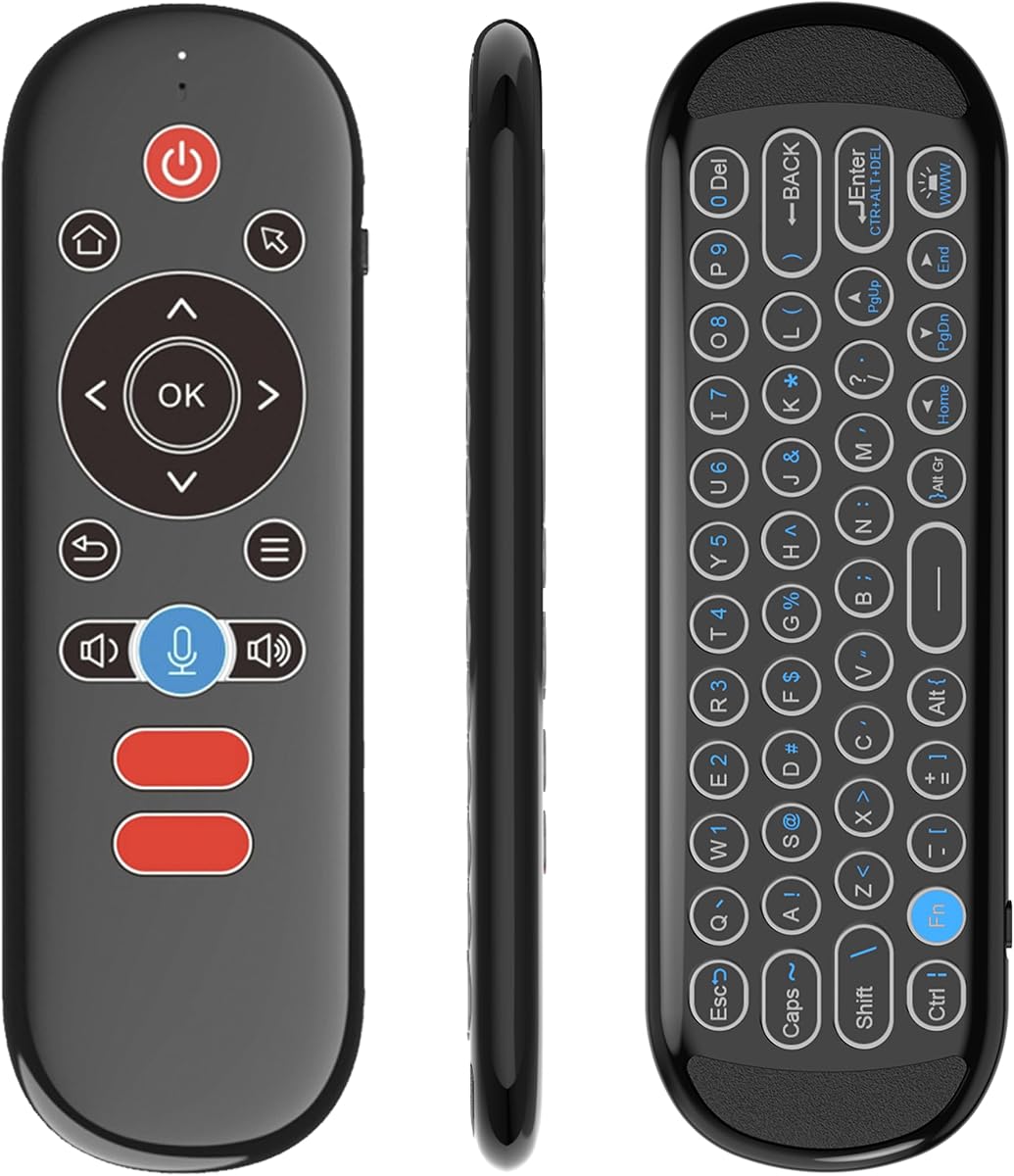
The MX3 Pro Air Mouse is a budget-friendly option that still delivers solid performance. With a 3.8 rating it is popular for its plug-and-play setup. It uses a 2.4G USB connection for immediate use without drivers.
We may earn a commission when you buy through this link, at no additional cost to you.
It includes a mini keyboard on the back which helps with typing searches on TV. The 6-axis somatosensory sensor allows cursor control by moving the remote. Five keys can learn IR codes from your TV remote.
This model lacks voice control and some advanced gyro features found in higher-end remotes. It is best suited for basic navigation and text entry. Users may find the motion sensor less smooth than premium models.
If you want a simple and affordable air mouse this MX3 Pro fits the bill. It is a good choice for casual viewers who need typing capability without spending much.
Type passwords and search terms easily with the built-in keyboard on the back.
Program power and color keys to control your TV with this single remote.
We may earn a commission when you buy through this link, at no additional cost to you.
The BOXPUT BPR2S Plus stands out with the highest user rating of 4.5. It combines air mouse navigation with voice search and universal IR learning. The design supports both Bluetooth and 2.4G wireless modes.
We may earn a commission when you buy through this link, at no additional cost to you.
Its universal remote control chip learns IR on all buttons which is rare at this price. Voice search works on ATV devices and supported apps. The electronic manual on the back helps with setup and updates.
It is not compatible with some LG TVs or Fire Stick. Also PC use requires a firmware update which adds a step. These limits are manageable if you use it primarily for Android systems.
This remote is the best premium choice for those who want advanced features like voice and IR. It offers a complete control solution for Android boxes and smart TVs.
Learn all buttons to control multiple devices with one remote easily.
Get instant setup tips and troubleshooting by checking the back of the remote.
We may earn a commission when you buy through this link, at no additional cost to you.
This dual mode air mouse features a backlit QWERTY keyboard ideal for dark rooms. It has a 4.3 rating for its rechargeable design and voice control. The cursor control uses a 3-axis gyroscope and accelerometer.
We may earn a commission when you buy through this link, at no additional cost to you.
You can learn 100% of IR functions from other remotes for total control. The 7-color backlight cycles via a key combo for clear typing at night. It is rechargeable via Type-C port though the cable is not included.
While it is robust some users may find the setup of IR learning time consuming. Also you need to get your own Type-C cable which adds a small cost. These are minor issues for a feature-rich remote.
If you need a keyboard and mouse in one with backlight this model is great. It is perfect for gaming and media control on PC or Android TV boxes.
Type accurately in the dark with bright LED keys and adjustable colors.
Use the long-life battery to save on buying batteries again and again.
We may earn a commission when you buy through this link, at no additional cost to you.
The EASYTONE Air Mouse is a 3-in-1 remote with air mouse and IR learning. It has a 3.8 rating for its ease of use and voice input. The 2.4G RF connection ensures stable control within 10 meters.
We may earn a commission when you buy through this link, at no additional cost to you.
Voice search works within built-in boxes or apps but not across all apps. The 6-axis gyroscope helps move the pointer and play somatosensory games. It supports Linux, Android, Windows and Mac OS systems.
Voice input is not as broad as on dedicated smart remotes so it is best for specific searches. The motion sensor is functional but not as fluid as premium models. Still it is a solid basic option.
Choose this if you want a compact remote that does typing and voice search well. It is a good fit for casual users who need basic control features.
Chat with friends or input words via voice for faster searches on TV.
Start using the remote right after plugging in the USB receiver.
We may earn a commission when you buy through this link, at no additional cost to you.
The iPazzPort Mini Air Mouse is a compact remote with 7-color backlight. It earned a 3.7 rating for its portability and dual mode connectivity. The remote pairs with Android boxes and PCs via Bluetooth or USB.
We may earn a commission when you buy through this link, at no additional cost to you.
It features a rechargeable battery with Type-C port for long use. The 6-axis gyroscope ensures precise cursor control and one-handed use. An IR Learning key lets you program basic TV functions.
Some users note limited compatibility with proprietary LG and Samsung TV software. Also the Type-C cable is not included so you must use your own. These are minor issues for the price.
If you want a sleek and portable remote this model is a strong pick. It is ideal for travel and daily use on multiple devices.
Cycle colors or turn off the RGB backlight with a simple key combo.
Save on batteries with the built-in Type-C rechargeable power source.
We may earn a commission when you buy through this link, at no additional cost to you.
The Rii MX3 is a classic air mouse with a mini wireless keyboard. It has a 4.0 rating for its motion sensor and IR learning. It works with Android TV boxes and Mini PCs easily.
We may earn a commission when you buy through this link, at no additional cost to you.
It has 5 keys for IR learning that can copy your TV remote. The 3-Gyro plus 3-Gsensor allows control in horizontal and vertical modes for games. Transmission reaches up to 10 meters.
Some keys may not apply to your device due to universal design. Pairing can require pressing keys together if the dongle does not connect at once. These are typical for universal remotes.
Choose this for a reliable and classic air mouse setup. It is a good option for users who want basic remote and keyboard functions.
Wave the remote to move the cursor without touching the device.
Program up to five keys to control your TV with this remote.
We may earn a commission when you buy through this link, at no additional cost to you.
This MX3 Pro Backlit features LED backlight for typing in dark settings. It has a 3.9 rating for its 2-in-1 design and motion system. The 3-axis gyro and sensor allow accurate cursor control.
We may earn a commission when you buy through this link, at no additional cost to you.
You can program five keys for IR learning to control TV power and volume. The remote offers a risk-free 30-day return and lifetime after-sales service. It works with Windows and Linux systems well.
It is not compatible with most Samsung and Roku TVs so check before buying. Also it requires AAA batteries which are not included. These are common limitations in this category.
If you need a backlight remote for night use this is a good fit. It offers strong value for its typing and motion control features.
Type accurately in the dark with LED lights on the keys.
Benefit from a lifetime after sales service and 30-day return policy.
We may earn a commission when you buy through this link, at no additional cost to you.
The G20S PRO features a gyroscope core for stable movement. It has a single-sided design for ease of use. It is new to the list and lacks a rating yet but looks promising.
We may earn a commission when you buy through this link, at no additional cost to you.
It includes anti-tremor tech for smooth cursor motion. The buttons are wear-resistant and permanent. For Bluetooth use on Android you must pair via the button combo.
Since it is new user feedback is limited but the specs look strong. It may not work with all systems so test before use. These are expected for a fresh product.
Consider this if you want a gyro remote with anti-shake. It is a good pick for Android systems.
Use the gyro core for stable and precise cursor movement.
Enjoy smooth motion without shake when you move your hand.
We may earn a commission when you buy through this link, at no additional cost to you.
The Rock&Rown MX3 Pro is a 2.4G wireless remote with voice control. It has a 4.0 rating for its value and learning function. It includes a mini keyboard and IR learning for TV.
We may earn a commission when you buy through this link, at no additional cost to you.
You can learn five keys from your old remote. It supports Android and Windows systems. It offers a 1-year no-reason return policy.
You must learn the power key to turn on your TV. It is a basic build. These are minor limits.
Choose this for basic control. It is a good pick for Android boxes.
Learn up to five keys from your TV remote to control it.
Get a 1-year no-reason return if you are not satisfied.
We may earn a commission when you buy through this link, at no additional cost to you.
Selecting the right air mouse for Android TV Box depends on several factors. This guide covers the key features you should check to ensure a good fit for your setup.
Most air mice for Android TV Box use 2.4G wireless or Bluetooth. 2.4G models come with a USB receiver and work on any USB port. Bluetooth models pair directly to your TV or box without a receiver. Choose Bluetooth if you want a cleaner setup without dongles. Choose 2.4G if your TV lacks Bluetooth support.
The motion sensor is core to an air mouse. Look for 6-axis gyroscope or 3-axis gyro plus accelerometer. This allows smooth cursor control by moving your wrist. Better sensors reduce hand fatigue. Test reviews for cursor lag.
IR Learning lets you copy buttons from your TV remote. This allows one remote to control both TV and box. Check how many keys learn. Some models allow all buttons. Some allow only five. Full IR Learning is best for simplifying your setup.
Voice search helps find content fast. Check which modes work with voice. Some support only 2.4G. Some support only Bluetooth. Some work on specific TV brands like TCL. Make sure it matches your device before buying.
Mini keyboards on the back aid typing. Look for QWERTY layout for standard typing. Backlight helps in dark rooms. Some models have 7-color backlight. A good layout speeds up searching and logging in.
Remotes use AAA batteries or rechargeable packs. AAA models need replacements often. Rechargeable models save long-term cost. Check if cable is included. Rechargeable is more eco-friendly. AAA is easier to swap out.
Check device compatibility before purchase. Most models work with Android TV Box and Smart TV. Some do not work with Fire Stick or Roku. Some LG and Samsung TVs have limits. Read the notes in the product data.
Comfort matters for long use. Look for single-sided or ergonomic shapes. Some remotes have wear-resistant buttons. A good fit reduces strain on your hand. Try to hold it in-store or read user feedback.
To start, plug the USB receiver into your Android TV Box or PC. Turn on the remote and wait for the cursor to appear. If it is a Bluetooth model, pair it via your device settings.
Use the motion sensor to move the cursor. Hold the remote level and move your wrist. Use the keyboard to type searches. Press the learn button to program TV keys. Test volume and power buttons.
For care, keep the remote dry and away from heat. Clean buttons with a soft cloth. Replace batteries when needed or recharge. Store in a cool place. Update firmware if needed for PC mode.
Yes but you may need IR Learning. Most remotes can copy power and volume from your TV remote. Bluetooth models work if your TV supports Bluetooth. 2.4G models need a USB port on the TV or box.
Most do not need drivers. They are plug and play. Some models have a PC mode that requires a firmware change. Always check the product specs before buying for your system.
Life depends on use and type. AAA batteries may last weeks. Rechargeable models can go months per charge. Look at battery notes in the product data for estimates.
No. Only some models have voice search. It works in Bluetooth or 2.4G mode on select devices. Check if your TV brand is supported before buying.
Yes some models support motion games. The 6-axis gyro helps with aim and movement. Look for somatosensory features in the specs for gaming use.
IR Learning copies signals from another remote. Press the learn key on your new remote. Point your old remote to it and press the function. It will store the code for future use.
Many universal remotes are not compatible with Fire Stick. Check the compatibility list in the product data. Use a Fire Stick specific remote if needed.
Turn on the remote and enter pairing mode. On your Android TV Box go to Bluetooth settings. Select the remote from the list. Wait for the connection icon to appear.
We reviewed ten top air mice for Android TV Box. The BOXPUT BPR1S Plus won as top overall pick. The MX3 Pro and BPR2S Plus were strong runners up.
Focus on connectivity motion sensing and IR Learning. These define your experience. Match the remote to your TV system for best results.
Prices change so check current offers before buying. Use this guide to make an informed choice. Enjoy smooth navigation on your smart setup.