
Canon PIXMA TS4320
4.0Editor score
Compact stylish design
Energy Star certified
Easy mobile printing setup
Discover the top 10 Airprint printers for iOS devices. Compare features, ratings, and real user feedback to find the perfect printer for your iPhone or iPad.
Finding the right printer for your Apple ecosystem can be a challenge. You need a device that seamlessly connects to your iPhone or iPad without frustrating setup processes. Airprint technology solves this by allowing wireless printing directly from your iOS device without installing additional drivers.
We have carefully selected and analyzed ten top-rated printers that excel in compatibility and performance. Our comparison focuses on reliability, print quality, and ease of use specifically for Apple users. Each model offers unique strengths whether you prioritize portability, cost efficiency, or professional photo quality.
Every pick in this list highlights key features and real-world performance metrics based on user data. While prices may fluctuate over time, the performance characteristics remain consistent indicators of value. Check the latest offers before making your final decision to ensure you get the best deal available today.
4.0Editor score

4.2Editor score

4.2Editor score
This side-by-side comparison helps you quickly identify which printer fits your specific needs. We have organized the top models by their core capabilities including connectivity options print speeds and unique features like cartridge-free ink systems.




The Canon PIXMA TS6520 stands out as the top choice for most home users seeking a reliable Airprint printer. With a solid 4.2 star rating it delivers crisp vibrant prints that satisfy both document and photo needs.
We may earn a commission when you buy through this link, at no additional cost to you.
Its dual-band Wi-Fi ensures stable connectivity from your iPhone or iPad without frequent dropouts. The automatic duplex printing saves paper while the OLED display provides clear feedback on ink levels and status updates instantly.
While the ink cartridges can be pricey over time the overall performance justifies the investment for active users. The compact design fits easily on desks without sacrificing functionality making it versatile for small spaces.
We recommend this model for hybrid workers or students who need consistent quality and seamless iOS integration. Its ease of use combined with robust features makes it a standout in a crowded market.
Airprint support allows direct printing from your iPhone or iPad without needing the Canon PRINT App.
Its compact build ensures it fits neatly into any home office setup without clutter.
We may earn a commission when you buy through this link, at no additional cost to you.
The Canon PIXMA TS4320 offers exceptional value for budget-conscious users who still demand Airprint compatibility. Rated 4.0 stars it balances cost and functionality effectively for basic home printing needs.
We may earn a commission when you buy through this link, at no additional cost to you.
Its eco-conscious certification means lower energy consumption which helps reduce utility bills over time. The setup process is straightforward ensuring you can start printing from your iOS device quickly without frustration.
Print speeds are modest compared to higher-end models but sufficient for occasional use. The small footprint makes it ideal for apartments or shared spaces where desk real estate is limited.
Choose this printer if you need a reliable machine for light tasks like schoolwork or occasional documents. It delivers consistent results without breaking the bank or compromising on essential connectivity features.
Energy Star certification reduces power usage while maintaining standard print quality levels.
Available in multiple colors to match your decor while saving valuable desk space.
We may earn a commission when you buy through this link, at no additional cost to you.
The Epson EcoTank ET-2803 redefines value with its cartridge-free system and massive ink capacity. A 4.2 star rating reflects user satisfaction with its dramatic savings on replacement ink over years of use.
We may earn a commission when you buy through this link, at no additional cost to you.
Its innovative Supertank design allows you to print thousands of pages without changing cartridges. Voice-activated printing adds convenience for busy households managing documents from multiple devices efficiently.
While the initial investment is higher than standard inkjet models the long term savings quickly offset the difference. The Micro Piezo technology ensures sharp text and vibrant colors that rival high-end photo printers.
This model suits families or small offices with heavy printing demands who want consistent performance. It combines durability with eco-friendly features making it a smart choice for forward-thinking buyers.
Refillable tanks replace expensive cartridges reducing waste and lowering long-term operating costs.
Hands-free voice commands simplify printing tasks from your iPhone or other smart devices.
We may earn a commission when you buy through this link, at no additional cost to you.
The Brother Work Smart 1360 delivers solid productivity with its fast speeds and useful document feeder. While rated 3.8 stars it appeals to users needing quick printing for documents and reports at home.
We may earn a commission when you buy through this link, at no additional cost to you.
The 1.8 inch color display simplifies navigation through menus and settings for seamless operation. Cloud app connections let you print directly from Google Drive or Dropbox via your iOS device effortlessly.
Automatic duplex printing and a 150-sheet paper tray reduce interruptions during busy work sessions. The USB option provides flexibility if wireless networks are unavailable or unstable in your workspace.
Pick this printer if speed and convenience are your priorities over premium photo quality. It provides robust features for everyday tasks making it a practical addition to any busy home office.
Auto Document Feeder lets you scan multi-page documents quickly without manual feeding.
Multiple connection options ensure reliable printing whether you use Wi-Fi or USB directly.
We may earn a commission when you buy through this link, at no additional cost to you.
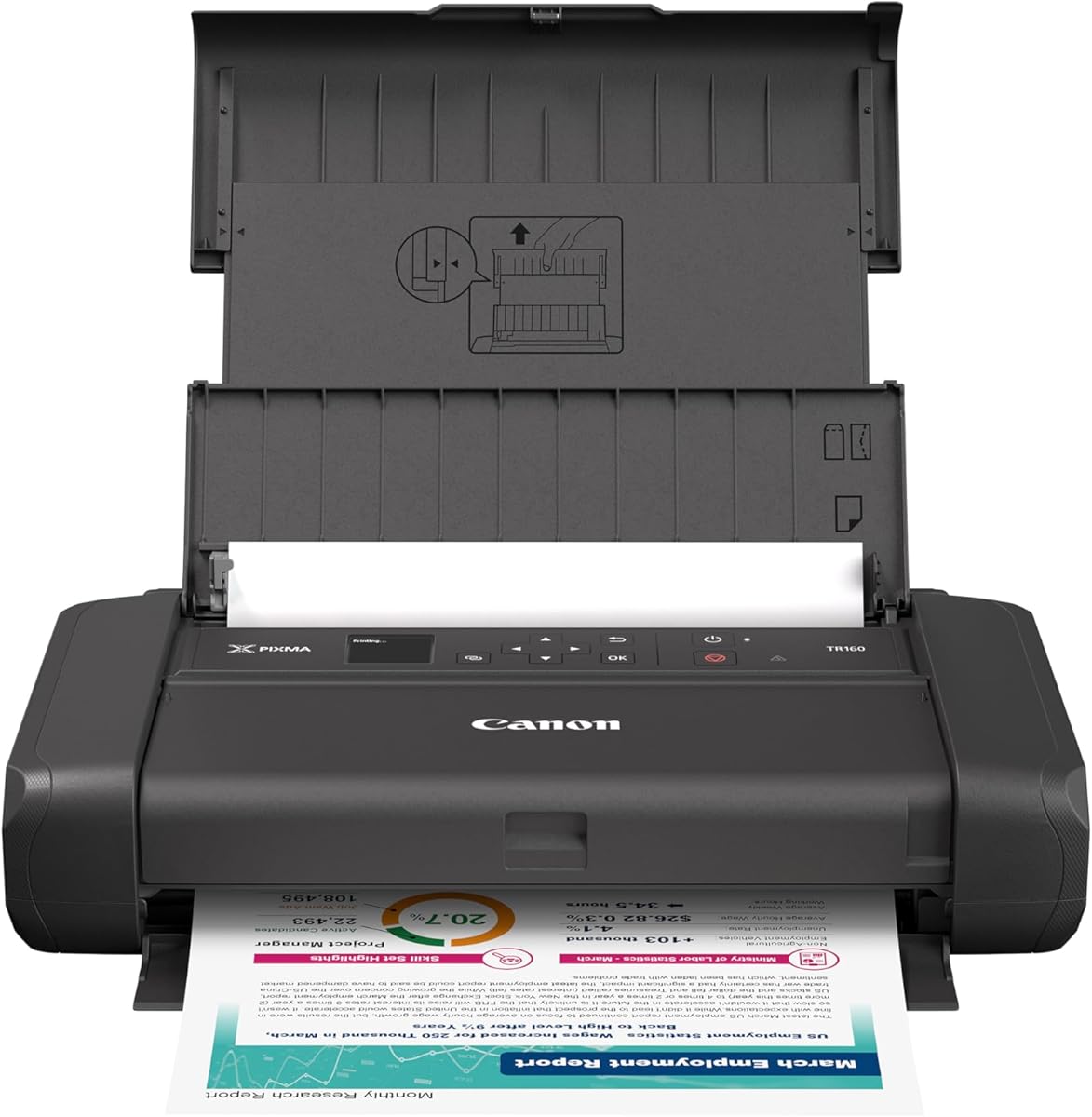
The Canon PIXMA TR160 is the ultimate companion for travelers needing reliable printing on the go. Its 4.2 star rating highlights satisfaction with its ability to produce quality prints from a bag-sized device.
We may earn a commission when you buy through this link, at no additional cost to you.
Wireless Direct Mode allows connection to your iOS device even without a Wi-Fi network. The 5-Color Hybrid Ink System ensures sharp text and vibrant details for photos printed at airports or hotels.
Its lightweight construction fits easily into backpacks without adding significant bulk to your gear. Despite its small size the OLED display provides clear status information for smooth operation during travel.
This model is ideal for students or professionals who need occasional mobile printing away from home. It balances portability with performance delivering professional results wherever your work takes you.
Connect directly to your phone without a router enabling printing anywhere instantly.
5-Color Ink delivers professional photos and sharp documents suitable for any occasion.
We may earn a commission when you buy through this link, at no additional cost to you.
The Epson EcoTank ET-2903 offers the highest user rating of 4.3 stars for its exceptional value and performance. It includes enough ink to last up to three years reducing frustration with frequent replacements.
We may earn a commission when you buy through this link, at no additional cost to you.
Its Heat-Free technology ensures the permanent printhead lasts the life of the printer. The 1.44 color screen provides intuitive navigation for scanning and printing tasks from your iPhone.
Printing speeds reach 11 PPM in black which is impressive for home inkjets with refillable tanks. The 5760 x 1440 dpi resolution delivers stunning photos that impress even professional users.
Select this printer if you want long-term reliability and minimal maintenance costs. It combines robust engineering with user-friendly features making it a top choice for families with high print volumes.
Years of included ink mean you buy refills rarely keeping costs predictable.
Heat-Free technology preserves the printhead ensuring consistent quality over years.
We may earn a commission when you buy through this link, at no additional cost to you.
The Canon TS5320 combines style with functionality making it an aesthetically pleasing addition to any home. Its 4.0 star rating reflects appreciation for its hybrid ink system and user-friendly OLED display.
We may earn a commission when you buy through this link, at no additional cost to you.
The LED status bar provides instant visual feedback on printer status from across the room. Airprint support ensures effortless wireless printing from iPhone or iPad without requiring extra apps.
Amazon Dash Replenishment keeps ink stocked automatically so you never face sudden interruptions. Available in four distinct colors it lets you match the device to your decor preferences.
Choose this printer if you want a blend of looks and reliable performance. It offers essential features in a compact stylish package suitable for modern home offices and creative spaces.
Four color options let you choose a style that matches your personal space.
Dash Replenishment ensures you always have ink when you need it automatically.
We may earn a commission when you buy through this link, at no additional cost to you.
The Canon IP8720 is a favorite among photography enthusiasts needing large format prints. Rated 4.0 stars it excels at producing vibrant photos up to 13 x 19 inches with incredible detail.
We may earn a commission when you buy through this link, at no additional cost to you.
Its 6 color ink system including gray produces accurate tones for professional-grade photo prints. Airprint compatibility means you can send high resolution images directly from your iPad effortlessly.
While it lacks scanning functionality the print quality compensates for those focused on hardcopy output. The high dot per inch rate ensures sharp details even in large poster-sized projects.
This printer suits hobbyists or professionals needing high-quality images without sending files to a lab. It offers unmatched versatility for creative projects that demand precision and color accuracy.
Prints up to 13 by 19 inches allowing for professional photo sizes at home.
Six color ink with gray delivers deep tones and accurate black and white results.
We may earn a commission when you buy through this link, at no additional cost to you.
The Canon TS5120 excels at mobile connectivity making it simple to print from social platforms. Its 4.2 star rating highlights the ease of use for iOS devices via Airprint and Cloud Link.
We may earn a commission when you buy through this link, at no additional cost to you.
Direct social media printing lets you create hard copies of your favorite Instagram posts effortlessly. Auto power on/off features save energy and reduce wear on the device during idle periods.
Bluetooth connectivity provides an extra layer of flexibility if Wi-Fi signals are weak nearby. The compact footprint fits easily on crowded desks without blocking other essential office items.
Choose this model if you want a straightforward mobile experience without complex setups. It offers solid performance for casual users who prioritize convenience and connectivity options.
Print directly from Facebook or Instagram to share posts physically.
Auto power management ensures you save energy while maintaining readiness.
We may earn a commission when you buy through this link, at no additional cost to you.
The Canon PIXMA TS3720 delivers essential printing functionality at an entry-level price point. Rated 4.0 stars it serves well for basic home tasks requiring simple scanning and copying.
We may earn a commission when you buy through this link, at no additional cost to you.
Airprint compatibility ensures your iPhone connects quickly without technical barriers. The 1.5 inch LCD screen offers intuitive guidance for navigating settings and status checks easily.
Stable dual-band Wi-Fi maintains consistent performance even when other devices congest the network. Chromebook support adds versatility for students managing homework from multiple device types.
This model is perfect for households with minimal printing needs. It combines ease of use with reliable connectivity making it a practical choice for first-time printer buyers.
Minimal setup time gets you printing homework or docs within minutes.
Dual-band Wi-Fi ensures stable connection regardless of network traffic levels.
We may earn a commission when you buy through this link, at no additional cost to you.
Choosing the right printer requires balancing your printing needs with available features. We have identified the most critical factors to help you make an informed decision.
Ensure the printer supports Airprint for seamless connection to your iPhone or iPad. Look for dual-band Wi-Fi to avoid interference from other devices in your home network.
A printer with robust wireless features simplifies your workflow by eliminating cable clutter and driver issues.
Consider your primary use case. For photos look for high DPI ratings and color ink systems. For documents sharp text and reliable margins are key priorities.
High-quality output ensures your documents look professional and photos stand out without fading.
Evaluate the cost per page. Refillable tank systems offer lower long-term expenses but require higher upfront costs. Traditional cartridges are cheaper upfront but cost more over time.
Calculating total ink expenses helps you avoid unexpected budget overruns after purchase.
Pages per minute (PPM) measures how fast your printer works. Faster speeds are beneficial for households with high-volume printing needs like homework or small business reports.
Choosing a faster model keeps your workflow efficient and reduces waiting time for large jobs.
Measure your desk space before buying. Compact models suit small apartments while all-in-one units may require more room for scanning functions.
A printer that fits your environment ensures better organization and easier access to controls.
Check for dedicated mobile apps that allow scanning and monitoring. Features like direct printing from social media enhance usability.
A robust companion app adds flexibility for managing tasks beyond basic printing.
Look for trays that hold enough paper to avoid constant refills. Duplex printing is a useful feature for saving paper and speeding up document output.
Efficient paper handling reduces interruptions during critical printing sessions at home.
Check the manufacturer's warranty period for peace of mind. Reliable brands typically offer at least one year of support for hardware issues.
A solid warranty protects your investment against unexpected mechanical failures.
To start using Airprint ensure your iOS device and printer are connected to the same Wi-Fi network. Open the document or photo you wish to print and select the share icon.
Select Print from the share menu and choose your printer from the list. Adjust settings like color or duplex options before confirming to save paper.
Maintain your printer by using it regularly to prevent ink clogging. Clean the heads according to the manufacturer's instructions to ensure consistent output quality.
No you do not need to install extra apps for Airprint. It works natively with iPhone iPad and Mac devices so you can print directly from your apps.
Generally Airprint requires both devices to be on the same network. However some models offer Wireless Direct modes that allow connections without a shared router.
The Canon IP8720 is excellent for photos due to its 6-color ink system and wide format support. It produces high-quality prints ideal for framing and display.
Consider printers with refillable tanks like the Epson EcoTank models. They significantly reduce the cost per page compared to traditional cartridges.
The Canon PIXMA TR160 is the best choice for travel. It fits in a backpack and connects directly to your iPhone via Wi-Fi Direct.
Yes most of these printers support Mopria Print Service or dedicated Android apps alongside Airprint for universal connectivity.
We have highlighted the top models ranging from the Canon PIXMA TS6520 for all-around excellence to the Epson EcoTank ET-2803 for value.
Prioritize the features that matter most to you whether that is speed ink cost or photo quality to narrow down your options effectively.
Remember to check current availability and prices before purchasing since market rates fluctuate frequently for electronic devices.